

Use Case Diagrams and Specifications: Actors, include, extend and the Cockburn Template
A use case diagram shows the system from outside: actors are roles, use cases are goals; the include arrow goes from the base to a mandatory step, the extend arrow from a conditional addition to the base. The HR Portal leave module's use case diagram, the Request Leave specification in Cockburn's fully dressed template, mapping use cases to user stories and API endpoints, and the same diagram in Mermaid.
Version note: The diagrams in this post use UML 2.5.1 notation; the C# examples were tested with .NET 10.
Guess First
The text below is a small fragment written in Mermaid's use case diagram syntax. It contains three use cases from the leave module and two relationships between them:
usecase-beta
actor Employee("Employee")
RequestLeave("Request Leave")
CheckBalance("Check Balance")
AttachReport("Attach Medical Report")
Employee -- RequestLeave
RequestLeave ..> : include CheckBalance
AttachReport ..> : extend RequestLeave
Two questions. First: if you delete the "Attach Medical Report" use case from the model entirely, is "Request Leave" still a complete use case? Second: what happens if you delete "Check Balance"? Also think about why the arrows point in opposite directions: one leaves the base use case, the other enters it.
The Four Elements of a Use Case Diagram
The use case diagram is the simplest-looking of the UML (Unified Modeling Language) diagrams and the most often misused. It shows the system from outside, as a black box: who uses it and for what goal. Classes, screens and ordering inside the system do not appear here. It is drawn with four elements.
An actor is a role played by a user or another system interacting with the system. The word "role" matters: Ada Lovelace is not an actor; Ada plays the Employee role when requesting leave and the Manager role (should she ever become one) when approving her team's requests. An actor is drawn as a stick figure, but UML says the same actor can also be shown as a rectangle with the «actor» keyword; for external systems that form reads better. The actor who starts a use case and whose goal it fulfills is the primary actor; an actor whose help the use case needs (our calendar system) is a secondary or supporting actor.
The subject, or system boundary, is the rectangle the use cases sit in, and it carries the name of what you are modeling. Actors are always outside the boundary. Drawing the boundary means answering explicitly: "is this job our system's or someone else's?"
A use case is a goal the actor wants to achieve with the system and that delivers a value to the actor at the end. It is drawn as an ellipse and named with a verb and a noun: "Request Leave", "Decide on Request". Its name is not the name of a screen or a button, but the actor's goal.
An association is the solid line between an actor and a use case and means "this actor participates in this use case". An arrowhead is not required; UML also lets you put multiplicities on the line, but in practice that is rarely needed. Three relationships are added to these four: generalization between actors and between use cases, and «include» and «extend» between use cases.
Reading the Leave Module's Diagram
We gathered the actors and goals extracted from R1–R12 in the previous post into a single diagram:
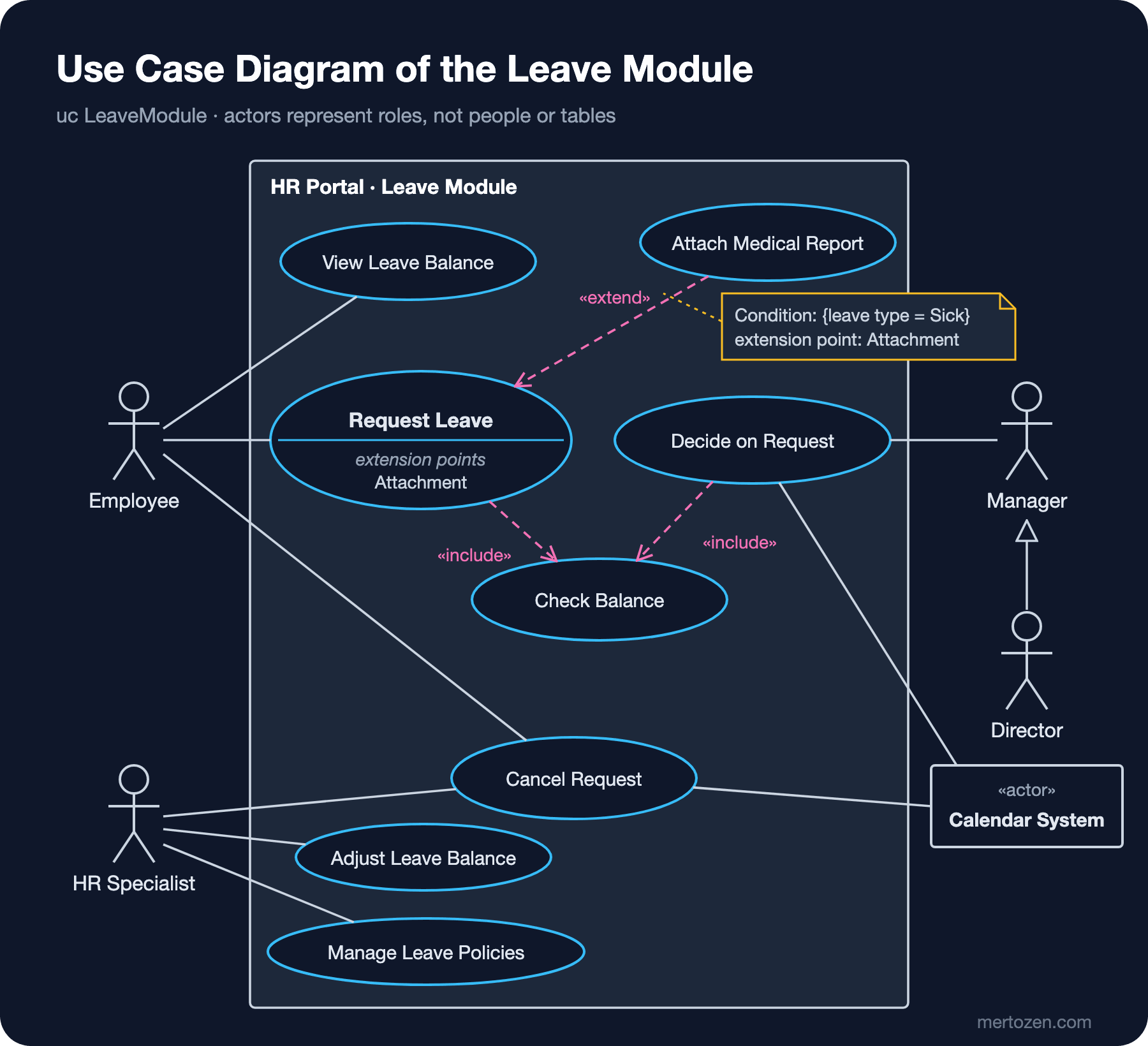
Read the diagram from left to right. The Employee takes part in three goals: requesting leave, cancelling a request and viewing the balance. The HR (Human Resources) Specialist can also cancel a request (R11's rule that "after the leave has started only HR can cancel it"), can correct a balance with a reason and manages leave types and public holidays. Two actors attached to the same use case means it has two different scenarios; the details go into the specification.
On the right, the arrow with a hollow triangle from Director to Manager is an actor generalization: the Director can do everything the Manager can, so they also take part in "Decide on Request". There was no need to connect the Director to that use case separately. Do not confuse this with inheritance in a class diagram: there are no two separate Employee types here, only two roles. In code this corresponds to granting the right to decide on a request both to the line manager and to the department director.
The Calendar System is a secondary actor drawn as a rectangle with the «actor» keyword. It is connected to two use cases because approved leave is written to the calendar and cancelled leave is removed from it. The leave module does not control the calendar system; it talks to it. That is what standing outside the boundary means.
The diagram has no "Log In", "Send Notification" or "Calculate Working Days". Logging in is not an actor's goal but a precondition for reaching another goal. Sending a notification is work the system does; no actor opens the portal thinking "let me send a notification today". The working day calculation is a step of "Request Leave". These appear as steps in the specification.
«include» and «extend»: Which Way Does the Arrow Point?
The answer to Guess First: delete "Attach Medical Report" and "Request Leave" stays complete; delete "Check Balance" and it does not. That difference carries the whole meaning of the two relationships.
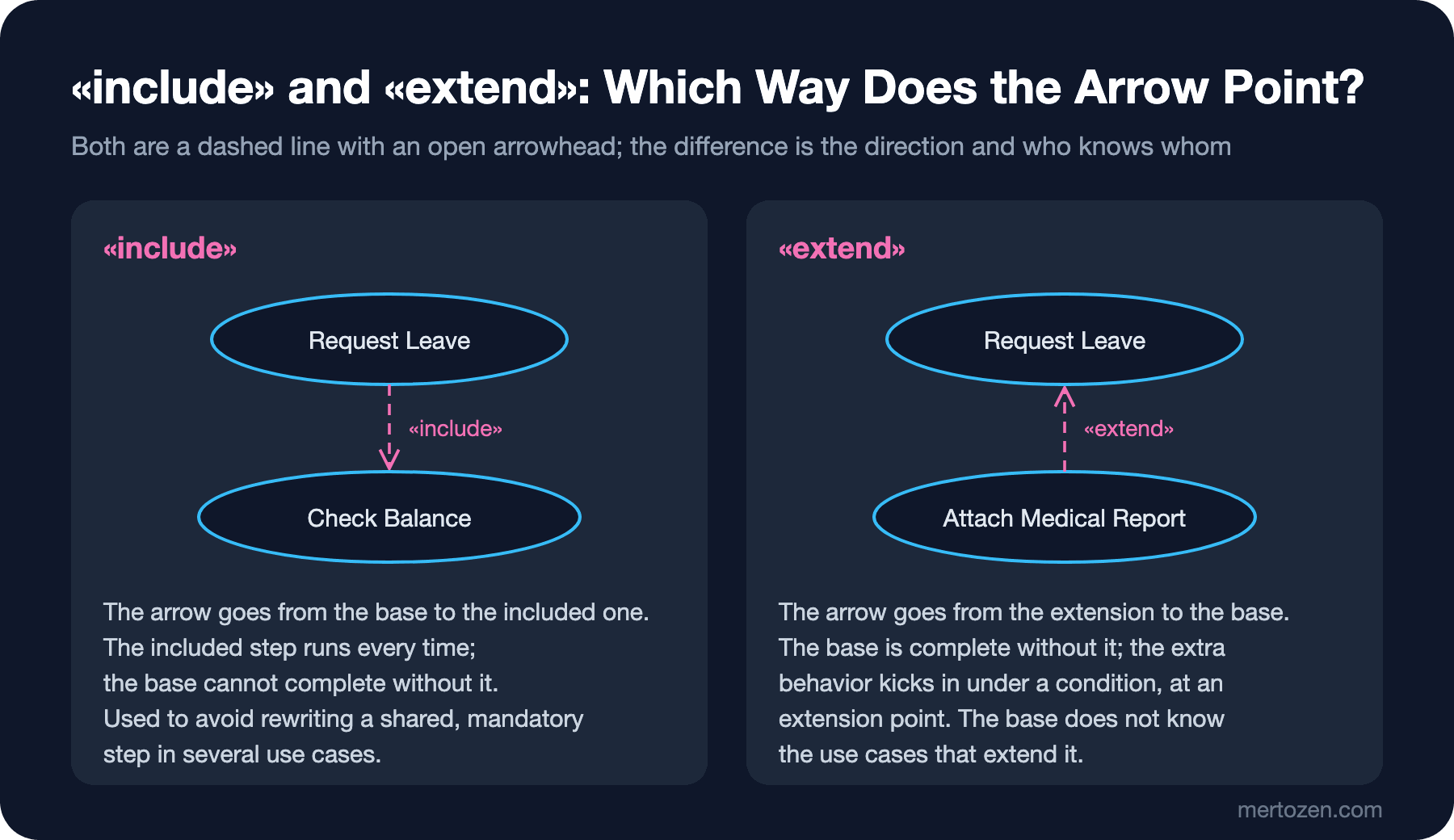
According to UML 2.5.1, «include» means the behavior of the included use case is inserted into the behavior of the including use case. The arrow goes from the including use case to the included one, because that is the direction of the dependency: "Request Leave" cannot complete without the balance check and performs it every time it runs. We need the same check in "Decide on Request" too (R8: the balance is checked again at approval time), so we moved it into its own use case and included it from two places. Include exists to define a repeated, mandatory behavior in one place.
«extend» works the other way round. The extending use case ("Attach Medical Report") defines additional behavior that kicks in at a specific point of the base use case ("Request Leave") if a specific condition holds. That point is called an extension point and is listed by name in a separate compartment of the base use case's ellipse. The condition is written in a note attached to the extend relationship: in our case {leave type = Sick}. The arrow goes from the extending use case to the base, because the extending side is the one that knows: "Request Leave" is complete on its own and unaware of who extends it.
In code the two relationships land in different places. An include is usually a direct call: a service call inside Submit that checks the balance. An extend is a point where the main flow can be extended without being touched: a separate endpoint, an event handler, or a form section that opens only for certain leave types. If it reminds you of the Open/Closed Principle from the SOLID (Single Responsibility, Open/Closed, Liskov Substitution, Interface Segregation, Dependency Inversion) series, that is no coincidence; extend is the requirements-level name for extending a use case without changing it.
A Diagram Says Little on Its Own
Look at the diagram again and try to answer these questions: what happens if the balance is insufficient? If there is an overlapping request? If no manager is defined? After the request is submitted, who guarantees what? The diagram says none of this. The real content of a use case is text; the diagram is only the table of contents. Both Ivar Jacobson, who introduced the use case concept in the late 1980s, and Alistair Cockburn, who later wrote the book that explains it best, stress this.
Cockburn's 2000 book "Writing Effective Use Cases" suggests writing use case text at three levels of detail: brief (a one-paragraph summary), casual (a few paragraphs, the main flow and important deviations) and fully dressed (the template with every field filled in). Not every use case needs to be fully dressed; the effort pays off for high-risk use cases, ones that concern several teams, or ones that carry money or legal obligations. A leave request touches balances, payroll and labor regulations, so it belongs in that group.
Cockburn also splits goals into three levels and explains them with a sea metaphor. The summary level (clouds) holds large goals that span several sittings: "manage an employee's annual leave process". The user goal level (sea level) is a goal the actor completes in one sitting and leaves satisfied: "request leave". The subfunction level (underwater) is part of a goal: "check the balance". Most use cases in a diagram should be at sea level; "Check Balance", which we separated with include, is deliberately a subfunction.
The "Request Leave" Specification
Let us write UC-01 with the fields of Cockburn's fully dressed template (UC stands for use case; the numbers follow the order of the earlier list). First the header fields:
| Field | UC-01 Request Leave |
|---|---|
| Primary actor | Employee |
| Scope | HR Portal Leave Module (black box) |
| Level | User goal |
| Stakeholders and interests | Employee: a quick request with the right number of days. Manager: seeing the team's plan in time. HR: balances kept correct and compliant with regulations. Payroll: unpaid leave reflected correctly. |
| Precondition | The employee is logged in to the portal and has a manager defined. |
| Minimal guarantees | If the request cannot be submitted, the balance does not change and the entered data stays as a draft. |
| Success guarantees | The request is saved as "Pending Manager Approval" with its number of working days; the manager is notified. |
| Trigger | The employee selects "New leave request". |
Note the difference between precondition and minimal guarantee. A precondition is something the system will not check and assumes to be true; the use case starts by accepting it. A minimal guarantee is what the system promises even if the use case fails. The sentence "the balance does not change" is a promise that will later turn into a transaction boundary or a unit test.
The main success scenario is the single flow in which everything goes well, written as numbered steps:
1. The employee enters the leave type, start and end date and an optional reason.
2. The system validates the dates and saves the request as a draft.
3. The employee submits the request.
4. The system calculates the number of working days, excluding weekends and public holidays.
5. The system checks the balance (Check Balance is included).
6. The system verifies that there is no active request overlapping the same dates.
7. The system puts the request into manager approval and notifies the manager.
The extensions section writes the deviations from the main flow with the number of the step they belong to plus a letter. An asterisk means "at any step":
1a. The leave type is Sick Leave: Attach Medical Report kicks in at the "Attachment" extension point, then the flow returns to step 2.
2a. The end date is before the start date: the system shows the error, the employee goes back to step 1.
4a. There are no working days in the range: the system does not submit the request, the use case fails.
5a. Remaining annual leave balance is insufficient: the system shows the remaining and requested days; the employee changes the dates (step 1) or gives up.
6a. An overlapping active request exists: the system shows the overlapping request, the use case fails.
*a. The employee gives up at any step: the entered data stays as a draft.
Writing this list raises far more questions than drawing the diagram. While writing 4a we asked "does a request that falls only on a public holiday make sense?"; while writing 6a we asked HR whether the word "active" in R4 covers drafts (it does not). The extensions section is also the richest source of test scenarios: every line means at least one test.
From Use Case to User Story and API Endpoint
Use cases and user stories are not rivals but different levels of detail. A user story, with the "As a ... I want ... so that ..." pattern popularized by the Connextra team, expresses a goal in one sentence as the start of a conversation. A use case is the written form of the agreement reached at the end of that conversation. Writing user stories is itself the subject of the upcoming Requirements Analysis series; here we look at the mapping:
| Use case | User story (short) | Endpoint |
|---|---|---|
| UC-01 Request Leave | As an employee I want to request leave in the portal so that my manager can approve it | POST /leave-requests, POST /leave-requests/{id}/submit |
| Attach Medical Report (extend) | On sick leave I want to attach my report so that HR does not have to ask for it | PUT /leave-requests/{id}/attachment |
| UC-02 Decide on Request | As a manager I want to approve my team's requests or reject them with a reason | POST /leave-requests/{id}/approve, POST /leave-requests/{id}/reject |
| UC-03 Cancel Request | When my plans change I want to cancel my request so that my balance is refunded | POST /leave-requests/{id}/cancel |
| UC-04 View Leave Balance | I want to see my remaining leave so that I can plan my holiday | GET /employees/{id}/leave-balances |
| Check Balance (include) | No story of its own; an acceptance criterion of two stories | No endpoint; a service call |
Two lessons come out of the table. First, there is no one-to-one mapping between use cases and endpoints: UC-01 is split into two endpoints, because saving a draft (steps 1–2) and submitting (steps 3–7) are two requests that happen at different moments. Second, an included subfunction may have no endpoint of its own; it is a behavior called inside a use case. With a shortened Minimal API (Application Programming Interface), the two ends of UC-01 look like this:
using System.Collections.Concurrent;
using System.Text.Json.Serialization;

WebApplicationBuilder builder = WebApplication.CreateBuilder(args);
builder.Services.ConfigureHttpJsonOptions(o => o.SerializerOptions.Converters.Add(new JsonStringEnumConverter()));
WebApplication app = builder.Build();

ConcurrentDictionary<int, LeaveRequest> requests = new();
Dictionary<int, int> remainingAnnualDays = new() { [1001] = 8 };
int nextId = 41;

RouteGroupBuilder leave = app.MapGroup("/leave-requests");

// UC-01 Request Leave, steps 1-2: the employee fills in the form, the system saves a draft
leave.MapPost("/", (CreateLeaveRequest body) =>
{
    LeaveRequest request = new(Interlocked.Increment(ref nextId), body.EmployeeId, body.LeaveTypeCode, body.Start, body.End);
    requests[request.Id] = request;
    return TypedResults.Created($"/leave-requests/{request.Id}", request);
});

// UC-01 steps 3-7: submit; step 5 <<include>> Check Balance; extension 5a insufficient balance
leave.MapPost("/{id:int}/submit", IResult (int id) =>
{
    if (!requests.TryGetValue(id, out LeaveRequest? request))
        return TypedResults.NotFound();

    int workingDays = WorkingDays.Count(request.Start, request.End);
    int remaining = remainingAnnualDays.GetValueOrDefault(request.EmployeeId);
    if (request.LeaveTypeCode == "ANNUAL" && remaining < workingDays)
        return TypedResults.Problem(
            title: "Insufficient leave balance",
            detail: $"Requested {workingDays} working days, remaining balance is {remaining}.",
            statusCode: StatusCodes.Status409Conflict);

    LeaveRequest submitted = request with { WorkingDays = workingDays, Status = LeaveStatus.PendingManagerApproval };
    requests[id] = submitted;
    return TypedResults.Ok(submitted);
});

app.Run();

public sealed record CreateLeaveRequest(int EmployeeId, string LeaveTypeCode, DateOnly Start, DateOnly End);

public sealed record LeaveRequest(int Id, int EmployeeId, string LeaveTypeCode, DateOnly Start, DateOnly End)
{
    public int WorkingDays { get; init; }
    public LeaveStatus Status { get; init; } = LeaveStatus.Draft;
}

public enum LeaveStatus { Draft, PendingManagerApproval, PendingDirectorApproval, Approved, Rejected, Cancelled }

public static class WorkingDays
{
    public static int Count(DateOnly start, DateOnly end)
    {
        int count = 0;
        for (DateOnly day = start; day <= end; day = day.AddDays(1))
        {
            if (day.DayOfWeek is not (DayOfWeek.Saturday or DayOfWeek.Sunday))
                count++;
        }
        return count;
    }
}
I ran the application and submitted two of Ada's requests. The first is 21–25 December (5 working days), the second 14–25 December (10 working days); Ada's remaining balance is 8:
curl -s -X POST http://127.0.0.1:5731/leave-requests -H 'Content-Type: application/json' -d '{"employeeId":1001,"leaveTypeCode":"ANNUAL","start":"2026-12-21","end":"2026-12-25"}'
{"id":42,"employeeId":1001,"leaveTypeCode":"ANNUAL","start":"2026-12-21","end":"2026-12-25","workingDays":0,"status":"Draft"}

curl -s -X POST http://127.0.0.1:5731/leave-requests/42/submit
{"id":42,"employeeId":1001,"leaveTypeCode":"ANNUAL","start":"2026-12-21","end":"2026-12-25","workingDays":5,"status":"PendingManagerApproval"}

curl -s -i -X POST http://127.0.0.1:5731/leave-requests/43/submit
HTTP/1.1 409 Conflict
Content-Type: application/problem+json

{"type":"https://tools.ietf.org/html/rfc9110#section-15.5.10","title":"Insufficient leave balance","status":409,"detail":"Requested 10 working days, remaining balance is 8."}
I kept only two of the last response's headers. Extension 5a of the specification shows up here as a 409 Conflict with a ProblemDetails body, and the minimal guarantee "the entered data stays as a draft" is kept too, because request 43 is still a Draft. To keep it short I left out public holidays, the overlap check of step 6 and authentication; the "Status Codes and Responses" and "Minimal API" posts of the ASP.NET Core Web API series cover those parts in detail. What matters here: the comment above each endpoint says which use case step produced it. Knowing which requirement an endpoint came from is the piece of information you will need most when changing it a year from now.
Diagrams as Code: The Same Diagram in Mermaid
I drew the diagram in the figure by hand. If you want to keep the same model as text, Mermaid supports use case diagrams, but in version 12.x it is still beta (with the usecase-beta header) and the syntax may change in backward-incompatible ways. I rendered the source below with Mermaid CLI (Command Line Interface) 12.2.0 installed locally:
usecase-beta
direction LR
actor Employee("Employee")
actor HrSpecialist("HR Specialist")
actor Manager("Manager")
actor Director("Director")
actor Calendar("Calendar System")
systemBoundary leave["HR Portal - Leave Module"]
  RequestLeave("Request Leave")
  Decide("Decide on Leave Request")
  Cancel("Cancel Leave Request")
  ViewBalance("View Leave Balance")
  AdjustBalance("Adjust Leave Balance")
  ManagePolicies("Manage Leave Policies")
  CheckBalance("Check Balance")
  AttachReport("Attach Medical Report")
end
Director --|> Manager
Employee -- RequestLeave
Employee -- Cancel
Employee -- ViewBalance
Manager -- Decide
HrSpecialist -- Cancel
HrSpecialist -- AdjustBalance
HrSpecialist -- ManagePolicies
Decide -- Calendar
Cancel -- Calendar
RequestLeave ..> : include CheckBalance
Decide ..> : include CheckBalance
AttachReport ..> : extend RequestLeave
note for AttachReport "condition: leave type = SICK"
The rendered output shows the right relationships and the «include» and «extend» labels, but it has two notation deviations: the ends of include and extend lines are drawn as filled triangles instead of the open arrowhead UML requires, and extension points cannot be shown as a separate compartment inside the ellipse; I could only write the condition in a note attached to the use case. Good enough for a sketch, not for teaching the notation itself. PlantUML's use case support is more mature but needs Java; we will compare diagrams-as-code tools in the two posts near the end of the series.
Common Pitfalls
Drawing use cases like a menu tree. Listing use cases such as "Open Request Form", "Pick Date" and "Save" under "Leave Operations" and connecting them all with include is a functional decomposition of the screens. The resulting diagram neither states the actor's goal nor is independent of the UI. If reading a use case's name gives no answer to "what did the actor gain when this finished?", it is a step.
Splitting every step out with include. Include exists for a mandatory behavior shared by several use cases. Breaking the steps of a single use case into small ellipses with include moves into the diagram what should be a numbered line in the specification.
Drawing the extend arrow backwards. This is the most common notation mistake: the arrow is drawn from the base use case to the extending one. The right direction is from the extending use case to the base. Ask "who knows whom?": the extending use case knows the base and its extension point; the reverse is not true.
Confusing an actor with a job title or a person. "Mr. Smith" or "HR Manager" is not an actor; an actor names a role in the interaction with the system. The same person can play several roles and many people can play the same role.
Giant use cases ending in "Manage". A use case like "Manage Requests" hides several different goals, such as create, update, cancel and list, and its specification cannot be written. We deliberately kept "Manage Leave Policies" as one, because for HR it is maintenance work and its details do not concern the business unit. Leave a use case as a CRUD (Create, Read, Update, Delete) bundle only through a deliberate decision like that.
Stopping at the diagram. A use case diagram without specifications is like a book with chapter titles and empty pages. At least write the extensions section of the critical use cases; that is where the real business rules live.
A Small Experiment
★☆☆ Write a brief, one-paragraph use case text for UC-03 Cancel Request. How did you express the three situations in R11 (pending, approved but not started, started)?
★★☆ Write UC-02 Decide on Request with the fully dressed template. Did you put director approval in the main flow or in an extension? Which extension lines did rejecting without a reason and the approver not deciding within 2 working days (R10) become?
★★★ Add step 6 to the sample API: if the same employee has a request that is not cancelled or rejected and whose dates overlap, submit should return 409. First reread extension 6a and note in a comment how you reflected the decision "drafts are not active" in the code; then submit two overlapping requests and check the output.
In the next post we step inside the system: the class diagram. The three compartments of a class box, attribute and operation syntax, visibility markers, multiplicity and stereotypes, each with its C# counterpart.