

Sequence Diagrams 2: alt, opt, loop, par, break and ref for Error Paths and Async Flows
Combined fragments add conditions (alt, opt), early exit (break), repetition (loop), parallelism (par) and indivisibility (critical) to a sequence diagram, while ref calls another diagram; an asynchronous message has an open arrowhead and stays asynchronous even when awaited if the sender does not wait for the result. The post draws the HR Portal approval flow, the insufficient balance error and the e-mail and calendar entry sent through a queue from the real code.
Version note: The diagrams in this post use UML (Unified Modeling Language) 2.5.1 notation; the C# examples were tested with .NET 10 and Entity Framework Core (EF Core) 10, and the diagrams-as-code examples with PlantUML 1.2026.9 and Mermaid 12.3.0.
Guess First: Two Requests, Eight Days
In the HR Portal, Ada has 8 days left in her 2026 annual leave balance. In the same week she submits two separate annual leave requests: #42 (December 21–25, 5 working days) and #44 (November 30 – December 4, 5 working days). At submission both pass the balance check, because pending requests are not deducted from the balance:
{"id":42,"status":"PendingManagerApproval","workingDays":5}
{"id":43,"status":"PendingManagerApproval","workingDays":2}
{"id":44,"status":"PendingManagerApproval","workingDays":5}
(#43 is a two-day excuse leave; it does not affect the balance.) Then manager Alan approves #42; since it lasts five days it goes to director Grace, and Grace approves it too. The approval code:
public async Task<LeaveRequest> ApproveAsync(int requestId, int approverId, string? comment, CancellationToken ct)
{
    LeaveRequest request = await requests.FindAsync(requestId, ct)
        ?? throw new LeaveRuleException($"Leave request {requestId} not found.");
    Employee approver = await requests.FindEmployeeAsync(approverId, ct)
        ?? throw new LeaveRuleException($"Employee {approverId} not found.");

    LeaveType type = request.LeaveType;
    int year = request.Period.Start.Year;

    // R8: the balance is re-checked at approval time
    if (type.DeductsFromBalance &&
        !await balances.HasEnoughBalanceAsync(request.EmployeeId, type, year, request.WorkingDays, ct))
        throw new LeaveRuleException("Balance is no longer sufficient.");

    ApprovalStep step = request.Status == LeaveStatus.PendingDirectorApproval
        ? ApprovalStep.Director
        : ApprovalStep.Manager;
    request.Approve(approver, comment, clock.GetUtcNow());

    if (request.Status == LeaveStatus.Approved && type.DeductsFromBalance)
        await balances.DeductAsync(request.EmployeeId, type, year, request.WorkingDays, ct);

    await requests.SaveChangesAsync(ct);
    await events.PublishAsync(new LeaveRequestApproved(request.Id, step, request.Status), ct);
    return request;
}
Two questions. What happens when Alan now tries to approve #44? And does Ada's "your request is waiting for director approval" e-mail arrive before or after Grace's decision?
The Answer: A 409 and a Late E-mail
The real run, shortened for readability. On the HTTP (Hypertext Transfer Protocol) side:
POST /leave-requests/42/approve  {"approverId":3}  -> {"id":42,"status":"PendingDirectorApproval"}
POST /leave-requests/42/approve  {"approverId":1}  -> {"id":42,"status":"Approved"}
POST /leave-requests/44/approve  {"approverId":3}  -> 409 {"title":"Conflict","detail":"Balance is no longer sufficient."}
Once #42 was approved, UsedDays went from 6 to 11, and the remaining 3 days are not enough for the 5 days of #44; rule R8 kicked in. On the e-mail side, a run in which the mail server did not answer the first attempt (I shortened the namespaces in the log categories):
23:21:44.702 Alan approved #42 -> PendingDirectorApproval
23:21:44.733 Grace approved #42 -> Approved
23:21:46.805 warn: LeaveApprovedConsumer[0] Mail attempt 1 timed out after 00:00:02
23:21:46.806 info: FlakyMailSender[0] Mail to ada@hrportal.test: Leave request #42: PendingDirectorApproval
23:21:46.806 info: FlakyMailSender[0] Mail to grace@hrportal.test: Leave request #42 waits for your approval
23:21:46.810 info: LoggingCalendarGateway[0] Calendar: add leave 42 2026-12-21..2026-12-25
23:21:46.810 info: FlakyMailSender[0] Mail to ada@hrportal.test: Leave request #42: Approved
Grace's "a request is waiting for your approval" e-mail went out two seconds after Grace had approved the request. In the demo the two approvals are 31 milliseconds apart, in real life they would be hours apart, but the ordering problem is the same: approval is synchronous, notification is asynchronous. The sequence diagram in the previous post could not describe these two behaviors because it drew a single happy path. Combined fragments are the tool for drawing conditions, repetition, parallelism and asynchronous messages.
What Is a Combined Fragment?
A combined fragment frames a region of a sequence diagram and applies an interaction operator to it. The operator is written in the pentagon tag at the top-left corner of the frame (alt, loop...), the frame can be split into operands with dashed lines, and each operand can start with a guard (condition) in square brackets: [enough == false], [else]. UML 2.5.1 defines twelve operators: seq, alt, opt, break, par, strict, loop, critical, neg, assert, ignore, consider. The ones you use day to day and their counterparts in code:
| Operator | Meaning | C# counterpart |
|---|---|---|
alt | Only the operand whose guard is true runs | if / else, switch |
opt | Single operand; runs if the guard is true | if without else |
break | If the guard is true the operand runs and the rest of the enclosing flow is skipped | throw, early return |
loop | The operand repeats at least min and at most max times | for, while, retry loop |
par | Operands are independent and may interleave | Task.WhenAll |
critical | The region runs without anything interleaving | lock, transaction, concurrency token |
ref (interaction use) | Calls another interaction at this point | a separately documented method or flow |
Technically ref is not a combined fragment but an interaction use; it is mentioned together because it uses the same frame notation. neg (this sequence is invalid) and assert (only this sequence is valid) are mostly useful when documenting test scenarios.
alt, opt and break: Conditions in the Approval Flow
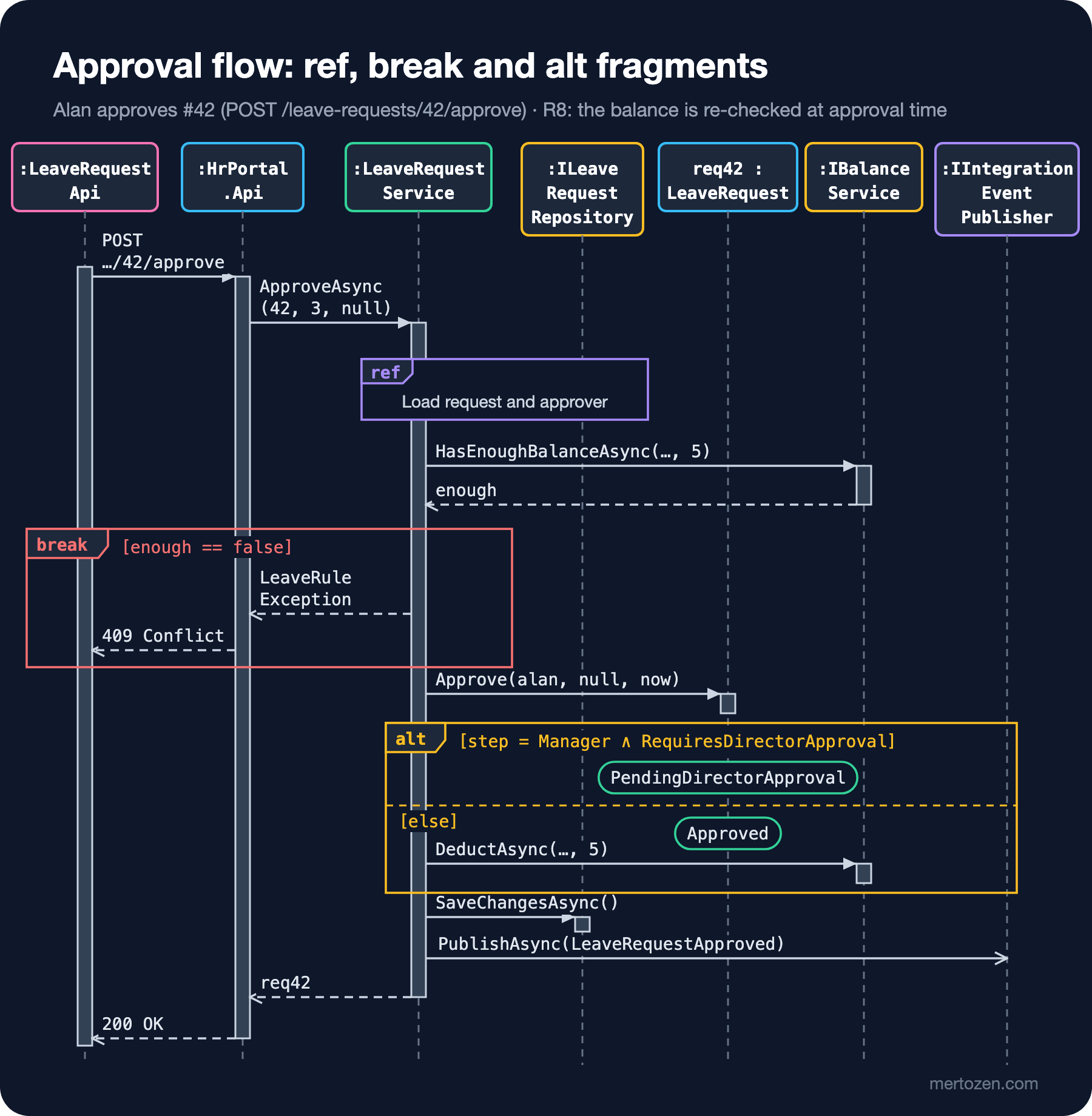
The figure is the sequence diagram of ApproveAsync. Let us read it from top to bottom.
break [enough == false]: if the balance is not enough, the messages inside the frame run (LeaveRuleException, then 409 Conflict) and the rest of the enclosing interaction is skipped. That is exactly the throw in the code. The difference between break and alt is that break ends the flow there: had you used alt, you would also have drawn the "else" branch and said that both join again at the same point. The frame covering three lifelines from SPA to Service is deliberate too: a break fragment should cover every lifeline affected by the interruption.
alt [step = Manager ∧ RequiresDirectorApproval] / [else]: a choice with two operands. In the first operand the request moves to PendingDirectorApproval; in the second it moves to Approved and the balance is deducted. The rounded boxes on the lifeline are state invariants: conditions saying "at this point req42 must be in this state". Showing all state transitions is the job of the state machine diagram (the State Machine Diagram post of the series); in a sequence diagram, marking the states that matter for the scenario is enough.
In code the counterpart is split in two: choosing the state happens inside LeaveRequest.Approve, deducting from the balance in the if in the service. When the diagram combines the two in a single alt, the rule "no deduction for a request that goes on to the director" can be read at a glance. We will see opt in the next figure: an alt with a single operand and no else.
ref: Pointing to Another Diagram
The ref frame in the figure calls another interaction named "Load request and approver": two SELECTs through FindAsync and FindEmployeeAsync. We draw it separately (it looks like the diagram in the previous post) and only mention it by name here. The closest counterpart of an interaction use in code is a method call: a step you trust by its name without knowing its inside. The frame says that the lifelines it covers (Service and Repository) take part in this sub-flow.
This is the most effective way to keep large scenarios readable. An end-to-end "leave request lifecycle" diagram can be a half-page summary made of ref Create, ref Manager approval, ref Director approval and ref Cancel frames, each leading to its own diagram. The full-diagram version of this idea, the interaction overview diagram, comes up together with the activity diagram in the following posts of the series.
loop, par and critical
The syntax of loop is loop(min, max) [guard]: the operand runs at least min times, then at most max times while the guard is true. For a retry, loop(1,3) [not sent] is the exact counterpart: at least one attempt, at most three.
par says the operands progress independently and their messages may interleave in any order. It does not say "start at the same time"; it says "no ordering constraint between them". In C#, awaiting two Tasks together with Task.WhenAll is the natural counterpart.
critical says the region runs indivisibly; messages of another trace cannot interleave. The problem in the opening of this post is a pure critical question: if another approval slips in between checking the balance and deducting it, two requests can spend the same days. Putting the check and the deduction in a critical frame in the diagram means, in code, a transaction, a lock, or a concurrency token (rowversion) added to LeaveBalance. Our code does not do that yet; if two approvers approve in the same millisecond, both can pass the check. The fix is in the EF Core Concurrency: Tokens, rowversion and DbUpdateConcurrencyException post of the EF Core series. The value of the diagram is that it makes this gap discussable before any code is written.
Asynchronous Flow: Queue, Retry and Timeout
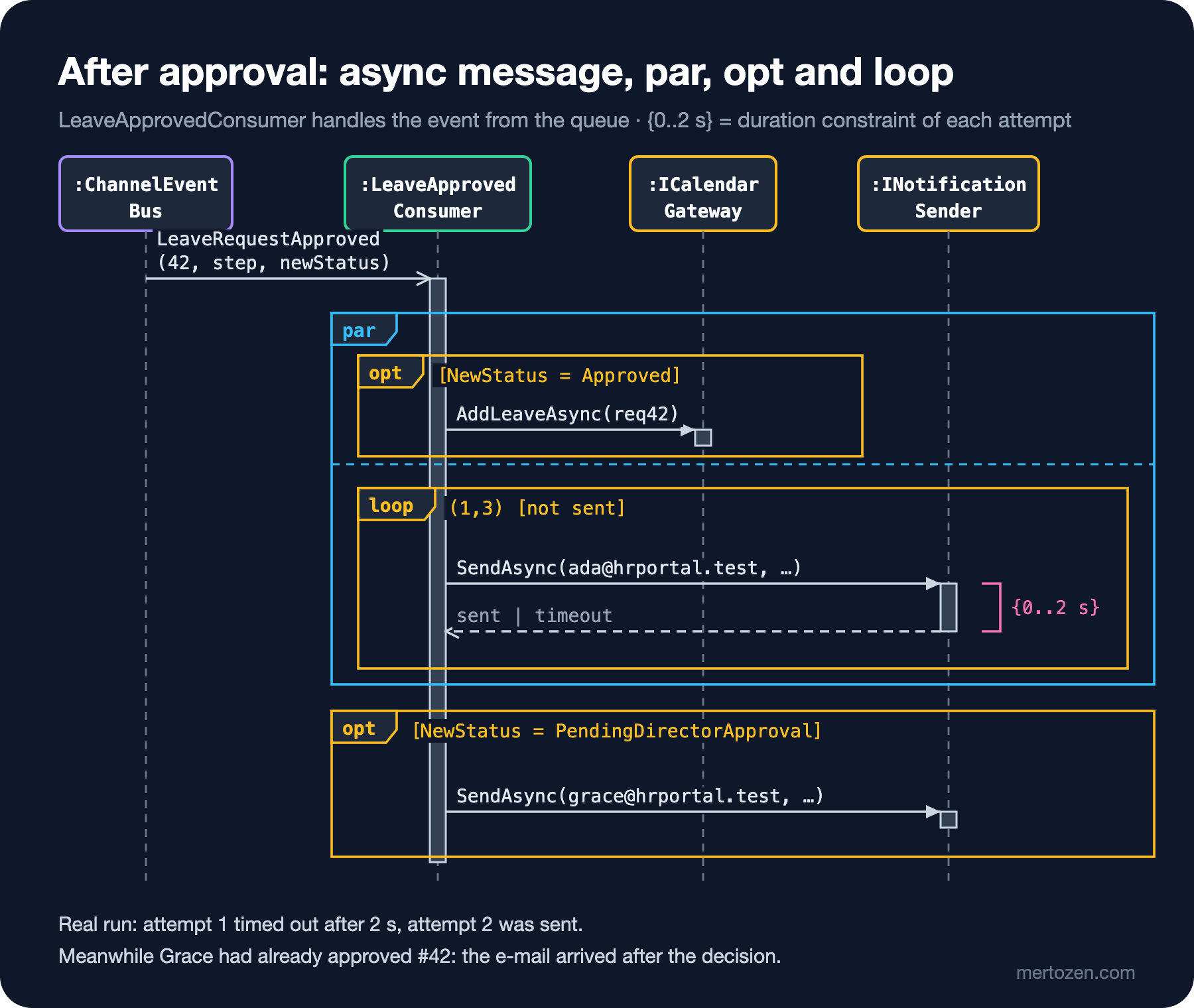
The last line of the approval code, PublishAsync, was drawn in the previous figure with an open arrowhead, that is, as an asynchronous message. The code has an await, but what it waits for is only the event being dropped into the queue, not the e-mail going out or the calendar entry being written. The question in UML is "does the sender wait for the result?", so the answer is no and the arrowhead is open. The queue in the demo is a Channel<T>; in production a message broker takes its place, and the diagram does not change:
internal sealed class ChannelEventBus : IIntegrationEventPublisher
{
    private readonly Channel<LeaveRequestApproved> channel = Channel.CreateUnbounded<LeaveRequestApproved>();

    public ChannelReader<LeaveRequestApproved> Reader => channel.Reader;

    public ValueTask PublishAsync(LeaveRequestApproved @event, CancellationToken ct) =>
        channel.Writer.WriteAsync(@event, ct);
}
The BackgroundService that handles the event is the one-to-one code of the fragments in the figure:
protected override async Task ExecuteAsync(CancellationToken stoppingToken)
{
    await foreach (LeaveRequestApproved e in bus.Reader.ReadAllAsync(stoppingToken))
    {
        await using AsyncServiceScope scope = scopes.CreateAsyncScope();
        HrPortalDbContext db = scope.ServiceProvider.GetRequiredService<HrPortalDbContext>();
        LeaveRequest request = await db.LeaveRequests
            .Include(r => r.Employee).ThenInclude(x => x.Department).ThenInclude(d => d.Director)
            .SingleAsync(r => r.Id == e.LeaveRequestId, stoppingToken);

        // par: the calendar entry and the e-mail do not wait for each other
        Task calendarTask = e.NewStatus == LeaveStatus.Approved
            ? calendar.AddLeaveAsync(request, stoppingToken)
            : Task.CompletedTask;
        Task mailTask = SendWithRetryAsync(request.Employee.Email,
            $"Leave request #{request.Id}: {e.NewStatus}", stoppingToken);
        await Task.WhenAll(calendarTask, mailTask);

        // opt: if it moved to director approval, notify the director too (R10)
        if (e.NewStatus == LeaveStatus.PendingDirectorApproval)
            await SendWithRetryAsync(request.Employee.Department.Director.Email,
                $"Leave request #{request.Id} waits for your approval", stoppingToken);
    }
}

private async Task SendWithRetryAsync(string to, string subject, CancellationToken stoppingToken)
{
    for (int attempt = 1; attempt <= MaxAttempts; attempt++)
    {
        using CancellationTokenSource timeout = CancellationTokenSource.CreateLinkedTokenSource(stoppingToken);
        timeout.CancelAfter(AttemptTimeout);
        try
        {
            await mail.SendAsync(to, subject, "", timeout.Token);
            return;
        }
        catch (OperationCanceledException) when (!stoppingToken.IsCancellationRequested)
        {
            logger.LogWarning("Mail attempt {Attempt} timed out after {Timeout}", attempt, AttemptTimeout);
        }
    }
    logger.LogError("Mail to {To} failed after {Max} attempts", to, MaxAttempts);
}
There are two options for drawing the timeout. The {0..2 s} in the figure is a duration constraint: a limit on the time between two events (the message leaving and the reply arriving), shown with a bracket next to the lifeline. In code, CancelAfter(AttemptTimeout). Alternatively you can draw the timeout as two paths with alt [answer within 2 s] / [else]; the constraint is more compact, while alt shows explicitly what happens after the timeout.
The figure makes one more thing visible: the consumer handles events one after another. While the first event's e-mail waited 2 seconds for the timeout, the second event (Grace's approval) waited in the queue; that is why all the log lines cluster at 23:21:46. This is not a bug but the nature of a queue with a single consumer; still, the conclusion "the e-mail may arrive after the decision" has to be told to the business.
The Diagrams as Code: PlantUML and Mermaid
The PlantUML source of the approval flow, with ref over, break, alt and hnote for the state invariants:
@startuml approve-leave
participant ":LeaveRequestApi" as SPA
participant ":HrPortal.Api" as Api
participant ":LeaveRequestService" as Svc
participant ":ILeaveRequestRepository" as Repo
participant "req42 : LeaveRequest" as Req
participant ":IBalanceService" as Bal
queue ":IIntegrationEventPublisher" as Bus

SPA -> Api : POST /leave-requests/42/approve
activate Api
Api -> Svc : ApproveAsync(42, approverId, comment)
activate Svc
ref over Svc, Repo : Load request and approver
Svc -> Bal : HasEnoughBalanceAsync(4, annual, 2026, 5)
Bal --> Svc : enough
break enough == false
  Svc --> Api : LeaveRuleException
  Api --> SPA : 409 Conflict
end
Svc -> Req : Approve(approver, comment, now)
alt step == Manager and RequiresDirectorApproval
  hnote over Req : PendingDirectorApproval
else else
  hnote over Req : Approved
  Svc -> Bal : DeductAsync(4, annual, 2026, 5)
end
Svc -> Repo : SaveChangesAsync()
Svc ->> Bus : PublishAsync(LeaveRequestApproved)
Svc --> Api : req42
deactivate Svc
Api --> SPA : 200 OK
deactivate Api
@enduml
In PlantUML -> is a synchronous call and ->> an asynchronous message with a thin open arrowhead. The Mermaid source of the consumer side; -) is an asynchronous message, par ... and ... end parallel operands:
sequenceDiagram
    participant Bus as :Channel
    participant C as :LeaveApprovedConsumer
    participant Cal as :ICalendarGateway
    participant Mail as :INotificationSender

    Bus-)C: LeaveRequestApproved(42, Director, Approved)
    activate C
    par calendar
        opt NewStatus == Approved
            C->>Cal: AddLeaveAsync(req42)
            Cal-->>C: done
        end
    and mail to requester
        loop attempt 1..3, until sent
            C->>Mail: SendAsync(ada@hrportal.test) within 2 s
            Mail-->>C: sent or timeout
        end
    end
    opt NewStatus == PendingDirectorApproval
        C->>Mail: SendAsync(grace@hrportal.test)
    end
    deactivate C
Both files rendered without errors, but with two small surprises. In Mermaid 12.3.0, ref over causes a parse error; you need PlantUML for interaction uses. Mermaid also treated the # character in message text as special and cut the label "#42: Approved" in half; I had to change the text. Neither has a direct counterpart for a duration constraint; it is written as text.
Its Siblings: Communication and Timing Diagrams
A communication diagram draws the same interaction without a time axis, with numbered messages (1, 1.1, 1.2...) on the links between objects. The order is read from the numbers; the gain is seeing who talks to whom as a network. It is useful for flows with few messages but many participants, for example to show which service depends on which external system; since it cannot express fragments, it falls behind the sequence diagram for conditional flows.
A timing diagram shows the state of each lifeline along a horizontal time axis; it is unmatched when talking about SLAs (Service Level Agreements) and timeouts. For the rule in R10, "if the approver does not decide within 2 working days, a reminder is sent", a timing diagram that puts {≤ 2 working days} constraints under the PendingManagerApproval → PendingDirectorApproval → Approved line of req42 speaks much more clearly than a sequence diagram. Draw both when the need arises; ninety percent of daily work is sequence diagrams.
Common Pitfalls
Confusing alt and break. If you draw the error path as an operand of alt, the reader assumes the two paths join again afterwards. If the flow ends there, it is break.
Writing vague guards. [error] or [if needed] is not a condition. A guard should be an expression that can be evaluated with the information available at that point: [enough == false], [NewStatus = Approved].
Nesting fragments without limit. When you see three levels of nested alt, the diagram has turned into code; split it into separate scenarios or break it up with ref.
Drawing a write to a queue as synchronous because it is awaited. Decide sync or async by whether the sender waits for the outcome of the work, not by the await keyword.
Reading par as "at the same time". par says there is no ordering guarantee. The calendar entry may finish before the e-mail or after it; set your test and log expectations accordingly.
A Small Experiment
★☆☆ Add a break to the approval flow that returns 403 Forbidden if the approver is neither the requester's manager nor the director. Should this check be inside the ref frame or outside it?
★★☆ Put the balance check and the deduction into a critical fragment, then implement it in code by adding a rowversion to LeaveBalance. Write a test that runs two approvals in parallel and show that one of them gets a DbUpdateConcurrencyException.
★★★ Draw a timing diagram for the reminder rule in R10: working days on the horizontal axis, the states of req42 on the vertical axis, and the moment the reminder e-mail goes out. Then implement the rule with a BackgroundService and TimeProvider, and test it with FakeTimeProvider.
In the next post we look at the same approval process as a workflow rather than messages between objects: with an activity diagram we will draw employee, system, manager and director swimlanes, decision and fork/join nodes, and why a join waits, using token flow.