

Class Diagrams 1: Classes, Attributes, Operations, Visibility, Multiplicity and Stereotypes
Every marker in a class diagram is a decision in code: [0..1] is a nullable type, [0..*] a collection, a slash a computed property, an underlined line a static member, and {readOnly} a field that never changes. The three compartments of a class box, attribute and operation syntax, the corners where visibility does not match C#, interfaces, enumerations, data types and stereotypes, and the same diagram in Mermaid.
Version note: The diagrams in this post use UML 2.5.1 notation; the C# examples were tested with .NET 10.
Guess First
You are going to turn the class below into a class diagram. Which visibility marker goes in front of each property, which ones get [0..1] next to them, which one is underlined, and whose name starts with /? Also guess this: when the project is compiled with Nullable enabled, how many warnings does the compiler give, and on which line?
LeaveRequest request = new();
Console.WriteLine(request.RequiresDirectorApproval);

public sealed class LeaveRequest
{
    public const int DirectorApprovalThreshold = 3;
    private readonly List<Approval> _approvals = [];

    public int Id { get; private set; }
    public DateRange Period { get; private set; }
    public string? Reason { get; private set; }
    public string RejectionReason { get; private set; }
    public LeaveStatus Status { get; private set; } = LeaveStatus.Draft;
    public int WorkingDays { get; private set; }
    public bool RequiresDirectorApproval => WorkingDays > DirectorApprovalThreshold;
    public IReadOnlyList<Approval> Approvals => _approvals;

    internal void Submit(int workingDays) => WorkingDays = workingDays;
}

public readonly record struct DateRange(DateOnly Start, DateOnly End);
public sealed record Approval(int ApproverId, DateTimeOffset DecidedAt);
public enum LeaveStatus { Draft, PendingManagerApproval, PendingDirectorApproval, Approved, Rejected, Cancelled }
The Compiler Knows the Difference Between [1] and [0..1]
There is a single warning:
Program.cs(12,19): warning CS8618: Non-nullable property 'RejectionReason' must contain a non-null value when exiting constructor. Consider adding the 'required' modifier or declaring the property as nullable.Reason and RejectionReason look like two properties of the same type, but with the nullable reference types that arrived in C# 8 they say different things. string? Reason says "there may be no reason"; in UML that is reason: string [0..1]. string RejectionReason says "there is always a value"; in UML that is rejectionReason: string [1], or no multiplicity written at all, because the default multiplicity of an attribute is 1. The compiler caught us not keeping that promise: when the constructor finishes, the field is still null. The real design error is elsewhere, though: a rejection reason exists only on a rejected request, so it should have been [0..1]. Or better, it should be an attribute of the rejection, that is of Approval, not of the request.
That is exactly the subject of this post: every marker in a class diagram corresponds to a decision in code. To answer the rest of the guessing question, let us look at the anatomy of a class box first.
The Three Compartments of a Class Box
In UML (Unified Modeling Language) 2.5.1 a class is a rectangle with three compartments: the name at the top, attributes in the middle, operations at the bottom. The figure below shows the design-level LeaveRequest we will use in the series; the numbered badges match the explanations on the right:
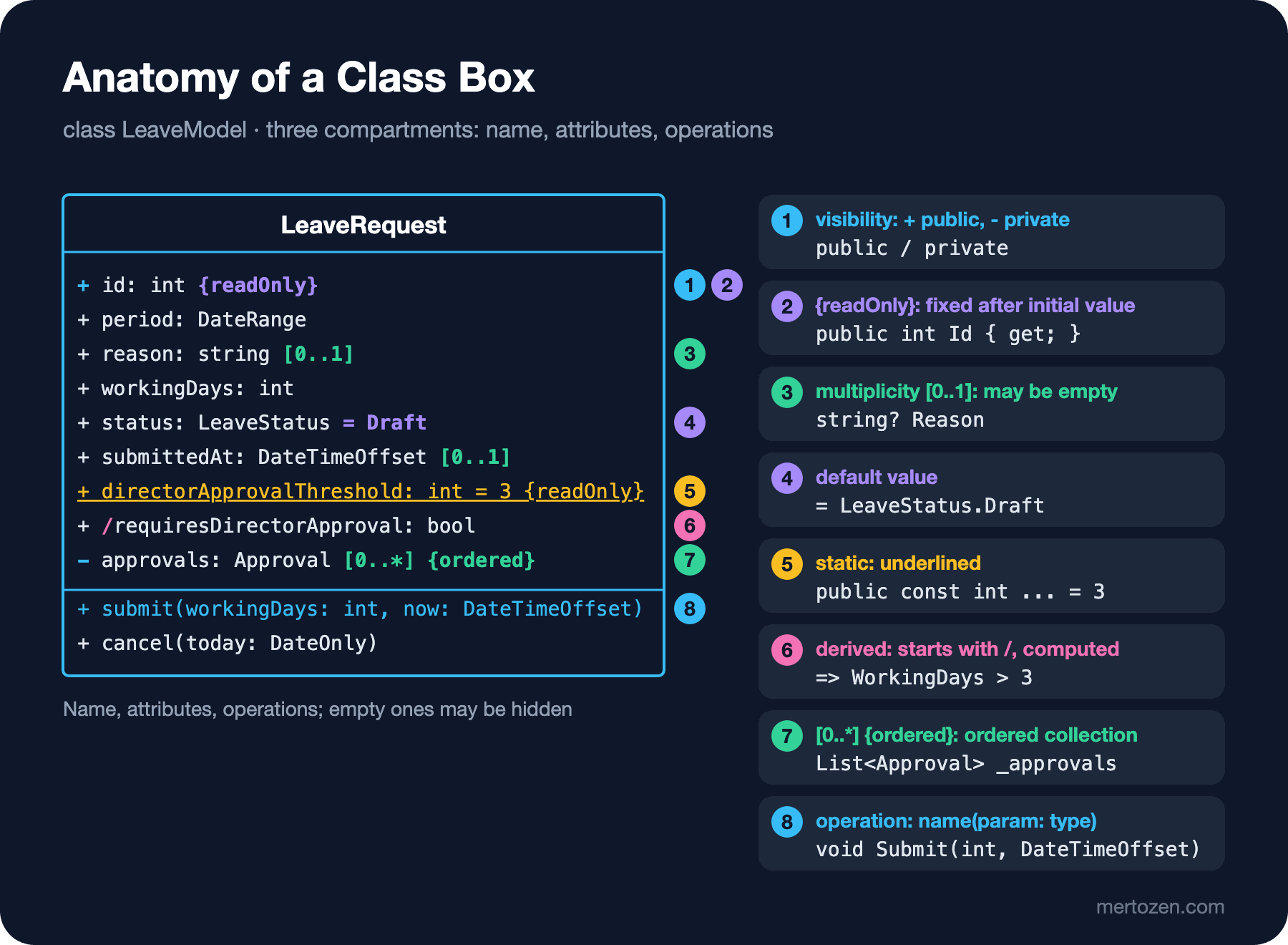
You do not have to show every compartment. In a conceptual model only the name compartment is drawn; attributes are added at the analysis level; the operation compartment usually comes at the design level. Hiding a compartment does not mean "this class has no operations", it means "I am not showing them in this diagram". The model versus diagram distinction from the first post applies here too.
The name compartment holds the class name, bold and centered. If the class is abstract, the name is italic or {abstract} is added below it; in C# that is an abstract class. In hand-drawn diagrams italics are easy to miss, so writing {abstract} is safer. Above the name there may be a keyword or stereotype such as «interface»; we will come back to those shortly.
Attribute Syntax: The C# Counterpart of Each Part
In UML 2.5.1 the general form of an attribute line is:
[visibility] [/] name [: type] [[multiplicity]] [= default] [{modifiers}]Square brackets mark optional parts; only the name is mandatory. Let us fit the lines of the figure into this pattern.
Visibility is the marker at the start of the line: + public, - private, # protected, ~ package. The type comes after a colon: id: int. Watch out for the C# habit here; writing int id is not UML. In design diagrams, using the target language's types (int, string, DateOnly) is common and correct. UML's own primitives (Integer, String, Boolean, Real, UnlimitedNatural) show up more in language-independent analysis models.
Multiplicity is written in square brackets after the type and says how many values the attribute can hold. [1] exactly one value, [0..1] may be empty, [*] or [0..*] zero or more, [1..*] at least one. C# counterparts: [1] a non-nullable type, [0..1] string? or DateTimeOffset?, [0..*] a collection. C#'s type system has no ready-made counterpart for [1..*]; you protect the "at least one" rule yourself in the constructor or a factory method.
The default value follows an equals sign: status: LeaveStatus = Draft. In C# that is a property initializer: = LeaveStatus.Draft.
A derived attribute is marked with a slash at the start of its name: /requiresDirectorApproval: bool. Its value is computed from other attributes and not stored separately. Its C# counterpart is an expression-bodied property: => WorkingDays > DirectorApprovalThreshold. Entity Framework Core (EF Core) does not map such a setter-less property to a column either; the slash in the diagram also hints that there is no column in the database.
A static attribute is underlined. directorApprovalThreshold belongs to the class itself, not to an instance; in C# that is const or static readonly.
The modifiers in curly braces are the most often skipped part. {readOnly} says the value cannot change after the initial assignment: in C# a getter-only property, init or a readonly field. {ordered} says the order of a multi-valued attribute matters: approvals are kept in time order, hence List<Approval>. {unique} is the default for multi-valued attributes and says the same value cannot appear twice; {nonunique} allows duplicates. {id} marks the attribute as part of the class's identity; the model-level counterpart of a primary key in EF Core.
Operation Signatures
The syntax of operations is similar to attributes:
[visibility] name([direction] param: type [[multiplicity]] [= default], ...) [: returnType [[multiplicity]]] [{properties}]The C# counterpart of + submit(workingDays: int, now: DateTimeOffset) in the figure is public void Submit(int workingDays, DateTimeOffset now). If there is no return type, the colon and type are simply omitted; UML has no type called void. A direction can be written in front of a parameter: in (the default), out, inout and return. A C# out parameter is out in UML, a ref parameter is inout. The C# in modifier, however, means "pass by read-only reference" and is not the same as UML's default in; it is a performance detail and does not appear in the model.
{query} at the end of an operation says the operation does not change the state of the system. DateRange.overlaps() is such an operation: it looks at two ranges and changes nothing. The closest tool in C# to make the compiler enforce this is a readonly member on a struct. Abstract operations are written in italics, which is why interface operations look italic in most tools.
Where Visibility Does Not Line Up with C#
UML's four markers and C#'s six access modifiers do not map one to one. + public and - private are fine. So is # protected. ~ package, though, means "visible to members of the same package" in UML; the closest C# counterpart is internal, but internal works per assembly, not per namespace. protected internal and private protected have no UML marker; if you need them, use a note or a stereotype from your own profile.
The gap you will hit more often is this: the most common C# property form, { get; private set; }, has no single counterpart in UML. Reading is public, writing is private. There are three ways. The first is to draw the attribute with + and express the writing rule through operations; this series takes that route, because the operation compartment already tells you that status only changes through submit() and cancel(). The second is to draw the attribute with - and add a + getStatus() operation; correct but noisy. The third, and wrong, one is to write {readOnly}: status does change, it just cannot be changed from outside. Use {readOnly} only for fields like id that really are assigned once.
The internal void Submit in Guess First was also a trap. It is drawn as ~ submit(workingDays: int), but a reader takes that as "classes in the same package may call it". If the code means "the application layer in the same assembly may call it", write that sentence next to the diagram.
Interfaces, Enumerations, Data Types and Stereotypes
Next to class there are three more types that use the same rectangle notation but carry a different meaning. The word in guillemets (« ») above the name compartment tells you which one it is:
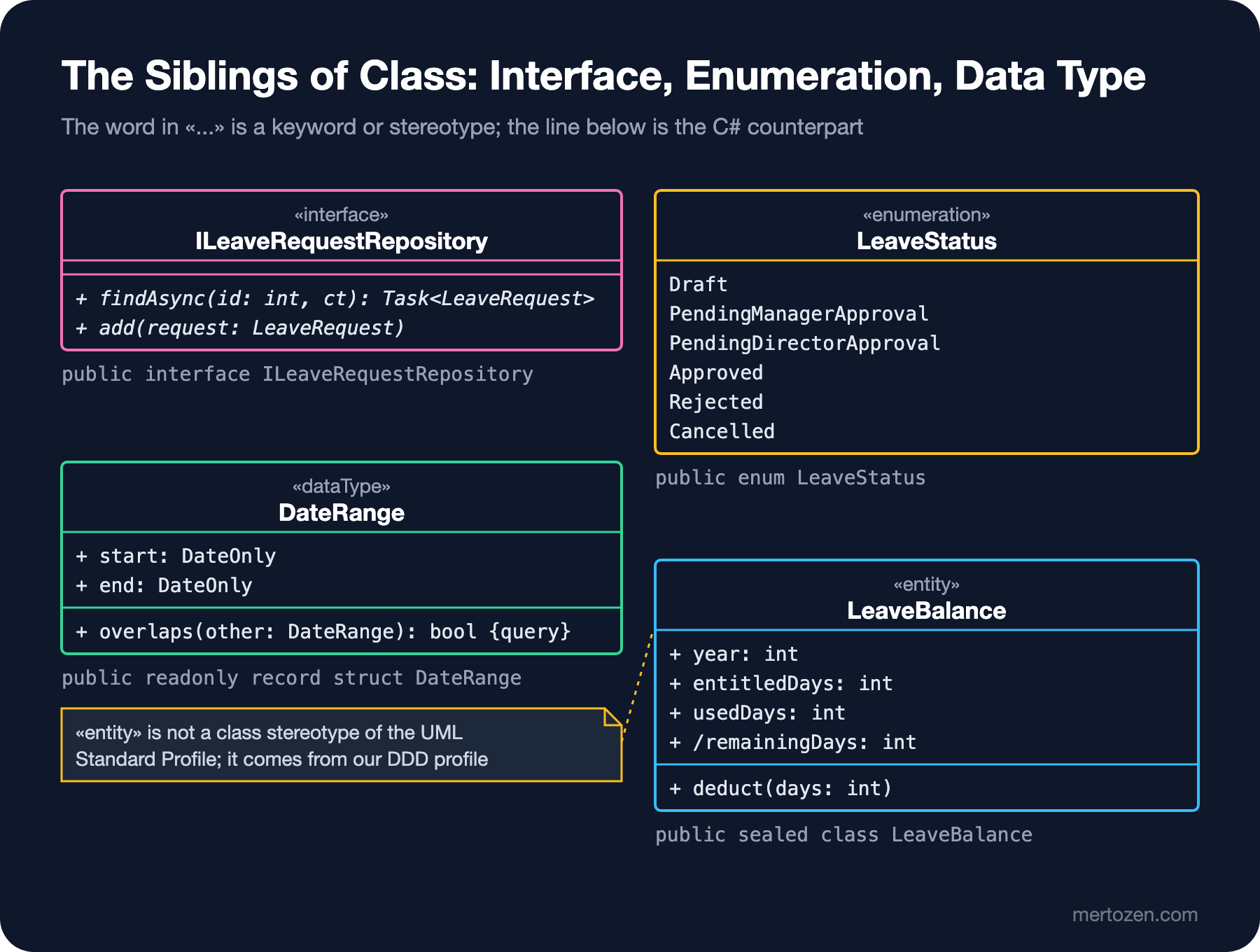
«interface» is a behavioral contract; its attribute compartment is usually empty and its operations are abstract. In C# that is interface ILeaveRequestRepository. We will see the short "lollipop" notation for interfaces in the component diagram post. «enumeration» is a fixed list of values; the literals sit in a separate compartment, without types. In C# that is enum LeaveStatus. «dataType» is a type whose instances are distinguished only by value, not by identity: two DateRanges with the same start and end are the same. The most honest C# counterpart is a readonly record struct; the last line of the output below shows that equality. «primitive» is also a data type but has no internal structure (like int or DateOnly).
Some of these words are keywords, some are stereotypes. Keywords are part of UML's own notation: «interface», «enumeration», «dataType», and «include» and «extend» from the previous post. Stereotypes come with a profile. A profile is the mechanism for extending UML for a domain and has its own diagram kind (the profile diagram). UML 2.5.1's own Standard Profile defines a few stereotypes too: for example «Utility» marks a class with no instances whose members are all static; it is the exact counterpart of a C# static class.
The «entity» in the figure is a different story. The Standard Profile does have a stereotype called «Entity», but it is defined for components that represent a persistent business concept, not for classes. The «entity» and «value object» we use are concepts from the DDD (Domain-Driven Design) world; they come from our own small profile. Nothing wrong with that, but there is one condition: if you use your own stereotypes in a diagram, write their meaning in a legend or a note. A reader who sees «entity» cannot tell whether it means an EF Core entity, a DDD entity or the entity of Jacobson's analysis classes.
From Diagram to Code: The Full Counterpart of the Figures
The compiled counterpart of the four types in the figures and of LeaveRequest is below. The comments show which diagram line each property came from:
DateRange period = new(new DateOnly(2026, 12, 21), new DateOnly(2026, 12, 25));
LeaveRequest request = new(42, employeeId: 1001, leaveTypeId: 1, period, reason: null);
request.Submit(workingDays: 5, now: new DateTimeOffset(2026, 12, 1, 9, 0, 0, TimeSpan.FromHours(3)));

LeaveBalance balance = new(employeeId: 1001, leaveTypeId: 1, year: 2026, entitledDays: 14);
balance.Deduct(6);

Console.WriteLine($"{request.Status}, needs director: {request.RequiresDirectorApproval}");
Console.WriteLine($"Overlaps 24-28 Dec: {period.Overlaps(new(new DateOnly(2026, 12, 24), new DateOnly(2026, 12, 28)))}");
Console.WriteLine($"Remaining: {balance.RemainingDays}");
Console.WriteLine(period == new DateRange(new DateOnly(2026, 12, 21), new DateOnly(2026, 12, 25)));

// «enumeration»
public enum LeaveStatus { Draft, PendingManagerApproval, PendingDirectorApproval, Approved, Rejected, Cancelled }

// «dataType»: no identity, equal when both values are equal
public readonly record struct DateRange(DateOnly Start, DateOnly End)
{
    public bool Overlaps(DateRange other) => Start <= other.End && other.Start <= End;
}

// «interface»: operations are abstract
public interface ILeaveRequestRepository
{
    Task<LeaveRequest?> FindAsync(int id, CancellationToken ct);
    void Add(LeaveRequest request);
}

public sealed record Approval(int ApproverId, DateTimeOffset DecidedAt);

public sealed class LeaveRequest(int id, int employeeId, int leaveTypeId, DateRange period, string? reason)
{
    // + directorApprovalThreshold: int = 3 {readOnly}, underlined (static)
    public const int DirectorApprovalThreshold = 3;

    // - approvals: Approval [0..*] {ordered}
    private readonly List<Approval> _approvals = [];

    public int Id { get; } = id;                                      // + id: int {readOnly}
    public int EmployeeId { get; } = employeeId;
    public int LeaveTypeId { get; } = leaveTypeId;
    public DateRange Period { get; private set; } = period;           // + period: DateRange
    public string? Reason { get; private set; } = reason;             // + reason: string [0..1]
    public int WorkingDays { get; private set; }                      // + workingDays: int
    public LeaveStatus Status { get; private set; } = LeaveStatus.Draft;  // + status: LeaveStatus = Draft
    public DateTimeOffset? SubmittedAt { get; private set; }          // + submittedAt: DateTimeOffset [0..1]
    public bool RequiresDirectorApproval => WorkingDays > DirectorApprovalThreshold;  // + /requiresDirectorApproval: bool
    public IReadOnlyList<Approval> Approvals => _approvals;

    // + submit(workingDays: int, now: DateTimeOffset)
    public void Submit(int workingDays, DateTimeOffset now)
    {
        if (Status != LeaveStatus.Draft)
            throw new InvalidOperationException($"Request {Id} is already {Status}.");
        WorkingDays = workingDays;
        SubmittedAt = now;
        Status = LeaveStatus.PendingManagerApproval;
    }

    // + cancel(today: DateOnly)
    public void Cancel(DateOnly today)
    {
        bool cancellable = Status is LeaveStatus.PendingManagerApproval or LeaveStatus.PendingDirectorApproval
            || (Status == LeaveStatus.Approved && today < Period.Start);
        if (!cancellable)
            throw new InvalidOperationException($"Request {Id} cannot be cancelled in status {Status}.");
        Status = LeaveStatus.Cancelled;
    }
}

public sealed class LeaveBalance(int employeeId, int leaveTypeId, int year, int entitledDays)
{
    public int EmployeeId { get; } = employeeId;
    public int LeaveTypeId { get; } = leaveTypeId;
    public int Year { get; } = year;
    public int EntitledDays { get; } = entitledDays;
    public int UsedDays { get; private set; }
    public int RemainingDays => EntitledDays - UsedDays;              // + /remainingDays: int

    public void Deduct(int days)
    {
        if (days > RemainingDays)
            throw new InvalidOperationException($"Only {RemainingDays} days left.");
        UsedDays += days;
    }
}
PendingManagerApproval, needs director: True
Overlaps 24-28 Dec: True
Remaining: 8
TrueThe naming difference between diagram and code is deliberate: by UML convention attribute and operation names start with a lowercase letter (workingDays, submit()), in C# properties and methods start with an uppercase letter (WorkingDays, Submit()). In this series diagrams follow the UML convention and code follows the C# convention; the mapping is mechanical, so it does not confuse. One more thing: I left Approval as a temporary record here. Treating it as a relationship between Employee and LeaveRequest is the subject of the next post.
The Same Diagram in Mermaid
The class diagram is one of Mermaid's most mature diagram types and renders directly in GitHub Markdown. I wrote the same types as text like this and checked them by rendering locally with Mermaid CLI (Command Line Interface) 12.2.0:
classDiagram
    class LeaveRequest {
        +id: int
        +period: DateRange
        +reason: string [0..1]
        +workingDays: int
        +status: LeaveStatus = Draft
        +directorApprovalThreshold: int = 3$
        +/requiresDirectorApproval: bool
        -approvals: List~Approval~
        +submit(workingDays: int, now: DateTimeOffset) void
        +cancel(today: DateOnly) void
    }
    class LeaveStatus {
        <<enumeration>>
        Draft
        PendingManagerApproval
        PendingDirectorApproval
        Approved
        Rejected
        Cancelled
    }
    class DateRange {
        <<dataType>>
        +start: DateOnly
        +end: DateOnly
        +overlaps(other: DateRange) bool
    }
    class ILeaveRequestRepository {
        <<interface>>
        +findAsync(id: int, ct: CancellationToken)* Task~LeaveRequest~
        +add(request: LeaveRequest)*
    }
Mermaid draws a $ at the end of a line as static (underlined) and a * as abstract (italic); generic types are written with ~ and appear as List<Approval> in the output. It has limits too: it writes the attribute line as is without interpreting it, so [0..1], / and = Draft show up as text but Mermaid does not understand them and will not complain if you get them wrong. There is no syntax for modifiers like {readOnly} and {ordered}, and you separate an operation's return type with a space instead of UML's colon. So Mermaid carries the notation but does not validate it; getting the notation right is still on you.
Common Pitfalls
Writing UML in C# syntax. int id, void Submit(int workingDays) or List<Approval> approvals is not UML. In UML the name comes first, the type after a colon, and collections are shown with multiplicity: approvals: Approval [0..*].
Writing {readOnly} for private set. {readOnly} means "never changes", not "cannot be changed from outside". A diagram that draws status as {readOnly} contradicts the state machine diagram.
Skipping multiplicity and forgetting the default. An attribute without multiplicity means [1]. If you draw a nullable field without multiplicity, the diagram says "always present" while the code says "may be missing"; the CS8618 warning in Guess First was the compiler catching exactly that contradiction.
Drawing everything at every level. In a conceptual diagram discussed with the business unit, visibility markers, types like DateTimeOffset and Id fields are noise. Choose the detail for the audience; hiding a compartment is legitimate.
Unexplained stereotypes. Stereotypes like «entity», «service» or «aggregate» only help when every reader understands the same thing. If you use your own profile, put a legend next to the diagram.
Drawing the same information twice. approvals: Approval [0..*] can be written as an attribute, but the same information can also be drawn as an association between LeaveRequest and Approval. Drawing both makes it look to the reader as if there were two separate relationships. Which one to choose when is the subject of the next post.
A Small Experiment
★☆☆ Draw the UML counterpart of the class in Guess First on paper, with each line's visibility, type and multiplicity. Which multiplicity did you give RejectionReason? Write two different C# changes that remove the CS8618 warning and note what each one changes in the diagram.
★★☆ Draw the Employee class at design level with the attributes from the case text: would you use {id} for employeeNumber or for id? What should the multiplicity of managerId be? Then write the C# counterpart and compare the compiler's nullable warnings with your diagram.
★★★ Write a class called WorkingDayCalculator with only static members (a static class in C#). Draw it with the «Utility» stereotype and underline its static operations. Write the same class in Mermaid and check how the $ marker looks in the output.
In the next post we move on to the lines between the boxes: association, aggregation, composition, generalization, realization and dependency. We will put the C# and EF Core counterpart of each arrow side by side and see why Approval starts out as an association class and turns into a class of its own.