

Sequence Diagrams 1: Lifelines, Message Types, Activation and the Journey of an API Request
A sequence diagram shows the messages between participants in one scenario in time order: lifelines side by side, time flowing down, synchronous calls with filled arrowheads and replies with dashed lines. The post draws the HR Portal's POST /leave-requests request from Angular to SQL Server from the real code and EF Core log, and gives it as Mermaid code too.
Version note: The diagrams in this post use UML (Unified Modeling Language) 2.5.1 notation; the C# examples were tested with .NET 10 and Entity Framework Core (EF Core) 10, the SQL (Structured Query Language) commands on SQL Server 2025, and the Mermaid code with Mermaid 12.3.0.
Guess First: How Many Times Does One Request Hit the Database?
In the HR Portal, Ada filled in the annual leave form for December 21–25 and pressed "Submit". The Angular form sends the request to the API (Application Programming Interface) as POST /leave-requests. The endpoint and the service on the server look like this:
app.MapPost("/leave-requests", async (CreateLeaveRequestDto dto, ILeaveRequestService service, CancellationToken ct) =>
{
    try
    {
        LeaveRequest request = await service.CreateAsync(
            new CreateLeaveRequest(dto.EmployeeId, dto.LeaveTypeCode, dto.Start, dto.End, dto.Reason, dto.Submit), ct);
        return Results.Created($"/leave-requests/{request.Id}",
            new { request.Id, Status = request.Status.ToString(), request.WorkingDays });
    }
    catch (LeaveRuleException ex)
    {
        return Results.Problem(ex.Message, statusCode: StatusCodes.Status409Conflict);
    }
});
public async Task<LeaveRequest> CreateAsync(CreateLeaveRequest command, CancellationToken ct)
{
Employee employee = await requests.FindEmployeeAsync(command.EmployeeId, ct)
?? throw new LeaveRuleException($"Employee {command.EmployeeId} not found.");
LeaveType leaveType = await requests.FindLeaveTypeAsync(command.LeaveTypeCode, ct)
?? throw new LeaveRuleException($"Leave type {command.LeaveTypeCode} not found.");
DateRange period = new(command.Start, command.End);
LeaveRequest request = new(employee, leaveType, period, command.Reason, clock.GetUtcNow());
if (command.Submit)
await SubmitAsync(request, ct);
requests.Add(request);
await requests.SaveChangesAsync(ct);
return request;
}
private async Task SubmitAsync(LeaveRequest request, CancellationToken ct)
{
int days = await workingDays.CountAsync(request.Period, ct);
if (request.LeaveType.DeductsFromBalance &&
!await balances.HasEnoughBalanceAsync(request.EmployeeId, request.LeaveType, request.Period.Start.Year, days, ct))
throw new LeaveRuleException($"Not enough annual leave balance for {days} working days.");
if (await requests.HasOverlapAsync(request.EmployeeId, request.Period, ct))
throw new LeaveRuleException("An active leave request already overlaps these dates.");
request.Submit(days, clock.GetUtcNow());
}How many commands go to SQL Server for this single request, and in which order? When is the LeaveRequest object born, and who sends it messages? You can answer by reading the code from top to bottom, but you have to jump across four different files (endpoint, service, repository, two separate service implementations). This post is about seeing it in a single picture.
The Answer: Six Commands, One Scenario
Actually sending the request and looking at EF Core's log:
curl -i -X POST http://localhost:5281/leave-requests -H 'Content-Type: application/json' \
  -d '{"employeeId":4,"leaveTypeCode":"ANNUAL","start":"2026-12-21","end":"2026-12-25","reason":"Year-end trip","submit":true}'

HTTP/1.1 201 Created
Location: /leave-requests/42

{"id":42,"status":"PendingManagerApproval","workingDays":5}
Executed DbCommand (19ms) SELECT TOP(2) ... FROM [Employees] AS [e] WHERE [e].[Id] = @id
Executed DbCommand (5ms) SELECT TOP(2) ... FROM [LeaveTypes] AS [l] WHERE [l].[Code] = @code
Executed DbCommand (5ms) SELECT [p].[Date] FROM [PublicHolidays] AS [p] WHERE ...
Executed DbCommand (8ms) SELECT TOP(2) ... FROM [LeaveBalances] AS [l] WHERE ...
Executed DbCommand (3ms) SELECT CASE WHEN EXISTS (SELECT 1 FROM [LeaveRequests] AS [l] WHERE ...)
Executed DbCommand (8ms) INSERT INTO [LeaveRequests] (...) OUTPUT INSERTED.[Id] VALUES (...)Five SELECTs and one INSERT (I shortened the log lines for readability). The order matches the order of the code, but to get it from the code you have to open the implementations of FindEmployeeAsync, CountAsync and HasEnoughBalanceAsync one by one. A sequence diagram is exactly the diagram that shows this information, who sends which message to whom and in what order, on a single page.
What Does a Sequence Diagram Answer?
In UML 2.5.1 the sequence diagram is one of the four diagrams of the Interactions clause (the others are communication, interaction overview and timing). An interaction is the ordered record of messages exchanged between participants in a given scenario. Participants are laid out side by side, and time flows from top to bottom. The class diagram answered "which classes exist and do they know each other?"; the sequence diagram answers "in this scenario, who calls whom, in what order?"
The key word is scenario. A sequence diagram usually draws a single path: here Ada's balance is sufficient, her dates do not overlap, and she presses "Submit" on the form. The if (command.Submit) and the two throws in the code are not in this diagram. We will draw the alternative paths (with combined fragments such as alt, opt and break) in the next post of the series.
Lifelines and Execution Specifications
A lifeline is a single participant in an interaction: a head box with a dashed line hanging below it. The syntax in the head is name : Type. If the name does not matter you write only :LeaveRequestService; if you mean a specific object, req42 : LeaveRequest. The type can be an interface: the :IBalanceService lifeline means "whatever answers the balance question", regardless of which implementation the DI (dependency injection) container provides at runtime. That keeps the diagram correct when the implementation changes.
A lifeline is an instance, not a class. The distinction matters: if two objects of the same class take part in a scenario, you draw two separate lifelines (for example, in the next post the approvers Alan and Grace can be two lifelines of the same Employee class).
The thin rectangle on a lifeline is the execution specification (in practice the "activation bar"): the interval during which that participant executes a behavior, or waits for another one from inside it. In C#, the time from the start of a method to its return. In async methods the thread is released during an await, but logically the method has not finished yet; the activation bar shows the lifetime of the method call, not the thread.
Message Kinds
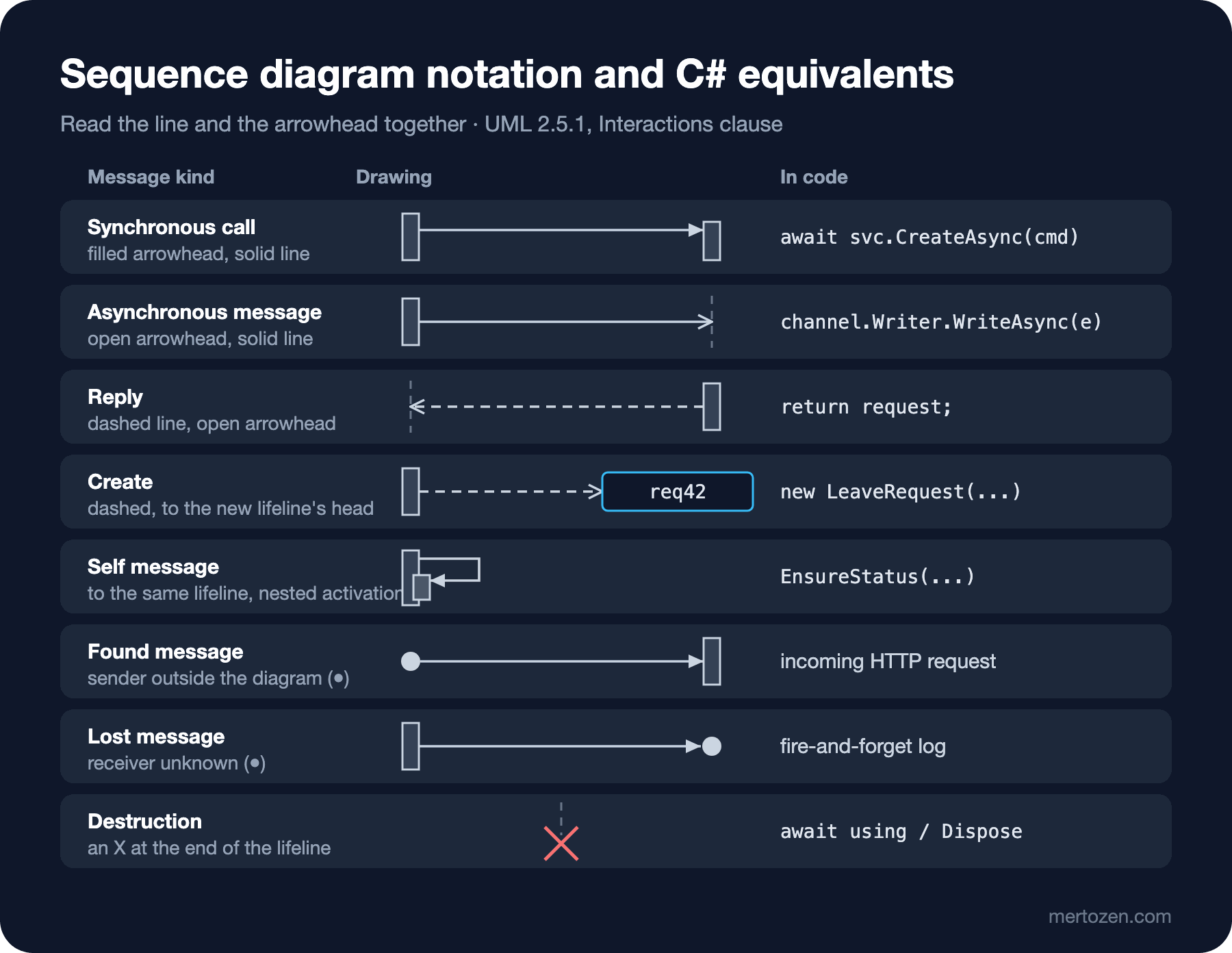
Messages are distinguished by their line and arrowhead. A synchronous call is a solid line with a filled arrowhead: the sender does not continue until the answer arrives. An asynchronous message is a solid line with an open arrowhead: the sender drops the message and carries on. A reply is a dashed line with an open arrowhead; the returned value can be written on it. A create message goes with a dashed line to the head box of the new lifeline; the lifeline does not exist before that point. A destruction occurrence is an X at the end of a lifeline. A message whose sender is outside the diagram is a found message (it starts from a filled circle), and one whose receiver is unknown is a lost message (it ends in a filled circle).
The point that surprises C# developers most: an async method called with await is a synchronous call in UML. The difference between sync and async is not whether the thread is blocked, but whether the sender waits for the result. The code after await service.CreateAsync(...) does not run before the answer arrives, so the caller is waiting. An asynchronous message is a send that nobody waits for: writing an event to a message queue, dropping an item into a Channel<T>, or a Task deliberately not awaited. We will see those in the approval flow in the next post.
A message label also has a syntax: the operation name and arguments, as in FindEmployeeAsync(4). A reply label says what comes back (ada, true, Id = 42). The specification also lets you write a reply as result = Operation(...): value; in practice the value alone is enough.
The Journey of a Leave Request
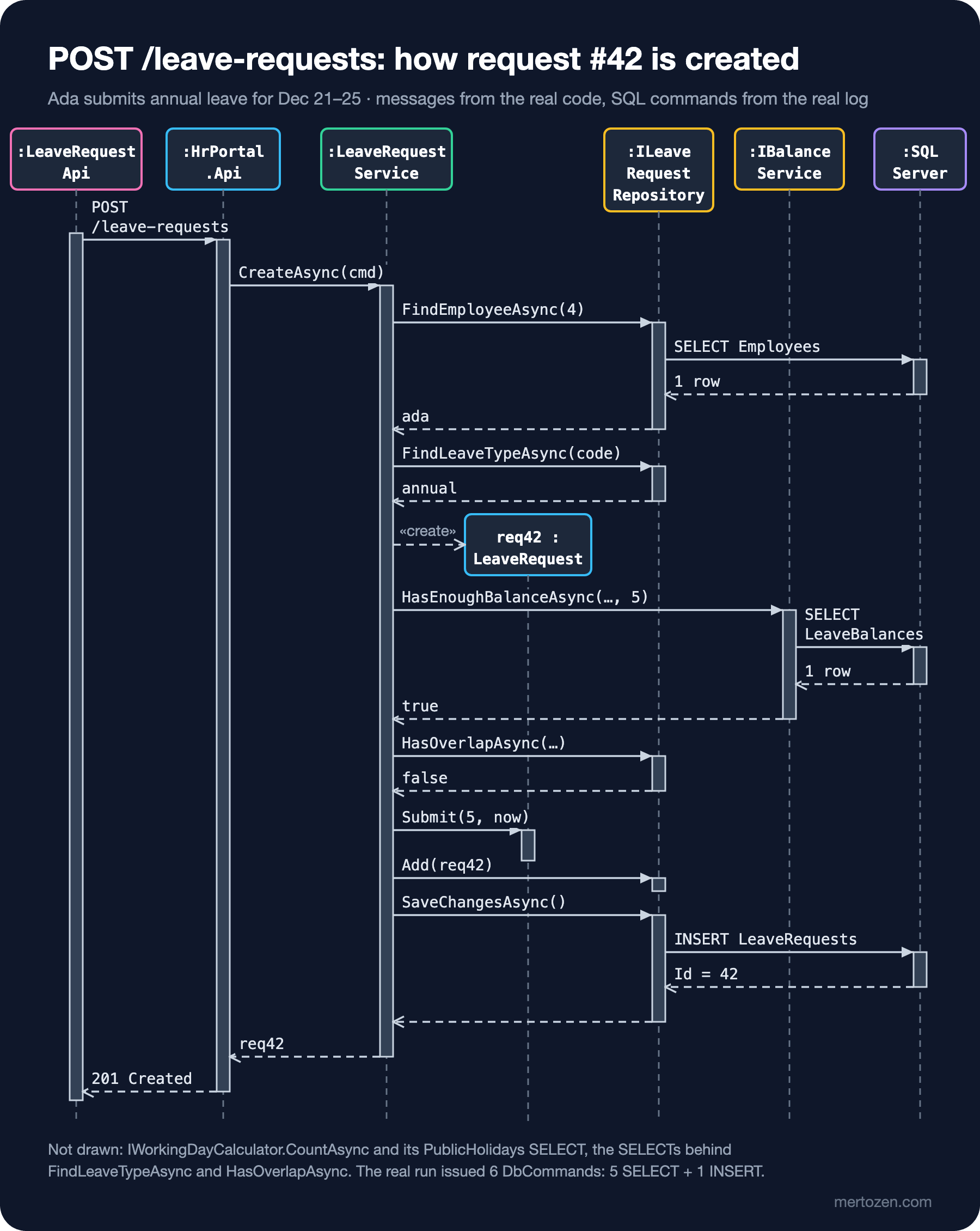
The figure is the sequence diagram of the real run above. What each lifeline corresponds to in code:
:LeaveRequestApi: theLeaveRequestApiservice on the Angular SPA (Single Page Application) side. The form sends the request withHttpClientand waits for the answer; since it shows the result on screen, the message is drawn as synchronous.:HrPortal.Api: the lambda passed toMapPost. It translates the HTTP (Hypertext Transfer Protocol) request into domain language and returns201 Createdor409 Conflict.:LeaveRequestService: the application service that runs the flow. It is the lifeline with the most outgoing arrows in the diagram.req42 : LeaveRequest: the entity born withnewin the middle of the service, which is why the create message goes to its head box.:ILeaveRequestRepositoryand:IBalanceService: interface-typed lifelines; their implementations inHrPortal.Leave.Infrastructureuse EF Core.:SQL Server: the database outside the system. The message labels are the real table names from the log.
The note under the diagram is part of the diagram too: I deliberately left out the IWorkingDayCalculator lifeline and some SELECTs. That is a level-of-detail decision; the diagram is not "all calls" but "what is needed to answer this question". Saying what you left out keeps the reader from taking an incomplete picture as complete.
Reading Responsibilities from the Diagram
Once a sequence diagram is drawn, properties of the code that go unnoticed while reading become visible. Four stand out in this one.
Most arrows leave a single lifeline. LeaveRequestService is like a conductor: it asks every participant and collects the answers. That is natural for an application service; but if the same shape appeared on an entity, it would be a sign that the entity knows too much.
req42 receives only two messages: create and Submit(5, now). The business rule (is it a draft, is the day count positive, what is the new status) lives inside the entity; the service only gathers what is needed from outside (working days, balance, overlap). The distribution of responsibility can be read from the diagram.
The arrows to the database can be counted. Six commands are no problem for this request, but if you draw the same diagram for a list screen and see one arrow per row, you catch the N+1 problem in the diagram before you catch it in code. The EF Core Performance Basics: N+1, Projection, AsNoTracking and Compiled Queries post of the EF Core series covers the fixes.
There is time between the check and the write. After HasEnoughBalanceAsync answers, four more messages pass before the INSERT, and nothing prevents another request from changing the balance in between. The diagram shows that plainly; it is also why requirement R8 (re-checking the balance at approval time) exists.
The Same Diagram as Code: Mermaid
The sequence diagram is the diagram type best supported by diagrams-as-code tools. The Mermaid version of the same scenario (renders directly in Markdown files on GitHub):
sequenceDiagram
    autonumber
    participant SPA as :LeaveRequestApi (Angular)
    participant Api as :HrPortal.Api
    participant Svc as :LeaveRequestService
    participant Repo as :ILeaveRequestRepository
    participant Bal as :IBalanceService
    participant Db as :SQL Server

    SPA->>+Api: POST /leave-requests
    Api->>+Svc: CreateAsync(command)
    Svc->>+Repo: FindEmployeeAsync(4)
    Repo->>+Db: SELECT ... FROM Employees
    Db-->>-Repo: 1 row
    Repo-->>-Svc: ada
    Svc->>+Repo: FindLeaveTypeAsync("ANNUAL")
    Repo-->>-Svc: annual
    create participant Req as req42:LeaveRequest
    Svc->>Req: new(ada, annual, period, reason, now)
    Svc->>+Bal: HasEnoughBalanceAsync(4, annual, 2026, 5)
    Bal->>+Db: SELECT ... FROM LeaveBalances
    Db-->>-Bal: EntitledDays 14, UsedDays 6
    Bal-->>-Svc: true
    Svc->>+Repo: HasOverlapAsync(4, period)
    Repo-->>-Svc: false
    Svc->>Req: Submit(5, now)
    Svc->>Repo: Add(req42)
    Svc->>+Repo: SaveChangesAsync()
    Repo->>+Db: INSERT INTO LeaveRequests ...
    Db-->>-Repo: Id = 42
    Repo-->>-Svc:
    Svc-->>-Api: req42
    Api-->>-SPA: 201 Created
This file rendered without errors with mermaid-cli (Mermaid 12.3.0). ->> is a synchronous call, -->> a reply, and the + and - after the arrow open and close an activation; autonumber numbers the messages. The create participant line starts the lifeline at the level of its first message, but Mermaid draws the create message with a solid line rather than a dashed one; you need to know that if you want a drawing faithful to UML. Mermaid has -) for asynchronous messages; we will use it in the next post. The rest of the syntax is in the Mermaid and Structurizr DSL (Domain-Specific Language) post of the series.
Common Pitfalls
Drawing every method call. Include, SingleOrDefaultAsync, GetUtcNow, logging calls... Draw them all and the diagram becomes a hard-to-read copy of the code. The rule: as many messages as it takes to answer the scenario's question, and say what you left out in a note.
Drawing lifelines as classes or layer names. "Business Layer" or "Data Access" is not a participant, it is a folder. What receives a message is an object; write a layer name and you lose who knows what.
Mistaking await for an asynchronous message. An open arrowhead means "the sender does not wait"; every awaited call is drawn with a filled arrowhead. The wrong arrowhead convinces the reader that the design is fire-and-forget.
Skipping all replies, or drawing all of them. If the returned value affects the rest of the flow (true, Id = 42), draw the reply; the empty reply of a void call is usually noise.
Squeezing several scenarios into one diagram. Once you start adding arrows for "if the balance is not enough go here, if there is an overlap go there", you need either a combined fragment (next post) or a separate diagram.
When Not to Use It
Do not draw a sequence diagram for CRUD (Create, Read, Update, Delete) endpoints where one service calls one repository; the code reads at a glance. A sequence diagram pays off when the flow crosses more than one boundary (process, network, external system), where order matters (check first, then write), or when discussing a performance or consistency problem. If a code review raises "how many times does this request hit the database?", it is exactly the time to draw one.
A Small Experiment
★☆☆ Add the :IWorkingDayCalculator lifeline and its PublicHolidays SELECT to the figure. Between which two messages does it go, and why?
★★☆ Ada sent the same form with "Save as draft" ("submit": false). Draw the sequence diagram of this scenario and verify it with a real run: how many DbCommands run, and which lifelines disappear from the diagram entirely?
★★★ FindEmployeeAsync and FindLeaveTypeAsync each go to the database separately. Propose a design that combines these two SELECTs and HasOverlapAsync, draw its new sequence diagram and compare the before and after logs. Which responsibility did you move to which lifeline?
In the next post we add conditions and parallelism to this diagram: with alt, opt, loop, par, break and ref we will draw the manager and director approvals, the insufficient balance error, and the e-mail and calendar entry that go out through a message queue after approval.