

Class Diagrams 2: Association, Aggregation, Composition, Generalization and Dependency — with C# Equivalents

An association is a lasting link and becomes a navigation property in C#; in a composition the part has one owner and is deleted with it, which in EF Core means an owned or complex type or cascade delete; aggregation has no precise meaning in UML 2.5.1. The notation and C# counterpart of six relationships, EF Core's cascade default on required relationships, qualified associations, and why Approval is promoted from an association class to a class of its own.
Version note: The diagrams in this post use UML 2.5.1 notation; the C# examples were tested with .NET 10.
Guess First
Alan Turing manages a team in the Engineering department; his own manager is Grace Hopper, the department's director. Alan asks for 5 working days of leave. By the rules the request goes first to the manager and then, since it exceeds 3 days, to the director; both are Grace. Approvals are modeled as a join entity that carries data on the many-to-many relationship between Employee and LeaveRequest. What happens when Grace's second approval is saved?
using Microsoft.Data.Sqlite;
using Microsoft.EntityFrameworkCore;

using SqliteConnection connection = new("Data Source=:memory:");
connection.Open();
using HrPortalDbContext db = new(new DbContextOptionsBuilder<HrPortalDbContext>().UseSqlite(connection).Options);
db.Database.EnsureCreated();

Employee grace = new() { Id = 7, FullName = "Grace Hopper" };
Employee alan = new() { Id = 420, FullName = "Alan Turing", ManagerId = 7 };
LeaveRequest request = new() { Id = 44, EmployeeId = 420, WorkingDays = 5 };
db.AddRange(grace, alan, request);

// Grace is both Alan's manager and his department's director
db.Add(new Approval { LeaveRequestId = 44, ApproverId = 7, Step = "Manager", DecidedAt = DateTimeOffset.UtcNow });
try
{
    db.Add(new Approval { LeaveRequestId = 44, ApproverId = 7, Step = "Director", DecidedAt = DateTimeOffset.UtcNow });
    db.SaveChanges();
    Console.WriteLine($"Approvals: {db.Set<Approval>().Count()}");
}
catch (InvalidOperationException ex)
{
    Console.WriteLine(ex.Message);
}

public sealed class Employee
{
    public int Id { get; set; }
    public string FullName { get; set; } = "";
    public int? ManagerId { get; set; }
    public List<LeaveRequest> ApprovedRequests { get; } = [];
}

public sealed class LeaveRequest
{
    public int Id { get; set; }
    public int EmployeeId { get; set; }
    public int WorkingDays { get; set; }
    public List<Employee> Approvers { get; } = [];
}

// Association class: the data of the link between Employee (approver) and LeaveRequest
public sealed class Approval
{
    public int LeaveRequestId { get; set; }
    public int ApproverId { get; set; }
    public string Step { get; set; } = "";
    public DateTimeOffset DecidedAt { get; set; }
}

public sealed class HrPortalDbContext(DbContextOptions<HrPortalDbContext> options) : DbContext(options)
{
    protected override void OnModelCreating(ModelBuilder b)
    {
        b.Entity<Employee>();
        b.Entity<LeaveRequest>()
            .HasMany(r => r.Approvers)
            .WithMany(e => e.ApprovedRequests)
            .UsingEntity<Approval>(
                j => j.HasOne<Employee>().WithMany().HasForeignKey(a => a.ApproverId),
                j => j.HasOne<LeaveRequest>().WithMany().HasForeignKey(a => a.LeaveRequestId),
                j => j.HasKey(a => new { a.LeaveRequestId, a.ApproverId }));
    }
}
The Code Enforces What the Model Says
The instance of entity type 'Approval' cannot be tracked because another instance with the same key value for {'LeaveRequestId', 'ApproverId'} is already being tracked. When attaching existing entities, ensure that only one entity instance with a given key value is attached. Consider using 'DbContextOptionsBuilder.EnableSensitiveDataLogging' to see the conflicting key values.Entity Framework Core (EF Core) refused to track the second Approval, because its key is (LeaveRequestId, ApproverId) and that pair already exists. The code is not buggy; it enforces exactly what the model says. In UML (Unified Modeling Language) this model is an association class: Approval is the association between Employee and LeaveRequest itself, and in UML an association by default carries only one link between the same two objects. "Grace approved request 44" is a link; there cannot be a second one of the same link. In a small department where the manager and the director are the same person, the model breaks.
In the previous post we looked inside the class box. In this one we look at the lines that connect the boxes: six kinds of relationship, the notation of each, its C# counterpart and how it shows up in the database through EF Core. At the end we solve the problem above with the right model.
Six Relationships at a Glance
The lines in a class diagram differ in two ways: the line itself (solid or dashed) and the marker at its end (open arrow, hollow triangle, hollow or filled diamond). Solid lines are structural relationships: one object holds the other in some way or is a kind of it. Dashed lines are weaker: fulfilling a contract or using something temporarily.
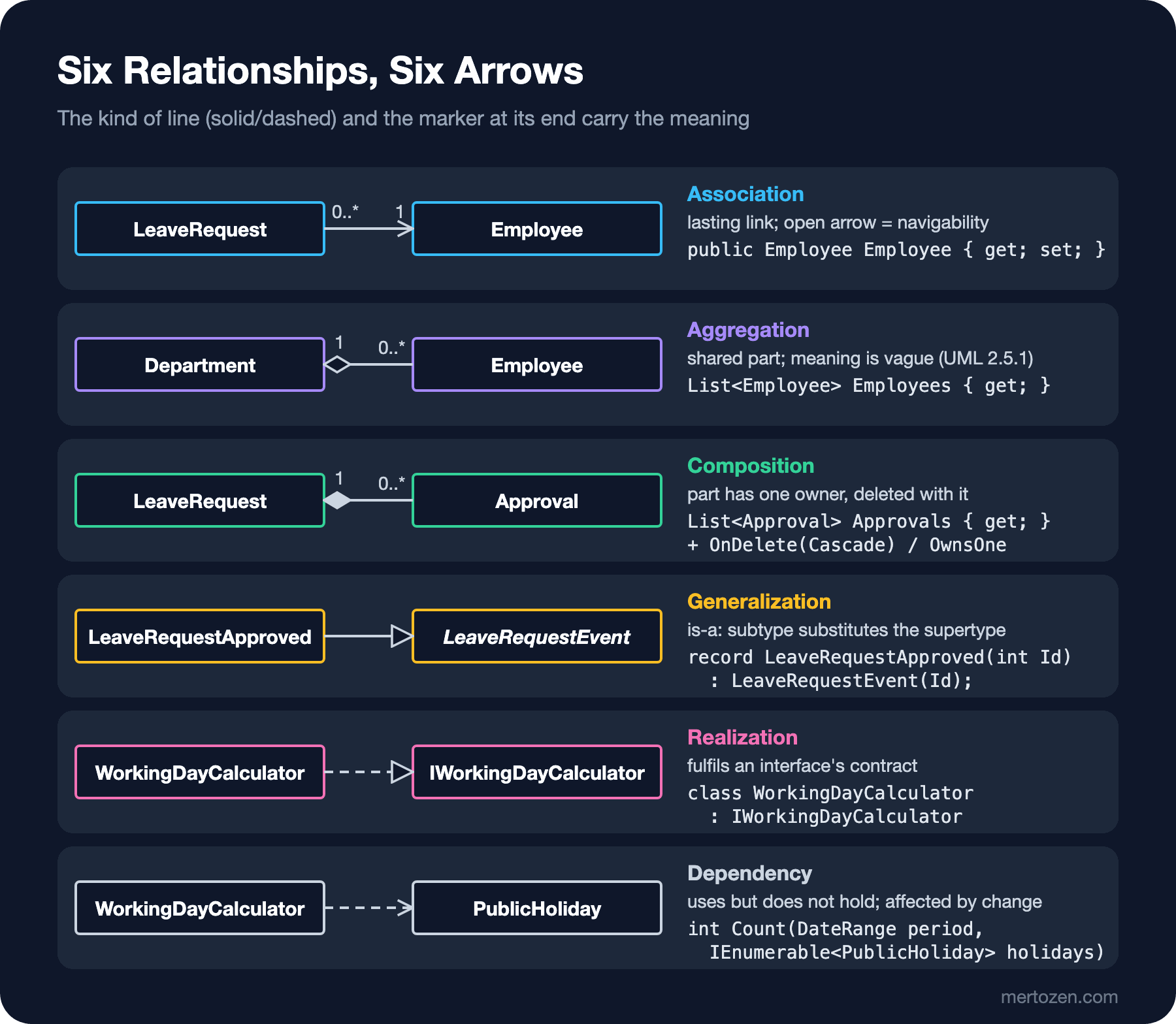
The C# line in each row is the most typical counterpart of that relationship, not the only one. Let us go through them one by one.
Association: Navigability, Role Names and Multiplicity
An association says there is a lasting link between instances of two classes: a leave request belongs to an employee. The two ends of the line are association ends, and three pieces of information can be written at each end. Multiplicity says how many instances are at this end when seen from the other side: an employee has zero or more requests (0..*), a request has exactly one owner (1). The role name is the role of the object at that end: employee, approver, manager. Navigability is shown with an open arrow at the end and means "you can go this way": if there is an arrow from LeaveRequest to Employee, the request knows its owner.
In C# a navigable end becomes a navigation property, and the role name usually becomes the property name: public Employee Employee { get; set; }. You do not write a property for the direction without an arrow; if the Employee class has no LeaveRequests collection, the diagram should not have an arrow that way either. Two-way navigability is not free: keeping both sides in sync, avoiding cycles during serialization and not loading needlessly large object graphs become your job. UML also lets you say explicitly that an end is not navigable by putting a small X on it; in practice most teams say "no arrow means no".
A class can also relate to itself. The relationship between an employee and their manager is a self-association: manager 0..1 at one end, reports 0..* at the other. In C# that is int? ManagerId and Employee? Manager; the 0 in the multiplicity is the nullable type itself. In UML 2.5.1 you can also put a small filled dot at an association end to show that it is owned by the class on the other side (ownership); in C# that means "the property is defined in that class". Most diagrams leave it out.
Aggregation and Composition: Two Diamonds
Aggregation and composition are special cases of association between a whole and a part. The diamond always goes on the side of the whole.
The hollow diamond (shared aggregation) is the most debated UML marker. UML 2.5.1 deliberately leaves its meaning open: according to the specification, the precise semantics of shared aggregation vary by application area and modeler. In "UML Distilled" Martin Fowler describes this vagueness by quoting James Rumbaugh, calling it a "modeling placebo". When you draw a hollow diamond between a department and its employees, every reader understands something different: is the employee deleted when the department is deleted, can they belong to another department too? The diagram does not say. Practical advice: draw a plain association instead of an aggregation and explain with multiplicity if needed.
The filled diamond (composite aggregation, i.e. composition) carries strict rules. A part can belong to at most one whole at a time, and when the whole is deleted its parts are deleted with it. A part may be removed from the whole earlier, but it cannot be shared with another whole. In the leave module, approvals and the report file are parts of the request: if the request is deleted they have no meaning of their own. The employee, however, is not part of the request; deleting a request does not delete the employee, and deleting an employee should not silently make their requests vanish.
In EF Core a composition can take three forms. For parts without identity that behave like a single value (our DateRange), the recommended route in EF Core 10 is ComplexProperty; the value is written into columns of the same table. For parts whose identity does not matter but that are tracked like entities, owned types (OwnsOne, OwnsMany) are used; the EF Core documentation states plainly that owned entities cannot exist without their owner and cannot be shared. Parts with their own identity (our Approval) are modeled with a separate table and a required foreign key, with OnDelete(DeleteBehavior.Cascade).
Here an EF Core default sets a trap: for every relationship whose foreign key is non-nullable, that is required, the default behavior is cascade delete. Because LeaveRequest.EmployeeId is required, unless you say otherwise EF Core sets up this association to behave like a composition. When I removed the OnDelete(DeleteBehavior.Restrict) line from the example below and ran the same code, the generated foreign key and the result were:
CONSTRAINT "FK_LeaveRequests_Employees_EmployeeId" FOREIGN KEY ("EmployeeId") REFERENCES "Employees" ("Id") ON DELETE CASCADE
Alan deleted; leave requests left: 0
Deleting Alan also deleted his leave history without a single warning. Drawing a plain association in the diagram while accepting composition behavior in code is a classic case of model and code saying two different things. The rule is simple: if there is no filled diamond in the diagram, set the OnDelete behavior of the required foreign key explicitly to Restrict or NoAction.
Generalization, Realization and Dependency
Generalization is a solid line with a hollow triangle and means "is a kind of" (is-a); the triangle points at the general type. In C# it is class or record inheritance: LeaveRequestApproved is a kind of the abstract LeaveRequestEvent. This relationship promises that the subtype can be used wherever the supertype is expected; the Liskov Substitution Principle post of the SOLID (Single Responsibility, Open/Closed, Liskov Substitution, Interface Segregation, Dependency Inversion) series explains how that promise gets broken. Do not draw a generalization just to reduce code duplication; the "role or type?" discussion from earlier applies here too.
Realization is a dashed line with a hollow triangle: a class fulfils an interface's contract. WorkingDayCalculator : IWorkingDayCalculator. In the component diagram post we will see the short "lollipop" notation for the same relationship.
Dependency is a dashed line with an open arrow and is the weakest relationship: a class uses another but does not hold on to it. Typical C# counterparts are a method parameter, a local variable or a static call. WorkingDayCalculator takes a list of PublicHoliday as a parameter, calculates and forgets it; it is affected if PublicHoliday changes, but does not store it in a field. You can state the kind of dependency with a keyword such as «use» or «create» (creates an instance). A service received through constructor injection and kept in a field, however, is an association, not a dependency, because the link lasts for the object's lifetime.
The Relationships of the Leave Module
With these six relationships we can draw the design-level class diagram of the leave module. To keep it uncluttered I show only the name compartments; Approval's attributes are visible because of the decision we discuss shortly:
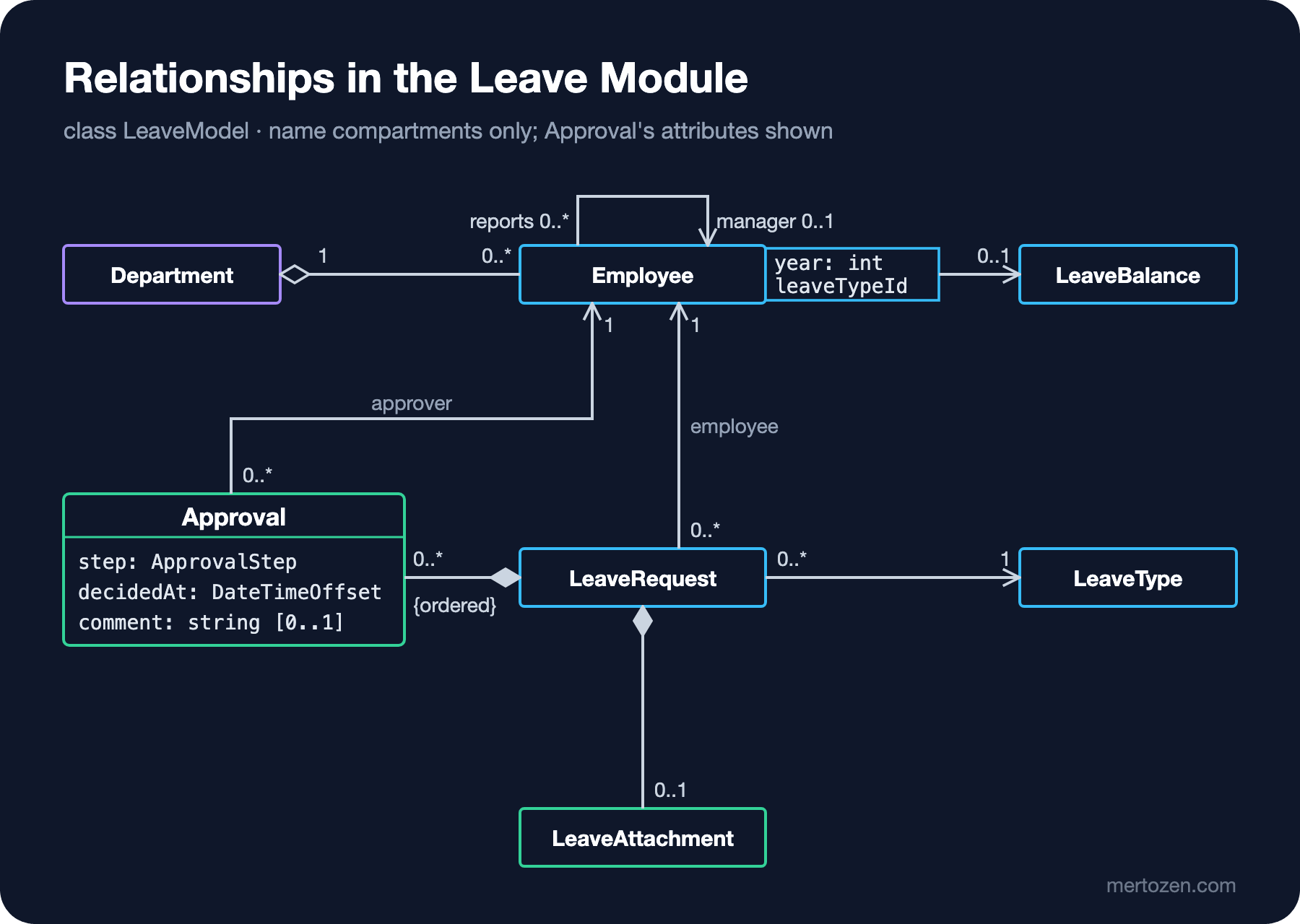
The only new notation in the diagram is the qualified association between Employee and LeaveBalance. The small rectangle stuck to the side of Employee is a qualifier: year and leaveTypeId. It reads like this: given an employee and a specific year and leave type, there is at most one balance (0..1). Without the qualifier the same relationship would be 0..* and the answer to "is there only one 2026 annual leave balance for Ada?" would not be visible in the diagram. In code a qualified association shows up in two places: a unique index on (EmployeeId, Year, LeaveTypeId) in the database, and a keyed collection such as Dictionary<(int Year, int LeaveTypeId), LeaveBalance> in memory.
The EF Core counterpart of the diagram is below. This time Approval is a class with its own identity, part of the request (composition) and linked to the approver (association); we add Grace's two approvals to Alan's request:
using Microsoft.Data.Sqlite;
using Microsoft.EntityFrameworkCore;

using SqliteConnection connection = new("Data Source=:memory:");
connection.Open();
using HrPortalDbContext db = new(new DbContextOptionsBuilder<HrPortalDbContext>().UseSqlite(connection).Options);
db.Database.EnsureCreated();

string script = db.Database.GenerateCreateScript();
int start = script.IndexOf("CREATE TABLE \"LeaveRequests\"");
Console.WriteLine(script[start..(script.IndexOf(");", start) + 2)]);
foreach (string line in script.Split('\n').Where(l => l.Contains("FK_Approvals") || l.Contains("FK_Employees")))
    Console.WriteLine(line.Trim());

Employee grace = new() { Id = 7, FullName = "Grace Hopper" };
Employee alan = new() { Id = 420, FullName = "Alan Turing", ManagerId = 7 };
LeaveRequest request = new()
{
    Id = 44, EmployeeId = 420, WorkingDays = 5,
    Period = new DateRange(new DateOnly(2026, 12, 21), new DateOnly(2026, 12, 25)),
    Attachment = new LeaveAttachment { FileName = "report.pdf", ContentType = "application/pdf" }
};
request.Approvals.Add(new Approval { ApproverId = 7, Step = ApprovalStep.Manager, DecidedAt = DateTimeOffset.UtcNow });
request.Approvals.Add(new Approval { ApproverId = 7, Step = ApprovalStep.Director, DecidedAt = DateTimeOffset.UtcNow });
db.AddRange(grace, alan, request);
db.SaveChanges();
Console.WriteLine($"Approvals saved: {db.Approvals.Count()}");

// Composition: deleting the request deletes its approvals
db.LeaveRequests.Remove(request);
db.SaveChanges();
Console.WriteLine($"After deleting request 44: approvals = {db.Approvals.Count()}");

// Association: an employee with requests cannot be deleted
db.LeaveRequests.Add(new LeaveRequest { Id = 45, EmployeeId = 420, WorkingDays = 2,
    Period = new DateRange(new DateOnly(2026, 11, 19), new DateOnly(2026, 11, 20)) });
db.SaveChanges();
db.ChangeTracker.Clear();
try
{
    db.Employees.Remove(new Employee { Id = 420 });
    db.SaveChanges();
}
catch (DbUpdateException ex)
{
    Console.WriteLine(ex.InnerException?.Message);
}

public enum ApprovalStep { Manager, Director }

public readonly record struct DateRange(DateOnly Start, DateOnly End);

public sealed class LeaveAttachment
{
    public string FileName { get; set; } = "";
    public string ContentType { get; set; } = "";
}

public sealed class Employee
{
    public int Id { get; set; }
    public string FullName { get; set; } = "";
    public int? ManagerId { get; set; }
    public Employee? Manager { get; set; }
}

public sealed class LeaveRequest
{
    public int Id { get; set; }
    public int EmployeeId { get; set; }
    public Employee Employee { get; set; } = null!;
    public DateRange Period { get; set; }
    public int WorkingDays { get; set; }
    public LeaveAttachment? Attachment { get; set; }
    public List<Approval> Approvals { get; } = [];
}

public sealed class Approval
{
    public int Id { get; set; }
    public int LeaveRequestId { get; set; }
    public int ApproverId { get; set; }
    public Employee Approver { get; set; } = null!;
    public ApprovalStep Step { get; set; }
    public DateTimeOffset DecidedAt { get; set; }
}

public sealed class HrPortalDbContext(DbContextOptions<HrPortalDbContext> options) : DbContext(options)
{
    public DbSet<Employee> Employees => Set<Employee>();
    public DbSet<LeaveRequest> LeaveRequests => Set<LeaveRequest>();
    public DbSet<Approval> Approvals => Set<Approval>();

    protected override void OnModelCreating(ModelBuilder b)
    {
        // Self-association: manager 0..1, reports 0..*
        b.Entity<Employee>().HasOne(e => e.Manager).WithMany().HasForeignKey(e => e.ManagerId);

        b.Entity<LeaveRequest>(r =>
        {
            // Association: the request belongs to an employee but is not part of them
            r.HasOne(x => x.Employee).WithMany().HasForeignKey(x => x.EmployeeId).OnDelete(DeleteBehavior.Restrict);
            // «dataType» stored as a value in the same table
            r.ComplexProperty(x => x.Period);
            // Composition [0..1]: the attachment is part of the request
            r.OwnsOne(x => x.Attachment);
            // Composition [0..*] {ordered}: approvals are part of the request
            r.HasMany(x => x.Approvals).WithOne().HasForeignKey(a => a.LeaveRequestId).OnDelete(DeleteBehavior.Cascade);
        });

        b.Entity<Approval>(a =>
        {
            a.HasOne(x => x.Approver).WithMany().HasForeignKey(x => x.ApproverId).OnDelete(DeleteBehavior.Restrict);
            // One decision per step; the same person may approve at two steps
            a.HasIndex(x => new { x.LeaveRequestId, x.Step }).IsUnique();
        });
    }
}
CREATE TABLE "LeaveRequests" (
"Id" INTEGER NOT NULL CONSTRAINT "PK_LeaveRequests" PRIMARY KEY AUTOINCREMENT,
"EmployeeId" INTEGER NOT NULL,
"WorkingDays" INTEGER NOT NULL,
"Attachment_FileName" TEXT NULL,
"Attachment_ContentType" TEXT NULL,
"Period_End" TEXT NOT NULL,
"Period_Start" TEXT NOT NULL,
CONSTRAINT "FK_LeaveRequests_Employees_EmployeeId" FOREIGN KEY ("EmployeeId") REFERENCES "Employees" ("Id") ON DELETE RESTRICT
);
CONSTRAINT "FK_Employees_Employees_ManagerId" FOREIGN KEY ("ManagerId") REFERENCES "Employees" ("Id")
CONSTRAINT "FK_Approvals_Employees_ApproverId" FOREIGN KEY ("ApproverId") REFERENCES "Employees" ("Id") ON DELETE RESTRICT,
CONSTRAINT "FK_Approvals_LeaveRequests_LeaveRequestId" FOREIGN KEY ("LeaveRequestId") REFERENCES "LeaveRequests" ("Id") ON DELETE CASCADE
Approvals saved: 2
After deleting request 44: approvals = 0
SQLite Error 19: 'FOREIGN KEY constraint failed'.Let us match the output with the diagram from top to bottom. The LeaveRequests table has Attachment_FileName and Period_Start columns: neither of the two compositions is a separate table, both are parts written into their owner's row. The association between request and employee became ON DELETE RESTRICT, the composition between approval and request ON DELETE CASCADE. The self-association's foreign key has no ON DELETE at all; that is how ClientSetNull, EF Core's default for nullable foreign keys, shows up in the database: the database blocks, and EF Core itself sets ManagerId to null on the employees it tracks. Grace's two approvals were saved without trouble this time, both went away when the request was deleted, and the attempt to delete Alan, who still has a request, was rejected by the database.
Association Class or a Class of Its Own?
The difference between the model in Guess First and the one that works, in a single figure:
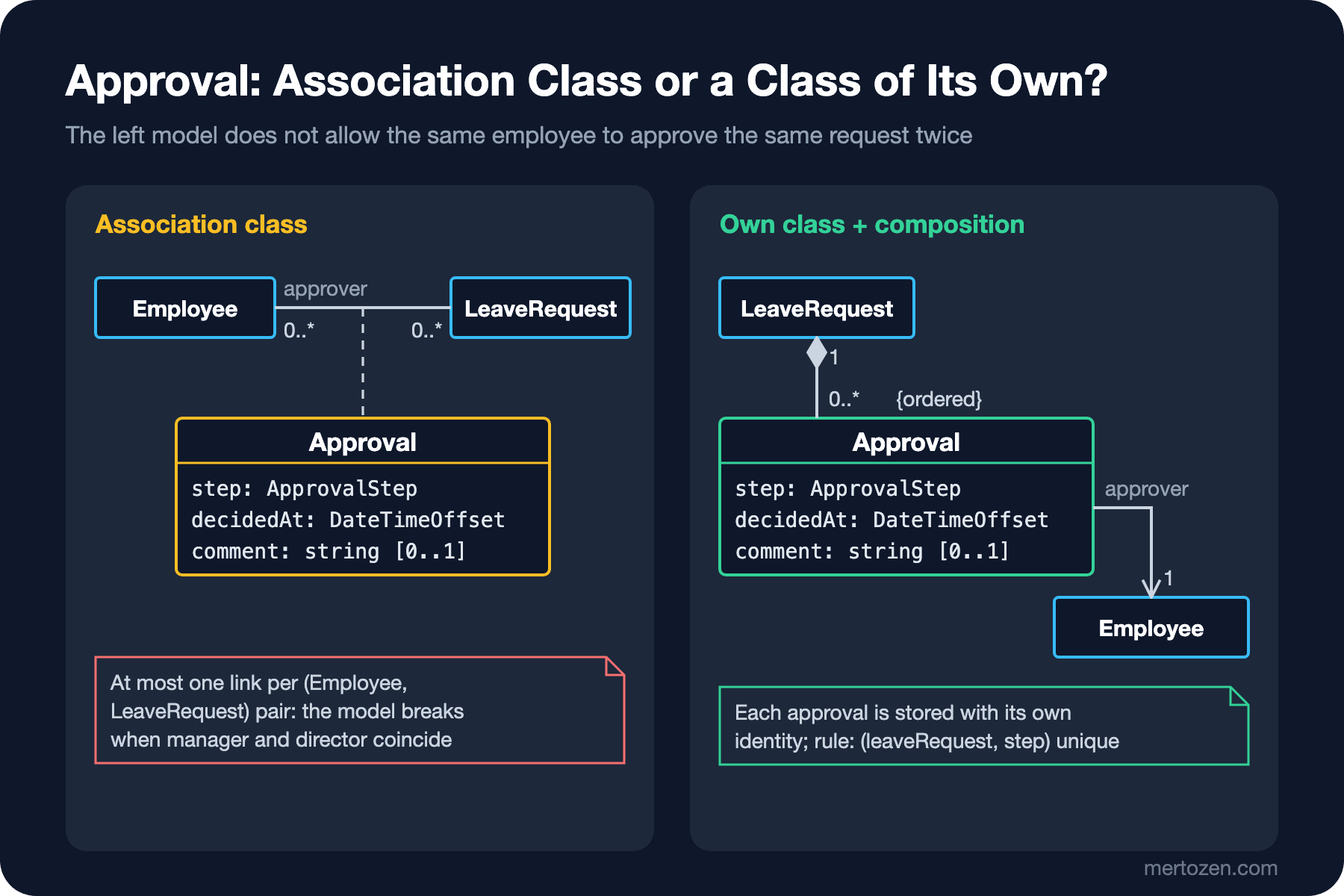
An association class is a nice notation for cases where an association itself carries attributes: the class connected to the association with a dashed line is the data of that link. Its exact EF Core counterpart is a many-to-many with payload set up with UsingEntity<Approval>, and the join entity's default primary key is the combination of the two foreign keys. Model and code are consistent; the problem is that the model is inconsistent with the requirements. R7 (requirement 7, from the list in the second post) defines manager and director approval as two separate steps; the step is part of the approval's identity, not of the link.
The fix is to promote Approval from an association class to a class with its own identity: tied to the request by composition (0..*, {ordered}) and to the approver by a plain association. The real rule is now in the right place too: "one decision per step on a request" is a unique constraint on (leaveRequest, step), and HasIndex(...).IsUnique() in code. The general lesson: if one of an association class's attributes implies that there can be more than one relationship between the same two objects (a date, a step, a sequence number), it is no longer an association class but a class of its own.
The Same Diagram in Mermaid
Mermaid's class diagram supports all the relationship kinds. I wrote the relationships of the leave module plus the three example relationships from the figure like this and rendered them locally with Mermaid CLI (Command Line Interface) 12.2.0:
classDiagram
    direction LR
    Department "1" o-- "0..*" Employee
    Employee "0..*" --> "0..1" Employee : manager
    LeaveRequest "0..*" --> "1" Employee : employee
    LeaveRequest "1" *-- "0..*" Approval : approvals
    Approval "0..*" --> "1" Employee : approver
    LeaveRequest "1" *-- "0..1" LeaveAttachment
    LeaveRequest "0..*" --> "1" LeaveType
    LeaveRequestEvent <|-- LeaveRequestApproved
    IWorkingDayCalculator <|.. WorkingDayCalculator
    WorkingDayCalculator ..> PublicHoliday
    class Approval {
        +step: ApprovalStep
        +decidedAt: DateTimeOffset
        +comment: string [0..1]
    }
    class LeaveRequestEvent {
        <<abstract>>
    }
    class IWorkingDayCalculator {
        <<interface>>
    }
The syntax lets you type the arrows almost as if drawing them: o-- a hollow diamond, *-- a filled diamond, <|-- generalization, <|.. realization, ..> dependency, and the quoted texts are the multiplicities at the two ends. Three things are missing. There is no syntax for association classes or qualified associations; you cannot draw those two notations in Mermaid. Marking an abstract class with the <<abstract>> annotation looks like a stereotype rather than UML's italic name or {abstract}. And the label is written on the relationship, not on an end; manager sits in the middle of the line even though it is a role name.
Common Pitfalls
Putting a diamond on every relationship. The thought "the request belongs to the employee, so a diamond" confuses ownership with relationship. The test for composition is lifetime: does the part become meaningless when the whole is deleted? For the employee the answer is no.
Trying to say something with a hollow diamond. Aggregation has no precise meaning in UML 2.5.1; every reader loads their own meaning into it. Say what you mean with multiplicity or a note.
Needless two-way navigability. Drawing every association with arrows at both ends makes you add navigation properties to both classes in code. In EF Core that is the door to serialization cycles and accidentally loaded giant object graphs. Draw the direction that is actually used.
Diagram and OnDelete contradicting each other. EF Core's default cascade delete on required relationships turns an association drawn as a plain line into a composition in the database. For every required foreign key that is not a composition, state the behavior explicitly.
Applying an association class to every many-to-many. If the link's data can repeat between the same two objects (dated approvals, ordered steps), an association class is the wrong model. Promote the join entity to a class with its own identity.
Confusing dependency with association. Anything taken from the constructor and kept in a field is an association; something used only inside a method is a dependency. The difference matters when you read which classes a change will affect.
A Small Experiment
★☆☆ Remove the aggregation between Department and Employee in the relationships figure and draw a plain association instead. Which multiplicities did you write at the ends? Also add the "department director" from the case text as a second association; what should its role name be?
★★☆ Map LeaveAttachment in the sample code with ComplexProperty, using EF Core 10's optional complex type support, instead of OwnsOne. Does the generated table change? Read EF Core's "Owned Entity Types" and "Complex types" pages and summarize the difference between the two approaches in one paragraph.
★★★ Add LeaveBalance and make the qualified association real: define a unique index on (EmployeeId, Year, LeaveTypeId) and try adding a second balance for Ada with the same year and type. Match the error text with the 0..1 in the diagram.
In the next post we split this class diagram into two levels: the domain model without operations, discussed with the business unit, and the design class diagram with services and repositories. Then we go from diagram to code and, with puml-gen, from code to diagram, and look at ways to keep the two in sync.