

Mermaid and Structurizr DSL: Diagrams Inside Markdown, Model-Based C4 and Which One to Choose
Mermaid is the right tool for quick diagrams that render directly in GitHub and Azure DevOps Markdown, the Structurizr DSL for deriving consistent C4 views from a single model. This post converts the series' diagrams to Mermaid and shows its syntax traps with real output, draws the same container diagram with Structurizr and compares PlantUML, Mermaid and Structurizr.
Version note: The diagrams in this post use UML (Unified Modeling Language) 2.5.1 and C4 (Context, Containers, Components, Code) notation and were rendered with Mermaid 12.3.0 (command-line tool Mermaid CLI (Command-Line Interface) 12.2.0) and Structurizr 2026.10.26; the series' C# code was tested with .NET 10.
Guess First: How Many States Are in This Diagram?
This time you write the leave request state machine we turned into PlantUML in the previous post with Mermaid, directly inside a README. The entry behaviour of the Approved state consists of two jobs: deducting the balance and adding a calendar entry. In PlantUML we separated the two jobs with a semicolon, and you do the same here:
stateDiagram-v2
    [*] --> Draft
    Draft --> PendingManagerApproval: Submit [hasEnoughBalance]
    PendingManagerApproval --> Approved: Approve [hasEnoughBalance]
    Approved: Approved
    Approved: entry / deductBalance; addCalendarEntry
    Approved --> Cancelled: Cancel [!leaveStarted || byHrSpecialist] / refundBalance
Mermaid CLI renders this file without errors, exit code 0. How many boxes do you see in the diagram? How exactly does the entry line read inside the Approved box? We will give the answer in the syntax limits section; a hint: not every diagram that renders without errors is a correct diagram.
Mermaid: Diagrams Inside Markdown
Mermaid is a JavaScript library that produces diagrams from text. The difference from PlantUML is where it renders: Mermaid runs in the browser, so platforms can embed it directly in their Markdown rendering. Since 2022 GitHub shows fenced code blocks with the mermaid language as diagrams; in issues, PR (pull request) descriptions, wikis and .md files in the repo. Adding one to a README is this simple:
# Leave module

States of a leave request:

```mermaid
stateDiagram-v2
    [*] --> Draft
    Draft --> PendingManagerApproval: Submit [hasEnoughBalance]
```
There is no separate build step, image file or CI (Continuous Integration) job; the diagram changes in the same commit as the code and GitHub draws it when the page opens. The price is that rendering depends on the Mermaid version GitHub uses. GitHub's documentation shows a way to check it: a mermaid block containing only info prints the version in use. Do this check before putting new syntax (for example the use case diagram that arrived with 12.0) into a README.
Azure DevOps is a bit different. The Markdown guidance on Microsoft Learn supports both the ::: mermaid container syntax and the standard fenced block on wiki pages, but it lists the supported diagram types explicitly: sequence, Gantt, flowchart, class, state, user journey, pie, requirement, gitgraph, ER (Entity-Relationship) and timeline. C4 and use case are not on the list, and the guidance warns about "limited syntax support". If your team lives in the Azure DevOps wiki, choose your diagram types accordingly.
Two tools are enough locally. The built-in Markdown preview of Visual Studio Code (VS Code) does not draw Mermaid; the "Markdown Preview Mermaid Support" extension fills the gap. On the command line, the Mermaid CLI's mmdc command produces SVG (Scalable Vector Graphics) or PNG (Portable Network Graphics) with a headless Chrome-based browser, and can render every mermaid block inside a Markdown file in one go:
npm install --save-dev @mermaid-js/mermaid-cli@12.2.0

# A single diagram
npx mmdc -i states.mmd -o states.svg

# Render every mermaid block in a Markdown file (exit code 1 on error)
npx mmdc -i README.md -o out/README.md
Found 2 mermaid charts in Markdown input
✅ ./README-2.svg
✅ ./README-1.svg
✅ out/README.mdThat second use is valuable for CI: you can verify in your own pipeline that the diagrams in the README parse before trusting GitHub with them.
The Series' Diagrams in Mermaid
Class diagram. The visibility marks (+, -, #, ~) are as in UML; the type is written before the attribute name, an enumeration is a stereotype, *-- is composition, --> association and ..> dependency:
classDiagram
    direction LR
    class LeaveRequest {
        +DateRange Period
        +int WorkingDays
        +string? Reason
        +LeaveStatus Status
        +Submit(int workingDays, DateTimeOffset now) void
        +Approve(Employee approver, string? comment, DateTimeOffset now) void
        +Cancel(DateOnly today) void
    }
    class Approval {
        +ApprovalStep Step
        +ApprovalDecision Decision
        +DateTimeOffset DecidedAt
    }
    class LeaveStatus {
        <<enumeration>>
        Draft
        PendingManagerApproval
        PendingDirectorApproval
        Approved
        Rejected
        Cancelled
    }
    class Employee {
        +string EmployeeNumber
        +string FullName
    }
    LeaveRequest "1" *-- "0..2" Approval : approvals
    Approval "0..*" --> "1" Employee : approver
    LeaveRequest "0..*" --> "1" Employee : requester
    LeaveRequest ..> LeaveStatus
Sequence diagram. In Mermaid a synchronous message with a filled arrowhead is ->>, a dashed reply is -->>; you open and close the activation bar with the + and - suffixes or with activate/deactivate lines:
sequenceDiagram
    autonumber
    actor Employee
    participant Form as LeaveRequestFormComponent
    participant Api as HrPortal.Api
    participant Svc as LeaveRequestService
    participant Bal as IBalanceService
    Employee->>Form: Submit
    Form->>+Api: POST /leave-requests/42/submit
    Api->>+Svc: SubmitAsync(42)
    Svc->>Bal: HasEnoughBalanceAsync(E-1001, ANNUAL, 5)
    Bal-->>Svc: true (remaining 8)
    alt enough balance
        Svc-->>Api: PendingManagerApproval
        Api-->>Form: 200 OK
    else insufficient balance
        Svc-->>Api: BalanceExceeded
        Api-->>Form: 422 ProblemDetails
    end
    deactivate Svc
    deactivate Api
State diagram (stateDiagram-v2). Composite states, choices and entry behaviours are supported; we will see shortly why the semicolon is written as #59;:
stateDiagram-v2
    [*] --> Draft
    Draft --> PendingManagerApproval: Submit [hasEnoughBalance]
    state "Pending Approval" as PendingApproval {
        state afterManager <<choice>>
        PendingManagerApproval: PendingManagerApproval
        PendingManagerApproval: entry / notifyManager
        PendingDirectorApproval: PendingDirectorApproval
        PendingDirectorApproval: entry / notifyDirector
        PendingManagerApproval --> afterManager: Approve [hasEnoughBalance]
        afterManager --> PendingDirectorApproval: [requiresDirectorApproval]
    }
    afterManager --> Approved: [else]
    PendingDirectorApproval --> Approved: Approve [hasEnoughBalance]
    PendingApproval --> Rejected: Reject [hasComment] / recordApproval
    PendingApproval --> Cancelled: Cancel
    Approved: Approved
    Approved: entry / deductBalance#59; addCalendarEntry
    Approved --> Cancelled: Cancel [!leaveStarted || byHrSpecialist] / refundBalance
The Mermaid version of the ER diagram was the topic of the previous post; that is where we wrote the generator that produces an erDiagram from the Entity Framework Core (EF Core) model. The use case diagram that arrived as a beta in Mermaid 12.0 is available too; its keyword is usecase-beta and the documentation says the syntax may change in a backwards-incompatible way:
usecase-beta
direction LR
actor Employee
actor Manager
actor Director
actor HR("HR Specialist")
systemBoundary "HR Portal - Leave"
  UC01("UC-01 Request Leave")
  UC02("UC-02 Decide on Leave Request")
  UC03("UC-03 Cancel Leave Request")
  CheckBalance("Check Balance")
  AttachReport("Attach Medical Report")
end
Director --|> Manager
Employee -- UC01
Employee -- UC03
Manager -- UC02
HR -- UC03
UC01 ..> : include CheckBalance
UC02 ..> : include CheckBalance
AttachReport ..> : extend UC01
note for AttachReport "condition: leave type = SICK"
All blocks render without errors with mmdc. Two things caught my eye in the use case output: the «include» and «extend» arrows are drawn with filled arrowheads instead of UML's open arrowhead, and there is no extension point compartment inside the use case. The beta diagram does the job, but its notational rigour is behind PlantUML's.
C4 in Mermaid and the Layout Problem
Mermaid's C4 syntax is deliberately modelled on C4-PlantUML; the Person, Container, ContainerDb and Rel macros are the same. The previous post's container diagram in Mermaid:
C4Container
    title HR Portal - containers
    Person(employee, "Employee", "Requests leave")
    Person(manager, "Manager", "Approves or rejects")
    System_Boundary(hr, "HR Portal") {
        Container(web, "Web App", "Angular 22", "Single-page app")
        Container(api, "HrPortal.Api", "ASP.NET Core, .NET 10", "Leave, Payroll, Notification modules")
        ContainerDb(db, "HR Database", "SQL Server", "Requests, balances, approvals")
        ContainerQueue(broker, "Message Broker", "Azure Service Bus", "leave-events topic")
        Container(worker, "HrPortal.Worker", ".NET 10 worker", "Notifications and reminders")
    }
    System_Ext(calendar, "Calendar System", "Corporate calendar")
    System_Ext(mail, "E-mail Server", "SMTP relay")
    Rel(employee, web, "Submits leave requests", "HTTPS")
    Rel(manager, web, "Approves or rejects", "HTTPS")
    Rel(web, api, "Calls", "JSON/HTTPS")
    Rel(api, db, "Reads and writes", "EF Core")
    Rel(api, broker, "Publishes events", "AMQP")
    Rel(broker, worker, "Delivers events", "AMQP")
    Rel(api, calendar, "Adds leave entries", "HTTPS")
    Rel(worker, mail, "Sends e-mails", "SMTP")
    UpdateLayoutConfig($c4ShapeInRow="3", $c4BoundaryInRow="1")
That is where the similarity ends. Mermaid's C4 documentation states openly that the layout does not use a fully automated algorithm and that shapes are placed in rows in statement order. UpdateLayoutConfig changes how many shapes go in a row, and that is all. The result is on the left of the figure below: the external systems fall below the people and above the system boundary, and relationship labels collide with the boundary title. The same model in Structurizr is on the right.
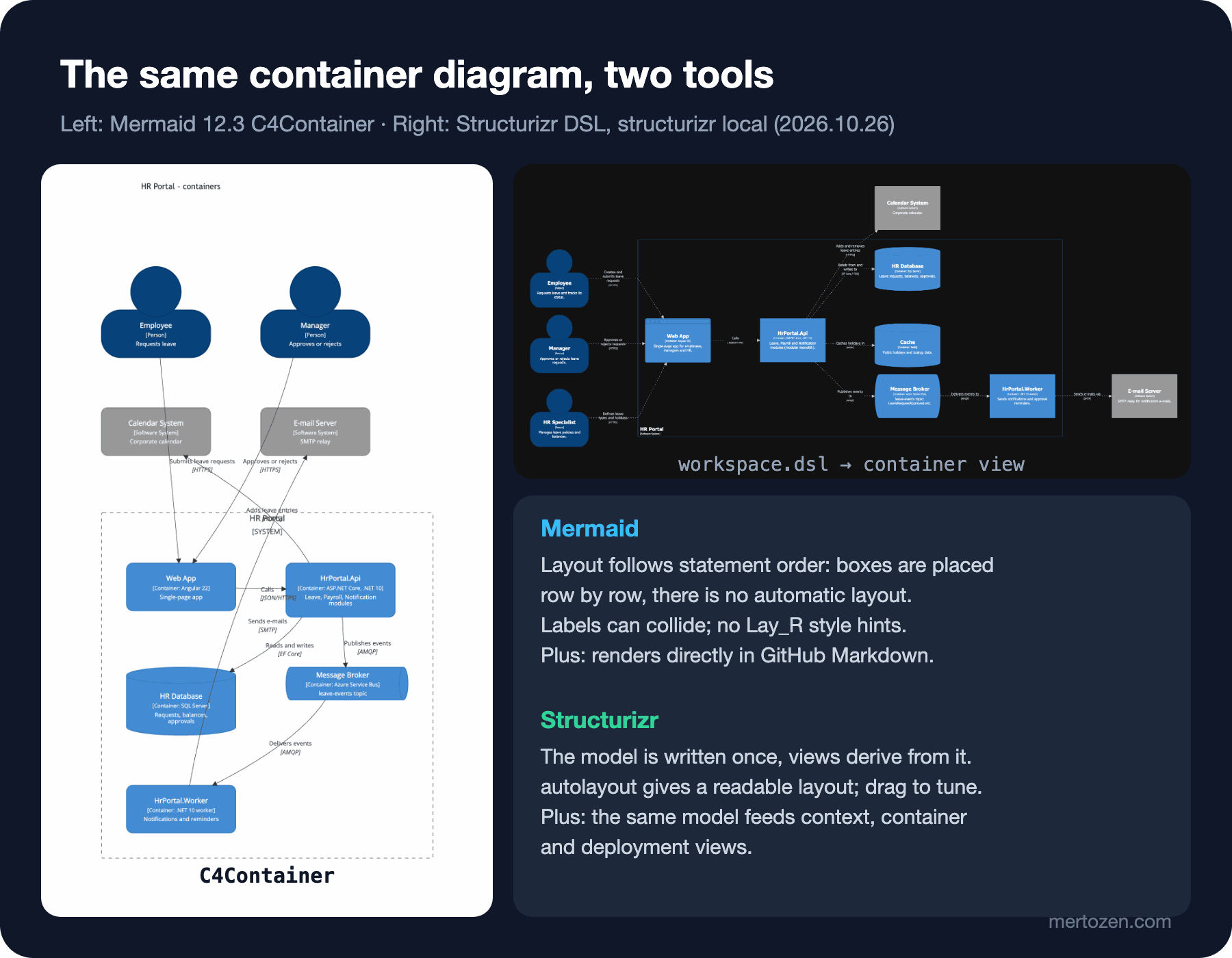
Hints like Lay_R, which C4-PlantUML uses to fix the layout, do not exist in Mermaid, and the documentation says there are no plans to add them. Write them out of PlantUML habit and this is the real error:
Error: Lexical error on line 5. Unrecognized text.
..., api, "Calls")    Lay_R(web, api)
----------------------^
Mermaid also has an architecture-beta diagram (since 11.1); it is designed for drawing cloud services with icons, but it has none of C4's element types and notation rules. Think of the C4 syntax for architecture documentation and of architecture for presentations.
Mermaid's Syntax Limits
Back to the opening question. In Mermaid's state diagram the semicolon is a statement separator. The line Approved: entry / deductBalance; addCalendarEntry is read as two statements: the description "entry / deductBalance" for Approved, and a new state called addCalendarEntry on its own. In the render two orphan boxes appeared at the top of the diagram: one called addCalendarEntry, the other containing nothing but ;. No error message, exit code 0. The fix is Mermaid's entity code: #59; writes the semicolon character as text and the box reads "entry / deductBalance; addCalendarEntry".
This small example shows the general rule of working with Mermaid: the syntax changes with the diagram type, and every type has its own reserved characters. The use case documentation, for example, lists separately that sequences such as --, --> and ..> cannot be used inside labels, and that "First\nSecond" does not break the line but leaves the backslash as text. Copy-paste from PlantUML is the most common source of errors. The second limit is versions: the Mermaid versions of GitHub, Azure DevOps and your local mmdc can differ; an older version does not recognise a beta diagram that rendered locally and shows an error instead of the diagram. The third limit is notation: Mermaid's class diagram has no direct syntax for an association class, and its sequence diagram none for found/lost messages. Do not look for every UML detail of this series in Mermaid; use as much as the question needs.
Structurizr DSL: One Model, Many Views
In PlantUML and Mermaid every diagram is a separate text. The "HR Portal" box in the context diagram and the system boundary in the container diagram are written twice in two different files; rename one and the other stays stale. Simon Brown's Structurizr DSL (Domain-Specific Language) turns the problem around: you write the model first, and the diagrams are views derived from that model.
workspace "HR Portal" "Leave module architecture" {

    !identifiers hierarchical

    model {
        employee = person "Employee" "Requests leave and tracks its status."
        manager = person "Manager" "Approves or rejects leave requests."
        hrSpecialist = person "HR Specialist" "Manages leave policies and balances."

        calendar = softwareSystem "Calendar System" "Corporate calendar." "External"
        mail = softwareSystem "E-mail Server" "SMTP relay for notification e-mails." "External"

        hrPortal = softwareSystem "HR Portal" "Employee self-service HR system." {
            web = container "Web App" "Single-page app for employees, managers and HR." "Angular 22" "Browser"
            api = container "HrPortal.Api" "Leave, Payroll and Notification modules (modular monolith)." "ASP.NET Core, .NET 10"
            db = container "HR Database" "Leave requests, balances, approvals." "SQL Server" "Database"
            cache = container "Cache" "Public holidays and lookup data." "Redis" "Database"
            broker = container "Message Broker" "leave-events topic: LeaveRequestApproved etc." "Azure Service Bus" "Queue"
            worker = container "HrPortal.Worker" "Sends notifications and approval reminders." ".NET 10 worker"
        }

        employee -> hrPortal.web "Creates and submits leave requests" "HTTPS"
        manager -> hrPortal.web "Approves or rejects requests" "HTTPS"
        hrSpecialist -> hrPortal.web "Defines leave types and holidays" "HTTPS"
        hrPortal.web -> hrPortal.api "Calls" "JSON/HTTPS"
        hrPortal.api -> hrPortal.db "Reads from and writes to" "EF Core / TDS"
        hrPortal.api -> hrPortal.cache "Caches holidays in" "RESP"
        hrPortal.api -> hrPortal.broker "Publishes events to" "AMQP"
        hrPortal.broker -> hrPortal.worker "Delivers events to" "AMQP"
        hrPortal.api -> calendar "Adds and removes leave entries" "HTTPS"
        hrPortal.worker -> mail "Sends e-mails via" "SMTP"
    }

    views {
        systemContext hrPortal "Context" {
            include *
            autolayout lr
        }

        container hrPortal "Containers" {
            include *
            autolayout lr
        }

        styles {
            element "Element" {
                color #ffffff
            }
            element "Person" {
                shape person
                background #08427b
            }
            element "Software System" {
                background #1168bd
            }
            element "Container" {
                background #438dd5
            }
            element "External" {
                background #999999
            }
            element "Database" {
                shape cylinder
            }
            element "Queue" {
                shape pipe
            }
            element "Browser" {
                shape webbrowser
            }
        }
    }
}
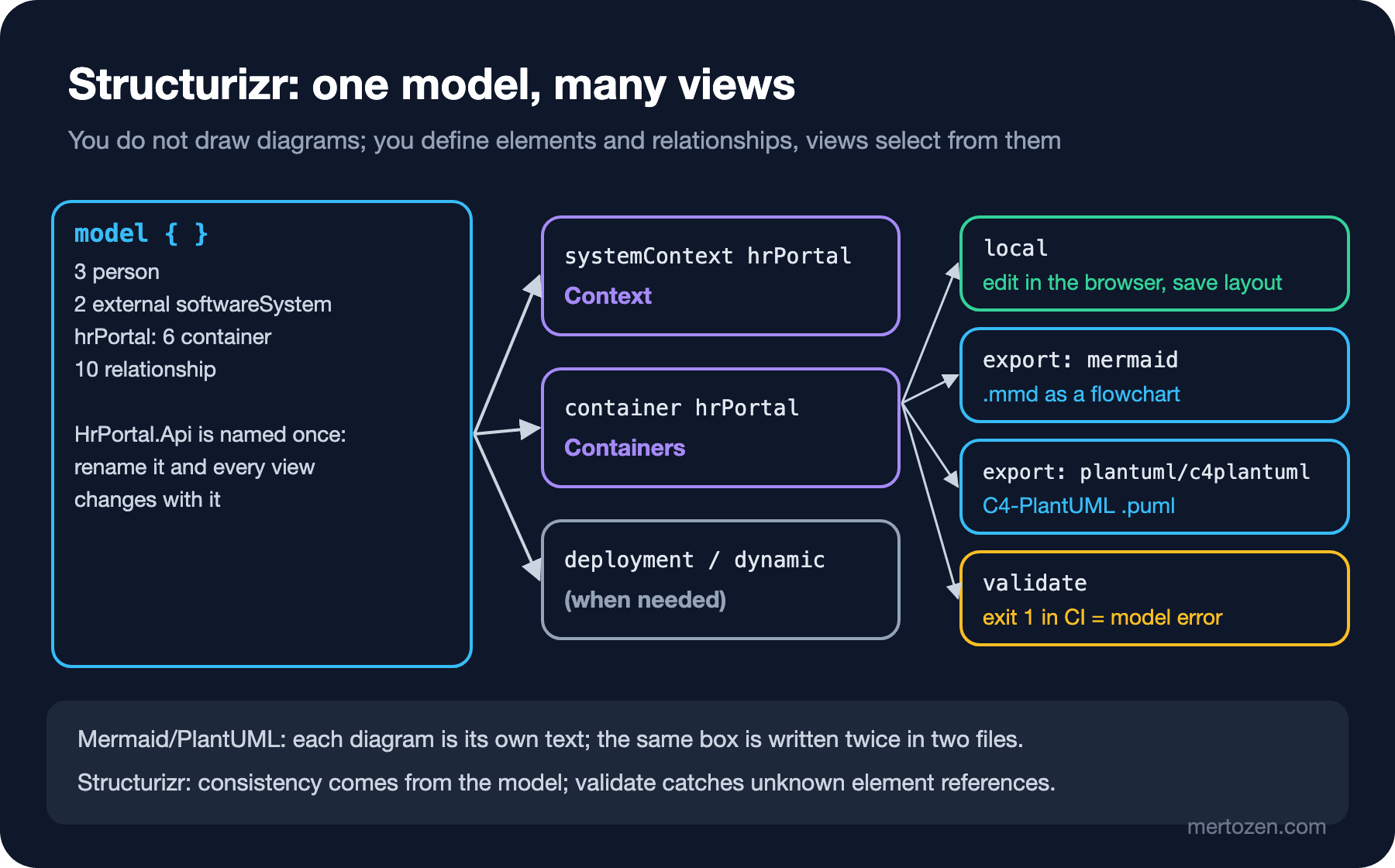
The model block defines elements and relationships; the views block chooses which elements each view shows. The systemContext hrPortal view with include * shows HR Portal and the people and systems directly related to it; it knows nothing about containers. The container hrPortal view draws the containers from the same model. Relationships are rolled up: the employee -> hrPortal.web relationship automatically appears as Employee → HR Portal in the context view, you do not write it again. !identifiers hierarchical lets you reach nested elements with dotted names like hrPortal.api; the tags in the styles block (Database, Queue, External) decide shape and colour.
structurizr local, validate and export
Structurizr now ships as a single distribution: structurizr.war, which needs Java 21, or the structurizr/structurizr Docker image, with subcommands. The tool that used to be distributed separately as Structurizr Lite is now the local command; according to the documentation every command except server is free, and server needs a license when used through the prebuilt binaries. Running it locally:
# Pass the folder that contains workspace.dsl as the data directory
java -jar structurizr.war local ./structurizr

# With Docker
docker run -it --rm -p 8080:8080 -v "$PWD/structurizr:/usr/local/structurizr" structurizr/structurizr local
At http://localhost:8080 the diagrams are drawn in the browser, autolayout computes the layout, and you can drag boxes by hand and save the layout; change the DSL and refresh the page, and the model is read again. The right panel in the figure is a screenshot of that screen.
Two commands matter for CI. validate parses the model and catches errors such as a reference to an unknown element. The real output for a DSL where hrPortal.worker was typed as hrPortal.workr (path shortened):
ERROR com.structurizr.command.ValidateCommand -- The source element "hrPortal.workr" does not exist at line 31 of .../workspace.dsl: hrPortal.workr -> mail "Sends e-mails via" "SMTP"Exit code 1. I tried the same typo in the other tools as well. Mermaid 12.3's C4 parser rejected the Rel(workr, mail, ...) line with "references an unknown shape or boundary". C4-PlantUML, on the other hand, rendered with exit code 0 and drew a new element called workr in the diagram; the typo slipped into the diagram silently. Structurizr's difference is that the check happens in the model rather than in a single diagram: an element is defined once and every view uses the same definition. export dumps the views into other formats:
java -jar structurizr.war validate -workspace workspace.dsl
java -jar structurizr.war export -workspace workspace.dsl -format plantuml/c4plantuml -output out
java -jar structurizr.war export -workspace workspace.dsl -format mermaid -output out
You get one file per view: structurizr-Context.puml, structurizr-Containers.puml, structurizr-Context.mmd, structurizr-Containers.mmd. I rendered both and both work, but their contents are worth a look. The Mermaid export produces not the C4 syntax but a graph LR flowchart with HTML (HyperText Markup Language) labels; in the C4-PlantUML export the "External" tag turns into a plain System rather than C4-PlantUML's System_Ext macro, so the distinction of an external system survives only in the colour. An export is a bridge; the real output is local or Structurizr's own renderer.
Which One to Choose?
After using the three tools on the same leave module, the comparison:
| Criterion | PlantUML | Mermaid | Structurizr DSL |
|---|---|---|---|
| Notation coverage | Almost all of UML, C4-PlantUML, Chen ER | Class, sequence, state, ER, C4, beta use case and architecture | C4 views (system landscape, context, container, component, dynamic, deployment) |
| Rendering environment | Java + Graphviz, the local jar or your own server | The browser; directly in GitHub and Azure DevOps Markdown | local (in the browser), Docker, export |
| Model consistency | Each diagram is a separate text | Each diagram is a separate text | One model, views are derived; validate checks references |
| Layout control | Automatic via Graphviz, hidden arrows and direction hints | Statement order in C4; automatic in the others | autolayout and dragging by hand in the browser |
| CI validation | --check-syntax, exit 200 | mmdc, exit 1 | validate, exit 1 |
| Learning curve | Medium, syntax per diagram type | Low, but inconsistent across types | Medium, the model and view concepts |
My rule is this. Mermaid for the README and PR descriptions in the repo: frictionless, visible to everyone, enough for small sequence and state diagrams. PlantUML for detailed diagrams that need UML's rigour (use case, class, composite state, combined fragments). Structurizr for architecture documentation that must stay consistent across several levels, that is, all of C4's levels. Using all three in the same repo is not a contradiction; each answers a different question. Documenting architecture decisions together with these diagrams is the topic of the upcoming Architecture Decisions series.
Validating Diagrams an LLM Generates
Asking an LLM (Large Language Model) to "draw a sequence diagram from this requirement" is an everyday task now, and text-based diagrams have one more advantage: you can validate the LLM's output directly. I suggest a three-layer check.
The first layer is syntax. Run the output through mmdc, plantuml --check-syntax or structurizr validate; if the exit code is not zero, the diagram does not exist. The Lay_R error above is caught exactly in this layer, and mixing the syntax of two tools is a typical source of such errors. The second is meaning. As the semicolon example showed, a diagram with exit code 0 can still be wrong; do not let it into a PR without looking at the render. The third is reality: are the names and relationships in the diagram consistent with the code? The strongest tool here is to generate whatever can be generated from code. Comparing the ER an LLM drew with the output of the generator we wrote in the ER diagram post reveals an invented column or a wrong cardinality in seconds. Structurizr's validate also does part of this layer automatically, because it rejects elements that are not in the model.
Let me add a practical prompt rule: give the LLM the series' name glossary (LeaveRequest, Approval, HrPortal.Api and so on from our CASE file) and the version of the target tool, and tell it "use only these names". Then still run the result through the three layers above.
Common Pitfalls
Mistaking an error-free render for correctness. The semicolon example: Mermaid drew two orphan boxes and said nothing. Know the reserved characters of the diagram type and look at the render.
Assuming the Mermaid version on GitHub. A usecase-beta diagram you drew locally with 12.3 does not render if the platform uses an older version. Check with an info block; do not put beta diagrams into permanent documentation.
Using Mermaid's C4 for large diagrams. Layout based on statement order becomes unreadable past five or six boxes. For large C4 diagrams use C4-PlantUML or Structurizr.
Mistaking Structurizr's export for the real output. The Mermaid export is a flowchart and the C4-PlantUML export loses the external system distinction; edit the exported file by hand and its link to the model breaks.
Keeping the same diagram in three tools. A diagram should have a single source. If you keep a summary in Mermaid in the README and the detail in PlantUML under docs/diagrams, make sure they answer different questions; two sources for the same question means two different answers.
A Small Experiment
★☆☆ Paste a mermaid block containing only info into a GitHub issue and note the Mermaid version GitHub uses. Does the usecase-beta diagram from this post render on that version?
★★☆ Add a deploymentEnvironment "Production" describing post 13's production topology (Azure Container Apps, Azure SQL Database, Azure Service Bus) to the Structurizr model and define a deployment view. Check it with validate, open it in local and verify that you got a new diagram without changing anything in the container view.
★★★ Give an LLM the content of docs/requirements.md and the name glossary and have it generate the sequence diagram of the "cancel the request" (UC-03) scenario in Mermaid. Run the output through the three layers in this post: the mmdc exit code, a visual check of the render and a comparison with the code (in which order does LeaveRequestService.CancelAsync really call what?). List every difference you find with its category.
In the last post of the series we put all these pieces together: we will take the leave module from the requirements text to use cases, from the domain model to sequence and state machine diagrams, from ER to C4 and from there to working .NET 10 API (Application Programming Interface), EF Core and Angular code in a single flow, and then see with git diff which diagrams change when the "half-day leave" requirement arrives.