

Hexagonal Architecture (Ports & Adapters): Isolating the Application from the Outside World
Hexagonal Architecture (Cockburn, 2005) keeps the application equally distant from UI, tests, batch scripts and the database: the outside world talks through purpose-based ports, and each technology plugs in through an adapter. In Bookstore we drive the IPlaceOrder driving port from a Minimal API, a console CSV import and an xUnit test, and back the IOrderStore driven port with EF Core and in-memory adapters; plus ASP.NET Core's IServer and common misreadings of the hexagon.
Version note: The code in this post was built and run with C# 14 and .NET 10.
Guess First
Bookstore's customer service team writes phone orders into a CSV (Comma-Separated Values) file during the day and wants to import them in bulk every evening. The same stock rule, the same shipping fee calculation and the same order record must apply; the only difference from an order placed on the website is that the request comes from a file, not a browser:
email,postalCode,bookId,quantity
ada@example.com,06100,1,2
alan@example.com,34000,2,1
grace@example.com,35000,1,2
At the end of the previous post the Ordering project referenced nothing and the business rule lived in PlaceOrderService. Now we put a single interface in front of that service:
// Driving port: the outside world drives the application through this interface
public interface IPlaceOrder
{
    Task<PlaceOrderResult> PlaceAsync(PlaceOrderCommand command, CancellationToken ct);
}
Two questions. Does the console program that reads the CSV and calls this interface live inside the application or outside it? And if the famous hexagon of Hexagonal Architecture has six sides, should Bookstore's ordering side have six ports?
Cockburn's Intent in 2005
Alistair Cockburn published this pattern as a technical report dated 4 September 2005, as version 0.9 with a note that it would be updated after reader comments. The name has two parts: the pattern itself is Ports and Adapters, its alternative name is Hexagonal Architecture. The report's first sentence states the intent in one line (UI here means user interface): "Create your application to work without either a UI or a database." In other words, build the application so it can run without a user interface and without a database, so that automated regression tests can run against it, it keeps working when the database is unavailable, and it can be linked to other applications without any user involvement.
The problem Cockburn diagnoses is familiar. Business logic leaks into UI code; the logic that needs testing then depends on often-changing visual details such as field sizes and button placement, and moving the system from human use to batch runs, or to being driven by another program, becomes impossible. The same happens on the database side: when the database goes down or gets replaced, developers cannot work. The solution organizations keep trying is to add a new layer to the architecture; Cockburn also explains why it does not hold: a layer drawing draws a line, but nothing stops logic from crossing it.
The pattern's intent statement describes the problem from the other side: the application should be equally drivable by users, programs, automated tests or batch scripts, and be developed and tested in isolation from the devices and databases it will eventually run against. The "equally" part matters: the web UI does not own the application, it is one of several things that drive it. For Cockburn the real distinction is not left versus right but inside versus outside.
Port: A Purposeful Conversation, Adapter: A Technology Translation
In the report a port is the door to a conversation the application has with the outside world for a specific purpose. The name borrows from operating system ports and electronic sockets: any device that follows the protocol can plug in. A port's protocol is an API (Application Programming Interface). An adapter is the piece that translates between that API and a specific technology: a GUI (graphical user interface), a test harness, a batch driver, an HTTP (Hypertext Transfer Protocol) interface, a real database or an in-memory mock database. Several adapters can plug into one port.
In C# the natural counterpart of a port is the interface itself and the types in its signature. Bookstore's ordering side has three:
namespace Bookstore.Ordering;

// Driving port: the outside world drives the application through this interface
public interface IPlaceOrder
{
    Task<PlaceOrderResult> PlaceAsync(PlaceOrderCommand command, CancellationToken ct);
}

public sealed record PlaceOrderCommand(string CustomerEmail, string PostalCode, int BookId, int Quantity);

public abstract record PlaceOrderResult
{
    public sealed record Placed(int OrderId, decimal Total) : PlaceOrderResult;
    public sealed record Rejected(string Reason) : PlaceOrderResult;
}

// Driven ports: the application drives the outside world through these interfaces
public interface IOrderStore
{
    Task<Book?> FindBookAsync(int bookId, CancellationToken ct);
    Task<int> SaveAsync(Order order, Book reservedBook, CancellationToken ct);
}

public interface IShippingQuoteProvider
{
    Task<decimal> QuoteAsync(string postalCode, int weightGrams, CancellationToken ct);
}
Look at the names: none mentions HTTP, SQL (Structured Query Language) or JSON (JavaScript Object Notation). IPlaceOrder describes the "place an order" conversation, IOrderStore the "store the order and the book" conversation, and IShippingQuoteProvider the "ask for the shipping fee" conversation. The result type PlaceOrderResult is part of the port too: when stock runs out, the application does not throw, it returns a Rejected; whether that answer becomes a 409 in HTTP or an error line on the console is the adapter's decision.
The implementation behind the port is almost the same as in the previous post; the only difference is that it now implements IPlaceOrder and returns the outcome as a value:
public sealed class PlaceOrderService(IOrderStore store, IShippingQuoteProvider shipping) : IPlaceOrder
{
    private const int GramsPerBook = 400;

    public async Task<PlaceOrderResult> PlaceAsync(PlaceOrderCommand command, CancellationToken ct)
    {
        Book? book = await store.FindBookAsync(command.BookId, ct);
        if (book is null)
            return new PlaceOrderResult.Rejected($"Book {command.BookId} not found.");
        if (!book.TryReserve(command.Quantity))
            return new PlaceOrderResult.Rejected($"Only {book.Stock} copies of '{book.Title}' left.");

        decimal fee = await shipping.QuoteAsync(command.PostalCode, command.Quantity * GramsPerBook, ct);
        Order order = new(command.CustomerEmail, command.PostalCode, book.Id, command.Quantity, book.Price, fee);
        int id = await store.SaveAsync(order, book, ct);
        return new PlaceOrderResult.Placed(id, order.Total);
    }
}
The adapter concept is the architecture-scale version of the GoF (Gang of Four: the 1994 Design Patterns book by Gamma, Helm, Johnson and Vlissides) Adapter that we covered with an SDK (Software Development Kit) example in the Design Patterns series post "Adapter Pattern: Fitting a Third-Party SDK to Your Own Interface"; Cockburn also names his pattern a specific use of it.
Driving and Driven Sides
To split ports into two groups, Cockburn uses the primary actor and secondary actor distinction from the use case world. A primary actor drives the application: it takes it out of its quiescent state to perform one of its advertised functions. A secondary actor is driven by the application: the application asks it for answers or merely notifies it. What decides is who starts the conversation. In the terms more common now, the primary side is driving and the secondary side is driven. In the report's drawings the driving side is on the left (or top) and the driven side on the right (or bottom); Cockburn still stresses that this left-right asymmetry is not the point, the real symmetry is between inside and outside.
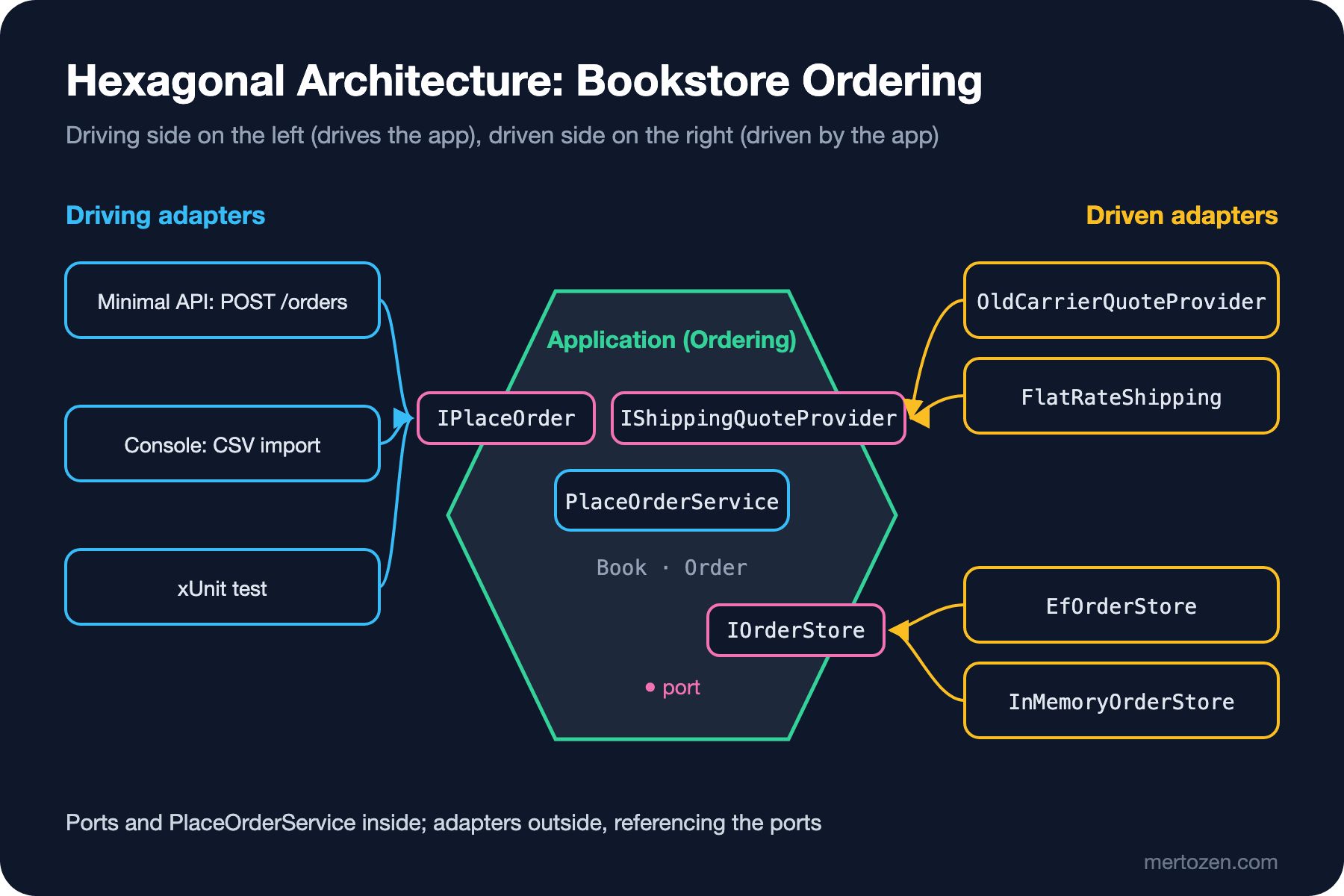
In Bookstore IPlaceOrder is a driving port: the website, the CSV import and the test call it. IOrderStore and IShippingQuoteProvider are driven ports: the application starts the conversation, the database and the carrier answer. Cockburn's testing advice follows the same split: on the driving side the natural stand-in is a test framework (FIT (Framework for Integrated Test) in those years), on the driven side a mock. At both ends the same thing happens: an adapter that imitates the real world is plugged in, and the application itself does not notice.
Remember the rule from the previous post: adapters reference the port, not the other way round. Both the driving and the driven port interfaces live inside, in the Ordering project; the Minimal API endpoint and the Entity Framework Core (EF Core) adapter both depend on Ordering.
Three Driving Adapters: Endpoint, Console and Test
The first driving adapter is a Minimal API endpoint. Its job is to translate the HTTP request into the port's language and the port's answer into HTTP's language:
// Driving adapter: translates the HTTP request into the port's language
app.MapPost("/orders", async (PlaceOrderCommand command, IPlaceOrder placeOrder, CancellationToken ct) =>
    await placeOrder.PlaceAsync(command, ct) switch
    {
        PlaceOrderResult.Placed placed => Results.Created($"/orders/{placed.OrderId}", placed),
        PlaceOrderResult.Rejected rejected => Results.Problem(rejected.Reason, statusCode: 409),
        _ => Results.StatusCode(500)
    });
With 3 copies of Dune in stock, ordering 2 and then 2 more gave these responses (I trimmed some headers):
HTTP/1.1 201 Created
Content-Type: application/json; charset=utf-8
Location: /orders/1

{"orderId":1,"total":540.0}
HTTP/1.1 409 Conflict
Content-Type: application/problem+json

{"type":"https://tools.ietf.org/html/rfc9110#section-15.5.10","title":"Conflict","status":409,"detail":"Only 1 copies of 'Dune' left."}
The second driving adapter is the console program that processes the CSV from the opening. It calls the same port with the same command type; it only reads its input from a file and writes its output to the screen:
// Driving adapter: feeds the CSV file of phone orders to the port line by line
InMemoryOrderStore store = new(new Book(1, "Dune", 250m, stock: 3), new Book(2, "Emma", 180m, stock: 1));
IPlaceOrder placeOrder = new PlaceOrderService(store, new FlatRateShipping(40m));

foreach (string line in File.ReadLines(args[0]).Skip(1))
{
    string[] f = line.Split(',');
    PlaceOrderCommand command = new(f[0], f[1], int.Parse(f[2]), int.Parse(f[3]));
    PlaceOrderResult result = await placeOrder.PlaceAsync(command, CancellationToken.None);
    Console.WriteLine(result switch
    {
        PlaceOrderResult.Placed p => string.Create(CultureInfo.InvariantCulture, $"OK   #{p.OrderId} {f[0]} total={p.Total}"),
        PlaceOrderResult.Rejected r => $"FAIL {f[0]}: {r.Reason}",
        _ => "?"
    });
}
OK #1 ada@example.com total=540
OK #2 alan@example.com total=220
FAIL grace@example.com: Only 1 copies of 'Dune' left.In this example the console program uses InMemoryOrderStore instead of a database; for the real import, plugging EfOrderStore in at the composition root is enough. The answer to the opening question is here too: the console program is outside the application, a driving adapter just like the web endpoint. Not a single line inside changes.
The third driving adapter is the test. The role FIT played in Cockburn's report is played here by xUnit:
// Driving adapter: the test drives the application through the same port as the UI
public sealed class PlaceOrderTests
{
    private readonly FakeStore _store = new(new Book(1, "Dune", 250m, stock: 3));
    private readonly IPlaceOrder _placeOrder;

    public PlaceOrderTests() => _placeOrder = new PlaceOrderService(_store, new FakeShipping(40m));

    // FakeStore and FakeShipping: a few lines of fakes, as in the previous post

    [Fact]
    public async Task Rejects_when_stock_is_insufficient()
    {
        PlaceOrderResult result = await _placeOrder.PlaceAsync(
            new PlaceOrderCommand("ada@example.com", "06100", BookId: 1, Quantity: 5), CancellationToken.None);

        PlaceOrderResult.Rejected rejected = Assert.IsType<PlaceOrderResult.Rejected>(result);
        Assert.Equal("Only 3 copies of 'Dune' left.", rejected.Reason);
        Assert.Empty(_store.Saved);
    }
}
Passed! - Failed: 0, Passed: 2, Skipped: 0, Total: 2, Duration: 8 ms - Bookstore.Ordering.Tests.dll (net10.0)All three adapters build the same PlaceOrderCommand and interpret the same PlaceOrderResult. The test calling the port directly instead of going through the endpoint is not a shortcut; it is exactly what Cockburn describes: the test is a driver with equal rights to the UI.
Driven Adapters: EF Core and In-Memory
On the right there are two adapters for IOrderStore. One writes to SQLite with EF Core (the examples use SQLite; Bookstore's production database is SQL Server and the difference is only the provider line):
public sealed class EfOrderStore(BookstoreDbContext db) : IOrderStore
{
    public async Task<Book?> FindBookAsync(int bookId, CancellationToken ct) =>
        await db.Books.Where(b => b.Id == bookId)
            .Select(b => new Book(b.Id, b.Title, b.Price, b.Stock))
            .SingleOrDefaultAsync(ct);

    public async Task<int> SaveAsync(Order order, Book reservedBook, CancellationToken ct)
    {
        BookRow row = await db.Books.SingleAsync(b => b.Id == reservedBook.Id, ct);
        row.Stock = reservedBook.Stock;
        OrderRow orderRow = new()
        {
            CustomerEmail = order.CustomerEmail, PostalCode = order.PostalCode, BookId = order.BookId,
            Quantity = order.Quantity, UnitPrice = order.UnitPrice, ShippingFee = order.ShippingFee
        };
        db.Orders.Add(orderRow);
        await db.SaveChangesAsync(ct);
        return orderRow.Id;
    }
}
The other is the in-memory InMemoryOrderStore we used in the console example. The shipping side is the same: the HTTP adapter from the previous post, OldCarrierQuoteProvider, and FlatRateShipping, which returns a fixed fee, serve the same port. The composition root decides which one is plugged in:
// Composition root: the only place that decides which adapter plugs into which port
builder.Services.AddDbContext<BookstoreDbContext>(o => o.UseSqlite("Data Source=bookstore.db"));
builder.Services.AddScoped<IOrderStore, EfOrderStore>();
builder.Services.AddSingleton<IShippingQuoteProvider>(new FlatRateShipping(40m));
builder.Services.AddScoped<IPlaceOrder, PlaceOrderService>();
In the report Cockburn suggests a development sequence for a team: first with a test harness and an in-memory database, then adding a GUI still on the in-memory database, then integration tests against a real test database, and finally a live database. At every step the inside of the application stays the same; only the adapters plugged into the ports change. In Bookstore too, while the UI team designs the API, the ordering rules can be developed and tested with InMemoryOrderStore; once the database schema settles, EfOrderStore plugs in.
Ports and Adapters Inside .NET: IServer
ASP.NET Core itself is a nice example of this pattern. The application's request pipeline sits behind a port that the server drives: the Microsoft.AspNetCore.Hosting.Server.IServer interface drives the application through IHttpApplication<TContext>. When I scanned the shared framework assemblies and the Microsoft.AspNetCore.TestHost package with reflection, these concrete classes implementing IServer came up:
System.Threading.Tasks.Task StartAsync[TContext](Microsoft.AspNetCore.Hosting.Server.IHttpApplication`1[TContext], System.Threading.CancellationToken)
Microsoft.AspNetCore.Server.HttpSys.MessagePump (internal) in Microsoft.AspNetCore.Server.HttpSys
Microsoft.AspNetCore.Server.IIS.Core.IISHttpServer (internal) in Microsoft.AspNetCore.Server.IIS
Microsoft.AspNetCore.Server.Kestrel.Core.KestrelServerImpl (internal) in Microsoft.AspNetCore.Server.Kestrel.Core
Microsoft.AspNetCore.Server.Kestrel.Core.KestrelServer (public) in Microsoft.AspNetCore.Server.Kestrel.Core
Microsoft.AspNetCore.TestHost.TestServer (public) in Microsoft.AspNetCore.TestHost
Kestrel, HTTP.sys and IIS (Internet Information Services) are driving adapters that translate real network traffic for the application. TestServer is the adapter that hands an in-memory request to the same pipeline without touching the network at all; the WebApplicationFactory we used in the ASP.NET Core Web API series post "Integration Testing an ASP.NET Core Web API: End-to-End Tests with WebApplicationFactory" plugs it in behind the scenes. Middleware and endpoints do not know which server they run behind. This is Cockburn's "drivable equally by tests and by real users" at framework level.
Misreadings
The six sides of the hexagon mean nothing. Cockburn says so explicitly: the shape was chosen to give whoever is drawing room to add ports and adapters, and to escape the one-dimensional layer drawing. Bookstore does not need six ports.
The number of ports stays small. In the report Cockburn's preference is two, three or four ports; four is the largest number he had met so far. The example system that notified subscribers of weather alerts by phone has four: the weather feed, administration, notified subscribers and the subscriber database. Count a port as a conversation, not as an interface: several ordering use cases can be part of the same driving port and live as a few separate interfaces in C#. Calling every interface a port inflates the count meaninglessly.
Hexagonal is not a stack of layers. Drawing a "Domain layer" in the middle and an "Application layer" ring around it is the subject of Onion and Clean, not Hexagonal. Cockburn's pattern says nothing about how the inside is organized; it only describes the boundary between inside and outside and the doors on that boundary. Inside there may be a single class or a rich domain model.
Adapter per technology, port per purpose. Port names like IEfCoreOrderStore or IHttpShippingClient bind the port to a technology; the port's name should state the purpose, the adapter's name the technology.
Common Pitfalls
Skipping the driving port and building the service directly in the endpoint. Writing new PlaceOrderService(new EfOrderStore(...), ...) inside the endpoint takes adapter selection away from the composition root and buries it inside a driving adapter. The console and the test then have to make the same choice again.
Smuggling business rules into the adapter. If a rule such as "cancel the campaign code when stock hits zero before returning 409" is written in the endpoint, the console import skips it. An adapter translates; it does not decide.
Putting technology types into port signatures. A driven port that takes PlaceAsync(HttpContext context) or returns Task<IQueryable<Book>> carries the outside in. Every type that enters must speak the inside's language.
Making everything a port. Re-wrapping abstractions .NET already provides as ports, such as an IClock for DateTime.UtcNow or a logging port for ILogger, is unnecessary; since .NET 8 there has been TimeProvider for testable time. A port is opened for a piece of the outside world that really can be replaced.
When Not to Use It
If the application has a single driver (one web UI) and a single driven side (one database) and that will not change in the near future, defining the driving port as a separate interface gains little; the endpoint can call the service directly. Keeping the interface on the driven side is usually cheap and makes testing easier. The value becomes visible when a second driver (a batch job, a message queue, another application) or a frequently changing external service shows up.
A Small Experiment
★☆☆ List everything that drives your own application: web endpoints, background jobs, message consumers, tests. How many call the business rules through the same entry point, and how many carry their own copy?
★★☆ Add a fourth driving adapter to Bookstore: a BackgroundService that processes order messages from a queue. Verify that you can write it without touching IPlaceOrder or PlaceOrderResult.
★★★ Write a contract test suite for IOrderStore: the same test class should run against both InMemoryOrderStore and EfOrderStore on a SQLite in-memory database. Find where the two adapters' behaviour diverges (for example, two saves in a row for the same book).
Hexagonal Architecture left the inside as a black box. In the next post we move to Onion Architecture, named by Jeffrey Palermo in 2008; it says how that same inside is split into rings and why coupling must always point toward the center.