

State Machine Diagrams: States, Transitions, Guards, Entry/Exit and Turning the Leave Request Lifecycle into Code

A state machine diagram shows which states an object can be in and which event, under which guard, moves it where; every arrow becomes a switch arm, a Stateless PermitIf and a unit test. In this post we draw the leave request lifecycle with a composite state, a choice and the entry/effect distinction, and turn it into C# and tests.
Version note: The diagrams in this post use UML (Unified Modeling Language) 2.5.1 notation; the C# examples were tested with .NET 10 and Stateless 5.20.1.
Guess First: How Did a Rejected Request Get Cancelled?
In the first release of the HR (human resources) Portal, the cancellation rule was written into a single method after reading R11 (the cancellation rules). The code looks short and harmless:
public void Cancel(DateOnly today)
{
    if (Status == LeaveStatus.Approved && today >= Period.Start)
    {
        throw new InvalidOperationException("Leave already started.");
    }
    Status = LeaveStatus.Cancelled;
}
If Cancel is called on December 1 for Ada's annual leave request for December 21–25 (#42) while it sits in each of its six statuses, what happens? In which statuses do you expect an exception, and in which does the request silently become Cancelled? And if Margaret from HR wants to cancel the leave after it has started, does this code let her?
What Question Does a State Machine Diagram Answer?
The output of a real run:
Draft                    -> Cancelled
PendingManagerApproval   -> Cancelled
PendingDirectorApproval  -> Cancelled
Approved                 -> Cancelled
Rejected                 -> Cancelled
Cancelled                -> Cancelled
No exception in any status. A request that the manager Alan rejected with a reason now shows up as "cancelled", and the rejection disappears from the reports. An already cancelled request is cancelled again, and if that triggers another refund, the balance is wrong. Margaret, on the other hand, cannot cancel after the leave has started, because the code knows nothing about roles. The bug is not one if; the code never asked "from which status to which status, under which condition, can we move?"
This post teaches the diagram that answers exactly that question. The use case diagram showed the system from the outside, the sequence diagram showed messages in one scenario, and the activity diagram showed the workflow. A state machine diagram tells the life story of a single object: which states it can be in, which event moves it from one state to another, and what happens during the move. Chapter 14 (StateMachines) of the UML 2.5.1 specification defines two kinds: the behavior state machine that models behavior, and the protocol state machine (marked {protocol}) that describes in which order a class's operations may be called. The diagram in this post is the first kind.
When should you draw one? When an entity has a Status property, more than one action changes it, and at least one rule says "in this status it cannot do that". LeaveRequest meets all three. Drawing one for every class is pointless, though: a two-valued IsActive field does not need a state machine.
Notation: States, Transitions and Pseudostates
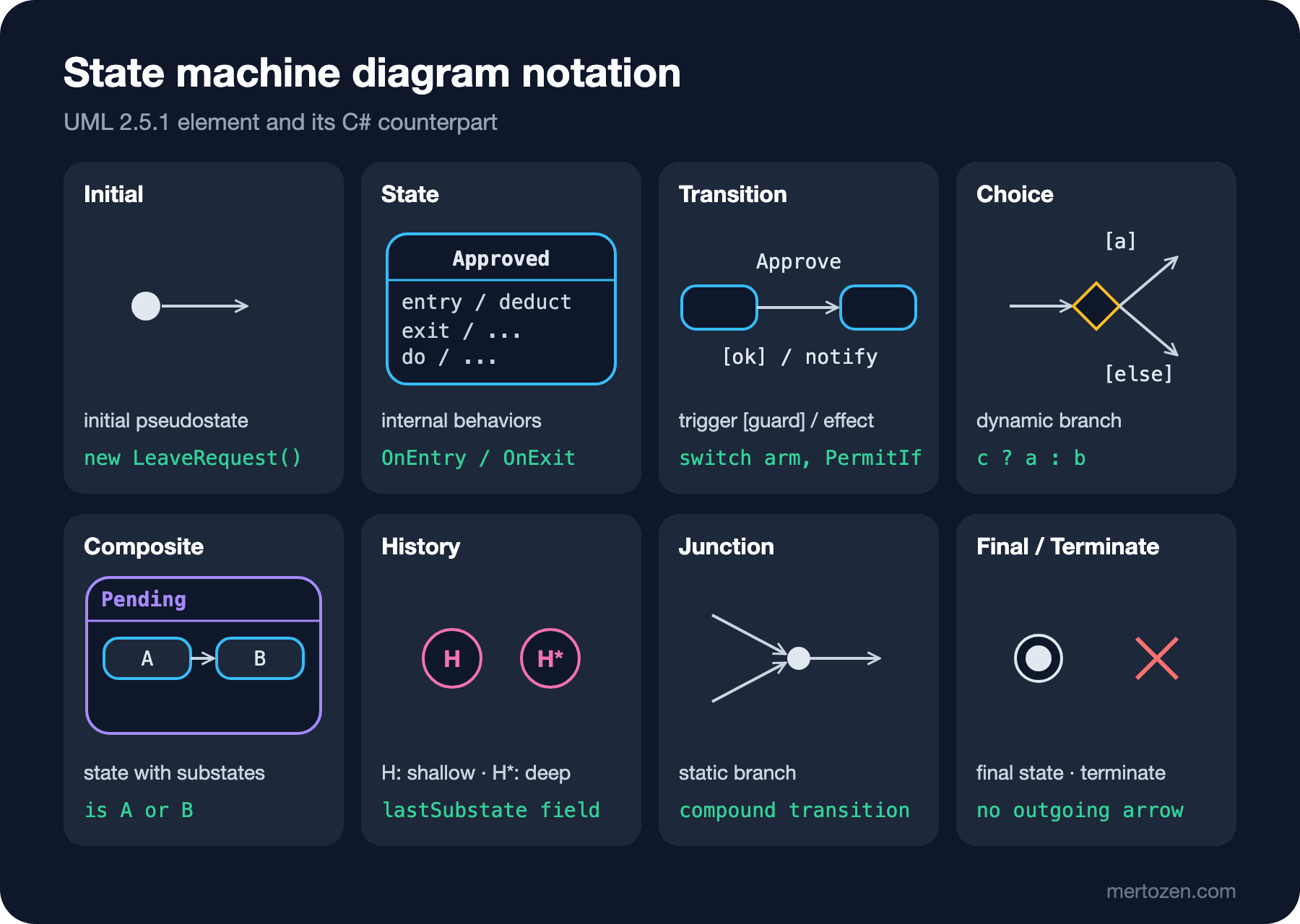
States and Internal Behaviors
A state is a rectangle with rounded corners. The top compartment holds its name, and an optional lower compartment holds its internal behaviors. entry / deductBalance runs once on every entry into the state; exit / ... runs on every exit; do / ... is a long-running activity that starts after entry finishes and is aborted if the state is left. The same compartment can also list internal transitions in the form trigger [guard] / effect: the event arrives, the effect runs, but because the state is not left, neither exit nor entry runs again. Its opposite is the self-transition, an arrow that leaves the state and comes back to it, which does run exit and entry again. Bugs like "every reminder e-mail also re-sent the 'new request' notification to the manager" usually come from drawing a self-transition where an internal transition was meant.
The Grammar of a Transition Label
An arrow label has three parts, all optional: trigger [guard] / effect. The trigger is the event that starts the transition. UML knows four basic event kinds: a call event (an operation call, e.g. Approve), a signal event (an asynchronous message), a time event (after(2 working days) or at(...)) and a change event (when(today >= start): fires when a condition turns from false to true). The guard is the boolean expression in square brackets; it is evaluated when the event arrives, and if it is false, the arrow behaves as if it did not exist. The effect is the behavior that runs during the transition. An arrow without a trigger is a completion transition: it fires on its own when the state's internal work is done.
The execution order of a transition is fixed: first the source state's exit (innermost first for nested states), then the transition's effect, then the target state's entry (outermost first). There is also the run-to-completion rule: the state machine finishes processing one event before it takes the next one. In code, that means two actions never run at the same time on the same request: a lock inside one process, a database concurrency check across instances.
Pseudostates
Pseudostates are not states the object "is in"; they are nodes that join or route arrows. The initial pseudostate (a filled circle) appears at most once per region, and its outgoing arrow has no trigger or guard. A choice (a diamond) is a dynamic branch: its guards are evaluated when the arrow reaches it, after the effects of the previous segment have run. If no guard is true, the model is ill-formed, so one branch gets [else]. A junction (a small filled circle) is a static branch: it chains several arrows into one compound transition, and all guards are evaluated before the transition starts. A history pseudostate remembers the last active substate when a composite state is re-entered: H (shallow history) remembers one level, H* (deep history) the entire nested configuration.
Final State and Terminate
A filled circle surrounded by a ring is a final state. Careful: a final state is not a pseudostate but a real state; it says its enclosing region is done. If it is reached in the outermost region, the state machine completes. A cross (X) is the terminate pseudostate: the machine stops immediately without running any exit behavior. Business applications rarely need either; a rejected request keeps living in the database, so Rejected stays an ordinary state with no outgoing arrow.
The State Machine Diagram of a Leave Request
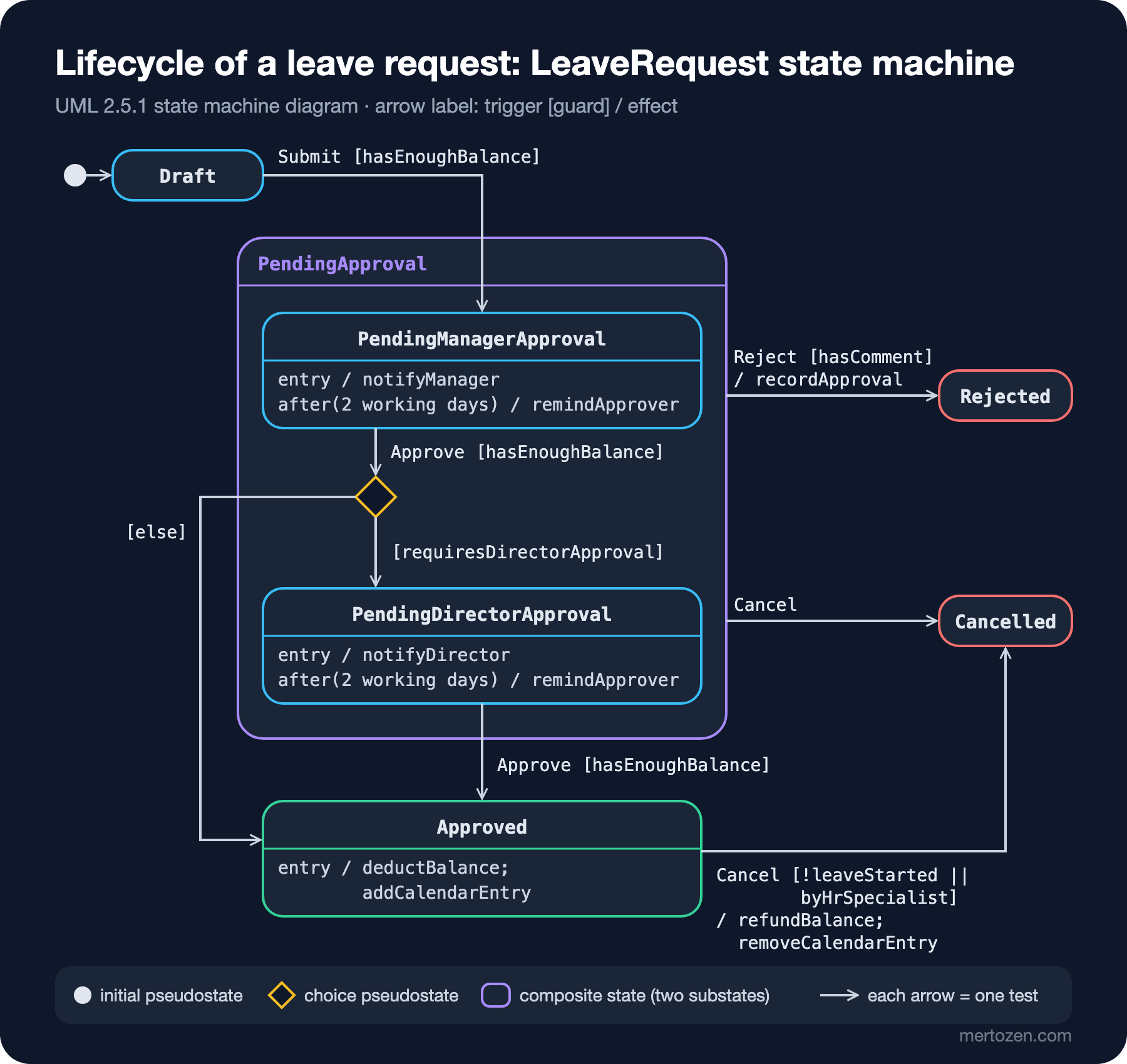
The diagram comes from requirements R1–R11 of the case text, and the names match the LeaveStatus enum one to one. A request is born as Draft. Submit fires only if the balance is sufficient (R3). For leave types that do not deduct from the balance (excuse, sick, unpaid) the guard is always true. A submitted request enters the PendingApproval composite state, specifically PendingManagerApproval inside it, and its entry notifies the manager (R10). When the manager approves, the balance is checked again (R8) and the choice pseudostate kicks in: a request longer than 3 working days goes to the director (R7), a shorter one becomes Approved directly.
The composite state does two jobs here. First, the Reject and Cancel arrows leave from the composite's border, so they apply to both substates and are not drawn twice. Second, the query behind the "requests awaiting approval" screen is exactly this box: Status is either manager or director approval. The line after(2 working days) / remindApprover draws the reminder from R10 as an internal transition. Because it sits in each substate separately, the clock starts when the request lands on that particular approver.
Two more details are separated on purpose. On entering Approved the balance is deducted and the calendar entry is written; that is an entry. The refund, however, is not the exit of Approved but the effect of the Cancel arrow. If tomorrow someone adds a new arrow such as "leave ended, request archived", a refund written into exit would hand back the balance for every archived request. Rule: if the behavior belongs to one particular arrow, write it as the effect; if it is needed on every entry or exit of the state, write it as entry/exit.
Drawing the diagram also exposed a gap in the requirements: there is no Cancel arrow from Draft, because R11 only talks about pending and approved requests. Can a draft be deleted, is it cancelled, or does it stay forever? Instead of guessing and coding it, you ask the business. Questions like this are often the most valuable output of a state machine diagram.
Reading Invalid Transitions from the Diagram
Turning the diagram into a (state × trigger) table shows missing and extra arrows at a glance. Six states and four triggers make 24 cells; the arrows fill only eight of them:
| State | Submit | Approve | Reject | Cancel |
|---|---|---|---|---|
Draft | PendingManagerApproval | — | — | — (not in the requirements) |
PendingManagerApproval | — | choice: director or Approved | Rejected | Cancelled |
PendingDirectorApproval | — | Approved | Rejected | Cancelled |
Approved | — | — | — | Cancelled [not started or HR] |
Rejected | — | — | — | — |
Cancelled | — | — | — | — |
The naive Cancel from the opening treated all six cells of the last column as "allowed"; the diagram keeps three of them closed. What happens for an empty cell is a design decision as well: throw an exception, or silently ignore it? In UML, an event a state does not recognize is consumed and discarded by default. Because here it is a business rule violation, we choose to reject it, which the API (Application Programming Interface) will turn into a 409.
Back to Code: From a Transition Table to a switch Expression
The first step, without adding a dependency, is to turn the table into a tuple switch expression. Each arrow is an arm, each guard a when, the composite state an or pattern, and the choice a condition inside the arm:
public static class LeaveTransitions
{
    // Each arrow in the diagram is one arm; a (state, trigger) pair without an arm is invalid
    public static LeaveStatus? Next(LeaveStatus from, LeaveTrigger trigger, TransitionContext c) => (from, trigger) switch
    {
        (LeaveStatus.Draft, LeaveTrigger.Submit) when c.HasEnoughBalance
            => LeaveStatus.PendingManagerApproval,

        // Choice pseudostate: [RequiresDirectorApproval] / [else]
        (LeaveStatus.PendingManagerApproval, LeaveTrigger.Approve) when c.HasEnoughBalance
            => c.RequiresDirectorApproval ? LeaveStatus.PendingDirectorApproval : LeaveStatus.Approved,

        (LeaveStatus.PendingDirectorApproval, LeaveTrigger.Approve) when c.HasEnoughBalance
            => LeaveStatus.Approved,

        // Arrows leaving the composite state's border: valid for both substates
        (LeaveStatus.PendingManagerApproval or LeaveStatus.PendingDirectorApproval, LeaveTrigger.Reject) when c.HasComment
            => LeaveStatus.Rejected,
        (LeaveStatus.PendingManagerApproval or LeaveStatus.PendingDirectorApproval, LeaveTrigger.Cancel)
            => LeaveStatus.Cancelled,

        (LeaveStatus.Approved, LeaveTrigger.Cancel) when !c.LeaveStarted || c.ByHrSpecialist
            => LeaveStatus.Cancelled,

        _ => null
    };
}
TransitionContext is a record carrying the values the guards read: HasEnoughBalance, RequiresDirectorApproval, HasComment, LeaveStarted, ByHrSpecialist. The function is pure: it does not touch the database, the clock or the user, so it is easy to test. LeaveRequest.Fire calls it and throws an InvalidOperationException when it gets null. The real output for #42 (5 working days) and #43 (2 working days):
#42 (5 days): Draft -> PendingManagerApproval -> PendingDirectorApproval -> Approved
#43 (2 days): Draft -> PendingManagerApproval -> Approved
#42 again: 'Approve' is not allowed when the request is Approved.
#42 cancel by Ada after start: 'Cancel' is not allowed when the request is Approved.
#42 cancel by Margaret after start: Cancelled
Both branches of the choice are visible: #42 passes through the director, #43 does not. The limit of this approach is clear too: entry, exit and effects are not in the switch. You have to write them inside Fire, in a separate block that looks at the target state. As states and behavior grow, that block turns into a second switch that is harder and harder to match against the diagram.
Back to Code: Composite States, Entry and Effects with Stateless
Stateless is the most widely used state machine library in .NET and its API is close to the UML concepts: SubstateOf is the composite state, OnEntry/OnExit are internal behaviors, PermitIf is an arrow with a guard. There is one snag: it needs a value for the superstate too, but LeaveStatus has no PendingApproval, and it should not, because a composite state is never written to the database. So we define a separate enum for the machine and keep the state in the entity's own property:
// The superstate needs a value; the first six values match LeaveStatus, PendingApproval is never written to the database
public enum LeaveState { Draft, PendingManagerApproval, PendingDirectorApproval, Approved, Rejected, Cancelled, PendingApproval }

public static StateMachine<LeaveState, LeaveTrigger> Create(LeaveRecord r, TransitionContext c, List<string> log)
{
    StateMachine<LeaveState, LeaveTrigger> m = new(() => (LeaveState)r.Status, s => r.Status = (LeaveStatus)s);

    m.Configure(LeaveState.Draft)
        .PermitIf(LeaveTrigger.Submit, LeaveState.PendingManagerApproval, () => c.HasEnoughBalance, "HasEnoughBalance");

    m.Configure(LeaveState.PendingApproval)
        .PermitIf(LeaveTrigger.Reject, LeaveState.Rejected, () => c.HasComment, "HasComment")
        .Permit(LeaveTrigger.Cancel, LeaveState.Cancelled);

    m.Configure(LeaveState.PendingManagerApproval)
        .SubstateOf(LeaveState.PendingApproval)
        .OnEntry(() => log.Add("entry: notify manager"))
        // Choice pseudostate: the two guards must be mutually exclusive
        .PermitIf(LeaveTrigger.Approve, LeaveState.PendingDirectorApproval,
            () => c.HasEnoughBalance && r.RequiresDirectorApproval, "RequiresDirectorApproval")
        .PermitIf(LeaveTrigger.Approve, LeaveState.Approved,
            () => c.HasEnoughBalance && !r.RequiresDirectorApproval, "else");

    m.Configure(LeaveState.PendingDirectorApproval)
        .SubstateOf(LeaveState.PendingApproval)
        .OnEntry(() => log.Add("entry: notify director"))
        .PermitIf(LeaveTrigger.Approve, LeaveState.Approved, () => c.HasEnoughBalance, "HasEnoughBalance");

    m.Configure(LeaveState.Approved)
        .OnEntry(() => log.Add("entry: deduct balance, add calendar entry"))
        .PermitIf(LeaveTrigger.Cancel, LeaveState.Cancelled, () => !c.LeaveStarted || c.ByHrSpecialist, "NotStartedOrHr");

    m.Configure(LeaveState.Cancelled)
        .OnEntry(t =>
        {
            // Transition effect: refund only when coming from Approved
            if (t.Source == LeaveState.Approved)
            {
                log.Add("effect: refund balance, remove calendar entry");
            }
        });

    m.OnTransitioned(t => log.Add($"{t.Source} --{t.Trigger}--> {t.Destination}"));
    return m;
}
To keep the sample short we used a LeaveRecord that only carries Status and WorkingDays instead of the entity; in the real LeaveRequest the two lambdas read and write the same property, and Entity Framework Core (EF Core) persists it. The real output after submitting #42, approving it twice and then cancelling it:
IsInState(PendingApproval): True
Permitted: Approve, Cancel
Draft --Submit--> PendingManagerApproval
entry: notify manager
PendingManagerApproval --Approve--> PendingDirectorApproval
entry: notify director
PendingDirectorApproval --Approve--> Approved
entry: deduct balance, add calendar entry
Approved --Cancel--> Cancelled
effect: refund balance, remove calendar entry
Stored status: Cancelled
No valid leaving transitions are permitted from state 'Cancelled' for trigger 'Approve'. Consider ignoring the trigger.
Several things line up with the diagram one to one. IsInState(PendingApproval) returns true while the request is with the director; being "in" a composite state means being in one of its substates. Reject is missing from the Permitted list because the HasComment guard is false, while Cancel is inherited from the composite. The order matches UML as well: first the transition (OnTransitioned), then the target's entry. The list returned by GetPermittedTriggersAsync can also drive the buttons on the Angular screen. Stateless has no counterpart for the history pseudostate; if you need one, you keep the last substate in a field and build the return arrow from it.
From Code to Diagram: MermaidGraph
Stateless can export its configuration as DOT (Graphviz's graph language) and as Mermaid. The real output of MermaidGraph.Format(machine.GetInfo()):
stateDiagram-v2
	state PendingApproval {
		PendingManagerApproval
		PendingDirectorApproval
	}
	Draft --> PendingManagerApproval : Submit [HasEnoughBalance]
	PendingApproval --> Rejected : Reject [HasComment]
	PendingApproval --> Cancelled : Cancel
	PendingManagerApproval --> PendingDirectorApproval : Approve [RequiresDirectorApproval]
	PendingManagerApproval --> Approved : Approve [else]
	PendingDirectorApproval --> Approved : Approve [HasEnoughBalance]
	Approved --> Cancelled : Cancel [NotStartedOrHr]
[*] --> Draft
This text renders without errors in Mermaid 12.3.0. The guards are labeled with the descriptions we passed to PermitIf, so the descriptions matter for the diagram, not just for logging. The gaps are visible too: entry behaviors and effects are missing, and the choice pseudostate became two separate arrows. A diagram generated from code answers "what does the code actually do?", a hand-drawn diagram answers "what should it do?". Putting the two side by side and discussing the difference in code review is the core of the workflow we build at the end of this series.
You can keep the hand-drawn diagram in the repo as text as well. Below is the PlantUML source of the model in the figure, rendered with PlantUML 1.2026.9, including the composite state, the choice, the entry lines and the internal transitions with time events:
@startuml leave-request-states
title LeaveRequest state machine
hide empty description

[*] --> Draft
Draft --> PendingManagerApproval : Submit [hasEnoughBalance]

state "Pending Approval" as PendingApproval {
    state PendingManagerApproval : entry / notifyManager
    state PendingManagerApproval : after(2 working days) / remindApprover
    state PendingDirectorApproval : entry / notifyDirector
    state PendingDirectorApproval : after(2 working days) / remindApprover
    state afterManager <<choice>>
    PendingManagerApproval --> afterManager : Approve [hasEnoughBalance]
    afterManager --> PendingDirectorApproval : [requiresDirectorApproval]
}

afterManager --> Approved : [else]
PendingDirectorApproval --> Approved : Approve [hasEnoughBalance]
PendingApproval --> Rejected : Reject [hasComment] / recordApproval
PendingApproval --> Cancelled : Cancel
state Approved : entry / deductBalance; addCalendarEntry
Approved --> Cancelled : Cancel [!leaveStarted || byHrSpecialist] / refundBalance; removeCalendarEntry
@enduml
We cover PlantUML syntax and rendering in a CI (continuous integration) pipeline in detail in the series' Diagrams as Code with PlantUML post.
How It Relates to the State Pattern and Status History
The same diagram has a third code counterpart: the State pattern from GoF (Gang of Four: Gamma, Helm, Johnson and Vlissides' 1994 book Design Patterns). There every state becomes a class (DraftState, PendingManagerApprovalState…) and every trigger such as Approve() is a method of that class. It pays off when state-specific behavior grows, i.e. when calculation, validation and screen logic differ in every state. In our request most behavior lives on the transitions, so a switch or Stateless covers the same diagram with less code. We build the pattern itself in the Design Patterns series post State Pattern: Managing Order States with State Objects Instead of switch.
The diagram also reaches into the database. Every arrow should produce a row: who, when, from which state to which, with what reason. The recordApproval effect on the Reject arrow is the first step (an Approval record). Keeping transitions in a transition table, writing the status history in the same transaction and preventing two approvers from deciding at the same time with a rowversion is the topic of the Solution Patterns series post When the Status Column Is Updated from Everywhere: Transition Tables, State Machines and Status History. The purchase order lifecycle in that post is a sibling diagram you could draw with the notation from this one.
Deriving Unit Tests from the Diagram
The most concrete benefit of a state machine diagram is that it hands you the test list almost mechanically. Each arrow is at least one positive test, each guard a "does not fire while the guard is closed" test, and each empty cell of the table a negative test:
// Each arrow in the diagram is one test row
public static TheoryData<LeaveStatus, LeaveTrigger, TransitionContext, LeaveStatus> Arrows => new()
{
    { LeaveStatus.Draft, LeaveTrigger.Submit, new(), LeaveStatus.PendingManagerApproval },
    { LeaveStatus.PendingManagerApproval, LeaveTrigger.Approve, new(RequiresDirectorApproval: true), LeaveStatus.PendingDirectorApproval },
    { LeaveStatus.PendingManagerApproval, LeaveTrigger.Approve, new(RequiresDirectorApproval: false), LeaveStatus.Approved },
    { LeaveStatus.PendingDirectorApproval, LeaveTrigger.Approve, new(), LeaveStatus.Approved },
    { LeaveStatus.PendingManagerApproval, LeaveTrigger.Reject, new(HasComment: true), LeaveStatus.Rejected },
    { LeaveStatus.PendingDirectorApproval, LeaveTrigger.Reject, new(HasComment: true), LeaveStatus.Rejected },
    { LeaveStatus.PendingManagerApproval, LeaveTrigger.Cancel, new(), LeaveStatus.Cancelled },
    { LeaveStatus.PendingDirectorApproval, LeaveTrigger.Cancel, new(), LeaveStatus.Cancelled },
    { LeaveStatus.Approved, LeaveTrigger.Cancel, new(LeaveStarted: false), LeaveStatus.Cancelled },
    { LeaveStatus.Approved, LeaveTrigger.Cancel, new(LeaveStarted: true, ByHrSpecialist: true), LeaveStatus.Cancelled },
};

// Every (state, trigger) pair without an arrow: the 16 of 6 x 4 = 24 cells the arrows do not cover
public static TheoryData<LeaveStatus, LeaveTrigger> MissingArrows()
{
    TheoryData<LeaveStatus, LeaveTrigger> data = [];
    TransitionContext open = new(HasComment: true, ByHrSpecialist: true);
    foreach (LeaveStatus s in Enum.GetValues<LeaveStatus>())
    {
        foreach (LeaveTrigger t in Enum.GetValues<LeaveTrigger>())
        {
            if (LeaveTransitions.Next(s, t, open) is null)
            {
                data.Add(s, t);
            }
        }
    }
    return data;
}

[Theory]
[MemberData(nameof(Arrows))]
public void Arrow_leads_to_target(LeaveStatus from, LeaveTrigger trigger, TransitionContext context, LeaveStatus expected) =>
    Assert.Equal(expected, LeaveTransitions.Next(from, trigger, context));

[Theory]
[MemberData(nameof(MissingArrows))]
public void Missing_arrow_is_rejected(LeaveStatus from, LeaveTrigger trigger) =>
    Assert.Null(LeaveTransitions.Next(from, trigger, new(HasComment: true, ByHrSpecialist: true)));
On top of these, the test class has one "closed guard" test for each of the five guards and a Fact that verifies there are exactly eight open cells. The last one matters: if someone adds an arm to the switch that is not in the diagram, say from Rejected to Cancel, the test breaks and the "update the diagram first" conversation starts in code review. A real run with xUnit 2.9.3:
Passed! - Failed: 0, Passed: 32, Skipped: 0, Total: 32, Duration: 20 ms - HrPortal.Leave.Tests.dll (net10.0)32 tests: 10 arrows, 5 closed guards, 16 empty cells and 1 counting test. The naive Cancel from the opening would break three of them, on the Rejected and Cancelled rows.
Common Pitfalls
Confusing a state with an activity. "Checking the balance" is not a state but the guard or effect of a transition. A state is where the object rests while waiting for an event, and it is named accordingly, with an adjective or a "pending/waiting" form. If your diagram has boxes named with verbs, you are probably drawing an activity diagram.
Forgetting [else] on a choice and writing overlapping guards. In UML a choice where no guard is true breaks the model; when two guards are true at once, behavior becomes undefined. Stateless catches this at runtime; with guards WorkingDays > 3 and WorkingDays >= 3 the real message is:
InvalidOperationException: Multiple permitted exit transitions are configured from state 'PendingManagerApproval' for trigger 'Approve'. Guard clauses must be mutually exclusive.Putting an effect into entry or exit. The refund example above: if the behavior belongs to one arrow, it is that arrow's effect. Similarly, drawing a self-transition for a reminder re-triggers the notification in entry every time.
Writing the composite state to the database. PendingApproval is a query filter and a reading aid; the column only holds leaf states. Adding a separate "pending approval" value leads to the same request being reported as both PendingApproval and PendingManagerApproval.
Squeezing everything into one diagram. HR's balance correction, the status of a notification in the e-mail queue and calendar synchronization are separate lifecycles. Put together in one diagram, nobody reads it. A state machine tells the life of one object.
Drawing the diagram without tying it to tests. A state machine diagram without tests falls behind the code by the end of the first sprint. Even a single test that checks the number of arrows keeps the two connected.
A Small Experiment
★☆☆ The business says drafts can be cancelled too. Add the Draft --Cancel--> Cancelled arrow to the diagram and the table. Which test breaks first? What should the eight in the counting test become?
★★☆ Split the Approved state into Upcoming and InProgress substates. Draw the transition between them with the change event when(today >= Period.Start) and express the R11 rule "after the leave has started only HR can cancel" through state structure instead of a guard. In code, what will fire the change event: a background job, or a property computed on every read?
★★★ During payroll closing, HR temporarily moves all pending requests into an OnHold state, and when closing ends every request must return to the approval step it was in. Draw this with a shallow history pseudostate, then implement it in Stateless by keeping the last substate in a field (since Stateless has no history), and write the tests you derive from the diagram.
So far we have looked inside one object and its behavior. In the next post we move one level up: we draw the Leave, Payroll and Notification modules with a component diagram and see how provided and required interfaces, ports and assembly connectors map to DI (dependency injection) registrations in .NET.