

Clean Architecture: The Dependency Rule, Use Cases, and Data Crossing Boundaries
Clean Architecture (Martin, 2012) has one rule, the Dependency Rule: source code dependencies point only inward, and what crosses a boundary is a simple data structure shaped for the inner circle, not an entity or a database row. In Bookstore: the four circles, the JSON cycle error caused by returning an EF Core row, the output port and presenter versus the pragmatic ASP.NET Core counterpart of a handler returning a Result, and a comparison of Hexagonal, Onion and Clean.
Version note: The code in this post was built and run with C# 14 and .NET 10.
Guess First
Someone quickly wrote an endpoint for Bookstore's order details screen. Entity Framework Core (EF Core) already loads the order and its items; why bother writing a DTO (Data Transfer Object) and mapping?
// The wrong way: handing out the database row as is
app.MapGet("/orders/{id:int}/row", async (int id, BookstoreDbContext db, CancellationToken ct) =>
    await db.Orders.Include(o => o.Items).SingleAsync(o => o.Id == id, ct));
OrderRow has an Items list, and each OrderItemRow has its own Order navigation property for the EF Core relationship. The order is in the database and the query runs fine. What do you expect when you send a request to this endpoint: the order as JSON (JavaScript Object Notation), or an error? And the real question: which Clean Architecture rule does this endpoint break?
Martin 2012: Unifying the Architectures
Robert C. Martin published a short blog post titled "The Clean Architecture" on 13 August 2012 and expanded the idea into a book of the same name in 2017. The post's starting point is not to propose a new architecture but to reduce existing ones to a single rule. Martin lists several architectures discussed in the preceding years: Hexagonal Architecture (Cockburn), Onion Architecture (Palermo), his own Screaming Architecture post, Coplien and Reenskaug's DCI (Data, Context and Interaction) and Jacobson's BCE (Boundary-Control-Entity). They differ in detail but share a goal: separating concerns by dividing software into layers.
According to Martin, the systems this family produces share five properties. They are independent of frameworks; they use a framework as a tool rather than cramming the system into its constraints. They are testable; business rules are tested without the UI (user interface), the database or the web server. They are independent of the UI; the web UI can be replaced with a console UI without touching business rules. They are independent of the database; you can move from one database engine to another without touching business rules. They are independent of external agencies; business rules know nothing about the outside world. What we built step by step in Bookstore in the first three posts of the series was exactly this list.
The Dependency Rule
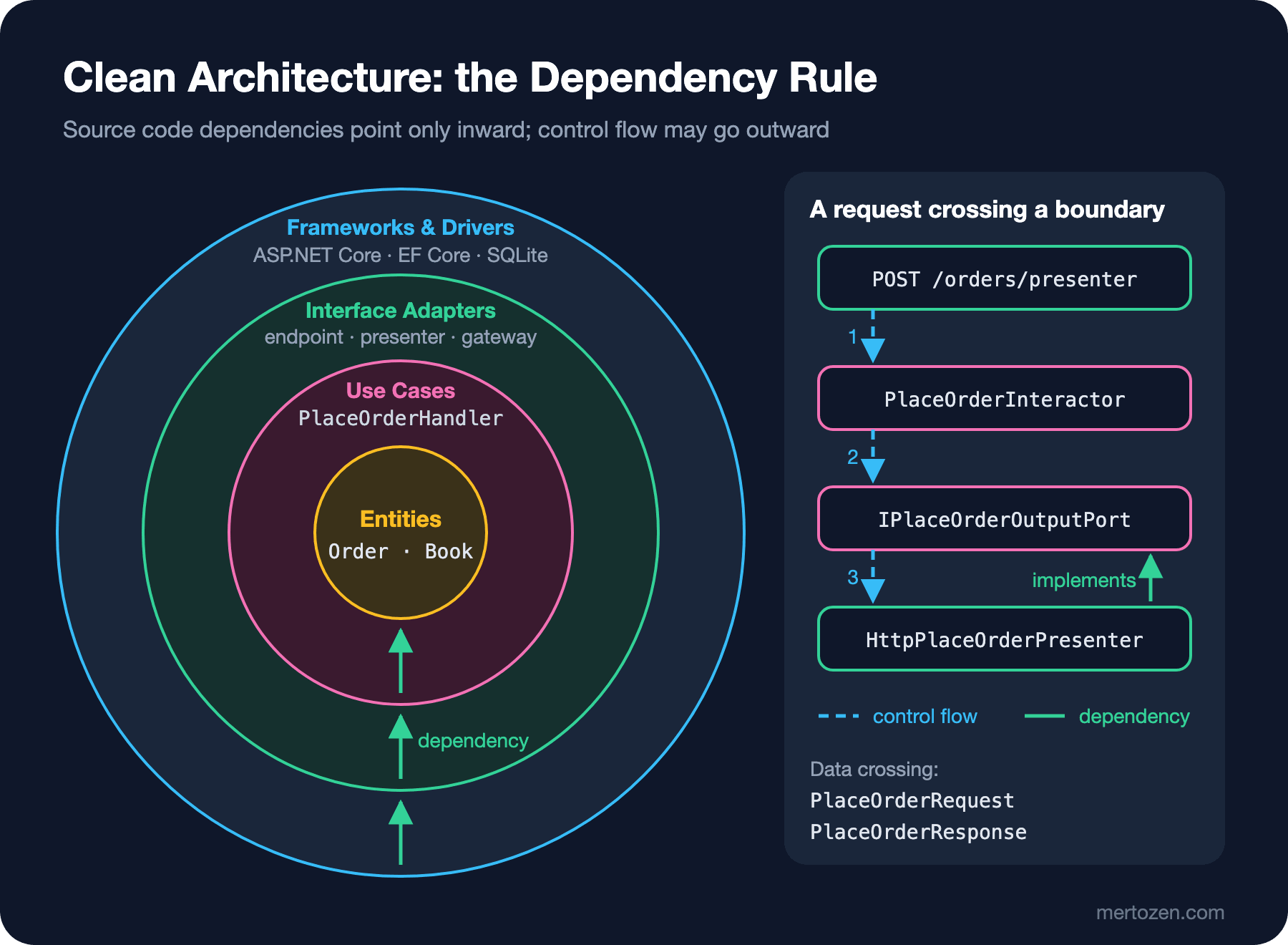
Martin ties all these architectures to a single rule and calls it the Dependency Rule: "source code dependencies can only point inwards." Nothing in an inner circle can know the name of anything in an outer circle; that includes functions, classes and variables. Martin takes the rule one step further: data formats declared in an outer circle, especially those generated by a framework, should not enter an inner circle.
The second half of the rule is usually overlooked. Putting interfaces in the right place satisfies the first half; but if a use case takes an OrderRow or returns an HttpContext, the inner circle is bound to the shape of the outer circle no matter how well the interfaces are placed.
The Four Circles and Their Bookstore Counterparts
The drawing in the post has four circles. Innermost are Entities: enterprise-wide business rules. They can be objects with methods or data structures and functions; what matters is that they are the least likely to change when something external, such as page navigation or security, changes. Martin adds that if there is a single application rather than an enterprise, the entities are that application's business objects. In Bookstore the free shipping threshold lives in this circle:
public sealed class Order(string customerEmail, string postalCode)
{
    public const decimal FreeShippingThreshold = 500m;
    private readonly List<OrderItem> _items = [];

    public string CustomerEmail { get; } = customerEmail;
    public string PostalCode { get; } = postalCode;
    public IReadOnlyList<OrderItem> Items => _items;
    public decimal ShippingFee { get; private set; }
    public decimal Subtotal => _items.Sum(i => i.UnitPrice * i.Quantity);
    public decimal Total => Subtotal + ShippingFee;

    public bool TryAddItem(Book book, int quantity)
    {
        if (!book.TryReserve(quantity)) return false;
        _items.Add(new OrderItem(book.Id, book.Price, quantity));
        return true;
    }

    // Enterprise rule: shipping is free once the order passes the threshold
    public void ApplyShipping(decimal quotedFee) =>
        ShippingFee = Subtotal >= FreeShippingThreshold ? 0m : quotedFee;
}
One circle out are the Use Cases: application-specific business rules. Use cases orchestrate the flow of data to and from the entities and direct the entities to apply their rules. This circle changes when how the application works changes; it does not change when the database, the UI or a framework changes. In Bookstore that is PlaceOrderHandler:
public sealed class PlaceOrderHandler(IBookGateway books, IOrderGateway orders, IShippingRates rates)
{
    private const int GramsPerBook = 400;

    public async Task<Result<PlaceOrderResponse>> HandleAsync(PlaceOrderRequest request, CancellationToken ct)
    {
        Book? book = await books.FindAsync(request.BookId, ct);
        if (book is null)
            return new Error("book.not_found", $"Book {request.BookId} not found.");

        Order order = new(request.CustomerEmail, request.PostalCode);
        if (!order.TryAddItem(book, request.Quantity))
            return new Error("book.out_of_stock", $"Only {book.Stock} copies of '{book.Title}' left.");

        order.ApplyShipping(await rates.QuoteAsync(request.PostalCode, request.Quantity * GramsPerBook, ct));
        int id = await orders.AddAsync(order, book, ct);
        return new PlaceOrderResponse(id, order.Subtotal, order.ShippingFee, order.Total);
    }
}
The third circle is Interface Adapters: adapters that convert data between the form most convenient for use cases and entities and the form most convenient for the outside world (the database, the web). The controllers of MVC (Model-View-Controller), presenters and views live here; Martin says all SQL (Structured Query Language) should stay in this circle as well. In Bookstore, EfOrderGateway (the gateway that converts the domain to OrderRow), the Minimal API (Application Programming Interface) endpoints and the presenter we will see shortly are in this circle.
Outermost are Frameworks and Drivers: the database, the web framework and similar tools. Usually little more than glue code that connects to an inner circle is written here. In Bookstore, ASP.NET Core itself, EF Core and SQLite sit here; their counterpart in our code is the registrations in Program.cs.
Martin also writes explicitly that the number four is not sacred: the drawing is a schematic, and there may be more circles if needed; the only constant is the Dependency Rule. Abstraction increases as you move inward: concrete details at the outside, the most general policies at the center. That is why the equation "Clean Architecture = four projects" is not something the post says.
Data Crossing a Boundary
The response when I sent a request to the opening endpoint:
HTTP/1.1 500 Internal Server Error
Content-Length: 0
And the reason in the server log:
System.Text.Json.JsonException: A possible object cycle was detected. This can either be due to a cycle or if the object depth is larger than the maximum allowed depth of 64. Consider using ReferenceHandler.Preserve on JsonSerializerOptions to support cycles. Path: $.Items.Order.Items.Order.Items.Order.Items.Order.Items.Order.Items.Order.Items.Order.Items.Order.Items.Order.Items.Order.Items.Order.Items.Order.Items.Order.Items.Order.Items.Order.Items.Order.Items.Order.Items.Order.Items.Order.Items.Order.Items.Order.Id.The OrderItemRow.Order navigation is required for EF Core but is an endless loop for the JSON serializer. Following the log's suggestion and turning on ReferenceHandler.Preserve silences the error; it does not fix the real problem. The real problem is that a data structure from the Frameworks and Drivers circle (EF Core's relationship graph) becomes an external contract, an API response, without any translation. The day you change the table structure, your API contract changes too.
Martin's answer to "what should cross the boundary" is clear: simple, isolated data structures. They can be basic structs, DTOs, function arguments or hashmaps; they should not be entities or database rows. The example in the post is exactly our situation: database frameworks return a row-shaped structure in response to a query, and passing that structure inward makes the inner circle depend on an outer circle. Data crossing a boundary should always be in the form most convenient for the inner circle.
In Bookstore the data going into and out of the use case is two plain records:
// Data crossing the boundary: plain records shaped for the inner circle
public sealed record PlaceOrderRequest(string CustomerEmail, string PostalCode, int BookId, int Quantity);
public sealed record PlaceOrderResponse(int OrderId, decimal Subtotal, decimal ShippingFee, decimal Total);
PlaceOrderRequest knows neither HttpContext nor carries JSON attributes; a console command, a queue consumer or a test can build the same record. PlaceOrderResponse carries only the numbers the screen needs, without leaking the Order entity. The entity has behavior such as TryAddItem and internal fields that will be added later; you do not want those to be part of an API contract.
Control Flow Crossing a Boundary: Output Port and Presenter
The subtlest idea in Martin's post is that control flow and dependency can go in opposite directions. A controller calls a use case; when the use case finishes, it hands the result to a presenter. Control flows from outside in and then from inside out; but the use case cannot know the presenter's name, because the presenter is in an outer circle. The fix is DIP (Dependency Inversion Principle): the use case calls an interface defined in its own circle (the use case output port), and the presenter in the outer circle implements it. That way, at every boundary the dependency stands against the control flow:
// Martin's recipe: the use case calls an output port defined in the inner circle
public interface IPlaceOrderOutputPort
{
    void Placed(PlaceOrderResponse response);
    void Rejected(string reason);
}

public sealed class PlaceOrderInteractor(IBookGateway books, IOrderGateway orders, IShippingRates rates)
{
    private const int GramsPerBook = 400;

    public async Task ExecuteAsync(PlaceOrderRequest request, IPlaceOrderOutputPort output, CancellationToken ct)
    {
        Book? book = await books.FindAsync(request.BookId, ct);
        if (book is null) { output.Rejected($"Book {request.BookId} not found."); return; }

        Order order = new(request.CustomerEmail, request.PostalCode);
        if (!order.TryAddItem(book, request.Quantity))
        {
            output.Rejected($"Only {book.Stock} copies of '{book.Title}' left.");
            return;
        }

        order.ApplyShipping(await rates.QuoteAsync(request.PostalCode, request.Quantity * GramsPerBook, ct));
        int id = await orders.AddAsync(order, book, ct);
        output.Placed(new PlaceOrderResponse(id, order.Subtotal, order.ShippingFee, order.Total));
    }
}
The presenter lives in the Interface Adapters circle, in the Web project, and turns the call arriving at the output port into an HTTP (Hypertext Transfer Protocol) response:
// Interface Adapters circle: the presenter that turns the output port into an HTTP response
public sealed class HttpPlaceOrderPresenter : IPlaceOrderOutputPort
{
    public IResult Result { get; private set; } = Results.StatusCode(500);

    public void Placed(PlaceOrderResponse response) =>
        Result = Results.Created($"/orders/{response.OrderId}", response);

    public void Rejected(string reason) =>
        Result = Results.Problem(reason, statusCode: StatusCodes.Status409Conflict);
}

app.MapPost("/orders/presenter", async (PlaceOrderRequest request, PlaceOrderInteractor interactor, CancellationToken ct) =>
{
    HttpPlaceOrderPresenter presenter = new();
    await interactor.ExecuteAsync(request, presenter, ct);
    return presenter.Result;
});
The response when I ordered 1 copy of Dune for Alan (order number 2, because the first order had gone through the /orders endpoint we will see below):
HTTP/1.1 201 Created
{"orderId":2,"subtotal":250.0,"shippingFee":40,"total":290.0}
In the test we replace the presenter with a small fake that records the calls; what the use case "says" is tested independently of HTTP:
// Test presenter: records the calls arriving at the output port
private sealed class RecordingPresenter : IPlaceOrderOutputPort
{
    public List<string> Calls { get; } = [];
    public void Placed(PlaceOrderResponse response) => Calls.Add($"Placed {response}");
    public void Rejected(string reason) => Calls.Add($"Rejected {reason}");
}

[Fact]
public async Task Interactor_talks_to_the_output_port()
{
    PlaceOrderInteractor interactor = new(new Books(new Book(1, "Dune", 250m, 3)), new Orders(), new Rates(40m));
    RecordingPresenter presenter = new();

    await interactor.ExecuteAsync(new PlaceOrderRequest("ada@example.com", "06100", 1, 2), presenter, CancellationToken.None);

    Assert.Equal(["Placed PlaceOrderResponse { OrderId = 1, Subtotal = 500, ShippingFee = 0, Total = 500 }"], presenter.Calls);
}
The Pragmatic ASP.NET Core Counterpart: A Handler That Returns a Result
The presenter recipe made sense in the MVC world of the time Martin wrote it: a separate object preparing the view kept the controller lean. In ASP.NET Core's Minimal API the endpoint lambda is already a small presenter: it turns the use case's answer into an IResult. That is why what is common in the .NET world is for the use case to return the outcome as a value and for the endpoint to map it to HTTP. For that we wrote our own small Result<T> type; it adds no library dependency and what it does is visible at a glance:
public sealed record Error(string Code, string Message);

public sealed class Result<T>
{
    private Result(T? value, Error? error) => (Value, Error) = (value, error);

    public T? Value { get; }
    public Error? Error { get; }
    public bool IsSuccess => Error is null;

    public static implicit operator Result<T>(T value) => new(value, null);
    public static implicit operator Result<T>(Error error) => new(default, error);
}

// The pragmatic way: the handler returns a Result, the endpoint maps it to HTTP
app.MapPost("/orders", async (PlaceOrderRequest request, PlaceOrderHandler handler, CancellationToken ct) =>
{
    Result<PlaceOrderResponse> result = await handler.HandleAsync(request, ct);
    return result.IsSuccess
        ? Results.Created($"/orders/{result.Value!.OrderId}", result.Value)
        : Results.Problem(result.Error!.Message, statusCode: StatusCodes.Status409Conflict,
            extensions: new Dictionary<string, object?> { ["code"] = result.Error.Code });
});
With 3 copies of Dune in stock, sending the same request (2 copies) twice gave:
HTTP/1.1 201 Created
{"orderId":1,"subtotal":500.0,"shippingFee":0,"total":500.0}

HTTP/1.1 409 Conflict
{"type":"https://tools.ietf.org/html/rfc9110#section-15.5.10","title":"Conflict","status":409,"detail":"Only 1 copies of 'Dune' left.","code":"book.out_of_stock"}
The dependency direction is the same in both recipes: the handler knows nothing of IResult, the presenter or HTTP. The difference is who does the translation. The presenter recipe pays off when the same use case goes to several output formats (HTML, JSON, PDF) and the formatting logic is large. The Result recipe is enough for most Web APIs and means fewer types and a straighter flow. We covered the Result pattern itself in the Design Patterns series post "Code-Level Patterns Beyond GoF: Null Object, Specification, Result and Pipeline" and ProblemDetails in the ASP.NET Core Web API series post "Global Error Handling in ASP.NET Core: Exception Middleware and ProblemDetails"; GoF stands for the Gang of Four (the 1994 Design Patterns book by Gamma, Helm, Johnson and Vlissides). We will go deeper into Result versus exceptions and where validation belongs in the 6th post of this series.
Data Crossing a Boundary in .NET: IFeatureCollection
The same principle works at ASP.NET Core's own boundaries. The IServer we saw in earlier posts drives the application through IHttpApplication<TContext>. When I listed that interface's methods with reflection:
TContext CreateContext(Microsoft.AspNetCore.Http.Features.IFeatureCollection)
System.Threading.Tasks.Task ProcessRequestAsync(TContext)
Void DisposeContext(TContext, System.Exception)
Kestrel does not hand its own connection objects, sockets or buffers to the application; what crosses the boundary is an IFeatureCollection: a bag of small feature interfaces describing the request line, the headers and the body stream. HttpContext is built from that bag in the form convenient for the inside. When Kestrel, HTTP.sys or TestServer changes, the data structure the application sees does not; that is the framework counterpart of Martin's "data crosses in the form most convenient for the inner circle".
The Three Architectures Side by Side
Let us collect the first four posts of the series in one table:
| Question | Hexagonal (2005) | Onion (2008) | Clean (2012) |
|---|---|---|---|
| Key terms | Port, adapter, driving and driven side | Rings, application core, repository interface | Circles, Dependency Rule, use case, output port, presenter |
| Describes the inner structure? | No; the inside is a black box | Yes; Domain Model, Domain Services, Application Services | Yes; Entities and Use Cases, noting the count is not fixed |
| Data crossing the boundary | Whatever the port's API defines | Not addressed explicitly | Simple data structures; not entities or rows |
| Testing view | A test is a driving adapter, a mock a driven adapter | Tests are in the outermost ring, the core runs without infrastructure | Business rules are tested without UI, database or web server |
| Main emphasis | Symmetry between inside and outside | Direction of coupling toward the center | Source code dependencies only inward |
Conclusion: these are not three rival architectures but three tellings of the same idea. Hexagonal tells about the boundary and its doors, Onion maps the inside, and Clean sets the rules for the data and flow crossing the boundary. When you set up a .NET solution you take something from each: port naming from Hexagonal, putting the domain model at the center from Onion, request/response records and the Dependency Rule from Clean.
Common Pitfalls
Turning circles into projects one to one. Martin's drawing is a schematic; four circles do not require four projects. In Bookstore Entities and Use Cases live in one project, in two namespaces. In the next post we will build the common four-project layout, but its justification is not Martin's drawing; it is the compiler policing the boundaries.
Opening yet another mapping layer at every boundary. Six mappings between request record, command, entity, row, response and view model are not what the rule asks for. The rule asks that data crossing the boundary create no dependency for the inner circle; passing the same record across several boundaries is often enough.
Returning the entity as the response. The cycle error in the opening is a noisy symptom; the silent one is more dangerous: every property added to the entity shows up in the API contract the next day.
Turning the presenter into ceremony. Building a chain of output port, presenter and view model for a simple endpoint that produces one JSON response adds indirection; a handler that returns a Result usually gives the same dependency direction with less code.
Letting the framework into the inner circle. A use case taking an IFormFile, a ClaimsPrincipal or a DbSet<T> looks like a shortcut; each one carries a type from an outer circle inward.
A Small Experiment
★☆☆ Fix the opening endpoint so it returns a record you define, OrderDetailsResponse, instead of OrderRow. Verify that the cycle error disappears without using ReferenceHandler.Preserve.
★★☆ Write a second presenter for PlaceOrderInteractor: a TextPlaceOrderPresenter that produces the order confirmation as plain text. Call it from a console without touching the interactor.
★★★ Look at the input and output types of a use case in your own project. Is any of them an EF Core entity, an ASP.NET Core type or a third-party SDK (Software Development Kit) type? Turn one into a plain record and count how many files change.
Block A ends here: we have seen the idea and the three original sources. In the next post we move to Block B and build Bookstore's Ordering part as a real solution in .NET 10: four projects with dotnet new sln, project reference rules, Directory.Build.props and Program.cs as the composition root.