

Object and Package Diagrams: Runtime Snapshots and the Dependency Map of a .NET Solution
An object diagram draws concrete instances and links at a given moment and catches multiplicity mistakes in a class diagram, while a package diagram shows dependencies between projects and makes layer violations visible. In this post the snapshot of request #42 exposes a wrong 0..1, and the solution's package diagram is generated from the csproj files so an EF Core dependency leaking into Domain is caught in CI.
Version note: The diagrams in this post use UML (Unified Modeling Language) 2.5.1 notation; the C# examples were tested with .NET 10 and Entity Framework Core (EF Core) 10, and the PlantUML output with PlantUML 1.2026.9.
Guess First: Where Did the Manager's Approval Go?
At the first design meeting of the HR Portal, this relationship was drawn on the whiteboard: LeaveRequest "1" *-- "0..1" Approval. It looks reasonable; a request is either approved or not. The code followed the diagram faithfully:
public class LeaveRequest
{
    public int Id { get; set; }
    public string Status { get; set; } = "PendingManagerApproval";
    public Approval? Approval { get; set; }
}

public class Approval
{
    public int Id { get; set; }
    public int LeaveRequestId { get; set; }
    public required string Approver { get; set; }
    public required string Step { get; set; }
}

// inside OnModelCreating
b.Entity<LeaveRequest>().HasOne(r => r.Approval).WithOne()
    .HasForeignKey<Approval>(a => a.LeaveRequestId).OnDelete(DeleteBehavior.Cascade);
Ada's annual leave for December 21–25 (#42) covers five working days, so according to R7 her manager Alan must approve first, then her director Grace. The code saves the two approvals one after the other:
LeaveRequest req = new() { Approval = new() { Approver = "Alan Turing", Step = "Manager" } };
db.LeaveRequests.Add(req);
await db.SaveChangesAsync();

req.Approval = new() { Approver = "Grace Hopper", Step = "Director" };
req.Status = "Approved";
await db.SaveChangesAsync();
How many rows does the Approvals table have after the second SaveChangesAsync? Do you expect an exception? And six months later, when an auditor asks "did the manager approve this leave?", where do you find the answer?
The Answer: A Silent DELETE
The SQL (Structured Query Language) command EF Core sent to the database, and the final state of the table:
SET NOCOUNT ON;
DELETE FROM [Approvals]
OUTPUT 1
WHERE [Id] = @p0;
UPDATE [LeaveRequests] SET [Status] = @p1
OUTPUT 1
WHERE [Id] = @p2;
INSERT INTO [Approvals] ([Approver], [LeaveRequestId], [Step])
OUTPUT INSERTED.[Id]
VALUES (@p3, @p4, @p5);

Approval 2: Director by Grace Hopper
No exception. In a one-to-one relationship, when a new dependent arrived EF Core treated the old one as an orphan and deleted it; Alan's approval was erased from history. The code worked correctly; the problem is the model: the multiplicity should not be 0..1 but at least 0..* (in practice 0..2). The class diagram did not reveal the mistake, because a class diagram describes the general rule, and the typical request we had in mind when we said "a request" had one approval. What would have caught it is a concrete example: drawing #42 as it looks after approval. That drawing, the object diagram, is the first topic of this post. The second is the package diagram, which applies the same concreteness to the physical structure of the code.
Object Diagram Notation: Instances, Slots and Links
In UML 2.5.1 the object diagram does not bring its own metamodel; it uses class diagram notation for instances. The InstanceSpecification concept in the Classification clause of the specification represents an object (or a link) that exists at a given moment. The pieces of the notation:
- Instance: the box header reads
req42 : LeaveRequest, that is, instance name, colon and class name, all underlined. If the name does not matter it is anonymous:: Approval. - Slot: the value of an attribute at that moment, written as
status = Approved. You do not have to list every attribute; the values you want to talk about are enough. - Link: a plain line between two instances, an instance of an association. No multiplicities on its ends, because a link always connects exactly two objects; the number of lines is the multiplicity. Role names may be shown.
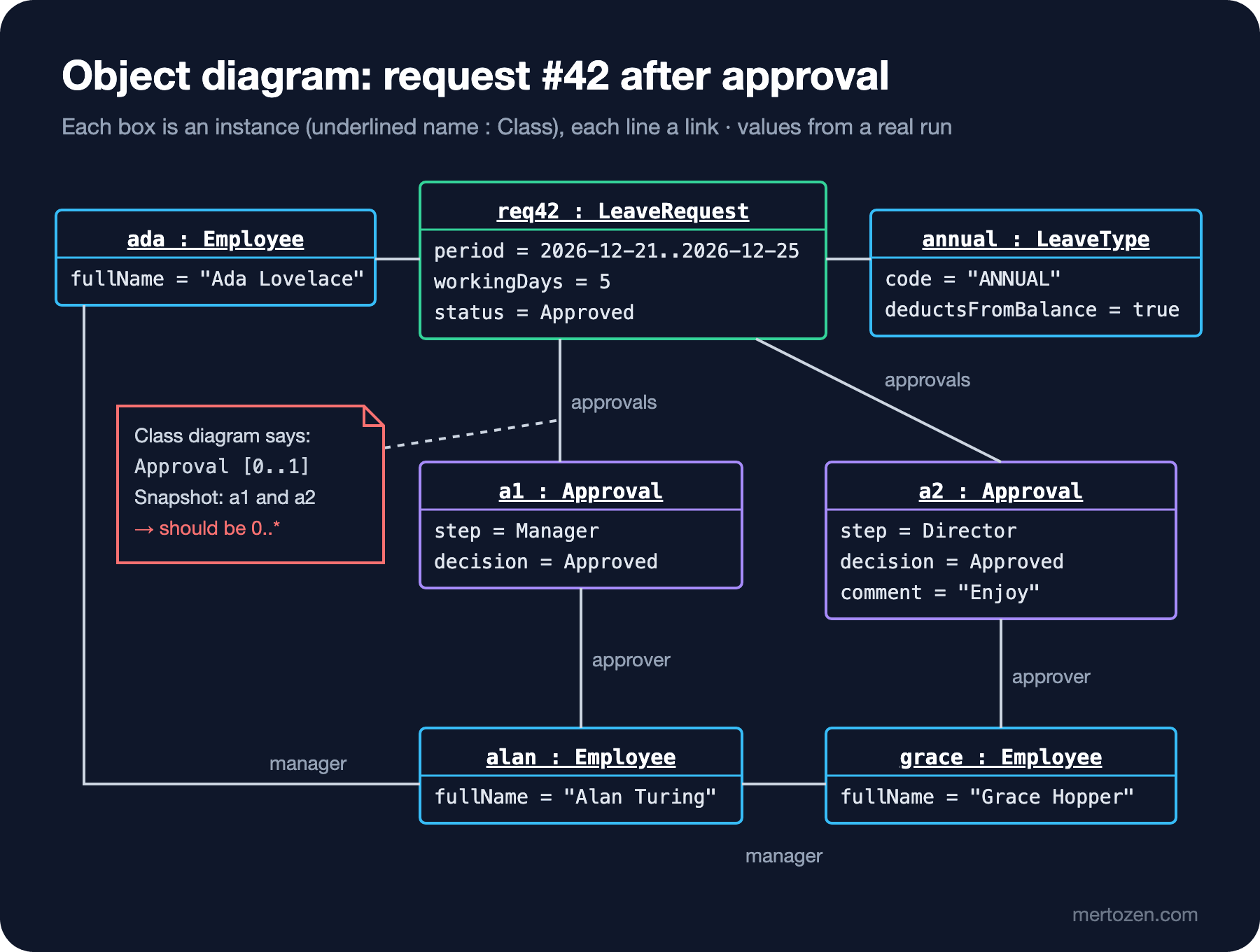
The figure is the snapshot of #42 after the director's approval. Two links leave req42 towards Approval instances: a1 (Manager, Alan) and a2 (Director, Grace). The 0..1 in the class diagram cannot be true at the same time as this picture. The same picture confirms another multiplicity: there is a "manager" link from alan to grace, but none going up from grace. So the Employee.Manager relationship is 0..1, not 1; that is why the code has int? ManagerId.
Validating a Class Diagram with Object Diagrams
The most valuable use of an object diagram is testing an abstract class diagram against concrete scenarios. The method is simple: pick a few "hard" scenarios from the requirements, draw a snapshot for each, and compare every link count with the multiplicity in the class diagram. Good candidates for the leave module: a five-day leave (two approvals, R7), a request rejected and submitted again (two separate LeaveRequest objects for the same dates, R4), a leave spanning the turn of the year (which year's LeaveBalance?), a balance corrected by HR (BalanceAdjustment, R12).
In code, the closest counterpart of an object diagram is a test fixture or seed data: code that builds the object graph at a given moment. So instead of drawing the diagram by hand you can also generate it from real objects. The small class below walks public properties with reflection and writes a PlantUML object diagram; references between the objects you named become links, the remaining values become slots:
public sealed class ObjectDiagram
{
    private readonly Dictionary<object, string> names = new(ReferenceEqualityComparer.Instance);
    private readonly StringBuilder objects = new();
    private readonly StringBuilder links = new();
    private readonly HashSet<(string, string)> linked = [];

    public ObjectDiagram Add(object instance, string name)
    {
        names[instance] = name;
        return this;
    }

    public string Render()
    {
        foreach ((object instance, string name) in names)
        {
            objects.AppendLine($"object \"{name} : {instance.GetType().Name}\" as {name} {{");
            foreach (PropertyInfo p in instance.GetType().GetProperties(BindingFlags.Public | BindingFlags.Instance))
            {
                object? value = p.GetValue(instance);
                if (value is null || names.ContainsKey(value))
                {
                    if (value is not null) Link(name, names[value], p.Name);
                    continue;
                }
                if (value is IEnumerable items and not string)
                {
                    foreach (object item in items)
                        if (names.TryGetValue(item, out string? target)) Link(name, target, p.Name);
                    continue;
                }
                if (p.Name.EndsWith("Id")) continue;
                objects.AppendLine($"  {p.Name} = {Format(value)}");
            }
            objects.AppendLine("}");
        }
        return $"@startuml\n{objects}{links}@enduml";
    }

    private void Link(string from, string to, string role)
    {
        // draw a bidirectional association as a single link
        if (linked.Contains((to, from))) return;
        linked.Add((from, to));
        links.AppendLine($"{from} -- {to} : {role}");
    }

    private static string Format(object value) => value switch
    {
        DateRange r => $"{r.Start:yyyy-MM-dd}..{r.End:yyyy-MM-dd}",
        DateTimeOffset d => d.ToString("yyyy-MM-dd"),
        DateOnly d => d.ToString("yyyy-MM-dd"),
        string s => $"\"{s}\"",
        _ => value.ToString() ?? ""
    };
}
Building the #42 scenario with the real domain classes (Submit, then Alan's and Grace's Approve calls) and running it gives this output, in part:
object "req42 : LeaveRequest" as req42 {
  Period = 2026-12-21..2026-12-25
  WorkingDays = 5
  Reason = "Year-end trip"
  Status = Approved
  CreatedAt = 2026-11-02
  SubmittedAt = 2026-11-02
  RequiresDirectorApproval = True
}
object "a2 : Approval" as a2 {
  Step = Director
  Decision = Approved
  Comment = "Enjoy"
  DecidedAt = 2026-11-04
}
req42 -- ada : Employee
req42 -- annual : LeaveType
req42 -- a1 : Approvals
req42 -- a2 : Approvals
ada -- alan : Manager
alan -- grace : Manager
a1 -- alan : Approver
a2 -- grace : Approver
This output rendered without errors in PlantUML. Two notes: PlantUML does not underline object names, so the tool does not apply UML's "underlined name" rule; apply it yourself when you draw by hand. Also, a derived value such as RequiresDirectorApproval came through as a slot; whether to keep it in the diagram is your call. A dump like this can document the "expected state" of a unit test; the diagram changes together with the code.
Package Diagram Notation
The object diagram was a close-up of a single moment; the package diagram goes the other way, the widest shot. In UML a package groups model elements and gives them a namespace (the Packages clause of the specification). It is drawn as a tabbed folder: the name goes in the tab if the contents are shown, otherwise in the body. The parts of the notation you use in practice:
- Nesting: a package is drawn inside another package. The full name is
HrPortal::Leave::Domain; the separator in UML is::, in C# a dot. - Dependency: a dashed line with an open arrowhead. It means "an element in this package needs an element over there; if that changes, this may be affected."
«import»and«access»: both let you use a package's elements without qualifying them with the package name. The difference is visibility:«import»is public, the imported names are also visible to those who import you;«access»is private, the names stay with you.- Visibility: elements inside a package may carry
+(public) and-(private). It is the package-level counterpart of thepublicversusinternaldistinction in C#.
The .NET Counterpart: Namespace or Project?
A UML package is a logical grouping, and .NET has two candidates. A namespace matches it one-to-one as a naming scope: the HrPortal.Leave.Domain namespace is the HrPortal::Leave::Domain package. But a namespace is not a dependency boundary; two namespaces in the same project can use each other freely. The boundary the compiler enforces is the project (assembly): without a ProjectReference you cannot use it. That is why package = project is the most useful mapping when drawing a dependency map. The physical side of a project, the .dll that gets deployed, belongs to artifacts and components in UML; we will draw those in the Component and Deployment Diagram posts of the series.
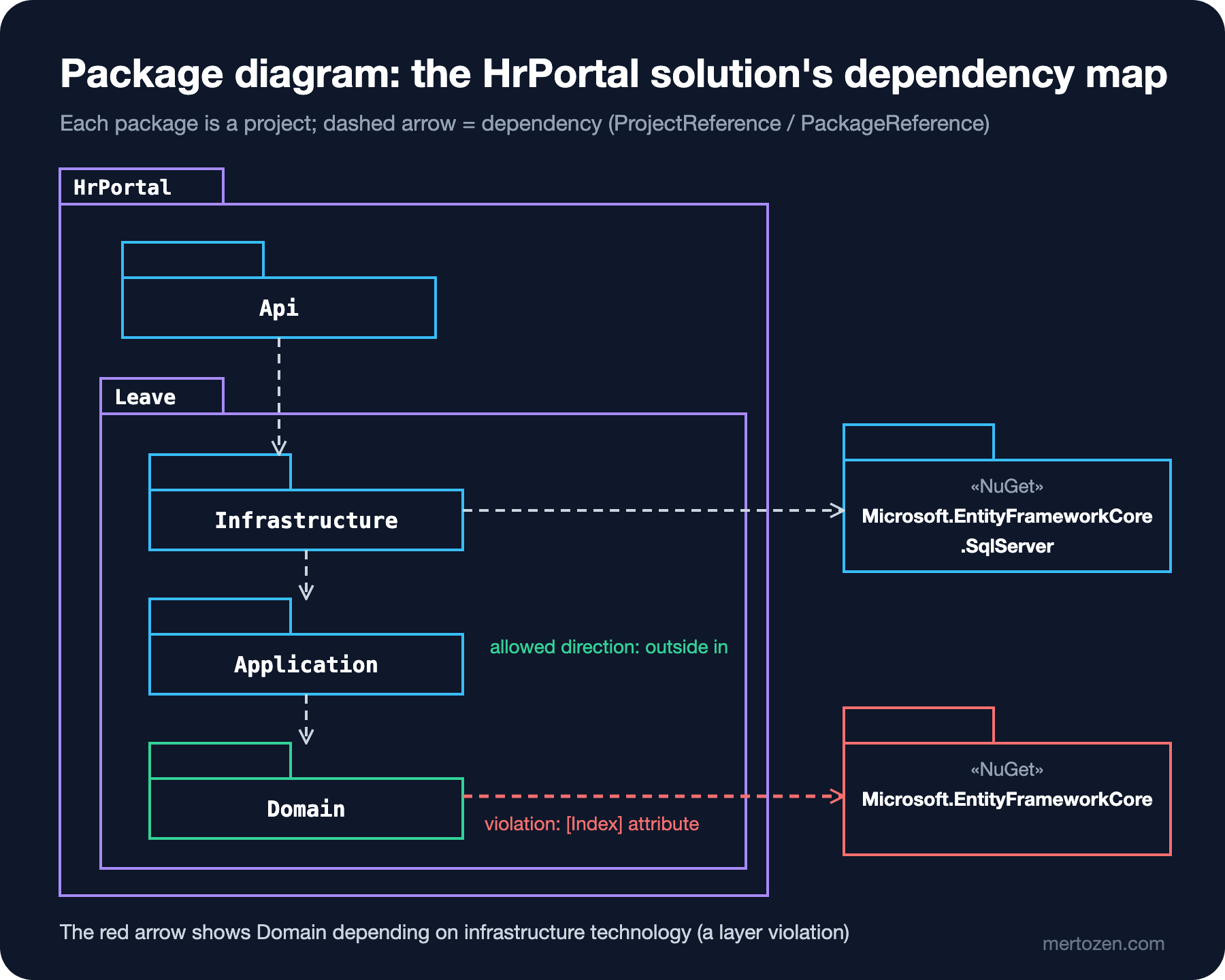
In the figure the HrPortal and Leave packages are nested, with the four projects inside them. The arrows flow from the outside in: Api → Infrastructure → Application → Domain. Infrastructure depending on Application is worth noticing: the interfaces (ILeaveRequestRepository, IBalanceService) are defined in Application and their implementations live in Infrastructure. That is the signature of dependency inversion in a package diagram, a bird's-eye view of what the Dependency Inversion Principle post of the SOLID (Single Responsibility, Open/Closed, Liskov Substitution, Interface Segregation, Dependency Inversion) series explains.
One .NET detail closely resembles the «import» distinction in UML. In SDK (Software Development Kit) style projects, ProjectReference is transitive: HrPortal.Api references only Infrastructure, yet it can use LeaveRequest from Domain and ILeaveRequestService from Application directly. A project reference behaves like a public import. Turn transitivity off and the compiler objects immediately:
<PropertyGroup>
    <DisableTransitiveProjectReferences>true</DisableTransitiveProjectReferences>
</PropertyGroup>
Program.cs(1,22): error CS0234: The type or namespace name 'Application' does not exist in the namespace 'HrPortal.Leave' (are you missing an assembly reference?)
Program.cs(2,22): error CS0234: The type or namespace name 'Domain' does not exist in the namespace 'HrPortal.Leave' (are you missing an assembly reference?)Whichever you choose, know what you are drawing: if you want to show transitive dependencies too, draw an explicit arrow from Api to Domain; otherwise draw only direct references and say so in a note on the diagram.
Generating the Package Diagram from Code and Catching Layer Violations
Instead of drawing the package diagram by hand, generating it from the .csproj files is easy and reliable, because the dependency information is already there. A small function that reads the ProjectReference and PackageReference elements and writes PlantUML:
static string PackageDiagram(string srcDir)
{
    List<string> lines = ["@startuml", "set separator none", "skinparam packageStyle folder"];
    List<string> deps = [];
    SortedSet<string> nugets = [];
    foreach (string csproj in Directory.GetFiles(srcDir, "*.csproj", SearchOption.AllDirectories).Order())
    {
        string name = Path.GetFileNameWithoutExtension(csproj);
        lines.Add($"package \"{name}\" as {Alias(name)} {{\n}}");
        XDocument doc = XDocument.Load(csproj);
        foreach (XElement r in doc.Descendants("ProjectReference"))
        {
            string target = Path.GetFileNameWithoutExtension(r.Attribute("Include")!.Value.Replace('\\', '/'));
            deps.Add($"{Alias(name)} ..> {Alias(target)}");
        }
        foreach (XElement p in doc.Descendants("PackageReference"))
        {
            string package = p.Attribute("Include")!.Value;
            nugets.Add(package);
            deps.Add($"{Alias(name)} ..> {Alias(package)}");
        }
    }
    lines.AddRange(nugets.Select(n => $"package \"{n}\" as {Alias(n)} <<NuGet>> {{\n}}"));
    return string.Join('\n', [.. lines, .. deps, "@enduml"]);
}

static string Alias(string name) => name.Replace("HrPortal.", "").Replace("Microsoft.", "").Replace(".", "");
Two practical details, both of which showed up while trying it. The path inside the .csproj uses the Windows separator (..\HrPortal.Leave.Domain\...); on macOS and Linux Path.GetFileNameWithoutExtension does not treat the backslash as a separator, so you have to convert it to / first. On the PlantUML side, if you do not give dotted names with quotes and an alias, Microsoft.EntityFrameworkCore.SqlServer is drawn as three nested packages and a class; and writing a stereotyped package on one line with {} made PlantUML 1.2026.9 fail on the next line, so the body had to be split over two lines.
Now let us commit a layer violation. Someone wants to define the unique index on Employee with an attribute instead of configuration and adds the EF Core package to Domain:
using Microsoft.EntityFrameworkCore;

namespace HrPortal.Leave.Domain;

[Index(nameof(EmployeeNumber), IsUnique = true)]
public class Employee
{
    public int Id { get; set; }
    // ...
}
The code compiles and the tests pass. In the generated package diagram, though, a new line appears:
Api ..> LeaveInfrastructure
LeaveApplication ..> LeaveDomain
LeaveDomain ..> EntityFrameworkCore
LeaveInfrastructure ..> LeaveApplication
LeaveInfrastructure ..> EntityFrameworkCoreSqlServer
LeaveInfrastructure ..> ExtensionsHostingAbstractions
The diagram shows the violation, but someone has to look at it. To turn the rule into a check that runs in CI (Continuous Integration), you can inspect the references of the compiled assemblies:
static int Check(string binDir)
{
    Dictionary<string, string[]> allowed = new()
    {
        ["HrPortal.Leave.Domain"] = ["System."],
        ["HrPortal.Leave.Application"] = ["System.", "HrPortal.Leave.Domain"],
    };
    int violations = 0;
    foreach ((string assembly, string[] prefixes) in allowed)
    {
        Assembly asm = Assembly.LoadFrom(Path.Combine(binDir, assembly + ".dll"));
        foreach (AssemblyName dep in asm.GetReferencedAssemblies())
        {
            bool ok = prefixes.Any(p => dep.Name!.StartsWith(p, StringComparison.Ordinal));
            Console.WriteLine($"{(ok ? "OK  " : "FAIL")} {assembly} -> {dep.Name}");
            if (!ok) violations++;
        }
    }
    Console.WriteLine($"{violations} violation(s)");
    return violations == 0 ? 0 : 1;
}
OK HrPortal.Leave.Domain -> System.Runtime
OK HrPortal.Leave.Domain -> System.Collections
FAIL HrPortal.Leave.Domain -> Microsoft.EntityFrameworkCore.Abstractions
OK HrPortal.Leave.Application -> System.Runtime
OK HrPortal.Leave.Application -> HrPortal.Leave.Domain
OK HrPortal.Leave.Application -> System.Collections
1 violation(s)An interesting detail: the violation does not show up under the package name but as Microsoft.EntityFrameworkCore.Abstractions, because the [Index] attribute is defined in that assembly. The compiler writes only references that are actually used into the assembly; had we added the package without using any of its types, this check would find nothing, while the diagram generated from the .csproj would still show it. The two views complement each other. In real projects, writing these rules as unit tests with libraries such as ArchUnitNET or NetArchTest is more readable; the rule logic is the same. The principles for splitting projects, for example ADP (Acyclic Dependencies Principle) and SDP (Stable Dependencies Principle), are in the Component Principles post of the SOLID series.
Common Pitfalls
Writing multiplicities in an object diagram. A link connects two objects; the answer to "how many" is the number of lines. If you write 0..* on the ends, you have drawn a class diagram.
Not underlining the instance name or forgetting the class name. req42 alone reads like a class; it should be req42 : LeaveRequest, underlined.
Drawing only the "happy path" snapshot. A one-day leave with a single approval validates every class diagram. The validating power comes from edge scenarios: two approvals, a leave spanning two years, a request rejected and submitted again.
Confusing packages with namespaces and treating them as a dependency boundary. Domain and Infrastructure folders in the same project use each other freely; drawing them separately does not stop the compiler. If you want to enforce the boundary you need separate projects or an automated check.
Drawing the package diagram by hand and leaving it. The dependencies live in the .csproj; a hand-drawn map goes stale with the first dotnet add reference. Generate it, commit it, check the difference in CI.
When Not to Use It
Do not draw an object diagram for every class diagram; if the relationships are simple and undisputed, it is unnecessary. Where a multiplicity, a composition or a recursive relationship (like the manager chain) is being argued about, a five-minute snapshot prevents hours of misunderstanding. Do not draw a package diagram for a small single-project application; the map only says something once there is more than one project or module.
A Small Experiment
★☆☆ Draw Ada's 2026 balance (EntitledDays 14, UsedDays 11) and a +2 day BalanceAdjustment made by HR specialist Margaret as an object diagram. What should the multiplicity between LeaveBalance and BalanceAdjustment be?
★★☆ Draw the object diagram of an annual leave request from December 30, 2026 to January 5, 2027. Which year's LeaveBalance does the request link to? What does the snapshot tell you to change in the class diagram or in the Submit flow?
★★★ Extend the package diagram generator to draw any arrow from Domain to a PackageReference in red (in PlantUML ..> X #line:red), and make the Check function also catch HrPortal.Api using HrPortalDbContext directly. Is an assembly reference enough for this second rule, or do you need to look at the type level?
In the next post we move from structure to behavior: with a sequence diagram we will follow the POST /leave-requests request from the Angular form through the endpoint, service, repository and EF Core all the way to SQL Server, and see what each lifeline corresponds to in code.