

Diagrams as Code with PlantUML: Syntax, C4-PlantUML, Includes and Rendering in CI
PlantUML describes a diagram in a text file and renders it locally or in CI, so the diagram changes in the same PR as the code, gets diffed and is validated with --check-syntax. This post walks through the PlantUML sources of the series' use case, class, sequence, state and C4 diagrams, sharing a style with !include, rendering in GitHub Actions, and the privacy risks of the public server and the source embedded in SVGs, with real output.
Version note: The diagrams in this post use UML (Unified Modeling Language) 2.5.1 and C4 (Context, Containers, Components, Code) notation and were rendered with PlantUML 1.2026.9, C4-PlantUML 2.14.0, Java 21 (Temurin 21.0.13) and Graphviz 16.1 (WebAssembly build); the series' C# code was tested with .NET 10.
Guess First: What Changed in This Diff?
Someone on the HR Portal team updates the sequence diagram and opens a PR (pull request). The repo holds both the source of the diagram and its PNG (Portable Network Graphics) version. The real output of git diff:
 submit.png  | Bin 11400 -> 11949 bytes
 submit.puml |   2 +-
 2 files changed, 1 insertion(+), 1 deletion(-)
diff --git a/submit.png b/submit.png
index 53a980c..c6b0416 100644
Binary files a/submit.png and b/submit.png differ
diff --git a/submit.puml b/submit.puml
index 08a2c98..07555d4 100644
--- a/submit.puml
+++ b/submit.puml
@@ -9,6 +9,6 @@ alt balance ok
   Api --> Employee : 200 OK
 else insufficient
   Svc --> Api : BalanceExceeded
-  Api --> Employee : 422
+  Api --> Employee : 422 ProblemDetails
 end
 @enduml
Both files changed. As a reviewer, what do you learn from the PNG's diff? Is the change just a label, or did someone also delete a lifeline? If two people change the same diagram on different branches a week later, which file holds the merge conflict and how do you resolve it? The answer is the actual topic of this post: if the source of a diagram is text, the diagram is diffed, reviewed, merged and validated in CI (Continuous Integration) like code.
Why Diagrams as Code?
Diagrams as code means describing a diagram in a text file and rendering it with a tool, instead of dragging boxes in a drawing tool. Every diagram we drew in this series answered a question; this post's question is different: are those answers still true six months later? A diagram made in a drawing tool has three well-known problems. The file is binary and has no diff. It lives on a wiki page or someone's disk, not next to the code. And since updating it is a separate job, nobody does it; the diagram goes stale, and a stale diagram does more harm than no diagram at all.
With a text-based diagram these three problems trade places. The .puml file sits next to the code under docs/diagrams/; code and diagram change in the same PR; the reviewer sees a one-line diff like the one above. There is a price: the tool decides the layout, not you. Of the sketch and blueprint modes Martin Fowler separates in his UmlAsSketch article, this approach fits "blueprint close to the code"; for a quick whiteboard sketch a pen is still better. This post covers PlantUML, the next one Mermaid and the Structurizr DSL (Domain-Specific Language).
Running PlantUML Locally
PlantUML is a single jar file and needs Java. The layout of class, use case, state and component diagrams is computed by Graphviz's dot program; sequence diagrams are drawn without Graphviz. On a machine without Graphviz the --version output says so plainly:
PlantUML version 1.2026.9 / 18d0aae [2026-10-17 08:25:10 UTC]
...
Error: Dot executable does not exist
Error: only sequence diagrams will be generated
brew install graphviz on macOS and apt-get install graphviz on Ubuntu are enough; the jar finds dot on the PATH, or reads it from the GRAPHVIZ_DOT environment variable. The 1.2026.9 help text shows readable double-dash options (--svg, --output-dir); the old single-dash -tsvg and -o still work too. The three commands you will use every day:
# Check the syntax without producing images (exit code 200 on error)
java -jar plantuml-1.2026.9.jar --check-syntax docs/diagrams

# Turn every .puml file in the folder into SVG
java -jar plantuml-1.2026.9.jar --svg --output-dir "$PWD/out" "docs/diagrams/*.puml"

# Check and render together, stop at the first error
java -jar plantuml-1.2026.9.jar --svg --stop-on-error "docs/diagrams/*.puml"
For a live preview in the editor, jebbs' PlantUML extension in Visual Studio Code (VS Code) and the "PlantUML Integration" plugin in Rider and the other JetBrains IDEs (Integrated Development Environments) are common. The VS Code extension's plantuml.render setting defaults to Local, meaning it draws with the Java and Graphviz on your machine; choose PlantUMLServer and it sends the text to the plantuml.server address. We will come back to why that distinction matters in the privacy section.
The Series' Diagrams in PlantUML
Every diagram we drew in this series has a PlantUML counterpart. The repo layout is simple: one file per diagram, the file named after the diagram, the shared style in a separate include file.
docs/diagrams/
    hr-style.iuml
    use-cases.puml
    domain-model.puml
    submit-leave-request.puml
    leave-request-states.puml
    containers.puml
The use case diagram (the model from the series' third post). The association between an actor and a use case is drawn undirected with --; <<include>> and <<extend>> are dashed ..> arrows, pointing as in UML from the including use case to the included one, and from the extending use case to the base use case:
@startuml use-cases
!include hr-style.iuml
title Leave module - use cases
left to right direction

actor "Employee" as Employee
actor "Manager" as Manager
actor "Director" as Director
actor "HR Specialist" as HR
actor "Calendar System" as Calendar <<system>>

Director -|> Manager

rectangle "HR Portal - Leave" {
  usecase "UC-01 Request Leave\n--\nextension points\nAttachment" as UC01
  usecase "UC-02 Decide on Leave Request" as UC02
  usecase "UC-03 Cancel Leave Request" as UC03
  usecase "UC-04 View Leave Balance" as UC04
  usecase "UC-05 Adjust Leave Balance" as UC05
  usecase "UC-06 Manage Leave Policies" as UC06
  usecase "Check Balance" as CheckBalance
  usecase "Attach Medical Report" as AttachReport
}

Employee -- UC01
Employee -- UC03
Employee -- UC04
Manager -- UC02
HR -- UC03
HR -- UC05
HR -- UC06
UC02 -- Calendar
UC03 -- Calendar

UC01 ..> CheckBalance : <<include>>
UC02 ..> CheckBalance : <<include>>
AttachReport ..> UC01 : <<extend>>
note right of AttachReport
  condition: leave type = SICK
  extension point: Attachment
end note
@enduml
The domain class diagram. Multiplicities are written in quotes at the ends of an association, *-- is composition (filled diamond), --> is a navigable association and /RemainingDays is a derived attribute. Note that the end from Department to its director is 0..1; in the ER (Entity-Relationship) diagram post we made it optional to break the cycle of two mandatory relationships:
@startuml domain-model
!include hr-style.iuml
title Leave module - domain model
hide empty members

class Employee {
  EmployeeNumber : string
  FullName : string
  Email : string
}

class Department {
  Name : string
}

class LeaveRequest {
  Period : DateRange
  WorkingDays : int
  Reason : string [0..1]
  Status : LeaveStatus
  + Submit(workingDays : int, now : DateTimeOffset)
  + Approve(approver : Employee, comment : string [0..1], now : DateTimeOffset)
  + Reject(approver : Employee, comment : string, now : DateTimeOffset)
  + Cancel(today : DateOnly)
}

class Approval {
  Step : ApprovalStep
  Decision : ApprovalDecision
  Comment : string [0..1]
  DecidedAt : DateTimeOffset
}

class LeaveType {
  Code : string
  Name : string
  DeductsFromBalance : bool
}

class LeaveBalance {
  Year : int
  EntitledDays : int
  UsedDays : int
  /RemainingDays : int
}

class LeaveAttachment {
  FileName : string
  StoragePath : string
}

enum LeaveStatus {
  Draft
  PendingManagerApproval
  PendingDirectorApproval
  Approved
  Rejected
  Cancelled
}

Employee "0..*" --> "0..1" Employee : manager
Employee "0..*" --> "1" Department
Department "0..*" --> "0..1" Employee : director
LeaveRequest "0..*" --> "1" Employee : requester
LeaveRequest "0..*" --> "1" LeaveType
LeaveRequest *-- "0..1" LeaveAttachment
LeaveRequest "1" *-- "0..2" Approval : approvals
Approval "0..*" --> "1" Employee : approver
LeaveBalance "0..*" --> "1" Employee
LeaveBalance "0..*" --> "1" LeaveType
@enduml
The sequence diagram, the "submit the request" scenario from the series' 8th and 9th posts. autonumber numbers the messages, activate/deactivate draw the activation bar and alt/else/end is a combined fragment:
@startuml submit-leave-request
!include hr-style.iuml
title UC-01 Submit leave request (R2, R3)
autonumber

actor "Employee" as Employee
participant "LeaveRequestForm\nComponent" as Form
participant "HrPortal.Api" as Api
participant "LeaveRequest\nService" as Service
participant "IWorkingDay\nCalculator" as Calc
participant "IBalance\nService" as Balance
database "HR Database" as Db

Employee -> Form : Submit
Form -> Api : POST /leave-requests/42/submit
activate Api
Api -> Service : SubmitAsync(42)
activate Service
Service -> Db : load LeaveRequest #42
Service -> Calc : CountWorkingDays(2026-12-21..25)
Calc --> Service : 5
Service -> Balance : HasEnoughBalanceAsync(E-1001, ANNUAL, 5)
Balance --> Service : true (remaining 8)
alt enough balance
  Service -> Service : request.Submit(5, now)
  Service -> Db : SaveChangesAsync()
  Service --> Api : PendingManagerApproval
  Api --> Form : 200 OK
else insufficient balance
  Service --> Api : BalanceExceeded
  Api --> Form : 422 ProblemDetails
end
deactivate Service
deactivate Api
@enduml
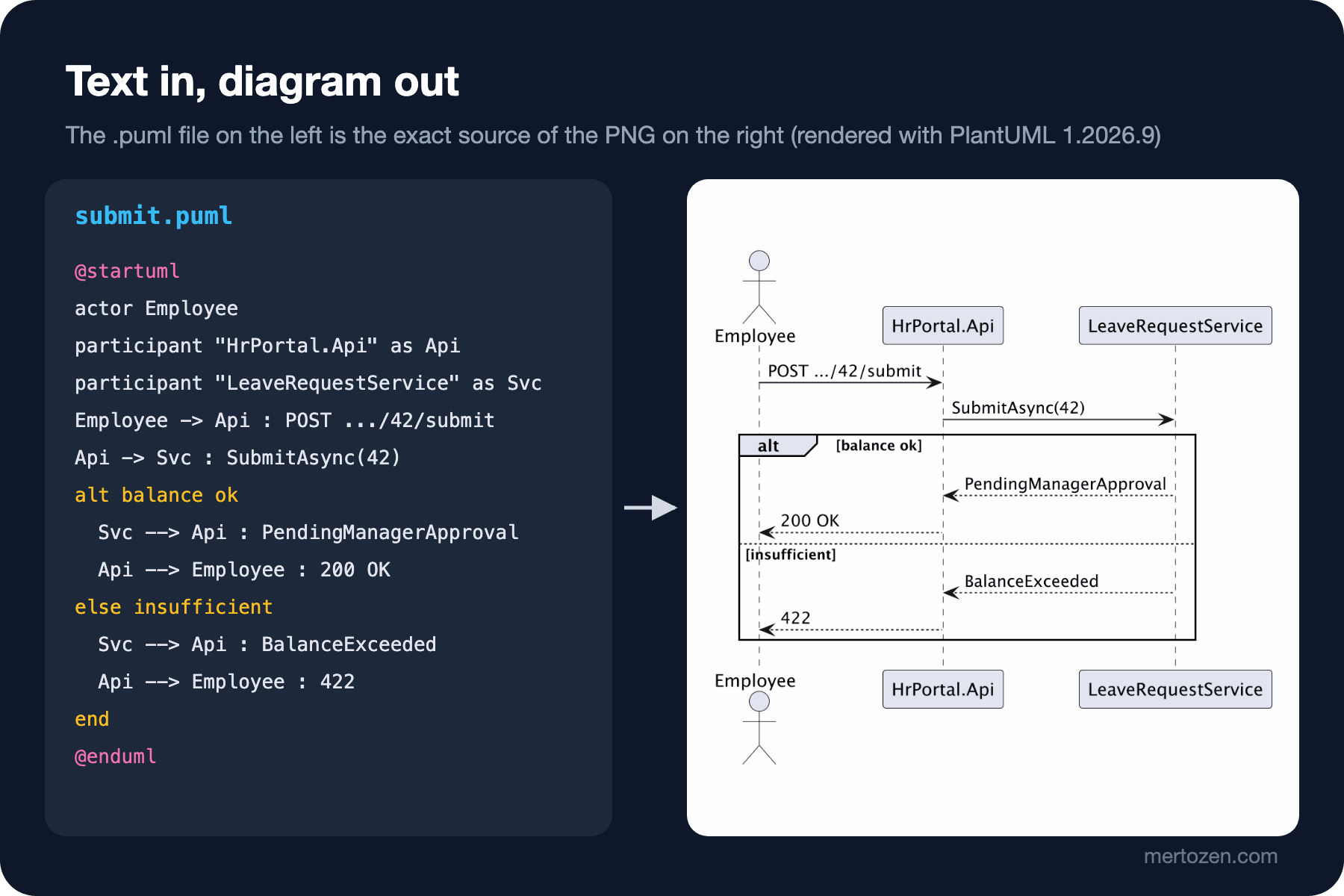
A reduced version of this file and the image PlantUML produces from it, side by side:
The state machine diagram, the same lifecycle as in post 11. A composite state is written with a state "..." as X { } block, a choice pseudostate with the <<choice>> stereotype, entry and after(...) behaviours with state X : ... lines:
@startuml leave-request-states
!include hr-style.iuml
title LeaveRequest lifecycle
hide empty description

[*] --> Draft
Draft --> PendingManagerApproval : Submit [hasEnoughBalance]

state "Pending Approval" as PendingApproval {
  state PendingManagerApproval : entry / notifyManager
  state PendingManagerApproval : after(2 working days) / remindApprover
  state PendingDirectorApproval : entry / notifyDirector
  state PendingDirectorApproval : after(2 working days) / remindApprover
  state afterManager <<choice>>
  PendingManagerApproval --> afterManager : Approve [hasEnoughBalance]
  afterManager --> PendingDirectorApproval : [requiresDirectorApproval]
}

afterManager --> Approved : [else]
PendingDirectorApproval --> Approved : Approve [hasEnoughBalance]
PendingApproval --> Rejected : Reject [hasComment] / recordApproval
PendingApproval --> Cancelled : Cancel
state Approved : entry / deductBalance; addCalendarEntry
Approved --> Cancelled : Cancel [!leaveStarted || byHrSpecialist] / refundBalance; removeCalendarEntry
@enduml
A Shared Style: !include, skinparam and style
Instead of writing a font, a corner radius and a note colour into each of the five diagrams, we put the shared settings in one file and pull it in with !include:
skinparam shadowing false
skinparam defaultFontName Arial
skinparam defaultFontSize 13
skinparam roundCorner 8
<style>
title {
  FontSize 16
  FontStyle bold
}
note {
  BackgroundColor #FFF8DC
}
</style>
Two styling mechanisms sit side by side. skinparam is the old method and still works; the PlantUML documentation recommends the CSS-like (Cascading Style Sheets) <style> block for new diagrams and says old diagrams will keep working in future versions. If you are starting a new repo, write the style with <style> and migrate your existing skinparams without hurrying.
The include file's extension is deliberately .iuml. In the first attempt the file was called hr-style.puml and the "docs/diagrams/*.puml" glob tried to render it too: Warning: no image in docs/diagrams/hr-style.puml. The warning looks harmless but clutters the CI log; keeping fragment files under a different extension keeps the glob clean. An !include path is resolved relative to the including file's folder; if several diagram sets share the same style, you can define a common search path with the plantuml.include.path Java property. !include also accepts a URL (Uniform Resource Locator), but a build that depends on the internet and on someone else's file that may change are two separate risks; keep the shared style in the repo.
C4-PlantUML: C4 Diagrams from the Standard Library
PlantUML itself has no notation for C4 (Context, Containers, Components, Code) diagrams; the C4-PlantUML library provides it, and that library ships embedded in PlantUML's standard library (stdlib). According to the java -jar plantuml.jar -stdlib output, the version inside 1.2026.9 is 2.14.0. There is no need to include it from the internet; the angle-bracket form <C4/C4_Container> reads it from inside the jar:
@startuml containers
!include <C4/C4_Container>
!include hr-style.iuml
title HR Portal - containers

Person(employee, "Employee", "Requests leave")
Person(manager, "Manager", "Approves or rejects")
System_Ext(calendar, "Calendar System", "Corporate calendar")
System_Ext(mail, "E-mail Server", "SMTP relay")

System_Boundary(hr, "HR Portal") {
  Container(web, "Web App", "Angular 22", "Single-page app")
  Container(api, "HrPortal.Api", "ASP.NET Core, .NET 10", "Leave, Payroll, Notification modules")
  Container(worker, "HrPortal.Worker", ".NET 10 worker", "Notifications and approval reminders")
  ContainerDb(db, "HR Database", "SQL Server", "Requests, balances, approvals")
  ContainerDb(cache, "Cache", "Redis", "Public holidays")
  ContainerQueue(broker, "Message Broker", "Azure Service Bus", "leave-events topic")
}

Rel(employee, web, "Creates and submits leave requests", "HTTPS")
Rel(manager, web, "Approves or rejects requests", "HTTPS")
Rel(web, api, "Calls", "JSON/HTTPS")
Rel(api, db, "Reads from and writes to", "EF Core")
Rel(api, cache, "Caches holidays in", "RESP")
Rel(api, broker, "Publishes LeaveRequestApproved etc.", "AMQP")
Rel(api, calendar, "Adds and removes leave entries", "HTTPS")
Rel(broker, worker, "Delivers events to", "AMQP")
Rel(worker, mail, "Sends e-mails via", "SMTP")
SHOW_LEGEND()
@enduml
The macros apply post 14's notation checklist almost by themselves: every element has a type (Container, ContainerDb, ContainerQueue), a technology and a short description; every Rel is one-way and labelled; SHOW_LEGEND() adds the legend. The container list matches post 13's deployment diagram: API (Application Programming Interface), worker, database (SQL Server), Redis and Azure Service Bus. What separates C4 from UML is visible here too: the meaning is not in the shape of the box but in the "[Container: ASP.NET Core, .NET 10]" information inside it.
Checking and Rendering in CI
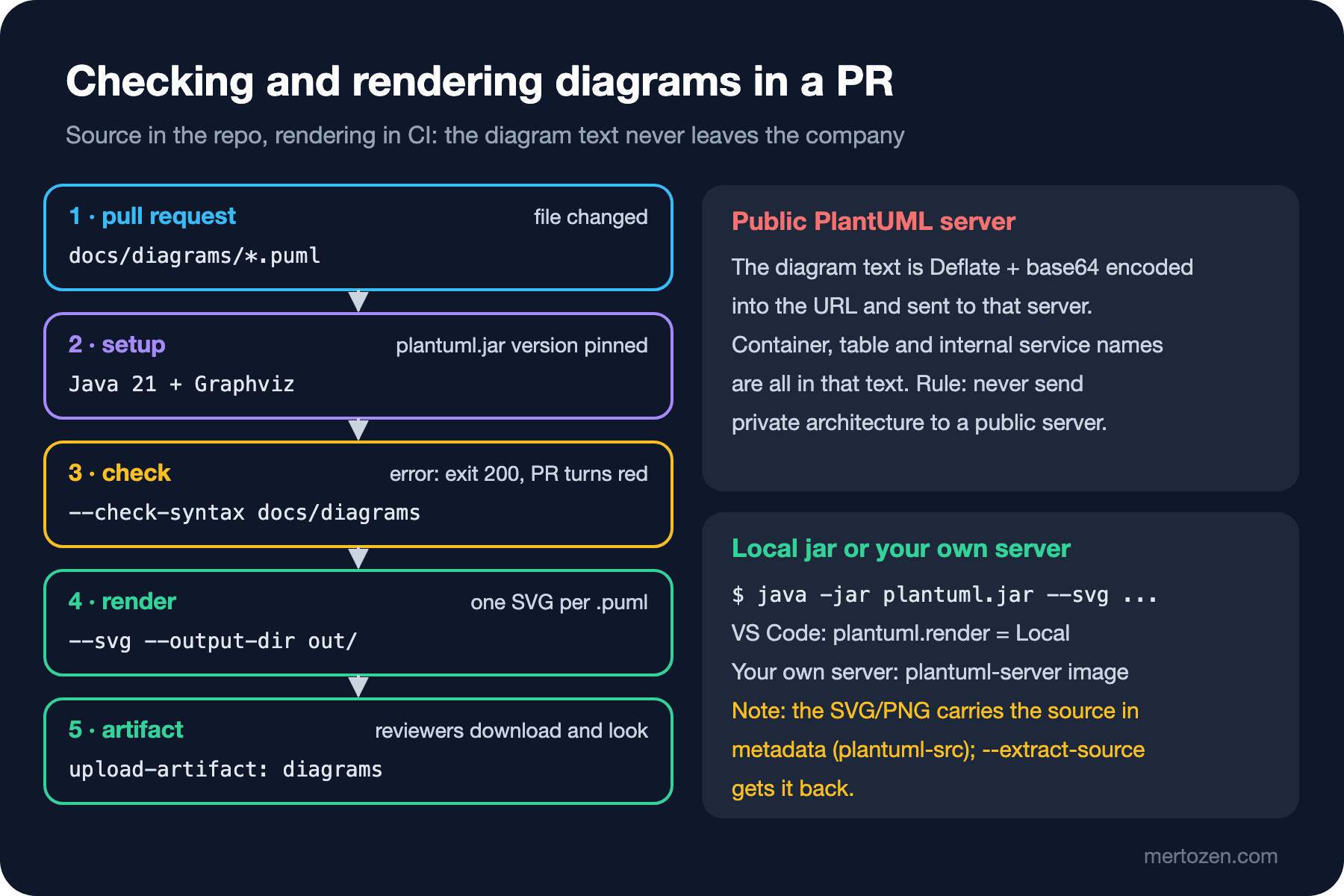
Once the diagram source is in the repo, the next step is to validate it on every PR. GitHub Actions needs no special action for PlantUML; install Java, install Graphviz, download the jar at a pinned version and run two commands:
name: diagrams

on:
  pull_request:
    paths:
      - "docs/diagrams/**"

jobs:
  render:
    runs-on: ubuntu-latest
    steps:
      - uses: actions/checkout@v7

      - uses: actions/setup-java@v6
        with:
          distribution: temurin
          java-version: "21"

      - name: Install Graphviz
        run: sudo apt-get update && sudo apt-get install -y graphviz

      - name: Download PlantUML
        run: curl -fsSL -o plantuml.jar https://github.com/plantuml/plantuml/releases/download/v1.2026.9/plantuml-1.2026.9.jar

      - name: Check syntax
        run: java -jar plantuml.jar --check-syntax docs/diagrams

      - name: Render SVG
        run: java -jar plantuml.jar --svg --output-dir "$PWD/out" "docs/diagrams/*.puml"

      - uses: actions/upload-artifact@v7
        with:
          name: diagrams
          path: out/
I ran the workflow's two steps locally with the same jar: --check-syntax returned exit code 0 and five SVGs (Scalable Vector Graphics) appeared under out/. I did not run the workflow itself on GitHub; the action versions are the latest major versions at the time of writing. What does a syntax error look like? A file where else was typed as els:
Error line 5 in file: broken/typo.puml
Some diagram description contains errors
The exit code is 200 and the job turns red. One detail about --output-dir: give it a relative path (out) and PlantUML resolves it against each source file's own folder, so the SVGs end up under docs/diagrams/out/. That is why the workflow uses an absolute path like "$PWD/out".
Commit the generated SVGs or leave them as an artifact? When I rendered twice on the same machine with the same jar and the same Graphviz, the files were byte-for-byte identical. But if the developer's Graphviz and the one in CI are different versions, the output can differ and an "is the SVG up to date?" check turns red on its own. A practical rule: commit the source, generate the image in CI. If you must show images in the README, give the rendering to a job that runs only on the main branch.
Privacy: The Public Server and the Source Inside the SVG
PlantUML has a public render server, and some wiki plugins, editor settings and Markdown previewers can be configured to use it or come with it. The server reads the diagram from the URL: PlantUML's "text encoding" page explains that the text is taken as Unicode (UTF-8), compressed with Deflate and written into the URL with a base64-like alphabet. So the complete diagram text, compressed but not encrypted, goes to that server. "HrPortal.Worker", "leave-events topic", database names and internal services from the container diagram leave the company. The rule is simple: render architecture diagrams with the local jar or with a PlantUML server running on your own infrastructure; check that the render mode in your editor extension is Local.
The second detail is less known: PlantUML embeds the source in the SVG and PNG it produces. The SVG contains a processing instruction called <?plantuml-src ...?> and --extract-source unpacks it:
$ java -jar plantuml.jar --extract-source submit-leave-request.svg
------------------------
submit-leave-request.svg

@startuml
!include hr-style.iuml
title UC-01 Submit leave request (R2, R3)
autonumber
...
Most of the time this is a feature, because if all you have left is the image you can get the source back. But the moment you say "I am only sharing the image", you share the text as well. For images that leave the company, PlantUML's --obfuscate option replaces the texts with meaningless strings; or you can convert the image with a non-PlantUML tool and send it without the metadata.
Common Pitfalls
The stdlib include breaking under a Turkish locale. While preparing this post the C4 diagram did not render on the first try. The machine's language is Turkish, so the JVM (Java Virtual Machine) starts with the tr_TR locale, and when PlantUML lowercases a file name in the stdlib, INFO becomes ınfo under the Turkish rules:
java.io.UncheckedIOException: java.io.FileNotFoundException: stdlib/c4/ınfo.spm (No such file or directory)
Error line 2 in file: containers.puml
Some diagram description contains errors
Exit code 200. This is the classic bug developers call the "Turkish I problem": a locale-sensitive toLowerCase used on a file name produces the dotless ı. The fix is to start the JVM with an English locale; an environment variable covers both the command line and editor extensions that call Java in the background:
export JAVA_TOOL_OPTIONS="-Duser.language=en -Duser.country=US"
java -jar plantuml-1.2026.9.jar --svg containers.puml
The same file renders without errors with this setting. The JVM on Ubuntu runners does not start with a Turkish locale, so the bug never shows up in CI and only explodes on Turkish machines; knowing the source of a "doesn't work on my machine" complaint saves hours.
Attaching an association class to the wrong relationship. In the first draft of the domain model I drew Approval as an association class with the (LeaveRequest, Employee) .. Approval syntax. The render put the dashed line on the requester relationship that points to the person who made the request, because there were two different relationships between the same two classes and PlantUML could not know which one I meant. The syntax was valid, --check-syntax was silent, and the diagram was wrong. That is why the model above draws Approval with a composition and a separate approver association. The lesson is general: a syntax check does not check meaning; do not merge without looking at the render.
Fighting the layout. Adding hidden arrows (-[hidden]->) and direction hints to move a box to the right is possible, but each one makes the diagram more fragile on the next change. If it is unreadable, the diagram is usually trying to say too much; split it in two.
Dumping the whole solution into one diagram. Huge class diagrams generated from code (the puml-gen discussion in the series' sixth post) cannot be reviewed. The one-question-per-diagram rule applies to diagrams as code too.
Going to the public server by default. As described above; check the settings of Confluence and wiki plugins in particular.
A Small Experiment
★☆☆ Put the five files from this post under docs/diagrams/ on your machine and render them with --check-syntax and --svg. Then move the skinparam lines in hr-style.iuml into the <style> block and verify that the output did not change by comparing the SVGs.
★★☆ Add an opt [WorkingDays > 3] fragment showing the director's approval, as in post 9, and parallel notification + calendar steps with par to the sequence diagram. Make the change on a branch and interpret what the git diff tells the reviewer.
★★★ Write a workflow step that adds the renders of the .puml files changed in the PR to a PR comment (hint: git diff --name-only and the step that puts the SVGs in an artifact). Then prove that it does the job without going to the public server: assume the job runs in an environment whose network access is open only to GitHub and list which step goes out to the internet.
In the next post we will write the diagram not as a separate file but directly inside Markdown: Mermaid, which GitHub and Azure DevOps render themselves, and the Structurizr DSL, which derives diagrams from a single model. We will draw the same container diagram with both tools and compare when to choose which.