

Layered Architecture: The Real Responsibilities of Presentation, Business, and Data Layers
The real promise of Layered Architecture is the isolation that closed layers provide, but because ProjectReference is transitive by default in .NET, Web silently sees Data through Business; DisableTransitiveProjectReferences moves that rule into the compiler. N-layer vs N-tier, closed and open layers, sinkholes, DB-centric design and the problem with the dependency direction.
Version note: The code in this post was built and run with C# 14 and .NET 10.
Guess First
Bookstore started life as a single project. As the team grows, it decides to split the code into three layers and sets up the most classic structure: Web references Business; Business references Data. The goal is that Web never sees Data directly, so every request goes through Business.
dotnet new sln -n Bookstore
dotnet new web -n Bookstore.Web -o Bookstore.Web
dotnet new classlib -n Bookstore.Business -o Bookstore.Business
dotnet new classlib -n Bookstore.Data -o Bookstore.Data
dotnet sln add Bookstore.Web Bookstore.Business Bookstore.Data
dotnet add Bookstore.Web reference Bookstore.Business
dotnet add Bookstore.Business reference Bookstore.Data
The Data layer holds book rows (in a real project the Entity Framework Core (EF Core) DbContext would live here), and the Business layer applies the member discount and the stock rule:
namespace Bookstore.Data;

public sealed record BookRow(int Id, string Title, string AuthorName, decimal ListPrice, int Stock);

public sealed class BookRepository
{
    private readonly List<BookRow> _rows =
    [
        new(1, "Dune", "Frank Herbert", 12.99m, 4),
        new(2, "Emma", "Jane Austen", 7.50m, 0),
        new(3, "The Hobbit", "J. R. R. Tolkien", 10.99m, 12)
    ];

    public BookRow? FindById(int id) => _rows.FirstOrDefault(b => b.Id == id);

    public IReadOnlyList<BookRow> All() => _rows;
}
using Bookstore.Data;
namespace Bookstore.Business;
public sealed record BookDetails(int Id, string Title, decimal Price, bool InStock);
public sealed class BookService(BookRepository books)
{
// Sinkhole: no business rule, just forwards the request to Data
public BookRow? GetBook(int id) => books.FindById(id);
// The Business layer's real job: member discount and stock rule
public BookDetails? GetDetails(int id, bool isMember)
{
BookRow? row = books.FindById(id);
if (row is null)
return null;
decimal price = isMember ? Math.Round(row.ListPrice * 0.90m, 2) : row.ListPrice;
return new BookDetails(row.Id, row.Title, price, row.Stock > 0);
}
}There are three endpoints on the Web side. The third is a shortcut written by someone in a hurry for the admin screen:
using Bookstore.Business;
using Bookstore.Data;

WebApplicationBuilder builder = WebApplication.CreateBuilder(args);
builder.Services.AddSingleton<BookRepository>();
builder.Services.AddScoped<BookService>();
WebApplication app = builder.Build();

app.MapGet("/books/{id:int}", (int id, bool member, BookService service) =>
    service.GetDetails(id, member) is { } book ? Results.Ok(book) : Results.NotFound());

app.MapGet("/books/{id:int}/raw", (int id, BookService service) =>
    service.GetBook(id) is { } row ? Results.Ok(row) : Results.NotFound());

// "Fast lane": skips Business and goes straight to Data
app.MapGet("/admin/stock", (BookRepository books) =>
    books.All().Select(b => new { b.Title, b.Stock }));

app.Run();
The csproj of Bookstore.Web has only one ProjectReference, to Bookstore.Business. Does the using Bookstore.Data; line, and the endpoint that uses BookRepository directly, compile?
The Closed Layer Stayed on Paper
It compiles, without a single warning. To see why, let's write a small tool that checks which Bookstore assemblies each compiled assembly references:
using System.Reflection;

foreach (string path in args)
{
    AssemblyName[] references = Assembly.LoadFile(Path.GetFullPath(path)).GetReferencedAssemblies();
    string bookstore = string.Join(", ", references
        .Where(r => r.Name!.StartsWith("Bookstore."))
        .Select(r => r.Name)
        .Order());
    Console.WriteLine($"{Path.GetFileNameWithoutExtension(path)} -> {bookstore}");
}
Bookstore.Web -> Bookstore.Business, Bookstore.Data
Bookstore.Business -> Bookstore.DataWeb depends directly on Data. In SDK-style (SDK: Software Development Kit) projects a ProjectReference is transitive by default: when Web references Business, everything Business references becomes visible to Web's compiler too. As a result, the "Web → Business → Data" diagram we drew is a statement of intent with no meaning to the compiler. In the first post we said architecture is a structure; here the structure in the diagram and the structure in the code have diverged from day one.
This post is about why that divergence matters and how to protect the real promise of Layered Architecture. Let's pin down the concepts first.
N-Layer and N-Tier
The two terms are often confused. A layer is a logical separation: it groups code by responsibility and sets rules on which group may use which. A tier is a physical separation: code running in separate processes or on separate machines. Microsoft's "Common web application architectures" document says it plainly: layers represent logical separation, when application logic is distributed to separate servers or processes those are called tiers, and it is very common for an N-layer application to be deployed to a single tier.
Bookstore is exactly that: three layers, one deployment unit. Bookstore.Web, Bookstore.Business.dll and Bookstore.Data.dll run in the same process; the database is a separate tier. The practical consequence of this distinction is big: a call between layers is a method call that takes nanoseconds; a call between tiers is a network call that takes milliseconds and can fail. That is why the Azure Architecture Center's N-tier page warns that physical separation brings scalability and resiliency but every extra network hop adds latency. Designing layers "so we can move them to separate servers later" leaves a cost unpaid today for tomorrow; that separation is a separate decision and the subject of this series' monolith and style map posts.
Closed and Open Layers
Richards and Ford's Fundamentals of Software Architecture (FoSA, 2nd edition, 2025) puts two concepts at the heart of layered architecture. Closed layer: as a request passes through, it must go to the layer directly below and cannot skip it. Open layer: the layer above may skip it and go to the next one down.
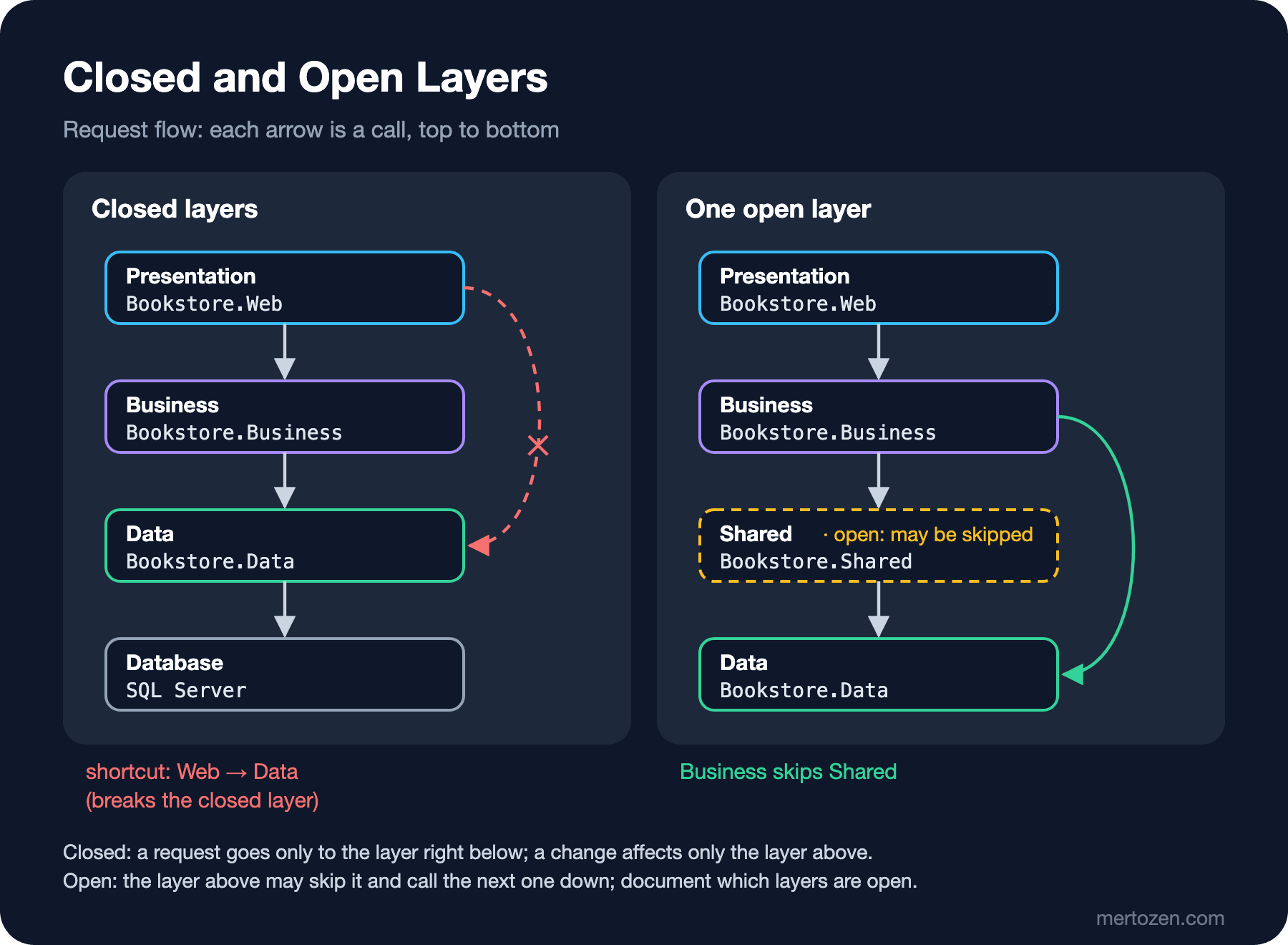
What closed layers give you is called layers of isolation: a change in one layer does not affect the other layers as long as the contracts between layers stay the same. Moving the Data layer from hand-written SQL (Structured Query Language) to EF Core doesn't concern Web at all, as long as the surface Business exposes from Data stays the same. The /admin/stock shortcut in the opening punctures this isolation: now if the name of a property on BookRow in Data changes, Web must change too.
An open layer is not a mistake but a design option. FoSA's example puts a layer with shared services (email, PDF generation, file storage and so on) between business and persistence and marks it open: Business uses it when needed and skips it to go straight to Data when not. The Fast-Lane Reader pattern of the early 2000s was also about read-only screens skipping the business layer and reading data directly. What matters is that which layers are open and which are closed is a deliberate decision and is written down. FoSA's warning is explicit: if it isn't, the team treats every layer as skippable and the result is a tightly coupled, brittle system. The shortcut in the opening was born exactly this way: nobody declared Data open, but it became open because the compiler allowed it.
Moving the Rule into the Compiler
An architecture rule that lives only in a document and in code review gets broken sooner or later. Moving the rule to a place the compiler can check is the cheapest protection. Let's turn off transitive project references in the Web project:
<Project Sdk="Microsoft.NET.Sdk.Web">

  <ItemGroup>
    <ProjectReference Include="..\Bookstore.Business\Bookstore.Business.csproj" />
  </ItemGroup>

  <PropertyGroup>
    <TargetFramework>net10.0</TargetFramework>
    <Nullable>enable</Nullable>
    <DisableTransitiveProjectReferences>true</DisableTransitiveProjectReferences>
    <ImplicitUsings>enable</ImplicitUsings>
  </PropertyGroup>

</Project>
Program.cs(2,17): error CS0234: The type or namespace name 'Data' does not exist in the namespace 'Bookstore' (are you missing an assembly reference?)You see a single error, but that is not the whole picture. In this example, once the compiler found the error on the using line, it did not report the errors in the body of the code. Delete the using Bookstore.Data; line, build again, and the real list appears (line numbers moved up by one because of the deleted line):
Program.cs(12,5): error CS0012: The type 'BookRow' is defined in an assembly that is not referenced. You must add a reference to assembly 'Bookstore.Data, Version=1.0.0.0, Culture=neutral, PublicKeyToken=null'.
Program.cs(15,29): error CS0246: The type or namespace name 'BookRepository' could not be found (are you missing a using directive or an assembly reference?)
Program.cs(4,31): error CS0246: The type or namespace name 'BookRepository' could not be found (are you missing a using directive or an assembly reference?)
Three errors, three different architecture problems. CS0246 on line 15 is the shortcut we expected. CS0012 on line 12 is more interesting: Web never mentions Data, but Business's GetBook method returns Data's BookRow type. The Business layer has leaked the lower layer's type into its own public surface; it is Business, not Web, that broke the closed layer. CS0246 on line 4 is the composition root: to do the DI (Dependency Injection) registration, Web needs to know the class in Data. Microsoft's document notes this case too, saying the simplest solution is to let the UI (User Interface) project reference the infrastructure project but to limit the use of those types to the composition root.
Here we choose a stricter path: move the registration into Business itself, replace the leaked type with a type owned by Business, and route the shortcut through Business. The Microsoft.Extensions.DependencyInjection.Abstractions package (10.0.14) was added to the Business project:
using Bookstore.Data;
using Microsoft.Extensions.DependencyInjection;

namespace Bookstore.Business;

public static class ServiceCollectionExtensions
{
    // The Data layer's registration stays inside Business too
    public static IServiceCollection AddBookstoreBusiness(this IServiceCollection services)
    {
        services.AddSingleton<BookRepository>();
        services.AddScoped<BookService>();
        return services;
    }
}
using Bookstore.Data;
namespace Bookstore.Business;
public sealed record BookDetails(int Id, string Title, decimal Price, bool InStock);
public sealed record StockLevel(string Title, int Stock);
public sealed class BookService(BookRepository books)
{
public BookDetails? GetDetails(int id, bool isMember)
{
BookRow? row = books.FindById(id);
if (row is null)
return null;
decimal price = isMember ? Math.Round(row.ListPrice * 0.90m, 2) : row.ListPrice;
return new BookDetails(row.Id, row.Title, price, row.Stock > 0);
}
// Deliberate pass-through: no rule, but Web doesn't see Data's types
public IReadOnlyList<StockLevel> GetStockLevels() =>
[.. books.All().Select(b => new StockLevel(b.Title, b.Stock))];
}using Bookstore.Business;
WebApplicationBuilder builder = WebApplication.CreateBuilder(args);
builder.Services.AddBookstoreBusiness();
WebApplication app = builder.Build();
app.MapGet("/books/{id:int}", (int id, bool member, BookService service) =>
service.GetDetails(id, member) is { } book ? Results.Ok(book) : Results.NotFound());
app.MapGet("/admin/stock", (BookService service) => service.GetStockLevels());
app.Run();The build is clean, and the reference tool now says the same thing as the diagram:
Bookstore.Web -> Bookstore.Business
Bookstore.Business -> Bookstore.Data
DisableTransitiveProjectReferences only turns off compile-time visibility; Bookstore.Data.dll is still copied to Web's output folder and the application runs:
curl "http://127.0.0.1:5205/books/1?member=true"
curl "http://127.0.0.1:5205/books/2?member=false"
curl "http://127.0.0.1:5205/admin/stock"
{"id":1,"title":"Dune","price":11.69,"inStock":true}
{"id":2,"title":"Emma","price":7.50,"inStock":false}
[{"title":"Dune","stock":4},{"title":"Emma","stock":0},{"title":"The Hobbit","stock":12}]This single property doesn't solve everything. If someone adds a direct ProjectReference from Web to Data, the rule is broken again; guarding against that needs an architecture test running in CI (Continuous Integration). We will do that in the last post of the series with fitness functions. But it prevents "accidental" breakage, the most common case, at zero cost.
The Real Responsibilities of the Layers
Naming folders is easy; deciding which code belongs where is hard. The ASP.NET Core Web API (Application Programming Interface) series post "Layered Structure: The Service Layer and the Repository Debate" discussed this at the controller and service level; here we look at it from the architecture level.
The Presentation layer's job is to talk to the outside world: receive the HTTP (Hypertext Transfer Protocol) request, model binding and input validation, authentication, turn what Business returns into JSON (JavaScript Object Notation) and a status code. If the "10 percent discount for members" rule lives here, you will have to write it again for the mobile app's API or for a background job. The test question is simple: would this code still be needed if the system were called from a message queue instead of HTTP? If yes, it doesn't belong in Presentation.
The Business layer's job is rules and use cases: the discount, the stock check, which state an order may move to, the transaction boundary of an operation. GetDetails in the opening is a real Business method; GetBook was not.
The Data layer's job is how data is stored: SQL, EF Core mapping, connection management, cache. It exposes a surface like "get the book" to Business and keeps "which table with which join" to itself.
The name of this structure is technical partitioning: code is split by its technical role. Its advantage is familiarity; every developer knows where to look. Its cost appears with domain changes: a request to "add an original language field to books" touches all three layers, because one business concept is spread across three technical parts. The alternative is domain partitioning (splitting code by business area, such as Catalog and Ordering), the subject of the next post.
Anti-Patterns: Sinkholes, DB-Centric Design and Utils
Architecture sinkhole. GetBook in the opening was a method that forwarded the request to Data without doing any work. FoSA calls this the architecture sinkhole anti-pattern: requests pass through the layers but no layer does anything. It is an inevitable side effect of keeping every layer closed, and on its own it is not a problem. FoSA suggests an 80-20 rule: if 20 percent of requests are sinkholes, that is acceptable; if 80 percent are, layered architecture may be the wrong style for the problem. GetStockLevels in the final version is a deliberate pass-through too: no rule, but it keeps Web away from Data's types. Counting how many of Bookstore's endpoints look like this gives a concrete measure of how well the style fits.
DB-centric (DB: database) design. BookRow in Data is the shape of a table row. In the first version that shape flowed out of Business's public API into Web, and from there out as JSON; the CS0012 error is its trace in the compiler. In such a structure the database schema becomes the model of the whole system: renaming a column changes the API contract. Like the order number in the first post, the schema has crossed the system boundary. In the final version Business returns its own type (BookDetails) and the schema stays inside Data.
"Everything goes into Utils". A Bookstore.Common or Utils project opened for code that belongs to no layer gradually collects everything from date formatting to sending email, from string extensions to business rules. Since everyone depends on it, it becomes the most frequently changed and riskiest project. CCP (Common Closure Principle) and CRP (Common Reuse Principle) from the "Component Principles" post in the SOLID (Single Responsibility, Open/Closed, Liskov Substitution, Interface Segregation, Dependency Inversion) and Design Principles series are a good guide here: things that don't change together and aren't used together shouldn't sit in the same project. If a shared layer is needed, its name, its responsibility and the fact that it is open should be written down.
The Problem with the Dependency Direction
The most criticized aspect of layered architecture is the dependency direction. In the classic structure compile-time dependencies flow top to bottom: Web → Business → Data. That makes the application's most valuable code (the business rules) depend on its most technical detail (data access). Microsoft's document lists this as a disadvantage too: the business logic layer depends on the data access implementation and often on the existence of a database, so testing it usually requires a test database.
You can see this in the constructor of BookService in Bookstore: it takes BookRepository directly. To test the member discount rule you have to set up a real repository. The fix is to define the interface Business needs inside Business and have Data implement it, inverting the dependency. This idea, which we saw at the class level in the "Dependency Inversion Principle" post of the SOLID and Design Principles series, goes by the names Clean, Onion and Hexagonal Architecture when applied at the architecture level; that is exactly the next big series in this category.
This is not a "layered is bad" verdict. Inverting the dependency direction means interfaces, mapping and indirection for every project. A team of three working on a CRUD (Create, Read, Update, Delete)-heavy application with few business rules may not need to pay that price. As Bookstore's Business layer grows, especially as order and payment rules get more complex, the price will become worth paying.
When Layered, When Not?
Layered architecture is a good starting point: everyone knows it, it is cheap to set up, and it works well for years in small teams and in applications light on business rules. Starting with a technical split while the domain's boundaries are still unclear is reasonable too. In FoSA's assessment the layered style's strengths are simplicity and low cost, and its weaknesses are scalability, elasticity and deployability.
These symptoms show the style has reached its limit: most requests are sinkholes; every business change touches every layer and several teams collide in the same files; you want to scale one part (catalog search, for example) separately but everything is one deployment; the Business layer depends on Data so much it can't be tested. Each symptom points in a different direction: Clean/Hexagonal, domain partitioning and a modular monolith, or separate services. The next two posts map those directions.
Common Pitfalls
Trusting the diagram without checking the compiler. In SDK-style projects, project references are transitive; the rule "Web doesn't see Data" is protected by nothing by default. Move the rule into the compiler with DisableTransitiveProjectReferences and check assembly references from time to time.
Leaking the lower layer's types through the public surface. If a Business method returns a Data entity, it is Business that breaks the closed layer. Each layer should expose its own contract types.
Filling every layer with sinkholes because "it's closed anyway". A Business layer that is 80 percent pass-through is not an architecture, it is bureaucracy. Count the pass-through ratio; if it is high, question the style or deliberately declare some layers open.
Mistaking N-layer for N-tier. Splitting layers into separate processes is a separate decision required by a characteristic (scalability, a security boundary). Done without a reason, every method call turns into a network call.
Using the composition root as an excuse. "Web needs a reference to Data for DI" may be true, but that reference shouldn't spread beyond Program.cs. Moving the registration into the layer's own extension method is the simplest way to remove the reference entirely.
A Small Experiment
★☆☆ Add DisableTransitiveProjectReferences to the Web project in your own solution and build. How many errors appear? Which kind is each: a shortcut, a leaked type, or the composition root?
★★☆ Run the reference tool from the opening on every assembly in your solution and turn the output into a dependency list. Compare it with the arrows in your diagram; is there an arrow that isn't in the diagram?
★★★ Make BookService depend on an IBookReader interface defined inside Business instead of BookRepository, and have Data implement it. How must the direction of the project references change? Write a unit test that checks the member discount rule without a database.
In this post we split Bookstore's inside into layers; but from the outside it is still one application, one deployment. In the next post we talk about that "single piece" itself: the kinds of monolith, how a Big Ball of Mud forms, and why Bookstore should be a monolith for now.