

"Why Isn't My Page Indexed?" Diagnosing Indexing Problems Step by Step

For a page that isn't indexed, ask in order: does Google know the URL, does robots.txt allow it, does it return 200, is there a noindex, does the canonical point to itself, is the content real; the first no is where the problem is. We cover the diagnosis tree, a .NET 10 check tool that runs locally, the robots.txt and noindex conflict, and the Crawled/Discovered – currently not indexed states.
Version note: This post is based on the Google Search Console Page indexing and URL (Uniform Resource Locator) Inspection help pages as of November 2026; the code examples were built and run with .NET 10.
Guess First
Bookstore has six URLs and none of them shows up in Google: a book page, a search results page, a shared reading list, a deleted book, a campaign link with UTM (Urchin Tracking Module) parameters and an author page that can't be found. Each has a different reason. Which of them is actually a problem, and which is behaving exactly as it should? And think about this: the search results page is both blocked by robots.txt and contains a noindex. Is that "double safety", or do the two break each other?
Ask the Right Question First: Where Did It Get Stuck?
Remember the pipeline from the first post of the series: discovery, crawl, render, index, serving. Half of the "it isn't indexed" complaints are actually "it's indexed but doesn't show up"; the two need completely different diagnoses. That's why the first step is always URL Inspection in Search Console: paste the URL and check whether it says "URL is on Google" or "URL is not on Google". If the page is in the index, the problem is on the serving side, that is, query, relevance and quality; we talked about ranking in the third post. If it isn't in the index, the tree below kicks in.
A warning: the site: operator is not a diagnostic tool. A site:bookstore.example/books/ search gives you an idea, but Google says plainly that this operator may not return all indexed URLs, and the result count is an estimate. The reliable answer to whether a URL is in the index is URL Inspection.
The Diagnosis Tree
The tree below asks you to answer the questions top to bottom and stop at the first "no". The fix details for each branch are in the Technical SEO (Search Engine Optimization) series; this post is the diagnosis hub.
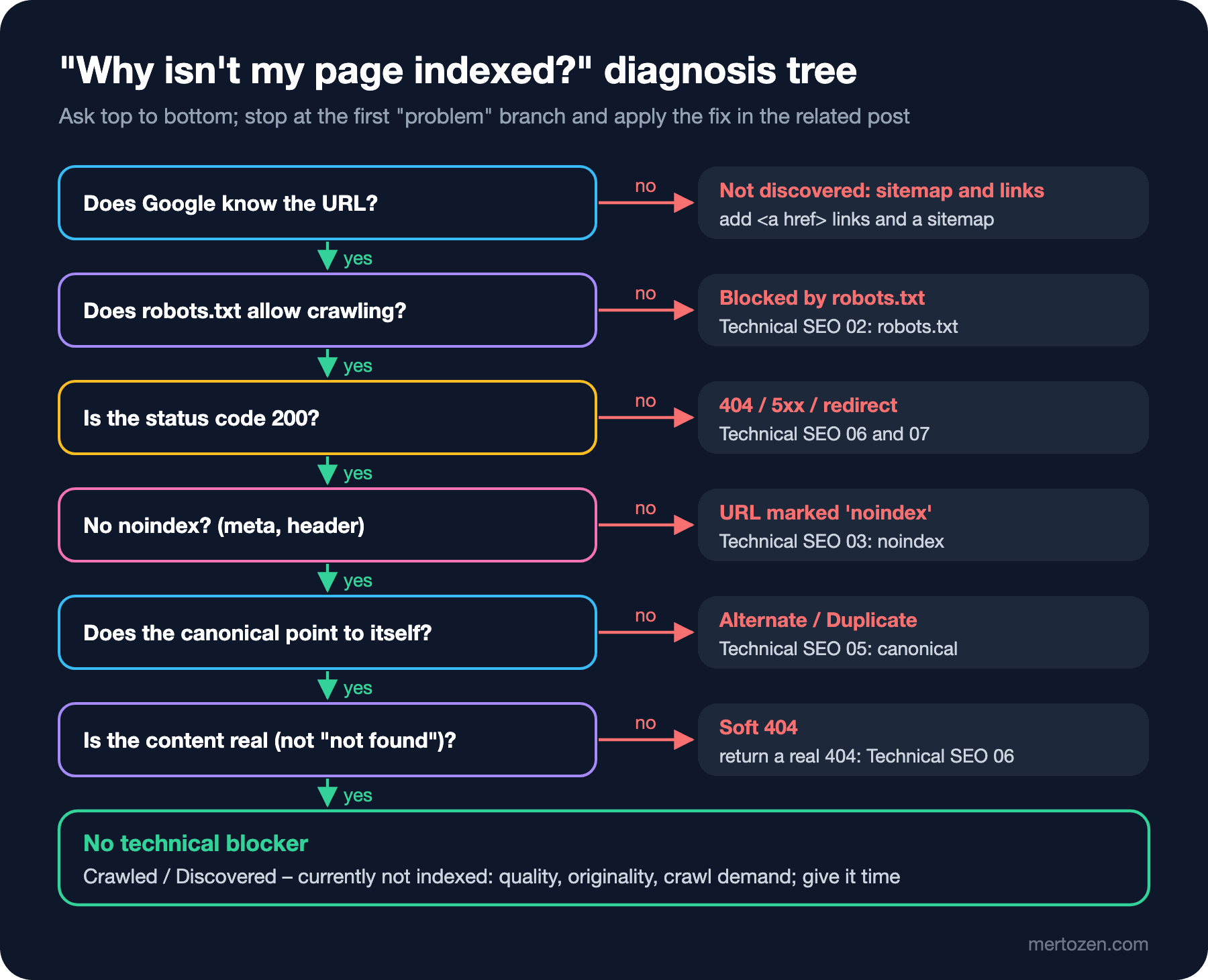
The order has a logic: each question is a precondition for the next. If robots.txt blocks crawling, Google never fetches the page; it can't see the status code, the noindex or the canonical. That's why you have to look at robots.txt before you examine the canonical.
Running the Tree Locally
You can write a small .NET 10 file-based app that checks the technical branches of the tree, robots.txt, status code, noindex, canonical and soft 404, against your own server. It doesn't replace Search Console; it shows the signals your site sends, not Google's decision. But it can run before release, on staging or in CI (Continuous Integration).
using System.Text.RegularExpressions;

Uri url = new(args[0]);
using HttpClient http = new(new HttpClientHandler { AllowAutoRedirect = false });

// 1. robots.txt: only the "*" group, longest matching prefix wins (no wildcards)
string robots = await http.GetStringAsync(new Uri(url, "/robots.txt"));
string? rule = MatchRobots(robots, url.PathAndQuery);
if (rule is not null && rule.StartsWith("Disallow"))
{
    Verdict("Blocked by robots.txt", $"{rule}; a noindex on this page can never be seen");
    return;
}

// 2. status code
using HttpResponseMessage response = await http.GetAsync(url);
int status = (int)response.StatusCode;
if (status is >= 300 and < 400)
{
    Verdict("Page with redirect", $"{status} -> {response.Headers.Location}");
    return;
}
if (status >= 400)
{
    Verdict(status >= 500 ? "Server error (5xx)" : $"Not found or blocked ({status})", "only 200 pages can be indexed");
    return;
}

// 3. noindex in header or HTML
string html = await response.Content.ReadAsStringAsync();
if (response.Headers.TryGetValues("X-Robots-Tag", out IEnumerable<string>? tags) && tags.Any(t => t.Contains("noindex")))
{
    Verdict("URL marked 'noindex'", "X-Robots-Tag header");
    return;
}
if (Regex.IsMatch(html, """<meta[^>]+name="robots"[^>]+noindex""", RegexOptions.IgnoreCase))
{
    Verdict("URL marked 'noindex'", "robots meta tag");
    return;
}

// 4. canonical pointing elsewhere
Match canonical = Regex.Match(html, """<link[^>]+rel="canonical"[^>]+href="([^"]+)""");
if (canonical.Success && new Uri(canonical.Groups[1].Value).PathAndQuery != url.PathAndQuery)
{
    Verdict("Alternate page / duplicate", $"canonical points to {canonical.Groups[1].Value}");
    return;
}

// 5. soft 404 heuristic
if (html.Contains("not found", StringComparison.OrdinalIgnoreCase))
{
    Verdict("Possible soft 404", "200 response whose content says 'not found'");
    return;
}

Verdict("No technical blocker", "if it is still not indexed, look at quality and duplicates");

void Verdict(string title, string detail) => Console.WriteLine($"{url.PathAndQuery,-44} {title}: {detail}");

static string? MatchRobots(string robots, string path)
{
    bool inStarGroup = false;
    string? best = null;
    foreach (string raw in robots.Split('\n'))
    {
        string line = raw.Trim();
        if (line.StartsWith("User-agent:", StringComparison.OrdinalIgnoreCase))
        {
            inStarGroup = line[11..].Trim() == "*";
            continue;
        }
        string[] parts = line.Split(':', 2);
        if (!inStarGroup || parts.Length != 2 || parts[1].Trim().Length == 0)
        {
            continue;
        }
        string prefix = parts[1].Trim();
        bool isRule = parts[0] is "Allow" or "Disallow";
        if (isRule && path.StartsWith(prefix) && (best is null || prefix.Length > best.Split(':', 2)[1].Trim().Length))
        {
            best = $"{parts[0]}: {prefix}";
        }
    }
    return best;
}
The robots.txt matching is deliberately simple: only the * group and prefix matching. Wildcards, $ and group merging rules are defined in RFC (Request for Comments) 9309; the details are in the "A robots.txt Guide" post of the Technical SEO series. Bookstore's robots.txt blocks /search and /account/. Real output for the six opening URLs:
/books/async-in-practice                     No technical blocker: if it is still not indexed, look at quality and duplicates
/search?q=async                              Blocked by robots.txt: Disallow: /search; a noindex on this page can never be seen
/lists/q7Hk2                                 URL marked 'noindex': X-Robots-Tag header
/books/no-such-book                          Not found or blocked (404): only 200 pages can be indexed
/books/async-in-practice?utm_source=newsletter Alternate page / duplicate: canonical points to https://bookstore.example/books/async-in-practice
/authors/nobody                              Possible soft 404: 200 response whose content says 'not found'
Now we can answer the opening question. The reading list, the deleted book and the UTM link are not problems; they are deliberate decisions. The book page has no technical blocker; if it isn't indexed, the problem is somewhere else. The author page is a real bug: it returns 200 for content that can't be found. And the search page is the answer to the second question.
robots.txt and noindex Together: Not Double Safety
The search page has both Disallow: /search and <meta name="robots" content="noindex">. Intuition says "twice as safe"; the reality is the opposite. Because Google doesn't fetch the page due to robots.txt, it never sees the meta tag. In URL Inspection the "Indexing allowed?" field always shows "Yes" in this case. A search URL that gets external links can therefore appear in results without its content being read; in the Page indexing report this is called "Indexed, though blocked by robots.txt".
If your goal is to keep search pages out of the index, the right order is: first allow crawling and let Google see the noindex; once the pages have dropped out of the index, add the robots.txt rule if you want to reduce crawl load. If your goal is only to reduce crawl load, robots.txt is enough, but then you accept the chance of appearing in the index. The "noindex and X-Robots-Tag" post of the Technical SEO series covers this conflict in detail.
The Status Code Branch: 404, 410, 5xx, 401/403 and Redirects
The HTTP (Hypertext Transfer Protocol) status code branch looks like a single question, but in the report it splits into several rows. Not found (404) is the right answer for pages you deleted on purpose; for content you removed permanently you can also use 410. These rows are only a problem if they cover a URL that still gets traffic or that internal links point to. Server error (5xx), on the other hand, should always be investigated: these errors hurt not only because Google can't index the page, but also because they lower the crawl rate. Blocked due to unauthorized request (401) and Blocked due to access forbidden (403) remind you that Googlebot doesn't send credentials; a page behind a login isn't indexed anyway, but if a page that should be public returns 403, a WAF (Web Application Firewall) or bot protection rule may be blocking Googlebot by mistake.
Page with redirect is usually a healthy state: the URL redirects to another address and the target goes into the index. In November 2026 mertozen.com moved its English pages from the ?lang=en parameter to the /en/ subfolder and redirects the old addresses to the new ones with a 301; over the coming weeks, those old addresses filling up the "Page with redirect" row in the report is the expected outcome. Redirect error is different: the chain is too long, loops, produces an overly long URL or leads to an empty target. Redirect types and chains are in the "Redirects" post of the Technical SEO series, status code details in the "HTTP Status Codes and Soft 404s" post.
The Canonical Branch: User-declared and Google-selected
URL Inspection shows two canonicals. The User-declared canonical is the URL you declared through a link tag, an HTTP header, the sitemap or another method. The Google-selected canonical is the URL Google picked among similar pages. If they're the same, all is well. In the Page indexing report you'll see three different situations:
- Alternate page with proper canonical tag: the page is an alternate of another page, and that page is indexed. Expected for the UTM campaign link; nothing to fix.
- Duplicate without user-selected canonical: you didn't declare a canonical, and Google picked another page. Declare your choice with
rel="canonical". - Duplicate, Google chose different canonical than user: you declared a canonical, and Google picked a different one. Your signals may conflict: internal links point to another URL, the sitemap lists another URL, or the two pages really are the same.
The last case takes the most time. In July 2026 Google's canonicalization troubleshooting guide clarified the timing of re-evaluation; after a change, the new decision takes a while to show up. The full set of canonical signals and making them consistent is in the "Canonical URLs" post of the Technical SEO series.
No Technical Blocker: Crawled and Discovered – Currently Not Indexed
If you've reached the bottom of the tree, you're in one of two situations. Discovered – currently not indexed: Google found the URL but hasn't crawled it yet; it rescheduled the crawl to avoid overloading the site. This usually happens on new sites or sites with many new URLs, or during periods when the server responds slowly. Crawled – currently not indexed: Google fetched the page but didn't index it. Google's note is clear: it doesn't index every page on the web, this status is common and doesn't always need action.
If an important page is in this state, once the technical diagnosis is done, change the question: why does this page deserve to be in the index? Is there a better version of the same content on the site or on the web, is the page thin, does it really say something original? Google's helpful content questions apply here too. After strengthening the page, supporting it with internal links and honestly updating the lastmod in the sitemap is the cleanest signal for Google to take another look. For large sites, crawl capacity and crawl demand are covered in the "Crawl Budget, Server Log Analysis and Verifying Googlebot" post of the Technical SEO series.
Production Notes
Finish the diagnosis with proof. If you fixed something on a branch, show with the live test in URL Inspection that the signal now goes out correctly, then start "Validate fix" in the Page indexing report. Validation typically takes up to two weeks; wait, don't press it again.
Group page types. Instead of dealing with URLs one by one, read the report by page template: if all /authors/ pages are soft 404s, the problem is in a single controller.
Run the tool above only against your own server, and run it in CI for a few critical URLs after deploys. A Disallow accidentally added to robots.txt gets caught before it goes live.
Common Pitfalls
Treating every "not indexed" row as a bug. Alternate page, redirect and deliberate noindex rows stay in the report, and they should.
Leaning on Request indexing. There's a quota and the request doesn't guarantee indexing; if there's a technical blocker, the request is useless too.
Ignoring soft 404s. A page that says "not found" but returns 200 wastes Google's crawl and expects to be treated like a real page. Return a real 404 or 410.
Taking the live test result for the indexed version. The live test is a snapshot; the indexed data comes from the last crawl.
A Small Experiment
★☆☆ Run IndexCheck.cs against five different page templates in your own project and write down at which branch of the tree each one stops.
★★☆ Improve the tool's soft 404 heuristic: in addition to the "not found" text, also flag 200 responses whose body is shorter than 512 bytes and contains no <h1>. Do you get false positives on Bookstore?
★★★ Add the * wildcard and $ for end of line to the robots.txt matching; write unit tests using the examples in RFC 9309 and show with a test which one wins when Allow and Disallow have the same length.
With the diagnosis tree we've learned to separate technical problems. In the last post of the series we move to a topic that isn't technical but wastes the most time: SEO myths, from meta keywords to "guaranteed ranking" promises, and what Google actually says about them.