

The TLS 1.3 Handshake: Certificate Chain, SNI, ALPN and Post-Quantum Key Exchange
TLS 1.3 sets up the encrypted channel in one RTT by putting the key_share in the ClientHello; ECDHE gives forward secrecy and X25519MLKEM768 adds post-quantum protection. The handshake with openssl s_client, a ClientHello growing from 285 to 1,525 bytes, certificate chain errors, SNI/ECH/ALPN, 0-RTT and .NET staying on TLS 1.2 on macOS.
Version note: The commands in this post were run with OpenSSL 4.0.3 and curl 8.7.1, and the code with .NET 10.0.13, on macOS and in a mcr.microsoft.com/dotnet/aspnet:10.0 Linux container; the TLS (Transport Layer Security) description follows RFC (Request for Comments) 9846 (TLS 1.3, July 2026). Browser status is as of November 2026.
Guess First
You run the Bookstore API (Application Programming Interface) in a Linux container and see TLS 1.3 when you connect with curl. You connect to the same server with HttpClient from a .NET 10 app running on a Mac. Which TLS version is spoken? The server supports 1.3, the client is .NET 10; the answer seems obvious.
Second question: when you open a TLS connection with OpenSSL 4.0.3's default settings, how many bytes is the first message, the ClientHello? A few hundred, or a kilobyte and a half? Both answers are in this post, and both are real measurements.
Three Goals and the 1-RTT Handshake
TLS provides three things. Confidentiality: nobody in between can read the content. Integrity: if the content is changed on the way, it's noticed. Authentication: the server you're talking to really is the server it claims to be. The first two come from symmetric encryption with an AEAD (Authenticated Encryption with Associated Data) algorithm, the third from certificates and digital signatures. The handshake's job is for two parties who have never met to agree on a shared secret key, and for the server to prove its identity along the way.
TLS 1.3 was first published in 2018 as RFC 8446. RFC 9846, published in July 2026, formally obsoleted RFC 8446 and TLS 1.2's RFC 5246; the protocol on the wire is the same, what changed is clarified text and accumulated fixes. To see the handshake's messages I connected OpenSSL's s_client to Kestrel in the container:
$ openssl s_client -connect 127.0.0.1:5592 -servername localhost -CAfile certs/ca.crt -alpn h2,http/1.1 -tls1_3
Connecting to 127.0.0.1
depth=1 CN=Bookstore Local Root CA
verify return:1
depth=0 CN=bookstore.localhost
verify return:1
CONNECTED(00000003)
---
Certificate chain
 0 s:CN=bookstore.localhost
   i:CN=Bookstore Local Root CA
   a:PKEY: EC, (prime256v1); sigalg: ecdsa-with-SHA256
   v:NotBefore: Nov  8 09:39:16 2026 GMT; NotAfter: Dec  8 09:39:16 2026 GMT
---
No client certificate CA names sent
Peer signing digest: SHA256
Peer signature type: ecdsa_secp256r1_sha256
Peer Temp Key: X25519, 253 bits
---
SSL handshake has read 824 bytes and written 1567 bytes
Verification: OK
---
New, TLSv1.3, Cipher is TLS_AES_256_GCM_SHA384
Protocol: TLSv1.3
ALPN protocol: h2
Early data was not sent
Verify return code: 0 (ok)
---
ECH: NOT CONFIGURED: -103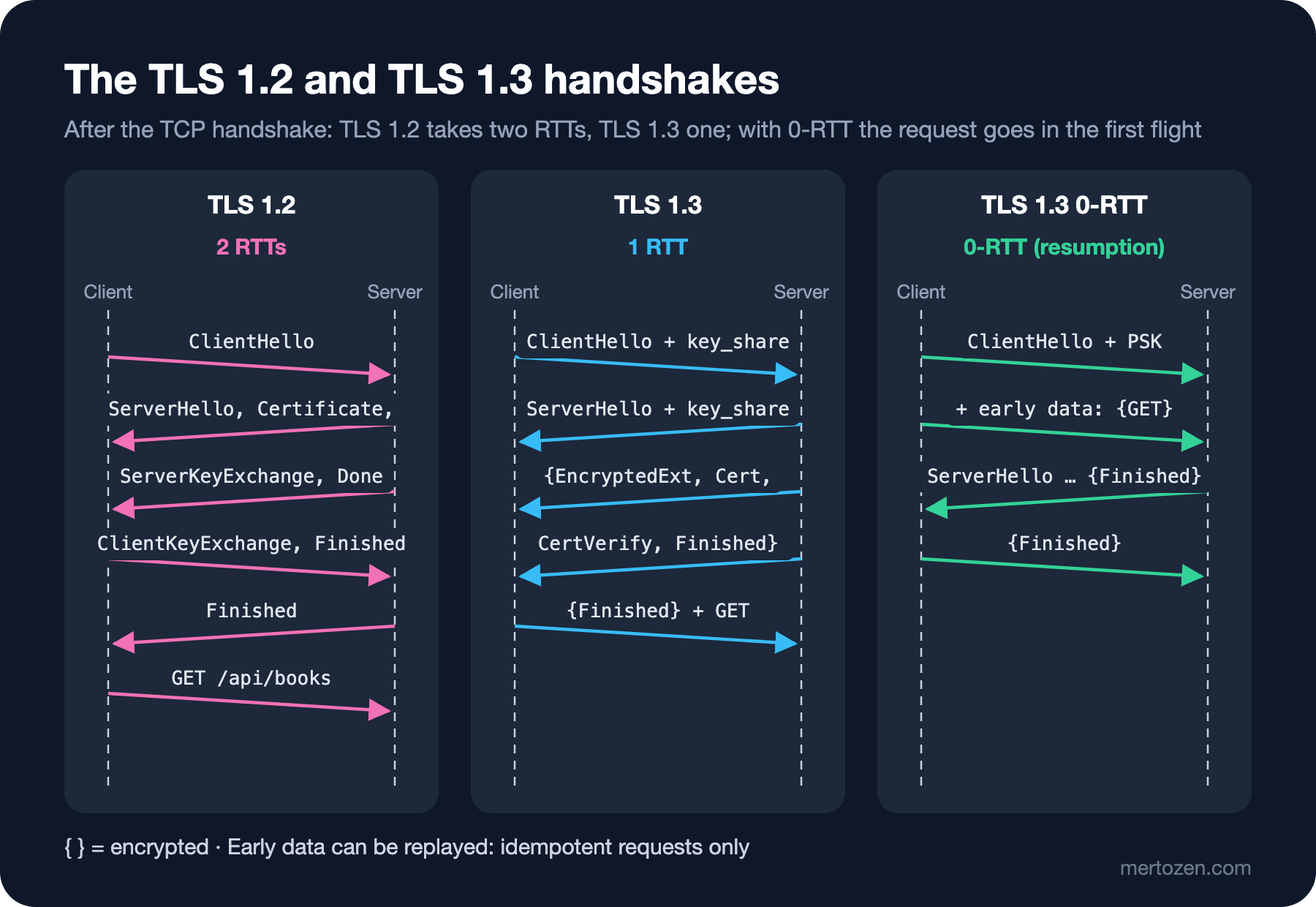
In TLS 1.2 the client first listed the algorithms it supported, the server picked one, and then the key exchange needed a second round: two RTTs (round-trip time) after TCP (Transmission Control Protocol). TLS 1.3 guesses: the client puts its key share (key_share) for the most likely group straight into the ClientHello. The server sends its own share in the ServerHello; from that moment both sides can compute the shared key, so the rest of the server's messages (EncryptedExtensions, Certificate, CertificateVerify, Finished) already travel encrypted. The client sends its Finished and the first HTTP (Hypertext Transfer Protocol) request in the same flight: one RTT. You can see this message by message with -msg:
$ openssl s_client -connect 127.0.0.1:5595 -CAfile certs/ca.crt -msg | grep -E "ClientHello|ServerHello,|Certificate$|CertificateVerify|Finished|Negotiated"
>>> TLS 1.3, Handshake [length 05f5], ClientHello
<<< TLS 1.3, Handshake [length 01c8], Certificate
<<< TLS 1.3, Handshake [length 004f], CertificateVerify
<<< TLS 1.3, Handshake [length 0034], Finished
>>> TLS 1.3, Handshake [length 0034], Finished
Negotiated TLS1.3 group: X25519MLKEM768
This second output comes from a different server: an OpenSSL 4.0.3 s_server I ran locally with the same certificate. The next section explains why I needed a separate server. The DevTools Security panel shows the same information (protocol, key exchange group, cipher) on the browser side.
ECDHE, Forward Secrecy and Post-Quantum Key Exchange
The Peer Temp Key: X25519 line says the key exchange was done with ECDHE (Elliptic Curve Diffie-Hellman Ephemeral). The word "ephemeral" is crucial: a new, temporary key pair is generated for every connection and discarded when the handshake ends. The long-lived private key in the server's certificate is used only for signing, not for deriving the session key. So even if the private key is stolen one day, traffic recorded in the past can't be decrypted; this is called forward secrecy. TLS 1.3 removed RSA (Rivest–Shamir–Adleman) key transport, which doesn't provide it, entirely.
Forward secrecy has a gap: traffic recorded today could be decrypted later if a sufficiently powerful quantum computer breaks elliptic curve math ("harvest now, decrypt later"). That's why key exchange moved to a hybrid design: classic X25519 (Diffie-Hellman over Curve25519) is used together with the quantum-resistant Module-Lattice-Based Key-Encapsulation Mechanism (ML-KEM), and the session stays safe as long as either one holds. According to the Google Security Blog, Chrome has used X25519MLKEM768 by default since Chrome 131; the other major browsers support the same group too. The groups OpenSSL 4.0.3 knows:
$ openssl list -tls-groups
secp256r1:secp384r1:secp521r1:x25519:x448:brainpoolP256r1tls13:brainpoolP384r1tls13:brainpoolP512r1tls13:curveSM2:ffdhe2048:ffdhe3072:ffdhe4096:ffdhe6144:ffdhe8192:MLKEM512:MLKEM768:MLKEM1024:SecP256r1MLKEM768:X25519MLKEM768:SecP384r1MLKEM1024:curveSM2MLKEM768
In the output from Kestrel in the container the group was X25519, because the OpenSSL version in the Ubuntu-based .NET image doesn't know ML-KEM; the hybrid share the client sent was ignored and the connection fell back to classic X25519. With the local OpenSSL 4 server, the default settings chose the hybrid group. The price is size. Comparing the ClientHello with X25519 only and with the defaults:
$ openssl s_client -connect 127.0.0.1:5595 -CAfile certs/ca.crt -groups X25519 -msg | grep -E "ClientHello|ServerHello"
>>> TLS 1.3, Handshake [length 011d], ClientHello
<<< TLS 1.3, Handshake [length 007a], ServerHello
$ openssl s_client -connect 127.0.0.1:5595 -CAfile certs/ca.crt -msg | grep -E "ClientHello|ServerHello,"
>>> TLS 1.3, Handshake [length 05f5], ClientHello
The ClientHello went from 285 bytes to 1,525 bytes, and the ServerHello (04ba in the first output) is 1,210 bytes. That's the answer to the second guessing question: ML-KEM's public key and ciphertext are over a kilobyte, against X25519's 32 bytes. The ClientHello may no longer fit in a single TCP segment; that's why, in the first deployments, some middleboxes that didn't expect a large ClientHello dropped connections. An important detail: only the key exchange is post-quantum. The signature on the certificate is still classic ECDSA (Elliptic Curve Digital Signature Algorithm); moving certificates to post-quantum signatures is a separate, slower process.
The Certificate Chain and Validation
The server proves its identity with a certificate. The certificate says "this public key belongs to bookstore.localhost" and is signed by a CA (Certificate Authority). The client checks the signature along the chain until it reaches a root CA it trusts; then it checks that the name matches and that the validity period is current. The depth=1 and depth=0 lines above are that chain: first the root, then the server's certificate. In the real world there's usually an intermediate CA in between, and the server must send it too; the root comes from the client's trust store.
I tried two common validation failures against the local server. First without introducing the CA, then with a wrong name:
$ openssl s_client -connect 127.0.0.1:5595 -servername localhost
verify error:num=20:unable to get local issuer certificate
verify error:num=21:unable to verify the first certificate
Verification error: unable to verify the first certificate
Verify return code: 21 (unable to verify the first certificate)

$ openssl s_client -connect 127.0.0.1:5595 -CAfile certs/ca.crt -verify_hostname shop.example
verify error:num=62:hostname mismatch
Verification error: hostname mismatch
Verify return code: 62 (hostname mismatch)
The most common certificate error in production is a variant of the first: the server doesn't send the intermediate certificate. Because browsers can find a missing intermediate from their cache or via AIA (Authority Information Access), the site looks fine in the browser, but services connecting with HttpClient or curl get an error. Getting, renewing and operating certificate chains, along with TLS's old name SSL (Secure Sockets Layer) and HTTPS (HTTP Secure), is the topic of the upcoming DevOps "SSL/TLS Certificates and HTTPS" series; here we stay on the protocol side.
SNI, ECH and ALPN
A server hosting several domains on the same IP (Internet Protocol) address has to know which certificate to send at the start of the handshake. The client says so with the SNI (Server Name Indication) extension in the ClientHello: -servername localhost does exactly that. The problem is that the ClientHello is unencrypted: anyone on the network can read from the SNI which site you're connecting to. ECH (Encrypted Client Hello, RFC 9849, March 2026) solves this: the client encrypts the real ClientHello with a public key the server publishes in its DNS (Domain Name System) HTTPS record, and only a shared "front" name is visible outside. The ECH: NOT CONFIGURED line in OpenSSL 4's output says the client supports ECH but there's no configuration to use for this connection. Because ECH's key comes from DNS, in practice it makes sense together with an encrypted DNS channel (the previous post's DoH).
ALPN (Application-Layer Protocol Negotiation) decides, within the same handshake, which application protocol will be spoken. The client offered h2,http/1.1 and Kestrel chose h2: ALPN protocol: h2. This is what lets HTTP/2 start over TLS without an extra round; we'll see it in detail in the eighth post.
0-RTT and the Replay Risk
In TLS 1.3, when you return to a server you've connected to before, you can send application data in the first flight using a PSK (pre-shared key) left over from the previous session: 0-RTT, or early data. I tried it with OpenSSL; first I opened a session and saved the ticket, then used the ticket to send an HTTP request together with the ClientHello:
$ openssl s_client -connect 127.0.0.1:5595 -CAfile certs/ca.crt -sess_out logs/sess.pem
$ openssl s_client -connect 127.0.0.1:5595 -CAfile certs/ca.crt -sess_in logs/sess.pem -early_data logs/early.txt
Reused, TLSv1.3, Cipher is TLS_AES_256_GCM_SHA384
Early data was accepted
    Max Early Data: 16384
The request's lines landed in the server's log before the handshake finished. The price is security: early data has weaker forward secrecy, and an attacker can send recorded early data to the server again (replay). That's why 0-RTT is only suitable for requests that are harmless to repeat, i.e. idempotent and side-effect free: a GET /api/books yes, a POST /api/orders never. We cover method semantics and idempotency in the sixth post.
.NET: TLS Comes from the Operating System
.NET doesn't ship its own TLS implementation; SslStream uses the operating system's library: SChannel on Windows, OpenSSL on Linux, Apple's library on macOS. To answer the guessing question I wrote a small probe that reports which protocol was negotiated:
public static async Task ProbeAsync(string host, int port, string caPath)
{
    var root = X509CertificateLoader.LoadCertificateFromFile(caPath);
    using var tcp = new TcpClient();
    await tcp.ConnectAsync(host, port);
    await using var tls = new SslStream(tcp.GetStream());
    await tls.AuthenticateAsClientAsync(new SslClientAuthenticationOptions
    {
        TargetHost = "localhost", // for SNI and the certificate name check
        ApplicationProtocols = [SslApplicationProtocol.Http2, SslApplicationProtocol.Http11],
        CertificateChainPolicy = new X509ChainPolicy
        {
            TrustMode = X509ChainTrustMode.CustomRootTrust,
            CustomTrustStore = { root },
            RevocationMode = X509RevocationMode.NoCheck,
        },
    });
    Console.WriteLine($"{host}:{port} protocol={tls.SslProtocol} cipher={tls.NegotiatedCipherSuite} alpn={tls.NegotiatedApplicationProtocol}");
    Console.WriteLine($"  server certificate: {tls.RemoteCertificate?.Subject}, issuer: {tls.RemoteCertificate?.Issuer}");
}
$ dotnet Bookstore.Net.Lab.dll tls 127.0.0.1 5592 certs/ca.crt
127.0.0.1:5592 protocol=Tls12 cipher=TLS_ECDHE_ECDSA_WITH_AES_256_GCM_SHA384 alpn=h2
server certificate: CN=bookstore.localhost, issuer: CN=Bookstore Local Root CA
$ curl -sv --cacert certs/ca.crt https://127.0.0.1:5592/api/books 2>&1 | grep "SSL connection"
* SSL connection using TLSv1.3 / AEAD-AES256-GCM-SHA384 / [blank] / UNDEFSame server, same machine: curl TLS 1.3, .NET TLS 1.2. The server side is the same; when I ran Kestrel directly on macOS, even curl connected with TLS 1.2 (SSL connection using TLSv1.2 / ECDHE-ECDSA-AES256-GCM-SHA384). The Apple API .NET uses on macOS doesn't support TLS 1.3; the topic is tracked in open issue 1979 in the dotnet/runtime repository, and work is underway to move to a newer Apple API. In a Linux container and on Windows, .NET speaks TLS 1.3. The lesson: TLS behavior comes from the platform, not your code; don't generalize what you see on your development machine to production, measure on the target platform.
The CustomRootTrust in the probe is the right way to solve certificate problems in local development: without touching the operating system's trust store, you trust your own CA for this connection only, and chain and name checks keep working. The common alternative, HttpClientHandler.DangerousAcceptAnyServerCertificateValidator, turns validation off entirely; the "Dangerous" in its name is a warning. It can only be used in a local test environment against a server you control; letting it into production code means anyone in the middle can read the traffic. Application-side encryption mistakes are covered in the Web Security series' OWASP (Open Worldwide Application Security Project) Top 10 posts, in "OWASP A04: Cryptographic Failures (1) — Encoding, Hashing, Encryption and HTTPS".
In Production
Leave TLS to the platform and the defaults as much as possible. Pinning SslProtocols by hand in .NET keeps your app on an old version even when the operating system supports a newer one. Microsoft's recommendation is to leave the version to the operating system as well.
Monitor certificate expiry and the chain. An expired certificate is the most common and the most easily prevented outage. Verify that the full chain is sent with openssl s_client -showcerts or curl, not with a browser.
Pay for the handshake with connection reuse. Every TLS handshake means an RTT and considerable CPU (Central Processing Unit); as we saw in earlier posts, reused connections make that a one-time cost. With the post-quantum hybrid making the ClientHello larger, a new connection has become a little more expensive.
Prepare network devices for post-quantum. An old proxy or firewall that can't parse a ClientHello over a thousand bytes can silently drop connections. Keep that in mind when diagnosing clients with connection problems on a corporate network.
Common Pitfalls
Turning validation off and forgetting it. DangerousAcceptAnyServerCertificateValidator or curl -k starts as a local convenience and leaks into production.
Not sending the intermediate certificate. It works in the browser and breaks in service-to-service calls.
Missing the platform difference. An app you develop on macOS and run on Linux speaks a different TLS version; measure on the target platform.
Enabling 0-RTT for every request. Early data can be replayed; it shouldn't be used for requests with side effects.
Overgeneralizing "post-quantum." What's protected today is the key exchange; certificate signatures are still made with classic algorithms.
A Small Experiment
★☆☆ Connect to a site you use often with the pattern openssl s_client -connect example.com:443 -servername example.com, using its own domain. Which group, which cipher and which certificate chain come back? Compare with the browser's Security panel.
★★☆ Connect openssl s_client to a local server with -groups X25519 and with the defaults, and compare the SSL handshake has read ... and written ... lines. Where does the difference come from?
★★★ Run this post's TlsProbe in a Linux container and connect to the same server. How do the SslProtocol and NegotiatedCipherSuite values differ from those on macOS?
The encrypted channel is up. Now we can move on to the real conversation inside it. In the next post we write HTTP/1.1 by hand with nc and openssl s_client and read it off the wire: request and response format, Content-Length vs chunked framing, method semantics and keep-alive.