

HTTP Caching and Conditional Requests: Cache-Control, ETag and 304
An HTTP cache uses Cache-Control to decide how long a copy stays fresh, and ETag or Last-Modified to cheaply revalidate it with a 304 Not Modified when it expires. no-cache vs no-store, heuristic freshness for static files without Cache-Control, the old index.html after a deploy, and an ETag handler written because HttpClient has no cache of its own.
Version note: The code and requests in this post were run with .NET 10 (ASP.NET Core 10 Kestrel) and curl 8.7.1; tests were run with xUnit v3 4.0.2. The HTTP (Hypertext Transfer Protocol) caching description follows RFC (Request for Comments) 9111.
Guess First
You deployed a new version of Bookstore's Angular app. On the server index.html points to the new bundle files, and the old files were deleted. An hour later the support team writes: some users see a white screen, and the console shows a main.js getting a 404. Everything on the server is correct. Which file did these users' browsers get, and from where?
Second question: a .NET service calls an endpoint of the catalog service that returns Cache-Control: public, max-age=60 three times in a row with HttpClient. How many requests does the catalog service see?
Freshness: Cache-Control and max-age
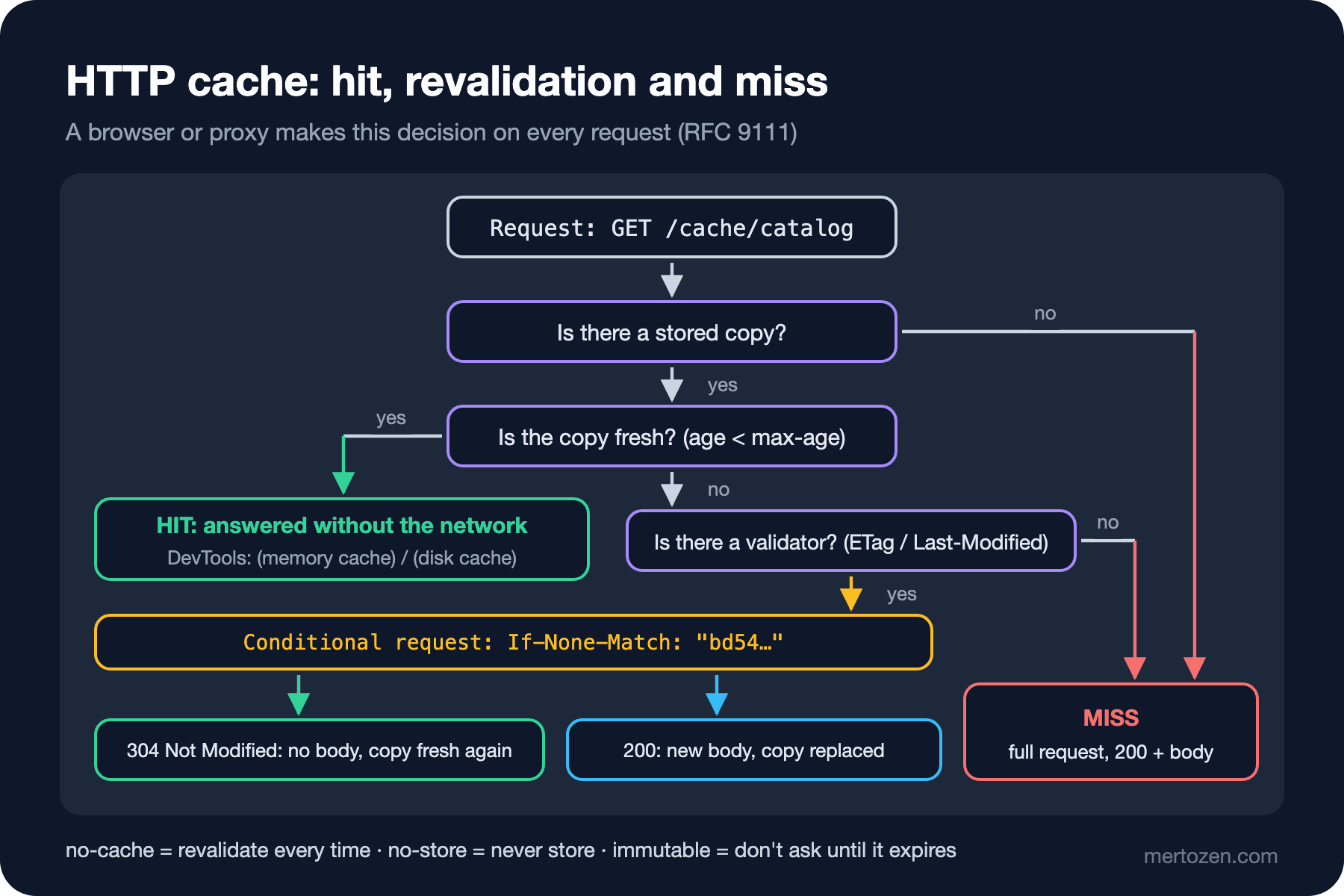
An HTTP cache makes two basic decisions: is the copy I have still usable (freshness), and if not, can I cheaply ask the server "is it still the same?" (validation). The server sets freshness with the Cache-Control header. The response of my catalog endpoint:
$ curl -si http://127.0.0.1:5491/cache/catalog
HTTP/1.1 200 OK
Content-Length: 311
Content-Type: application/json
Date: Sun, 08 Nov 2026 10:32:15 GMT
Server: Kestrel
Cache-Control: public, max-age=60
ETag: "bd54bce21b5e0aa3"
X-Server-Hits: 1

[{"Id":1,"Isbn":"978-0000000001","Title":"Title 1","Price":11},...]
max-age=60 says the response counts as fresh for 60 seconds from when it was generated; within that time a cache answers the same request with this copy without touching the network. public means the response may also be stored in shared caches (a CDN (Content Delivery Network), a reverse proxy). The important directives:
| Directive | Meaning | Where in Bookstore |
|---|---|---|
max-age=N | Fresh for N seconds | The catalog list, 60 s |
s-maxage=N | max-age for shared caches only | 10 minutes in the CDN, 1 minute in the browser |
public / private | Whether a shared cache may store it | The user's cart is private |
no-cache | May be stored, but must be revalidated before every use | index.html |
no-store | Never stored anywhere | Payment page, personal data |
immutable | No need even to revalidate while fresh | Hashed bundle files |
stale-while-revalidate=N | After expiry, serve the old copy for N seconds while refreshing in the background | Home page showcase list |
When computing a response's age, a cache also takes into account the Age header added by proxies in between: a response that reaches the browser after waiting 50 seconds in a CDN has only 10 seconds left of its max-age=60. So if there are several caches in the chain, total staleness depends on the whole path, not on any single max-age; answer the question "how stale can this content get" by looking at that chain.
The pair most often confused is no-cache and no-store. no-cache doesn't mean "don't cache"; it means "ask before using." The right directive for content that must never be stored is no-store.
Validation: ETag, Last-Modified and 304
When a copy expires the cache doesn't throw it away right away. If the response has a validator, it sends the server a conditional request: "I have this version; has it changed?" There are two kinds of validator. ETag is an opaque value representing the content's version; I use the first 16 characters of a hash of the JSON (JavaScript Object Notation), computed with the Secure Hash Algorithm (SHA) family's SHA-256 (JavaScript Object Notation). Last-Modified is the time the content last changed. The client sends them back with If-None-Match and If-Modified-Since:
$ curl -si -H 'If-None-Match: "bd54bce21b5e0aa3"' http://127.0.0.1:5491/cache/catalog
HTTP/1.1 304 Not Modified
Date: Sun, 08 Nov 2026 10:32:24 GMT
Server: Kestrel
Cache-Control: public, max-age=60
ETag: "bd54bce21b5e0aa3"
X-Server-Hits: 2
304 Not Modified: no body, just headers. The cache treats its copy as fresh again and uses it. For a 311-byte JSON the gain is small; but for a page's dozens of CSS (Cascading Style Sheets), JavaScript and image files, 304s turn megabytes of downloads into a few hundred bytes. The server-side code is simple:
var catalogJson = System.Text.Json.JsonSerializer.Serialize(books);
var catalogEtag = $"\"{Convert.ToHexString(SHA256.HashData(Encoding.UTF8.GetBytes(catalogJson)))[..16].ToLowerInvariant()}\"";
var catalogHits = 0;
app.MapGet("/cache/catalog", (HttpContext ctx) =>
{
    ctx.Response.Headers["X-Server-Hits"] = Interlocked.Increment(ref catalogHits).ToString();
    ctx.Response.Headers.CacheControl = "public, max-age=60";
    ctx.Response.Headers.ETag = catalogEtag;
    if (ctx.Request.Headers.IfNoneMatch == catalogEtag)
    {
        return Results.StatusCode(StatusCodes.Status304NotModified);
    }
    return Results.Text(catalogJson, "application/json");
});
For static files ASP.NET Core already does this. The response for a CSS file served with UseStaticFiles(), and a conditional request with Last-Modified:
$ curl -sI http://127.0.0.1:5491/css/site.css
HTTP/1.1 200 OK
Content-Length: 73
Content-Type: text/css
Date: Sun, 08 Nov 2026 10:32:24 GMT
Server: Kestrel
Accept-Ranges: bytes
ETag: "1dd6f6c6b664b49"
Last-Modified: Sun, 08 Nov 2026 10:32:14 GMT

$ curl -sI -H "If-Modified-Since: Sun, 08 Nov 2026 10:32:14 GMT" http://127.0.0.1:5491/css/site.css
HTTP/1.1 304 Not Modified
Content-Type: text/css
...
ETag: "1dd6f6c6b664b49"
Last-Modified: Sun, 08 Nov 2026 10:32:14 GMT
Note: there's no Cache-Control in the static file response. The Static Files middleware adds validators by default but doesn't specify freshness. In that case RFC 9111 allows the browser heuristic freshness: typically 10 percent of the time since the file last changed. A file changed a month ago can be used from cache for three days without asking the server at all. That's the key to the guessing question.
A Real Bug: The Old index.html After a Deploy
An Angular build adds a content hash to file names (main.3f9a1c.js); when the content changes, so does the name. The name of index.html, however, never changes, and it's what says which bundles to load. The browsers of the users in the guessing section took the old index.html from cache via heuristic freshness, and it asked for the old main.js that's no longer on the server: a 404 and a white screen.
The right rule is two lines: no-cache for index.html, a long max-age plus immutable for hashed files. I imitated both on my demo server:
$ curl -s -D - -o /dev/null http://127.0.0.1:5491/app/index.html
HTTP/1.1 200 OK
Content-Length: 59
Cache-Control: no-cache
ETag: "index-v42"
$ curl -s -D - -o /dev/null -H 'If-None-Match: "index-v42"' http://127.0.0.1:5491/app/index.html
HTTP/1.1 304 Not Modified
Cache-Control: no-cache
ETag: "index-v42"
$ curl -s -D - -o /dev/null http://127.0.0.1:5491/app/main.3f9a1c.js
HTTP/1.1 200 OK
Content-Length: 26
Cache-Control: public, max-age=31536000, immutable
index.html is revalidated on every load, but if it hasn't changed only a 304 comes back; the cost is one RTT (round-trip time). The bundles are used for a year without being asked about; since their names change when they change, there's no risk of using an old copy. In ASP.NET Core you set this per file name with Static Files' OnPrepareResponse callback; if you're behind a CDN, the same rules must be applied there too.
This experiment turned up a side finding: curl's -I sends HEAD, and endpoints defined with MapGet in minimal APIs (Application Programming Interface) return 405 Method Not Allowed for HEAD; that's why I read the headers with GET and -D -. Static Files does support HEAD.
Vary and Seeing the Cache in the Browser
If a URL's (Uniform Resource Locator) response depends on a header in the request, the server must say so with Vary. Vary: Accept-Encoding keeps the gzip- and brotli-compressed copies stored separately. If Vary: Authorization or Vary: Cookie is forgotten, a shared cache can give one user's response to another; for personalized responses the safest route is private or no-store anyway.
In the browser you can see the cache working in the Size column of the DevTools Network panel: (memory cache) and (disk cache) show the network wasn't touched at all, while a 304 arriving with a tiny size shows a revalidation. The "Disable cache" checkbox turns all these decisions off while DevTools is open; when a developer says "it works for me" and has DevTools open, that's often why.
.NET: HttpClient Has No Cache
The answer to the second guessing question: three requests. Unlike browsers, HttpClient has no HTTP cache; it doesn't read Cache-Control and sends every request to the server. If you want revalidation on the client side, you have to write it. A small handler that stores the ETag and sends If-None-Match on later GETs:
// HttpClient has no HTTP cache of its own; this handler revalidates GETs with If-None-Match
public sealed class EtagCacheHandler : DelegatingHandler
{
    private sealed record Entry(EntityTagHeaderValue ETag, byte[] Body, MediaTypeHeaderValue? ContentType);

    private readonly ConcurrentDictionary<Uri, Entry> _entries = new();

    protected override async Task<HttpResponseMessage> SendAsync(HttpRequestMessage request, CancellationToken cancellationToken)
    {
        if (request.Method != HttpMethod.Get || request.RequestUri is null)
        {
            return await base.SendAsync(request, cancellationToken);
        }

        _entries.TryGetValue(request.RequestUri, out var cached);
        if (cached is not null)
        {
            request.Headers.IfNoneMatch.Add(cached.ETag);
        }

        var response = await base.SendAsync(request, cancellationToken);
        if (response.StatusCode == HttpStatusCode.NotModified && cached is not null)
        {
            // 304: build the body from our copy, not from the server
            var fromCache = new HttpResponseMessage(HttpStatusCode.OK)
            {
                RequestMessage = request,
                Content = new ByteArrayContent(cached.Body),
            };
            fromCache.Content.Headers.ContentType = cached.ContentType;
            foreach (var header in response.Headers)
            {
                fromCache.Headers.TryAddWithoutValidation(header.Key, header.Value);
            }
            fromCache.Headers.Add("X-Cache", "revalidated");
            response.Dispose();
            return fromCache;
        }

        if (response.IsSuccessStatusCode && response.Headers.ETag is { } etag)
        {
            var body = await response.Content.ReadAsByteArrayAsync(cancellationToken);
            _entries[request.RequestUri] = new Entry(etag, body, response.Content.Headers.ContentType);
            var copy = new ByteArrayContent(body);
            copy.Headers.ContentType = response.Content.Headers.ContentType;
            response.Content = copy;
            response.Headers.Add("X-Cache", "miss");
        }
        return response;
    }
}
$ dotnet Bookstore.Net.Lab.dll httpcache http://127.0.0.1:5491/cache/catalog
plain HttpClient:
#1 status=200 bytes=311 serverHits=1 x-cache=-
#2 status=200 bytes=311 serverHits=2 x-cache=-
#3 status=200 bytes=311 serverHits=3 x-cache=-
with EtagCacheHandler:
#1 status=200 bytes=311 serverHits=4 x-cache=miss
#2 status=200 bytes=311 serverHits=5 x-cache=revalidated
#3 status=200 bytes=311 serverHits=6 x-cache=revalidatedThe plain HttpClient downloaded the 311-byte body again every time. In the version with the handler, after the first request the server still saw every request (serverHits keeps rising) but returned a 304; the body didn't cross the wire and was handed to the client from the stored copy. The handler's behavior is verified in an xUnit test written with a fake HttpMessageHandler: the second request sends If-None-Match: "v1" and the body comes from the cache. This example doesn't enforce max-age; writing a full client cache (freshness, Vary, size limits, eviction) is serious work, and the right layer is usually a cache sitting between services or Output Caching on the server side.
Server-side caching options are covered in "Caching in ASP.NET Core Web API: IMemoryCache, Redis and Response Caching" and "What's New in ASP.NET Core with .NET 7: MapGroup, TypedResults, Rate Limiting and Output Caching" in the ASP.NET Core Web API series. The short difference: the Response Caching middleware is an HTTP cache that works by this post's header rules; Output Caching is a server cache that stores responses by the server's own rules, independent of the client's headers.
In Production
Choose a deliberate Cache-Control for every response type. Not sending the header at all doesn't mean "don't cache"; it means leaving it to heuristic freshness and to every proxy in between.
Keep personalized responses away from shared caches. Use private or no-store on endpoints that require authentication; a CDN showing one user's cart to another is the most expensive caching mistake.
Invalidate by changing names. Purging a CDN's cache is slow and error-prone; content-hashed file names guarantee the old and new versions never mix.
Common Pitfalls
Taking no-cache for "never store." It's stored but revalidated every time; for content that must never be stored, use no-store.
Forgetting Cache-Control on static files. Validators are there but freshness isn't; the browser can use an old file for days by heuristic.
Giving index.html a long max-age. The classic cause of a white screen after a deploy.
Assuming HttpClient caches like a browser. In service-to-service calls no cache is automatic.
Not sending Vary when the response depends on the user. That leads to data leaks in shared caches.
A Small Experiment
★☆☆ Request a static file from your own ASP.NET Core app with curl; take the ETag and Last-Modified, then send a conditional request with each separately. Do you get a 304 for both?
★★☆ Write an OnPrepareResponse for UseStaticFiles that adds public, max-age=31536000, immutable to files with a dot and a hash in their name and no-cache to index.html, and verify it with curl.
★★★ Add max-age support to EtagCacheHandler: if the copy is fresh, answer without going to the server at all. Measure with X-Server-Hits how many requests go out over 60 seconds and extend the xUnit test.
Caching keeps you from downloading the same response again. But since the first post we've postponed a problem: in HTTP/1.1 a connection can carry only one response at a time. In the next post we move to HTTP/2: binary framing, multiplexing, HPACK (HTTP/2's header compression format) and HTTP/2 in Kestrel.