

HTTP/2: Binary Framing, Multiplexing, HPACK and HTTP/2 in Kestrel
HTTP/2 doesn't change semantics; it splits messages into binary frames belonging to streams, interleaves them on one TCP connection and compresses headers with HPACK. Pseudo-headers and h2c with curl, one connection instead of 20 for 20 concurrent requests, Kestrel's 100-stream limit, HttpClient's default 1.1, and 103 Early Hints instead of Server Push.
Version note: The code in this post was run with .NET 10 (ASP.NET Core 10 Kestrel, in a Linux container), and the requests with curl 8.7.1 (nghttp2 1.69). The description of HTTP (Hypertext Transfer Protocol) version 2 follows RFC (Request for Comments) 9113, and header compression RFC 7541 (HPACK).
Guess First
For one page, Bookstore's order service sends 20 concurrent requests to the catalog service, and each takes 300 milliseconds on the server. With HttpClient, over TLS (Transport Layer Security). There are three scenarios: an unlimited number of client connections over HTTP/1.1; 6 connections per host, like browsers, over HTTP/1.1; and HTTP/2. In each scenario, how many TCP (Transmission Control Protocol) connections are opened, and in how many milliseconds do all 20 requests finish?
And one more: with HTTP/2, does the time change if you raise the number of requests to 200? If a single connection can carry unlimited requests, it shouldn't.
Why HTTP/2: Binary Framing and Streams
In the previous two posts we saw three limits of HTTP/1.1. A connection can carry only one response at a time; that's why browsers open 6 connections per host and queue the remaining requests. Because responses must come back in order, a slow response holds up the ones behind it (head-of-line blocking). And every request carries the same headers, like User-Agent, Cookie and Accept, as text, over and over.
HTTP/2 doesn't change semantics; methods, status codes and the meaning of headers stay the same in HTTP (Hypertext Transfer Protocol) Semantics (RFC 9110). What changes is the format on the wire. Messages are split into binary frames instead of text lines. Every frame starts with a 9-byte header: the length, the type, flags and a 31-bit stream identifier saying which stream it belongs to. A stream is a logical channel made of one request and its response; streams opened by the client have odd numbers (1, 3, 5…). Frames of different streams can be mixed on the same TCP connection, and the other side reassembles them by stream id:
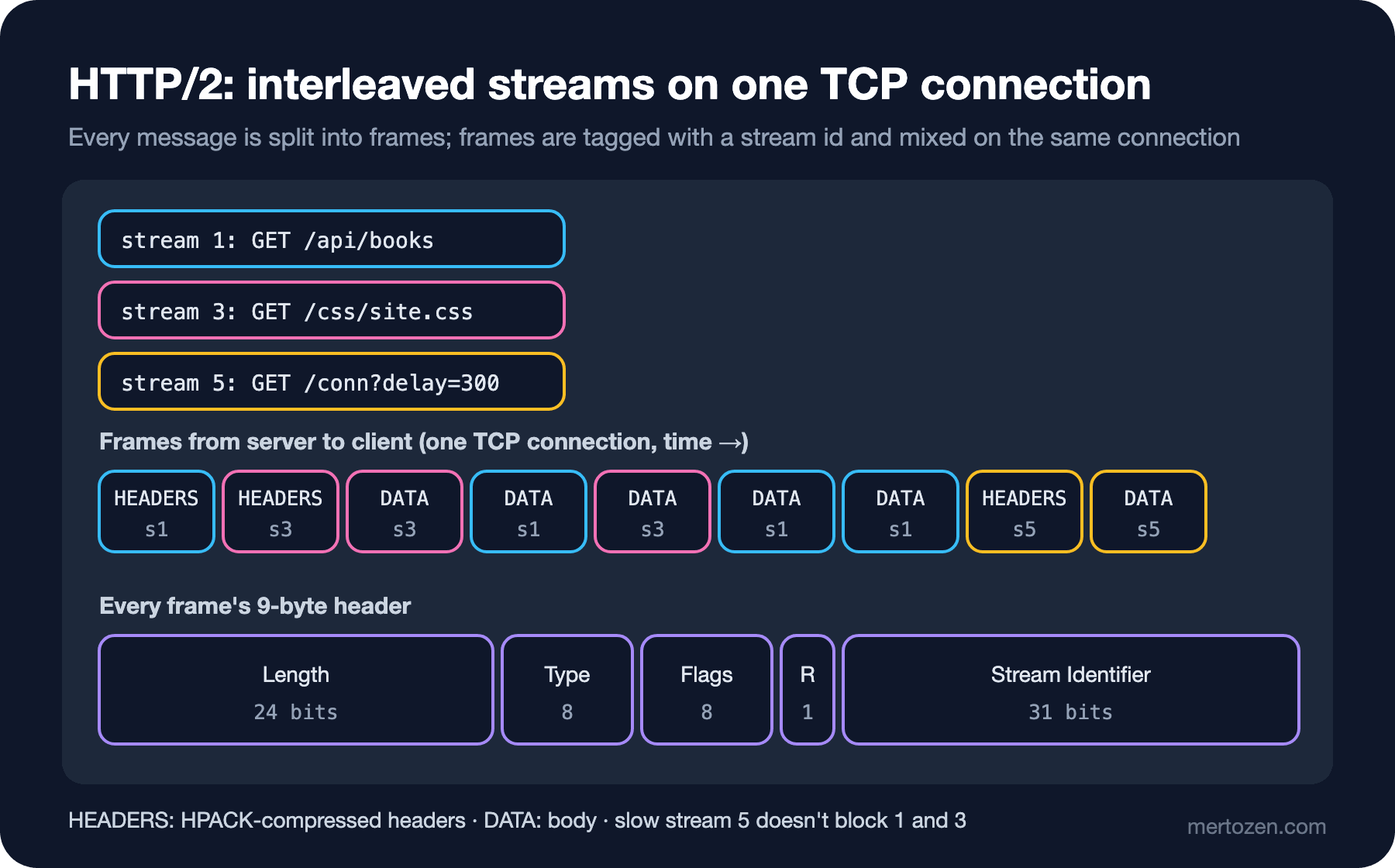
Besides HEADERS and DATA there are frames that manage the connection: SETTINGS (the first frame, where both sides announce their limits), WINDOW_UPDATE (flow control), RST_STREAM (cancelling a single stream without closing the connection), PING and GOAWAY (closing the connection gracefully). So cancelling a single request doesn't require tearing down the whole connection as in HTTP/1.1.
Seeing HTTP/2 with curl
Over TLS, HTTP/2 is selected with ALPN (Application-Layer Protocol Negotiation), which we saw in the fifth post; no extra round is needed:
$ curl -sv --http2 --cacert certs/ca.crt https://127.0.0.1:5592/whoami
* ALPN: curl offers h2,http/1.1
* SSL connection using TLSv1.3 / AEAD-AES256-GCM-SHA384 / [blank] / UNDEF
* ALPN: server accepted h2
* using HTTP/2
* [HTTP/2] [1] OPENED stream for https://127.0.0.1:5592/whoami
* [HTTP/2] [1] [:method: GET]
* [HTTP/2] [1] [:scheme: https]
* [HTTP/2] [1] [:authority: 127.0.0.1:5592]
* [HTTP/2] [1] [:path: /whoami]
* [HTTP/2] [1] [user-agent: curl/8.7.1]
* [HTTP/2] [1] [accept: */*]
> GET /whoami HTTP/2
> Host: 127.0.0.1:5592
> User-Agent: curl/8.7.1
> Accept: */*
>
< HTTP/2 200
< content-type: text/plain; charset=utf-8
< date: Sun, 08 Nov 2026 10:37:13 GMT
< server: Kestrel
< content-length: 6
[1] is the stream number. HTTP/1.1's start line has turned into pseudo-headers in HTTP/2: :method, :scheme, :authority (the old Host) and :path. curl shows its > lines in HTTP/1.1 form for readability; what travels on the wire is a HEADERS frame compressed with HPACK. Header names arriving in lowercase is an HTTP/2 rule too.
HTTP/2 without TLS is called h2c (HTTP/2 cleartext). Browsers don't support h2c; it's used for service-to-service traffic, and the client must know in advance that the server speaks HTTP/2 (prior knowledge). My server has port 5493, which speaks only HTTP/2, and port 5491, which speaks only HTTP/1.1:
$ curl -s --http2-prior-knowledge -w '\n%{http_version}\n' http://127.0.0.1:5493/whoami
blue

2
$ curl -sS --http2-prior-knowledge http://127.0.0.1:5491/whoami
curl: (16) Remote peer returned unexpected data while we expected SETTINGS frame.  Perhaps, peer does not support HTTP/2 properly.
In the second command curl sent the HTTP/2 preface and a SETTINGS frame at the start of the connection, and the server answered with an HTTP/1.1 error response.
Measuring Multiplexing
I sent 6 parallel requests with curl to an endpoint that waits 500 milliseconds on the server, first over HTTP/1.1, then over HTTP/2. The endpoint returns Kestrel's ID for the connection the request arrived on:
$ U='https://127.0.0.1:5592/conn?delay=500'
$ /usr/bin/time -p curl -s --http1.1 --parallel --parallel-max 6 --cacert certs/ca.crt "$U" "$U" "$U" "$U" "$U" "$U"
{"id":"0HNPTGGU6A21L","remotePort":55680,"protocol":"HTTP/1.1"}{"id":"0HNPTGGU6A21M","remotePort":55678,"protocol":"HTTP/1.1"}...
real 0.54
$ /usr/bin/time -p curl -s --http2 --parallel --parallel-max 6 --cacert certs/ca.crt "$U" "$U" "$U" "$U" "$U" "$U"
{"id":"0HNPTGGU6A21Q","remotePort":55748,"protocol":"HTTP/2"}{"id":"0HNPTGGU6A21Q","remotePort":55748,"protocol":"HTTP/2"}...
real 0.52
The time is the same but the path is different: six separate connections over HTTP/1.1 (six source ports, six TCP and six TLS handshakes), a single connection over HTTP/2. To measure the guessing question with .NET, I wrote a demo that sends concurrent requests and counts how many distinct connections answered them:
// Fires N concurrent requests and reports how many connections served them
public static async Task RunAsync(string url, int count, Version version, int maxConnections, string caPath, bool multipleHttp2 = false)
{
    var handler = LocalCaTrust.CreateHandler(caPath);
    handler.MaxConnectionsPerServer = maxConnections;
    handler.EnableMultipleHttp2Connections = multipleHttp2;
    using var client = new HttpClient(handler)
    {
        DefaultRequestVersion = version,
        DefaultVersionPolicy = HttpVersionPolicy.RequestVersionExact,
    };
    var stopwatch = Stopwatch.StartNew();
    var results = await Task.WhenAll(Enumerable.Range(0, count).Select(_ => client.GetFromJsonAsync<ConnectionInfo>(url)));
    var protocols = string.Join(",", results.Select(r => r!.Protocol).Distinct());
    var connections = results.Select(r => r!.Id).Distinct().Count();
    Console.WriteLine($"exact {version}, maxConnections={maxConnections,-10} multipleHttp2={multipleHttp2,-5} -> protocol={protocols} connections={connections} elapsed={stopwatch.ElapsedMilliseconds} ms");
}
exact 1.1, maxConnections=2147483647 multipleHttp2=False -> protocol=HTTP/1.1 connections=20 elapsed=380 ms
exact 1.1, maxConnections=6 multipleHttp2=False -> protocol=HTTP/1.1 connections=6 elapsed=1278 ms
exact 2.0, maxConnections=2147483647 multipleHttp2=False -> protocol=HTTP/2 connections=1 elapsed=364 ms
exact 2.0, maxConnections=2147483647 multipleHttp2=False -> protocol=HTTP/2 connections=1 elapsed=663 ms
exact 2.0, maxConnections=2147483647 multipleHttp2=True -> protocol=HTTP/2 connections=2 elapsed=376 msThe answers to the guessing section, line by line: unlimited HTTP/1.1 opened 20 connections and finished in 380 milliseconds; one request per connection. Limited to 6 connections, the requests were processed in four waves (6 + 6 + 6 + 2): 1,278 milliseconds, exactly what a browser experiences over HTTP/1.1. HTTP/2 took 364 milliseconds over a single connection. The fourth line answers the second question: 200 requests took 663 milliseconds, i.e. two waves. In Kestrel's source, Http2Limits.MaxStreamsPerConnection is 100; the server announces it in a SETTINGS frame and the client holds the 101st request until a stream frees up. With EnableMultipleHttp2Connections = true the client opened a second HTTP/2 connection when the limit was reached, and the time dropped to 376 milliseconds. For clients making heavy concurrent calls to a single service, gRPC for example, this setting matters.
HPACK, Flow Control and Priority
HPACK (RFC 7541) shrinks headers in three ways. 61 common header names and values (such as :method: GET and accept-encoding: gzip, deflate) sit in a static table both sides know and are sent as a single index. Headers sent during the connection are added to a dynamic table both sides maintain; the same User-Agent or Cookie is again just an index from the second request on. The remaining strings are compressed with Huffman coding. Headers that take hundreds of bytes per request in HTTP/1.1 often shrink to a few bytes in HTTP/2. A custom format was chosen instead of gzip for security: the CRIME (Compression Ratio Info-leak Made Easy) attack, which extracts secrets from length changes in compressed and encrypted data.
Flow control is a per-stream copy of TCP's flow control: every stream and the whole connection have a window, and the receiver opens it with WINDOW_UPDATE. That way a large download doesn't block small requests on the same connection. Kestrel's defaults in the source are 1 MB for the connection and 768 KB per stream.
The priority scheme in the first version of HTTP/2 (RFC 7540), based on a tree of stream dependencies, was complex and inconsistently implemented; RFC 9113 deprecated it. RFC 9218's extensible priorities scheme replaced it: the client sends an urgency (u=0…7) and incremental processing (i) in a Priority header. The same scheme is used in HTTP/3.
The End of Server Push and 103 Early Hints
HTTP/2 also brought server push: the server could send CSS (Cascading Style Sheets) and JavaScript files it thought the client would need before the client asked. In practice it didn't work; since the server doesn't know what's in the client's cache, it often pushed files that were already there. Chrome 106 turned server push off by default and Chromium-based browsers followed. The recommended alternative is 103 Early Hints: while preparing the real response, the server first sends a 103 response with headers like Link: </css/site.css>; rel=preload; the browser checks its own cache and requests the file or not.
.NET: HTTP/2 in HttpClient and Kestrel
Recall the defaults we read in the third post:
HttpClient.DefaultRequestVersion : 1.1
HttpClient.DefaultVersionPolicy  : RequestVersionOrLower
HttpClient asks for HTTP/1.1 by default and settles for lower; so it speaks HTTP/1.1 even if the server supports HTTP/2. For HTTP/2 you set DefaultRequestVersion = HttpVersion.Version20 on the client. The policy matters here: a client that asks for 1.1 with RequestVersionOrHigher and connects over TLS upgrades to HTTP/2 thanks to ALPN; that's why I used RequestVersionExact in the demo to force HTTP/1.1. On a plaintext (h2c) address there's no ALPN, so HTTP/2 can only be used with Version20 and RequestVersionExact, i.e. with prior knowledge.
In Kestrel, an endpoint's default protocol is Http1AndHttp2, per the ListenOptions.DefaultHttpProtocols constant in the source. On an endpoint with TLS, the choice is made with ALPN. A plaintext Http1AndHttp2 endpoint, however, effectively speaks only HTTP/1.1, because there's no handshake to say which protocol to use; for h2c you open the endpoint separately as HttpProtocols.Http2. That's why port 5493 on my demo server is a separate port. Since gRPC relies entirely on HTTP/2, this distinction directly affects you if you run service-to-service gRPC traffic without TLS; gRPC itself is covered in the upcoming gRPC and GraphQL series.
In Production
HTTP/2 doesn't solve TCP's head-of-line blocking. Streams are independent at the HTTP layer, but they all share the same TCP byte stream; when a single packet is lost, TCP holds back every byte behind it until the lost packet is resent, and at that moment all streams stop. On lossy mobile networks HTTP/2's single connection can perform worse than HTTP/1.1's six connections. The fix for this is changing the transport; the topic of the next post.
Revisit HTTP/1.1-era optimizations. Domain sharding (spreading files across subdomains like static1 and static2 to get around the 6-connection limit) backfires with HTTP/2: every domain means a separate DNS (Domain Name System) query, separate TCP and TLS handshakes and a separate congestion window. Excessive bundling too: one giant JavaScript file invalidates the whole cache on a small change; with HTTP/2, smaller pieces cached separately are often better.
In service-to-service HTTP/2, account for the per-connection stream limit. As the measurement above shows, with concurrency above 100 requests queue up; choose EnableMultipleHttp2Connections or the server's MaxStreamsPerConnection deliberately.
Common Pitfalls
Assuming HttpClient uses HTTP/2 on its own. The default is 1.1; the server supporting HTTP/2 isn't enough.
Assuming a plaintext Http1AndHttp2 endpoint speaks h2c. Without ALPN, HTTP/2 can't be chosen; h2c needs an endpoint that speaks only HTTP/2.
Investing in server push. It's off in major browsers; use 103 Early Hints and preload.
Taking HTTP/2 as the cure for all head-of-line blocking. It solves it at the HTTP layer, not at the TCP layer.
Thinking a single connection is unlimited. The server has a stream limit; 100 in Kestrel.
A Small Experiment
★☆☆ Open the DevTools Network panel in your browser, add the Protocol column and look at the share of h2, h3 and http/1.1 on a few sites you use.
★★☆ Lower Limits.Http2.MaxStreamsPerConnection to 10 in Kestrel and run this post's multiplex demo with 50 requests. How does the time change? How many connections are opened with EnableMultipleHttp2Connections on?
★★★ Configure an IHttpClientFactory typed client to use HTTP/2 (DefaultRequestVersion, DefaultVersionPolicy) and verify with an integration test that the response's Version is 2.0.
HTTP/2 solved the ordering at the application layer but couldn't change TCP's ordering. In the next post we move to HTTP/3, which drops TCP entirely, and QUIC (the transport protocol that replaces TCP), which runs over UDP (User Datagram Protocol).