

Site Migrations and Domain Changes: URL Mapping, 301 Plans and Change of Address

In a site migration every old URL goes to its final target in one 301 hop; redirects stay for at least a year, and Change of Address is used only for domain changes, for every www and non-www variant. We build a chain-checked redirect table from a CSV mapping and a script that verifies every old URL for 301, a 200 target and its canonical, and read mertozen.com's /en/ move against that checklist.
Version note: The code in this post was built and run with .NET 10 (ASP.NET Core 10); the migration steps are explained based on Google's guide to site moves with URL (Uniform Resource Locator) changes ("Site moves with URL changes") and the Change of Address tool documentation as of November 2026.
Guess First
Bookstore has planned two changes for the same quarter: English pages will move from the ?lang=en parameter to the /en/ subfolder (the structure from the tenth post of the series), and the old /catalog/ path will become /books/. There are also old URLs of a few books withdrawn from the catalog. The project manager's list has three items: "submit a Change of Address in Search Console", "keep the redirects for three months, then remove them", "redirect old URLs with no target to the home page".
Which of the three items is right? This is the last post of the series, and it combines almost all of the previous eleven posts (URL design, robots.txt, noindex, sitemaps, canonicals, status codes, redirects, hreflang, log analysis) into a single operation: a site migration.
Types of Migration
Google's guide covers migrations that change URLs, and they all share the same core: old URLs are permanently redirected to new URLs. The difference is in scope and in the role of Search Console:
| Type | Example | Change of Address |
|---|---|---|
| Protocol | http:// → https:// | Not needed |
| Domain or subdomain | bookstore-old.example → bookstore.example | Yes, for every variant of the old domain |
| URL structure (same host) | ?lang=en → /en/, /catalog/ → /books/ | Can't be used; the tool is for host changes |
| Platform or CMS (Content Management System) | From Razor to Angular SSR (Server-Side Rendering), from one CMS to another | Only the relevant row if URLs or the host change |
The answer to the first item is in the table: the Change of Address tool is for domain and subdomain moves; there's nothing to submit for a path change within the same host. A note added to the guide in June 2026 is about domain moves too: the tool has to be used separately for every subdomain variant of the old domain, including the www and non-www versions. For that, every variant needs to be a verified property in Search Console.
Preparation: URL Inventory and Mapping
The most laborious and most often skipped part of a migration is getting the full list of old URLs. Google's guide lists the sources: existing sitemaps, server logs, analytics data and the CMS. A sitemap only shows what's live today; URLs removed years ago whose external links still exist only show up in logs. The log tool from the eleventh post of the series can also be used to extract every path that received requests over the last few months.
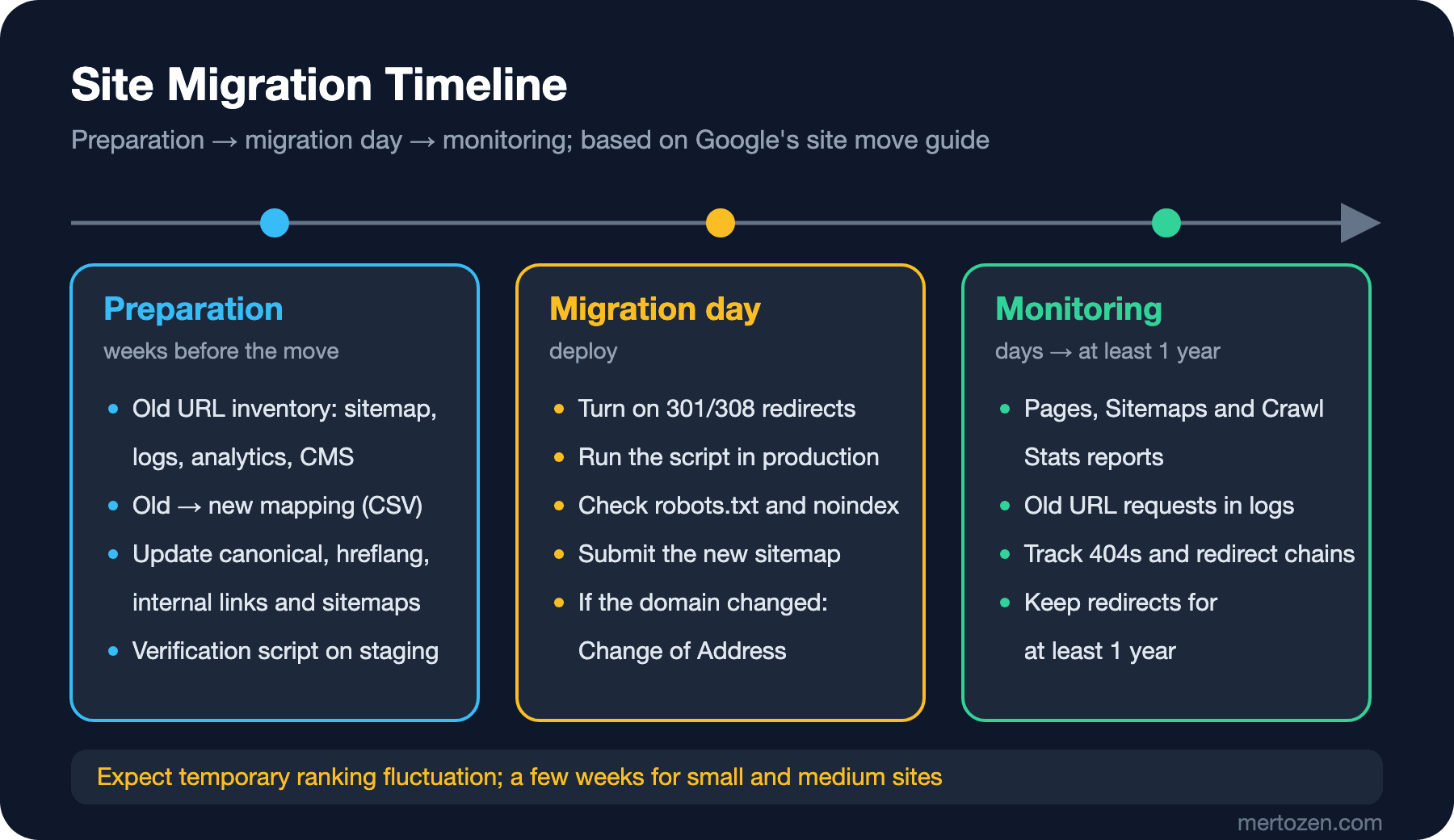
Once the inventory is done, every old URL must have a target. There are two kinds of rules: those that can be expressed with a pattern (every ?lang=en URL goes to the /en/ version of the same path) and those that must be mapped one by one (renamed slugs, merged categories). Pattern rules live in code or rewrite rules; one-by-one mappings need a table. Bookstore's table is a plain CSV (Comma-Separated Values):
old,new
/books/dune?lang=en,/en/books/dune
/books/dune?lang=tr,/books/dune
/books/foundation?lang=en,/en/books/foundation
/books/foundation?lang=tr,/books/foundation
/catalog/dune-1965,/books/dune
/catalog/neuromancer,/books/neuromancer
/catalog/hyperion,/books/hyperion
/gift-cards,/campaigns/gift-cards
The rule in Google's guide for choosing targets is clear: every old URL should go straight to its final target, and you should avoid redirecting many pages to a single irrelevant target such as the home page. The right response for content that isn't moving is 404 or 410. That's why the opening's third item is wrong: redirecting a URL with no target to the home page takes users away from what they were looking for, and Google may report such redirects as soft 404s.
A Redirect Table from CSV
The table is read once at application startup. Two checks are made while reading: the same old URL must not appear twice, and a target must not also be another row's old URL, meaning the table must not form a chain within itself:
namespace Bookstore.Migration;

// old URL (path + query) -> new path, loaded once at startup from the mapping CSV
public sealed class RedirectMap
{
    private readonly Dictionary<string, string> _map = new(StringComparer.OrdinalIgnoreCase);

    public static RedirectMap Load(string csvPath)
    {
        RedirectMap map = new();
        foreach (string line in File.ReadLines(csvPath).Skip(1))
        {
            string[] cols = line.Split(',');
            if (cols.Length != 2) continue;
            if (!map._map.TryAdd(cols[0].Trim(), cols[1].Trim()))
                throw new InvalidOperationException($"duplicate old URL in mapping: {cols[0]}");
        }
        // targets must not be old URLs themselves: that would be a chain
        foreach ((string oldUrl, string target) in map._map)
            if (map._map.ContainsKey(target))
                throw new InvalidOperationException($"chain: {oldUrl} -> {target} -> {map._map[target]}");
        return map;
    }

    public bool TryGet(string pathAndQuery, out string target) => _map.TryGetValue(pathAndQuery, out target!);

    public IEnumerable<KeyValuePair<string, string>> All => _map;
}
Adding the row /dune-classic,/catalog/dune-1965 to the table stops the application before it starts:
Unhandled exception. System.InvalidOperationException: chain: /dune-classic -> /catalog/dune-1965 -> /books/duneYou want to see the mistake as an exception before deploy, not as a redirect chain in production. The middleware checks the table before routing and returns 301 on a match:
// 1) one-off moves from the mapping table, checked before routing
app.Use(async (context, next) =>
{
    string pathAndQuery = context.Request.Path + context.Request.QueryString;
    if (map.TryGet(pathAndQuery, out string target))
    {
        context.Response.StatusCode = StatusCodes.Status301MovedPermanently;
        context.Response.Headers.Location = target;
        return;
    }
    await next();
});
$ curl -sI "http://localhost:20114/books/dune?lang=en" | grep -iE "^HTTP|^location"
HTTP/1.1 301 Moved Permanently
Location: /en/books/duneIf the table is large (tens of thousands of rows), an in-memory Dictionary is still the fastest solution; if the row count goes into the hundreds of thousands, or the table must be updated independently of deploys, move it into the database and query it like the slug history table from the seventh post of the series. With query string matching, parameter order matters: ?lang=en&page=2 and ?page=2&lang=en aren't the same URL. If there are many parameterized old URLs, a pattern rule (drop the language parameter, carry the rest) is more robust than a table.
A Verification Script: Every Old URL to the Right Place in One Hop
Having redirects isn't enough; you need to prove they go to the right place and that the place they go is healthy. Bookstore's verifier checks three things for every old URL in the table: is the first response a 301, is Location the expected target, and does the target return 200 with itself as canonical?
// after the move: every old URL must answer 301 straight to its target, and the target must be a 200 canonical page
public static partial class Verifier
{
    public static async Task<int> RunAsync(RedirectMap map, Uri site)
    {
        using HttpClient http = new(new HttpClientHandler { AllowAutoRedirect = false }) { BaseAddress = site };
        int failures = 0;
        foreach ((string oldUrl, string expected) in map.All)
        {
            using HttpResponseMessage first = await http.GetAsync(oldUrl);
            string location = first.Headers.Location?.OriginalString ?? "-";
            string problem = "";

            if (first.StatusCode != HttpStatusCode.MovedPermanently)
                problem = $"expected 301, got {(int)first.StatusCode}";
            else if (location != expected)
                problem = $"Location {location}, expected {expected}";
            else
            {
                using HttpResponseMessage target = await http.GetAsync(expected);
                string html = await target.Content.ReadAsStringAsync();
                string? canonical = CanonicalRegex().Match(html) is { Success: true } m ? m.Groups[1].Value : null;
                if (target.StatusCode != HttpStatusCode.OK)
                    problem = $"target returns {(int)target.StatusCode}";
                else if (canonical != new Uri(new Uri("https://bookstore.example"), expected).ToString())
                    problem = $"target canonical is {canonical ?? "missing"}";
            }

            failures += problem.Length > 0 ? 1 : 0;
            Console.WriteLine($"{(problem.Length > 0 ? "FAIL" : "ok  "),-5} {oldUrl,-28} {(int)first.StatusCode} -> {location,-24} {problem}");
        }
        Console.WriteLine($"\n{map.All.Count()} URLs checked, {failures} failed");
        return failures == 0 ? 0 : 1;
    }

    [GeneratedRegex("<link rel=\"canonical\" href=\"([^\"]+)\"")]
    private static partial Regex CanonicalRegex();
}
AllowAutoRedirect = false is critical: HttpClient follows redirects by default and hides the chain. I ran the script against the migrated application:
$ dotnet run -- verify http://localhost:20114
ok    /books/dune?lang=en          301 -> /en/books/dune
ok    /books/dune?lang=tr          301 -> /books/dune
ok    /books/foundation?lang=en    301 -> /en/books/foundation
ok    /books/foundation?lang=tr    301 -> /books/foundation
ok    /catalog/dune-1965           301 -> /books/dune
ok    /catalog/neuromancer         301 -> /books/neuromancer
FAIL  /catalog/hyperion            301 -> /books/hyperion          target returns 404
FAIL  /gift-cards                  301 -> /campaigns/gift-cards    target canonical is https://bookstore.example/campaigns

8 URLs checked, 2 failed
The two failures are the same as the two most common migration mistakes. Hyperion was withdrawn from the catalog; a target was written into the table anyway, and the target returns 404. The right fix is to remove this row from the table and return 410 directly for the old URL; a 301 followed by a 404 is both a wasted hop and a broken journey for the user. The gift card page works at its new address, but its canonical points to another page; a stale value in the template. Google follows the redirect, then sees the canonical, and the two signals conflict. Since the script returns a non-zero exit code, it can be used as a gate in CI (Continuous Integration) and in the deploy pipeline.
Migration Day and Change of Address
If preparation is done, migration day is a short checklist. Turn on the redirects; 301 or 308, server-side if possible. Run the verification script again, this time against production; a test that passes on staging can give a different result because of reverse proxy, CDN (Content Delivery Network) or IIS (Internet Information Services) rules in production. Check that the new site's robots.txt doesn't carry a leftover Disallow: / from staging, and that pages don't have a leftover noindex from staging; that's the most expensive migration mistake. Submit the sitemap with the new URLs in Search Console. Google's guide recommends preparing sitemaps for both old and new URLs; keeping the old URLs in a separate sitemap for a while can help Google discover the redirects sooner.
If the domain changed, use the Change of Address tool in Search Console on the old property. The tool tells Google about the move directly and is an extra signal next to the redirects; but it doesn't replace them. Remember the June 2026 note: www.bookstore-old.example and bookstore-old.example must be verified as two separate properties and submitted separately for both.
Monitoring: What to Expect?
Google's guide states the expectation honestly: expect temporary ranking fluctuation during the move; for small and medium sites, it may take a few weeks for most pages to move, longer for large sites. Permanent redirects don't cause a loss in PageRank. It's also normal for the old URL to keep appearing in results for a while; Google may show the old URL as an alternate name for the canonical for some time, and this fades on its own.
What to monitor: Search Console's "Pages" report (old URLs should move to the "Page with redirect" row), the Sitemaps report (the URLs in the new sitemap should get indexed), Crawl Stats (a temporary increase in crawl requests after the move is normal) and server logs. The share of requests to old URLs in the logs should fall over the weeks; if it doesn't, old URLs are still being spread somewhere: in a template, in a sitemap or in an external system. The opening's second item also falls here: Google recommends keeping redirects for at least a year. Since external links, bookmarks and links in emails live for years, keeping redirects indefinitely is safer unless you have a good reason to remove them.
mertozen.com: The Migration Plan for the ?lang= to /en/ Move
The /en/ move described in the tenth post of the series is a full URL structure migration: same host, every English URL changed. Reading releases v1.12.0–v1.12.3 in the site's source code against this post's checklist:
- The mapping is expressed as a pattern:
?lang=en→ the/en/version of the same path,?lang=tr→ the parameterless path, other query parameters are kept. No table was needed. - The redirects are 301 and a single hop;
/en→/en/is a 301 too. - Canonical, hreflang, sitemap and internal links have been updated for the new structure; links in CMS content are converted to the
/enprefix while rendering on English pages. - Change of Address isn't needed; the host didn't change.
- A post-migration side effect was fixed in v1.12.3: CSS (Cascading Style Sheets), JavaScript and font paths given with
~/were generated like/en/css/site.csson English pages; the files worked, but the browser downloaded and cached the same file separately for Turkish and English. The paths were changed to the root.
The steps I can't see from the source code, and therefore still open: running the verification script above against production (the list of old ?lang= URLs can be extracted from previous sitemaps and logs), a temporary sitemap for the old URLs, watching Search Console's "Page with redirect" and "Pages" reports for a few weeks, and following the trend of requests containing lang= in the logs. I didn't crawl the live site for this post; the information above comes from the site's source code and commit history. When to do what is the site owner's decision.
Production Notes
Don't put a migration and a content change on the same day. If URLs, templates and content change at the same time, you can't tell the cause of a change in traffic. Do the migration on its own, as a measurable change.
Plan the migration for a low-traffic period and have a rollback plan. Being able to turn redirects on and off with a configuration flag lets you return to the old state within minutes in case of an unexpected error; but once they're on, reverting means a second migration for Google, so keep the bar high.
Don't let go of the old domain. In a domain move, letting the old domain expire means the redirects end too; and if the domain falls into someone else's hands, old links go to their site. The guide also has a warning about buying a used domain: check for manual actions and URL removal requests left over from the previous owner.
Deliberately leave content that isn't moving to 404 or 410, and mark it explicitly in the mapping table (for example, an empty target). Distinguishing "URL whose target was forgotten" from "URL removed on purpose" lets the verification script report failures meaningfully.
Common Pitfalls
Removing redirects after a few months. Google recommends at least a year; external links live longer.
Redirecting everything without a target to the home page. It may be reported as a soft 404; return 404 or 410.
Old → intermediate → new chains. Redirects from previous migrations chain with the new one; tie every old URL directly to the final target.
A leftover noindex or Disallow: / from staging. The most expensive and most common migration mistake.
Looking for Change of Address for a path change within the same host, or forgetting one of the www and non-www variants in a domain move.
Verifying only on staging. The proxy, CDN and server rules in production can change the result.
A Small Experiment
★☆☆ Extract every path that received requests in the last month from your own site's logs and compare it with today's sitemap. Paths that receive requests but aren't in the sitemap are candidates for URLs that would be forgotten in a migration.
★★☆ Add empty-target support to RedirectMap: rows with an empty target return 410. Update the verification script to expect 410 for these rows, and turn the Hyperion row into one.
★★★ Turn the verification script into a crawler: have it read the new site's sitemap, request every URL, collect all internal links on the page, and report which page it's on if it finds a link matching the old URL patterns (?lang=, /catalog/). That way, beyond the redirects, you also see whether the site itself still links to old URLs.
The series ends here. Starting from the URL, we went through robots.txt, noindex, sitemaps, canonicals, status codes, redirects, JavaScript rendering, Angular SSR, hreflang and log analysis to site migrations; at every step we relied on Google's own documentation and the real responses of our own application. Natural next stops from here: enriching the appearance on the results page with structured data in the upcoming Structured Data and Schema.org series, page speed and Core Web Vitals in the upcoming Web Performance series; and how AI (Artificial Intelligence) answer engines read the site in the GEO (Generative Engine Optimization) series.