

How DNS Works: Resolvers, Record Types, TTL and Querying with dig
DNS resolves a name through a chain of stub resolver, recursive resolver, root, TLD and authoritative servers and caches every answer for its TTL. dig +trace, A/AAAA/CNAME/MX/TXT/CAA/HTTPS records, negative caching, DoH, and a blue-green experiment showing why HttpClient's open connections don't see DNS changes.
Version note: The commands in this post were run with dig 9.10.6 and curl 8.7.1, and the code with .NET 10, on macOS; the DNS (Domain Name System) description follows RFC (Request for Comments) 1034/1035 and RFC 9460.
Guess First
You're moving the Bookstore catalog service to a new version with a blue-green deployment. The A record (IPv4 address record) of catalog.bookstore.example has a TTL (Time To Live) of 60 seconds and points to the old "blue" environment. You change the record to the address of the new "green" environment. A minute later new requests start going to green. Ten minutes later, as you're about to shut down blue, you look at the logs: the order service is still sending requests to blue. The DNS record is right, the TTL expired long ago. Why is the order service going to the old address?
In this post we follow how DNS works from the query to the cache and look for the answer both on the resolver side and in .NET's connection pool.
From Name to Address: Stub, Recursive and Authoritative
When your application wants to resolve a name, it doesn't do the work itself. The stub resolver in the operating system passes the question to a recursive resolver on the network: your home router, your company's DNS server or a public resolver like 1.1.1.1. If the recursive resolver doesn't find the answer in its cache, it asks down the hierarchy from the top: the root servers say who runs .com, the TLD (Top-Level Domain) servers for .com say who runs example.com, and finally the authoritative server gives the real answer.
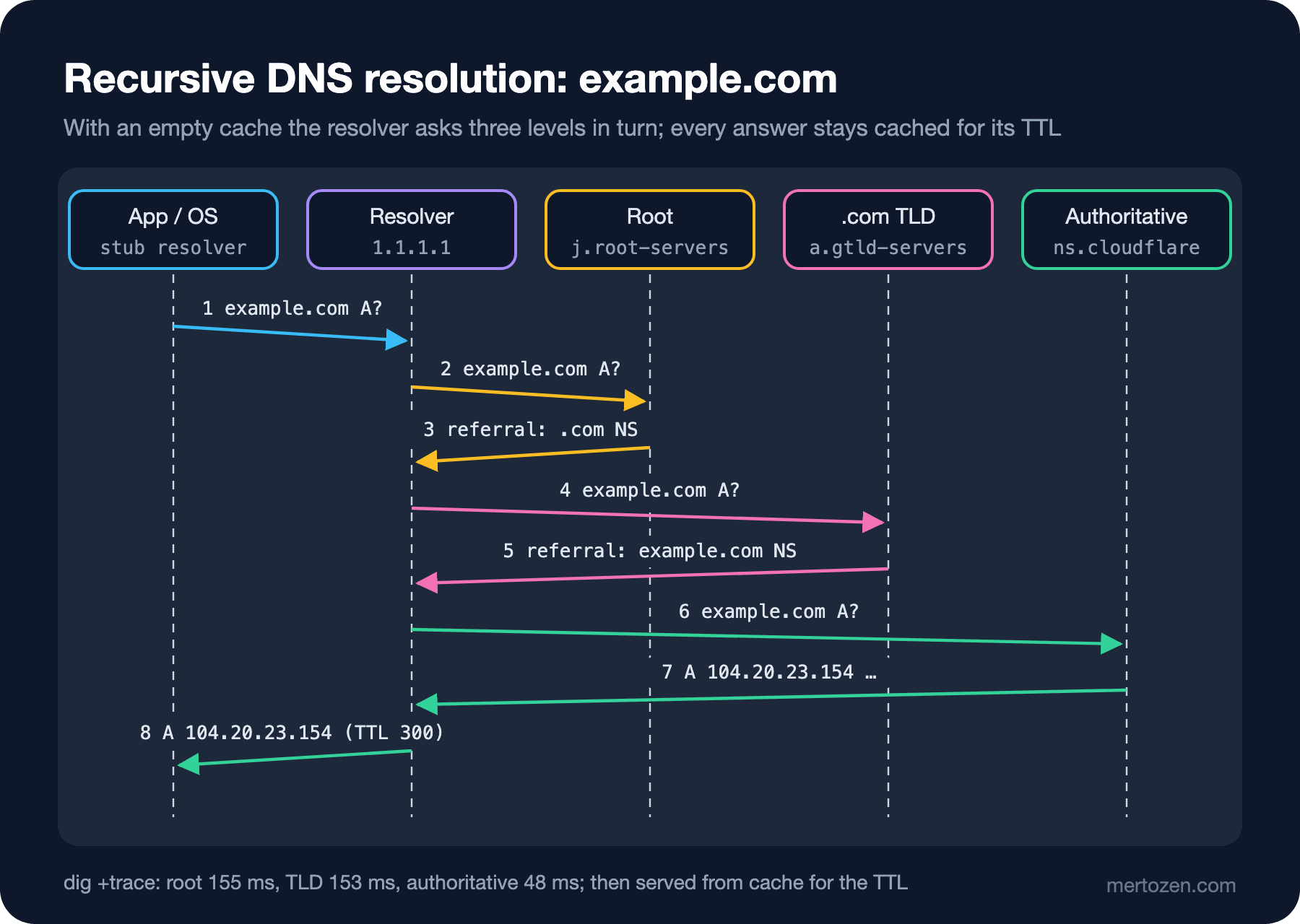
dig +trace walks this chain itself instead of leaving it to the resolver. It first gets the list of root servers from a public resolver, then asks each level directly:
$ dig +trace +nodnssec @1.1.1.1 example.com A
.			511335	IN	NS	a.root-servers.net.
.			511335	IN	NS	b.root-servers.net.
...
;; Received 239 bytes from 1.1.1.1#53(1.1.1.1) in 21 ms

com.			172800	IN	NS	l.gtld-servers.net.
com.			172800	IN	NS	j.gtld-servers.net.
...
;; Received 836 bytes from 192.58.128.30#53(j.root-servers.net) in 155 ms

example.com.		172800	IN	NS	hera.ns.cloudflare.com.
example.com.		172800	IN	NS	elliott.ns.cloudflare.com.
;; Received 359 bytes from 192.5.6.30#53(a.gtld-servers.net) in 153 ms

example.com.		300	IN	A	172.66.147.243
example.com.		300	IN	A	104.20.23.154
;; Received 72 bytes from 162.159.44.228#53(elliott.ns.cloudflare.com) in 48 ms
The root server (j.root-servers.net) doesn't know the answer but gives the 13 NS (name server) records for .com; this is called a referral. The .com server in turn points to example.com's two authoritative servers at Cloudflare. The actual A records come last, with a TTL of 300 seconds. The whole chain took over 350 milliseconds in this measurement. That's why recursive resolvers cache every level for its own TTL: the TTL of .com's NS records is 172,800 seconds, two days. In practice a resolver rarely goes to the root.
Normal queries go over UDP (User Datagram Protocol) to port 53. If the answer doesn't fit in a single UDP packet, the resolver asks again over TCP (Transmission Control Protocol); large answers and DNSSEC (DNS Security Extensions) signatures trigger this.
Record Types
DNS doesn't only translate names into IP (Internet Protocol) addresses; it carries all kinds of structured information about a domain. Real queries against example.com and a few other domains:
$ dig example.com AAAA +noall +answer
example.com.		65	IN	AAAA	2606:4700:10::6814:179a
example.com.		65	IN	AAAA	2606:4700:10::ac42:93f3

$ dig www.microsoft.com +noall +answer
www.microsoft.com.	867	IN	CNAME	www.microsoft.com-c-3.edgekey.net.
www.microsoft.com-c-3.edgekey.net. 867 IN CNAME	e13678.dscb.akamaiedge.net.
e13678.dscb.akamaiedge.net. 7	IN	A	2.22.114.96

$ dig example.com MX +noall +answer
example.com.		300	IN	MX	0 .

$ dig example.com TXT +noall +answer
example.com.		300	IN	TXT	"v=spf1 -all"
example.com.		300	IN	TXT	"_k2n1y4vw3qtb4skdx9e7dxt97qrmmq9"

$ dig example.com SOA +noall +answer
example.com.		830	IN	SOA	elliott.ns.cloudflare.com. dns.cloudflare.com. 2418004112 10000 2400 604800 1800

$ dig google.com CAA +noall +answer
google.com. 952 IN CAA 0 issue "pki.goog"| Type | What it carries | What to watch |
|---|---|---|
A / AAAA | IPv4 / IPv6 address | Several records can come back; the order can change with every query |
CNAME | This name is an alias for another name | Can't coexist with other records at the same name, so it can't be used at the zone apex (example.com itself) |
MX | Mail servers and their priorities | 0 . means "this domain accepts no mail" (null MX (Mail Exchanger)) |
TXT | Free text | SPF (Sender Policy Framework) and domain ownership verification tokens live here |
NS / SOA | Servers running the zone / the zone's administrative info | The last SOA (Start of Authority) value sets how long negative answers are cached |
CAA | Which CAs (Certificate Authority) may issue certificates for this domain | A typo makes certificate renewal fail |
SVCB / HTTPS | The service's connection parameters (ALPN (Application-Layer Protocol Negotiation), IP hints, ECH (Encrypted Client Hello) key) | The browser can learn whether the server supports HTTP (Hypertext Transfer Protocol) version 3 before connecting |
The www.microsoft.com example shows CNAME (Canonical Name) in practice: the name points to a CDN (Content Delivery Network) provider's name, which points to yet another name, and the A record at the end of the chain has a TTL of only 7 seconds. CDNs use short TTLs so they can steer users to the nearest server. Because of CNAME's apex restriction, many DNS providers offer non-standard solutions such as ALIAS or "CNAME flattening"; zone management is the topic of the upcoming DevOps "Domain, DNS and CDN" series.
The newest type is the HTTPS (HTTP Secure) record (RFC 9460). dig 9.10 doesn't know it yet, so it shows it raw:
$ dig cloudflare.com TYPE65 +noall +answer
cloudflare.com.		145	IN	TYPE65	\# 61 0001000001000602683302683200040008681084E5681085E5000600 20260647000000000000000000681084E52606470000000000000000 00681085E5
Decoding the bytes: priority 1, target the same name (00), under the alpn key (0001) h3 (6833) and h2 (6832), then under ipv4hint (0004) 104.16.132.229 and 104.16.133.229, and finally ipv6hint. So the browser learns this server speaks HTTP/3 before it even connects. We'll see why that matters in the ninth post.
TTL and the Cache Layers
Every answer carries a TTL, and every cache that receives it keeps it for at most that long. Asking the same query three times, five seconds apart:
# three times, 5 seconds apart
$ dig @1.1.1.1 example.com A +noall +answer
example.com.		198	IN	A	172.66.147.243
example.com.		191	IN	A	172.66.147.243
example.com.		185	IN	A	172.66.147.243
The resolver serves the answer from its cache and counts the TTL down to the remaining time. The record is defined as 300 seconds on the authoritative side; the resolver won't ask the authoritative server again until those 300 seconds are up. That's why changes don't propagate "instantly": a record is updated at each resolver when the old answer's TTL expires there.
There are several layers of these caches: the browser's own DNS cache, the operating system's cache (mDNSResponder on macOS, systemd-resolved on Linux), the recursive resolver's cache. To see the operating system cache's effect from .NET, I resolved the same name twice in one process:
$ dotnet Bookstore.Net.Lab.dll resolve docs.github.com docs.github.com
docs.github.com -> 185.199.109.154, 185.199.110.154, 185.199.111.154, 185.199.108.154, 2606:50c0:8002::154, 2606:50c0:8000::154, 2606:50c0:8003::154, 2606:50c0:8001::154 (66.6 ms)
docs.github.com -> 185.199.109.154, 185.199.110.154, 185.199.111.154, 185.199.108.154, 2606:50c0:8001::154, 2606:50c0:8002::154, 2606:50c0:8000::154, 2606:50c0:8003::154 (1.0 ms)
The first resolution took 66.6 milliseconds, the second 1 millisecond. Dns.GetHostAddressesAsync doesn't keep its own cache; the speedup comes from the operating system's cache. Note also that the order of the IPv6 addresses differs between the two answers: code that relies on the order is fragile.
Negative answers are cached too. When a name that doesn't exist is queried, the answer is NXDOMAIN and the zone's SOA record comes with it:
$ dig nonexistent-bookstore-zzz-4711.com +noall +comments +authority
;; ->>HEADER<<- opcode: QUERY, status: NXDOMAIN, id: 19898
com.			824	IN	SOA	a.gtld-servers.net. nstld.verisign-grs.com. 1794132981 1800 900 604800 900
Per RFC 2308, the resolver caches this "doesn't exist" answer for the smaller of the SOA's TTL and its last field; here 824 seconds. Querying a new subdomain to get an NXDOMAIN before creating it means you'll still see "doesn't exist" at that resolver for a few minutes after adding the record.
Tools: dig, nslookup, Resolve-DnsName, DoH and DoT
dig is the most detailed tool: it shows the record type, the TTL, which server answered and how long it took. You can ask a specific resolver with @1.1.1.1, walk the chain yourself with +trace, or ask only for the values with +short. On Windows nslookup is available everywhere; PowerShell's Resolve-DnsName example.com -Type AAAA gives structured output closer to dig.
Classic DNS is unencrypted; anyone on the path can see which names you ask for and change the answer. DoT (DNS over Transport Layer Security; RFC 7858) carries queries inside TLS (Transport Layer Security) on port 853. DoH (DNS over HTTPS, RFC 8484) puts queries inside ordinary HTTPS traffic. Trying the JSON (JavaScript Object Notation) format of Cloudflare's DoH endpoint with curl:
$ curl -s -H 'accept: application/dns-json' 'https://cloudflare-dns.com/dns-query?name=example.com&type=A'
{"Status":0,"TC":false,"RD":true,"RA":true,"AD":true,"CD":false,"Question":[{"name":"example.com","type":1}],"Answer":[{"name":"example.com","type":1,"TTL":200,"data":"104.20.23.154"},{"name":"example.com","type":1,"TTL":200,"data":"172.66.147.243"}]}
Browsers can use DoH internally. That has a side effect: the browser and the operating system using different resolvers can make curl and the browser see different answers on the same machine.
.NET: The Connection Pool Doesn't See DNS
The real answer to the guessing question isn't in DNS but in the client. As we saw in the previous post, HttpClient resolves DNS only when it opens a new connection, and an open connection is unaware of DNS changes. To show this without touching /etc/hosts, I wrote a small class that imitates DNS with SocketsHttpHandler.ConnectCallback. The callback is called on every new connection; inside it I connect to whatever address "DNS points to" at that moment. The blue server is on 5491, the green server (a separate container) on 5591, and both return their name from /whoami:
// A tiny in-process "DNS" so we can flip a name from blue to green without touching /etc/hosts
public sealed class FakeDns
{
    private volatile IPEndPoint _current;
    public int Lookups;

    public FakeDns(IPEndPoint initial) => _current = initial;

    public void Point(IPEndPoint target) => _current = target;

    public SocketsHttpHandler CreateHandler(TimeSpan pooledLifetime) => new()
    {
        PooledConnectionLifetime = pooledLifetime,
        // Called for every new connection: the real handler resolves DNS here
        ConnectCallback = async (context, cancellationToken) =>
        {
            Interlocked.Increment(ref Lookups);
            var socket = new Socket(SocketType.Stream, ProtocolType.Tcp) { NoDelay = true };
            await socket.ConnectAsync(_current, cancellationToken);
            return new NetworkStream(socket, ownsSocket: true);
        },
    };
}
I ran a loop that flips "DNS" to green at the second second, first with the default infinite connection lifetime, then with a 2-second PooledConnectionLifetime:
lifetime=infinite
t=0s answered by blue  (connections opened so far: 1)
t=1s answered by blue  (connections opened so far: 1)
        -- DNS now points to green --
t=2s answered by blue  (connections opened so far: 1)
t=3s answered by blue  (connections opened so far: 1)
t=4s answered by blue  (connections opened so far: 1)
t=5s answered by blue  (connections opened so far: 1)
lifetime=2s
t=0s answered by blue  (connections opened so far: 1)
t=1s answered by blue  (connections opened so far: 1)
        -- DNS now points to green --
t=2s answered by green (connections opened so far: 2)
t=3s answered by green (connections opened so far: 2)
t=4s answered by green (connections opened so far: 3)
t=5s answered by green (connections opened so far: 3)
With the default setting the client opened a single connection and kept talking to blue even after DNS changed. As long as there's traffic, that connection can live for hours or days; the idle minute (PooledConnectionIdleTimeout) never comes. The order service in the guessing section is in exactly this situation. With a lifetime limit, the connection was retired when its time was up and the new connection went to green with a fresh resolution.
In Production
Lower the TTL before a change. If you're going to change a record's address, lower its TTL to something short like 60 seconds at least one old TTL before the change, and restore it when the switch is done. Otherwise some resolvers keep handing out the old address for hours.
For every switch that relies on a DNS change, think about the client's connection lifetime too. Blue-green, failover or moving a database to a new address finish much later than DNS says because of long-lived connections. Set PooledConnectionLifetime to a few minutes, and keep the old environment up for the longest connection lifetime plus the TTL.
Monitor DNS as a dependency. A slow or failed resolver means every outbound call gets stuck at the connection stage. .NET's dns.lookup.duration metric is the way to see it; we use it in the last post of the series.
Common Pitfalls
Taking TTL for the propagation time. TTL isn't a global bound; it's each cache's own clock. Some resolvers and clients enforce a minimum, some ignore TTL entirely. HttpClient's open connections are one of them.
Trying to put a CNAME at the apex. example.com itself already has SOA and NS records; a CNAME can't coexist with them.
Forgetting negative caching. Querying a record for testing before adding it makes you see NXDOMAIN for a few minutes.
Relying on address order. The order within the same query's answer can change; don't treat the first address as the "primary server."
Assuming curl and the browser see the same DNS. If the browser uses DoH, the two may be asking different resolvers.
A Small Experiment
★☆☆ Run dig +trace for a domain you use. Which TLD server answered, and which provider hosts the authoritative servers?
★★☆ Query a domain's TTL with dig a few times and watch the countdown. Then ask the same query to a different resolver (@8.8.8.8). Why do the TTL values differ?
★★★ Extend FakeDns to return several addresses for a name and spread connections across them in turn. How are connections distributed across the addresses when you send concurrent requests with MaxConnectionsPerServer = 4?
We found the address and opened the TCP connection. But every HTTPS query in this post had one more step: setting up the encrypted channel. In the next post we look at the TLS 1.3 handshake, the certificate chain, SNI (Server Name Indication) and ALPN, and post-quantum key exchange step by step with openssl s_client.