

How Search Engines Work: Crawling, Rendering, Indexing and Serving
Google processes a page in four steps: it discovers and crawls the URL, renders the JavaScript, indexes the content through duplicate clusters and canonical selection, and serves it by relevance and quality when a query arrives. We show Googlebot's 2 MB limit with a real measurement and follow a post on mertozen.com step by step.
Version note: This post is based on the Google Search Central documentation as of November 2026; the code examples were built and run with .NET 10.
Guess First
The Bookstore team has published a new book page: /books/modeling-bounded-contexts. It is in the sitemap, it opens flawlessly in the browser, and its gzip-compressed size is 84 KB. But a large JSON (JavaScript Object Notation) block carrying every reader review is embedded in the page's <head>, and the uncompressed HTML (HyperText Markup Language) is just over 2 MB. So: does Google see this page's <title>? What about the <h1> with the book's name? And one more: because the page is in the sitemap, is Google guaranteed to index it?
We will answer with a real measurement halfway through the post. First, let's build up, step by step, how a search engine carries a URL (Uniform Resource Locator) all the way to the results page; the whole job we call SEO (Search Engine Optimization) is about finding the page that got stuck somewhere in this pipeline.
Four Stages: Crawling, Rendering, Indexing and Serving
Google's own documentation describes the process as three stages: crawling, indexing and serving. Rendering is not a separate heading there, but for any site that uses JavaScript you have to think about it separately, because that is exactly where the gap between your HTML and what Google sees is born. The diagram below shows each stage and why a page can drop out at that stage.
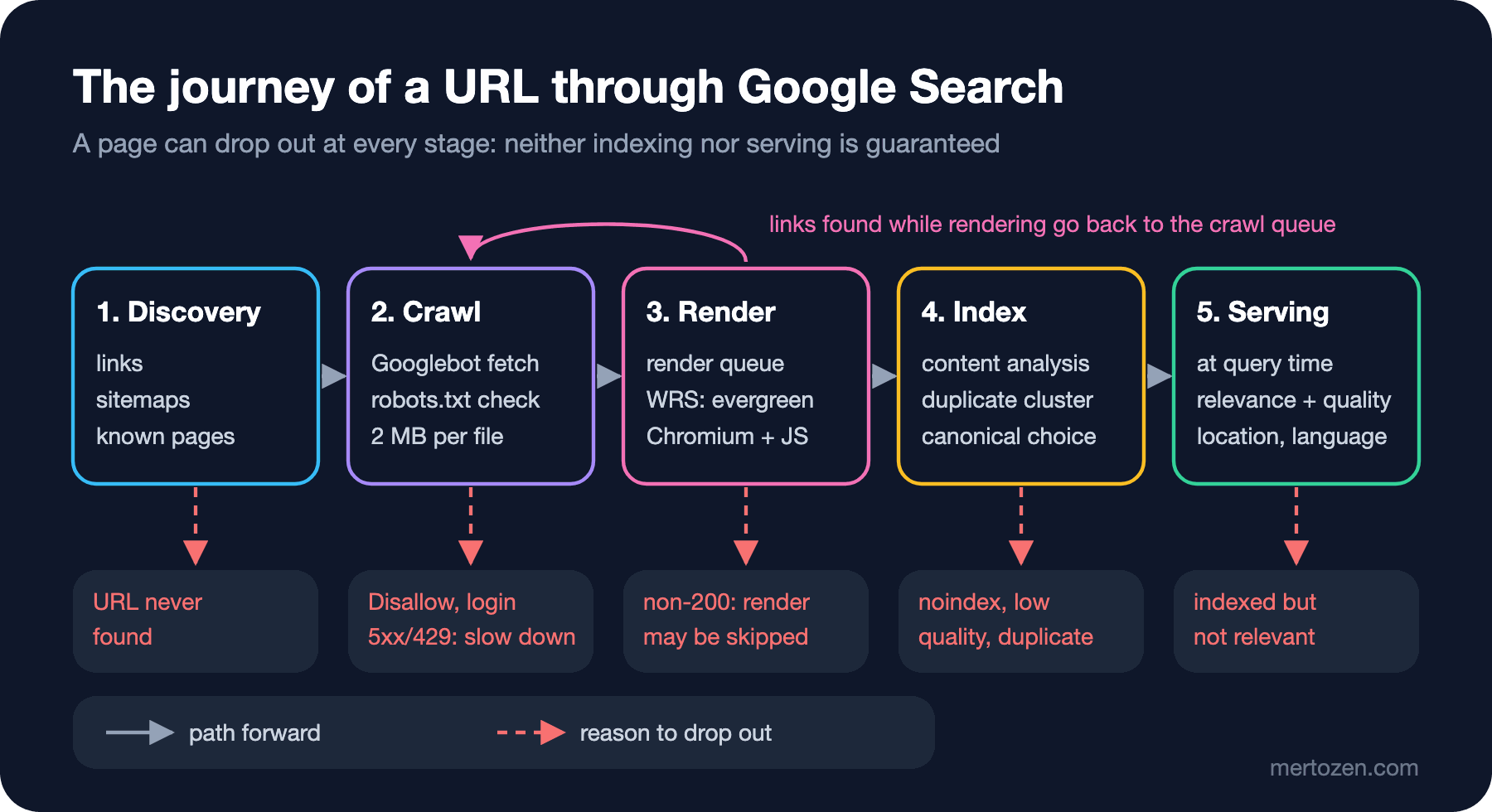
The red boxes matter: in Google's own words, even for a page that meets Search Essentials, Google doesn't guarantee that it will crawl, index or serve it. That is also the main idea of the rest of this series. The answer to "why don't I show up?" is always in one of these five boxes.
Crawling: How URLs Are Discovered and Fetched
The web has no central registry. Google learns about new URLs from three places: links on pages it has already visited, sitemaps submitted by site owners, and pages it already knows. For Bookstore's new book page, the fastest route is a real <a href> link on the home page plus a sitemap entry. Google states plainly that it can only discover links from <a> elements with an href attribute; a div that navigates with onclick is not a link for discovery.
A discovered URL enters a crawl queue. Googlebot's algorithms decide which sites to crawl, how often, and how many pages to fetch from each. Two things concern you directly here:
- Googlebot checks robots.txt before requesting a URL. A disallowed URL isn't fetched, and pages that require a login aren't crawled either.
- Googlebot adjusts its pace based on your server's responses. Google's example is blunt: HTTP (Hypertext Transfer Protocol) 500 errors mean "slow down". A server that keeps returning 5xx or 429 lowers the number of crawled pages with its own hands.
There are two kinds of Googlebot: Googlebot Smartphone and Googlebot Desktop. Because Google indexes the mobile version of most sites, most requests come from the mobile crawler. Both obey the same robots.txt token, so you can't target only one of them in robots.txt. The robots.txt rules, and when a blocked URL can still appear in results, are covered in detail in the "A robots.txt Guide" post of the Technical SEO series.
Rendering: When Does Googlebot Run JavaScript?
The fetched HTML is parsed for links and content. For pages that build content with JavaScript there is one more step: pages that return 200 go into a render queue, and when resources allow, Google's WRS (Web Rendering Service) renders the page with an evergreen, that is, continuously updated, Chromium. Google says a page may stay in this queue for "a few seconds", but it can take longer.
This step has three practical consequences. First, if the status code isn't 200, rendering may be skipped; whatever your 404 page shows with JavaScript stops mattering. Second, if the initial HTML contains noindex, Google may skip rendering and JavaScript execution; don't rely on a noindex that JavaScript removes later. Third, WRS is stateless: it clears local storage and session data between requests, doesn't request images or videos, and can only run the JavaScript the crawler actually fetched. I'm leaving CSR (Client-Side Rendering), SSR (Server-Side Rendering) and Angular SSR to the "JavaScript SEO" and "SEO with Angular SSR" posts of the Technical SEO series; what you should keep in mind here is this: if the critical content is in the initial HTML, the risk of this step shrinks.
The 2 MB Limit: How Much of a File Does Googlebot Read?
Google clarified the limits in its crawler documentation in February 2026 and went into detail in its "Inside Googlebot" post on March 31, 2026. For Google Search, Googlebot fetches the first 2 MB of a supported file type and the first 64 MB of a PDF. The limit applies to uncompressed data and includes the response headers. A page over the limit isn't rejected; the fetch stops, and the first 2 MB is sent to indexing and to WRS as if it were the complete file. Bytes after the cutoff are not fetched, not rendered and not indexed. CSS (Cascading Style Sheets) and JavaScript files referenced by the page are fetched separately, each with its own counter. For other Google crawlers that don't specify a limit, the default is 15 MB.
Let's measure the opening question. Bookstore's book page embedded every review in the <head>:
// Every review is serialized into the page, as some SSR apps do with their state.
var reviews = Enumerable.Range(1, 9_000)
    .Select(i => new { id = i, rating = i % 5 + 1, text = $"Review {i}: " + new string('x', 180) });
InlineReviewState = JsonSerializer.Serialize(reviews);
I wrote a small .NET 10 file-based app that downloads the page asking for gzip, like Googlebot, then decompresses it and finds the byte offset of the critical markers:
using System.Globalization;
using System.IO.Compression;
using System.Net;
using System.Text;

CultureInfo.CurrentCulture = CultureInfo.InvariantCulture;

// Google says "2MB" and counts response headers too, so we stay on the safe side.
const int CrawlLimit = 2_000_000;
string url = args[0];
string[] markers = ["<title>", "rel=\"canonical\"", "<h1>", "id=\"reviews\""];

using HttpClient http = new(new HttpClientHandler { AutomaticDecompression = DecompressionMethods.None });
http.DefaultRequestHeaders.AcceptEncoding.ParseAdd("gzip");

using HttpResponseMessage response = await http.GetAsync(url);
byte[] transferred = await response.Content.ReadAsByteArrayAsync();
byte[] body = response.Content.Headers.ContentEncoding.Contains("gzip")
    ? await GunzipAsync(transferred)
    : transferred;

Console.WriteLine($"Status:        {(int)response.StatusCode}");
Console.WriteLine($"Transferred:   {transferred.Length,12:N0} bytes (gzip)");
Console.WriteLine($"Uncompressed:  {body.Length,12:N0} bytes");

foreach (string marker in markers)
{
    int offset = body.AsSpan().IndexOf(Encoding.UTF8.GetBytes(marker));
    string verdict = offset < 0 ? "missing" : offset < CrawlLimit ? "inside limit" : "PAST LIMIT";
    Console.WriteLine($"{marker,-20} at {offset,12:N0}  {verdict}");
}

static async Task<byte[]> GunzipAsync(byte[] data)
{
    using GZipStream gzip = new(new MemoryStream(data), CompressionMode.Decompress);
    using MemoryStream output = new();
    await gzip.CopyToAsync(output);
    return output.ToArray();
}
Running it with dotnet run HtmlSizeCheck.cs -- http://localhost:5481/books/modeling-bounded-contexts gives this real output:
Status:        200
Transferred:         83,836 bytes (gzip)
Uncompressed:     2,032,603 bytes
<title>              at          150  inside limit
rel="canonical"      at          331  inside limit
<h1>                 at    2,032,320  PAST LIMIT
id="reviews"         at    2,032,474  PAST LIMIT
The answer: the title and canonical are inside the limit, but the book's name and description are beyond 2 MB. The 84 KB on the wire misleads you; Google looks at the uncompressed size. The fix is to put only the first page of reviews in the HTML and page the rest:
// Only the first page of reviews goes into the HTML; the rest is paged.
var reviews = Enumerable.Range(1, 20)
Status: 200
Transferred: 750 bytes (gzip)
Uncompressed: 5,239 bytes
<title> at 150 inside limit
rel="canonical" at 331 inside limit
<h1> at 4,956 inside limit
id="reviews" at 5,110 inside limitDon't overreact either: Google says that for most of the web a 2 MB HTML payload is so large that you will never get near this limit. The risky cases are inline base64 images, huge state JSON embedded in the page, and enormous inline CSS/JavaScript. Google's advice follows from that: move heavy CSS and JavaScript into external files, and keep critical elements such as the title, meta tags, canonical and structured data high in the HTML. It also notes that the limit may change over time.
Indexing: Duplicate Clusters and Canonical Selection
The rendered page is analyzed: text, <title>, alt attributes, images, videos. Then comes a critical step: Google groups pages with similar content into a cluster and picks the most representative one as the canonical. The canonical page is the one that may appear in results; the others are alternate versions and may be served in other contexts, for example on a mobile device. Google also collects signals about the canonical page, such as language, the country the content targets and the page's usability, and stores them in the index.
For Bookstore this means: /books/modeling-bounded-contexts, /books/modeling-bounded-contexts?utm_source=newsletter and /Books/Modeling-Bounded-Contexts are three different URLs to Google but most likely one cluster. You vote on which one becomes canonical with rel="canonical", redirects, the sitemap and internal links; Google makes the final call. That voting mechanism is the subject of the "Canonical URLs" post in the Technical SEO series.
In Google's own words: indexing isn't guaranteed; not every page Google processes will be indexed. The most common reasons are low-quality content, robots meta rules that block indexing, and site designs that make indexing hard.
Serving: What Happens When a Query Arrives?
When a user searches, Google looks up matching pages in the index and returns the ones it finds most relevant and of highest quality. Relevance depends on hundreds of factors; Google explicitly names the user's location, language and device among them. The same query can produce different results in Istanbul and in Berlin. The features on the results page also change with the query: one query shows local results, another shows image results. On the same page Google also states that it doesn't accept payment to rank pages higher.
An indexed page may still never appear. The reasons Google lists: the content is irrelevant to the query, the quality is low, or robots meta rules prevent serving. We'll open up what the ranking systems do in the third post of the series, and the appearance on the results page (title links, snippets) in the fourth.
The Journey of a Post on mertozen.com
Let's tie the theory to this site's own source code. mertozen.com is an ASP.NET Core application and posts are rendered on the server with Razor. When a post is published, the process works like this:
Discovery: the /sitemap.xml endpoint in SeoController produces two <url> entries for every post, one for the TR address and one for the EN address under /en/; both carry the hreflang="tr", hreflang="en" and x-default alternates. lastmod is whichever is newer, the post's publish date or its edit date. The last line of robots.txt also points to the sitemap. The post can also be discovered from real <a href> links on the home page and the blog list.
Crawl and render: robots.txt says Allow: / to everyone. Because the content is produced on the server with Razor, the post's text is in the initial HTML; it doesn't depend on WRS running JavaScript. That brings the risk of the rendering stage close to zero.
Index: every page declares its own canonical with <link rel="canonical">; the TR post's canonical is its own address, the EN post's is the /en/blog/... address. Google takes this vote into account but makes the final choice itself; you see the canonical it picked as "Google-selected canonical" in the URL Inspection tool in Search Console.
Serving: once the post is in the index, which queries it shows up for, and in what position, depends on the content itself and the query. The only honest measurement the site has is the Performance report in Search Console; we'll look at it in the fifth post of the series.
Production Notes
Track page size uncompressed. The tool above can run in CI (Continuous Integration) against your few most important page templates; warning when a template passes 1 MB is the cheapest way to hear about it before it reaches 2 MB.
Track your 5xx and 429 rate. One of the signals that sets crawl speed is your server's health. Returning 503 for a few minutes during a deploy is no disaster, but a high error rate for days slows Googlebot down.
Keep critical content in the initial HTML. The render queue delay, the stateless WRS and the 2 MB limit all lead to the same conclusion: the main content, title, canonical and links should be in the HTML that comes from the server, as high as possible.
Common Pitfalls
Thinking "it's in the sitemap, so it will be indexed". The sitemap is for discovery; it doesn't guarantee indexing. Google's wording is clear: being eligible is not a guarantee.
Looking at the gzipped size. The transfer size in the DevTools Network tab is the compressed size. Googlebot's limit applies to the decompressed data; in our measurement an 84 KB transfer was a 2 MB HTML.
Trying to remove pages from the index with robots.txt. robots.txt blocks crawling, not indexing. Because the content of a blocked URL can't be read, a noindex on it is never seen either. The right tool is noindex with crawling allowed.
Building links in JavaScript. Navigation without <a href> closes the crawler's discovery path.
A Small Experiment
★☆☆ Measure the heaviest page template in your own project with HtmlSizeCheck.cs. What is the ratio between the transfer size and the uncompressed size?
★★☆ Extend the tool: have it also report the total bytes of inline <script> and <style> blocks inside <head>. See how much of the page is content and how much is embedded code.
★★★ Write a version that reads every URL in the sitemap in turn and reports the status code and uncompressed size of each; list the URLs over 1 MB and the ones that don't return 200 separately. Run it only against your own local environment.
We now know at which stage a page can get stuck. In the next post we'll look at the document where Google writes the rules of this process, Search Essentials: technical requirements, spam policies and new rules added in 2026 such as back button hijacking.