

hreflang and Multilingual Sites: URL Strategy for TR/EN and x-default

Each language needs its own URL and its own canonical, linked reciprocally with hreflang; since Googlebot sends no Accept-Language, the other version of a page that switches language by cookie or header disappears for the crawler. We cover route-based language and an hreflang tag helper in ASP.NET Core, a canonical bug Lighthouse missed in Angular i18n, and mertozen.com's move from ?lang= to /en/.
Version note: The code in this post was built and run with .NET 10 (ASP.NET Core 10 Razor Pages and Request Localization), Angular 22.2 and @angular/localize 22.2.5; the hreflang rules are explained based on Google Search Central as of November 2026.
Guess First
Bookstore publishes in Turkish and English. In the first setup, every book has a single URL (Uniform Resource Locator): /books/dune. The language is chosen from the browser's Accept-Language header and, if the user picked a language, a cookie. Users are happy: Turkish readers see Turkish, German readers see English. The team says "there's no need for a separate URL per language".
Two questions. Does Googlebot ever see the English version of this page? And if the team later opens /en/books/dune for English but forgets the English page's canonical and leaves it pointing at the Turkish address, does Lighthouse catch it?
In the fifth post of the series we said that a translation isn't a duplicate, that the Turkish and English pages are each their own canonical, and that hreflang describes the relationship between them. In this post we set up that relationship: URL strategy, the rules of hreflang, the ASP.NET Core and Angular implementations, and the move mertozen.com made on 7 November 2026.
URL Strategy: Four Options
Google's documentation on multi-regional and multilingual sites compares four URL structures:
| Structure | Example | Pros | Cons |
|---|---|---|---|
| Country-code domain (ccTLD: country-code Top-Level Domain) | bookstore.de | Clear geotargeting | Expensive, tied to a single country, each domain managed separately |
| Subdomain | en.bookstore.example | Easy to set up, separate servers possible | Users may not tell whether en is a language or a country |
| Subfolder | bookstore.example/en/ | Easy to set up and maintain, single host | Single server location |
| URL parameter | bookstore.example?lang=en | - | "Not recommended" in Google's table |
For a bilingual site run by a single team, like Bookstore, the subfolder is the simplest choice: one domain, one certificate, one deploy, one Search Console property. The problem with the parameter option is that the language becomes an "optional" part of the URL: which language the parameterless URL is in stays ambiguous, and parameters are exactly what gets dropped from canonicals.
Two more rules from Google's documentation affect this decision. First, use separate URLs for language versions; switching languages on the same URL based on a cookie or browser setting isn't recommended. Second, Google detects a page's language from its visible content; the lang attribute and hreflang aren't used for language detection. So a page's content and navigation should be in a single language.
The Rules of hreflang
hreflang tells Google about a page's other language and region versions; it helps show the version that fits the user's language in results. It can be given in three equivalent places: in HTML (HyperText Markup Language) with <link rel="alternate" hreflang="...">, in the HTTP (HyperText Transfer Protocol) response with a Link header (for non-HTML files such as PDFs), and in the sitemap with xhtml:link. According to Google, using all three brings no extra benefit; pick one and apply it consistently. The rules:
- Each version lists itself and all other versions; the set is the same on every page.
- Reciprocity is required: if A points to B, B must point to A; otherwise the annotations are ignored.
- URLs are written in full, including the protocol; they can be on different domains.
- The language code is the two-letter code from ISO (International Organization for Standardization) 639-1, with an optional region code in ISO 3166-1 Alpha 2. A region can't be used alone;
en-UKis invalid, the correct one isen-GB. x-defaultspecifies the page to show when the user's language matches none of the versions; it's meant for language selector pages and auto-redirecting home pages.
One more rule sits where hreflang and canonical intersect: every URL hreflang points to must be its own canonical. If hreflang points to a non-canonical URL, the hreflang signal loses its meaning as Google folds that URL into its canonical. Google's canonical documentation also says it prefers URLs in reciprocal hreflang clusters when choosing canonicals; the two signals should be set up to support each other.
Locale-Adaptive Pages: Googlebot Doesn't Send Accept-Language
The answer to the first opening question is explicit in Google's documentation: Googlebot usually crawls from the USA and sends no Accept-Language header in its requests. So not all variations of a page that changes its content based on language settings may be found and crawled. I ran Bookstore's Razor Pages demo in two modes. In "adaptive" mode, ASP.NET Core's default culture providers are on (query string, cookie, Accept-Language):
$ LANG_MODE=adaptive dotnet run --no-launch-profile --urls http://localhost:20111
$ curl -s http://localhost:20111/en/books/dune | grep -oE '<html lang="[a-z]+"|<link rel="canonical"[^>]*>|<p>.*</p>'
<html lang="tr"
<link rel="canonical" href="https://bookstore.example/en/books/dune" />
<p>Bir çöl gezegeni, soylu bir aile ve herkesin istediği baharat.</p>
$ curl -s -H "Accept-Language: en" http://localhost:20111/books/dune | grep -oE '<html lang="[a-z]+"|<link rel="canonical"[^>]*>|<p>.*</p>'
<html lang="en"
<link rel="canonical" href="https://bookstore.example/books/dune" />
<p>A desert planet, a noble family and the spice everyone wants.</p>Two separate disasters. First: a client requesting the English URL without sending Accept-Language, that is, Googlebot, gets Turkish content; the English page never exists for Google. Second: the Turkish URL, requested with an English browser setting, returns English content, but its canonical is the Turkish address. The same URL returns content in a different language depending on the visitor; what the opening team called "users are happy" is inconsistency for a crawler.
ASP.NET Core: Language Only from the URL
The fix is to read the language from a single source, the URL. Turkish at the root, English under /en/; the same Razor Page is reachable from two routes, and the culture comes from a route value:
WebApplicationBuilder builder = WebApplication.CreateBuilder(args);
builder.Services.AddRazorPages(o =>
    // the same page under the English subfolder: /en/books/{slug}
    o.Conventions.AddPageRoute("/Books/Detail", "{culture:regex(^en$)}/books/{slug}"));
builder.Services.AddHttpContextAccessor();

builder.Services.Configure<RequestLocalizationOptions>(o =>
{
    o.SetDefaultCulture("tr").AddSupportedCultures("tr", "en").AddSupportedUICultures("tr", "en");
    // language comes only from the URL: same URL, same language, for every visitor
    o.RequestCultureProviders = [new RouteDataRequestCultureProvider()];
});

WebApplication app = builder.Build();
app.UseRouting();
app.UseRequestLocalization();
app.MapRazorPages();
app.Run();
Because RouteDataRequestCultureProvider reads route values, UseRequestLocalization must come after UseRouting. A tag helper produces hreflang and canonical; it finds the language-neutral path and builds a URL for every language:
[HtmlTargetElement("hreflang-links", TagStructure = TagStructure.WithoutEndTag)]
public sealed class HreflangTagHelper(IHttpContextAccessor accessor) : TagHelper
{
    private const string Site = "https://bookstore.example";
    private static readonly (string Lang, string Prefix)[] Languages = [("tr", ""), ("en", "/en")];

    public override void Process(TagHelperContext context, TagHelperOutput output)
    {
        HttpRequest request = accessor.HttpContext!.Request;
        string path = request.Path.Value!;
        // the language-neutral path: "/en/books/dune" -> "/books/dune"
        string neutral = path.StartsWith("/en/", StringComparison.Ordinal) ? path[3..] : path;
        string current = path.StartsWith("/en/", StringComparison.Ordinal) ? "en" : "tr";

        output.TagName = null; // render only the children
        output.Content.AppendHtml($"<link rel=\"canonical\" href=\"{Url(current, neutral)}\" />\n");
        foreach ((string lang, _) in Languages)
            output.Content.AppendHtml($"<link rel=\"alternate\" hreflang=\"{lang}\" href=\"{Url(lang, neutral)}\" />\n");
        // x-default: the page for users whose language matches none of the above
        output.Content.AppendHtml($"<link rel=\"alternate\" hreflang=\"x-default\" href=\"{Url("tr", neutral)}\" />");
    }

    private static string Url(string lang, string neutralPath) =>
        Site + Languages.Single(l => l.Lang == lang).Prefix + neutralPath;
}
$ curl -s http://localhost:20111/en/books/dune | grep -oE '<html lang="[a-z]+"|<link[^>]*>|<p>.*</p>'
<html lang="en"
<link rel="canonical" href="https://bookstore.example/en/books/dune" />
<link rel="alternate" hreflang="tr" href="https://bookstore.example/books/dune" />
<link rel="alternate" hreflang="en" href="https://bookstore.example/en/books/dune" />
<link rel="alternate" hreflang="x-default" href="https://bookstore.example/books/dune" />
<p>A desert planet, a noble family and the spice everyone wants.</p>
$ curl -s -H "Accept-Language: en" http://localhost:20111/books/dune | grep -oE '<html lang="[a-z]+"|<link[^>]*>|<p>.*</p>'
<html lang="tr"
<link rel="canonical" href="https://bookstore.example/books/dune" />
<link rel="alternate" hreflang="tr" href="https://bookstore.example/books/dune" />
<link rel="alternate" hreflang="en" href="https://bookstore.example/en/books/dune" />
<link rel="alternate" hreflang="x-default" href="https://bookstore.example/books/dune" />
<p>Bir çöl gezegeni, soylu bir aile ve herkesin istediği baharat.</p>Every URL now returns the same language to every client; the canonical is its own URL, and the hreflang set is the same and reciprocal on both pages. Accept-Language is still useful information, but its place isn't changing the content: it can be used to show a user with an English browser on the Turkish page a banner saying "This page is available in English".
The characters like ç in the output may have caught your eye. Razor's default HTML encoder leaves only the Basic Latin range as is and turns Turkish characters into entities. Browsers and Google read them correctly, but the HTML grows and the source becomes unreadable. Widening the allowed range with AddWebEncoders fixes it:
builder.Services.AddWebEncoders(o => o.TextEncoderSettings = new TextEncoderSettings(UnicodeRanges.All));<p>Bir çöl gezegeni, soylu bir aile ve herkesin istediği baharat.</p>Angular i18n: A Build per Locale, and SSR
In Angular, multilingualism is resolved at build time: @angular/localize produces a separate build for every locale, and the SSR (Server-Side Rendering) server routes the request to the right locale's application by URL prefix. The setting in angular.json that keeps Turkish at the root and English under /en in Bookstore's i18n copy:
"i18n": {
  "sourceLocale": { "code": "en", "subPath": "en" },
  "locales": {
    "tr": { "translation": "src/locale/messages.tr.xlf", "subPath": "" }
  }
}
"localize": true in the build options, i18n attributes in templates (<h1 i18n="@@homeTitle">Science fiction classics</h1>), and a messages.tr.xlf extracted with ng extract-i18n with translations added. The build prerendered four pages per locale (Prerendered 8 static routes.), and dist/bookstore-ng/browser/index.html and dist/bookstore-ng/browser/en/index.html were created separately. Angular sets <html lang> per locale in each build, and thanks to <base href>, routerLinks are generated with the right prefix automatically. The first attempt, however, had a bug:
== /books/dune
<html lang="tr" <link rel="canonical" href="https://bookstore.example/books/dune"> <a routerlink="/" href="/en/">Ana Sayfa</a> ...
== /en/books/dune
<html lang="en" <link rel="canonical" href="https://bookstore.example/books/dune"> <a routerlink="/" href="/en/">Home</a> ...
The English page's canonical points to the Turkish address. The SeoService left over from the earlier posts of the series built the canonical as SITE + path and knew nothing about the locale. The result tells Google "the English page is a copy of the Turkish page"; a signal strong enough to drop the English page from the index. The answer to the second opening question is here too: for /en/books/dune in this build, Lighthouse's SEO (Search Engine Optimization) score was 100 and the canonical audit said "Document has a valid rel=canonical". Since the page had no hreflang, Lighthouse had no way to tell that the canonical pointed to another language version. The fixed service takes the locale from LOCALE_ID:
const SITE = 'https://bookstore.example';
// locale -> URL prefix; must match "subPath" in angular.json
const PREFIX: Record<string, string> = { tr: '', en: '/en' };

@Injectable({ providedIn: 'root' })
export class SeoService {
  private readonly document = inject(DOCUMENT);
  private readonly title = inject(Title);
  private readonly meta = inject(Meta);
  private readonly locale = inject(LOCALE_ID); // "tr" or "en", fixed per build

  update(page: { title: string; description: string; path: string; noindex?: boolean }): void {
    this.title.setTitle(`${page.title} | Bookstore`);
    this.meta.updateTag({ name: 'description', content: page.description });
    this.document.head.querySelectorAll('link[rel="canonical"], link[rel="alternate"][hreflang]')
      .forEach(l => l.remove());
    if (page.noindex) {
      this.meta.updateTag({ name: 'robots', content: 'noindex' });
      return;
    }
    this.meta.removeTag('name="robots"');
    // canonical: this language's own URL, never the other language
    this.addLink({ rel: 'canonical', href: this.url(this.locale, page.path) });
    for (const lang of Object.keys(PREFIX)) {
      this.addLink({ rel: 'alternate', hreflang: lang, href: this.url(lang, page.path) });
    }
    this.addLink({ rel: 'alternate', hreflang: 'x-default', href: this.url('tr', page.path) });
  }

  private url(lang: string, path: string): string {
    return SITE + PREFIX[lang] + (path === '/' && PREFIX[lang] ? '/' : path);
  }

  private addLink(attrs: Record<string, string>): void {
    const link = this.document.createElement('link');
    for (const [k, v] of Object.entries(attrs)) {
      link.setAttribute(k, v);
    }
    this.document.head.appendChild(link);
  }
}
$ curl -s http://localhost:20112/en/books/dune | grep -o '<html lang="[^"]*"\|<link rel="canonical"[^>]*>\|<link rel="alternate"[^>]*>'
<html lang="en"
<link rel="canonical" href="https://bookstore.example/en/books/dune">
<link rel="alternate" hreflang="tr" href="https://bookstore.example/books/dune">
<link rel="alternate" hreflang="en" href="https://bookstore.example/en/books/dune">
<link rel="alternate" hreflang="x-default" href="https://bookstore.example/books/dune">In the fixed build, Lighthouse's hreflang audit passed as well ("Document has a valid hreflang"). The lesson: Lighthouse audits the format of hreflang codes and the canonical, not the meaning of the relationship between language versions. Testing that is your job.
mertozen.com: From ?lang= to /en/
On the morning of 7 November 2026, when this series was planned, mertozen.com was using a variant of the "adaptive" structure from the opening. According to the site's source code as of that day: the hreflang tr target was ?lang=tr, the en target ?lang=en, and x-default the parameterless URL. The ?lang=tr page gave its canonical to the parameterless URL, so the Turkish URL hreflang pointed to wasn't canonical. The parameterless URL chose its language by cookie and Accept-Language, and when rendered in English it gave its canonical to ?lang=en. To Googlebot, the parameterless URL was always Turkish.
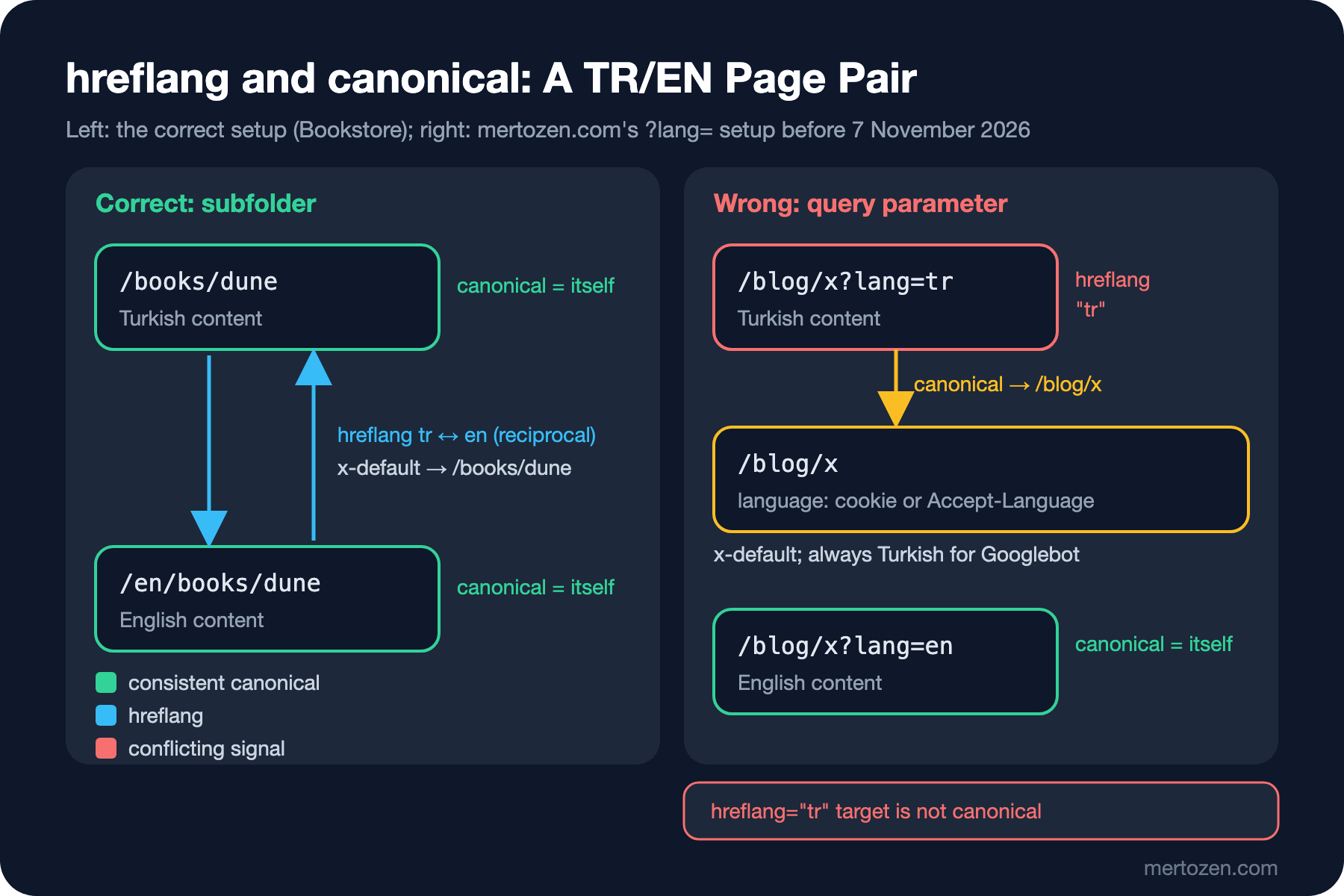
Release v1.12.0, shipped the same evening, moved to the structure recommended in this post. The reasoning in the commit message: in the previous structure, the same URL returned content and canonical in a different language depending on the visitor's language cookie and Accept-Language. The changes in the source code:
- Turkish at the root (
/blog/x), English under/en/(/en/blog/x). A middleware moves the/enprefix intoPathBase; that way controllers and routes didn't change at all. - Culture only from the URL: the query string, cookie and
Accept-Languageproviders were removed, and the language cookie is no longer written. - Canonical and hreflang URLs are generated with the
/enprefix;x-defaultis the Turkish page. - The old
?lang=enand?lang=traddresses are redirected to the new ones with 301;/ento/en/as well. - In-post links written with a single (Turkish) address in the CMS (Content Management System) are converted to the
/enprefix when rendered on an English page; English readers stay on English pages. - The sitemap produces two entries per page, Turkish and English, both carrying the same alternate set.
Technically, this change is a site migration: every English URL changed. The plan for the migration, verifying the redirects and what to monitor afterwards are the topic of the last post of the series.
Production Notes
Don't redirect automatically based on language preference. Google explicitly doesn't recommend it; it can keep Googlebot from ever seeing some versions. Offer users a visible language selector, and have the selector link to the same page's address in the other language, not to the home page.
Keep a page's content and navigation in a single language. Google detects language from visible content; half-translated templates (an English menu on a Turkish page) weaken language detection. Still set <html lang> correctly: even though Google doesn't use it for language detection, screen readers and the browser's translation offer do.
Don't give hreflang for untranslated content. If the English URL of a post without an English version returns Turkish content, hreflang declares two pages with the same content as if they were in different languages. Either don't publish untranslated pages on the English side, or generate the hreflang set per page.
Test the hreflang set: does every page's set include itself, is the set reciprocal, does every target return 200 and is it its own canonical? These can be automated with a small crawler script; Lighthouse isn't enough.
Common Pitfalls
Switching languages on the same URL with a cookie or Accept-Language. Googlebot sends no header; the other language version disappears for the crawler.
Pointing the English page's canonical to the Turkish page. A translation isn't a duplicate; each language is its own canonical.
Giving hreflang to non-canonical URLs (such as parameterized variants). The signal loses its meaning.
Non-reciprocal hreflang. If the Turkish page points to the English one but the English page doesn't point back, Google ignores the annotation.
Invalid codes: en-GB instead of en-UK, and language plus region instead of a region alone (hreflang="GB").
A Small Experiment
★☆☆ Get a page's hreflang set from your own site with curl -s, request each target one by one, and check two things: does the target return 200, and does the target's own hreflang set include the starting page?
★★☆ Extend HreflangTagHelper so it knows which languages a page has translations in: it should produce no alternate for a language without a translation. Test it with a book that has only a Turkish version.
★★★ Write an hreflang validator for Bookstore: request every URL in the sitemap, extract the hreflang set from the HTML, check reciprocity, self-reference, code validity and that every target's canonical is itself; show that it catches the Angular bug from the first attempt (the English page's canonical pointing to Turkish).
mertozen.com's move left us two topics: how quickly the crawler will process this many URL changes, and how to manage the migration itself. In the next post we'll look at crawl budget, analyzing bot traffic from server logs, and telling fake Googlebots apart.