

Generating PDFs Part 1: Invoices and Reports with QuestPDF, Fonts and Turkish Characters
Build the invoice with QuestPDF's fluent layout, repeat the table header on every page, put page numbers in the footer and ship fonts with the app: since 2026.9 system fonts are off by default and a missing font or glyph throws. Bookstore's invoice prints Turkish characters correctly with the bundled Lato, in a container too; the Community License line is a declaration for companies under USD 1 million in annual revenue.
Version note: The code in this post was built and run with .NET 10, QuestPDF 2026.9.2 and PdfPig 0.1.16. The QuestPDF license details were checked against the official license guide on 15 November 2026.
Guess First
Bookstore, the online bookstore used as the shared example across this site's series, is going to produce the order invoice as a PDF. The billing address is "Bağdat Caddesi No: 12, Kadıköy, İstanbul". Three questions:
First: you add QuestPDF to the project and generate the first document without any setup. What happens?
Second: you gave the address line .FontFamily("Arial"). Arial is installed on your Windows development machine. Is the PDF produced? And when the same code runs in a Linux container?
Third: a customer ordered a Murakami novel under its Japanese title. What happens while the invoice is generated?
The answers come from a real run with QuestPDF 2026.9.2: in the first case you get an exception whose message asks you to choose a license type. In the second you get an error on your development machine too, because system fonts have not been used by default since 2026.9.0; with an explicit setting the code works on your machine and still fails in the container. In the third, generation stops with a DocumentDrawingException that lists the missing glyphs one by one. All three are better than silently producing a broken PDF.
QuestPDF's Layout Model: Page, Header, Content, Footer
QuestPDF is a library that lets you describe a document in C# code with a fluent API. There is no HTML or template file; you build the page by nesting containers, and the layout engine measures the text and splits lines and pages itself. The invoice renderer is the PDF implementation of the IDocumentRenderer<InvoiceModel> from the first post:
private static void Compose(IDocumentContainer container, InvoiceModel model)
{
    container.Page(page =>
    {
        page.Size(PageSizes.A4);
        page.Margin(36);
        page.DefaultTextStyle(text => text.FontSize(10).FontColor(Colors.Grey.Darken4));

        page.Header().Element(header => ComposeHeader(header, model));
        page.Content().PaddingVertical(16).Element(content => ComposeContent(content, model));
        page.Footer().AlignCenter().Text(text =>
        {
            text.Span("Page ");
            text.CurrentPageNumber();
            text.Span(" / ");
            text.TotalPages();
        });
    });
}
Header and Footer repeat on every page; Content spreads over as many pages as needed. Sizes are in points (1 inch = 72 points), so a 36-point margin is half an inch. The CurrentPageNumber and TotalPages values are filled in after layout; you do not have to calculate the page count up front. In the header, the logo and the invoice details sit side by side:
private static void ComposeHeader(IContainer container, InvoiceModel model)
{
    container.Row(row =>
    {
        row.ConstantItem(150).Height(40).Image(Logo).FitArea();
        row.RelativeItem().AlignRight().Column(column =>
        {
            column.Item().Text($"Invoice {model.InvoiceNumber}").FontSize(16).Bold();
            column.Item().Text($"Order #{model.OrderId}");
            column.Item().Text($"Issue date: {model.IssueDate.ToString("d MMMM yyyy", Tr)}");
        });
    });
}
Row and Column are the two basic building blocks: ConstantItem is a fixed width, RelativeItem a share of the remaining space. The logo is a PNG embedded in the assembly, so we do not have to look for a file path on the server.
Tables, a Repeating Header and Page Breaks
The invoice lines are a Table:
container.Table(table =>
{
    table.ColumnsDefinition(columns =>
    {
        columns.ConstantColumn(95);
        columns.RelativeColumn();
        columns.ConstantColumn(40);
        columns.ConstantColumn(70);
        columns.ConstantColumn(40);
        columns.ConstantColumn(75);
    });

    // Repeated at the top of every page the table continues on
    table.Header(header =>
    {
        foreach (string title in new[] { "ISBN", "Title", "Qty", "Unit price", "VAT", "Net amount" })
        {
            header.Cell().BorderBottom(1).BorderColor(Colors.Grey.Darken1).PaddingVertical(4).Text(title).Bold();
        }
    });

    foreach (InvoiceLine line in model.Lines)
    {
        table.Cell().Element(Cell).Text(line.Isbn);
        table.Cell().Element(Cell).Text(line.Title);
        table.Cell().Element(Cell).AlignRight().Text(line.Quantity.ToString(Tr));
        table.Cell().Element(Cell).AlignRight().Text(line.UnitPrice.ToString("C", Tr));
        table.Cell().Element(Cell).AlignRight().Text(line.VatRate.ToString("P0", Tr));
        table.Cell().Element(Cell).AlignRight().Text(line.NetAmount.ToString("C", Tr));
    }
});
Institutional orders can produce invoices with dozens of lines. Instead of checking page breaks by eye, we produced a 120-line invoice and extracted the text of every page with PdfPig, an Apache 2.0 licensed PDF reading library:
$ dotnet run -- long 120
page 1: header row=True lines=32 footer='Page 1 / 4'
page 2: header row=True lines=36 footer='Page 2 / 4'
page 3: header row=True lines=36 footer='Page 3 / 4'
page 4: header row=True lines=16 footer='Page 4 / 4'
Each of the four pages has the table header, the lines add up to 32 + 36 + 36 + 16 = 120, and the footer writes the page count correctly. The first page has fewer lines because the header block and the addresses take up space. We put the same check into an xUnit test; if adding a column to the template breaks the page layout, the test fails.
Money, Dates and the VAT Summary
Amounts are decimal and formats use the tr-TR culture: ToString("C", Tr) produces "₺1.702,00" and ToString("P0", Tr) produces "%10". The VAT summary groups the lines by rate:
foreach (IGrouping<decimal, InvoiceLine> rate in model.Lines.GroupBy(l => l.VatRate).OrderBy(g => g.Key))
{
    column.Item().Row(row =>
    {
        row.RelativeItem().Text($"VAT {rate.Key.ToString("P0", Tr)} on {rate.Sum(l => l.NetAmount).ToString("C", Tr)}");
        row.ConstantItem(80).AlignRight().Text(rate.Sum(l => l.VatAmount).ToString("C", Tr));
    });
}
The VAT of each line is rounded to two places in InvoiceModel with MidpointRounding.AwayFromZero; the summary is the sum of the rounded line amounts. The 10 and 20 percent rates in the sample are only for illustration; accounting decides which rate applies to which product, and the rate belongs to the catalog data, not the code. The first page of the generated invoice:
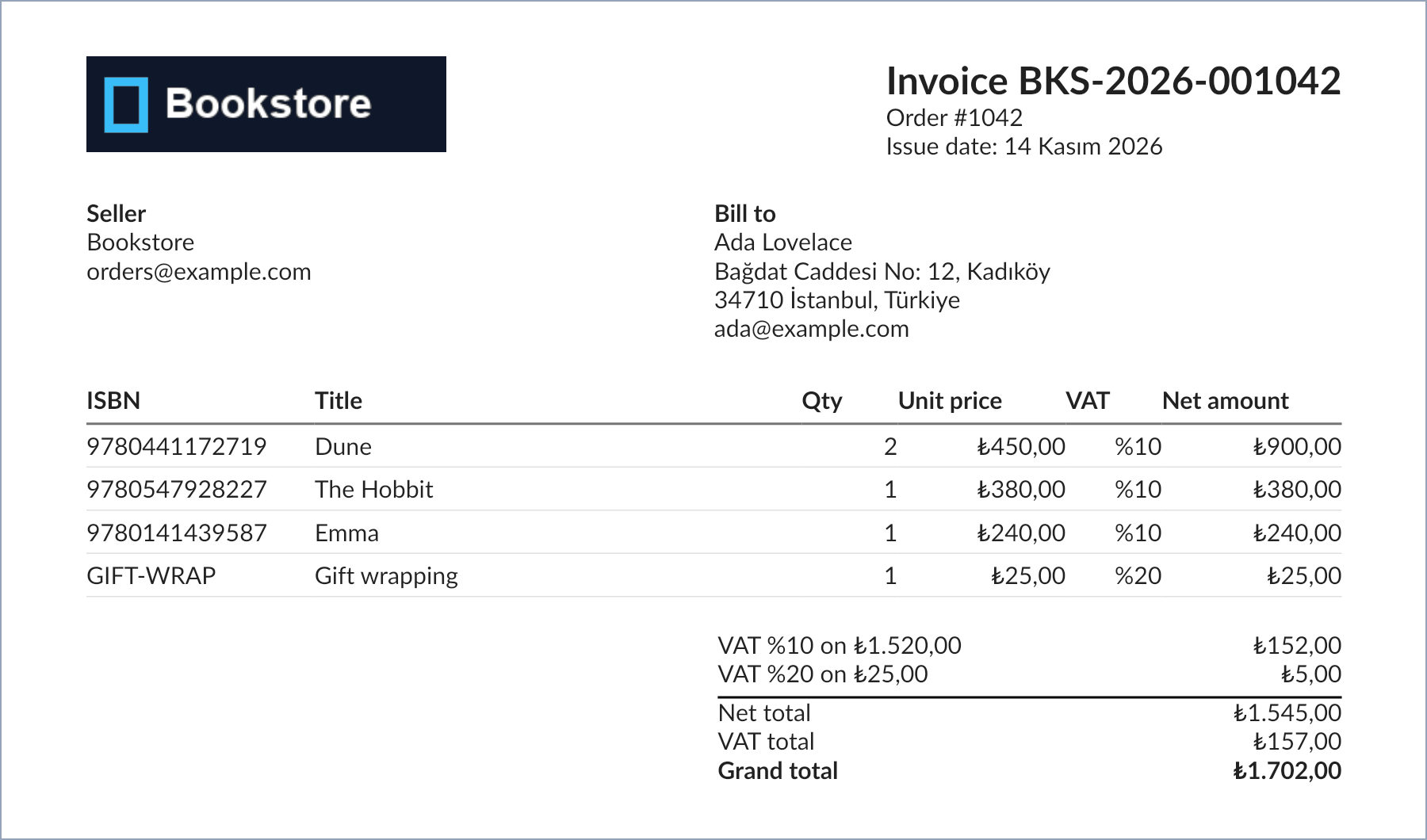
We took the image from the same document with QuestPDF's GenerateImages method. When we read the PDF's text with PdfPig, the Turkish characters and the totals are in place:
$ dotnet run -- invoice
out/invoice.pdf 38 KB in 99 ms
pages=1
  ...
  Bookstore Ada Lovelace
  orders@example.com Bağdat Caddesi No: 12, Kadıköy
  34710 İstanbul, Türkiye
  ...
  VAT %10 on ₺1.520,00 ₺152,00
  VAT %20 on ₺25,00 ₺5,00
  Net total ₺1.545,00
  VAT total ₺157,00
  Grand total ₺1.702,00
  Page 1 / 1
In Turkey, a legal invoice is issued through the e-Fatura or e-Arşiv system as UBL-TR XML submitted to the Revenue Administration. The PDF we produce here is the visual copy sent to the customer; the legal integration is a separate job.
Fonts and Turkish Characters
For a PDF to look the same everywhere, it has to embed the font it uses. QuestPDF does this itself: it puts the subset containing the characters actually used into the PDF, which is why the 38 KB invoice includes the font. The real question is where the font comes from.
QuestPDF ships the Lato font family inside the package, and it is the default font. Lato has the Turkish characters (ı, İ, ş, ğ) and the ₺ sign; our invoice came out right without any extra font. Version 2026.9.0 changed font behaviour significantly. UseSystemFonts is now off by default, so the operating system's fonts are not used. A missing font family (ThrowOnMissingFontFamilies) and a missing glyph (ThrowOnMissingTextGlyphs) now always throw an exception. The second check used to run only with a debugger attached. The Arial attempt from the guessing question:
$ dotnet run -- font Arial
DocumentDrawingException: The text "Bağdat Caddesi No: 12, Kadıköy" uses font families that are not available: 'Arial'.

Since version 2026.9.0, system fonts are not used by default, and an unavailable font family stops document generation instead of being silently replaced with another font. More info: https://www.questpdf.com/api-reference/text/font-management.html

Font families used in this text block: 'Arial', 'Lato'
With QuestPDF.Settings.UseSystemFonts = true, the same command works on a development machine where Arial is installed. When we run the same compiled application in the mcr.microsoft.com/dotnet/runtime:10.0 image, however:
$ docker run --rm -v ./bin/Debug/net10.0:/app:ro -w /tmp mcr.microsoft.com/dotnet/runtime:10.0 \
    sh -c 'dotnet /app/Bookstore.PdfLab.dll invoice | head -9; echo ---; dotnet /app/Bookstore.PdfLab.dll font Arial --system-fonts | head -3; echo ---; ls /usr/share/fonts'
out/invoice.pdf 38 KB in 179 ms
pages=1
  Invoice BKS-2026-001042
  Order #1042
  Issue date: 14 Kasım 2026
  Seller Bill to
  Bookstore Ada Lovelace
  orders@example.com Bağdat Caddesi No: 12, Kadıköy
  34710 İstanbul, Türkiye
---
DocumentDrawingException: The text "Bağdat Caddesi No: 12, Kadıköy" uses font families that are not available: 'Arial'.

Since version 2026.9.0, system fonts are not used by default, and an unavailable font family stops document generation instead of being silently replaced with another font. More info: https://www.questpdf.com/api-reference/text/font-management.html
---
ls: cannot access '/usr/share/fonts': No such file or directory
The invoice produced with Lato comes out the same in the container, because the font ships with the package. Code that relies on a system font stops in the container: the official .NET runtime image does not even have a /usr/share/fonts folder. That is exactly what the new defaults do: they pull the "works on my machine" problem forward from deployment to the development machine. In older versions the same situation quietly fell back to another font, and PDFs with broken characters were noticed in production.
The Japanese title, on the other hand, is outside Lato's coverage:
$ dotnet run -- glyphs
DocumentDrawingException: The text "Haruki Murakami: 海辺のカフカ" contains 5 glyph(s) that are not available in the configured fonts or their fallbacks.

Missing glyphs: U+306E 'の', U+30AB 'カ', U+30D5 'フ', U+6D77 '海', U+8FBA '辺'
The fix is to ship the font you need with the application. Settings.FontDiscoveryPath defaults to the application folder, and QuestPDF registers the .ttf and .otf files there by itself. Adding a Fonts folder to the project, copying a suitably licensed font (for example Noto Sans JP under the SIL Open Font License) to the output, and giving the text style a fallback chain is enough. With the font file in place, the fallback chain looks like this:
// The Noto Sans JP font file must be shipped with the application
table.Cell().Element(Cell).Text(line.Title).FontFamily("Lato", "Noto Sans JP");
Check a font's license just like a library's: embedding a font in a PDF is a form of distribution, and not every font license allows it. Copying commercial fonts from Windows into a container on a server is often against their license. This section is based on the official documentation.
Setting the Community License in Code
The answer to the first guessing question is the exception you get without the license line:
Unhandled exception. System.Exception: Please configure the QuestPDF license by setting 'QuestPDF.Settings.License' at application startup.
...
> QuestPDF.Settings.License = LicenseType.Evaluation; // or Community / Professional / Enterprise
...
No license key or activation is required: the setting is a self-declaration, and we simply trust you.
As the message says, this is not a license key but a declaration. In Bookstore.Api it is written once at application start:
// Bookstore qualifies for the QuestPDF Community License (annual gross revenue under USD 1M); set once at startup
QuestPDF.Settings.License = QuestPDF.Infrastructure.LicenseType.Community;
We assume Bookstore is a small company that meets this condition. Who may write this line is set by version 3.0 of the license guide, effective 6 July 2026. The groups are: individuals, companies whose annual gross revenue in the last completed fiscal year stays under USD 1 million (counted across commonly controlled entities), open source projects distributed under an OSI-approved license, charities and non-profit academic institutions. Public-sector bodies and publicly traded companies cannot use the Community License whatever their revenue. Individual use for learning and evaluation is free regardless of revenue. An organisation that does not qualify may try it with LicenseType.Evaluation for up to 60 days, outside production only; before production it needs a Professional or Enterprise license. According to the summary in the exception message, both paid tiers cover unlimited developers, and Enterprise also covers affiliated companies.
Who makes this decision? Not the developer writing the code, but someone who knows the company's revenue and structure. The license check from the first post paid off here: the moment we added QuestPDF, eng/check-licenses.sh exited with 1. We recorded the decision as a version-pinned override and the check went green again:
[
  {
    "Id": "QuestPDF",
    "Version": "2026.9.2",
    "License": "LicenseRef-QuestPDF-Community"
  }
]
For when the company grows, the official pricing page gives a 90-day transition period starting at the end of the fiscal year in which revenue exceeded USD 1 million. That is why the decision has to be checked again on every version upgrade and at the end of every fiscal year.
Producing the Invoice Once and Keeping It
QuestPDF is fast: we produced 100 invoices on a single thread in 193 milliseconds, about 2 milliseconds per invoice. Producing it inside the request is therefore possible. Still, regenerating the invoice on every download is wrong: an issued invoice must not change. When you add a column to the template or the address changes later, last month's invoice must not download as a different PDF. A small service that produces the invoice on the first request and writes it to IFileStore:
// An issued invoice never changes: render it once, keep the file, serve the same bytes on every download
public sealed class InvoiceArchive(IDocumentRenderer<InvoiceModel> renderer, IFileStore files)
{
    public static string PathFor(InvoiceModel invoice) =>
        $"invoices/{invoice.IssueDate:yyyy}/{invoice.InvoiceNumber}{FileFormat.Pdf.Extension}";

    public async Task<string> EnsureStoredAsync(InvoiceModel invoice, CancellationToken cancellationToken = default)
    {
        string path = PathFor(invoice);
        if (await files.ExistsAsync(path, cancellationToken))
        {
            return path;
        }

        using MemoryStream pdf = new();
        await renderer.RenderAsync(invoice, pdf, cancellationToken);
        pdf.Position = 0;
        await files.SaveAsync(path, pdf, renderer.Format.ContentType, cancellationToken);
        return path;
    }
}
We added ExistsAsync to IFileStore for this. Two consecutive downloads:
HTTP/1.1 200 OK
Content-Type: application/pdf
Content-Disposition: attachment; filename=invoice-BKS-2026-001042.pdf; filename*=UTF-8''invoice-BKS-2026-001042.pdf
time=0.140990s size=39870
HTTP/1.1 200 OK
Content-Type: application/pdf
Content-Disposition: attachment; filename=invoice-BKS-2026-001042.pdf; filename*=UTF-8''invoice-BKS-2026-001042.pdf
time=0.001308s size=39870
The first takes 141 milliseconds, including the loading done for the application's first PDF; the second takes 1 millisecond, and the two files are identical byte for byte. In the first post we attached the renderer straight to the response with Results.Stream. QuestPDF writes synchronously, like ClosedXML, so the renderer first produces into a MemoryStream and then copies with CopyToAsync; otherwise we would get the "Synchronous operations are disallowed" error from the previous post. In production, producing the invoice moves to a job that runs when the order is confirmed, and the file is attached to the email or sent as a link once it is ready. We build that chain in the last post of the series.
The Development Loop: Companion and Tests
QuestPDF has a desktop application called Companion. A document.ShowInCompanion() call sends the document to the application, and with the IDE's hot reload the preview refreshes as you change the code. We did not use Companion in this post. We built the loop with the PdfLab console app, the PNG from GenerateImages, and PdfPig tests. Companion or a PNG helps you check the visual layout by eye, but the test is what catches regressions:
[Fact]
public async Task Turkish_characters_and_totals_survive_in_the_pdf_text()
{
    using PdfDocument pdf = await RenderAsync(BookstoreSampleData.Invoice(1042));
    string text = string.Join(" ", pdf.GetPage(1).GetWords().Select(w => w.Text));

    Assert.Contains("Bağdat Caddesi No: 12, Kadıköy", text);
    Assert.Contains("34710 İstanbul, Türkiye", text);
    Assert.Contains("Grand total ₺1.702,00", text);
}
Extracting text from the PDF also verifies that the glyphs were embedded with the right Unicode mappings. Copy and paste and screen readers rely on that mapping. The test class runs the same license line in its constructor.
In Production
Put the license line at the very top of Program.cs. QuestPDF expects the setting before the first document; if a background job produces the first invoice before Program.cs reaches that line, you get an exception.
Ship fonts with the application and leave UseSystemFonts off. Installing a font package in the Docker image is another option, but the image's distribution decides which version of which font arrives; a font file in the application folder is the same in every environment.
QuestPDF uses a native, Skia-based library, and the package comes with ready binaries for Windows, Linux (glibc and musl) and macOS. When you publish framework-dependent into a container, make sure the runtimes folder is copied into the image; the container run above confirms this.
Memory and time in large reports: QuestPDF calculates the layout in memory. The 120-line invoice is 53 KB and takes milliseconds, but a report with hundreds of pages belongs in a job. If the code puts external text or images into the document, set a size limit.
Protect the invoice as personal data. It contains an address and an email address; if you leave the file path predictable (invoices/2026/BKS-2026-001042.pdf), an ownership check in the download endpoint is a must. In the eighth post we solve this on the storage side with short-lived signed URLs.
Common Pitfalls
Using the Community License in a company above the revenue threshold. The line is a declaration; its accuracy is the company's responsibility. The threshold is calculated on the total revenue of the group, and public-sector bodies and publicly traded companies are excluded regardless of revenue.
Not testing page breaks in a large table. An invoice that looks fine with three lines can come out at 120 lines with a second page missing its header, or a total overlapping the footer.
Relying on system fonts. Arial on the development machine, nothing in the container; before 2026.9 this quietly fell back to another font.
Switching off ThrowOnMissingTextGlyphs. The error goes away, but the customer sees empty boxes instead of the book title on the invoice.
Regenerating the invoice on every download. When the template or the data changes, two different versions of the invoice with the same number end up in circulation.
A Small Experiment
★☆☆ Produce invoices with 33, 34 and 35 lines with BookstoreSampleData.LongInvoice and check the page counts with PdfLab's long command. At which line count does the VAT summary move to the second page? If you do not want the summary to land on a page apart from the table, which QuestPDF containers, such as ShowEntire, could you look at?
★★☆ Add a Fonts folder to the application folder, put a suitably licensed Japanese font in it, and run the glyphs command again with FontFamily("Lato", "<font-family>"). How much does the PDF size change?
★★★ Turn InvoiceArchive into a design that writes a "produce the invoice" job to the outbox from the third post when an order is confirmed. Let the dispatcher produce the invoice, write it to IFileStore, and attach the PDF to the order confirmation email. If the job runs twice for the same order, is there still a single PDF file?
With QuestPDF we drew the invoice in code. In the next post we do the opposite: we turn the institutional quote that a designer prepared in HTML and CSS into a PDF with Playwright's headless Chromium, read PDFs with PdfPig, merge PDFs, and put the two approaches side by side.