

Documents and Notifications in the Backend: In the Request or a Background Job, Library Licenses and Abstractions
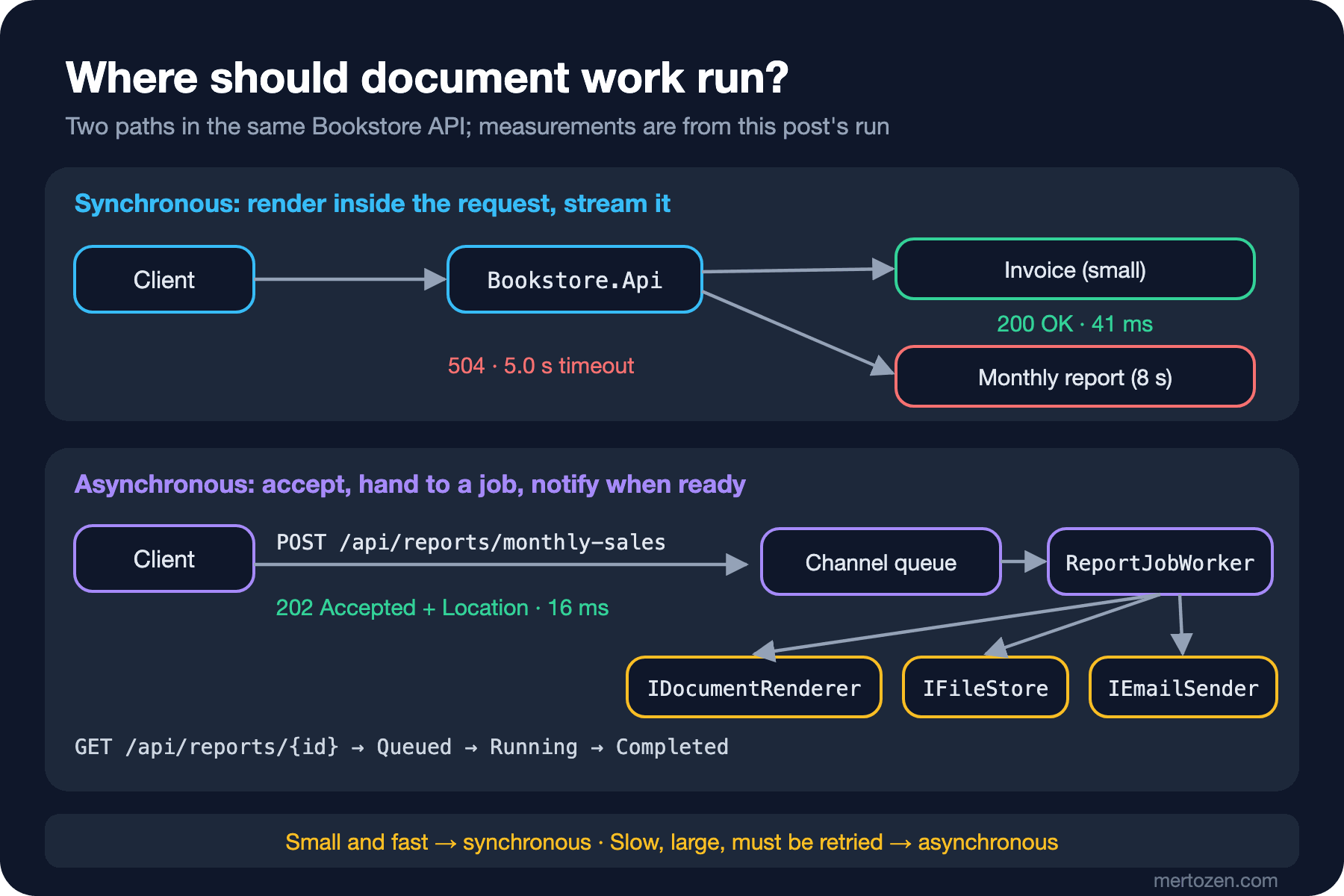
Render a small, fast document inside the request and stream it; accept slow, large or retryable work with 202 Accepted, hand it to a background job and email a link when it is ready. In Bookstore an 8-second report returns a 504 after 5 seconds on the synchronous path and a 202 in 16 ms on the asynchronous one; we track the QuestPDF, EPPlus and ImageSharp licenses, including ImageSharp 4's check that stops Release builds, with nuget-license in CI.
Version note: The code in this post was built and run with .NET 10 and nuget-license 4.0.18. License details were checked on 15 November 2026 against NuGet and each library's official license page.
Guess First
Bookstore, the online bookstore used as the shared example across this site's series, learns three jobs in this series: sending email, generating PDF and Excel files, and storing files. Selin in the back office wants the monthly sales report. It has 2,000 rows and takes 8 seconds to produce. We put a 5-second request timeout on the endpoint. Three questions:
First: what does Selin see when she clicks the report link? Does she wait 8 seconds and get the file, or something else?
Second: if we hand the same report to a job and answer right away, how many milliseconds does the first response take, and with which status code?
Third: you added QuestPDF for PDFs and ImageSharp 4 for images, and everything compiles in Debug. What happens to the Release build in CI?
The answers come from this post's real run: the first is an empty 504 after 5.02 seconds. The second is a 202 Accepted in 16 milliseconds. The third is a build error: ImageSharp 4 stops a Release build that has no license key. That last one is the subject of the second half of this post.
What Document Work Has in Common
Sending an email, generating a PDF invoice, building an Excel report and shrinking an uploaded cover image look like very different jobs at first. From the backend's point of view they share the same three traits.
They are slow. A PDF invoice takes milliseconds, but a 100,000-row Excel file or a report with hundreds of pages takes seconds, sometimes minutes. The time grows with the data, and the report that is fast today is slow six months from now.
They have external dependencies. Email needs an SMTP server, files need a disk or object storage, and sometimes you need a font file or a headless browser. Each of these fails now and then.
They must be retryable. When the SMTP server returns a transient 451 you do not want to lose the email, but when you retry you also do not want the customer to receive two confirmation emails.
These three traits raise the question of where the code goes: do you do the work inside the HTTP request, or do you answer the request right away and hand the work to a background job? In this post we build both paths side by side in Bookstore.Api and measure them.
The Synchronous Path: Render and Stream Inside the Request
A single order's invoice is a small, fast document. When the user clicks "download my invoice" there is no point in making them wait; rendering it straight into the response is the simplest solution:
// Synchronous: a small, fast document is written straight into the response
app.MapGet("/api/orders/{orderId:int}/invoice", (int orderId, IDocumentRenderer<InvoiceModel> renderer, CancellationToken ct) =>
{
    InvoiceModel invoice = BookstoreSampleData.Invoice(orderId);
    return Results.Stream(
        stream => renderer.RenderAsync(invoice, stream, ct),
        renderer.Format.ContentType,
        fileDownloadName: $"invoice-{invoice.InvoiceNumber}{renderer.Format.Extension}");
});
The overload of Results.Stream that takes a callback does not collect the document in memory before sending it; bytes go to the response as the renderer writes them. In this post the renderer still produces plain text; in the fifth post a real PDF from QuestPDF takes its place. The endpoint itself will not change, because it only knows IDocumentRenderer<InvoiceModel>.
$ curl -s -D - http://127.0.0.1:52560/api/orders/1042/invoice
HTTP/1.1 200 OK
Content-Type: text/plain; charset=utf-8
Content-Disposition: attachment; filename=invoice-BKS-2026-001042.txt; filename*=UTF-8''invoice-BKS-2026-001042.txt

Invoice BKS-2026-001042 / order 1042
2 x Dune                ₺900,00
1 x The Hobbit          ₺380,00
1 x Emma                ₺240,00
1 x Gift wrapping        ₺25,00
Total incl. VAT: ₺1.702,00
The response arrived in 41 milliseconds. ASP.NET Core added the filename* part of Content-Disposition by itself; in the fourth post we will see why it matters when the file name contains Turkish characters.
What a Slow Document Does to a Request
Let's apply the same approach to the monthly report. The Excel renderer arrives in the fourth post; until then we imitate the report's real cost with an 8-second Task.Delay. We also put a 5-second limit on the endpoint with ASP.NET Core's request timeout middleware:
builder.Services.AddRequestTimeouts();
// ...
app.UseRequestTimeouts();

// Synchronous on purpose, to show what a slow document does to a request
app.MapGet("/api/reports/monthly-sales/{month}", async (string month, IDocumentRenderer<MonthlySalesReport> renderer, CancellationToken ct) =>
{
    MonthlySalesReport report = BookstoreSampleData.MonthlySales(DateOnly.ParseExact(month + "-01", "yyyy-MM-dd"), rowCount: 2_000);
    using MemoryStream buffer = new();
    await renderer.RenderAsync(report, buffer, ct);
    return Results.File(buffer.ToArray(), renderer.Format.ContentType, $"monthly-sales-{month}{renderer.Format.Extension}");
}).WithRequestTimeout(TimeSpan.FromSeconds(5));
$ curl -s -o /dev/null -w "%{http_code} %{time_total}s\n" http://127.0.0.1:52560/api/reports/monthly-sales/2026-10
504 5.021302sThat is the answer to the first question: Selin waits 5 seconds and is left with an empty 504. When the time runs out the middleware cancels HttpContext.RequestAborted; the ct we pass to the renderer is that token, so Task.Delay throws OperationCanceledException and the middleware returns 504. If the renderer ignored the token, the work would keep running on the server for the full 8 seconds; the middleware does not stop the work by force, it only signals cancellation. Microsoft's documentation adds one more detail: the middleware does not trigger while the app runs under a debugger. To try the timeout, start the app without the debugger.
Had we removed the timeout, Selin would get the file in 8 seconds. The trouble is that 8 seconds is today's number. As rows grow the time grows, the load balancer's or reverse proxy's own timeout kicks in, and the user refreshes the page. Every refresh starts the same report from scratch on top of the abandoned one.
The Asynchronous Path: Accept, Hand Off to a Job, Notify When Ready
We separate producing the report from the request. The endpoint accepts the request, writes it to a queue and returns 202 immediately. A BackgroundService takes the job from the queue, produces the report, writes the file to IFileStore and emails Selin a link:
// Asynchronous: accept, queue, answer 202 with a status URL
app.MapPost("/api/reports/monthly-sales", async (MonthlySalesRequest request, ReportJobQueue queue, ReportJobStore store, CancellationToken ct) =>
{
    ReportJob job = new(Guid.CreateVersion7(), DateOnly.ParseExact(request.Month + "-01", "yyyy-MM-dd"), request.NotifyEmail);
    ReportJobStatus queued = new(job.Id, ReportJobState.Queued);
    store.Set(queued);
    await queue.EnqueueAsync(job, ct);
    return Results.Accepted($"/api/reports/{job.Id}", queued);
});
The worker's body calls the three abstractions in order:
await foreach (ReportJob job in queue.ReadAllAsync(stoppingToken))
{
    store.Set(new ReportJobStatus(job.Id, ReportJobState.Running));
    try
    {
        MonthlySalesReport report = BookstoreSampleData.MonthlySales(job.Month, rowCount: 2_000);
        string path = $"reports/monthly-sales-{job.Month:yyyy-MM}-{job.Id:N}{renderer.Format.Extension}";

        using MemoryStream buffer = new();
        await renderer.RenderAsync(report, buffer, stoppingToken);
        buffer.Position = 0;
        StoredFile file = await fileStore.SaveAsync(path, buffer, renderer.Format.ContentType, stoppingToken);

        await emailSender.SendAsync(new EmailMessage
        {
            To = new EmailAddress(job.NotifyEmail),
            Subject = $"Monthly sales report {job.Month:yyyy-MM} is ready",
            HtmlBody = $"<p>Your report is ready: <a href=\"/api/reports/{job.Id}/file\">download</a></p>",
            TextBody = $"Your report is ready: /api/reports/{job.Id}/file",
        }, stoppingToken);

        store.Set(new ReportJobStatus(job.Id, ReportJobState.Completed, file.Path));
    }
    catch (Exception ex) when (ex is not OperationCanceledException)
    {
        // Never let one failed report stop the worker loop
        store.Set(new ReportJobStatus(job.Id, ReportJobState.Failed, Error: ex.Message));
        logger.LogError(ex, "Report job {JobId} failed", job.Id);
    }
}
The queue is the bounded Channel<ReportJob> described in the first post of the Background Jobs series. Status lives in an in-memory ConcurrentDictionary. Both are enough for this post's purpose but vanish when the app restarts; we build the durable version with Hangfire in the last post of this series. The real run:
$ curl -s -i -X POST http://127.0.0.1:52560/api/reports/monthly-sales -H "Content-Type: application/json" -d '{"month":"2026-10","notifyEmail":"selin@example.com"}'
HTTP/1.1 202 Accepted
Content-Type: application/json; charset=utf-8
Location: /api/reports/01a1ddae-6dc1-71af-8a0c-236b0c7c8d91

{"id":"01a1ddae-6dc1-71af-8a0c-236b0c7c8d91","state":"Queued"}

$ curl -s http://127.0.0.1:52560/api/reports/01a1ddae-6dc1-71af-8a0c-236b0c7c8d91
{"id":"01a1ddae-6dc1-71af-8a0c-236b0c7c8d91","state":"Running"}

$ curl -s http://127.0.0.1:52560/api/reports/01a1ddae-6dc1-71af-8a0c-236b0c7c8d91
{"id":"01a1ddae-6dc1-71af-8a0c-236b0c7c8d91","state":"Completed","filePath":"reports/monthly-sales-2026-10-01a1ddae6dc171af8a0c236b0c7c8d91.txt"}
The 202 came back in 16 milliseconds. On the request nine seconds later the job had completed, and the app log had two lines:
info: Bookstore.Notifications.Email.LoggingEmailSender[0]
      Email to selin@example.com: Monthly sales report 2026-10 is ready (0 attachments)
info: Bookstore.Api.Reports.ReportJobWorker[0]
      Report job 01a1ddae-6dc1-71af-8a0c-236b0c7c8d91 completed: reports/monthly-sales-2026-10-01a1ddae6dc171af8a0c236b0c7c8d91.txt (114279 bytes)
For now the email only goes to the log. In the second post real SMTP delivery with MailKit replaces LoggingEmailSender.
When choosing a path, ask yourself three questions. Is the document always ready within the few seconds the user is willing to wait? If generation fails, can the user fix it by clicking again? Is the same document requested again and again, or must it be produced once and kept? For an invoice all three answers point to the synchronous path. A monthly report, a bulk email and processing an uploaded image fit the asynchronous one. Even a single document like an invoice sometimes lives on both paths: it is produced by a job when the order is placed and read from storage on later downloads.
Three Abstractions: IEmailSender, IDocumentRenderer, IFileStore
MailKit, QuestPDF or a disk path appear nowhere in the worker. Bookstore's Notifications module defines these three interfaces, and the rest of the series implements them:
public interface IEmailSender
{
    Task SendAsync(EmailMessage message, CancellationToken cancellationToken = default);
}

public interface IDocumentRenderer<in TModel>
{
    FileFormat Format { get; }

    Task RenderAsync(TModel model, Stream output, CancellationToken cancellationToken = default);
}

public interface IFileStore
{
    Task<StoredFile> SaveAsync(string path, Stream content, string contentType, CancellationToken cancellationToken = default);

    // FileNotFoundException if the path does not exist
    Task<Stream> OpenReadAsync(string path, CancellationToken cancellationToken = default);

    Task<bool> DeleteAsync(string path, CancellationToken cancellationToken = default);
}
These interfaces carry deliberate decisions. IDocumentRenderer does not return a byte array; it writes to a Stream, so the same renderer can write to an HTTP response, a file or memory, and large documents do not have to fit in memory. The model type is a generic parameter, so the invoice renderer and the report renderer never get mixed up in the dependency injection container. IFileStore only knows paths and streams. When the Azure Blob Storage and S3 implementations arrive in the eighth post, the only addition to the contract will be GetDownloadUrl.
The first implementations are deliberately simple. LocalFileStore writes to a temporary file first and then moves it into place with File.Move, so a reader never sees a half-written file. It also refuses paths that leave the root folder. The real gain is in testing: we can verify that the report sends an email when it is ready without setting up an SMTP server:
FakeEmailSender email = new();
HttpClient client = factory.WithWebHostBuilder(builder =>
{
    builder.UseSetting("Reports:SimulatedRenderTime", "00:00:00.200");
    builder.ConfigureServices(services => services.Replace(ServiceDescriptor.Singleton<IEmailSender>(email)));
}).CreateClient();
// ... POST, then poll the status until Completed ...
EmailMessage sent = Assert.Single(email.Sent);
Assert.Equal("selin@example.com", sent.To.Address);
Assert.Contains($"/api/reports/{status!.Id}/file", sent.TextBody);
$ dotnet test
Test run summary: Passed!
total: 4
failed: 0
succeeded: 4
skipped: 0The License Map
For all of these jobs, .NET's own library is either missing or not enough. For email there is System.Net.Mail.SmtpClient, but Microsoft's own documentation does not recommend it for new development (details in the next post). For PDF, Excel and image processing you have to pick a third-party library. Some of these libraries come under permissive licenses such as MIT or Apache 2.0, while others tie commercial use to a paid license. The situation on 15 November 2026:
| Library | Version | License | In commercial use |
|---|---|---|---|
| MailKit | 5.0.0 | MIT | Free |
| ClosedXML | 0.105.1 | MIT | Free |
| PdfPig | 0.1.16 | Apache-2.0 | Free |
| SkiaSharp | 4.156.1 | MIT | Free |
| QuestPDF | 2026.9.2 | Community License 3.0 + paid license | Free for companies under USD 1 million annual gross revenue; paid for public-sector bodies and publicly traded companies regardless of revenue |
| EPPlus | 8.7.2 | PolyForm Noncommercial 1.0.0 + commercial license | Paid per-developer license in a commercial setting |
| SixLabors.ImageSharp | 4.1.3 | Six Labors Split License 1.0 | Apache 2.0 under USD 1 million annual gross revenue, for open source or for non-profits; paid otherwise |
QuestPDF's license guide, version 3.0 effective 6 July 2026, grants the Community License to individuals, to companies whose annual gross revenue in the last completed fiscal year stays under USD 1 million, to open source projects distributed under an OSI-approved license, to charities and to non-profit academic institutions. Revenue is counted across commonly controlled entities, so you cannot get under the threshold through a small subsidiary. An organisation that does not qualify may evaluate the library for up to 60 days, outside production, before buying a paid license. You also have to state the license type in code; we will see that line in the fifth post.
EPPlus has been PolyForm Noncommercial licensed since version 5, and its official license page requires a commercial license for use in a commercial setting. In EPPlus 8 the license is set in code with ExcelPackage.License.SetNonCommercialPersonal, SetNonCommercialOrganization or SetCommercial; according to the package's own documentation, a LicenseNotSetException is thrown when it is not set.
ImageSharp's license grants the Apache 2.0 terms to companies under USD 1 million in revenue, to open source projects and to anyone using it as a transitive dependency. The 4.x series adds something else, and we learned it from the build output rather than the license text. We added the package to a project and built it in Release:
$ dotnet build -c Release
SixLabors.ImageSharp.targets(35,5): error : No Six Labors license found. Set $(SixLaborsLicenseKey), set $(SixLaborsLicenseFile), or add a 'sixlabors.lic' file to the project/workspace.
SixLabors.ImageSharp.targets(35,5): error : Please obtain a license from https://sixlabors.com/pricing/
Build FAILED.
In a Debug build the same message is a warning and the build continues. One of the warnings mentions an "assembly-scoped community key", which means that even if you meet the free-use conditions you need to obtain a key for Release builds. The package runs the license check as an MSBuild target before CoreCompile. That is why everything compiles on the developer's machine while the Release build in CI breaks. We cover image processing in detail in the seventh post, where we also try SkiaSharp for the same jobs.
Tracking Licenses in CI
Reading the license once when you pick a library is not enough. Transitive dependencies change, and a library can change its license in a new version. QuestPDF is a good example: the NuGet license page of its 2023 releases is titled "QuestPDF Community MIT License", while today's 3.0 text is a very different document. So we put the check into CI. nuget-license is a .NET tool that reads the licenses of a solution's packages from NuGet metadata; we install it not globally but as a local tool in the repo's tool manifest:
$ dotnet new tool-manifest
$ dotnet tool install nuget-license --version 4.0.18
#!/usr/bin/env bash
# Fails (non-zero exit) when a package's license is not in eng/allowed-licenses.json
set -euo pipefail
cd "$(dirname "$0")/.."
dotnet tool restore
dotnet nuget-license -i Bookstore.slnx -t \
-a eng/allowed-licenses.json \
-override eng/license-overrides.jsonToday eng/allowed-licenses.json contains only ["MIT", "Apache-2.0", "BSD-3-Clause"]. In Bookstore's current state all 49 packages, transitive ones included, are on that list and the script exits with zero. When we add the candidate libraries to a separate probe project and run the same tool, the picture changes (we took JSON output and trimmed it to four columns with jq):
$ dotnet nuget-license -i LicenseProbe.csproj -a "MIT;Apache-2.0" -o Json | jq -r '...'
ClosedXML             0.105.1   MIT
EPPlus                8.7.2     PolyForm-Noncommercial-1.0.0  License "PolyForm-Noncommercial-1.0.0" not found in list of supported licenses
MailKit               5.0.0     MIT
PdfPig                0.1.16    Apache-2.0
QuestPDF              2026.9.2  LICENSE.md                    Unable to determine license from the given license file
SixLabors.ImageSharp  4.1.3     LICENSE                       Unable to determine license from the given license file
SkiaSharp             4.156.1   MIT
$ echo $?
3
The exit code is the number of packages that broke the rule. QuestPDF and ImageSharp ship their license as a file embedded in the package instead of an SPDX expression; the tool cannot interpret that file, and that is the right behaviour. No tool can approve a revenue-dependent license on your behalf. A person makes the decision and records it:
[
  { "Id": "QuestPDF", "Version": "2026.9.2", "License": "LicenseRef-QuestPDF-Community" }
]
The override file is pinned to a version. When you upgrade QuestPDF, the override no longer matches, the check turns red again, and someone has to look at the new version's license text. That is exactly the behaviour we want for libraries whose license can change. Adding LicenseRef-QuestPDF-Community to the allow list is a separate decision too: the pull request that adds that line should also say who checked that the company meets the Community License terms.
In Production
The in-memory queue and status dictionary lose their contents when the app restarts. Reports waiting in the queue during a deployment silently disappear. If you need durability, use a job platform such as Hangfire or an outbox table in the database; the mechanics are covered in the Background Jobs and Working with Message Queues series, and we apply them in the third and ninth posts of this series.
With more than one API instance, status must be shared too. The load balancer may send the POST to instance A and the status query to instance B; instance B does not find the job in its in-memory dictionary and returns 404.
On the synchronous path, measure the time and set a limit. A request timeout only signals cancellation; the renderer has to actually listen to the CancellationToken. If a library does not accept a token, as with the synchronous APIs of some PDF and Excel libraries, running the work inside the request gets riskier.
On the asynchronous path, give the user a way back: a status endpoint, an email, or the SignalR notification covered in the Real-time series. The download endpoint needs as much protection as the report itself. Here the job id is a hard-to-guess Guid, but a real application must also check that the user asking for the file is allowed to have it.
Put the license check in the pull request pipeline, not the release pipeline. You want to learn about a license problem on the day the package is added, not in the middle of a release.
Common Pitfalls
Picking a library without reading its license. The most downloaded package on NuGet may not be free for you; QuestPDF, EPPlus and ImageSharp all tie commercial use to conditions.
Making a web request wait 30 seconds for a PDF. The user refreshes, the proxy times out, and the server keeps trying to finish work that nobody is waiting for.
Writing document generation straight into the controller. When the library changes or the work moves to a job, you change every endpoint one by one, and your tests need a real SMTP server and a disk.
Detaching background work from the request with Task.Run. When the app shuts down the work is cut off and the error reaches no one. Use a hosted service or a durable job platform.
Trying the Release build only in CI. As the ImageSharp 4 example shows, a warning in Debug can be an error in Release.
A Small Experiment
★☆☆ Set Reports:SimulatedRenderTime to 00:00:03 and call the synchronous report endpoint again. How many seconds does it take, and with which status code? What changes when you raise it to 00:00:06?
★★☆ Do not pass the CancellationToken to the Task.Delay in PlainTextSalesReportRenderer and try the synchronous endpoint again. Does the client still get the 504 at second 5, or at second 8? When does the work end on the server?
★★★ Add one of the candidate packages (EPPlus, for example) to Bookstore.Notifications and run eng/check-licenses.sh. Turn the script into a GitHub Actions job that runs on pull requests, and add a field to every override entry that records who made the decision and when.
In the next post we retire LoggingEmailSender: we send a real order confirmation email over SMTP with MailKit, try the TLS and port options, and check the sent email in a local Mailpit server.