

Sending Email in .NET: SMTP with MailKit, TLS and Ports, Local Testing with Mailpit and the State of SmtpClient
In new .NET projects send email with MailKit rather than System.Net.Mail.SmtpClient: use StartTls on 587 and SslOnConnect on 465, avoid Auto, reuse the connection and read the password from a secret. We send Bookstore's order confirmation with HTML, plain text, an inline logo and an attached invoice to a STARTTLS Mailpit and show the MIME structure and the up to sixfold connection gap over 50 emails with real output.
Version note: The code in this post was built and run with .NET 10, MailKit 5.0.0 and Mailpit 1.33.1.
Guess First
In Bookstore, the online bookstore used as the shared example across this site's series, the customer gets an email when an order is confirmed. Our SMTP server listens on port 587 and expects STARTTLS. Three questions:
First: what happens if you tell MailKit to start TLS as soon as it connects to this port (SecureSocketOptions.SslOnConnect)?
Second: if you connect to the same server without any encryption (SecureSocketOptions.None) and try to log in with a user name and password, does the server refuse you?
Third: how big is the difference between sending 50 emails with a new connection for each and sending them over a single connection?
On this post's local test server the real answers are: the first is an SslHandshakeException. The second may surprise you: our test server accepted the password over the unencrypted connection, so the server did nothing to stop the password going out in clear text. The third is 692 versus 112 milliseconds, roughly six times. With a real email provider, network latency makes the gap much larger.
Why System.Net.Mail.SmtpClient Is Not Recommended
.NET ships an SmtpClient, and it still works. But Microsoft's own API documentation does not recommend it for new projects: "We don't recommend that you use the SmtpClient class for new development because SmtpClient doesn't support many modern protocols." (Microsoft Learn, SmtpClient Class). The same note points to MailKit or other libraries instead. The class has not been removed; it is part of .NET Standard 2.0, so every .NET version has to carry it. The DE0005 note in the platform-compat repository describes it as a class kept for compatibility and suitable for tools that send the odd email. One concrete gap: EnableSsl only means STARTTLS; according to the EnableSsl documentation, port 465, where the connection starts with TLS from the first byte, is not supported.
You will meet it in older codebases. When reading that code, these equivalents help:
| System.Net.Mail | MailKit / MimeKit |
|---|---|
MailMessage, MailAddress | MimeMessage, MailboxAddress |
AlternateViews, LinkedResource | BodyBuilder.TextBody, HtmlBody, LinkedResources |
EnableSsl = true | SecureSocketOptions.StartTls (SslOnConnect for 465) |
Credentials = new NetworkCredential(...) | AuthenticateAsync(user, password) |
SendMailAsync(message) | ConnectAsync, AuthenticateAsync, SendAsync, DisconnectAsync |
DeliveryMethod = SpecifiedPickupDirectory | Writing to a file with MimeMessage.WriteToAsync(stream) |
MailKit 5.0 was released on 10 November 2026. For code coming from 4.x, the most visible change is that SendAsync now returns a SendResult instead of a string; the server's response text is in SendResult.ResponseText. The package no longer depends on BouncyCastle; if you use DKIM or S/MIME, you have to add the MimeKit.Cryptography package yourself.
MimeMessage and BodyBuilder: HTML, Plain Text, Attachments and Inline Images
The EmailMessage abstraction from the previous post knows nothing about MailKit. A single factory turns it into a MimeKit type:
public static MimeMessage Create(EmailMessage message, SmtpOptions options)
{
    MimeMessage mime = new();
    mime.From.Add(new MailboxAddress(options.FromName, options.FromAddress));
    mime.To.Add(new MailboxAddress(message.To.DisplayName ?? "", message.To.Address));
    mime.Subject = message.Subject;
    mime.Date = DateTimeOffset.UtcNow;
    mime.MessageId = MimeUtils.GenerateMessageId(MailboxAddress.Parse(options.FromAddress).Domain);

    BodyBuilder body = new()
    {
        HtmlBody = message.HtmlBody,
        TextBody = message.TextBody,
    };

    foreach (EmailAttachment attachment in message.Attachments)
    {
        ContentType contentType = ContentType.Parse(attachment.ContentType);
        if (attachment.ContentId is null)
        {
            body.Attachments.Add(attachment.FileName, attachment.Content.ToArray(), contentType);
        }
        else
        {
            // Inline image: lives in multipart/related, referenced as cid: from the HTML
            MimeEntity inline = body.LinkedResources.Add(attachment.FileName, attachment.Content.ToArray(), contentType);
            inline.ContentId = attachment.ContentId;
        }
    }

    mime.Body = body.ToMessageBody();
    return mime;
}
We added one field to EmailAttachment: ContentId. When it is set, the attachment becomes an inline image shown in the HTML with <img src="cid:bookstore-logo">. BodyBuilder decides which multipart structure is needed on its own. After sending the order confirmation (HTML, plain text, inline logo and attached invoice), these are the Content-Type lines of the raw message:
Content-Type: multipart/mixed; boundary="=-qEaf4eu2L/46aDVSA0a17Q=="
Content-Type: multipart/alternative; boundary="=-fsgGF5QpNO00lDLMGeV/LQ=="
Content-Type: text/plain; charset=utf-8
Content-Type: multipart/related; boundary="=-NfcbvNfC1sS/5ULmAnrLAw==";
Content-Type: text/html; charset=utf-8
Content-Type: image/png; name=logo.png
Content-Type: text/plain; charset=utf-8; name=invoice-BKS-2026-001042.txt
The outer multipart/mixed carries the body and the attachment. Inside it, multipart/alternative offers two versions of the same content, and the email client picks the richest one it can show. The HTML version sits in multipart/related together with the logo. Do not skip the plain text body: clients that cannot show HTML, screen readers and some spam filters look at it.
We set the Date header ourselves, in UTC. Otherwise MimeKit would use the server's local time zone, and the same email would carry a different offset depending on which server sent it. We also generate the Message-Id with the sender's domain; in the third post we will need this value when we stop two emails going out for the same order.
Ports and TLS: 587, 465 and SecureSocketOptions
You will meet three ports in SMTP. The one you use determines when the connection is encrypted:
| Port | Used for | Encryption | MailKit setting |
|---|---|---|---|
| 25 | Server-to-server relay | Optional STARTTLS | Do not use from an application; most cloud providers block it |
| 587 | An application submitting email | Opens in plain text, upgraded with STARTTLS | SecureSocketOptions.StartTls |
| 465 | Submission | TLS from the first byte (implicit TLS) | SecureSocketOptions.SslOnConnect |
RFC 8314, which describes TLS between email clients and servers, prefers implicit TLS over STARTTLS for submission. Most providers support both; whichever you use, the setting has to match the port. We ran the experiments from the guessing questions against the local test server with a small console app. The server only speaks STARTTLS and uses a self-signed certificate:
$ dotnet run -- connect SslOnConnect
SslOnConnect: SslHandshakeException: An error occurred while attempting to establish an SSL or TLS connection.
...
6. You are trying to connect to a port which does not support SSL/TLS.

$ dotnet run -- connect StartTls
StartTls: SslHandshakeException: An error occurred while attempting to establish an SSL or TLS connection.

The server's SSL certificate could not be validated for the following reasons:
• The server certificate has the following errors:
  • The certificate was not trusted.

$ dotnet run -- connect None --auth
None: connected, secure=False, None, auth: LOGIN PLAIN
None: authenticated as bookstore
The first error comes from trying to start TLS on a port that speaks plain text. MailKit's error message lists the possible causes, and the sixth is exactly this. In the second the port is right but the certificate is not trusted. The third is the truly dangerous one: the connection is unencrypted and the password went out in clear text. Mailpit allows this with these settings; most real providers refuse it, but do not rely on that. Keeping the password off the wire in clear text is the client's job.
For the same reason, stay away from SecureSocketOptions.Auto and StartTlsWhenAvailable. According to MailKit's documentation, both continue without encryption when the server does not offer STARTTLS. If someone in the middle strips the server's STARTTLS capability from the response, your application sends the password in clear text without noticing. StartTls, on the other hand, fails when STARTTLS is missing, which is the behaviour we want.
Local SMTP with Mailpit
In development you do not want to send email through a real provider: an email may reach a real customer by mistake, and you burn the provider's sending quota. Mailpit is a small SMTP server that accepts and stores every incoming email and has a web UI and a REST API. The Integration and E2E Testing series used it as a fake SMTP server in its post on faking external dependencies. In this post we make it look like production: STARTTLS and user name/password login are switched on.
$ openssl req -x509 -newkey rsa:2048 -nodes -keyout certs/key.pem -out certs/cert.pem -days 30 \
    -subj "/CN=localhost" -addext "subjectAltName=DNS:localhost,IP:127.0.0.1"
$ docker run -d --name bookstore-mailpit \
    -p 127.0.0.1:52561:1025 -p 127.0.0.1:52562:8025 \
    -v "$PWD/certs:/certs:ro" \
    -e MP_SMTP_TLS_CERT=/certs/cert.pem -e MP_SMTP_TLS_KEY=/certs/key.pem \
    -e MP_SMTP_AUTH="bookstore:<password>" \
    axllent/mailpit:v1.33.1
SMTP is on 52561 and the web UI and API on 52562; we picked these port numbers so they would not clash with other services on the machine and bound both only to 127.0.0.1. Because the certificate is self-signed, MailKit does not trust it. The fix is not to switch off certificate validation. SmtpOptions.TrustedCertificateSha256 is set only in development, and in that case the sender accepts only the certificate whose SHA-256 thumbprint matches exactly:
if (_options.TrustedCertificateSha256 is { } pinned)
{
    client.ServerCertificateValidationCallback = (_, certificate, _, errors) =>
        errors == SslPolicyErrors.None || IsPinned(certificate, pinned);
    client.CheckCertificateRevocation = false;
}
This is how the order confirmation looks in the Mailpit UI:
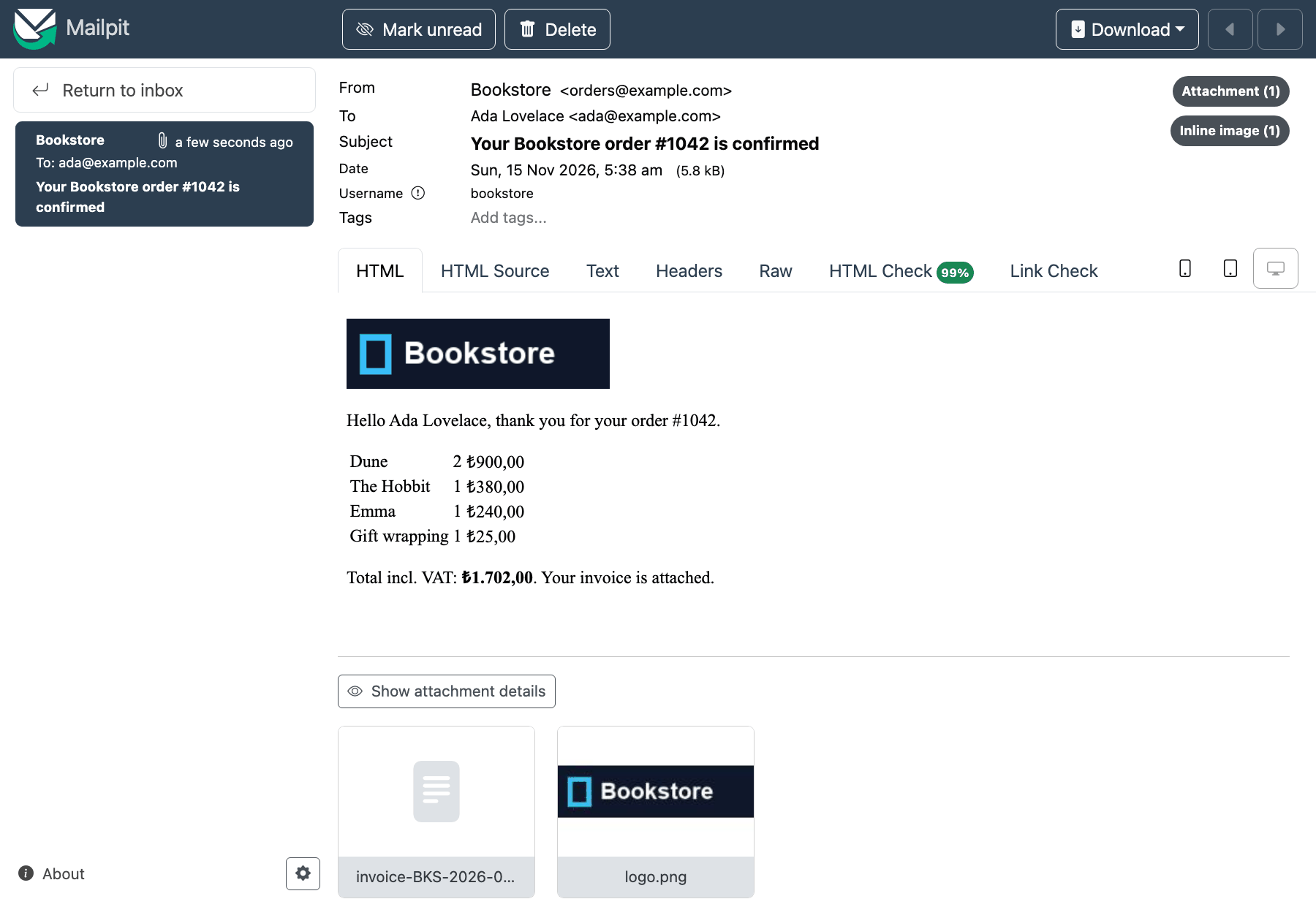
The top right counts one attachment and one inline image, and the logo is in place in the HTML through cid:. The "HTML Check" tab scores how well the HTML is supported across email clients; we come back to it in the third post when we work on templates.
MailKitEmailSender: Reusing the Connection
Opening a connection per email means repeating these steps every time: the TCP connection, the server greeting, EHLO, the TLS handshake through STARTTLS, AUTH, the send and QUIT. Bookstore's sender opens the connection once and keeps it:
// One SMTP connection, reused across messages; SmtpClient is not thread-safe, so sends are serialized
public sealed class MailKitEmailSender(IOptions<SmtpOptions> options, ILogger<MailKitEmailSender> logger) : IEmailSender, IAsyncDisposable
{
    private readonly SmtpOptions _options = options.Value;
    private readonly SemaphoreSlim _gate = new(1, 1);
    private SmtpClient? _client;

    public async Task SendAsync(EmailMessage message, CancellationToken cancellationToken = default)
    {
        MimeMessage mime = MimeMessageFactory.Create(message, _options);

        await _gate.WaitAsync(cancellationToken);
        try
        {
            SmtpClient client = await GetConnectedClientAsync(cancellationToken);
            SendResult result = await client.SendAsync(mime, cancellationToken);
            logger.LogInformation("Sent {MessageId} to {To}: {Response}", mime.MessageId, message.To.Address, result.ResponseText);
        }
        catch (Exception ex) when (ex is IOException or SmtpProtocolException or ServiceNotConnectedException)
        {
            // The connection is in an unknown state: drop it so the next send reconnects
            await ResetClientAsync();
            throw;
        }
        finally
        {
            _gate.Release();
        }
    }
}
GetConnectedClientAsync opens a new connection and logs in when there is none or it has dropped. When we catch an error we do not swallow the exception: we drop the connection and throw again. Whether to retry is decided by the caller, not the sender; we build that with an outbox in the third post. The sender is registered as a singleton and uses a SemaphoreSlim to guard the SmtpClient while it sends. That means a few hundred emails per second over one connection; if you need more, you need a small pool of a few connections.
We sent 50 emails to the local Mailpit three times:
$ dotnet run -- timing 50
50 messages, new connection each: 704 ms
50 messages, one reused connection: 132 ms
50 messages, new connection each: 692 ms
50 messages, one reused connection: 112 ms
50 messages, new connection each: 695 ms
50 messages, one reused connection: 68 ms
Even on the same machine with no network latency, the gap is five to six times. If the provider is in another data centre, every handshake adds several network round trips. Some providers also temporarily block clients that open many connections in a short time.
SMTP Settings: Options and Secrets
The settings are bound to SmtpOptions and validated when the app starts:
services.AddOptions<SmtpOptions>()
    .Bind(smtp)
    .ValidateDataAnnotations()
    .Validate(o => o.UserName is null || !string.IsNullOrEmpty(o.Password), "Smtp:Password is required when Smtp:UserName is set.")
    .ValidateOnStart();
services.AddSingleton<IEmailSender, MailKitEmailSender>();
There is no password in appsettings.json:
"Smtp": {
  "Host": "127.0.0.1",
  "Port": 52561,
  "Security": "StartTls",
  "UserName": "bookstore",
  "FromAddress": "orders@example.com",
  "FromName": "Bookstore"
}
The password comes from an environment variable (in Windows PowerShell, $env:Notifications__Smtp__Password = "<password>"). In production the same value is read from a secret store such as Key Vault; the Configuration and Secret Management series covers these layers in detail. Thanks to ValidateOnStart, a deployment with a missing password fails when the app starts, not on the first order email. When there is no Notifications:Smtp:Host at all, as for someone who has just cloned the repo, AddNotifications falls back to the LoggingEmailSender from the previous post.
Integration Testing with Mailpit
In unit tests a fake IEmailSender is enough. But you only see that the MIME structure, the inline image and the attachment really come out right after a real SMTP conversation. Mailpit's REST API makes that testable:
await using (MailKitEmailSender sender = new(Options.Create(options), NullLogger<MailKitEmailSender>.Instance))
{
    await sender.SendAsync(message, ct);
}

using HttpClient mailpit = new() { BaseAddress = new Uri(api!) };
MailpitSearch? found = await mailpit.GetFromJsonAsync<MailpitSearch>(
    $"/api/v1/search?query={Uri.EscapeDataString($"subject:\"{message.Subject}\"")}", ct);

MailpitSummary summary = Assert.Single(found!.Messages);
Assert.Equal("ada@example.com", Assert.Single(summary.To).Address);

MailpitMessage? full = await mailpit.GetFromJsonAsync<MailpitMessage>($"/api/v1/message/{summary.ID}", ct);
Assert.Equal("bookstore-logo", Assert.Single(full!.Inline).ContentID);
Assert.Equal("invoice.txt", Assert.Single(full.Attachments).FileName);
Assert.Contains("cid:bookstore-logo", full.HTML);
Assert.Contains("Total incl. VAT: ₺1.702,00", full.Text);
Adding a Guid to the subject makes the test find only its own email; other tests may use the same Mailpit. When MAILPIT_API_URL is not set, the test is skipped with xUnit v3's Assert.SkipWhen, so dotnet test stays green on a machine without Mailpit:
$ dotnet test
Test run summary: Passed!
  total: 5
  failed: 0
  succeeded: 5
  skipped: 0
In CI it is enough to start Mailpit as a service container and set this variable.
In Production
If the sending domain's SPF, DKIM and DMARC records are wrong, your emails land in the spam folder or are not delivered at all. Setting up these records is covered in the Domain, DNS and CDN series. On the application side, your job is to choose a From address on the domain those records cover.
The SMTP server's 250 Ok does not mean the email was delivered; it only says the email entered the provider's queue. Bounces and complaints arrive later. Providers reporting them through webhooks is the subject of the webhook post in the External Service Integration and Resilience series.
Set a timeout. SmtpOptions.Timeout defaults to 30 seconds and is passed to SmtpClient.Timeout. Without a timeout, a server that does not answer keeps a job worker busy for a long time.
Learn the provider's sending limits: how many emails per hour or day, how many messages per connection. Bulk sends hit these limits, and the provider answers with a 4xx (transient) response. Telling these responses apart and retrying later is the subject of the third post.
Do not write the email body to the log. The Message-Id, the recipient and the provider's response are enough to trace a problem; the body contains personal data.
Common Pitfalls
Opening a new connection for every email. You will not notice with a few emails; in bulk sends it both slows you down and runs you into the provider's rate limit.
Writing the SMTP password into appsettings.json. That file goes into the repo and the password stays in the commit history. The password should come from an environment variable or a secret store.
Swallowing send errors. An SmtpCommandException passed over with catch { } means the customer's confirmation never went out, and nobody finds out. Log the error and rethrow it, or record it so it gets retried.
Switching off certificate validation with (s, c, h, e) => true. It works in development, and then the same line goes to production. If you need a self-signed test certificate, pin it by thumbprint and put that only in the development settings.
Mixing up the port and the encryption setting. SslOnConnect on 587 and StartTls on 465 give a handshake error; Auto, in the worst case, quietly continues without encryption.
A Small Experiment
★☆☆ Restart Mailpit with -e MP_SMTP_REQUIRE_TLS=true. How do the results of connect StartTls and connect SslOnConnect change? Which setting do you need to change in appsettings.json?
★★☆ Leave the plain text body in OrderConfirmationEmail empty and send the email again. Does multipart/alternative remain in the raw message? What do you see in Mailpit's "Text" tab?
★★★ Turn MailKitEmailSender into a small pool of two connections and compare it with the single connection using timing 200. Looking at Mailpit's limit settings such as MP_SMTP_MAX_RECIPIENTS, think about how you could imitate a provider's per-connection limit.
For now we built the order confirmation's HTML by concatenating strings. In the next post we produce email HTML with Razor components and TR/EN templates, look at the CSS limits of email clients, and tie sending to an outbox with retries.