

State Across Requests in MVC: TempData, Session, Cookies and Query Strings — Which One When?

Use the query string for filters, a consented cookie for preferences, a Data Protection cookie for an anonymous cart, session with Redis for a multi-step form and TempData for flash messages. Running Bookstore.Web on two instances, we show with real output how in-memory session silently resets the form, how separate key rings empty the cart and how cookie consent switches off TempData.
Version note: The code in this post was built and run with .NET 10 (SDK 10.0.404, runtime 10.0.15), Microsoft.Extensions.Caching.StackExchangeRedis 10.0.15 and Redis 8.10.3. The cart and the institutional order form gave the same results on .NET 11 (SDK 11.0.100) with version 11.0.0 of the package.
Guess First
Bookstore.Web, the MVC side of Bookstore, the online bookstore used as the shared example across this site's series, has been scaled out to two instances for the busy season. A load balancer sits in front of them and sticky sessions are off. Session is kept with AddDistributedMemoryCache, as in the template. Nevin, the school's purchasing officer, fills in the first step of the three-step institutional order form; the request for the second step goes to the other instance. What happens: does she get an error, does the form reset, or does nothing noticeable happen?
Second question: to show the order summary on the next page, you wrote TempData["Draft"] = draft; in the last step, and draft is a class. Does it compile, and does it work?
Where Can State Live?
HTTP is stateless; if you want to carry something between two requests, you put it either in the browser or on the server. The options in MVC:
- Query string and route: a visible, shareable address. Filters, sort order, page number.
- Hidden field: a value that travels back and forth with the form. The user can change it.
- Cookie: lives in the browser and goes to the server with every request. It can be encrypted and signed with Data Protection.
- TempData: small values that live until the next request. Stored in a cookie by default.
- Session: only an id in the browser; the data itself sits in an
IDistributedCacheon the server side. - Database: anything permanent, such as a submitted order.
In this post we add four of them to Bookstore.Web: an anonymous user's cart, a three-step institutional order form, flash messages and a catalog sort preference. The code lives in the src/Bookstore.Web project of the Bookstore repo; dotnet run --project src/Bookstore.Web starts it.
TempData: The Home of Flash Messages
In the forms post we used TempData["StatusMessage"] for Post-Redirect-Get. In the error pages post, DomainExceptionHandler wrote the stock warning to TempData too. The default provider is CookieTempDataProvider: it serializes the values, encrypts them with Data Protection, encodes them with Base64Url and splits them into several cookies if needed. The real response after adding to the cart:
HTTP/1.1 302 Found
Location: /books/1/dune
Set-Cookie: bookstore_cart=CfDJ8FswMoxR_8FKk...; max-age=2592000; path=/; samesite=lax; httponly
Set-Cookie: .AspNetCore.Mvc.CookieTempDataProvider=CfDJ8FswMoxR_8FKk...; path=/; samesite=lax; httponly
Every value starting with CfDJ8 is Data Protection output (I shortened the values). A TempData value is marked for deletion at the end of the request that reads it. The institutional order's confirmation page uses that:
[HttpGet("done")]
public IActionResult Done() => View(nameof(Done), TempData["OrderNumber"] as string);
Opening the same page twice:
<h1>Order IO-1001 was sent for approval</h1>
<h1>Your order was sent for approval</h1>
The first request read the number and deleted it; the refreshed page shows the general message. When I tried TempData.Peek("OrderNumber"), both requests showed the number, but the TempData cookie stayed in the browser after browsing other pages too; Peek protects the value from deletion and carries it until the next normal read. Keep() also keeps read values for one more request. Use both deliberately, or an old message shows up on the wrong page.
The reason I wrote View(nameof(Done), ...) is a separate trap: the first version was View(TempData["OrderNumber"] as string). The View(string) overload treats its argument as a view name; the result is the error The view 'IO-1001' was not found.
An app that already uses session can move TempData into session as well: AddControllersWithViews().AddSessionStateTempDataProvider(). Microsoft's documentation says that if you put more than 500 bytes into TempData, the session provider saves you from sending that data back and forth on every request. Bookstore.Web stays on the cookie provider: the messages are small and session is only on in the order form. This section is based on the official documentation.
An Anonymous Cart: A Cookie Protected with Data Protection
The cart is data the user collects without signing in and expects to stay for days. It doesn't fit a 30-minute session lifetime, and there's no user yet to write it to the database for. Bookstore.Web keeps the cart in a cookie as "book id:quantity" pairs:
// Anonymous cart in the browser: "bookId:quantity" pairs, encrypted and signed with Data Protection
public sealed class CookieCartStore(IDataProtectionProvider provider, ILogger<CookieCartStore> logger) : ICartStore
{
    public const string CookieName = "bookstore_cart";
    private readonly IDataProtector protector = provider.CreateProtector("Bookstore.Web.Cart.v1");

    public IReadOnlyList<CartLine> Read(HttpContext context)
    {
        string? value = context.Request.Cookies[CookieName];
        if (string.IsNullOrEmpty(value))
        {
            return [];
        }

        try
        {
            return protector.Unprotect(value)
                .Split(',', StringSplitOptions.RemoveEmptyEntries)
                .Select(pair => pair.Split(':'))
                .Select(parts => new CartLine(int.Parse(parts[0]), int.Parse(parts[1])))
                .ToList();
        }
        catch (CryptographicException ex)
        {
            // Tampered cookie or a key this instance doesn't have: start with an empty cart
            logger.LogWarning(ex, "Cart cookie could not be read");
            return [];
        }
    }

    public void Write(HttpContext context, IReadOnlyList<CartLine> lines)
    {
        string payload = string.Join(',', lines.Select(l => $"{l.BookId}:{l.Quantity}"));
        context.Response.Cookies.Append(CookieName, protector.Protect(payload), new CookieOptions
        {
            HttpOnly = true,
            Secure = context.Request.IsHttps,
            SameSite = SameSiteMode.Lax,
            MaxAge = TimeSpan.FromDays(30),
            IsEssential = true // the cart is what the user asked for
        });
    }
}
The purpose string passed to CreateProtector (Bookstore.Web.Cart.v1) matters: the value of a TempData or antiforgery cookie protected with the same key ring can't be opened as a cart cookie. The v1 at the end separates old cookies if the format changes.
There is no price in the cookie, only ids and quantities. The price is read from the catalog on every request; that way the user can't change it even if they could open the cookie, and the cart stays current if the price changes. The cart with two books:
<li>2 × Dune · 978.00 TRY</li>
<li>1 × Foundation · 319.00 TRY</li>
<p class="price">Total 1297.00 TRY</p>
The cookie value is 134 characters with two books and 240 with all 19 books that have stock. Most browsers limit a single cookie to about 4096 bytes, and the cookie goes to the server with every request, CSS and image requests included. The "id and quantity" format fits well within that limit; it wouldn't if we put book titles or descriptions in the cookie.
When I changed one of the last characters of the cookie and opened /cart, the cart came back empty and the log said:
warn: Bookstore.Web.Ordering.CookieCartStore[0] ... Cart cookie could not be read System.Security.Cryptography.CryptographicException: The payload was invalid.Data Protection doesn't just encrypt the value, it signs it too; a tampered cookie doesn't silently give wrong data, it doesn't open.
The Institutional Order Form: Session
The institutional order has three steps: institution details, books and quantities (at least 20 copies), and a summary with the 10% institutional discount. The draft between steps is a few hundred bytes of data that has to live until the user finishes the form. That's exactly what session is for:
builder.Services.AddSession(options =>
{
    options.IdleTimeout = TimeSpan.FromMinutes(30);
    options.Cookie.Name = ".Bookstore.Session";
    options.Cookie.Path = "/institutional-orders"; // only the wizard's requests carry it (and touch the store)
    options.Cookie.IsEssential = true; // the institutional order form can't work without it
});

// Session only where it is used: every request through UseSession refreshes its entry in the store
app.UseWhen(context => context.Request.Path.StartsWithSegments("/institutional-orders"), wizard => wizard.UseSession());
The default IdleTimeout is 20 minutes and it restarts on every request; I gave 30 minutes for a user filling in a long book list. Session only stores string, int and byte[]; turning objects into JSON is up to you:
public static class SessionJsonExtensions
{
    public static T? GetJson<T>(this ISession session, string key) =>
        session.GetString(key) is { } json ? JsonSerializer.Deserialize<T>(json) : default;

    public static void SetJson<T>(this ISession session, string key, T value) =>
        session.SetString(key, JsonSerializer.Serialize(value));
}
The controller loads the draft on every step and sends the user back to the start if step 1 is missing:
private async Task<InstitutionalOrderDraft> LoadDraftAsync(CancellationToken cancellationToken)
{
    // Load the session asynchronously; otherwise the first access loads it synchronously
    await HttpContext.Session.LoadAsync(cancellationToken);
    return HttpContext.Session.GetJson<InstitutionalOrderDraft>(DraftKey) ?? new InstitutionalOrderDraft();
}

[HttpGet("books")]
public async Task<IActionResult> Books(CancellationToken cancellationToken)
{
    InstitutionalOrderDraft draft = await LoadDraftAsync(cancellationToken);
    if (draft.InstitutionName is null)
    {
        return RedirectToAction(nameof(Institution)); // step 1 is missing (or the session is gone)
    }

    return View(new BooksStep { Quantities = draft.Quantities, Catalog = await catalog.ListAsync(null, cancellationToken) });
}
The LoadAsync call isn't cosmetic. Without it, the session is read from the store synchronously on the first GetString; with a store across the network like Redis, that means blocking the request thread while it waits for I/O. The form's real flow:
HTTP/1.1 302 Found
Location: /institutional-orders/new/books
Set-Cookie: .Bookstore.Session=CfDJ8FswMoxR%2F8F...; path=/institutional-orders; samesite=lax; httponly

<li>Institutional orders need at least 20 copies (now 12).</li>

<p>Ankara Science High School / Library · nevin@school.example.com</p>
<li>10 × Dune</li>
<li>10 × The Hobbit</li>
<li>5 × 1984</li>
<p>Subtotal 9584.00 TRY · Institutional discount -958.40 TRY · Total 8625.60 TRY</p>
After submission the action removes the draft with Session.Remove, and a request back to /review is sent to step 1. The form can't be submitted twice.
Multiple Instances: Redis and a Shared Key Ring
I set up the Guess First scenario: two copies of the same app on ports 52215 and 52216, and I switch between the two instances with the same cookie jar.
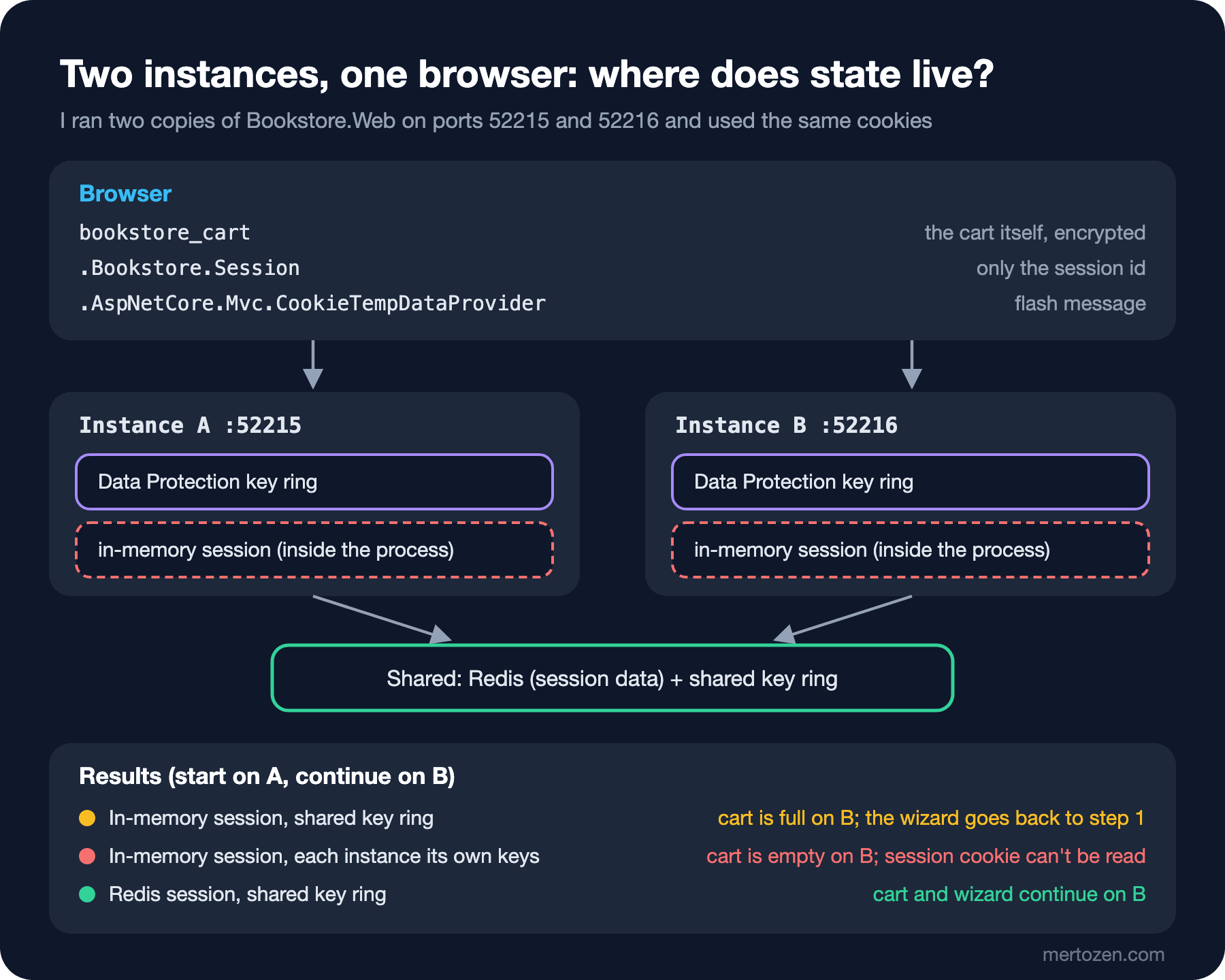
With in-memory session and a shared key ring, step 1 on A:
GET books on A -> 200
GET books on B -> 302 http://127.0.0.1:52216/institutional-orders/new/institution
cart on B: <li>2 × Dune · 978.00 TRY</li>
The answer to the first question: no error, no warning in the log, the form silently goes back to the start. B can open the session cookie, but it finds no data for that id in its own memory and starts an empty session. The cart, on the other hand, is full on B; the data itself is in the cookie.
If the two instances have separate key rings (like two separate machines or containers), the cart goes too. B's log:
warn: Bookstore.Web.Ordering.CookieCartStore[0] ... Cart cookie could not be read System.Security.Cryptography.CryptographicException: The key {fc3f6d2a-...} was not found in the key ring.
fail: Microsoft.AspNetCore.Antiforgery.DefaultAntiforgery[7] ... An exception was thrown while deserializing the token.
warn: Microsoft.AspNetCore.Mvc.ViewFeatures.CookieTempDataProvider[3] ... The temp data cookie .AspNetCore.Mvc.CookieTempDataProvider could not be loaded.
warn: Microsoft.AspNetCore.Session.SessionMiddleware[7] Error unprotecting the session cookie.
The cart, the antiforgery token, TempData and the session cookie all depend on the same key ring. The fix has two parts. The first is putting session data in a shared store:
string? redis = builder.Configuration.GetConnectionString("Redis");
if (string.IsNullOrEmpty(redis))
{
    builder.Services.AddDistributedMemoryCache(); // one instance only: data lives in this process
}
else
{
    builder.Services.AddStackExchangeRedisCache(options =>
    {
        options.Configuration = redis;
        options.InstanceName = "bookstore-web:";
    });
}

// Every instance must read the others' cookies: same application name, shared key ring
IDataProtectionBuilder dataProtection = builder.Services.AddDataProtection().SetApplicationName("Bookstore.Web");
if (builder.Configuration["DataProtection:KeysPath"] is { Length: > 0 } keysPath)
{
    dataProtection.PersistKeysToFileSystem(new DirectoryInfo(keysPath));
}
The second is that key ring. In this experiment I gave both instances the same folder; in production you keep the keys in Redis or blob storage and encrypt them at rest. The details are in the ASP.NET Core Security series' post on Data Protection. The same experiment with my own Redis container (ConnectionStrings__Redis=127.0.0.1:63790):
step 2 on B -> 302 http://127.0.0.1:52216/institutional-orders/new/review
<p>Ankara Science High School / Library · nevin@school.example.com</p>
<li>10 × Dune</li>
<li>10 × Foundation</li>
Step 1 on A, step 2 on B, the summary on A again; the form continues where it left off. The entry in Redis:
$ redis-cli HKEYS bookstore-web:8e542909...
absexp
data
sldexp
$ redis-cli HGET bookstore-web:8e542909... sldexp
18000000000
$ redis-cli TTL bookstore-web:8e542909...
1800
$ redis-cli HGET bookstore-web:8e542909... data
.....>..q.V.....(..#..InstitutionalOrder.Draft....{"InstitutionName":"Ankara Science High School","UnitName":"Library","ContactEmail":"nevin
The entry is a Redis hash: sldexp is 30 minutes in ticks, and the TTL is 1800 seconds. The line that stands out is the last one: the session id in the cookie is encrypted, but the data in Redis is plain JSON. Everything you put in session is readable by anyone who can reach Redis. Serialization and key design for the distributed cache are in the Caching series' post on IDistributedCache and Redis.
I also measured why I open session only for the form with UseWhen. At the end of a request, the session middleware goes to refresh the entry in the store (RefreshAsync) even if the session was never touched. With UseSession() across the whole pipeline, stopping Redis made the catalog page take 5.6 seconds, with "Error closing the session" in the log. With UseWhen, the same request took 0.02 seconds, and no entries were created in Redis for visitors who only browsed the catalog. The form page, with Redis gone, returned 503 after 22 seconds; I added a line for RedisConnectionException to the StatusCodeSelector from the error pages post.
Preferences, Query Strings and Cookie Consent
The catalog's filter and sort order are in the query string: the link /books?category=Classics&sort=price can be shared, bookmarked and crawled by a search engine. Putting this in session is how you get the complaint "I sent the link to a friend and they saw a different list". Remembering the last chosen sort order on the next visit, though, is a preference, and that's a job for a cookie:
if (sort is "title" or "price")
{
    // Not essential: with the cookie policy this is only written after consent
    Response.Cookies.Append(SortCookie, sort, new CookieOptions { MaxAge = TimeSpan.FromDays(180), IsEssential = false });
}
else
{
    sort = Request.Cookies[SortCookie] is "price" ? "price" : "title";
}
CookiePolicyOptions decides which cookies need consent:
builder.Services.Configure<CookiePolicyOptions>(options =>
{
    options.CheckConsentNeeded = _ => true; // non-essential cookies wait for consent
    options.MinimumSameSitePolicy = SameSiteMode.Lax;
});

app.UseCookiePolicy();
Without consent, /books?sort=price applies the sort, but the bookstore_sort cookie is not in the response. The consent form calls ITrackingConsentFeature.GrantConsent():
HTTP/1.1 302 Found
Set-Cookie: .AspNet.Consent=yes; expires=Mon, 15 Nov 2027 08:07:26 GMT; path=/; samesite=lax

HTTP/1.1 200 OK
Set-Cookie: bookstore_sort=price; max-age=15552000; path=/; samesite=lax
There's a trap here. The IsEssential value of the session and TempData cookies is false by default. With CheckConsentNeeded on, neither is written for a user who hasn't consented. In my attempt without the IsEssential = true line in the session settings, the response to step 1 had no session cookie and step 2 sent the user back to the start. When I deleted the Configure<CookieTempDataProviderOptions>(o => o.Cookie.IsEssential = true) line, the add-to-cart response had no TempData cookie, and the "added to your cart" message didn't appear on the book page. No error, no log; the feature just silently doesn't work. The cart, the order form and flash messages are part of what the user asked for; the sort preference isn't. Which cookie counts as essential is still a legal assessment; we covered the KVKK side in the Data Privacy and KVKK series' post on notices, explicit consent and cookies.
Which One When?
| Need | Place | Why |
|---|---|---|
| Catalog filter, sort order, page | Query string | Shareable, crawlable address |
| User preference (sort order, language) | Cookie, after consent | Small, long-lived, takes no server space |
| Anonymous cart | Cookie protected with Data Protection | Lives for days, independent of the instance |
| Multi-step form draft | Session + Redis | A few hundred bytes, deleted when the form is done |
| Flash message | TempData (cookie provider) | Lives until the next request |
| Submitted order, signed-in user's cart | Database | Permanent, across devices |
Hidden fields aren't in the table because they have no place in Bookstore.Web, but they're an option for a form without session. The data between steps travels inside the form and no state is kept on the server. The price: the user can change the values. You have to revalidate all the data on every step or protect it with Data Protection.
Production Notes
Session data lives in a cache, not a database. If Redis restarts or IdleTimeout runs out, the draft is gone. For a form that takes effort, like an institutional order, a database record the user can save as a draft may be the better choice. Use session for data you can afford to lose.
When the session store can't be reached, the behavior comes in two kinds. LoadAsync throws; that's why in Bookstore.Web the request lands on the 503 page. If the commit the middleware makes at the end of the request fails, however, it is only logged and the request looks successful. According to the documentation, if you want to be sure a write really persisted, you have to catch the error yourself with await HttpContext.Session.CommitAsync(). The Redis client's default timeouts (the 5000 ms in the log) can make a request wait more than 20 seconds while Redis is down; shorten the connection settings to fit what the app expects.
Put Data Protection keys in a shared, persistent and encrypted place. If every container generates its own key, a new deploy empties every cart, session and open form. The "No XML encryptor configured" warning in the log says the keys are written to disk unencrypted.
Watch cookie sizes. The TempData cookie provider can encrypt the data and split it across several cookies, but every chunk goes with every request. A large cookie also makes every CSS and image request on the page larger. This section is based on the official documentation.
Common Pitfalls
Putting large objects in session. Everything in session is read from the store on every request and written back if it changed. Bookstore's draft is 208 bytes; putting the whole book list, the user's order history or an Entity Framework Core entity there slows down every step. An entity can also run into a serialization cycle because of its navigation properties.
In-memory session with multiple instances. As in Guess First, there's no error, just lost data. Sticky sessions hide the problem but don't solve it: when an instance restarts or during a deploy, the data still goes.
Putting complex types in TempData. The answer to the second question: the code compiles, and at run time you get this exception:
InvalidOperationException: The 'Microsoft.AspNetCore.Mvc.ViewFeatures.Infrastructure.DefaultTempDataSerializer' cannot serialize an object of type 'Bookstore.Web.Institutional.InstitutionalOrderDraft'.The timing makes it worse: TempData is saved after the action finishes, while the result runs. The order had already been saved by orders.Submit, but the user saw a 500. According to the default serializer's source code, TempData accepts only string, int, bool, DateTime, Guid, enums, collections of int and string, and IDictionary<string, string>. Not even decimal: trying TempData["Total"] = 7272.00m gave the same exception for System.Decimal. If you need more, store the id and read the data from its source.
Using session instead of authentication. The "there's a UserId in session, so the user is signed in" approach means rewriting by hand the lifetime, renewal and revocation behavior that cookie authentication gives you. For sign-in, use the approach from the Authentication and Authorization series' post on cookie authentication; leave session to temporary data like form drafts.
A Small Experiment
★☆☆ In Bookstore.Web, change CreateProtector("Bookstore.Web.Cart.v1") to v2, restart the app and open the cart. What happened, and which line is in the log? What would you do to read old cookies after a format change?
★★☆ Rewrite the institutional order form without session, using hidden fields: step 1's values travel as hidden fields in step 2's form. Try whether the user can change the institution name or the quantities in the browser, and list what you have to revalidate in step 3.
★★★ Run two instances with Redis, and after writing step 1 of the draft, restart the Redis container. Is the draft gone? Then add a "Save draft" button that stores the draft in the database, and use session only for the form's current step.
With this post we close the ASP.NET Core MVC and Razor Pages series. Starting from the MVC pattern, we built on Bookstore the pieces a server-side rendered app needs in production: Razor syntax, partial views and view components, tag helpers, forms, validation, Razor Pages, static assets, localization, htmx, migration from MVC 5, version differences, error pages and state across requests. From here, if you want to continue the same server-side approach with a component model, the Blazor series in the Frontend category, and if you want to go deeper into sign-in and authorization, the Authentication and Authorization series are the natural next steps.