

Image Processing in .NET: Resizing, Format Conversion, EXIF and Safe Processing with ImageSharp and SkiaSharp
Validate an uploaded image by its first bytes and pixel count first, then apply the EXIF orientation, shrink it and save it as WebP without metadata. Bookstore's cover thumbnails are made with SkiaSharp (MIT); ImageSharp 4 stays in a Debug-only example, because its Release build needs a license key and it keeps metadata by default.
Version note: The code in this post was built and run with .NET 10, SkiaSharp 4.156.1 and SixLabors.ImageSharp 4.1.3. ImageSharp license information was checked against the official license text, the documentation and the pricing page on 15 November 2026.
Guess First
Someone in the back office of Bookstore, the online bookstore used as the shared example across this site's series, takes a photo of the cover of a new Dune edition with a phone and uploads it. Bookstore will produce thumbnails in three sizes for the catalog from this image. Three questions:
First: the photo looks upright on the phone. If you decode the file and shrink it directly, what does the thumbnail look like?
Second: someone uploaded a 48 KB PNG file. How much memory does decoding it take?
Third: you produced the thumbnail with ImageSharp and saved it as WebP. Does the GPS position the phone wrote into the photo survive in the thumbnail?
The answers come from real runs. In the first case the cover comes out lying on its side: the phone stores the pixels sideways and states the correct direction in the Orientation field of the EXIF data. In the second the file is 20000x20000 pixels; at 4 bytes per pixel that is 1.6 GB. In the third, yes: ImageSharp keeps metadata by default, and 7 EXIF values, location included, stay in the thumbnail.
Choosing a Library: ImageSharp, SkiaSharp and System.Drawing
There are three common options for image processing in .NET, and each comes with a condition.
System.Drawing.Common sits on top of Windows' GDI+. Since .NET 6 it is supported on Windows only, and .NET 7 removed the switch that turned it on for Linux. It gives CA1416 platform warnings at build time, and in a Linux container it stops at the first line:
$ docker run --rm -v ./pub:/app:ro -w /app mcr.microsoft.com/dotnet/runtime:10.0 dotnet CoverResize.dll
Unhandled exception. System.TypeInitializationException: The type initializer for 'Windows.Win32.PInvokeGdiPlus' threw an exception.
 ---> System.DllNotFoundException: Unable to load shared library 'gdiplus.dll' or one of its dependencies.
Bookstore runs in Linux containers, so this option is out.
SixLabors.ImageSharp is fully managed, its API is pleasant and its documentation is good. Its license is the Six Labors Split License 1.0: the Apache 2.0 terms apply to companies using the package directly with annual gross revenue under USD 1 million, to open source projects, to non-profits and to anyone who gets the package as a transitive dependency; everyone else buys a commercial license. As we saw in the first post, the 4.x series adds one more step: a Release build of a project that references the package directly stops without a license key:
$ dotnet build -c Release
SixLabors.ImageSharp.targets(35,5): error : No Six Labors license found. Set $(SixLaborsLicenseKey), set $(SixLaborsLicenseFile), or add a 'sixlabors.lic' file to the project/workspace.
SixLabors.ImageSharp.targets(35,5): error : Please obtain a license from https://sixlabors.com/pricing/
According to the official documentation, the key has been required at build time since 4.0.0, the check runs only for direct references, and the key comes from the SixLaborsLicenseKey property, SixLaborsLicenseFile or a sixlabors.lic file in the project folder. The pricing page says a free Community license for businesses with annual revenue under USD 1 million is granted on application (licensing.sixlabors.com). An assembly-scoped community key may be committed to the repo; it must list the exact AssemblyName of every project that references the package directly, test projects included. Other keys stay private and reach CI as environment variables. The paid tiers start at USD 799 a year (up to 10 developers). So even if Bookstore meets the revenue condition, a Release build needs an application, a key and its renewal schedule.
SkiaSharp is the .NET binding of Google's Skia graphics engine and is MIT-licensed. No key, no revenue threshold. The price is a native library. In Bookstore we wrote the cover processing with SkiaSharp. We left the ImageSharp example in a separate project outside the solution that builds in Debug only. The license check backs this decision: ImageSharp's license comes as a file on NuGet, so the tool from the first post cannot determine its type (Unable to determine license from the given license file) and does not let the package through until someone writes a deliberate override.
Validate the File Itself First: Signature and Pixel Limit
We trust neither the extension nor the Content-Type the client sent. We read the format from the first bytes of the file:
// Decides by the first bytes of the file, never by its name or the Content-Type the client sent
public static UploadedImageFormat? Detect(ReadOnlySpan<byte> header) => header switch
{
    [0xFF, 0xD8, 0xFF, ..] => UploadedImageFormat.Jpeg,
    [0x89, 0x50, 0x4E, 0x47, 0x0D, 0x0A, 0x1A, 0x0A, ..] => UploadedImageFormat.Png,
    [(byte)'R', (byte)'I', (byte)'F', (byte)'F', _, _, _, _, (byte)'W', (byte)'E', (byte)'B', (byte)'P', ..] => UploadedImageFormat.WebP,
    _ => null,
};
The signature alone is not enough; the real danger is a decompression bomb. The compressed file is small, the decoded image is enormous. So we get the dimensions by reading only the header, without decoding a pixel:
// Reads only the header: width and height are known before a single pixel is decoded
using SKData data = SKData.CreateCopy(file);
using SKCodec? codec = SKCodec.Create(data);
if (codec is null)
{
    throw new InvalidImageException($"The {format} file could not be read.");
}

long pixels = (long)codec.Info.Width * codec.Info.Height;
if (pixels > o.MaxPixels)
{
    throw new InvalidImageException($"{codec.Info.Width}x{codec.Info.Height} is {pixels:N0} pixels, the limit is {o.MaxPixels:N0}.");
}
We set the limit to 40 million pixels; even that is 160 MB once decoded. Three test files:
$ dotnet run -- inspect cover-dune.jpg
cover-dune.jpg: 112,704 bytes, Jpeg 2400x1600, origin=RightTop (388.4 ms)
$ dotnet run -- inspect bomb.png
bomb.png: rejected in 6.1 ms: 20000x20000 is 400,000,000 pixels, the limit is 40,000,000.
$ dotnet run -- inspect not-an-image.jpg
not-an-image.jpg: rejected in 0.7 ms: Not a JPEG, PNG or WebP file.
bomb.png is a 48 KB, 1-bit-per-pixel, completely black PNG; decoding it would need 1.6 GB. Rejecting it took 6 milliseconds. not-an-image.jpg is really an SVG with a script inside. We never accept SVG as a cover, because it can run script when opened in a browser. The 388 milliseconds in the first line come from loading the native library into the process for the first time.
EXIF Orientation and Resizing
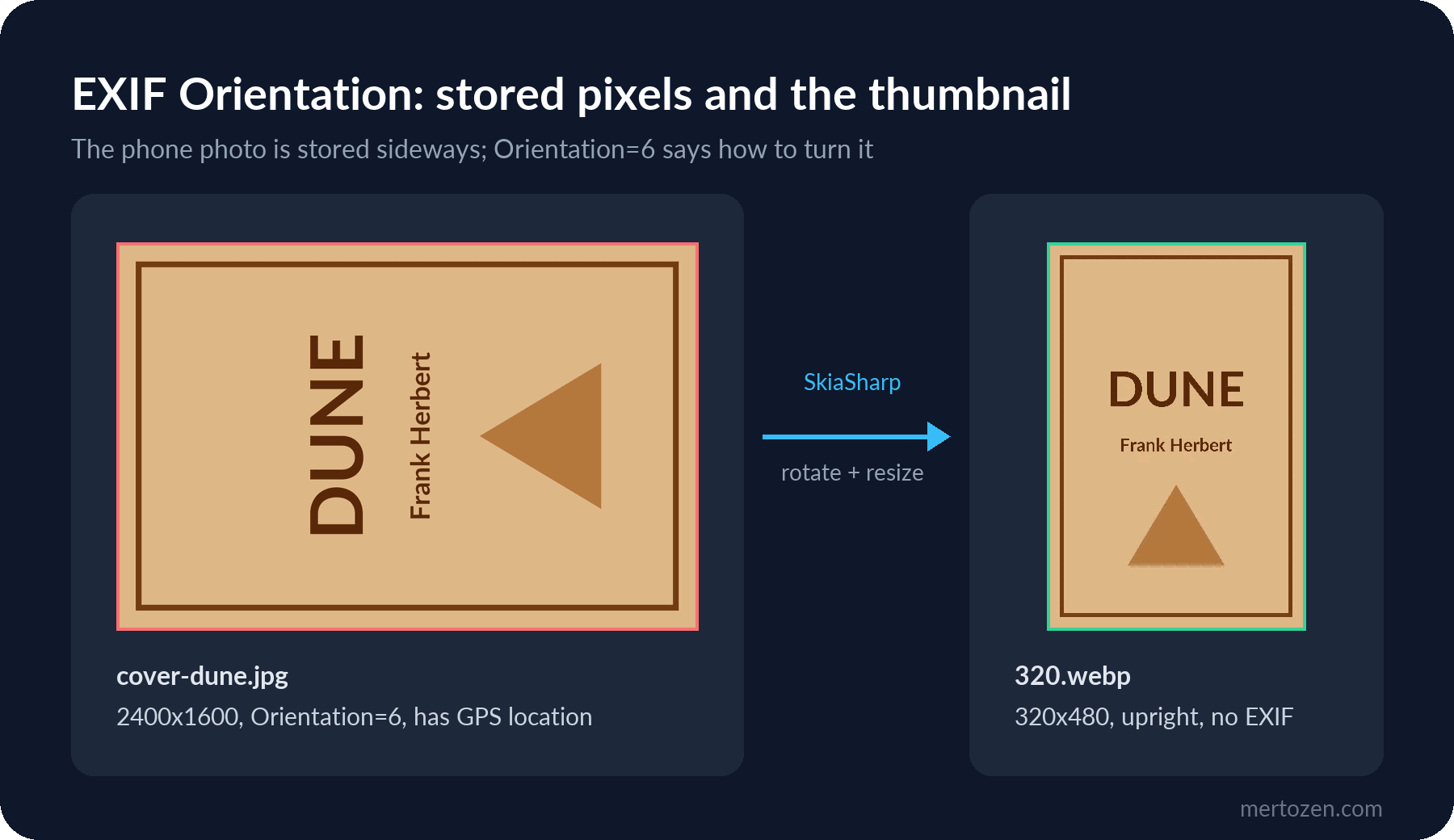
Phones store the photo in the sensor's orientation and leave a "rotate 90 degrees when displaying" note in the EXIF data. SkiaSharp reports that note through SKCodec.EncodedOrigin but does not apply it while decoding; we do the transformation ourselves:
// Phone photos are often stored sideways; the EXIF Orientation tag says how to turn them
private static SKBitmap ApplyOrigin(SKBitmap source, SKEncodedOrigin origin)
{
    if (origin == SKEncodedOrigin.TopLeft)
    {
        return source.Copy();
    }

    bool swap = origin is SKEncodedOrigin.LeftTop or SKEncodedOrigin.RightTop or SKEncodedOrigin.RightBottom or SKEncodedOrigin.LeftBottom;
    SKBitmap target = new(swap ? source.Height : source.Width, swap ? source.Width : source.Height);
    using SKCanvas canvas = new(target);
    canvas.SetMatrix(OriginMatrix(origin, source.Width, source.Height));
    using SKImage image = SKImage.FromBitmap(source);
    canvas.DrawImage(image, 0, 0, SKSamplingOptions.Default);
    return target;
}
OriginMatrix returns a transformation matrix for each of the eight EXIF orientations. For Orientation 6 (RightTop) it is a 90-degree clockwise rotation. Then for each width we shrink while keeping the aspect ratio and convert to WebP:
foreach (int width in options.Value.Widths.Where(w => w < upright.Width))
{
    int height = (int)Math.Round(upright.Height * (double)width / upright.Width);
    using SKBitmap resized = upright.Resize(new SKImageInfo(width, height), new SKSamplingOptions(SKCubicResampler.Mitchell));
    using SKImage image = SKImage.FromBitmap(resized);
    using SKData webp = image.Encode(SKEncodedImageFormat.Webp, options.Value.WebPQuality);
    thumbnails.Add(new CoverThumbnail(width, height, "image/webp", ".webp", webp.ToArray()));
}
SKCubicResampler.Mitchell gives a balanced result between soft and sharp when shrinking. The default sampling picks the nearest pixel, which makes the cover text jagged. We skip widths that are not smaller than the original; an enlarged thumbnail only bloats the file.
$ dotnet run -- thumbs
original: 112,704 bytes, EXIF=True
160x240 image/webp 1,410 bytes, EXIF=False
320x480 image/webp 2,762 bytes, EXIF=False
640x960 image/webp 5,682 bytes, EXIF=False
3 thumbnails in 50 ms
Metadata: Do Not Publish the Location
The original file holds the phone's make, model, capture time and GPS coordinates. Publishing the location of the employee who photographed the cover in the warehouse is a mistake that is also hard to explain under data protection law (KVKK in Turkey, the GDPR in the EU). The output of the Debug project that does the same work with ImageSharp:
$ dotnet run
bomb.png: 20000x20000 = 400,000,000 pixels
cover-dune.jpg: 2400x1600, 8 EXIF values
  Orientation: 6
  Make: ExampleCam
  Model: PhoneModel 1
  GPSLatitude: 41 0 29.52
  GPSLongitude: 28 58 42.24
thumbnail 320x480 in 277 ms, EXIF kept: 7 values, GPS=True
after clearing: 2,616 bytes, EXIF=none
In ImageSharp AutoOrient() rotates the image, but 7 of the original's 8 EXIF values, GPS coordinates included, are carried into the thumbnail and written into the WebP file as an EXIF chunk. Clearing them is an explicit step:
// Remove the metadata before saving
thumb.Metadata.ExifProfile = null;
thumb.Metadata.XmpProfile = null;
thumb.Metadata.IptcProfile = null;
SkiaSharp's encoders write no metadata, so our outputs are clean. Instead of leaving that to a library's behavior, we test it. The test reads the WebP file's chunk list and checks that it contains no EXIF; for ImageSharp's uncleared output the list is VP8X, VP8, EXIF, for ours only VP8. The original file stays private and is never served as it is.
Format and Quality: WebP, JPEG and AVIF
We gave the same 320x480 image to four encoders at quality 80:
$ dotnet run -- formats
Jpeg: 8,230 bytes
Png: 14,161 bytes
Webp: 2,614 bytes
Avif: no encoder (null)
WebP is a third of the JPEG size, and every common browser displays it today. AVIF exists in the enum, but this SkiaSharp build has no encoder for it, and Encode returns null instead of throwing. Skip the null check and you get a NullReferenceException on the next line. If you need AVIF you need a separate encoder; for cover thumbnails WebP is enough. Quality is a matter of measurement: 80 gave a loss we could not see on our covers. Run the same experiment on your own images, since it depends on the kind of picture.
From Upload to Thumbnail: a Background Job
The upload endpoint does only the cheap checks: ISBN format, size limit, signature and pixel count. It writes the original to a private path and leaves the work in a queue. Decoding and resizing burn CPU; a BackgroundService does them outside the request. The HTTP side of uploads (IFormFile, Kestrel limits, streaming) belongs to the ASP.NET Core Web API series.
// The original stays private: it may carry EXIF data such as the location where the photo was taken
string originalPath = $"covers/{isbn}/original{extension}";
await files.SaveAsync(originalPath, new MemoryStream(upload), contentType, ct);
await queue.EnqueueAsync(new CoverThumbnailJob(isbn, originalPath), ct);
return Results.Accepted($"/api/books/{isbn}/cover/320", new { check.Format, check.Width, check.Height, check.Origin });
$ curl -s -w '\nHTTP %{http_code}\n' --data-binary @cover-dune.jpg -H 'Content-Type: image/jpeg' http://127.0.0.1:52560/api/books/9780441172719/cover
{"format":"Jpeg","width":2400,"height":1600,"origin":"RightTop"}
HTTP 202
$ curl -s -w '\nHTTP %{http_code}\n' --data-binary @bomb.png -H 'Content-Type: image/jpeg' http://127.0.0.1:52560/api/books/9780441172719/cover
{"type":"https://tools.ietf.org/html/rfc9110#section-15.5.16","title":"Unsupported Media Type","status":415,"detail":"20000x20000 is 400,000,000 pixels, the limit is 40,000,000."}
HTTP 415The log showed Cover thumbnails for 9780441172719 ready in 45 ms, and GET /api/books/9780441172719/cover/320 returned the 2,762-byte WebP. Checking the ISBN with a regex also keeps a value from the URL from entering the file path as ../; we look at file path safety in detail in the next post. The in-process queue here loses work on a restart; in the last post we move these jobs to Hangfire. On Azure the same step could also be a blob-triggered function; the serverless post of the Cloud Fundamentals series covers that approach.
In Production
The SkiaSharp package brings native binaries for Windows and macOS, not for Linux. Running the same application in a Linux container:
Unhandled exception. System.TypeInitializationException: The type initializer for 'SkiaSharp.SkiaApi' threw an exception.
 ---> System.DllNotFoundException: Unable to load shared library 'libSkiaSharp' or one of its dependencies.
After adding the SkiaSharp.NativeAssets.Linux.NoDependencies package, the same image produced the three thumbnails in 129 milliseconds. The NoDependencies flavor does not depend on system libraries such as fontconfig; for work that draws no text it causes the fewest problems in small images.
Memory: a decoded image is 4 bytes per pixel. Limit how many images you process at once; four parallel jobs at 40 megapixels mean 640 MB.
Keep the original separate and private. When you need a new thumbnail size you regenerate it from the original; enlarging a small thumbnail ruins quality.
Pass every image shown to users through your own encoder. Serving the incoming file as it is also serves its metadata and any unexpected content embedded in the file.
Common Pitfalls
Trusting the extension. The SVG with a .jpg extension failed the first-bytes check; code that looked at the extension would have stored it as a cover.
Showing the large original in lists. The 2.7 KB thumbnail instead of the 112 KB original makes a real difference with 50 covers on a page.
Publishing personal data from EXIF. Location, device and time can travel into the thumbnail on their own; the ImageSharp example showed it.
Checking the size after decoding. By then the 1.6 GB is already allocated.
Finding out about the license key in CI. ImageSharp 4 builds in Debug on the developer's machine and stops in the Release pipeline.
A Small Experiment
★☆☆ Set CoverImageOptions.MaxPixels to 3,000,000 and inspect cover-dune.jpg again. What does the error message say? What would be a sensible limit for real cover photos?
★★☆ Add JPEG qualities 60, 80 and 95 to the formats command and compare the sizes. Do you see the same difference with WebP?
★★★ Change CoverThumbnailWorker so that it processes at most two images at a time, upload 10 covers and look at the timings. Where do you put the limit: in the worker or in CoverImageProcessor?
Covers and invoices live on the local disk for now. In the next post we run IFileStore on Azure Blob Storage and S3, harden the local implementation against path traversal, and set up uploads that bypass the API with short-lived SAS and presigned URLs.