

Board and Workflow Design in Jira: Statuses, Transitions, Columns and WIP Limits
Jira's reports read whether an item is finished from two places: the board's right-most column and the resolution field; if they are not set up consistently, the board and the filters contradict each other. The post derives the Bookstore workflow from the Definition of Workflow and covers transition names, the resolution rule, column mapping, the Scrum board, column constraints, swimlanes and custom filters.
Version note: This post describes Jira Cloud as of 2026-11 (space and work item terminology) using a company-managed software space; team-managed differences are pointed out where they matter. This post is based on the official documentation (Atlassian Support, checked on 15 November 2026).
Guess First
The team behind Bookstore, the online bookstore used as the shared example across this site's series, is finishing its first sprint after moving to Jira. The board looks fine: there are 14 cards in the Done column, and the Sprint Report also counts 14 items as completed. The next day Hakan from institutional sales complains: the "open institutional bugs" filter saved for him, the one with a resolution = Unresolved clause, still shows five bugs you closed last week as open. The Created vs Resolved chart on the dashboard draws zero resolved items for the whole sprint.
Is the board lying, or the filter? Guess: both are right by their own definition. The board and the Sprint Report decide whether an item is finished by looking at the right-most column; the filter and the Created vs Resolved report look at the resolution field. While setting up the workflow, the team forgot to add the rule that sets the resolution on the transition into Done. That is exactly what this post is about: how statuses, transitions, columns and the resolution connect.
Deriving the Workflow from the Definition of Workflow
In Jira a workflow means the statuses a work item passes through during its life and the transitions between them. Jira's default workflow is a starting point, but the team's flow should come from the team's own definition, not from Jira's template. The Definition of Workflow we discussed in the second post of the Kanban series is exactly that definition: when work counts as started and finished, the states in between and explicit policies on how items move. The Jira workflow reflects those decisions in the tool; it is not the decision itself.
Atlassian's best practices page for workflows points the same way: build the workflow with someone from every role on the team, do not copy one template to every team, write down the team's real steps from scratch and keep the number of statuses and transitions to what is really needed. The page's reasoning is simple: every status and every transition adds complexity for everyone who works in the workflow.
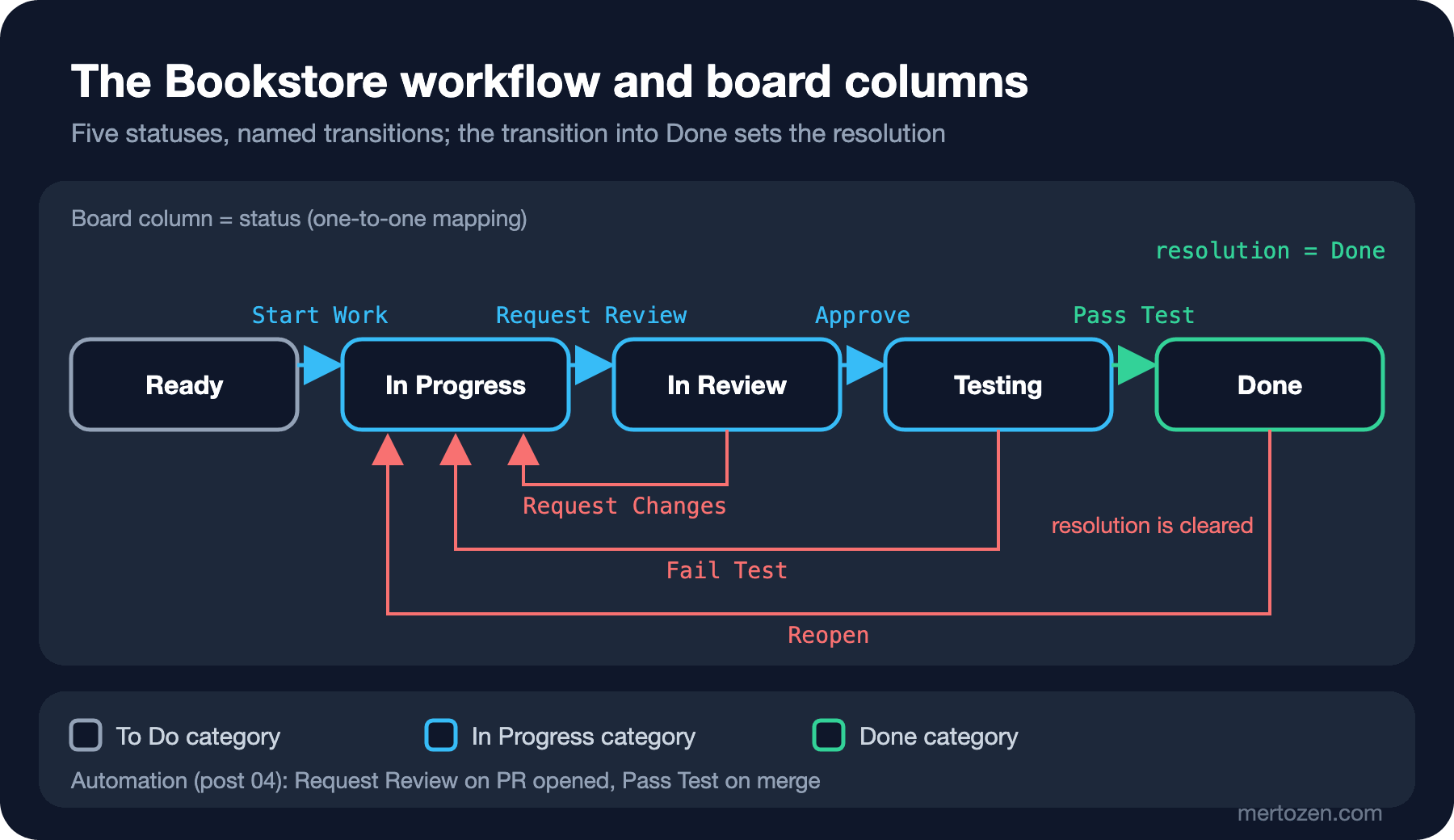
Here is what the Bookstore team decided. Work starts when a developer pulls an item from Ready. It finishes when the PR is merged into the main branch, because the team's CI/CD pipeline ships every change that reaches main to production and testing happens before the merge, in the PR's own test environment. There are three states in between: In Progress (code is being written), In Review (the PR is being read) and Testing (scenarios are tried in the PR environment). Five statuses in total: Ready, In Progress, In Review, Testing, Done.
Jira ties every status to one of three categories: To Do, In Progress and Done. Categories decide the colour of statuses and some calculations; in JQL they can be queried with the statusCategory field. Ready is in the To Do category, the middle three are in In Progress and Done is in the Done category.
Transitions: The Name and the Rule of a Move
Statuses say where the work is; transitions say how it moves. Bookstore's forward transitions are Start Work, Request Review, Approve and Pass Test; the backward ones are Request Changes (from review back to code), Fail Test (from testing back to code) and Reopen (from Done back into work).
Naming transitions can look like ceremony at first, but the names are used elsewhere. Smart commits, which we will see in post 04, match a command such as #approve in a commit message against transition names and only look at the first word of the name. Because Request Review and Request Changes start with the same word, #request is ambiguous in a commit message; for these two the full name has to be written with a hyphen: #request-review. Knowing this while choosing names is easier than renaming a transition later.
Transitions can also carry rules: conditions that limit who can run them, validators that require a field to be filled and actions that update a field after the move. In team-managed spaces a workflow can have up to 200 transitions; the documentation also warns that transitions that do not start from "Any status" can cause unexpected behaviour when people drag cards across the board. The Bookstore team added a single rule, and it is the one below: the resolution.
A company-managed software space created with a board uses the simplified workflow by default; in that mode a space or board admin can add statuses directly from the board settings. When the space uses a Jira workflow, that button disappears and Jira admins manage statuses in the workflow editor. The Bookstore team wanted named transitions and a resolution rule, so it uses a Jira workflow.
The Resolution: The Hidden Key to the Reports
The resolution is the field that says why a work item moved to Done: Done, Won't Do, Cannot Reproduce and so on. Atlassian's documentation says that items in Done do not have to have a resolution but strongly recommends that they do, and shows why in three places. On boards, items with a resolution appear struck through; if the resolution is set wrongly, even a card in In Progress can show up struck through. The Created vs Resolved report relies on the resolution. And the Open work items filter shows items without a resolution; that is exactly what Hakan's filter did.
The documentation suggests two ways. The first is to add a rule to the transition into Done that updates the resolution field with a fixed value. The second is to show a screen with the Resolution field on the transition and let the person choose. The Bookstore team chose the first: the Pass Test transition sets the resolution to Done. If a second end state such as Won't Do is needed, the transition into that status will set its own resolution value. There is also the reverse direction: the documentation says transitions leading away from a resolved status need configuring too. If Reopen does not clear the resolution, a reopened bug appears in In Progress, struck through and closed in filters, all at once.
One more detail: Jira sets the resolved date automatically at the moment the resolution goes from empty to a value. The resolved field in JQL and the dates in resolution-based reports come from that moment. The resolution page is written for company-managed spaces; on the team-managed side, the JQL fields page says that service team-managed spaces have no resolution field and that statusCategory = Done should be used there instead.
Mapping Statuses to Board Columns
A column on the board shows the item's current status; more than one status can be mapped to a column. A Scrum board's default columns are To Do, In Progress and Done; a Kanban board's are Backlog, Selected for Development, In Progress and Done. This mapping matters more than it seems, because the reports look at columns. The pages for the velocity chart, the cumulative flow diagram and the Sprint Report repeat the same rule: an item in a status mapped to the left-most column counts as To Do, and an item in a status mapped to the right-most column counts as Done. The page on completing a sprint also says an item counts as complete once it has been moved to the last column of the board.
The consequence: whatever you put in the right-most column goes into the sprint's "completed" list. If you map Won't Do to the Done column, the story points of abandoned items show up in velocity as completed work. If you map a status to no column, items in that status do not appear on the board at all; the first suspects in the documentation's troubleshooting section for items missing from a board are the board filter and unmapped statuses. The Bookstore team mapped its five statuses to five columns one to one; the Done column holds only Done.
The Scrum Board: Backlog, Sprint and Sprint Goal
The Bookstore team works with Scrum, so its board is a Scrum board. On the backlog screen Selin manages the ordered Product Backlog, and in Sprint Planning the team fills a sprint and starts it. The dialog for starting a sprint has an optional goal field; the sprint goal also appears on the Sprint Report and on the Burndown Chart. As we discussed in the fourth post of the Scrum series, the sprint goal says why the sprint exists; Jira letting you leave it empty does not mean you should.
A few behaviours are worth knowing. Sprints belong to a board, not to a space; when items move to another space, the sprint data does not go with them. To complete a sprint, all subtasks have to be Done; unfinished parent items are carried to the backlog or to a later sprint. There is a parallel sprints feature for two teams working from the same backlog, but the documentation states plainly that the velocity chart then does not show velocity per team and that the feature assumes both teams estimate the same way.
The Kanban Board: WIP Limits, Swimlanes and Custom Filters
In Jira a WIP limit is called a column constraint. In the board settings each column can get a minimum and a maximum; when the maximum is exceeded the column header turns red, and when the minimum is not met it turns yellow. Two notes in the documentation matter. The constraint values do not change the number of items shown in the column, so Jira does not stop a card from entering it; keeping to the limit is the team's policy. And the constraint counts every item in the column, including ones hidden by a quick filter. The count can be set to "Work item count" or "Work item count, excluding subtasks"; the documentation recommends excluding subtasks for Scrum teams. We covered why WIP limits work with Little's Law in the third post of the Kanban series; here we only look at how the tool applies them.
Swimlanes group cards horizontally. The options are query swimlanes, each a JQL query, or swimlanes by story, by assignee, by epic, by space, or none at all. In query mode you get an Expedite lane with the query priority = Blocker and an Everything Else lane that cannot be deleted. Quick filters are buttons that narrow the board with JQL; the defaults are Only My Work items (assignee = currentUser()) and Recently Updated. In the new board view coming to company-managed spaces, quick filters have been renamed custom filters.
The Bookstore team borrowed two things from Kanban for its Scrum board (the Scrumban idea from the seventh post of the Kanban series): column constraints with a maximum of 4 for In Progress and 3 for In Review, excluding subtasks. They use query swimlanes: they changed the Expedite lane's query to labels = expedite, and everything else goes to Everything Else. As custom filters they added parent = BOOK-120 for the Institutional Ordering epic and type = Bug next to Only My Work items. We will build the automation that moves an item to In Review when its PR is opened and to Done when it is merged in post 04.
In Production
In a company-managed space the workflow is attached to the space through a workflow scheme; every space using the same scheme is affected by a workflow change together. When you remove a status, the items in it have to be moved to a new status; Jira asks for this while updating the workflow. Atlassian recommends running the new workflow end to end with sample items in a separate test space first and checking whether items get stuck at any step. That is much cheaper than discovering a dead end on the team's board after go-live.
The 5,000-item board limit fills up faster on Kanban boards, because the Done column keeps growing. Adding a clause to the board filter that leaves out finished, old items, or clearing done items from the board in team-managed spaces, should happen before you reach the limit.
Common Pitfalls
The first pitfall is the story from the start: because the resolution stays empty, items in Done appear open in filters and in the Created vs Resolved report. The opposite also happens: a workflow that sets the resolution in a status that is not done, or that does not clear it on Reopen, shows cards being worked on as struck through. In both cases the fix is in the same place: the transitions into and out of the end statuses.
The second pitfall is columns that do not reflect the team's real flow: "In Review 2", "Ready for Test", "Test Approved Waiting Deploy", each a status once added to solve one problem. The rule from the second post of the Kanban series applies here too: keep a status separate only if there is a wait or a piece of work you want to measure. The third pitfall is building approval steps into the workflow: a "Manager Approval" status and a transition only one person can run. When that person goes on leave, the whole flow stops. If an approval is really needed, set it up as a rule that does not lock the flow itself, with the permission given to a role. The fourth is putting abandoned work such as Won't Do in the right-most column and inflating velocity.
A Small Experiment
★☆☆ Write one sentence for each column on your team's current board: in this column, who is the item waiting for, or who is working on it? A column whose sentence cannot be written is a candidate for removal.
★★☆ Add a "Won't Do" end status to the Bookstore workflow: which statuses lead to it, what is the transition called, which resolution does it set and which column is it mapped to? Explain the effect of your decision on velocity in one sentence.
★★★ On a Jira site you have access to, run the queries statusCategory = Done AND resolution = Unresolved and statusCategory != Done AND resolution is not EMPTY. Every item returned points to a transition whose resolution rule is missing or wrong. Find which transition it is.
The board now shows the right thing; the next question is how to ask the right questions of this data. In the next post we cover the basics of JQL, saved filters and dashboards, what velocity, burndown, cumulative flow and the control chart answer, and where metrics turn into personal performance scores.