

Troubleshooting Terraform: Reading the Plan, TF_LOG, Provider Errors, State Locks, "Already Exists" and Drift
The first step in troubleshooting Terraform is to check which stage the error came from (init, plan or apply) and to read the notes in the plan. We read the plan as text and as JSON, look inside the provider with TF_LOG, and go through a lock file mismatch, an "already exists" error, a locked state, drift the provider cannot see, a cycle error and -target with real output; on Azure we solve the case of a Key Vault waiting in soft-delete.
Version note: The examples in this post were run with Terraform 1.17.2, the kreuzwerker/docker provider 4.7.0, the hashicorp/http provider 3.6.3, PostgreSQL 18 for the pg backend, jq 1.7 and Docker Engine 29. The Azure-specific errors are described from the documentation and source code of AzureRM 5.14.0.
Guess First
In post 13 we gave the Docker network of Bookstore, the online bookstore used as the shared example across this site's series, a subnet. The plan was clean: one resource, -/+, with an obvious reason. The apply ended like this:
module.bookstore.docker_network.bookstore: Destroying... [id=<network-id>]
module.bookstore.docker_network.bookstore: Still destroying... [id=<network-id>, 00m10s elapsed]
module.bookstore.docker_network.bookstore: Still destroying... [id=<network-id>, 00m20s elapsed]
module.bookstore.docker_network.bookstore: Still destroying... [id=<network-id>, 00m30s elapsed]

Error: timeout while waiting for state to become 'removed' (last state: 'pending', timeout: 30s)
Where is the cause: in Terraform, in the provider, or in Docker? And could the plan have shown the problem in advance? In this post we sort Terraform errors by the stage they appear in and find the first place to look for each; this case is one of them.
Reading the Plan: Markers, Notes and JSON
In post 2 we saw the +, ~, -/+ and - markers. When troubleshooting, the notes under a resource header and the comments at the end of a line help more than the markers. The notes we met in this series:
  # module.bookstore.docker_network.bookstore must be replaced
      + ipam_config { # forces replacement

  # module.bookstore.module.api.docker_container.this will be replaced, as requested

  # terraform_data.image will be updated in-place
  # (moved from terraform_data.api_image)

  # terraform_data.by_index["4"] will be destroyed
  # (because key ["4"] is not in for_each map)

  # module.bookstore.data.http.health will be read during apply
  # (config will be reloaded to verify a check block)

      ~ env                                         = (sensitive value) # forces replacement
      ~ id                                          = "..." -> (known after apply)
# forces replacement tells you which attribute triggers the replacement. will be replaced, as requested is a replacement asked for with the -replace flag. # (moved from ...) shows that the resource reached a new address through a moved block and has another change on top; moving an address does not mean recreating. (because key ... is not in for_each map) usually points to a changed key, that is, the index pitfall from post 13. will be read during apply is the check block from post 5 being read again on every plan, and it does not count as a change. (known after apply) says the value is not known before apply; on a resource being replaced it is normal for id to look like this, but if a change is caused by such a line, the value depends on another resource being recreated.
The hardest one is (sensitive value). In post 13, changing a setting in the YAML made the plan say only "env changed". To see at a glance which resource changes and why in a long plan, I added a small script to the repo, scripts/plan-changes.sh:
#!/usr/bin/env bash
# Lists every resource a saved plan changes, with the attributes that force a replacement.
# Usage: scripts/plan-changes.sh tfplan   (run inside the root module that made the plan)
set -euo pipefail

plan=${1:-tfplan}

# The JSON plan holds every value in clear text, sensitive ones too: never save or upload it
terraform show -json "$plan" | jq -r '
  .resource_changes[]?
  | select(.change.actions != ["no-op"] and .change.actions != ["read"])
  | [
      (.change.actions | join("+")),
      .address,
      (.change.replace_paths // [] | map(map(tostring) | join(".")) | join(", "))
    ]
  | @tsv'
$ terraform plan -out=tfplan
$ ../../../../scripts/plan-changes.sh tfplan
delete+create module.bookstore.docker_network.bookstore ipam_config
delete+create module.bookstore.module.api.docker_container.this networks_advanced, envThe replace_paths field is the machine-readable form of the # forces replacement comments in the text output. The order of delete+create matters too: for a resource with create_before_destroy you see create+delete. Sensitive values are not hidden in the JSON, only flagged in the after_sensitive field. So you can compare the setting that changed directly:
$ terraform show -json tfplan | jq -r '.resource_changes[]
    | select(.address | endswith("docker_container.this"))
    | (.change.before.env - .change.after.env | map("- " + .))[],
      (.change.after.env - .change.before.env | map("+ " + .))[]'
- Bookstore__Catalog__PageSize=20
+ Bookstore__Catalog__PageSize=25
For the same reason, uploading the JSON plan as a CI artifact or printing it to a log is exactly the secret leak we avoided in post 9. You can find more queries like these in the "jq and yq" post of the site's JSON, YAML and Configuration Formats series.
Looking Inside with TF_LOG
When the error message is not enough, you turn on Terraform's log. TF_LOG sets the level (TRACE, DEBUG, INFO, WARN, ERROR) and TF_LOG_PATH the file. With TF_LOG_CORE and TF_LOG_PROVIDER you can enable the log of Terraform only or of the providers only; for provider errors the latter removes most of the noise. Set the variables for that one command only; in PowerShell you do the same with $env:TF_LOG_PROVIDER = "DEBUG" and remove it afterwards with Remove-Item Env:TF_LOG_PROVIDER:
TF_LOG_PROVIDER=DEBUG TF_LOG_PATH=terraform.log terraform apply tfplanI ran the apply from the opening question again with this setting. The log shows clearly what the provider does:
[INFO] Waiting for network: '<network-id>' to be removed: max '30s seconds'
[DEBUG] Waiting for state to become: [removed]
[TRACE] Waiting 5s before next try
[TRACE] Waiting 10s before next try
[TRACE] Waiting 10s before next try
[TRACE] Waiting 10s before next try
[WARN] WaitForState timeout after 30s
The provider sends the request to delete the network, waits for it to disappear and gives up after 30 seconds; it does not log why Docker did not delete it. To find the reason I did the same operation with the tool itself:
$ docker network rm tfseries-dev
Error response from daemon: error while removing network: network tfseries-dev has active endpoints (name:"tfseries-dev-api" id:"<id>")
This is a general method for provider errors: repeating the provider's API call with the cloud's own CLI (az on Azure) often gives you the real error message. It also answers the opening question. The problem is neither in Terraform nor in Docker; it is in the code. The container was attached to the network by name, the name did not change, so the plan left the container alone, but Docker will not delete a network while a container is attached. The plan could not show this, because the constraint lives in the Docker API, not in the provider's schema. The fix in post 13 was to give the container the network's ID: when the ID changes, the plan replaces both resources and Terraform deletes the container first.
Two things to note in the log. First, you will see this warning on every plan:
[WARN] Provider "registry.terraform.io/kreuzwerker/docker" produced an invalid plan for module.bookstore.module.api.docker_volume.data["covers"], but we are tolerating it because it is using the legacy plugin SDK.This is normal for providers written with the old plugin SDK; it is not the cause of your error, so keep looking. The second matters more: a DEBUG log contains every value the provider sees. In the log I took with TF_LOG=DEBUG, the value of Bookstore__Payments__ApiKey appeared in clear text; sensitive only hides Terraform's own screen output. Clean the log file before attaching it to an issue, and delete it when you are done. That is why I added terraform.log to the repo's .gitignore.
Init and Import Errors: The Lock File and "Already Exists"
If you change a provider version constraint and skip init, the plan does not even start:
$ terraform plan
Error: Inconsistent dependency lock file

The following dependency selections recorded in the lock file are
inconsistent with the current configuration:
  - provider registry.terraform.io/kreuzwerker/docker: locked version selection 4.7.0 doesn't match the updated version constraints "~> 3.6"

To update the locked dependency selections to match a changed configuration,
run:
  terraform init -upgrade
A plain terraform init stops for the same reason and suggests init -upgrade. Stop and think here: the message gives you the command, but was the change that lowered the constraint from ~> 4.7 to ~> 3.6 deliberate? If you see such a gap between the lock file and the constraint in a pull request, first ask who changed it and why. -upgrade rewrites the lock file with the new selection, which changes the provider version in every environment.
An "already exists" error means the resource is in the cloud but not in the state. I tried to create a network with Terraform that had been created by hand:
docker_network.reports: Creating...

Error: Unable to create network: Error response from daemon: network with name tfseries-reports already exists

  with docker_network.reports,
  on main.tf line 12, in resource "docker_network" "reports":
  12: resource "docker_network" "reports" {
The fix is not deleting it but the import block from post 8:
import {
  to = docker_network.reports
  id = "tfseries-reports"
}
# docker_network.reports will be imported
Plan: 1 to import, 0 to add, 0 to change, 0 to destroy.
...
Apply complete! Resources: 1 imported, 0 added, 0 changed, 0 destroyed.The plan after the import said "No changes". One frequent cause of this error is an interrupted apply: the provider creates the resource, but the process dies before Terraform writes it to the state. In that case, first make sure the resource really is the one Terraform left behind, then import it.
A Locked State and force-unlock
We saw the lock in post 4. This time I ran a second plan while an apply was waiting at the approval prompt:
Error: Error acquiring the state lock

Error message: Workspace is already locked: default
Lock Info:
  ID:        83cf26d1-dc0a-de24-b954-fc940a11bf38
  Path:
  Operation: OperationTypePlan
  Who:       user@my-pc
  Version:   1.17.2
  Created:   2026-11-15 08:12:48.5891 +0000 UTC
  Info:
With -lock-timeout=5s the same command waited five seconds and returned the same error. Then, knowing the warning from post 4, I tried force-unlock with a made-up ID:
$ terraform force-unlock -force 12345
Terraform state has been successfully unlocked!

The state has been unlocked, and Terraform commands should now be able to
obtain a new lock on the remote state.
$ terraform plan
Error: Error acquiring the state lock
The command reported success, but the lock was still there. The pg backend's documentation says force-unlock is not supported and that the advisory lock is released when the connection drops; the CLI does not report this as an error. The general lesson: a command saying "success" does not prove the problem is solved, so try the operation again. The real fix was finding the process that held the lock; when it finished, the lock was released.
On the Azure Storage backend the lock is a blob lease, and a crashed process does not release it; there you really need force-unlock <ID>. The only safe case is when you have used Who and Created in the Lock Info to find the owner and you are sure that process has finished. With the pipeline from post 11, that means seeing on GitHub that the workflow run was cancelled or has finished.
Drift, Cycles and -target
We saw drift in posts 4 and 12; this time I hit drift the provider cannot see. I removed the API container from the shared network by hand (docker network disconnect). The normal plan:
Plan: 0 to add, 0 to change, 0 to destroy.terraform plan -refresh-only showed the change only in the computed network_data list; networks_advanced still listed both networks. The provider does not compare this attribute with the container's real connections, so the plan says all is well. "No changes" means everything the provider reads matches the code; not the whole real world. If you are sure a resource is broken and the plan cannot see it, recreate it with Terraform:
$ terraform apply -replace=module.bookstore.module.api.docker_container.this
  # module.bookstore.module.api.docker_container.this will be replaced, as requested
Plan: 1 to add, 0 to change, 1 to destroy.
A cycle error comes from two resources referring to each other:
resource "terraform_data" "api" {
  input = { worker_url = "http://${terraform_data.worker.output.name}:8080" }
}

resource "terraform_data" "worker" {
  input = { name = "worker", api_url = terraform_data.api.output.worker_url }
}
$ terraform validate
Error: Cycle:
terraform_data.api
terraform_data.workerThe error says the dependency graph contains a loop and names the resources in it. The fix is always the same: take one of the values that form the loop from a local or a variable instead of a resource's output. The worker's name here is fixed anyway; define it as local.worker_name, use it on both sides, and the loop is gone. The unnecessary depends_on entries from post 5 can produce the same error.
-target narrows the plan to the selected addresses and their dependencies. Terraform warns about it itself:
$ terraform plan -target=module.bookstore.module.api

Warning: Resource targeting is in effect

You are creating a plan with the -target option, which means that the result
of this plan may not represent all of the changes requested by the current
configuration.

The -target option is not for routine use, and is provided only for
exceptional situations such as recovering from errors or mistakes, or when
Terraform specifically suggests to use it as part of an error message.
It is a legitimate tool for fixing a single resource after an interrupted apply. But if it becomes a habit, changes that were never applied pile up between state and code; after every apply with -target, run an untargeted plan and keep going until it says "No changes".
Azure-specific Errors and a Key Vault Waiting in Soft-Delete
This section is based on the official documentation.
Errors during an apply on Azure mostly arrive as HTTP status codes from Azure Resource Manager. With 403 the error code is usually AuthorizationFailed, and the message says which identity cannot perform which action at which scope; that is why the least-privileged role from post 11 is widened based on the error, not on guesswork. 429 means throttling: the Azure SDK that AzureRM uses treats 429 as a temporary error and retries, honouring the Retry-After header; if this error still stopped an apply, reduce the number of applies running at the same time. 409 is a conflict: another operation running on the same resource, or a resource that already exists.
For an existing resource, AzureRM checks by itself before creating. The message in the provider's source code, together with the resource ID, says "a resource with the ID ... already exists - to be managed via Terraform this resource needs to be imported into the State". The fix is an import block, as in the Docker example.
In Bookstore the most annoying form of this shows up with Key Vault. Say the dev environment has its own vault (kv-bookstore-dev-weu) and you destroy the environment and rebuild it the next day. Soft-delete is always on in Key Vault: a deleted vault waits in the "deleted" state for a period between 7 and 90 days, and vault names are unique across Azure. Two settings in AzureRM's features block control this behaviour:
provider "azurerm" {
  features {
    key_vault {
      purge_soft_delete_on_destroy    = true
      recover_soft_deleted_key_vaults = true
    }
  }
}
Both default to true. On destroy the provider deletes the vault permanently (purge), but with purge protection enabled that is not possible and the vault waits out the retention period. When creating again, the provider first looks for a deleted vault with the same name and recovers it if it finds one; the "new" vault comes back with the old one's secrets. With recover_soft_deleted_key_vaults = false, the provider stops with an error that starts with "An existing soft-deleted Key Vault exists with the Name ..." and suggests recovering the vault by hand and importing it, or picking another name. The source code has one more detail: if the identity is not allowed to read deleted vaults at subscription level, this check gets a 403 and is skipped, and the create request runs straight into Azure's name conflict. To see and fix the situation:
az keyvault list-deleted --resource-type vault
az keyvault recover --name kv-bookstore-dev-weu
az keyvault purge --name kv-bookstore-dev-weu
After recover, bring the vault into the state with import; if there is no purge protection and you do not need its secrets, free the name with purge. For environments that are built and torn down often, adding a short random_string suffix to the vault name avoids the problem from the start.
Production Notes
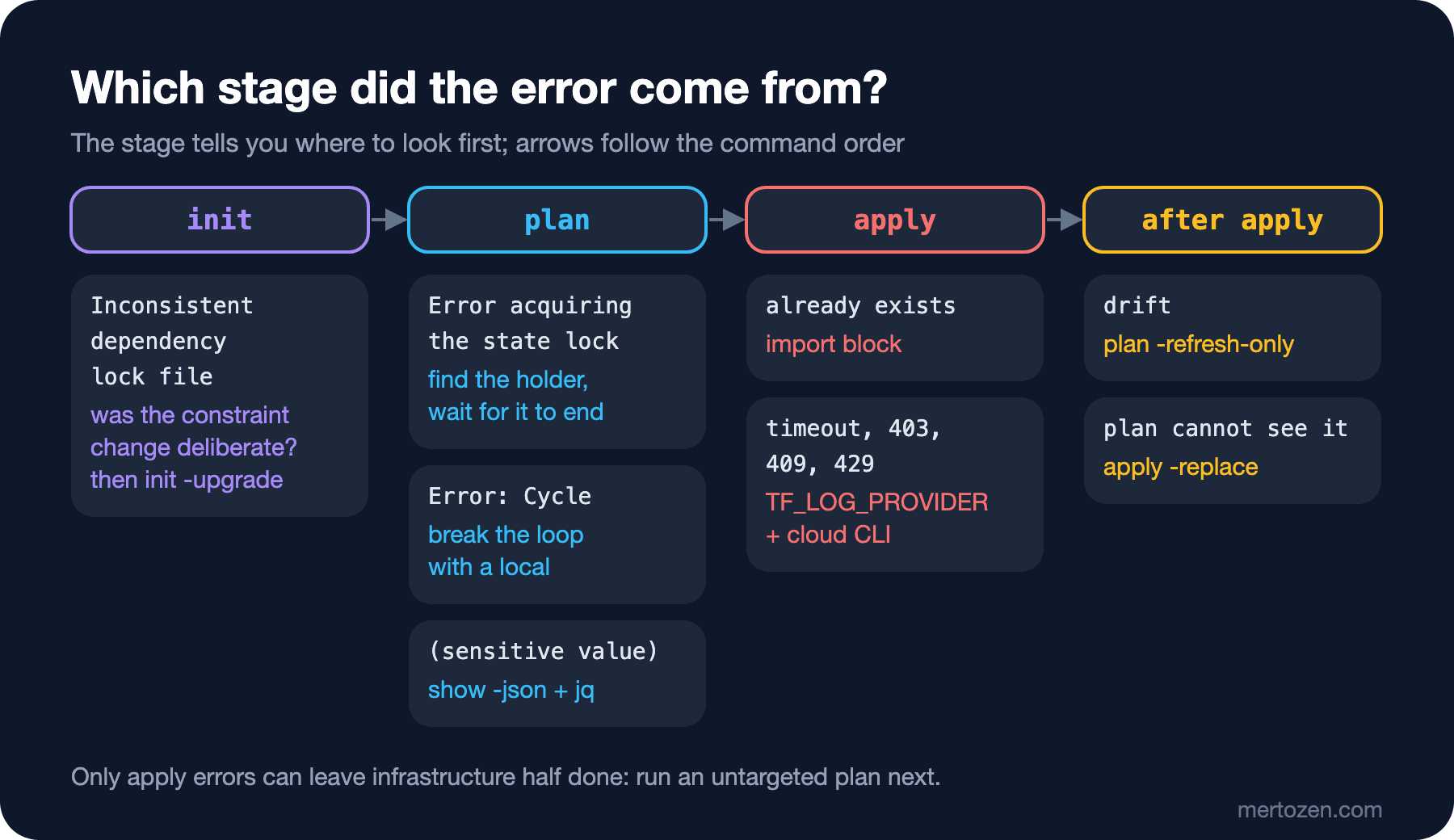
Look at which stage gave you the error: an error in init is about downloading providers and the lock file, an error in plan is about code, state and the lock, and an error in apply is about the behaviour of the provider and the cloud API. Only apply errors can leave infrastructure half done; the first thing after one is an untargeted plan to see what the state knows.
After an interrupted apply, do not panic and edit the state by hand. Even when an apply ends with an error, the resources it finished are written to the state; most of the time the next plan shows correctly what was completed. For what remains, the tools from posts 4 and 8 (import, state rm, moved) are enough.
Limit logs and plan output in CI. Do not leave TF_LOG on in the pipeline and do not upload the JSON plan as an artifact; both contain secrets. If you need to debug, take the log on a local run.
Common Pitfalls
Applying without reading the plan. In most cases in this post the clue was in the plan: (because key ... is not in for_each map), # forces replacement, (sensitive value). Summarise a long plan with scripts/plan-changes.sh, then find the reason for every line in the summary.
Making -auto-approve a local habit. In CI we apply a saved plan (post 11), because the approved plan and the applied plan are the same. Locally, -auto-approve means applying without ever seeing the plan; one day you will run it in the wrong environment's folder.
Running the command from an error message without thinking. init -upgrade, force-unlock, -target and -lock=false remove the error, not its cause. Before each of them, you should be able to say in one sentence why the message appeared.
A Small Experiment
★☆☆ In infra/local/envs/dev, change a value in appsettings.yaml, run terraform plan -out=tfplan and summarise it with scripts/plan-changes.sh tfplan. Then compare it with the terraform show tfplan output: what does the summary show, and what does the text output hide?
★★☆ Change the container's restart policy by hand with docker update. Do the normal plan and the -refresh-only plan see this change? If not, how would you catch drift for this attribute?
★★★ For each error in this post (lock file, already exists, lock, cycle, timeout), add a check to scripts/check-infra.sh or to the pull request workflow from post 11 that catches it early. Which ones can be caught before the plan, and which only show up during apply?
We have reached the end of the series. Bookstore's infrastructure is now in code: a state per environment, modules, resources that keep secrets out of state, tests, a pipeline that applies after approval, and a team that knows where to look when something goes wrong. Getting the application into production on top of this infrastructure, deployment strategies and the Kubernetes side are the subject of the site's CI/CD and Kubernetes series.