

Jira Automation and GitHub Integration: Rules, Smart Values, Usage Limits and the REST API
Jira automation rules are made of triggers, conditions, actions and branches; from 3 December 2026 every step that runs is billed by usage, and by default a rule's action does not trigger another rule. The post covers Bookstore's four rules, the step count, GitHub for Atlassian and smart commits, and a .NET tool that checks commit messages and drafts release notes with REST API v3.
Version note: The C# code in this post was built and run with .NET 10 (SDK 10.0.402), Microsoft.Extensions.Configuration.UserSecrets 10.0.15 and Microsoft.Extensions.Configuration.EnvironmentVariables 10.0.15. Automation, the GitHub integration and REST API behaviour are based on the Jira Cloud documentation as of 2026-11 (Atlassian Support and Atlassian Developer, checked on 15 November 2026).
Guess First
The team behind Bookstore, the online bookstore used as the shared example across this site's series, writes two automation rules. The first: when a PR is merged, move the linked work item from Testing to Done. The second: when a subtask moves to Done and all subtasks of its parent are finished, move the parent forward too. Emre merges the PR for the BOOK-143 subtask; the first rule moves the subtask to Done. The other subtask of the BOOK-142 story was already finished.
Guess: does the second rule run, that is, does the story move? And if these two rules run hundreds of times a month, how does that show up on the bill after 3 December 2026? There is also a reporting script Hakan from institutional sales set up with his own API token; what happens when Hakan leaves the company?
Anatomy of an Automation Rule: Trigger, Condition, Action, Branch
Every automation rule starts with a trigger: a work item being created, a field changing, a transition, a schedule or an event from a connected development tool (branch created, commit created, PR created, PR merged). Conditions decide whether the rule continues; conditions can also be set inside the trigger ("only for transitions to Done", for example). Actions do the actual work: a transition, a field update, a comment, an e-mail. A branch runs part of the rule on related items instead of the trigger item: the parent, the subtasks or whatever a JQL query returns. Atlassian's newer pages also use the word "flow" instead of rule; they are the same thing.
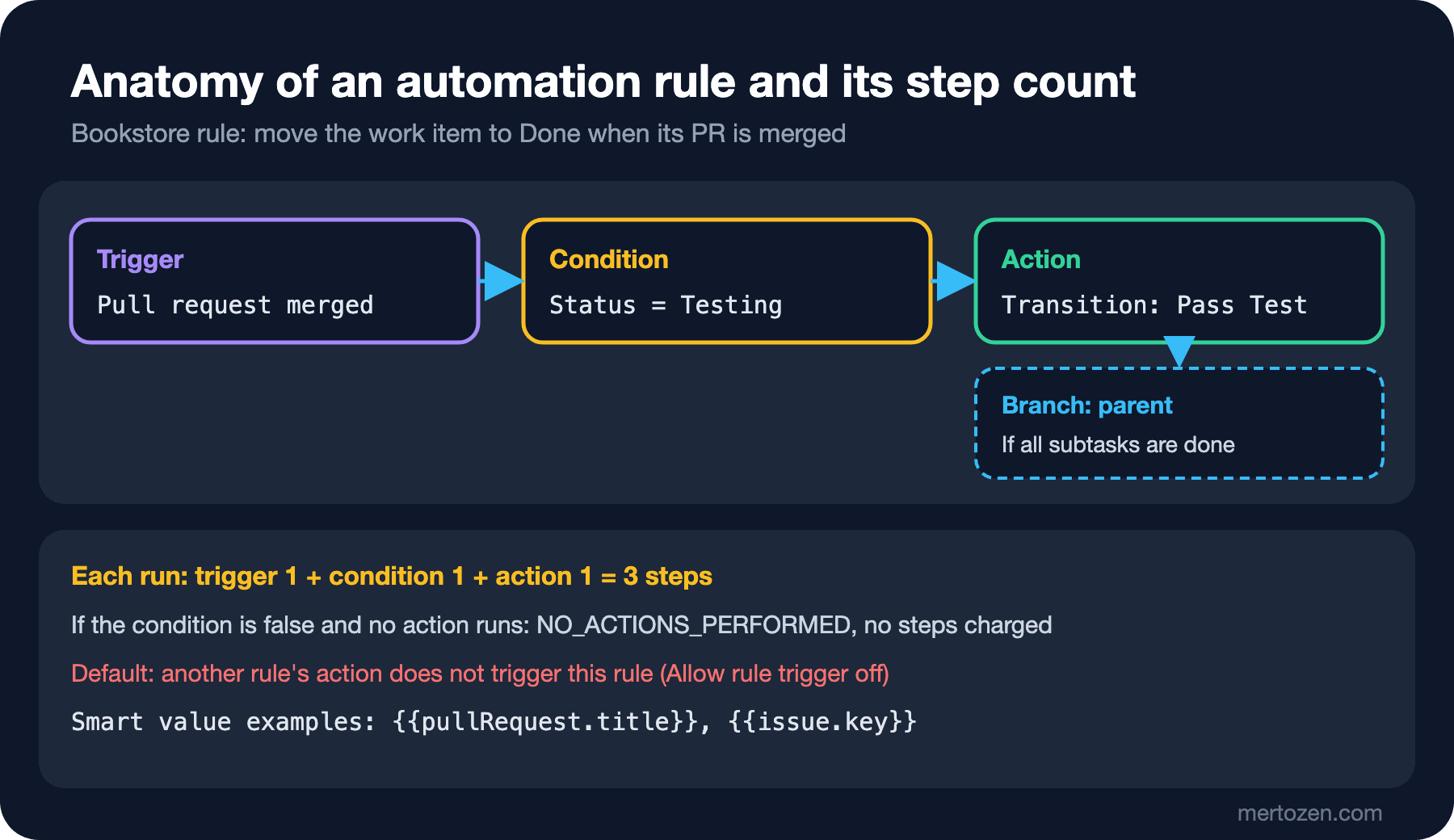
The documentation states two rules about branches plainly. The main branch of a rule always applies to the trigger item; if you create a new item inside the rule and want to comment on it, you have to do that in a branch opened for the created items. Branches over several items run in parallel with no guarantee of order; you cannot rely on a change made in one branch from another.
The limits are worth knowing too. A rule can contain at most 65 steps, a scheduled JQL search can return at most 999 items, the Lookup work items action only uses the first 100 items, and if a rule triggers itself or other rules 10 times in quick succession, loop detection stops the execution with the LOOP status. The number of rules that can run at the same time depends on the plan: Free 5, Standard 10, Premium 20, Enterprise 30.
This section is based on the official documentation.
Smart Values
Smart values let you use changing data inside a rule. The format is double curly braces with dot notation: {{issue.key}}, {{issue.summary}}, {{issue.assignee.displayName}}. They can be chained with functions: {{now.plusDays(5)}} is five days from now, {{issue.summary.toLowerCase()}} the summary in lower case. Development events have their own smart values: {{pullRequest.title}}, {{pullRequest.url}}, {{pullRequest.sourceBranch}} and {{pullRequest.destinationBranch}} on PR triggers, {{branch.name}} on the branch trigger.
The way the documentation suggests to see what a smart value returns is simple: create a temporary rule with Manual trigger from work item as the trigger and Log action as the action, run it by hand on an item and read the result in the audit log. Because Log action does not count as a step, this test does not eat into the usage allowance either.
This section is based on the official documentation.
Bookstore's Four Rules
In post 02 we said the board would move items to In Review when a PR is opened and to Done when it is merged. The Bookstore team turned that and two further needs into four rules:
Rule 1  PR opened: move to In Review
  Trigger    Pull request created
  Condition  Issue fields: Status = In Progress
  Action     Transition work item: Request Review

Rule 2  PR merged: move to Done
  Trigger    Pull request merged
  Condition  Issue fields: Status = Testing
  Action     Transition work item: Pass Test

Rule 3  Last subtask done: move the parent
  Trigger    Work item transitioned (to Done), work type = Subtask
  Branch     Parent
    Condition  Related issues: all subtasks match statusCategory = Done
    Action     Transition work item: Request Review
  Rule details  Allow rule trigger = on

Rule 4  Stale work reminder
  Trigger    Scheduled, every day 09:00
             JQL: project = BOOK AND statusCategory = "In Progress" AND updated <= "-7d"
  Action     Comment on work item:
             {{issue.assignee.displayName}}, {{issue.key}} has not moved for 7 days. Blocked?
Rules 1 and 2 are two sides of the same idea: PR events move an item only if it is in the expected status. A PR merged without going through Testing does not take the item to Done; the item stays in In Review and the board shows that to everyone. Rule 3 moves the parent to In Review, not to Done, because the story as a whole still has to go through review and testing; finished subtasks do not mean a finished story. The updated clause in Rule 4 is the seven-day, team-wide version of the "work untouched for five days" query from post 03; its purpose is not to blame anyone but to make stuck work visible before the Daily Scrum.
The answer to the opening question is in the last line of Rule 3. According to Atlassian's support article, by default a rule's actions do not trigger other rules; this is to prevent rule loops. When Rule 2 moves the subtask to Done, Rule 3 runs only if the Allow rule trigger box is ticked in its Rule details. The note in the documentation also says to enable this only for rules that really need to respond to another rule. That is why the Bookstore team ticked the box on Rule 3 only.
This section is based on the official documentation.
Usage: Counting Steps and 3 December 2026
Atlassian's usage page says usage-based billing starts on 3 December 2026. The unit is the step: every trigger, condition and action that runs is a step; a branch or a loop is one step for itself plus the steps that run inside it. A condition set inside the trigger is part of the trigger's step and adds none. Runs where no action runs and that end with NO_ACTIONS_PERFORMED have not been charged since 5 November 2026; system steps such as Log action, Create variable, Re-fetch work item data and Lookup work items are not charged either.
The allowance is pooled at organisation level and refreshes every month. For Jira the monthly steps are 150 per subscription on Free, 400 per user on Standard, 750 on Premium and 1000 on Enterprise. With extra usage enabled, every 1,000 steps over the allowance cost 0.50 dollars and admins are notified at 80% and 100%; with extra usage disabled, all rules stop at 100% until the next period.
Bookstore's numbers: 8 Jira users on Standard means 3,200 steps a month. Rule 2 uses 3 steps per run (trigger, condition, action); 60 merged PRs a month make 180 steps. If we moved the condition into the trigger, each run would drop to 2 steps, as in the documentation's example. Rule 4 is one trigger a day plus one comment action for every item it finds; with 4 stuck items a day on average that is 5 steps a day, roughly 150 a month. These four rules use a small part of the allowance. What gets expensive is a broad Field value changed rule that fires on every field change, or a loop over hundreds of items; in the usage page's example even a loop with a single action over three items costs four steps.
What each rule spends can be seen rule by rule on the Usage screen under Settings, System, Global automation in Jira; selecting a rule opens its audit log, which shows how many steps each run used.
This section is based on the official documentation.
The GitHub Integration: Putting the Key in the Right Place
The app that connects GitHub to Jira is currently called GitHub for Atlassian. Installing it takes two people: a Jira site admin installs the app, and a GitHub organization owner connects the organization and chooses whether Jira can access all repositories or only selected ones. With selected repositories, repos created later are not added automatically; the Bookstore team put that on its checklist for new repos.
Once connected, the only key to matching is the work item key. If the key appears in a branch name, a commit message or a PR title, Jira links it to the Development panel of that item; the key must be in upper case, book-142 does not match. The link appears after a push and can take a few minutes. Cards on the board show development icons (if the board has fewer than 100 items), and if the Development page is enabled, metrics such as PR cycle time and deployment frequency are collected there. The rules in this section build on the PR flow and branching strategy from posts 14 and 15 of the Git and GitHub series:
git switch -c BOOK-142-bulk-order-discount
git commit -m "BOOK-142 Add bulk order discount for institutions"
gh pr create --title "BOOK-142 Bulk order discount for institutions" --body "Jira: BOOK-142"
This section is based on the official documentation.
Smart Commits and a Small Check
Smart commits let a commit message do work in Jira. The syntax in the documentation is: the key first, then #command and its arguments. There are three commands: #comment adds a comment, #time 1h 30m logs time, and any other #name runs the transition with that name. The rules are strict: a command cannot span more than one line and each line needs its own key; only the part of a transition name up to the first space is considered, and an ambiguous name needs the full hyphenated form; #resolve cannot set the resolution field. The e-mail address in the commit has to match exactly one Jira user who has permission for the action; if it does not, the commit still shows up but the command has no effect. git push --force or a squash merge, which rewrite history, create "new" commits with the same commands and can make the commands run a second time.
This section is based on the official documentation.
Most of these rules can be checked before the commit is made. We added a smart-commit command to Bookstore.JiraTools; it knows the transition names of the Bookstore workflow and checks a message line by line against the rules in the documentation:
using System.Text.RegularExpressions;

namespace Bookstore.JiraTools;

public sealed record SmartCommitLine(int Number, IReadOnlyList<string> Keys, IReadOnlyList<string> Commands,
    IReadOnlyList<string> Problems);

public static partial class SmartCommit
{
    [GeneratedRegex(@"\b[A-Z]{2,}-\d+\b")]
    private static partial Regex Key();

    [GeneratedRegex(@"\b[a-z]{2,}-\d+\b")]
    private static partial Regex LowercaseKey();

    [GeneratedRegex(@"#(?<name>[A-Za-z][\w-]*)")]
    private static partial Regex Command();

    public static IReadOnlyList<SmartCommitLine> Parse(string message, IReadOnlyList<string> transitions)
    {
        List<SmartCommitLine> result = [];
        string[] lines = message.Split('\n');
        for (int i = 0; i < lines.Length; i++)
        {
            string line = lines[i];
            List<string> keys = [.. Key().Matches(line).Select(m => m.Value)];
            List<string> commands = [.. Command().Matches(line).Select(m => m.Groups["name"].Value)];
            List<string> problems = [];

            if (keys.Count == 0 && LowercaseKey().Match(line) is { Success: true } lower)
                problems.Add($"{lower.Value} is lowercase; Jira will not link it");
            if (keys.Count == 0 && commands.Count > 0)
                problems.Add("commands ignored: no work item key on this line");
            foreach (string command in commands.Where(c => c is not ("comment" or "time")))
                problems.AddRange(CheckTransition(command, transitions));

            if (keys.Count > 0 || commands.Count > 0 || problems.Count > 0)
                result.Add(new SmartCommitLine(i + 1, keys, commands, problems));
        }
        return result;
    }

    // Jira matches the part of a transition name before the first space;
    // a hyphenated full name ("request-review") picks one when that is ambiguous.
    private static IEnumerable<string> CheckTransition(string command, IReadOnlyList<string> transitions)
    {
        string[] exact = [.. transitions.Where(t => t.Replace(' ', '-').Equals(command, StringComparison.OrdinalIgnoreCase))];
        if (exact.Length == 1)
            yield break;
        string[] byFirstWord = [.. transitions.Where(t => t.Split(' ')[0].Equals(command, StringComparison.OrdinalIgnoreCase))];
        if (byFirstWord.Length == 0)
            yield return $"#{command} matches no transition";
        else if (byFirstWord.Length > 1)
            yield return $"#{command} is ambiguous: {string.Join(", ", byFirstWord)}";
    }
}
using Bookstore.JiraTools;
using Microsoft.Extensions.Configuration;
string[] bookstoreTransitions =
["Start Work", "Request Review", "Request Changes", "Approve", "Pass Test", "Fail Test", "Reopen"];
return args switch
{
["lint-jql", var path] => LintFilters(path),
["smart-commit", var path] => CheckSmartCommits(path, bookstoreTransitions),
["release-notes", .. var options] => await WriteReleaseNotesAsync(options),
_ => Usage(),
};static int CheckSmartCommits(string path, string[] transitions)
{
// Messages are separated by a line containing only "---".
string[] messages = File.ReadAllText(path).Replace("\r\n", "\n").Split("\n---\n");
int problems = 0;
for (int m = 0; m < messages.Length; m++)
{
Console.WriteLine($"message {m + 1}");
foreach (SmartCommitLine line in SmartCommit.Parse(messages[m].Trim(), transitions))
{
string keys = line.Keys.Count > 0 ? string.Join(" ", line.Keys) : "-";
string commands = line.Commands.Count > 0 ? string.Join(" ", line.Commands.Select(c => "#" + c)) : "-";
Console.WriteLine($" line {line.Number}: keys {keys}, commands {commands}");
foreach (string problem in line.Problems)
Console.WriteLine($" problem: {problem}");
problems += line.Problems.Count;
}
}
Console.WriteLine($"{messages.Length} messages, {problems} problems");
return problems > 0 ? 1 : 0;
}Five sample messages the team wrote:
BOOK-142 Add bulk order discount for institutions #comment 10% off from 20 copies
---
book-151 fix VAT rounding on invoice PDF
---
BOOK-153 Keep institutional discount after login #request
---
BOOK-153 BOOK-155 #request-review #time 1h 30m
---
BOOK-147 #comment Approval mail uses the new template
and the approver name in the subject #time 2h
Run from the project folder rather than the repo root, the real output is this (exit code 1):
cd tools/Bookstore.JiraTools
dotnet run -- smart-commit ../../jira/commit-messages.txt
message 1
line 1: keys BOOK-142, commands #comment
message 2
line 1: keys -, commands -
problem: book-151 is lowercase; Jira will not link it
message 3
line 1: keys BOOK-153, commands #request
problem: #request is ambiguous: Request Review, Request Changes
message 4
line 1: keys BOOK-153 BOOK-155, commands #request-review #time
message 5
line 1: keys BOOK-147, commands #comment
line 2: keys -, commands #time
problem: commands ignored: no work item key on this line
5 messages, 3 problemsThe second message links to no item because of the lower-case key. The third runs into the ambiguity we left on purpose in post 02: Request Review and Request Changes start with the same word. The fourth shows the right form: two keys, the full hyphenated transition name and a time entry. In the fifth, the second line has no key, so its #time command is ignored; it is the same case as the multi-line example in the documentation. This check can go into a commit-msg hook or a PR pipeline; conditions on the Jira side, such as the e-mail match and permissions, only Jira can know.
Drafting Release Notes with REST API v3
The last piece is a small command that drafts release notes from the work finished in the sprint. The simplest way to authenticate against Jira Cloud REST API v3 is basic authentication: the e-mail address of an Atlassian account and an API token. The documentation recommends this for simple scripts and manual calls; for integrations that will be distributed it asks for an app using OAuth 2.0. Since 15 December 2024 API tokens expire after one year by default, and you choose a lifetime between 1 and 365 days when creating one. There are also scoped tokens; according to the documentation, calls with them go to https://api.atlassian.com/ex/jira/{cloudId} rather than the site address.
For the search we use the /rest/api/3/search/jql endpoint; the old /rest/api/3/search is marked as being removed in the documentation. The new endpoint pages with nextPageToken instead of page numbers and returns isLast on the last page. The fields parameter asks only for the fields we need. The documentation also says recent updates may not be visible in search results immediately; running the command a few minutes after the sprint closes rather than right away is safer.
This section is based on the official documentation.
<Project Sdk="Microsoft.NET.Sdk">

  <PropertyGroup>
    <OutputType>Exe</OutputType>
    <TargetFramework>net10.0</TargetFramework>
    <Nullable>enable</Nullable>
    <ImplicitUsings>enable</ImplicitUsings>
    <RootNamespace>Bookstore.JiraTools</RootNamespace>
    <UserSecretsId>bookstore-jiratools</UserSecretsId>
  </PropertyGroup>

  <ItemGroup>
    <PackageReference Include="Microsoft.Extensions.Configuration.EnvironmentVariables" Version="10.0.15" />
    <PackageReference Include="Microsoft.Extensions.Configuration.UserSecrets" Version="10.0.15" />
  </ItemGroup>

</Project>
using System.Net.Http.Headers;
using System.Text;
using System.Text.Json;
namespace Bookstore.JiraTools;
public sealed class JiraSearchClient(HttpClient http)
{
private const string Fields = "summary,issuetype";
public static HttpClient CreateHttpClient(Uri siteUrl, string email, string apiToken)
{
HttpClient http = new() { BaseAddress = siteUrl };
string basic = Convert.ToBase64String(Encoding.UTF8.GetBytes($"{email}:{apiToken}"));
http.DefaultRequestHeaders.Authorization = new AuthenticationHeaderValue("Basic", basic);
http.DefaultRequestHeaders.Accept.Add(new MediaTypeWithQualityHeaderValue("application/json"));
return http;
}
public static string BuildSearchPath(string jql, string? nextPageToken = null)
{
string path = $"rest/api/3/search/jql?jql={Uri.EscapeDataString(jql)}&fields={Fields}&maxResults=100";
return nextPageToken is null ? path : $"{path}&nextPageToken={Uri.EscapeDataString(nextPageToken)}";
}
public async Task<IReadOnlyList<WorkItem>> SearchAsync(string jql, CancellationToken cancellationToken = default)
{
List<WorkItem> items = [];
string? nextPageToken = null;
do
{
using HttpResponseMessage response = await http.GetAsync(BuildSearchPath(jql, nextPageToken), cancellationToken);
response.EnsureSuccessStatusCode();
await using Stream body = await response.Content.ReadAsStreamAsync(cancellationToken);
using JsonDocument json = await JsonDocument.ParseAsync(body, cancellationToken: cancellationToken);
JsonElement root = json.RootElement;
foreach (JsonElement issue in root.GetProperty("issues").EnumerateArray())
{
JsonElement fields = issue.GetProperty("fields");
items.Add(new WorkItem(
issue.GetProperty("key").GetString()!,
fields.GetProperty("issuetype").GetProperty("name").GetString()!,
fields.GetProperty("summary").GetString()!));
}
bool isLast = root.TryGetProperty("isLast", out JsonElement last) && last.GetBoolean();
nextPageToken = !isLast && root.TryGetProperty("nextPageToken", out JsonElement token) ? token.GetString() : null;
}
while (nextPageToken is not null);
return items;
}
}using System.Text;
namespace Bookstore.JiraTools;
public sealed record WorkItem(string Key, string Type, string Summary);
public static class ReleaseNotes
{
private static readonly (string Type, string Heading)[] Sections =
[("Story", "New"), ("Bug", "Fixed"), ("Task", "Other changes")];
public static string Render(string title, IReadOnlyList<WorkItem> items)
{
StringBuilder text = new();
text.AppendLine($"# {title}");
foreach ((string type, string heading) in Sections)
{
WorkItem[] section = [.. items.Where(i => i.Type == type).OrderBy(i => i.Key, StringComparer.Ordinal)];
if (section.Length == 0)
continue;
text.AppendLine().AppendLine($"## {heading}");
foreach (WorkItem item in section)
text.AppendLine($"- {item.Summary} ({item.Key})");
}
int skipped = items.Count(i => !Sections.Any(s => s.Type == i.Type));
if (skipped > 0)
text.AppendLine().AppendLine($"Left out (other work types): {skipped}");
return text.ToString();
}
public static readonly IReadOnlyList<WorkItem> SampleItems =
[
new("BOOK-142", "Story", "Institutions get 10% off orders of 20 or more copies"),
new("BOOK-147", "Story", "Approvers receive an e-mail when a purchase needs approval"),
new("BOOK-151", "Bug", "VAT rounding on the invoice PDF is off by 0.01 TRY"),
new("BOOK-153", "Bug", "Cart total drops the institutional discount after login"),
new("BOOK-155", "Task", "Index Orders by InstitutionId"),
new("BOOK-120", "Epic", "Institutional ordering, release 1"),
];
}static async Task<int> WriteReleaseNotesAsync(string[] options)
{
const string jql = "project = BOOK AND sprint in openSprints() AND statusCategory = Done "
+ "AND hierarchyLevel = 0 ORDER BY key ASC";
const string title = "Bookstore release notes (current sprint)";
if (options.Contains("--sample"))
{
Console.Write(ReleaseNotes.Render(title, ReleaseNotes.SampleItems));
return 0;
}
IConfiguration config = new ConfigurationBuilder()
.AddUserSecrets<Program>(optional: true)
.AddEnvironmentVariables()
.Build();
string? site = config["Jira:SiteUrl"], email = config["Jira:Email"], token = config["Jira:ApiToken"];
if (site is null || email is null || token is null)
{
Console.Error.WriteLine("Set Jira:SiteUrl, Jira:Email and Jira:ApiToken (user secrets or Jira__* variables).");
return 2;
}
Uri siteUrl = new(site.TrimEnd('/') + "/");
if (options.Contains("--dry-run"))
{
Console.WriteLine($"GET {new Uri(siteUrl, JiraSearchClient.BuildSearchPath(jql)).AbsoluteUri}");
Console.WriteLine($"Authorization: Basic <{email}:token, hidden>");
return 0;
}
using HttpClient http = JiraSearchClient.CreateHttpClient(siteUrl, email, token);
IReadOnlyList<WorkItem> items = await new JiraSearchClient(http).SearchAsync(jql);
Console.Write(ReleaseNotes.Render(title, items));
return 0;
}The JQL follows the rules from post 03: sprint in openSprints(), statusCategory = Done for finished work and hierarchyLevel = 0 to leave subtasks out. The token is not written into code or an appsettings file; on a development machine it lives in user secrets, in CI in an environment variable such as Jira__ApiToken. The values below are obviously fake samples:
dotnet user-secrets set "Jira:SiteUrl" "https://bookstore.atlassian.net"
dotnet user-secrets set "Jira:Email" "ada@example.com"
dotnet user-secrets set "Jira:ApiToken" "fake-api-token-not-real"
Successfully saved Jira:SiteUrl to the secret store.
Successfully saved Jira:Email to the secret store.
Successfully saved Jira:ApiToken to the secret store.--dry-run shows the request that would be sent without going to the network; the token is not printed. --sample tries the formatting with the sample items in the code. The real output of both:
dotnet run -- release-notes --dry-runGET https://bookstore.atlassian.net/rest/api/3/search/jql?jql=project%20%3D%20BOOK%20AND%20sprint%20in%20openSprints%28%29%20AND%20statusCategory%20%3D%20Done%20AND%20hierarchyLevel%20%3D%200%20ORDER%20BY%20key%20ASC&fields=summary,issuetype&maxResults=100
Authorization: Basic <ada@example.com:token, hidden>dotnet run -- release-notes --sample# Bookstore release notes (current sprint)
## New
- Institutions get 10% off orders of 20 or more copies (BOOK-142)
- Approvers receive an e-mail when a purchase needs approval (BOOK-147)
## Fixed
- VAT rounding on the invoice PDF is off by 0.01 TRY (BOOK-151)
- Cart total drops the institutional discount after login (BOOK-153)
## Other changes
- Index Orders by InstitutionId (BOOK-155)
Left out (other work types): 1The epic in the sample list is there on purpose: hierarchyLevel = 0 in the JQL already leaves epics out of a real search, but the formatting code also counts an unknown work type instead of silently swallowing it. dotnet run -- release-notes without options connects to the real site; the issues, key, fields.summary and fields.issuetype.name fields it reads come from the response schema shown in the documentation.
In Production
Rules run on behalf of an actor and with that actor's permissions: the documentation notes that when a rule runs, a JQL condition is evaluated with the actor's permissions, not those of the person who built the rule. If the actor has no permission in a space, the rule fails there with an error in the audit log rather than silently; when a new space is created, check in the audit log that the rules work there too. Scheduled rules that end in Failure 10 times in a row disable themselves; the way to notice is to look at the audit log and the Usage screen regularly.
On the REST API side a token lives for a year. Building an integration on a personal token means it stops quietly after a year or when that person leaves the company. Atlassian offers service accounts for this: accounts not tied to a person, created by an organization admin in Atlassian Administration, with their own credentials. According to the documentation each organization gets 5 service accounts free, and service accounts given access to Jira do not count towards the user count. Hakan's reporting script, which answers the third opening question, should move to a scoped token of a service account.
Common Pitfalls
The first pitfall is rules that trigger each other. If Allow rule trigger is on for two rules and one changes back a field the other changed, the rules trigger each other up to loop detection's limit of 10 and stop with LOOP; the steps that ran up to that limit are taken from the allowance. Turn Allow rule trigger on only for the rule that really needs it, and think about whether that rule's action triggers its own trigger again.
The second is integrations tied to a person: a personal API token, an employee chosen as the rule actor, a developer who connected the GitHub app with their own account. All of them break when that person leaves. The third is the silent failure of smart commits: if the e-mail address in the commit does not match the address in Jira, the command is silently skipped and nobody notices. The fourth is overly broad triggers: a rule that fires on every field change fills both the allowance and the audit log; writing the condition inside the trigger is both cheaper and easier to read.
A Small Experiment
★☆☆ Put your team's last ten commit messages into a file in the commit-messages.txt format and run the smart-commit command. How many messages link to no work item?
★★☆ Redesign Bookstore's Rule 4 with steps in mind: move the conditions into the trigger, comment only on weekdays and work out how many steps it will use a month with the counting rules from the documentation.
★★★ Extend JiraSearchClient to also read the status name of each item in the response, and show any item that is not Done in a separate "Check" section of the release notes. Write its test without going to the network, using a list of sample items.
This post completes the Jira and Project Tools series. Over four posts we set Jira up not as a pile of screens and fields but as a tool that carries the team's decisions: the model and the space type, the workflow and the board, the right questions and automation. The tool may change, and the names will change again; the decisions we discussed in the Scrum, Kanban and Agile series stay the same. Let your next step be not Jira itself but writing those decisions down so your team speaks a shared language.