

File-Based Integration: Exchanging Files over SFTP and FTP, Watching Folders, Idempotent Processing and Reconciliation
In a file-based integration you read a file only once the other side has marked it ready (a .done marker, or upload under a temporary name and rename), verify the host key, and record processed files in a ledger by content hash, so nothing is processed half-written or twice. In Bookstore we fetch the supplier's stock file over SFTP with SSH.NET and the bank's collections file over FTPS with FluentFTP, and reconcile it against orders.
Version note: The code in this post was built and run with .NET 10, SSH.NET 2026.0.1 and FluentFTP 55.1.
Guess First
Bookstore, the online bookstore used as the shared example across this site's series, receives two files every night: the stock and price file the supplying publisher drops on its SFTP server, and the bank's collections file listing transfers from institutional customers. Three questions:
First: if your job reads the supplier's file before the supplier has finished writing it, what happens? Do you get an exception?
Second: the supplier accidentally sends yesterday's file again under a new name. If you keep "processed" records by file name, what happens to your stock levels?
Third: the bank's server requires TLS and you connect with plain FTP. What do you get?
The first answer is "usually no exception": a half-written line is sometimes invalid and gets rejected, but cut at a point like 9780441013593;479,00;TRY;2 it looks valid and the stock becomes 2 instead of 20. The second is "yesterday's values are applied again, overwriting the sales made in between". The third is in the real output below: 550 SSL/TLS required on the control channel. In this last post of the series we look at an integration with no HTTP at all: exchanging files.
The Rules of File-Based Integration
In an HTTP API the contract is the endpoints and the schemas. In a file exchange the contract is folders, file names and the "file is ready" signal; an integration that starts without agreeing on these processes a file half-written or twice within its first month. The rules Bookstore agreed on with the supplier:
- Every night the supplier drops
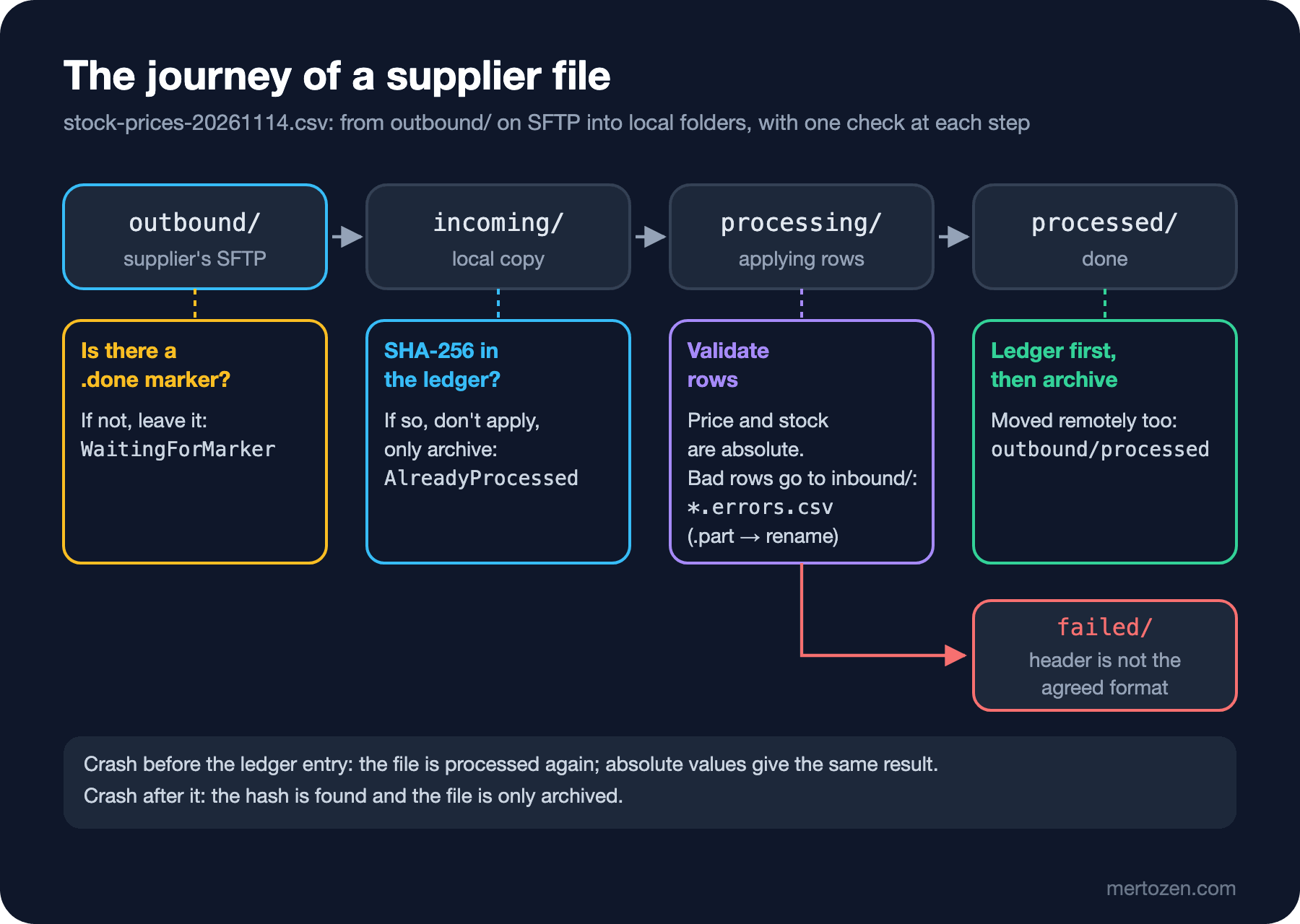
stock-prices-YYYYMMDD.csvintooutbound/; when the file is complete it writes an empty.donefile next to it. - Bookstore moves each processed file to
outbound/processed/and puts rejected rows back intoinbound/as a report file. - The format is CSV,
UTF-8, headerisbn;list_price;currency;stock, with decimal commas because the prices come out of Excel. - Price and stock are absolute values ("stock 20"), not changes ("stock +3").
The last rule looks small, but it's half of the idempotency. If a file is applied twice, absolute values give the same result; changes would raise the stock twice. Turkish Excel's habits of semicolons and decimal commas are covered in the CSV post of the I/O in .NET series, and row-by-row error reports for bulk imports in the Bulk Import post of the Solution Patterns series. A file's journey through Bookstore:
SFTP with SSH.NET: Key-Based Login and Host Key Verification
Instead of a real supplier the repo has docker/fake-sftp: a small image running OpenSSH that only allows key-based login and locks the supplier user into its own folder. First we create test keys in the repo's .local/sftp folder (the folder is in .gitignore; you can leave the passphrase empty when asked, these are test keys only):
ssh-keygen -t ed25519 -f .local/sftp/ssh_host_ed25519_key -C fake-supplier-host
ssh-keygen -t rsa -b 3072 -f .local/sftp/ssh_host_rsa_key -C fake-supplier-host
ssh-keygen -t ed25519 -f .local/sftp/bookstore_supplier -C bookstore-test
docker build -t resseries-sftp:dev docker/fake-sftp
docker run -d --name resseries-sftp -p 127.0.0.1:52422:22 -v "$PWD/.local/sftp:/keys:ro" resseries-sftp:dev
The first two keys are the server's identity, the third is Bookstore's. In an SSH connection the server first shows its host key; if the client doesn't recognize it, it can't know that the server really is the supplier. That's the "Are you sure you want to continue connecting?" question the ssh command asks on the first connection. In code, the counterpart is the HostKeyReceived event:
// Host key check: without it anyone between us and the supplier can pose as the server.
client.HostKeyReceived += (_, e) =>
{
    e.CanTrust = string.Equals("SHA256:" + e.FingerPrintSHA256, settings.HostKeyFingerprint, StringComparison.Ordinal);
    if (!e.CanTrust)
    {
        logger.LogError("Host key {Algorithm} SHA256:{Fingerprint} of {Drop} does not match the configured fingerprint",
            e.HostKeyName, e.FingerPrintSHA256, name);
    }
};
The expected fingerprint comes from configuration. Confirm the value with the supplier over a channel other than e-mail; on your own test server you can read it in two ways:
ssh-keyscan -p 52422 -t ed25519 127.0.0.1 | ssh-keygen -lf -
ssh-keygen -lf .local/sftp/ssh_host_ed25519_key.pub
256 SHA256:GxPPYJtPnULoH0Lxu0qpPdBjvgmRXPHcVhBFJrT1S1Y [127.0.0.1]:52422 (ED25519)
256 SHA256:GxPPYJtPnULoH0Lxu0qpPdBjvgmRXPHcVhBFJrT1S1Y fake-supplier-host (ED25519)In appsettings.json this field deliberately says SHA256:set-this-to-your-test-host-key; the application won't connect until you enter your own value. I tried a wrong value first, the fingerprint of the server's RSA key:
fail: Bookstore.FileDrops.SftpFileDrop[0]
      Host key ssh-ed25519 SHA256:GxPPYJtPnULoH0Lxu0qpPdBjvgmRXPHcVhBFJrT1S1Y of supplier does not match the configured fingerprint
warn: Bookstore.Infrastructure.ExternalServiceExceptionHandler[0]
      External service failure mapped to 503
      Bookstore.FileDrops.FileDropException: Could not connect to the 'supplier' SFTP drop.
       ---> Renci.SshNet.Common.SshConnectionException: Host key could not be verified.
SSH.NET chose the ed25519 key with this server. When a server offers several host keys, which one is picked depends on the algorithm lists of both sides; note which algorithm the fingerprint you got from the supplier belongs to. For authentication the private key is loaded with PrivateKeyFile, and there is no password at all. In production that file also comes from a secret store.
Never Reading a Half-Written File: the .done Marker and Uploading Under a Temporary Name
When the job sees a file in the listing, it can't know whether the file is complete. Instead of guessing, for example by waiting until the size stops changing, we look for the marker from the contract:
var markers = files.Where(f => f.Name.EndsWith(".done", StringComparison.Ordinal)).Select(f => f.Name[..^5]).ToHashSet();
var results = new List<FeedFileResult>();
foreach (var file in files.Where(f => f.Name.EndsWith(".csv", StringComparison.Ordinal)).OrderBy(f => f.Name))
{
    if (!markers.Contains(file.Name))
    {
        // Still being written (or the supplier crashed): never read a file without its marker.
        logger.LogInformation("Skipping {File}: no .done marker yet", file.Name);
        results.Add(new FeedFileResult(file.Name, FeedFileStatus.WaitingForMarker));
        continue;
    }

    results.Add(await ProcessAsync(session, file.Name, cancellationToken));
}
In the other direction, when we write a file, we apply the same rule for the other side. The rejected-rows report is first uploaded with a .part extension and renamed when it's complete. The rename is a single operation on the server; the other side sees either no file or the whole file:
public async Task UploadAsync(string path, Stream content, CancellationToken cancellationToken)
{
    var temporary = path + ".part";
    await client.UploadFileAsync(content, temporary, cancellationToken);
    // SFTP rename fails if the target exists, so remove an earlier version first.
    if (await client.ExistsAsync(path, cancellationToken))
    {
        await client.DeleteFileAsync(path, cancellationToken);
    }

    await client.RenameFileAsync(temporary, path, cancellationToken);
}
I put two files into the supplier's outbound/ folder: stock-prices-20261114.csv with its .done marker, and a stock-prices-20261115.csv that hadn't been fully written. Sending POST /admin/file-drops/supplier-feed/run to the back office's "run now" endpoint gave:
[{"name":"stock-prices-20261114.csv","status":"Processed","rows":5,"applied":3,"failed":2,"errorReport":"stock-prices-20261114.errors.csv"},{"name":"stock-prices-20261115.csv","status":"WaitingForMarker","rows":0,"applied":0,"failed":0,"errorReport":null}]Three of five rows were applied. The files left on the server and the report sent to the supplier:
./inbound/stock-prices-20261114.errors.csv
./outbound/processed/stock-prices-20261114.csv
./outbound/processed/stock-prices-20261114.csv.done
./outbound/stock-prices-20261115.csv
line;isbn;error
5;9780141439549;unsupported currency
6;9780000000001;invalid ISBN-13
Line number, ISBN and reason: everything the supplier needs to fix it. The report contains no stack trace and no internal details.
The Polling Job and the Limits of FileSystemWatcher
Because the files live on another server, there is no "file arrived" event; the job looks at regular intervals:
using var timer = new PeriodicTimer(options.Value.Interval, time);
do
{
    using var scope = scopes.CreateScope();
    try
    {
        await scope.ServiceProvider.GetRequiredService<SupplierFeedProcessor>().RunAsync(stoppingToken);
        await scope.ServiceProvider.GetRequiredService<BankStatementReconciler>().RunAsync(stoppingToken);
    }
    catch (FileDropException ex)
    {
        // The next tick is the retry; an alert fires if this repeats (see "In production").
        logger.LogWarning(ex, "File drop run failed, trying again in {Interval}", options.Value.Interval);
    }
}
while (await timer.WaitForNextTickAsync(stoppingToken));
The good thing about polling is that a missed round is caught up by the next one; a connection failure doesn't need a separate retry pipeline. With Interval lowered to 10 seconds and the API running for 24 seconds, the half-written file was held back in all three rounds:
info: Bookstore.Inventory.SupplierFeed.SupplierFeedProcessor[0]
      Skipping stock-prices-20261115.csv: no .done marker yet
info: Bookstore.Inventory.SupplierFeed.SupplierFeedProcessor[0]
      Skipping stock-prices-20261115.csv: no .done marker yet
info: Bookstore.Inventory.SupplierFeed.SupplierFeedProcessor[0]
      Skipping stock-prices-20261115.csv: no .done marker yet
The processor has a SemaphoreSlim so that the admin endpoint and the job don't process the same file at the same time. If the API runs as several instances that's not enough; you need a distributed lock or Hangfire's recurring jobs, which run on one instance (the Hangfire posts in the Background Jobs series).
If the files arrive in a folder on your own server, FileSystemWatcher looks tempting, but it doesn't replace polling. Changes collect in a buffer the operating system fills; when many changes happen in a short time the buffer overflows, events are lost and only the Error event arrives. For a folder watched over the network, InternalBufferSize can be at most 64 KB. A single operation such as moving a file can raise several Changed, Created and Deleted events, and other applications such as antivirus software raise extra ones. And Created tells you the file was created, not that writing has finished. Even if you use the watcher, use it only as a "run a round now" trigger and leave the work itself to the periodic scan. This section is based on the official documentation.
Never Processing the Same File Twice: Hash, Ledger and Absolute Values
A file name is not an identity: the supplier can send the same content under a new name, or different content under the same name. We use the SHA256 of the content as the identity and write processed files to a persistent ledger:
var hash = Convert.ToHexStringLower(SHA256.HashData(await File.ReadAllBytesAsync(incoming, cancellationToken)));
// 2. Same content seen before (a resend, or a crash after processing): do not apply it again.
if (ledger.Find(Scope, hash) is { } earlier)
{
    logger.LogInformation("{File} has the same content as {Earlier}, already processed at {At}", name, earlier.Detail, earlier.At);
    File.Delete(incoming);
    await ArchiveRemoteAsync(session, name, cancellationToken);
    return new FeedFileResult(name, FeedFileStatus.AlreadyProcessed);
}
When the supplier sent yesterday's file again as stock-prices-20261114-resend.csv:
[{"name":"stock-prices-20261114-resend.csv","status":"AlreadyProcessed","rows":0,"applied":0,"failed":0,"errorReport":null},{"name":"stock-prices-20261115.csv","status":"WaitingForMarker","rows":0,"applied":0,"failed":0,"errorReport":null}]stock-prices-20261114-resend.csv has the same content as stock-prices-20261114.csv, already processed at 11/15/2026 08:37:02 +00:00The order matters too. After applying, we write to the ledger first and archive the file second:
// 5. Record first, then archive: if we crash in between, the next run finds the hash and only archives.
ledger.Add(Scope, hash, name, time.GetUtcNow());
If we crash before writing to the ledger, the file is processed again in the next round; the values are absolute, so the result is the same. If we crash after writing, the hash is found and the file is only archived. In this sample the ledger is a JSON-lines file. In Bookstore it's a table with a unique index on (Scope, Key); one of the tests reopens the ledger to imitate an application restart. With files of millions of rows the question "where was I?" comes up too; resuming with chunks and checkpoints is in the long-running and batch jobs post of the Background Jobs series.
FTPS with FluentFTP: the Bank's Collections File
The bank provides its file on an FTPS server instead of SFTP. The repo's tools/fake-bank-ftps.py uses pyftpdlib to open an FTP server on 127.0.0.1:52421 that requires TLS, and writes the certificate to trust to .local/bank-ftp/cert.pem. It's started from the repo root with a Python that has the pyftpdlib and pyOpenSSL packages:
python tools/fake-bank-ftps.pyThe client side is FluentFTP's AsyncFtpClient:
var client = new AsyncFtpClient(settings.Host, settings.UserName, settings.Password, settings.Port);
client.Config.ConnectTimeout = (int)settings.Timeout.TotalMilliseconds;
client.Config.ReadTimeout = (int)settings.Timeout.TotalMilliseconds;
client.Config.DataConnectionType = FtpDataConnectionType.PASV;
if (settings.UseTls)
{
    client.Config.EncryptionMode = FtpEncryptionMode.Explicit;
    client.Config.DataConnectionEncryption = true;
    if (settings.TrustedCertificatePath is { Length: > 0 } path)
    {
        var trusted = X509CertificateLoader.LoadCertificateFromFile(path);
        client.ValidateCertificate += (_, e) => e.Accept = e.Certificate.GetRawCertData().AsSpan().SequenceEqual(trusted.RawData);
    }
}
The methods of FluentFTP's AsyncFtpClient have no Async suffix: Connect, GetListing, DownloadStream, MoveFile all return a Task and take a CancellationToken. I tried two wrong settings. Without the pinned certificate, that is, with the machine's trust store:
Bookstore.FileDrops.FileDropException: Could not connect to the 'bank' FTP drop.
 ---> System.Security.Authentication.AuthenticationException: The remote certificate was rejected by the provided RemoteCertificateValidationCallback.
With UseTls off, that is, with plain FTP:
Bookstore.FileDrops.FileDropException: Could not connect to the 'bank' FTP drop.
 ---> FluentFTP.Exceptions.FtpAuthenticationException: Code: 550 Message: SSL/TLS required on the control channel.
With plain FTP the user name and password cross the network as clear text. If the other side only offers plain FTP, put that in writing as a risk and at least run the connection inside an encrypted channel such as a VPN.
Reconciliation: Matching the Statement Against Orders
Institutional customers pay by bank transfer and type the order reference into the description themselves: BKS-1003, bks 1004, sometimes nothing. This is the file version of the reconciliation we did against the payment provider's records in post 06:
// Customers type the reference by hand: "BKS-1003", "bks 1003", "BKS1003 school payment".
[GeneratedRegex(@"\bBKS[-\s]?(\d{4,})\b", RegexOptions.IgnoreCase)]
private static partial Regex OrderReference();
This time idempotency is per bank transaction, not per file. Banks may resend a statement, and a day's file may repeat lines from earlier days:
// Idempotency per bank transaction, not per file: banks resend statements, and a day's file may repeat earlier lines.
private ReconciliationLine Match(StatementLine line)
{
    if (ledger.Find(Scope, line.TransactionId) is { } seen)
    {
        return new(line.TransactionId, line.Amount, line.Description, MatchOutcome.AlreadySeen, null, $"seen at {seen.At:O}");
    }
The first statement, with three lines:
[{"transactionId":"TX-20261114-0001","amount":4131.00,"description":"BKS-1003 School 0042 book order","outcome":"Matched","orderId":1003,"note":null},{"transactionId":"TX-20261114-0002","amount":2000.00,"description":"bks 1004 library payment","outcome":"AmountMismatch","orderId":1004,"note":"expected 2250.00 TRY"},{"transactionId":"TX-20261114-0003","amount":980.00,"description":"Payment for books","outcome":"UnknownReference","orderId":null,"note":"no order reference found"}]Order 1003 became Paid. The other two lines aren't errors but work: retrying doesn't solve them, a person in the back office has to look at them, and the job logs them as Warning. When the bank sent the first line again in the next day's file:
[{"transactionId":"TX-20261114-0001","amount":4131.00,"description":"BKS-1003 School 0042 book order","outcome":"AlreadySeen","orderId":null,"note":"seen at 2026-11-15T08:37:10.6939375+00:00"}]The processors depend on the IFileDrop port, not on SFTP or FTPS. That's why the tests need no server; LocalFolderFileDrop runs the same flow in a temporary folder:
Test run summary: Passed!
  total: 23
  failed: 0
  succeeded: 23
  skipped: 0
  duration: 17s 478ms
In Production
Watch for silence. The most common failure of a file-based integration is not an error but a file that never arrives. A rule like "alert if today's file hasn't been processed by 06:00" is worth more than a connection-error alert. Likewise, a file waiting for hours in WaitingForMarker is a sign of a job left half done on the supplier's side.
Keep secrets out of the code and the repo. The SFTP private key, the FTPS password and every connection detail, including the fingerprint in this post, should come from a secret store as described in the Configuration and Secret Management series; the values in appsettings.json are only for the local fakes.
Manage the local folders. The processed/ folder grows forever; set a retention period based on accounting and audit needs and archive old files. Bank statements contain personal and financial data; set folder permissions accordingly.
Common Pitfalls
Turning host key verification off. e.CanTrust = true solves the problem on day one, but someone in between can then hand you a fake stock file or read the files you upload.
Reading a file that hasn't been fully written. Agree with the other side on a .done marker or on uploading under a temporary name and renaming; don't guess from the file size or the time.
Processing the same file twice. Use a hash of the content, not the file name, as the identity, keep values absolute where you can, and write the "processed" record before archiving.
Keeping the password in code. Especially in FTP integrations you often see the user name and password sitting in a constant; they stay in the commit history for years.
A Small Experiment
★☆☆ Create the .done marker for stock-prices-20261115.csv and call the endpoint again. Which error rejects the half-written line?
★★☆ Imagine two separate transfers arriving for the same order in the bank file (2000.00 and 250.00 TRY). Change Compare to add up partial payments and write a test. What should happen with an overpayment?
★★★ Move the ledger to a SQL Server table with a unique index on (Scope, Key) and write a test where two API instances try to process the same file at the same time. What decides which one wins?
This post ends the series. Every channel Bookstore uses to talk to the outside world now answers the same questions: how long do we wait, what do we retry, how do we guarantee the same work isn't done twice, and how do we verify the result. With HTTP it's timeouts and the Idempotency-Key, with webhooks signatures and the inbox, with SOAP in the previous post the channel abort and the invoice's fixed identity, with files the .done marker, the hash and the ledger. You'll find the infrastructure for making no external calls inside the user's request in the Working with Message Queues series, and the design of such flows in the Messaging and Event-Driven Architecture series.