

Email Templates and Reliable Delivery: Razor HtmlRenderer, Inline CSS, Outbox, Retry and Provider APIs
Write email HTML as a Razor component rendered to a string with HtmlRenderer, inline the CSS with PreMailer.Net, store the email as an outbox row in the same transaction as the business data, and retry on a schedule for 4xx while giving up on 5xx. In Bookstore the TR/EN approver reminder goes out once with the same Message-Id after two 451s from Mailpit's chaos mode, and an idempotency key stops the second run.
Version note: The code in this post was built and run with .NET 10, MailKit 5.0.0, PreMailer.Net 2.7.4, Entity Framework Core 10 with SQLite and Mailpit 1.33.1.
Guess First
In Bookstore, the online bookstore used as the shared example across this site's series, orders from institutional customers go through an approver. Nevin, the school's purchasing officer, has not approved two orders for more than 48 hours. A job that runs every morning sends her a reminder email. Three questions:
First: the job ran twice in one day by mistake. How many emails does Nevin get?
Second: the SMTP server returned 451 (a transient error) on the first two attempts. Is the email lost, sent twice, or sent once on the third attempt?
Third: the English version of the same template goes to an approver with a single order waiting. What does the subject line say?
With the code at the end of this post, the answers are: one email; the second run returns {"queued":0,"alreadyQueued":2}. In the second case the email goes out once on the third attempt, with the same Message-Id. The third was a bug on the first try: "1 purchase approvals are waiting for you". We will see the reason for each in turn.
An Email Template as a Razor Component
In the previous post we built the order confirmation's HTML by concatenating strings. That works for a few lines, but once a table, conditional rows and two languages come in, it becomes unreadable, and you must remember to encode every variable by hand. Since .NET 8 you can render Razor components straight to a string with HtmlRenderer, without an HTTP request. For that, the class library's SDK becomes Microsoft.NET.Sdk.Razor and the Microsoft.AspNetCore.Components.Web package is added.
The reminder template is written inside a layout component:
@inject IStringLocalizer<EmailText> T

<EmailLayout Title="@(One ? T["ReminderSubjectOne"] : T["ReminderSubject", Model.Pending.Count])" Footer="@T["Footer"]">
    <p>@T["Greeting", Model.ApproverName]</p>
    <p>@(One ? T["ReminderIntroOne", Model.InstitutionName] : T["ReminderIntro", Model.InstitutionName, Model.Pending.Count])</p>
    <table class="items" role="presentation">
        @foreach (PendingApproval item in Model.Pending)
        {
            <tr>
                <td>#@item.OrderId</td>
                <td>@item.RequestedBy (@item.UnitName)</td>
                <td>@item.RequestedAtUtc.ToString("d MMMM yyyy")</td>
                <td class="amount">@item.Total.ToString("C", Money)</td>
            </tr>
            @if (item.Note is not null)
            {
                <tr><td colspan="4">@T["Note"]: @item.Note</td></tr>
            }
        }
    </table>
    <p><a class="button" href="@Model.ApprovalsUrl">@T["ReviewButton"]</a></p>
</EmailLayout>

@code {
    private static readonly CultureInfo Money = CultureInfo.GetCultureInfo("tr-TR");

    [Parameter, EditorRequired] public required ApprovalReminderModel Model { get; set; }

    private bool One => Model.Pending.Count == 1;
}
EmailLayout carries the HTML skeleton, a <style> block, the header and the footer; every email template uses the same frame. The texts live in EmailText.resx (English) and EmailText.tr.resx, and the component reads them with ASP.NET Core's IStringLocalizer. Since the amount is TRY in every language, we format money with a fixed tr-TR, and the date with the approver's culture.
The service that renders it:
public async Task<EmailMessage> ApprovalReminderAsync(ApprovalReminderModel model, EmailAddress to, CultureInfo culture)
{
    // Culture set here flows into the renderer's dispatcher; it is restored when this method returns
    CultureInfo.CurrentCulture = culture;
    CultureInfo.CurrentUICulture = culture;

    string html = await RenderAsync<PurchaseApprovalReminder>(new Dictionary<string, object?> { ["Model"] = model });
    return new EmailMessage
    {
        To = to,
        Subject = model.Pending.Count == 1 ? text["ReminderSubjectOne"] : text["ReminderSubject", model.Pending.Count],
        HtmlBody = html,
        TextBody = HtmlToText(html),
    };
}

private async Task<string> RenderAsync<TComponent>(Dictionary<string, object?> parameters) where TComponent : IComponent
{
    await using HtmlRenderer renderer = new(services, loggerFactory);
    string html = await renderer.Dispatcher.InvokeAsync(async () =>
    {
        HtmlRootComponent output = await renderer.RenderComponentAsync<TComponent>(ParameterView.FromDictionary(parameters));
        return output.ToHtmlString();
    });
    // ... the CSS is inlined (below)
}
According to Microsoft's documentation, RenderComponentAsync must be called through the renderer's dispatcher, and InvokeAsync takes care of that. Because we change the culture inside an async method, the change does not affect the caller's culture; .NET carries the culture with the execution context in async flow, and the old value comes back when the method ends. We derive the plain text body from the same HTML with AngleSharp, so the two bodies never drift apart.
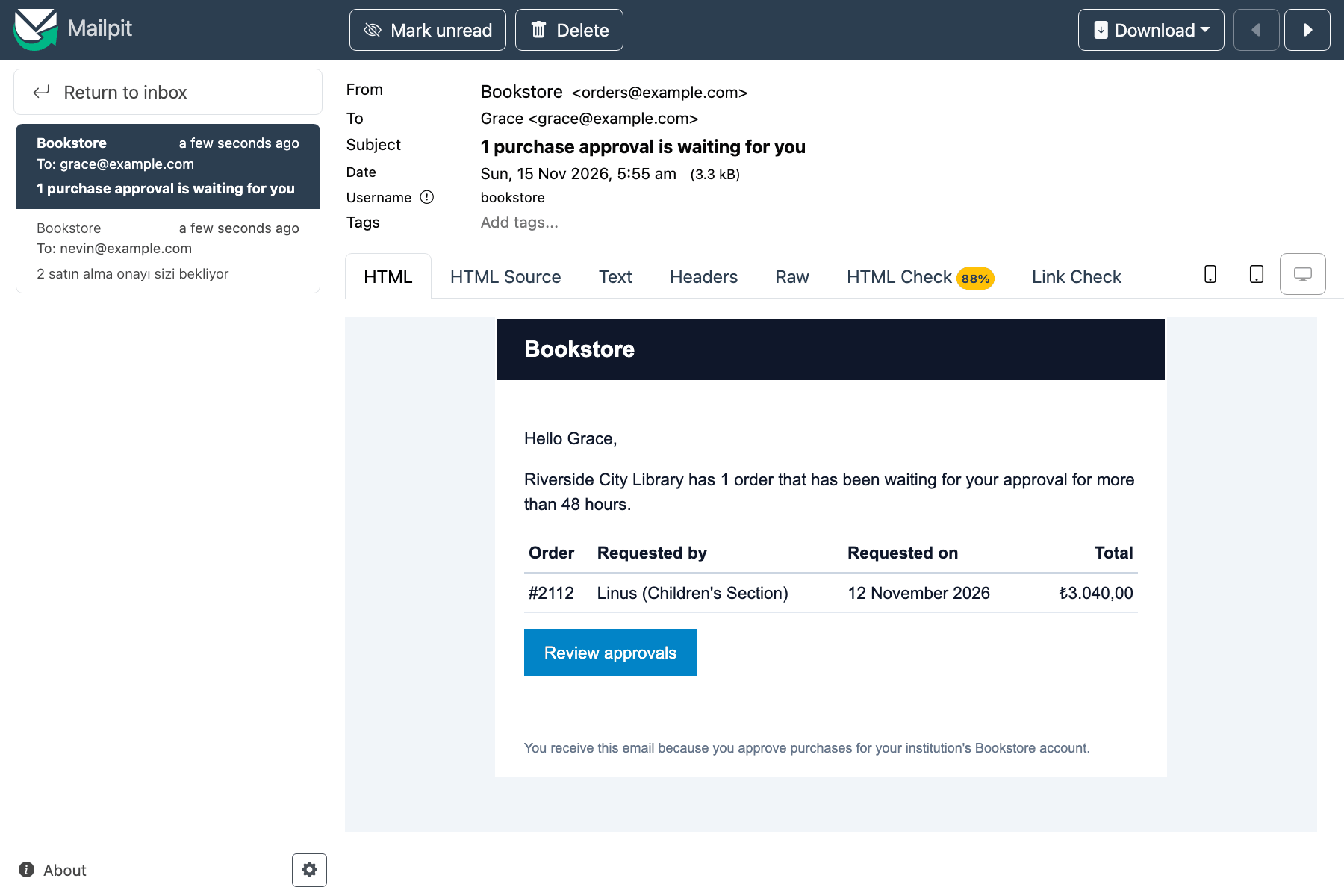
Here is the story behind the third guessing question. The first version of the template had a single ReminderSubject text that said "{0} purchase approvals are waiting for you". The Turkish one is right for any number ("1 satın alma onayı"), but for a single order the English one appeared in Mailpit's inbox as "1 purchase approvals are waiting for you". The fix is a separate text for the singular: ReminderSubjectOne. If you expand to more languages, plural rules change from language to language; at that point you should look at a library that supports ICU MessageFormat.
The CSS Limits of Email Clients and Inline CSS
Do not expect the CSS you write for a web page to work the same in an email. Mailpit's HTML Check tab counts, for every element and CSS property in the sent HTML, which email clients support it. When we sent the first version with a <style> block, the result for the <style> element was:
$ curl -s http://127.0.0.1:52562/api/v1/message/{id}/html-check | jq '.Warnings[] | select(.Slug=="html-style") | .Score'
{
  "Found": 1,
  "Supported": 61.11111,
  "Partial": 18.88889,
  "Unsupported": 20
}
A fifth of the clients do not support the <style> block at all, and some support it only partly; the list includes some mobile and webmail versions of Gmail. That is why the established practice in email HTML is to move styles into each element's style attribute. Instead of doing that by hand, we do it after rendering with PreMailer.Net (MIT licensed):
// Many email clients ignore <style>; copy every rule into style="" attributes
InlineResult inlined = PreMailer.Net.PreMailer.MoveCssInline(html, removeStyleElements: true);
foreach (string warning in inlined.Warnings)
{
    logger.LogWarning("CSS inliner: {Warning}", warning);
}

return inlined.Html;
While writing the template you work comfortably with classes in <style>, and in the sent HTML every cell carries its own style:
<td class="amount" style="text-align: right;white-space: nowrap;border-bottom: 1px solid #e2e8f0;padding: 6px 4px">₺9.120,00</td>The inliner follows CSS specificity, and that caught us once: on the first try the .amount { text-align: right } rule lost to .items th { text-align: left } in the header cell, because .items th is more specific. A browser would give the same result; changing the rule to .items .amount fixed it. We build the layout with <table role="presentation"> instead of <div> and flexbox for the same reason: some email clients do not support modern layout features. Mailpit's overall score for the inlined template is 88 percent:
Encoding User Input
The note typed by the teacher who requested the order goes into the template. We wrote a deliberately malicious note: <b>Urgent</b> for the reading week <script>alert('x')</script>. Razor HTML-encodes the @item.Note expression by default, and in the sent HTML the row looks like this:
<td colspan="4" style="border-bottom: 1px solid #e2e8f0;padding: 6px 4px">Not: <b>Urgent</b> for the reading week <script>alert('x')</script></td>On screen the note appears as plain text, tags included. Most email clients do not run scripts, but with unencoded HTML an attacker could put a fake "reset your password" link or a form with your brand into the email. Since the email leaves from Bookstore's address with its DKIM signature, the recipient has no reason to be suspicious. The way to switch off encoding in Razor is to cast to (MarkupString); in templates, use it only for HTML you produced yourself and that contains no user input. If you build HTML by concatenating strings, remembering to call WebUtility.HtmlEncode on every variable is up to you; the OrderConfirmationEmail in the previous post did that by hand.
Separating Sending from the Transaction: the Outbox
You could write the reminder job in its simplest form like this: read the approvals, send the email, update LastRemindedAtUtc, SaveChanges. There are two separate systems here, the database and SMTP, and you cannot put them in one transaction. If SaveChanges fails after the email went out, the database thinks the reminder was never sent and sends it again on the next run. Reverse the order and save first, and this time an SMTP error leaves a record saying "sent" for an email that never left.
We apply the solution from the transactional outbox post in the Working with Message Queues series: instead of sending the email, we add it as an outbox row to the same DbContext as the business data. The two commit together or not at all. Bookstore's real database is SQL Server; here we use SQLite so the sample runs on its own.
// Adds the email to the caller's DbContext; it is sent only if the caller's SaveChanges commits
public sealed class EmailOutbox(TimeProvider time, IOptions<EmailOutboxOptions> options)
{
    public async Task<bool> EnqueueAsync(DbContext db, string idempotencyKey, EmailMessage message, CancellationToken cancellationToken = default)
    {
        if (await db.Set<OutboxEmail>().AnyAsync(e => e.IdempotencyKey == idempotencyKey, cancellationToken))
        {
            return false;
        }

        db.Set<OutboxEmail>().Add(OutboxEmail.From(idempotencyKey, message, options.Value.SenderDomain, time.GetUtcNow().UtcDateTime));
        return true;
    }
}
The end of the reminder job:
string key = $"approval-reminder:{first.ApproverEmail}:{now:yyyy-MM-dd}";
if (await outbox.EnqueueAsync(db, key, message, cancellationToken))
{
    queued++;
    foreach (PurchaseApproval approval in approver)
    {
        approval.LastRemindedAtUtc = now;
    }
}
else
{
    alreadyQueued++;
}
// ...
// The outbox rows and LastRemindedAtUtc are committed together, or not at all
await db.SaveChangesAsync(cancellationToken);
OutboxEmailDispatcher is a BackgroundService; every few seconds it reads the rows that are due, sends them through IEmailSender and saves the state after every email.
The Retry Schedule and Permanent Failures
Not every SMTP error is worth a retry. 4xx responses are transient: the server is busy, the recipient's mailbox is temporarily unavailable, you hit a rate limit. 5xx responses are permanent: the address does not exist, the content was rejected. Retrying only lowers your reputation with the provider. MailKitEmailSender turns this distinction into its own exception; the outbox does not know MailKit types:
catch (SmtpCommandException ex)
{
    // 4xx: try again later; 5xx: the server will never accept this message
    bool transient = (int)ex.StatusCode is >= 400 and < 500;
    throw new EmailDeliveryException($"SMTP {(int)ex.StatusCode} {ex.ErrorCode}: {ex.Message}", transient, ex);
}
On a transient error the dispatcher postpones the next attempt according to the schedule; on a permanent error, or when the schedule runs out, it marks the row Failed:
private void Reschedule(OutboxEmail email, EmailDeliveryException ex)
{
    TimeSpan[] delays = options.Value.RetryDelays;
    email.LastError = ex.Message;
    if (!ex.IsTransient || email.Attempts > delays.Length)
    {
        email.Status = OutboxEmailStatus.Failed;
        logger.LogError("Outbox {Key} failed permanently after {Attempts} attempts: {Error}", email.IdempotencyKey, email.Attempts, ex.Message);
        return;
    }

    email.NextAttemptAtUtc = time.GetUtcNow().UtcDateTime + delays[email.Attempts - 1];
    logger.LogWarning("Outbox {Key} attempt {Attempt} failed ({Error}); next attempt at {Next:HH:mm:ss}",
        email.IdempotencyKey, email.Attempts, ex.Message, email.NextAttemptAtUtc);
}
The default schedule is 1 minute, 5 minutes, 30 minutes, 2 hours and 6 hours, so an email is tried six times over about nine hours and then given up. In development, appsettings.Development.json cuts the schedule to 5, 10 and 20 seconds. Here one behaviour of the configuration binder caught us. When you give the property a default array, the binder does not replace it; it appends the values from configuration to the end of the array. In a small probe project, binding 5 and 10 seconds from configuration onto a default array of 1 and 5 minutes gave:
00:01:00, 00:05:00, 00:00:05, 00:00:10That is why RetryDelays starts empty and the default schedule is applied in PostConfigure when configuration has no value.
Mailpit's chaos feature can imitate SMTP errors. With PUT /api/v1/chaos we asked it to return 451 at the recipient stage with 100 percent probability, triggered the job twice, and switched chaos off nine seconds later:
$ curl -s -X POST http://127.0.0.1:52560/api/institutional/approval-reminders/run
{"queued":2,"alreadyQueued":0}
$ curl -s -X POST http://127.0.0.1:52560/api/institutional/approval-reminders/run
{"queued":0,"alreadyQueued":2}
warn: Bookstore.Notifications.Outbox.OutboxEmailDispatcher[0]
Outbox approval-reminder:nevin@example.com:2026-11-15 attempt 1 failed (SMTP 451 RecipientNotAccepted: Chaos recipient error); next attempt at 05:52:50
warn: Bookstore.Notifications.Outbox.OutboxEmailDispatcher[0]
Outbox approval-reminder:nevin@example.com:2026-11-15 attempt 2 failed (SMTP 451 RecipientNotAccepted: Chaos recipient error); next attempt at 05:53:01
info: Bookstore.Notifications.Email.MailKitEmailSender[0]
Sent 7037395b2256da849b3f26c647792fc7@example.com to nevin@example.com: 2.0.0 Ok: queued as 1wmLclPEhx4i2VjotX5jhA
info: Bookstore.Notifications.Outbox.OutboxEmailDispatcher[0]
Outbox approval-reminder:nevin@example.com:2026-11-15 sent on attempt 3We test the permanent failure and schedule-exhausted scenarios in unit tests instead of Mailpit, moving time forward with FakeTimeProvider:
await dispatcher.DispatchDueAsync(ct);                       // attempt 1 fails
_time.Advance(TimeSpan.FromSeconds(59));
Assert.Equal(0, await dispatcher.DispatchDueAsync(ct));      // not due yet
_time.Advance(TimeSpan.FromSeconds(1));
await dispatcher.DispatchDueAsync(ct);                       // attempt 2 fails
_time.Advance(TimeSpan.FromMinutes(5));
await dispatcher.DispatchDueAsync(ct);                       // attempt 3 succeeds
$ dotnet test -- --filter-class "*OutboxEmailDispatcherTests"
Test run summary: Passed!
total: 4
failed: 0
succeeded: 4
skipped: 0Idempotency: No Second Email to the Same Person
The answer to the first guessing question comes from the idempotency key: approval-reminder:nevin@example.com:2026-11-15. However many times the job runs on the same day, it produces the same key. EnqueueAsync looks for the key first, and the table also has a unique index on it. If two jobs running at the same time both see "not there", the second SaveChanges hits the unique index. For an order confirmation the key should be tied to the order, like order-confirmed:1042; a time-based key only makes sense for emails that repeat on purpose, such as "one reminder a day".
The outbox has an honest limit: at-least-once. If the dispatcher crashes after sending an email but before saving the Sent state, it sends the same email again when it restarts. That window is as short as one SaveChanges, but it is not zero; the retry and idempotency post in the Background Jobs series covers this reality in detail. We reduce the damage: the Message-Id is derived from the key and stays the same on every attempt:
// Same key -> same Message-Id, also on every retry
MessageId = $"{Convert.ToHexStringLower(System.Security.Cryptography.SHA256.HashData(System.Text.Encoding.UTF8.GetBytes(idempotencyKey)))[..32]}@{senderDomain}",
The 7037395b2256da849b3f26c647792fc7@example.com sent on the third attempt in the log above is that value. Providers and some receiving servers can treat a second message with the same Message-Id as a duplicate; at the very least, a support team can tell from the header that two emails are the same message.
SMTP or the Provider's HTTP API?
Most transactional email providers offer both SMTP and an HTTP API; Azure Communication Services Email is one example. The API's advantages over SMTP: instead of holding connection and TLS state, every send is an independent HTTPS request. Templates, bulk sending, tagging and delivery tracking are richer in the API. The provider sends delivery, bounce and open information back as events; for that, Azure Communication Services publishes a Microsoft.Communication.EmailDeliveryReportReceived event to Event Grid. The drawback is that your code becomes tied to one provider.
Thanks to IEmailSender, this decision does not touch the outbox, the templates or the jobs: moving to a provider means writing a new sender that fills EmailDeliveryException with the same transient/permanent distinction. With an HTTP API the distinction comes from HTTP status codes instead of SMTP codes: 429 and 5xx are transient, 400 is permanent. For the resilience layer, see the standard pipeline post in the External Service Integration and Resilience series. Receiving the provider's bounce and complaint webhooks is covered in the webhook post of the same series. Whichever you choose, the SPF, DKIM and DMARC records must be set up as in the Domain, DNS and CDN series.
In Production
If more than one API instance reads the same outbox table, two dispatchers may pick up the same row at the same time. On SQL Server you need to claim rows with the UPDLOCK, READPAST hints; the outbox post in the Working with Message Queues series shows that query. With a single instance this problem does not exist.
Watch the Failed rows. An order confirmation that ends in a permanent failure means the customer never got the email. Set up a metric and an alert for the number of these rows; an admin screen that fixes the address and puts the row back to Pending also helps.
The outbox table grows. Add a job that deletes or archives sent rows after a while, say 30 days. Because the HTML body is repeated in every row, the table grows faster than you expect.
We render the body when the email is queued, not when it is sent. That way the user gets the data they saw at that moment, and a template error surfaces inside the job, together with the business data. The price is keeping personal data in the outbox; set the retention period according to KVKK, Turkey's personal data protection law, and company policy.
Do not embed attachments in the outbox. Write the invoice PDF to IFileStore and keep only its path in the outbox row; we build that chain in the last post of the series.
Common Pitfalls
Sending email before the transaction commits. The order rolls back, while the customer has already received "your order is confirmed". Write the email to the outbox and leave sending until after the commit.
Putting user input into a template without encoding it. A (MarkupString) cast or string concatenation can turn the email into a phishing tool sent from your domain.
Retrying on every error. Trying for hours to send to an address that answered 550 lowers your reputation with the provider; separate the permanent failures.
Generating a new Message-Id on retry. When a duplicate does go out, you remove your own way of telling that the two are the same message.
Testing the template in only one language. As our "1 purchase approvals" bug shows, plural forms and date formats need a separate test in each language.
A Small Experiment
★☆☆ Turn on chaos in Mailpit with {"Recipient":{"ErrorCode":550,"Probability":100}} and delete the database so the reminder job runs again. After how many attempts does the outbox row become Failed? What does LastError say?
★★☆ Add an English test with three pending approvals to EmailTemplatesTests and check the subject line. Then add a German (de-DE) copy of EmailText.resx; for which numbers does its plural rule behave differently?
★★★ Make the dispatcher safe for two instances: write a query that claims a row with a LockedUntilUtc field before sending and takes back expired locks. Run two dispatchers against the same SQLite file at the same time and verify through the Mailpit API that no email went out twice.
The email side is done: sending, templates and reliability. In the next post we move to Block B, produce the back office's monthly sales report as a formatted Excel file with ClosedXML, and measure what happens to memory in a 100,000-row export.