

Jira Cloud's Model: Spaces, Work Items, Work Types, Hierarchy and Team-Managed vs Company-Managed
In Jira Cloud a project is now a space and an issue is now a work item; the API and JQL still accept the old names. The post builds the work type hierarchy and the Parent relationship with Bookstore's Institutional Ordering epic, explains team-managed versus company-managed spaces, why there is no conversion between them, what a move loses and when Jira is too heavy.
Version note: This post describes Jira Cloud as of 2026-11 (space and work item terminology); menu names change often, so it works with concepts and queries rather than screens. This post is based on the official documentation (Atlassian Support and Atlassian Developer, checked on 15 November 2026).
Guess First
The team behind Bookstore, the online bookstore used as the shared example across this site's series, kept its backlog in GitHub Projects in the third post of the Scrum series. When Institutional Ordering grew, new people joined the picture: Hakan from institutional sales, Gül from customer service, and the requests of Nevin Hanım, who runs purchasing at a school. The team decides to move to Jira Cloud. To get going quickly, Emre and Ayşe open two separate team-managed spaces: one for API work, one for the Angular front end. Each defines its own "Story point estimate" field and its own "Improvement" work type.
Three months later Selin, the Product Owner, wants to see both teams' work on one board and in one velocity chart. Guess: what does it take to put the items of these two spaces on a single board? Is "Improvement" in the two spaces the same work type? And when the team says "let's convert this to company-managed", is there a one-click conversion in Jira? The answers are in the middle of the post; a hint: all three depend on the decision you make on the day you create the space.
Projects Are Now Spaces, Issues Are Now Work Items
Someone returning to Jira after a few years first notices that the names have changed. Atlassian made two big terminology changes in 2025. The first replaced "issue" with "work item", and "work" as the collective term: it reached Free and Standard plans first and rolled out to Premium and Enterprise sites from 14 April 2025. The second replaced "project" with "space": according to the "Jira Spaces have landed" announcement on Atlassian Community it reached Free and Standard plans first and started on Premium and Enterprise sites on 20 October 2025. The announcement states clearly that this is only a rename and that the container behaves exactly as before.
What matters to a developer is where the change stops. Both announcements say the existing APIs have not changed: REST API v3 endpoints are still /rest/api/3/issue and the field is still called project. In JQL the old words keep working for backward compatibility; the JQL fields page also notes that while the rollout is in progress some entries using the new terms may not work yet, and suggests trying the old term in that case. Even the smart commits documentation adds a note that "issue" in its commands means a work item. So when an old app's documentation, a Stack Overflow answer or your company wiki says "issue" and "project", they mean the same thing:
| Old term | New term (UI and docs) | Where the old one still appears |
|---|---|---|
| project | space | REST API (project), JQL (project), URLs |
| issue | work item | REST API (/rest/api/3/issue), smart commits |
| issue type | work type | REST API (issuetype); in JQL type and its alias workType |
| Epic Link | Parent | Filters saved before February 2024 |
| classic / next-gen | company-managed / team-managed | Old blog posts and app documentation |
This series uses Jira's current language: space, work item, work type. You will see the old names in code and in the API; that is not an inconsistency, it is the transition itself.
Work Items, Work Types and the Hierarchy
The building block of Jira is the work item. Every work item has a key: the space key, a hyphen and a sequence number. Bookstore's space key is BOOK, so its items look like BOOK-142 and BOOK-153. A space key must be at least two characters long and start with an uppercase letter; smart commits, which we will meet later, only recognise the default format of two or more uppercase letters, a hyphen and a number. Choosing a short, letters-only key is therefore more than a matter of taste.
A work type is the kind of item. Software spaces come with one parent type (Epic), three standard types (Story, Task, Bug) and one child type (Subtask) by default. They sit on three hierarchy levels: level 1 for larger pieces of work (epic), level 0 for day-to-day work (story, task, bug) and level -1 for subtasks. On Premium and Enterprise plans you can add levels above the epic, which the plans feature uses to group several spaces under one initiative. Changing the hierarchy is a serious step: the documentation says that changing its structure breaks existing parent and child relationships and cannot be undone.
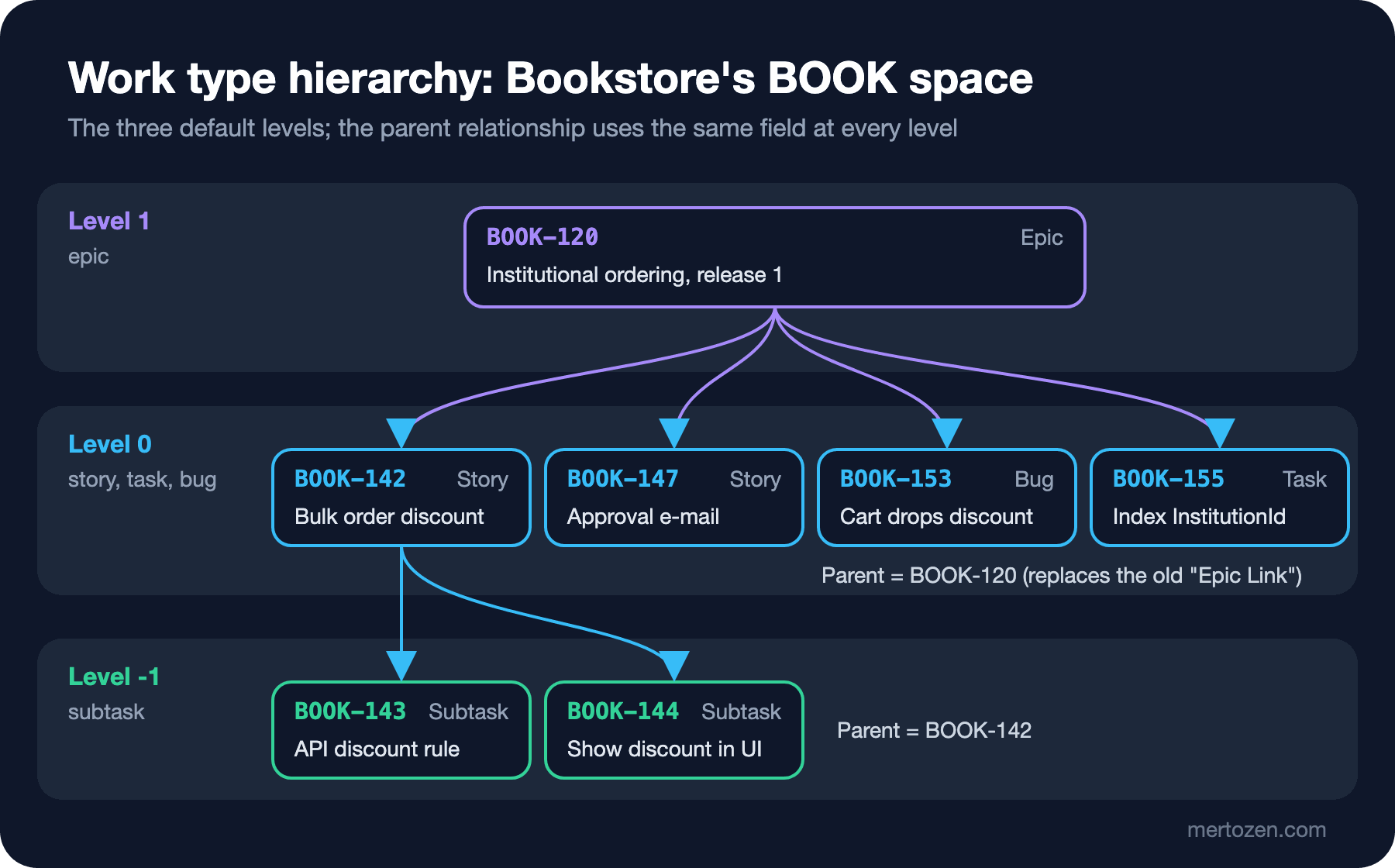
The figure shows Institutional Ordering, which we worked out in the Requirements Analysis series, as it looks in Jira. The BOOK-120 epic stands for release 1. Under it are the story "10% institutional discount on orders of at least 20 copies" (BOOK-142), the story for the e-mail to the approver (BOOK-147), the bug where the discount drops out of the cart after login (BOOK-153) and a task for a database index (BOOK-155). Partial shipping is in release 2, so it is not under this epic; it waits in a separate one.
The relationship has the same name at every level: Parent. In the past a story was attached to an epic with "Epic Link" and a subtask to its story through a separate mechanism; Epic Link was retired in February 2024 and new filters use Parent. One more practical limit: the documentation says an item can display at most 500 child items and that a parent beyond that should be split. A story with 500 subtasks is not a story anyway.
Team-Managed or Company-Managed: Who Owns the Settings?
Atlassian's own summary is one sentence: the key difference between the two types is how they are administered. Anyone on the team can set up and manage a team-managed space; its settings belong to that space and are not shared with other spaces. In a company-managed space Jira admins configure the screens and schemes, the shared definitions of workflows, permissions and fields that spaces are attached to. When an admin changes a scheme, every company-managed space using it changes with it. That can read like a drawback, but it is also the only way to standardise.
| Topic | Team-managed | Company-managed |
|---|---|---|
| Who configures it | A team member with the space admin role | A Jira admin (schemes and screens) |
| Scope of settings | Only that space | Every space using the scheme |
| Custom fields | Bound to the space, cannot be shared | Site-wide, shared by many spaces |
| Permissions | Space-specific roles | Through a permission scheme |
| Features | Turned on and off when needed (backlog, sprints) | Tied to the template chosen when the space is created |
| Extra boards | Cannot be created from inside the space; build a board from a saved filter | Several boards, boards spanning several spaces through a filter |
Work types behave differently too. In a team-managed space the work type is the main container of the item: it carries its own fields, and those fields never leave the space. In a company-managed space a work type is closer to a label; the admin attaches fields through mappings such as a work item screen scheme, and many spaces share the same field. That gives us the second answer from the start: "Improvement" in the two team-managed spaces is two separate definitions that happen to share a name.
The board side matters as well. The page on creating a board from a saved filter says this is the required way to add boards for team-managed projects. A board created this way is a company-managed board and can show items from several spaces. So the single board Selin wants can be built, but the independent fields and work types of the two spaces will not speak a common language on it. The documentation pages for the velocity chart, burndown chart, cumulative flow diagram and control chart all start with a note that they are for company-managed spaces.
No Conversion, Only a Move
The answer to the third question is clear: no. Atlassian's migration page states that there is no native feature to convert a team-managed space into a company-managed one. What you do is create a new space of the target type (a Jira admin creates a company-managed target) and move the work items there with bulk change. The page lists what is lost on the way:
- Going from company-managed to team-managed, sprints do not move, and component and version data is lost for good.
- Story points are lost in both directions, because the two types use different fields: "Story points" in company-managed and "Story point estimate" in team-managed.
- Velocity and burnup history does not move; reports start from zero.
- Going from team-managed to company-managed, an admin has to recreate custom statuses, custom fields and work types; if they are not recreated, the data in those fields is lost.
- Work item keys change to match the new space; the old keys redirect.
The page recommends doing a test migration in a sandbox before moving real data. In our own words: the space type is not a setting you can cheaply change later; treat it like an architecture decision.
Which One Did the Bookstore Team Choose?
The Bookstore team created a single company-managed space: BOOK. Their reasons were these. Selin manages a single Product Backlog; as we discussed in the third post of the Scrum series, there is one backlog per product, not per team. Institutional Ordering touches the API, the Angular front end and the back office screens at the same time; splitting the work into two spaces by technology would mean spreading one story across two spaces. Hakan's and Gül's reports (open bugs on institutional orders, work coming from customer complaints) need consistent fields. And if the company sets up a second team later, both teams should be able to share the same workflow.
There is a price: adding a status to the workflow means going to a Jira admin. The team accepted that on purpose; they do not want the workflow to change often anyway. There are real cases where team-managed is the right choice: if a single team wants to try its own process without depending on an admin, its reporting needs end at the team boundary and it shares no fields with other spaces, team-managed is fast and good enough.
The End of Data Center: Cloud Is the Only Road
This series covers Jira Cloud only, and Atlassian's Data Center timeline is the reason. According to Atlassian's licensing page, new customers cannot buy Data Center subscriptions from 30 March 2026, existing customers cannot buy new subscriptions or expansions after 30 March 2028, and Data Center products become read-only on 28 March 2029. For a team starting with Jira today, running Jira on its own servers is no longer an option. Installing and administering Data Center is out of scope for this series.
When Is Jira Too Heavy?
This is where a series about Jira has to be honest. If there is one team, its code lives on GitHub and its stakeholders are a few people who come to the sprint review, GitHub Projects is usually enough; in the third post of the Scrum series we ran the backlog, the sprint and the board there, and because issues and PRs lived in the same place no extra integration was needed. If the team works in Azure DevOps, Azure Boards plays the same role next to its pipelines and repos.
Jira's weight pays off when several teams, non-developer stakeholders, cross-team reporting, a workflow standard and automation come into play. For Bookstore, Institutional Ordering pushed the team past that threshold: sales, customer service and an institutional customer got involved. Without that threshold, moving to Jira mostly adds one more system for the team to look after.
In Production
If you want to know a space's type, look at the menu: at the bottom of the More actions menu next to the space name it says team-managed or company-managed. Boards and backlogs show at most 5,000 work items at a time; on company-managed boards the fix is to narrow the board filter with JQL, on team-managed ones to clear done work from the board or move items to the backlog. Before changing a company-managed scheme, check which spaces use it; the change reaches all of them at once. And the documentation itself is in transition: seeing "space" on a page and "project" in its URL is normal.
Common Pitfalls
The most common pitfall is every team inventing its own fields and work types. Three separate fields called "Müşteri", "Customer" and "Client"; three separate types called "Improvement", "Enhancement" and "Tech Task". Six months later nobody can ask "all open work coming from institutional customers" with a single query. The rule is simple: before adding a field or a type, write the report or the query that will use it. If you cannot write it, the field is probably unnecessary.
The second pitfall is saying "let's start team-managed for now and convert later". As we saw above, there is no conversion, only a move, and story points, sprints and report history stay behind. The third is trusting old "Epic Link" filters and writing new ones the same way; the old ones keep working, but new ones should use Parent. The fourth is trying to add up estimates from both types of space in one report without knowing that story points live in two different fields.
A Small Experiment
★☆☆ Place your team's current work into the Jira hierarchy on paper: one epic, three or four standard items and subtasks if needed. Which item did you want to make a subtask, and should it really have been a separate item?
★★☆ Fill in the team-managed versus company-managed table above for your company: how many teams are there, do you need a shared workflow, who reads the reports, how quickly can you reach a Jira admin? Which type would you choose in the end, and what would you accept losing?
★★★ If you work on an existing Jira site, list the custom fields in its spaces and find the ones that mean the same thing under different names. For each, note which query cannot be written because of it.
The model is in place; the next step is how items flow. In the next post we derive the Bookstore team's workflow from the Definition of Workflow in the Kanban series, map statuses, transitions and board columns, and see why the resolution field matters so much to the reports.