

Subagents in Claude Code: Splitting Context, Specializing and Running in Parallel
In Claude Code a subagent is a separate Claude instance that the main session hands a side task to and that works in its own context window: it doesn't see the conversation history, does see CLAUDE.md, and returns only a summary. The .claude/agents/ file format, the tools allowlist, the model and memory fields, the background and forks, worktree isolation, and ef-query-reviewer, angular-a11y-checker and test-runner for Bookstore.
Version note: This post describes Claude Code 2.1.325 (13 November 2026); the subagent file format, locations, frontmatter fields and the options for parallel work were checked on 15 November 2026 against the Create custom subagents, Run agents in parallel, Orchestrate teams of Claude Code sessions, Orchestrate subagents at scale with dynamic workflows and Manage costs effectively pages at code.claude.com/docs. This post is based on the official documentation. The frontmatter of the sample subagent files was parsed and validated locally.
Guess First
While speeding up the order list endpoint in Bookstore, the online bookstore used as the shared example across this site's series, Ayşe first had Claude Code review the EF Core queries and then run dotnet test. Forty minutes later the session had slowed down: most of the context was taken up by the contents of thirty files and two full test logs. The next day Ayşe did the same work with three subagents, and only a few lines of report came back to the main conversation.
What is your guess? Does a subagent see the files read earlier in the main conversation, and CLAUDE.md? And if you add a memory field to a reviewer defined with read-only tools so that it "remembers what it learns", is it still read-only? The first answer is in the first section, the second in the memory section.
What Is a Subagent, and How Does It Differ from the Main Conversation?
A subagent is a separate Claude instance that the main session hands a side task to. It works in its own context window, with its own system prompt and its own tool restrictions, and when it finishes only a summary returns to the main conversation. The documentation's advice is clear: if search results, logs or file contents you won't look at again would flood the main conversation, give that work to a subagent.
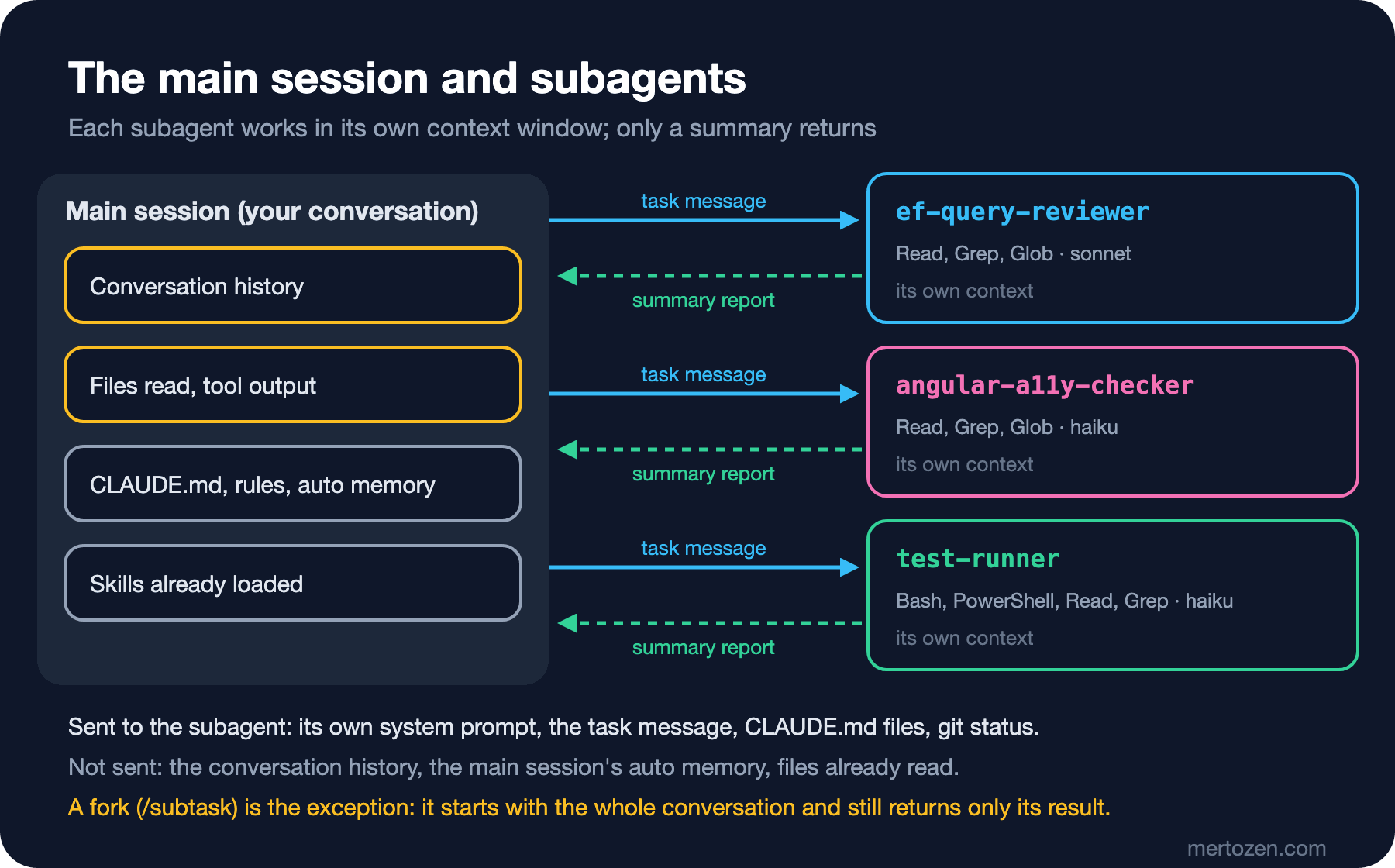
The answer to the first question is in the starting context. A subagent does not see the conversation history, skills loaded earlier or the files the main session read; Claude writes it a task message that summarizes the work. On the other hand, the whole CLAUDE.md hierarchy, path-scoped rules and a git status snapshot taken at start are loaded into the subagent too. The main session's auto memory and output style are not. The built-in Explore and Plan subagents also skip CLAUDE.md and git status so that they start faster.
Claude Code ships with built-in subagents: Explore, which searches the codebase read-only; Plan, which does research in plan mode; and general-purpose, which can both read and change things. Write your own subagent when you notice you keep starting the same kind of worker with the same instructions.
File Format and Locations
A subagent is a Markdown file with YAML frontmatter. Only name and description are required; the body of the file becomes the subagent's system prompt and replaces Claude Code's own system prompt. The locations, in priority order: managed settings, the --agents JSON passed at launch, the project's .claude/agents/, your personal ~/.claude/agents/, and plugins last. When the same name exists in two places, the higher-priority one wins.
In older versions the /agents command opened a wizard. According to the documentation, since v2.1.198 it only prints a note reminding you where the files live; you have Claude write the subagent or edit the file yourself. Claude Code watches both folders, and changes take effect at the next delegation within a few seconds. The one exception is an agents folder that did not exist when the session started; if you just created it, restart the session.
Frontmatter field names are camelCase and must match the table exactly: Claude Code ignores a field it doesn't recognize without an error. If you wrote maxturns, the limit is never applied. If name is missing or the YAML doesn't parse, the file is skipped silently; the reason is in the claude --debug log.
Bookstore: ef-query-reviewer
The first subagent moves Ayşe's query review out of the main conversation. .claude/agents/ef-query-reviewer.md:
---
name: ef-query-reviewer
description: Reviews EF Core queries in src/Bookstore.Api for N+1 loads, unneeded tracking, missing indexes and unbounded reads. Use after changing queries, endpoints or BookstoreContext. Read-only.
tools: Read, Grep, Glob
model: sonnet
effort: high
---

You review EF Core data access in Bookstore.Api. You never edit files.

Scope: the files named in the task. If the task names none, use the changed
files under src/Bookstore.Api from the git status snapshot in your context.

Check every query in scope for:
1. N+1: a query inside a loop, or navigation properties read after the query
   without `Include` or a `Select` projection.
2. Tracking: read-only queries without `AsNoTracking()` or a projection.
3. Indexes: `Where`, `OrderBy` and join columns with no index in
   `BookstoreContext.OnModelCreating` or in src/Bookstore.Api/Data/Migrations.
4. Unbounded reads: list endpoints without paging or a maximum page size.
5. Cancellation: async EF Core calls without the request's `CancellationToken`.

Report, at most 30 lines:
- One line per finding: `file:line | rule | what to change`
- Then "Index candidates:" with table and column names
- "No findings" when there are none. Never paste whole files.
tools is an allowlist: every tool not on it, MCP tools included, is closed to this subagent. Without the field, the subagent would inherit the tools of the main conversation. For the opposite case, "everything but no writes", use disallowedTools: Write, Edit. One subtlety: if you put a scoped rule such as Bash(git push *) in disallowedTools, the whole Bash tool goes away; to block a single command, use the deny rules from the third post, which apply to subagents too.
The "git status snapshot" sentence in the prompt is deliberate: when the task message names no files, the only place the subagent can find the changed files is the git status snapshot it received at start. Writing the report format with a line limit also protects the main benefit of the subagent; the shorter the text that returns to the main conversation, the less context it uses.
Bookstore: angular-a11y-checker and test-runner
The second subagent scans Angular templates for accessibility. The background of the rules is in the Accessibility (a11y) series; what matters here is stating plainly what the subagent can and cannot tell from source code:
---
name: angular-a11y-checker
description: Checks Angular templates in web/bookstore-web for accessibility problems such as missing labels and alt text, click handlers without keyboard access and ARIA misuse. Use after creating or changing a component template. Read-only.
tools: Read, Grep, Glob
model: haiku
---

You check accessibility in the Angular client under web/bookstore-web/src/app.
You never edit files.

For each template (`*.html` or an inline `template`) in the task scope, check:
- Images: every `<img>` has `alt`; decorative images use `alt=""`.
- Forms: every input, select and textarea has a `<label for>`, `aria-label`
  or `aria-labelledby`.
- Interaction: `(click)` on a `div` or `span` without a role, `tabindex="0"`
  and a key handler; suggest a `<button>` instead.
- Headings: one `h1` per page component and no skipped levels.
- ARIA: attributes that repeat native semantics or point to missing ids.
- Status messages: cart and checkout messages use `aria-live`.

Color contrast and screen reader output cannot be judged from source code;
list them under "Check in the browser".

Report: one line per finding as `file:line | rule | fix`, at most 25 lines.
The third keeps noisy test output away from the main conversation. This is the case the documentation calls one of the most effective uses: hundreds of lines of output stay in the subagent's context, and only the totals and the red tests return to the main conversation:
---
name: test-runner
description: Runs the Bookstore test suites and returns only the totals and the failing tests with their first error lines. Use proactively when tests need to run and the full output is not needed.
tools: Bash, PowerShell, Read, Grep
model: haiku
maxTurns: 8
---

Run only the test commands the task asks for, from the repository root:
- API: `dotnet test Bookstore.slnx`
- Client: `npm test` in `web/bookstore-web`

Never edit files, never install packages and never run
`dotnet ef database update`.

Report:
1. The command and its exit code.
2. Totals: passed, failed, skipped.
3. For each failing test, at most 5 lines: the test name, the assertion
   message and the first stack frame in Bookstore code.
4. If the build failed, the compiler errors as `file(line): error CODE message`
   instead of test results.
Never paste the full output.
The list has both Bash and PowerShell because on a machine without Git for Windows Claude Code doesn't register the Bash tool at all, and commands go through the PowerShell tool. The "Never run" lines are instructions, not a security boundary; the real boundary is the settings.json from the third post: dotnet test is on the allow list and dotnet ef database update on the ask list. "Use proactively" in the description is the phrase the documentation recommends; it makes it easier for Claude to delegate to this subagent on its own.
Invoking, the Background and Forks
Claude delegates on its own by looking at your request and the subagents' description fields. When you want to be sure, there are three ways: name the subagent in the prompt, pick it with @, or start the whole session as that subagent:
Use the ef-query-reviewer subagent on the order endpoints changed in this branch.
@"test-runner (agent)" run dotnet test and report only the failures
claude --agent ef-query-reviewer
Picking with @ guarantees that subagent runs, but Claude still writes the task message. --agent gives the main session itself the subagent's tool restrictions, model and system prompt; to make it the team default there is the agent setting in .claude/settings.json.
A subagent started from the main conversation runs in the background by default, and you keep typing. When a background subagent reaches a tool that needs approval, the question comes to your main session with the subagent's name; if you answer "allow for the session", that grant covers the main conversation too. /tasks lists running and just-finished work and shows which model each subagent runs on. Also know that a background subagent works with a smaller built-in tool set: core tools such as Read, Grep, Glob, Bash, PowerShell, Edit and Write stay, and the others are removed even if they are in your list.
A fork is a special subagent that inherits the whole conversation. You start one yourself with /subtask, or Claude starts one while fork mode is on; fork mode has been on by default since v2.1.302. Because a fork uses the same system prompt and tools as the main conversation, it also shares its prompt cache and costs less than a new subagent for work that needs the same context. While fork mode is on, Claude in the terminal can't wait for a subagent to finish; if you want it to wait, add CLAUDE_CODE_FORK_SUBAGENT=0 to your personal settings:
{
  "env": {
    "CLAUDE_CODE_FORK_SUBAGENT": "0"
  }
}
Model, Memory and Worktree Isolation
The order of model selection: the model Claude passes when delegating, the model in the subagent file, the CLAUDE_CODE_SUBAGENT_MODEL environment variable, and finally the main conversation's model. We use haiku in test-runner and angular-a11y-checker because those jobs are rule-based scanning and summarizing. Subagent requests count against the same usage limits as your main conversation, so a cheaper model really makes a difference here.
The answer to the second question is in the memory field. memory: project gives the subagent a persistent folder under .claude/agent-memory/<name>/ (there are also user and local scopes) and adds the first 200 lines or 25KB of MEMORY.md to its system prompt. But according to the documentation, enabling memory automatically enables the Read, Write and Edit tools. The documentation doesn't say whether that write access is limited to the memory folder, so we didn't add memory to ef-query-reviewer. Using this field on a subagent that must stay read-only changes its contract.
isolation: worktree is for subagents that change files: it gives the subagent a temporary git worktree branched from the default branch, and the worktree is removed automatically if the subagent makes no changes. This keeps two subagents that touch the same files in parallel from overwriting each other's changes. The bundled /batch skill from the fifth post uses the same mechanism, splitting a large change across background subagents running in worktrees. The details of worktrees are in the ninth post.
By default subagents can start subagents of their own: at most three layers below the main conversation, and at most 20 running subagents at a time. If you don't want a reviewer to start other subagents, leave Agent out of its tools list.
Subagent, Skill, Agent Team or Workflow?
The Run agents in parallel page separates the options by the question "who coordinates the work". Our own summary:
| Approach | Who holds the plan | Where intermediate results live | When in Bookstore |
|---|---|---|---|
| Skill | Claude, following the instructions | Main context | A repeated procedure such as adding a migration |
| Subagent | Claude, turn by turn | The subagent's context, a summary to the main conversation | Query review, running tests |
| Agent team | A lead session | A shared task list | A few long-running workers that need to talk to each other |
| Dynamic workflow | A JavaScript script Claude writes | Script variables | The same audit across every endpoint |
Agent teams are experimental and off by default; you turn them on with CLAUDE_CODE_EXPERIMENTAL_AGENT_TEAMS=1. According to the Manage costs effectively page, when teammates run in plan mode they use about 7 times more tokens than a standard session. Dynamic workflows are available on paid plans; when a run schedules more than 25 agents or its projected token total passes 1.5 million, Claude Code shows a warning. We use neither in Bookstore's daily work; for an ordinary endpoint change, one session and a few subagents are enough.
In Production
Keep descriptions short. If your own subagents' descriptions add up to more than 15,000 tokens, Claude Code warns at startup; detail belongs in the system prompt, the body of the file, which loads only when the subagent runs.
Hooks run inside subagents too. A PreToolUse hook in settings.json also fires before every tool call a subagent makes; that is why the migration guard we write in the seventh post will cover subagents as well. Hooks and inline MCP servers in a project subagent's frontmatter, however, run only after the workspace trust dialog is accepted for the folder; a claude -p run doesn't count as that acceptance.
Read a subagent's report as data. Claude Code scans each report for instruction-shaped patterns and marks them before handing it to the main conversation, but the documentation says plainly that this is not a security boundary. Every tool call that follows from a report still goes through the permission checks. The in-depth treatment is in the LLM Application Security series.
Common Pitfalls
Splitting everything into subagents. Work that needs frequent back-and-forth and phases that share the same context are better in the main conversation; a subagent that isn't a fork starts from scratch, so gathering context takes time.
Granting write access and not reviewing the result. Files a subagent changes end up in your diff; as we saw in the fourth post, subagent edits mostly can't be undone with checkpoints either.
Parallel edits to the same files. If two subagents write to the same file in the same checkout, use isolation: worktree or split the work by file.
Misspelling a field name. disallowed-tools is a valid field in skills, but in a subagent the correct spelling is disallowedTools; a misspelled field is ignored without an error.
A Small Experiment
★☆☆ Pick a command in your own project that produces long output and write a subagent like test-runner. Run the same command once in the main conversation and once through the subagent, and compare the difference in the /context output.
★★☆ Replace the description of ef-query-reviewer with a vague sentence ("Helps with the database") and note across five different requests whether Claude delegates to it. Then restore the description and repeat the same experiment.
★★★ Give the same test task first to a fork with /subtask, then to test-runner. Compare the models in /tasks and the token difference in the /usage output, and write down which is cheaper in which situation.
We told the subagents "never edit" and "never run", but these are still instructions; Claude follows them most of the time, not always. The way to make the Bookstore rule "don't touch existing migration files" certain is to have Claude Code run your script before the tool call. In the seventh post we set up that rule, automatic formatting and a test check with PreToolUse, PostToolUse and Stop hooks.