

Measuring SEO: Which Question, Which Data? Why Search Console, GA4, Server Logs and CrUX Disagree
Search Console, GA4, server logs and CrUX count different parts of the same visit, so they give different numbers; the right number depends on the question you ask. We cover the question-metric-source mapping, why the numbers disagree, C# code that separates Google traffic in logs using Google's Referer rules, and the measurement options for mertozen.com.
Version note: The code in this post was built and run with .NET 10. This post is based on the official documentation: the Search Console, Google Analytics and Chrome UX Report docs as of 15 November 2026.
Guess First
You are in the weekly meeting for the blog of Bookstore, the online bookstore used as the shared example across this site's series. Selin from marketing has three screens open: Search Console shows a click count for last week, GA4 shows clearly fewer sessions in the "Organic Search" channel, and the "requests from Google" count Emre pulled from the server log differs from both. Selin asks: "Which one is right? Is one of them broken?" Is one of the three wrong, or are all three right while counting different things? And which number should you take to management as the answer to "what did SEO bring us?"
Question First, Then Metric, Then Source
Measurement work often starts backwards: someone installs a tool and the team looks at whatever the dashboard shows. The right order is this: write down the question you want to answer, pick the metric that answers it, and only then check which source can measure that metric. Most SEO questions fall into five groups. The abbreviations in the table (CTR, LCP, INP, CLS, CrUX, RUM) will come up often in this series; how LCP, INP and CLS relate to SEO is the topic of the sixth post.
| Question | Metric | Source |
|---|---|---|
| Am I visible on Google? | impression, average position | Search Console Performance report |
| When visible, do people click? | click, CTR | Search Console Performance report |
| What do readers do on the site? | session, engagement rate, event, key event | GA4 or another on-site analytics tool |
| Is the page fast for real users? | LCP, INP, CLS (75th percentile) | CrUX, the Search Console Core Web Vitals report, your own RUM |
| What do bots and real requests do? | request count, status code, referer | server log |
The point of the table is this: no source answers every question, and asking a source a question it cannot answer is the shortest path to trusting the wrong number. "Did SEO work?" is really the question of the first two rows; "are the readers who arrive satisfied?" is the question of the third. Squeezing them into a single number in a meeting is where Selin's confusion comes from.
Each Source Sees a Different Part of the Journey
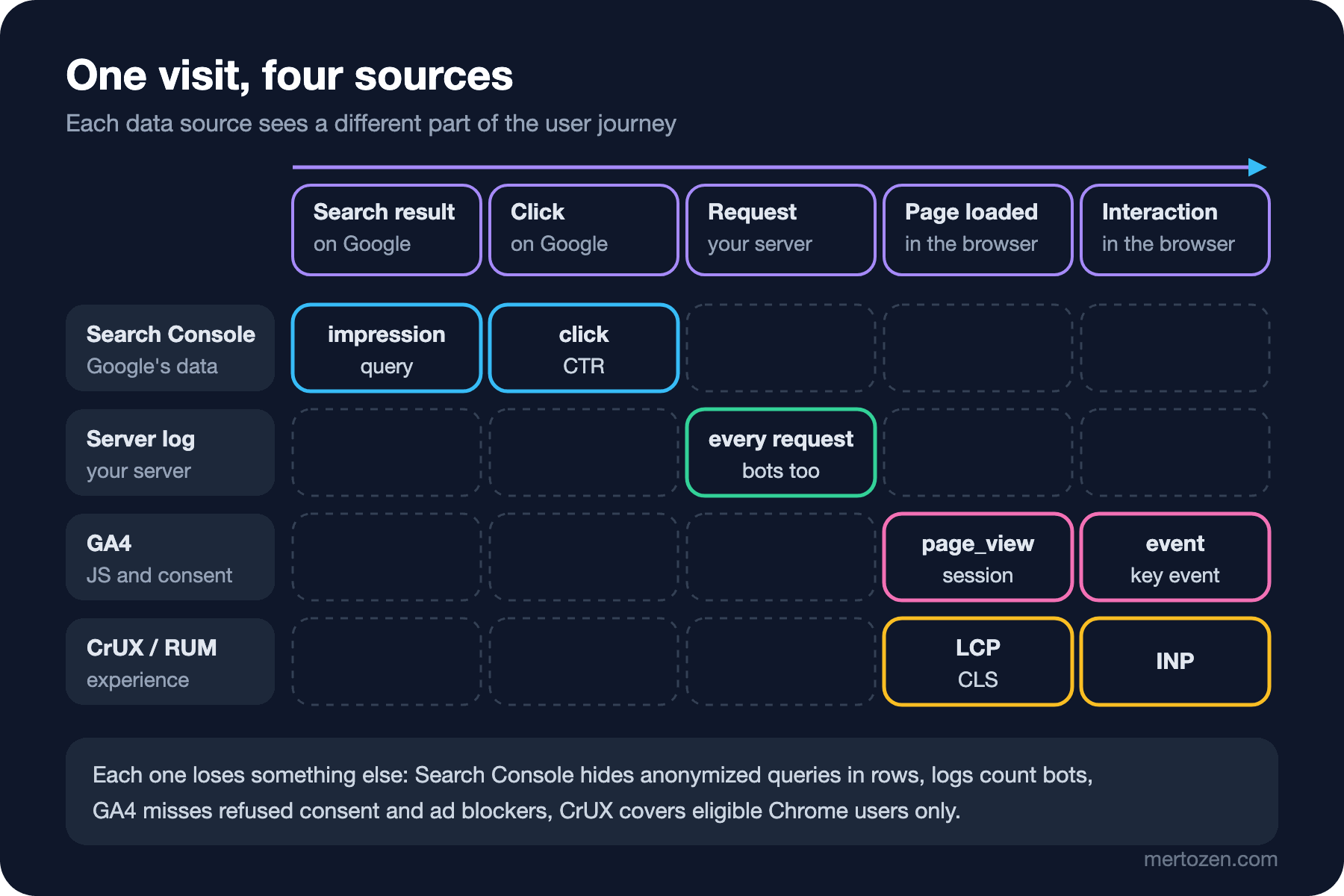
Follow a reader step by step. A Bookstore post appears on a Google results page; Search Console counts an impression. The reader clicks; Search Console counts a click, and its part ends at that moment. The browser sends a request to the server; only your server sees it and writes it to the log. The page loads, JavaScript runs and, if the user allowed it, the GA4 tag sends a page_view. The reader copies some code or moves to the next post in the series; those show up in GA4 as events. During the same visit the browser measures LCP, INP and CLS; the values go to CrUX if the reader is an eligible Chrome user, and to your RUM if you built one.
Search Console data comes from Google's own records; nothing has to run on your site. GA4 depends entirely on code running in the browser. The server log sits between them: it does not depend on JavaScript or consent, but it counts every request, bots included. Setting up and verifying these sources was covered in the SEO Fundamentals post "Getting Started with Google Search Console and Bing Webmaster Tools", and verifying bot requests in the Technical SEO post "Crawl Budget, Server Log Analysis and Verifying Googlebot"; here we only look at what each one sees.
Why Don't the Numbers Match?
Google's guide on using Search Console and Google Analytics together, published in February 2025, says the closest pair between the two tools is "Search Console clicks vs. Analytics sessions" and adds right away that they are calculated differently, so they will not match one to one; what matters is that the trends move the same way. Combining the reasons in that guide and in the Referer page Google added in November 2026 with your own observations gives this list:
- Clicks and sessions are counted at different moments: Search Console counts when the result is selected, GA4 when the page loads and the tag runs. A reader who closes the tab before the page loads exists in only one of them.
- Consent, ad blockers and privacy settings stop the JavaScript tag; Search Console is not affected by them.
- Search Console dates use Pacific Time and that cannot be changed; GA4 uses the property's time zone. Seen from Turkey, daily numbers shift around midnight.
- GA4 attribution models can credit a session to a different channel; Search Console counts every click.
- Search Console credits data to the canonical URL Google selected; GA4 sees every URL where the tag runs.
- Non-HTML pages such as PDFs can get clicks in Search Console but run no tag, so they are missing from GA4.
- GA4 excludes known bots; Search Console does not filter bots the same way, and the server log counts everything unless you filter it.
- Search Console anonymizes some queries for privacy: they are in the totals but not in the query table. Adding up the rows will not give you the chart total.
This list answers the opening question: all three numbers are most likely right; they just count different things. The "traffic from Google" number for management is the Search Console click count; "what did these readers do" is answered in GA4; the server log is an independent reference for checking both.
Separating Google Traffic in the Server Log
On 12 November 2026 Google published a page called "Identify Google Search traffic" that settles the log side. Google Search uses the origin referrer policy, so the Referer header holds only the scheme and host, no path and no query. On the web the value is https://www.google.com/ or a local domain such as https://www.google.com.tr/. The Google app on Android, when it opens a link in a browser tab, sends android-app://com.google.android.googlequicksearchbox/https/www.google.com. Services served from the same origins, such as Google Images, send the same values, so this signal means "came from a Google surface", not "came from web search". The page adds a warning: requests for CSS, JavaScript and images carry a Referer too, but its value is your own page's URL; count landing pages only.
The nginx in front of the Bookstore blog writes its log in the "combined" format. A small parser that reads such a line:
using System.Globalization;
using System.Text.RegularExpressions;

namespace Bookstore.Analytics.Logs;

// Parses the "combined" access log format used by nginx and Apache:
// ip - user [time] "METHOD path HTTP/x" status bytes "referer" "user-agent"
public static partial class CombinedLogParser
{
    [GeneratedRegex("""^\S+ \S+ \S+ \[(?<time>[^\]]+)\] "(?<method>[A-Z]+) (?<path>\S+) [^"]*" (?<status>\d{3}) \S+ "(?<referer>[^"]*)" "(?<ua>[^"]*)"$""")]
    private static partial Regex Line();

    public static AccessLogEntry? Parse(string line)
    {
        Match m = Line().Match(line);
        if (!m.Success)
        {
            return null;
        }

        DateTimeOffset time = DateTimeOffset.ParseExact(
            m.Groups["time"].Value, "dd/MMM/yyyy:HH:mm:ss zzz", CultureInfo.InvariantCulture);
        string referer = m.Groups["referer"].Value;
        string ua = m.Groups["ua"].Value;

        return new AccessLogEntry(
            time,
            m.Groups["method"].Value,
            m.Groups["path"].Value,
            int.Parse(m.Groups["status"].Value, CultureInfo.InvariantCulture),
            referer is "" or "-" ? null : referer,
            ua is "" or "-" ? null : ua);
    }
}
The classifier first sets aside requests that are not landings (assets, redirects, errors, anything other than GET), then the requests whose user agent claims to be a known bot, and only then looks at the Referer:
public sealed partial class TrafficClassifier(string siteHost)
{
    private static readonly string[] AssetExtensions =
        [".css", ".js", ".png", ".jpg", ".jpeg", ".webp", ".avif", ".svg", ".ico", ".woff2", ".map", ".json", ".xml", ".txt"];

    private static readonly string[] BotTokens = ["Googlebot", "bingbot", "GPTBot", "ClaudeBot", "PerplexityBot"];

    // www.google.com, www.google.com.tr, www.google.co.uk ...
    [GeneratedRegex(@"^(www\.)?google(\.[a-z]{2,3}){1,2}$")]
    private static partial Regex GoogleHost();

    private const string GoogleAndroidApp = "android-app://com.google.android.googlequicksearchbox/";

    public TrafficSource Classify(AccessLogEntry entry)
    {
        if (entry.Method != "GET" || entry.Status != 200 || IsAsset(entry.Path))
        {
            return TrafficSource.NotALanding;
        }

        if (entry.UserAgent is { } ua && BotTokens.Any(t => ua.Contains(t, StringComparison.OrdinalIgnoreCase)))
        {
            // only what the user agent claims; verify with reverse DNS
            return TrafficSource.ClaimsToBeBot;
        }

        if (entry.Referer is null)
        {
            return TrafficSource.NoReferer;
        }

        if (entry.Referer.StartsWith(GoogleAndroidApp, StringComparison.Ordinal))
        {
            return TrafficSource.GoogleSearch;
        }

        if (!Uri.TryCreate(entry.Referer, UriKind.Absolute, out Uri? referer))
        {
            return TrafficSource.OtherReferral;
        }

        if (referer.Host.Equals(siteHost, StringComparison.OrdinalIgnoreCase))
        {
            return TrafficSource.InternalNavigation;
        }

        return GoogleHost().IsMatch(referer.Host) ? TrafficSource.GoogleSearch : TrafficSource.OtherReferral;
    }

    private static bool IsAsset(string path)
    {
        string clean = path.Split('?', 2)[0];
        return AssetExtensions.Any(ext => clean.EndsWith(ext, StringComparison.OrdinalIgnoreCase));
    }
}
The bot bucket is called a "claim" on purpose: a user agent can be spoofed, and verifying the real Googlebot with reverse DNS and IP lists is the topic of the Technical SEO log post. The output below comes from data/access-sample.log, a synthetic 26-line log; the lines are not real site traffic, they were written to exercise every branch of the classifier:
$ dotnet run --project src/Bookstore.Analytics.Cli -- logs data/access-sample.log www.bookstore.example
source               requests
NotALanding                 7
ClaimsToBeBot               2
GoogleSearch               10
OtherReferral               2
InternalNavigation          1
NoReferer                   3
unparsed lines: 1

top landing pages from Google Search:
    4  /blog/cs8618-nullable-uyarisi
    2  /blog/dependency-injection-nedir
    2  /blog/ef-core-migration-rehberi
    1  /blog/yeni-yazi
    1  /en/blog/ef-core-migrations-guide
Three things to read here. First, only 10 of the 25 parsed lines are landings from Google; counting assets and bots would have doubled the number. Second, a 301 and a 404 from Google were not counted as landings: after a redirect the real page arrives as a separate request anyway, and a 404 is a lost reader that deserves its own tracking. Third, NoReferer: private windows, privacy extensions and some new-tab behaviors strip the header; some of these visits may also come from Google, and the log cannot know.
The tests are under tests/Bookstore.Analytics.Tests/Logs, with one for the Android app value, country domains, non-search Google hosts such as mail.google.com and the asset filter. dotnet test passes all 11.
The mertozen.com Case: What to Install?
Take this site as the example. As of 15 November 2026 the mertozen.com source code has no client-side analytics script: no GA4, no other tag. The data available today is Search Console and the server-side logs. There are three realistic options for the next step, and each gives up something different:
| Option | What it shows | What it does not show | Cost and compliance |
|---|---|---|---|
| Search Console and server log only | Google visibility, clicks, landing pages | On-page behavior, moving through a series, code copies | No extra script; no consent banner needed; no effect on Core Web Vitals |
| GA4, with consent | Sessions, engagement, events, key events, landing report through the Search Console link | Readers who do not consent; readers with ad blockers | Third-party script and cookies; explicit consent flow and privacy notice needed; JavaScript cost on the page |
| A cookieless tool (Plausible, Umami, Matomo in cookieless mode, Cloudflare Web Analytics) | Page views, referrers, rough visitor counts | Reliable recognition of returning visitors, detailed event analysis | Small script; self-hosted options keep the data with you; whether consent is needed is a legal assessment |
The decision belongs to the site owner; this series gives no legal advice and does not declare one option "right". What we can say technically is this: whichever option is chosen, the Search Console data stays the same, and it is the main source for measuring the effect of SEO. Adding GA4 does not give a new answer to "is SEO working?"; it answers "what do the readers who arrive do?". Consent and cookieless tools are covered in detail in the fifth post.
In Production
Write a definition next to every report. "Organic traffic" can mean Search Console clicks on one slide and GA4 sessions on the next. Putting the source and the metric in the report title ends a half-hour argument in the meeting.
Fix the time zone. For daily comparisons, take Search Console's Pacific Time as the reference or work with weekly and monthly totals; the shift at the day boundary then stops mattering.
Think about the log together with its retention. IP addresses and user agents in the log can count as personal data; the fields needed for analysis (time, path, status, referer host, classification result) are usually enough. Handling personal data in logs is covered in the Logging in .NET post "Sensitive Data in Logs".
Write a note when a source changes. Changing the consent banner text, an ad blocker list starting to block GA4 or the CDN changing its log format breaks the chart without any change in traffic. Telling those breaks apart is the topic of the last post in the series.
Common Pitfalls
Looking at vanity metrics. Total page views is a big, pleasant number, but it does not answer "did SEO work?"; bots, reloads and internal navigation inflate it as well. A number that is not tied to a question does not lead to a decision.
Treating one source as the absolute truth. Reading a drop in GA4 as lost traffic, or a rise in Search Console as certain success, without checking the two sources against each other.
Trying to make the sources match exactly. Expecting Search Console clicks and GA4 sessions to be equal means weeks of hunting for a "bug" that is not there. What you should expect is that both move the same way.
Counting every Google referer in the log as search traffic. Asset requests, other Google services and redirect chains inflate the count; filter on landing pages and status codes.
A Small Experiment
★☆☆ For your own site, write the last four weeks of Search Console clicks next to the GA4 "Organic Search" sessions. Compute the weekly ratio: is it stable, or does one week break? What changed on the site that week?
★★☆ Add Bing to TrafficClassifier: count the www.bing.com referer as a separate BingSearch value and add an InlineData row to TrafficClassifierTests.
★★★ Add a time zone parameter to the command and split the Google landings into days in Pacific Time. When you group the same log by day in Istanbul time and in Pacific Time, which days change?
We have separated what each source sees. In the next post we go into the main source for SEO measurement, the Search Console Performance report: how average position is calculated, how to write regex filters, and what the branded query filter and query groups show.