

Plan Mode and the Daily Workflow: Explore, Plan, Implement, Verify and Manage Context
The safe way to have Claude Code build a large feature is to get a plan with a file list in plan mode, fix it with Ctrl+G, approve it and commit after every verified layer; checkpoints don't roll back files changed by Bash or the database. Plan approval options, a completion condition with /goal, compaction and Compact Instructions, /clear, /resume, /branch and /rewind.
Version note: This post describes Claude Code 2.1.325 (13 November 2026); plan mode, /goal, checkpoints and session commands were checked on 15 November 2026 against the Permission modes, Keep Claude working toward a goal, Checkpointing, Manage sessions and How Claude Code works pages at code.claude.com/docs. This post is based on the official documentation.
Guess First
Ayşe decided to build the low-stock notification feature of Bookstore, the online bookstore used as the shared example across this site's series, with Claude Code. She wrote the whole feature into one long prompt and left the session in Auto mode. Early in the conversation she also added a note: "To send e-mail, use the existing service in the Notifications module; don't write SMTP code directly." Two hours and a few automatic compactions later, Claude put an SMTP client straight into the notification code. Ayşe pressed Esc twice and rolled the code back to an earlier point; but the migration already applied to her local database didn't come back, and a file Claude had changed with a sed command didn't return to its old state either.
What is your guess? Why did the instruction given at the start of the conversation get lost? Which changes does the rewind menu bring back, and which can it not? The first answer is in the context section, the second in the checkpoint section.
We covered the tool-independent version of the explore, plan, implement, verify flow and spec-driven development in the third post of the AI-Assisted Development series, and how the same flow works with Copilot's agent in the fifth post of the GitHub Copilot series. Here we build the flow with Claude Code's commands: plan mode, plan approval, /goal, the context commands and checkpoints.
Plan Mode: Exploring Before Changing
In plan mode Claude reads files, can run shell commands to explore and writes a plan, but doesn't edit the source code; edits stay blocked until you approve the plan. You enter it three ways: with Shift+Tab in a session, by starting a single prompt with /plan, or by starting the session with claude --permission-mode plan. If Auto mode is available and useAutoModeDuringPlan is on (the default), the classifier reviews commands during planning; otherwise commands outside the built-in read-only set prompt you.
When the plan is ready, three options appear. "Yes, and use auto mode" approves the plan and starts implementing in Auto mode (if Auto isn't available this option reads "Yes, auto-accept edits"). "Yes, manually approve edits" approves but has every edit ask you. "No, keep planning" keeps planning. Before approving, Ctrl+G opens the plan in your default text editor, where you can delete steps, reorder them or add a missing constraint. Plans are saved under ~/.claude/plans/ or in the plansDirectory folder you set, and an approved plan gives an unnamed session a title based on the plan.
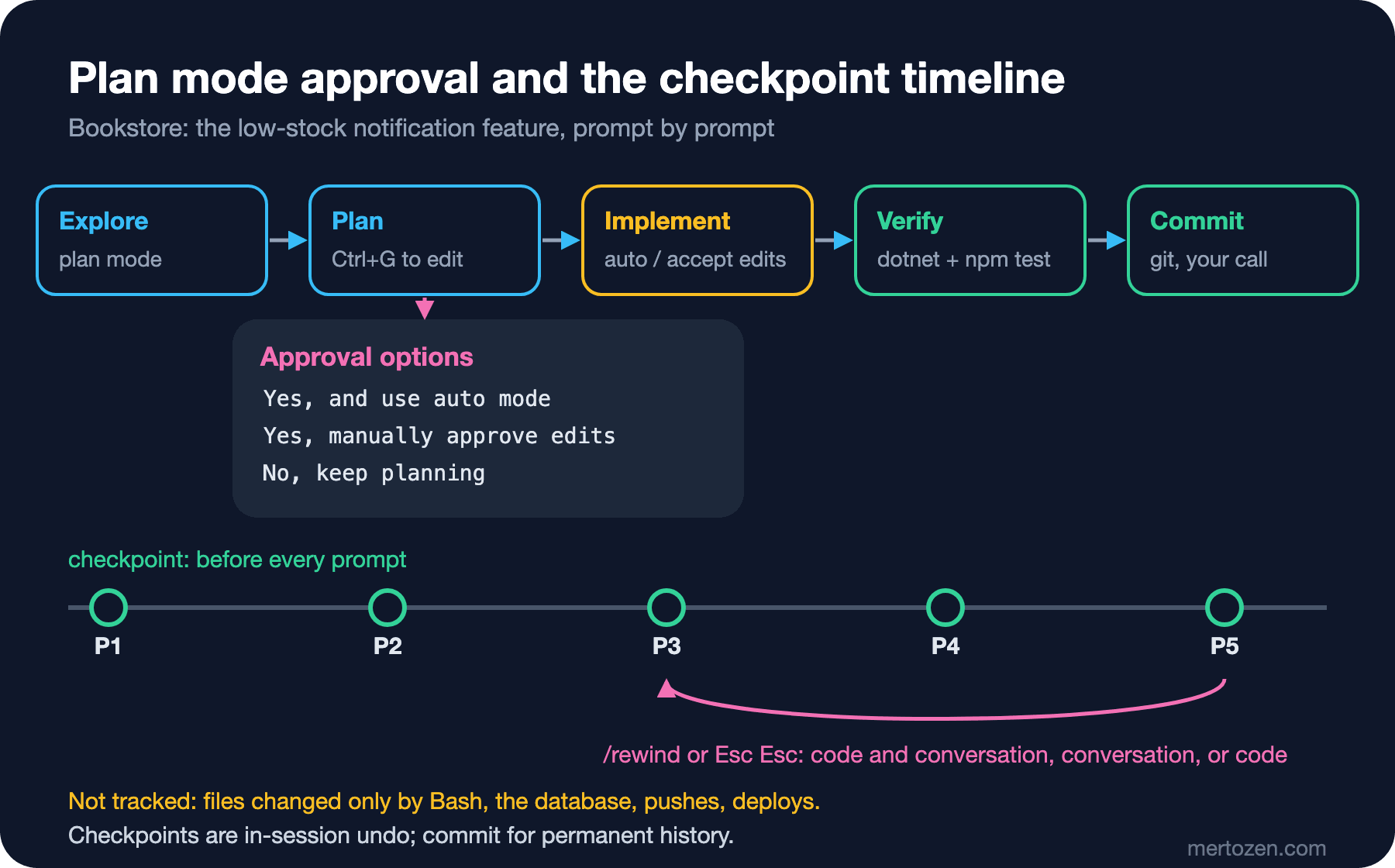
Watch out for one trap: pressing Shift+Tab while the approval prompt is open approves the plan. To leave plan mode without approving, press Esc first, then Shift+Tab.
Bookstore: A Plan for Low-Stock Notifications
The feature touches three layers: a stock threshold and an alert entity in the Inventory module (with a new EF Core migration), a Minimal API endpoint for the admin side and an admin page in web/bookstore-web. Instead of one giant "do it" prompt, we ask for the plan first:
/plan Add low-stock notifications to Bookstore.
When a StockItem's available quantity drops below its LowStockThreshold,
create a LowStockAlert and notify the book's publisher through the existing
Notifications module (do not send e-mail directly).
Scope: the Inventory entity and an EF Core migration, a Minimal API endpoint
GET /api/admin/low-stock-alerts, and an admin page in web/bookstore-web.
Before planning, read how Ordering reserves stock and how Notifications sends
messages. The plan must list every file to create or change, the migration
name and the tests to add. Do not plan changes to existing migrations.
The last three sentences of the prompt make the plan reviewable. "Read this first" points Claude at the existing patterns; the alert should be raised at the same point where Ordering reserves stock. "List every file, the migration name and the tests" turns the plan into a checklist you can compare with git status after approval.
When the plan arrives, ask four questions. Is anything in the file list out of scope, such as an unexpected change to Ordering's own files? Is the migration new, or an addition to an existing one? Are there tests for every layer, or only for the backend? Has an open decision (the threshold's default value, when a second alert for the same book is raised) been left to Claude? You can write the missing pieces into the plan yourself with Ctrl+G, such as "Default LowStockThreshold is 5" or "At most one open alert per StockItem". If you want to see every edit in the migration step, approve with "Yes, manually approve edits"; to switch to Auto for the second and third layers, Shift+Tab is enough.
Implement and Verify: A Completion Condition with /goal
After approval Claude starts implementing the plan. If the work will take several turns, instead of typing "continue" every turn you can give a completion condition with /goal. When each turn finishes, a small, fast model checks whether the condition holds; if not, Claude starts another turn, and if it holds, or the model decides the condition is impossible, the goal clears:
/goal dotnet test and npm test both exit 0, the new LowStockAlert tests exist and pass, and no file under src/Bookstore.Api/Data/Migrations is modified except the new migration; or stop after 15 turnsTwo details from the docs decide how to write the condition. First, the evaluator model doesn't run commands or read files; it only looks at what Claude has surfaced in the conversation. So the condition must be something Claude's own output can demonstrate: "the tests pass" works because Claude runs the tests and the result appears in the transcript. Second, /goal doesn't change the permission mode. In Manual mode Claude still asks you for every command that isn't allowed; if you want the turns to run unattended, set the goal in Auto mode. The docs say a good condition contains one measurable end state, how to prove it and what must not change on the way; a condition can be up to 4,000 characters, and a clause such as "or stop after 15 turns" bounds how long it runs.
There is one goal per session. /goal without arguments shows the condition, the elapsed time, the number of evaluated turns, the tokens spent and the evaluator's latest reason; /goal clear removes the goal early. An active goal comes back when you return to the session with --continue or --resume. Because the goal is built on the hooks mechanism, it is subject to the same workspace trust rule as hooks.
Even when the goal is met, the job isn't done. Compare the plan's file list with git status, read the changes with /diff, run the tests in your own terminal and commit after each verified layer.
Managing Context
Here is the answer to the first question. When the context window approaches its limit, Claude Code automatically turns the conversation into a summary. According to the docs the summary keeps your requests and key code snippets, but detailed instructions from early in the conversation can be lost. Ayşe's SMTP note was exactly such an instruction. The place for a lasting rule is not the conversation but CLAUDE.md: the root CLAUDE.md is re-read from disk after compaction.
There are two ways to steer what compaction keeps. On the spot, you can give /compact a focus: /compact focus on the low-stock feature and the failing tests. Permanently, you can add a "Compact Instructions" section to CLAUDE.md. The section we add to Bookstore's root file:
## Compact Instructions
When compacting, keep: the approved plan and which of its steps are done,
the exact test commands and their last results, and every rule I gave in
this session that is not already in this file.
/context shows what the context is filled with. But the most effective tool is still /clear: moving to a new conversation when a job is done keeps the old topic out of new answers and stops unneeded history from being carried with every message. If you give it a name such as /clear low-stock-api, the conversation you leave shows up under that name in the /resume list. Naming sessions at the start with claude -n low-stock-ui or midway with /rename makes it easier to get back to the right conversation when work runs in parallel. claude --continue opens the latest conversation in this directory, claude --resume the picker, and claude --from-pr 123 the sessions linked to that pull request.
Two more small commands help. /btw lets you ask a side question that isn't added to the conversation; a question like "which test framework does this project use?" doesn't clutter the main job's context. /branch creates a copy of the conversation as it stands and switches you into it; the original stays untouched while you try a different approach. Avoid opening the same session in two terminals at once: both write to one transcript, and when you come back later some messages can be missing.
Checkpoints and /rewind
Claude Code saves the state of the code before every prompt that starts a turn. File snapshots for the 100 most recent checkpoints in a session are kept; checkpoints are stored with the conversation, so they are available when you come back to a session later, and by default they are cleaned up after about 30 days. With an empty prompt, pressing Esc twice or running /rewind (aliases /undo and /checkpoint) lists the prompts you sent. When you pick a point you get these options: restore code and conversation, restore the conversation only, restore the code only, summarize from that point on, summarize up to that point, or never mind. The summarize options don't touch files; like a targeted compaction, they free up room in the context.
The answer to the second question is in the limitations section of the docs. Checkpoints track only changes made with Claude's file editing tools. A file changed only by Bash commands is not tracked; that was Ayşe's file changed with sed. Subagents' edits are usually not restored. Changes you make by hand or that another session makes are not tracked. Actions that affect external systems, such as the database, API calls and deploys, can't be undone at all: a migration applied to the local database with dotnet ef database update stays in the database even if you roll back the code, and you have to move the database back to the previous migration with dotnet ef database update yourself.
The docs are clear: checkpoints are for quick recovery inside a session; keep using version control for permanent history and teamwork. In practice this means committing each time a layer of the plan is verified. Checkpoints make the next wrong step cheap; commits make every verified state permanent.
In Production
Use the plan like a contract. Every difference between the file list you approved and git status is a question: if Claude went out of scope, ask why or revert that file. Adding the plan file to a pull request description also shows the reviewer what was intended.
Long sessions have a cost. Every message reprocesses the whole conversation history; coming back to a large conversation after a long break can be expensive because the prompt cache has gone cold. According to the docs, on Pro, Max and Ultra plans the "Resume this conversation?" dialog estimates how much of your five-hour limit the saved conversation would use in that case. Starting a new conversation for new work is usually cheaper; cost details are in the last post of the series.
Bound unattended /goal runs. A goal with no turn or time limit can run for hours in Auto mode. Always add an "or stop after N turns" clause to the condition, and verify the result yourself before committing it.
Common Pitfalls
One giant prompt. An unplanned feature carries the first wrong assumption into every layer. Plan first, then implement layer by layer.
Stale context in a long session. A rule stated two hours ago can be lost in compaction. Write lasting rules into CLAUDE.md and use /clear when the job changes.
Using checkpoints instead of git. Files changed by Bash, the database and pushes are not rolled back. Commit after every verified step.
Missing changes outside the plan. A job left unread because the goal was met is the job that raises the most questions in review.
Shift+Tab at the approval prompt. You approve the plan while trying to change modes; press Esc first.
A Small Experiment
★☆☆ In your own repo, ask for a small change with /plan, open the plan with Ctrl+G and add a constraint. After approval, did the change follow the constraint you added?
★★☆ Approve a plan with a file list for a feature, and when the work is done compare the plan's list with the output of git status --short. If there is a difference, ask "why?" for each one.
★★★ Set a goal with /goal including a turn limit, and when it finishes look at the status report with /goal. Then have a file changed only by a shell command and try "Restore code" with /rewind; note which file comes back and which doesn't, consistent with the limitation in the docs.
Plan mode and checkpoints make the same work more controlled, but writing the same steps for every migration in Bookstore is still repetitive. In post five we package that repetition into skills and slash commands: /add-migration and an Angular component scaffold that follows the project's rules.