

Introduction to the Claude Agent SDK: Using Claude Code as a Library
The Claude Agent SDK lets you call Claude Code's tools, agent loop and permission system from TypeScript and Python; each query() starts a separate Claude Code process. A nightly dependency report agent for Bookstore: narrow permissions with settingSources, tools, allowedTools and dontAsk, structured output, turn and budget caps, the env trap and scheduling with GitHub Actions.
Version note: This post describes Claude Code 2.1.325 (13 November 2026) and the @anthropic-ai/claude-agent-sdk 0.3.325 package on npm; the details were checked on 15 November 2026 against the Agent SDK overview, Quickstart, Configure your agent, Configure permissions, Use Claude Code features in the SDK, Get structured output from agents, Track cost and usage, Hosting the Agent SDK, Securely deploying AI agents and Agent SDK reference - TypeScript pages at code.claude.com/docs. This post is based on the official documentation. The script was compiled with TypeScript 7.0.2 and run on Node.js 24 with a stub in place of the Claude Code binary; the workflow was checked with actionlint 1.7.12.
Guess First
For Bookstore, the online bookstore used as the shared example across this site's series, Emre wrote a small agent that scans the dependencies every night. To pass the API key he put only ANTHROPIC_API_KEY into the env option of query(), left settingSources out and set maxTurns: 5. Three things happened: Claude never found the dotnet command; the run also tried to load the hooks and MCP servers of the bookstore-dev plugin in the repository; and on a large repository it hit the turn limit and the script crashed before writing what it had.
What is your guess? Why wasn't dotnet found, why did the plugin load, and why did the script go down without a report? The answers are in the section that goes through the options one by one.
What the Agent SDK Is
The Claude Agent SDK is a library that lets you use Claude Code's tools, agent loop and context management from Python and TypeScript. When you call query(), the SDK starts a separate Claude Code process and talks to it over stdio; that subprocess owns the shell, the working directory and the session files. The built-in tools, the permission system, hooks, subagents, sessions, skills and plugins are the same. Both SDKs bring a native Claude Code binary; in TypeScript it is installed through npm optional dependencies, so an install with --omit=optional doesn't get it.
There is no C# SDK. That is why the example uses TypeScript, which we already use on the Angular side. If you want to build an agent with Claude from .NET, the tool runner and Managed Agents posts in the Building Applications with the Claude API series, or Microsoft Agent Framework in the eleventh post of the AI with .NET series, are the more natural choices.
Authentication uses an API key from the Claude Console, or the environment variables for Amazon Bedrock, Google Cloud and Microsoft Foundry. The docs state plainly that, unless previously approved, third-party products may not offer claude.ai login or subscription rate limits. Use of the SDK is governed by Anthropic's Commercial Terms of Service, and you can't call your own product "Claude Code".
Which Approach When
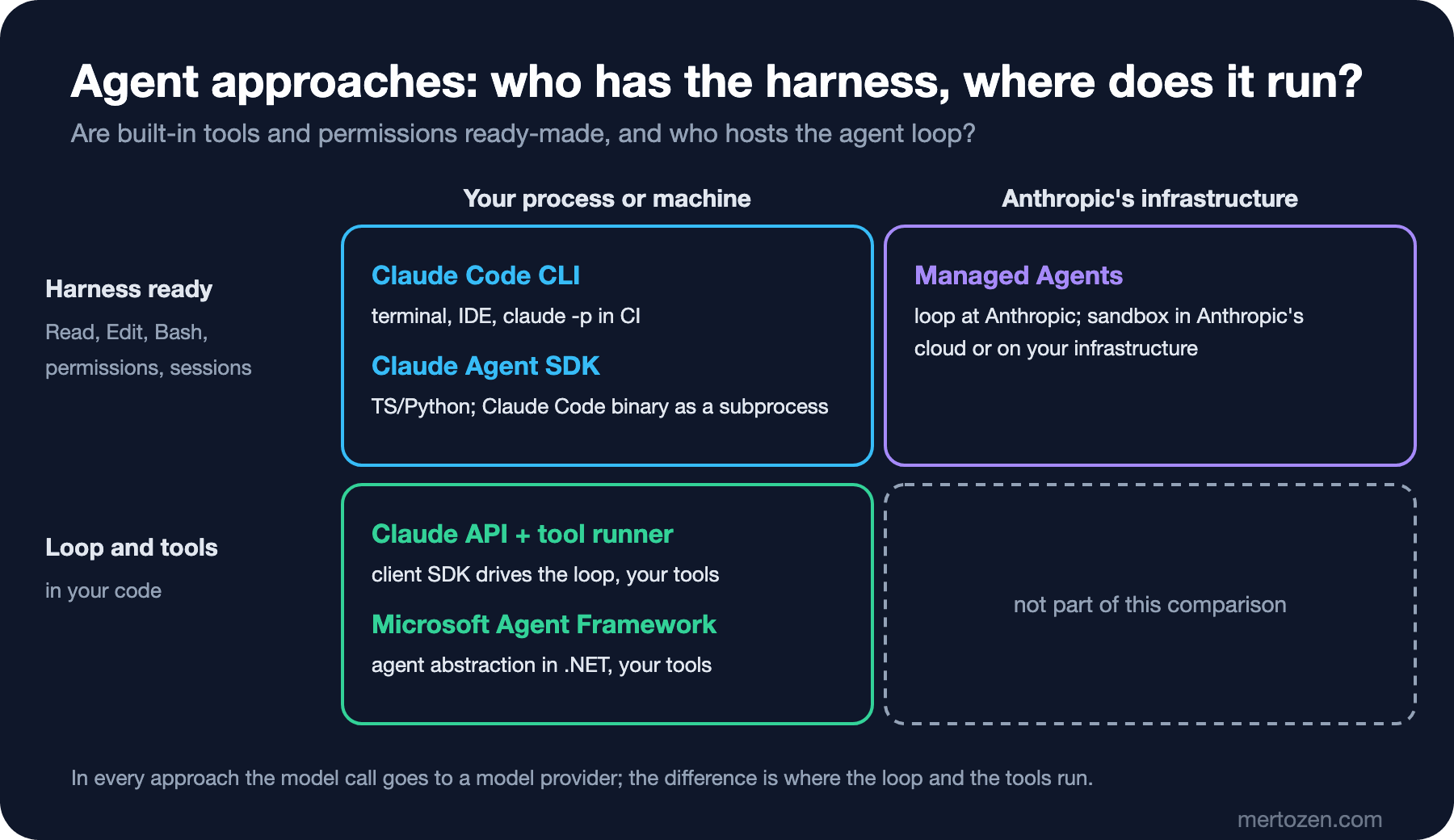
Two questions tell them apart: are the file read, edit and shell tools and the permission system ready-made, and where does the agent loop run? The Claude Code CLI is for interactive work and one-off claude -p tasks. The Agent SDK is for when you want the same harness inside your own application, in a process you operate. With the Claude API client SDKs you write the loop yourself or leave it to the beta tool runner, and the tools are your code. With Managed Agents, Anthropic hosts the harness, and sessions run in Anthropic's cloud sandbox or in a sandbox on your infrastructure. Microsoft Agent Framework is an agent abstraction inside a .NET application, with tools you write.
For the nightly report the choice is easy: the job is running commands and reading files in the repository, so Claude Code's ready-made tools are enough; all we need is to call it from a script with clear limits. A single claude -p command would do the job too; we picked the SDK to handle the result, errors and cost in type-safe code.
Bookstore: A Nightly Dependency Report
The agent lives in the repository under tools/dependency-report. It takes the output of two commands and matches each vulnerability with the file in Bookstore that uses it: which .csproj references the package, which Angular file imports it. A script could run the commands too; the agent adds the matching and a short explanation. package.json:
{
  "name": "bookstore-dependency-report",
  "private": true,
  "type": "module",
  "description": "Nightly dependency and vulnerability report for the Bookstore repository, built on the Claude Agent SDK",
  "scripts": {
    "report": "tsx report.ts",
    "check": "tsc --noEmit"
  },
  "engines": {
    "node": ">=24"
  },
  "dependencies": {
    "@anthropic-ai/claude-agent-sdk": "0.3.325"
  },
  "devDependencies": {
    "@types/node": "26.6.6",
    "tsx": "4.23.15",
    "typescript": "7.0.2"
  }
}
We pinned the versions and committed package-lock.json. TypeScript 7.0 is only for type checking (npm run check); tsx runs the script. Install with npm ci, without skipping optional dependencies, or the native binary won't come.
report.ts:
// Nightly dependency and vulnerability report for the Bookstore repository.
// Run from tools/dependency-report with ANTHROPIC_API_KEY set: npm run report
import { query, type Options, type SDKResultMessage } from "@anthropic-ai/claude-agent-sdk";
import { mkdir, writeFile } from "node:fs/promises";
import path from "node:path";

type Finding = {
  ecosystem: "nuget" | "npm";
  project: string;
  package: string;
  installedVersion: string;
  severity: "low" | "moderate" | "high" | "critical";
  usedIn: string;
  advisory: string;
  fixedIn?: string;
};

type Report = { summary: string; findings: Finding[] };

const repoRoot = path.resolve(import.meta.dirname, "../..");
const reportPath = path.join(repoRoot, "artifacts", "dependency-report.md");

const schema = {
  type: "object",
  properties: {
    summary: { type: "string" },
    findings: {
      type: "array",
      items: {
        type: "object",
        properties: {
          ecosystem: { type: "string", enum: ["nuget", "npm"] },
          project: { type: "string" },
          package: { type: "string" },
          installedVersion: { type: "string" },
          severity: { type: "string", enum: ["low", "moderate", "high", "critical"] },
          usedIn: { type: "string" },
          advisory: { type: "string" },
          fixedIn: { type: "string" },
        },
        required: ["ecosystem", "project", "package", "installedVersion", "severity", "usedIn", "advisory"],
      },
    },
  },
  required: ["summary", "findings"],
};

const prompt = [
  "Produce a dependency vulnerability report for the Bookstore repository.",
  "1. Run `dotnet list Bookstore.slnx package --vulnerable --include-transitive` from the repository root.",
  "2. Run `npm audit --json --prefix web/bookstore-web`.",
  "3. For each vulnerable package, find where Bookstore uses it: the .csproj that references it,",
  "   or the Angular files that import it. Put the file paths in usedIn.",
  "4. Write the advisory in one plain sentence and fill fixedIn when a fixed version is known.",
  "Do not change any file. If a command fails, say so in summary and report what you have.",
].join("\n");

const options: Options = {
  cwd: repoRoot,
  settingSources: [],
  tools: ["Read", "Grep", "Glob", "Bash", "PowerShell"],
  allowedTools: [
    "Bash(dotnet list Bookstore.slnx package --vulnerable *)",
    "Bash(npm audit *)",
    "PowerShell(dotnet list Bookstore.slnx package --vulnerable *)",
    "PowerShell(npm audit *)",
  ],
  disallowedTools: ["Read(**/.env)", "Read(**/.env.*)", "Read(**/appsettings.Production.json)"],
  permissionMode: "dontAsk",
  model: "sonnet",
  maxTurns: 20,
  maxBudgetUsd: 1,
  persistSession: false,
  outputFormat: { type: "json_schema", schema },
};

function toMarkdown(report: Report, result: SDKResultMessage): string {
  const lines = [
    "# Bookstore dependency report",
    "",
    `Generated: ${new Date().toISOString()}`,
    "",
    report.summary,
    "",
    "| Severity | Ecosystem | Package | Version | Fixed in | Used in | Advisory |",
    "| --- | --- | --- | --- | --- | --- | --- |",
    ...report.findings.map((f) =>
      `| ${f.severity} | ${f.ecosystem} | ${f.package} | ${f.installedVersion} | ${f.fixedIn ?? "-"} | ${f.usedIn} | ${f.advisory} |`),
  ];
  if (result.permission_denials.length > 0) {
    lines.push("", "Denied tool calls:", ...result.permission_denials.map((d) => `- ${d.tool_name}: ${JSON.stringify(d.tool_input)}`));
  }
  lines.push("", `Turns: ${result.num_turns}, estimated cost: ${result.total_cost_usd.toFixed(2)} USD`);
  return lines.join("\n") + "\n";
}

let result: SDKResultMessage | undefined;
try {
  for await (const message of query({ prompt, options })) {
    if (message.type === "result") {
      result = message;
    }
  }
} catch (error) {
  // A turn or budget cap ends the run with a result message and then throws.
  console.error(`query ended with an error: ${String(error)}`);
}

if (!result) {
  console.error("No result message.");
  process.exit(1);
}
if (result.subtype !== "success" || result.is_error || !result.structured_output) {
  console.error(`Run failed: ${result.subtype}, estimated cost ${result.total_cost_usd.toFixed(2)} USD`);
  process.exit(1);
}

await mkdir(path.dirname(reportPath), { recursive: true });
await writeFile(reportPath, toMarkdown(result.structured_output as Report, result));
console.log(`Wrote ${path.relative(repoRoot, reportPath)} (${(result.structured_output as Report).findings.length} findings)`);
The script writes the file, not Claude. Claude only reads and runs two commands, and returns the result as an object that matches the JSON Schema in outputFormat. A result that passes schema validation arrives in the structured_output field; if the field is missing, the script exits with an error code without writing a report. We also append the denied tool calls to the report: permission_denials shows what Claude tried outside the allow list.
The Options: Permissions, Setting Sources and Limits
settingSources: [] answers the second question in the guess. Per the docs, leaving this option out means ["user", "project", "local"]: the SDK loads the .claude/settings.json in cwd, its hooks, CLAUDE.md, skills and the personal ~/.claude settings. In Bookstore that also brings in the plugin from the eleventh post. The empty array turns all of them off, and we pass everything the run needs explicitly through options. That is why the repository's deny rules appear again in disallowedTools.
The three tool lists do different jobs. tools decides which built-in tools Claude can see; Edit, Write or WebFetch, which aren't in the list, never enter the context. allowedTools approves the listed calls without asking but doesn't block anything else. disallowedTools denies a matching call in every mode. permissionMode: "dontAsk" settles the rest: every call that would need approval is denied without a prompt. Reading files in the working directory doesn't need approval by default, so Read, Grep and Glob work. Per the docs, since v2.1.302 the SDK starts in default mode, that is Manual, when no mode is given; since nobody can answer at night, writing the mode explicitly is clearer.
maxTurns and maxBudgetUsd are the two caps. The docs answer the third question in the guess: in a single-shot query(), a run that hits a cap first yields a result message with the subtype error_max_turns or error_max_budget_usd and then throws. If you don't wrap the loop in try, the script goes down before it can handle the result. The budget is a client-side estimate and can go slightly over; leave headroom. maxBudgetUsd: 0 is invalid, while maxTurns: 0 means no limit.
env answers the first question. In the TypeScript SDK, passing env doesn't merge with the subprocess environment, it replaces it; without PATH, dotnet can't be found either. If you need to add a variable, write { ...process.env, X: "..." }; our script passes no env, so the subprocess inherits the environment as is. The Python SDK merges the values over the inherited environment instead, so the two languages differ here.
persistSession: false doesn't write the session file to disk; we won't resume the nightly run, so we don't need it. The model: "sonnet" alias resolves to the newest Sonnet on the Anthropic API. When we ran the script with a stub that records its arguments in place of the Claude Code binary, we saw the SDK turn these options into CLI flags such as --permission-mode=dontAsk, --setting-sources=, --tools=..., --max-budget-usd=1 and --no-session-persistence; it's the same engine as claude -p in the tenth post.
Running It at Night: GitHub Actions
A workflow runs the report on weekdays at 03:00 UTC:
name: Dependency report

on:
  schedule:
    - cron: "0 3 * * 1-5"
  workflow_dispatch:

permissions:
  contents: read

concurrency:
  group: dependency-report
  cancel-in-progress: false

jobs:
  report:
    runs-on: ubuntu-latest
    timeout-minutes: 20
    steps:
      - uses: actions/checkout@v7
      - uses: actions/setup-dotnet@v6
        with:
          dotnet-version: 10.0.x
      - uses: actions/setup-node@v7
        with:
          node-version: 24
      - run: dotnet restore Bookstore.slnx
      - run: npm ci
        working-directory: tools/dependency-report
      - run: npm run report
        working-directory: tools/dependency-report
        env:
          ANTHROPIC_API_KEY: ${{ secrets.ANTHROPIC_API_KEY }}
      - uses: actions/upload-artifact@v7
        if: always()
        with:
          name: dependency-report
          path: artifacts/dependency-report.md
          if-no-files-found: ignore
dotnet list package --vulnerable needs restored project information, so dotnet restore comes first; npm audit reads only package-lock.json. The job's only permission is contents: read, and the report file is uploaded as an artifact. The API key is a GitHub secret, as in the tenth post. You can also run the same script from Windows Task Scheduler; the PowerShell lines in tools and allowedTools are for a Windows machine without Git Bash.
In Production
Every query() is a subprocess. The docs recommend running the SDK in a container or similar isolation: mount only the folders it needs, read-only where possible, limit the network to specific endpoints through a proxy, and inject credentials from a proxy the agent can't see. A GitHub Actions runner is a clean machine on every run, so in our scenario it already provides part of that isolation.
The npm audit output and the package descriptions are data for Claude; they may contain text that looks like instructions. Giving no write tools at all and limiting commands with narrow rules makes that risk smaller. The topic is covered in depth in the LLM Application Security series.
settingSources doesn't turn everything off. Managed settings on the machine, ~/.claude.json and auto memory are read in every case; for a deployment that serves several customers, the docs recommend a separate filesystem per customer, settingSources: [] and CLAUDE_CODE_DISABLE_AUTO_MEMORY=1.
total_cost_usd is an estimate at list price, not an invoice, and it includes subagent spend. Follow actual consumption in the Console reports.
Common Pitfalls
Running with bypassPermissions on a server. The nightly run is a process nobody watches; broad permissions widen the impact of a run that goes wrong.
No budget or turn cap. A stuck run can burn tokens until morning; use both, together with timeout-minutes.
Adding MCP servers when the built-in tools are enough. Each server's tool names and instructions enter the context and its process starts on every run; a job that reads files and runs two commands doesn't need one.
Treating allowedTools as a restriction. Tools not in the list stay available; remove the tools you don't want visible with tools.
A Small Experiment
★☆☆ Delete the settingSources line, run again and print the plugins, skills and mcp_servers fields of the system message whose subtype is init. Compare the two runs.
★★☆ Lower maxTurns to 2, remove the try block and watch how the script goes down. Then put the block back and print the result's subtype at the top of the report.
★★★ Set permissionMode to default and add a canUseTool callback that denies every call needing approval and writes the command to a list. Using the evaluation order in the docs, explain why this callback is never called in dontAsk mode.
The Agent SDK opened a way to call Claude Code from our own code, and every run has a cost. In the last post of the series we collect Claude Code's cost, usage limits and safe use into a checklist.