

Connecting MCP Servers to Claude Code: The Bookstore MCP Server, the Database and the Browser
You connect an MCP server to Claude Code with claude mcp add or, for the team, with .mcp.json at the repository root; project servers ask for approval in interactive sessions and load without asking in claude -p. Scopes, ${VAR} expansion, tool search and output limits, and for Bookstore the C# MCP server, SQL Server through a read-only login and DBHub, Playwright MCP and a ui-tester subagent.
Version note: This post describes Claude Code 2.1.325 (13 November 2026); scopes, the .mcp.json format, approvals and output limits were checked on 15 November 2026 against the Connect Claude Code to tools via MCP, Control MCP server access for your organization, Use Claude Code with Chrome and Manage costs effectively pages at code.claude.com/docs. This post is based on the official documentation. The DBHub 1.6.1 and @playwright/mcp 0.0.85 servers in .mcp.json were started locally with Node.js 24 and their tool lists read, DBHub's readonly setting was tried against a SQLite sample, and the SQL script was parsed with ScriptDom.
Guess First
Ayşe added an MCP server to Bookstore, the online bookstore used as the shared example across this site's series, so that Claude Code could look at the database directly. She wrote the connection string with the sa user into .mcp.json and committed it. Emre assumed that when he pulled the repository the server would just run without asking, and that the claude -p run in CI would never start it.
What is your guess? Does the server in .mcp.json connect on a teammate's machine without asking? What happens in claude -p? And where does the password belong? The first two answers are in the In Production section, the third in the SQL Server section.
What Does MCP Add to Claude Code?
An MCP server gives Claude new tools; Claude Code sees them under the name mcp__<server>__<tool>, and both permission rules and hook matchers use that name. We covered the protocol itself and writing a server in C# in the AI Agents and MCP series; here we only look at the Claude Code side.
According to the documentation, tool search is on by default: at session start only tool names and server instructions load, and tool definitions arrive when Claude needs them. So adding servers no longer bloats the context the way it used to. Still, the Manage costs effectively page finds CLI tools such as gh and az cheaper, because they have no tool listing at all and Claude runs the command directly. The rule in Bookstore is simple: don't add MCP while dotnet, git and gh are there; use MCP for sources that have no CLI or whose access you want to narrow.
claude mcp add and Scopes
There are two ways to add a server: the claude mcp add command, or writing the file by hand. The basic form of the command:
claude mcp add --transport http <name> <url>
claude mcp add --transport stdio --scope project <name> -- <command> [args...]
claude mcp list
claude mcp get <name>
claude mcp remove <name>
With stdio, -- separates Claude Code's own options from the server's command; everything after it goes to the server as is. The scope decides where the server is stored and who sees it:
| Scope | Where it lives | Who sees it |
|---|---|---|
| local (default) | ~/.claude.json, under this project | Only you, only in this project |
| project | .mcp.json at the repository root | Everyone who pulls the repository |
| user | ~/.claude.json | Only you, in every project |
When the same name exists in more than one place, local wins first, then project, then user, and fields are not merged: the whole winning entry is used. Note that "local scope" for MCP is not .claude/settings.local.json but ~/.claude.json in your home folder. Inside a session, /mcp shows the state of each server; claude mcp list prints states such as ✔ Connected, ! Needs authentication, or ⏸ Pending approval for project servers that haven't been approved yet.
Bookstore: .mcp.json and the C# Server
We put three servers for the team in .mcp.json at the repository root, that is, in project scope:
{
  "mcpServers": {
    "bookstore": {
      "type": "stdio",
      "command": "dotnet",
      "args": ["${CLAUDE_PROJECT_DIR:-.}/src/Bookstore.Mcp.Server/bin/Debug/net10.0/Bookstore.Mcp.Server.dll"],
      "env": {
        "Bookstore__CustomerId": "7"
      }
    },
    "bookstore-db": {
      "type": "stdio",
      "command": "node",
      "args": [
        "${CLAUDE_PROJECT_DIR:-.}/tools/mcp/node_modules/@bytebase/dbhub/dist/index.js",
        "--transport", "stdio",
        "--config=${CLAUDE_PROJECT_DIR:-.}/tools/mcp/dbhub.toml"
      ],
      "env": {
        "BOOKSTORE_RO_PASSWORD": "${BOOKSTORE_RO_PASSWORD}"
      }
    },
    "playwright": {
      "type": "stdio",
      "command": "node",
      "args": [
        "${CLAUDE_PROJECT_DIR:-.}/tools/mcp/node_modules/@playwright/mcp/cli.js",
        "--browser", "msedge",
        "--isolated",
        "--allowed-origins", "http://localhost:4200"
      ]
    }
  }
}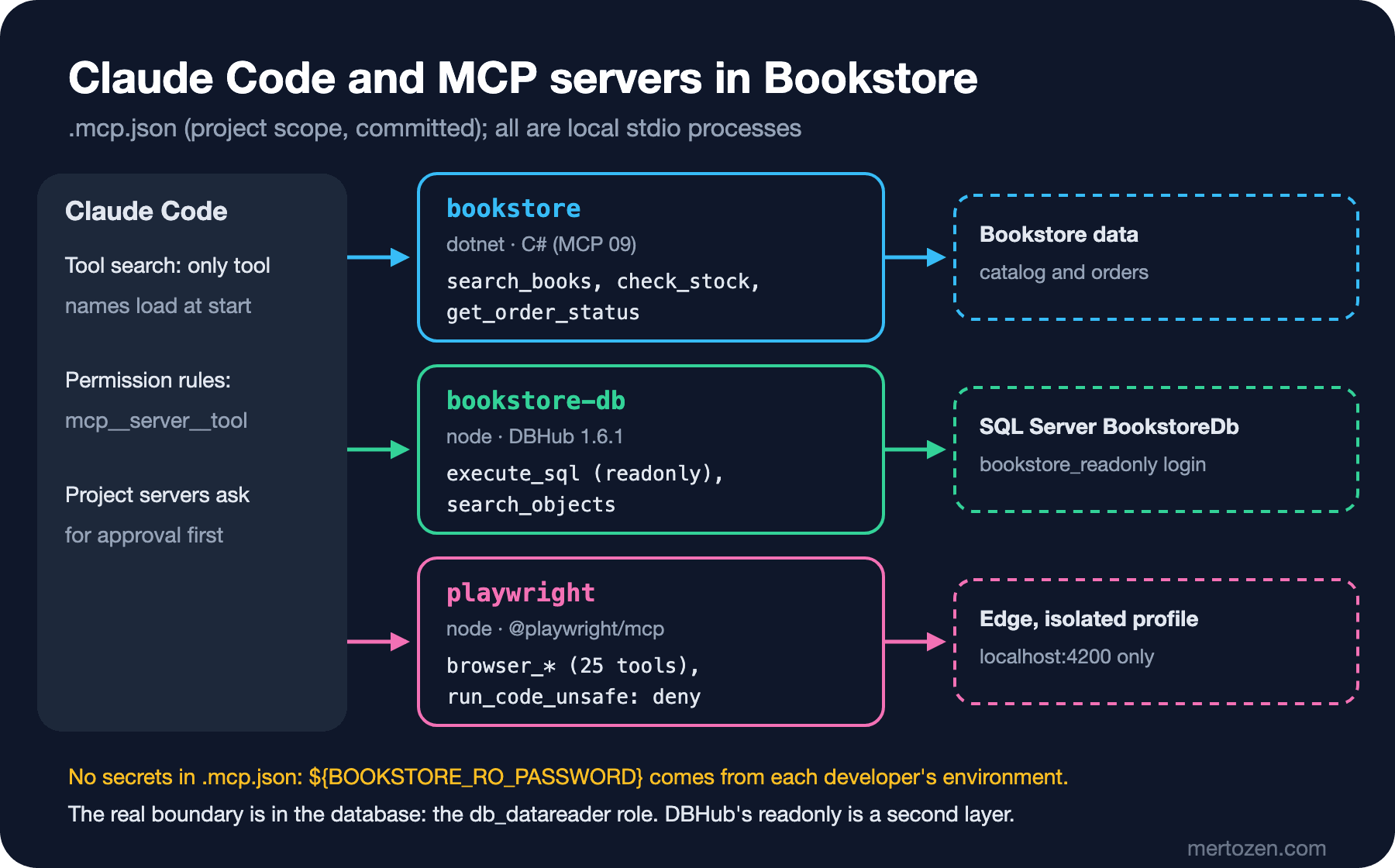
bookstore is the C# stdio server from the ninth post of the AI Agents and MCP series: it has the search_books, check_stock and get_order_status tools and lives in the repository under src/Bookstore.Mcp.Server. We run the compiled DLL instead of dotnet run; as we saw in that post, with stdio the stdout belongs to protocol messages only, and we don't want build output mixed into it. One dotnet build src/Bookstore.Mcp.Server before the session is enough.
The ${CLAUDE_PROJECT_DIR:-.} form comes from the documentation: Claude Code puts this variable into the stdio server's own environment but doesn't hold it in its own, so in .mcp.json it has to be written with a default inside command and args. ${VAR} and ${VAR:-default} expansion is supported in the command, args, env, url and headers values of .mcp.json.
We start the two Node.js-based servers with node from packages pinned in the repository, not with npx -y. That way no package is downloaded from the internet on every session and everyone uses the same version. tools/mcp/package.json:
{
  "name": "bookstore-mcp-tools",
  "private": true,
  "description": "MCP servers that Claude Code starts for the Bookstore repository",
  "dependencies": {
    "@bytebase/dbhub": "1.6.1",
    "@playwright/mcp": "0.0.85"
  }
}
A new developer runs npm install --prefix tools/mcp once; node_modules is in .gitignore. DBHub 1.6.1's package.json requires Node.js 22.5 or later.
Bookstore: Read-Only SQL Server
The answer to the third question has two layers. The first is the database itself: the login Claude uses must only be able to read. tools/mcp/sql/create-readonly-login.sql:
/* Read-only login for the bookstore-db MCP server. Local development databases only.
   sqlcmd -S localhost -i tools/mcp/sql/create-readonly-login.sql -v ReadOnlyPassword="..." */
CREATE LOGIN bookstore_readonly WITH PASSWORD = '$(ReadOnlyPassword)';
GO
USE BookstoreDb;
GO
CREATE USER bookstore_readonly FOR LOGIN bookstore_readonly;
ALTER ROLE db_datareader ADD MEMBER bookstore_readonly;
GO
The password is not in the script; it is passed at run time with sqlcmd's -v parameter. The db_datareader role grants SELECT on every table in the database and nothing else. Create this login only on your local development database; an MCP server connected to production is out of scope here.
The second layer is DBHub's own setting. The database example on the MCP page of the Claude Code documentation also uses DBHub. tools/mcp/dbhub.toml:
# Local SQL Server, read-only login (tools/mcp/sql/create-readonly-login.sql).
# The password comes from the BOOKSTORE_RO_PASSWORD environment variable.
[[sources]]
id = "bookstore"
dsn = "sqlserver://bookstore_readonly:${BOOKSTORE_RO_PASSWORD}@localhost:1433/BookstoreDb"

[[tools]]
name = "execute_sql"
source = "bookstore"
readonly = true
max_rows = 200

[[tools]]
name = "search_objects"
source = "bookstore"
With readonly = true, DBHub checks each statement against an allowlist of read commands and, according to its documentation, also uses the database's own read-only mode; max_rows limits the rows a single query can return. When we gave the same [[tools]] settings to DBHub 1.6.1 locally with a SQLite sample, a DELETE statement was refused with the READONLY_VIOLATION code and the table didn't change. The real boundary is still the login: if DBHub's classifier makes a mistake, db_datareader doesn't allow writes.
The password goes into neither .mcp.json nor dbhub.toml. The line "BOOKSTORE_RO_PASSWORD": "${BOOKSTORE_RO_PASSWORD}" in .mcp.json takes the value from your environment variable and passes it to the server process, and DBHub fills the ${...} expression in the TOML from its own environment. If the password contains characters such as @ or :, it needs URL encoding inside the DSN.
Bookstore: Testing Angular in a Browser
There are two ways to have Claude check the Angular UI. The Claude in Chrome integration (claude --chrome) uses your real Chrome or Edge; it can reach sites you are signed into, it requires a direct Anthropic subscription and /login, it doesn't work with an API key, and it isn't supported in WSL. Playwright MCP instead starts a separate browser process. In Bookstore we chose the second: --isolated doesn't write the profile to disk, so your sessions and cookies aren't in that browser. Alternatives such as the Chrome DevTools MCP are in the tenth post of the Browser DevTools series.
--allowed-origins limits the origins the browser may request to http://localhost:4200, but Playwright MCP's own documentation states plainly that this isn't a security boundary and doesn't affect redirects. The server's tool list has 25 tools, among them browser_run_code_unsafe and browser_file_upload. We turn these two off in .claude/settings.json and allow the read-only tools; the lines below are added to the existing allow and deny lists:
{
  "permissions": {
    "allow": [
      "mcp__bookstore__search_books",
      "mcp__bookstore__check_stock",
      "mcp__bookstore-db__search_objects"
    ],
    "deny": [
      "mcp__playwright__browser_run_code_unsafe",
      "mcp__playwright__browser_file_upload"
    ]
  }
}
Screenshots and DOM snapshots are large outputs; following the logic of the sixth post, we give the browser work to a subagent. .claude/agents/ui-tester.md:
---
name: ui-tester
description: Walks through a flow of the running Angular client at http://localhost:4200 in a browser through the playwright MCP server and reports console errors and the step that failed. Use after UI changes while the dev server is running.
tools: Read, Grep, Glob, mcp__playwright__*
model: sonnet
mcpServers:
  - playwright
---

You test the Bookstore Angular client in a browser. You never edit files.

Open only pages under http://localhost:4200. If the page does not load,
report that the dev server is down and stop.

For the flow in the task (for example: search for "Dune", add it to the cart,
open the cart):
1. Do each step with the browser tools and take a snapshot after it.
2. Read the console messages after each step.
3. Stop at the first step that fails.

Report, at most 20 lines: the steps that passed, the failing step with the
expected and actual result, and every console error with its source file.
A server given by name in mcpServers shares the main session's connection; mcp__playwright__* in the tools list opens all of that server's tools to the subagent. If you want to keep the server out of the main conversation entirely, the documentation suggests defining it inline in the subagent's frontmatter instead of in .mcp.json; in that case a project subagent's inline server connects only after the workspace trust dialog is accepted.
Large Outputs, Long Calls and MCP Tasks
When an MCP tool's output passes 10,000 tokens, Claude Code shows a warning; the default upper limit is 25,000 tokens and changes with MAX_MCP_OUTPUT_TOKENS. A successful result over the limit doesn't enter the conversation; it is written to a file in the session folder and Claude reads that file when needed. If the tool doesn't declare its own limit, text results over 50,000 characters also go to a file regardless of token count. That is why max_rows = 200 is a context setting, not only a safety one.
An MCP call in the main conversation that takes longer than two minutes moves to the background, and its result arrives as a task notification; it shows up in /tasks. If the server supports the MCP tasks extension, the work keeps running on the server, and on a remote server it continues even after you leave the session; according to the documentation this feature has been in public beta in the terminal since v2.1.304.
In Production
The documentation is clear on the first two questions. In an interactive session Claude Code asks for approval before using project servers from .mcp.json; an unapproved server shows as ⏸ Pending approval in claude mcp list. A setting such as enableAllProjectMcpServers committed to the repository is ignored in an untrusted folder, so a cloned repository can't approve its own servers. But in claude -p, the Agent SDK and cloud sessions there is no one to show that question to, so project servers load without asking. If you are going to run claude -p in a repository you didn't write, turn the server off with disabledMcpjsonServers or load only the configuration you pass yourself with --strict-mcp-config.
In the url and headers values of remote servers, Claude Code doesn't expand its own credentials, such as ANTHROPIC_API_KEY, and reads them as empty; a .mcp.json can't send these variables to some other server. Pass a secret the server needs through a variable with a name of your own.
The tool descriptions of a server you don't trust enter Claude's context and can carry instructions. The in-depth treatment of tool poisoning and least privilege is in the thirteenth post of the AI Agents and MCP series. On the organization side, managed-mcp.json can deploy a fixed set of servers, and allowedMcpServers with allowManagedMcpServersOnly can allow only approved servers; those settings are in the eleventh post.
Common Pitfalls
Writing a password into .mcp.json. The file is committed; the secret should come from an environment variable.
Connecting with a privileged user. With a server connected as sa or db_owner, DBHub's readonly setting is the only protection left; narrow the database login.
A url but no type. According to the documentation an entry without a type field counts as stdio; if you give a url and don't write "type": "http", the server is skipped.
Adding MCP for work that has a CLI. gh and dotnet are already there; every new server is an approval, a trust decision and a maintenance cost.
A Small Experiment
★☆☆ Run npm install --prefix tools/mcp, start Claude Code, look at the state of the three servers in /mcp, and compare it with the claude mcp list output.
★★☆ Ask the bookstore-db server to "list the indexes of the Book table". Then ask for a query containing DELETE, and work out from the error text whether the refusal came from DBHub or from the database.
★★★ Instead of connecting ui-tester to the server in .mcp.json, define the Playwright server inline in the subagent's frontmatter. Note the difference in /context and in the tool list of the main session.
So far everything has been in one session and one checkout. In the ninth post we open parallel sessions in the same repository with claude --worktree, and move on to the Desktop app, cloud sessions at claude.ai/code and following work from mobile.