

An Overview of Claude Managed Agents: Agents, Environments, Sessions and When to Choose Them
In Claude Managed Agents you create the agent once as a versioned definition and open a session pinned to that version on every run; Anthropic manages the loop, the container and the event history, and credentials go into a vault, not the prompt. client.Beta.Agents and Sessions in the C# SDK, agents and cron deployments from files with ant apply, session-hour pricing, and a comparison with your own loop or Agent Framework.
Version note: The code in this post was built with .NET 10, Anthropic C# SDK 13.8.0 and Claude API version 2026-10-21, and its unit tests were run. The tests use the SDK's real client with a fake HttpMessageHandler that never touches the network; the agent response is taken from the example in the Managed Agents documentation. The ant apply files follow the documented format. Claude Managed Agents is in beta (managed-agents-2026-04-01); concepts, prices and limits were taken on 15 November 2026 from the platform.claude.com documentation. This post is based on the official documentation.
Guess First
On the team of Bookstore, the online bookstore used as the shared example across this site's series, Selin asks the same question every morning: which issues were opened yesterday, and which one blocks the release? Emre is thinking of extending the tool loop from the fifth post into an agent that does this. But the agent has to clone the repository, read files and maybe run commands; that needs a sandbox, a scheduler, a place that stores session history, and a way to keep the GitHub token safe.
What is your guess? How much of this infrastructure should you write yourself? Do you create the agent again every morning? What is wrong with putting the GitHub token into the system prompt? This post is an overview of Claude Managed Agents: its concepts, minimal use from the C# SDK, and when to choose it. Agent patterns and the loop itself were covered in the AI Agents and MCP series.
What Is Managed Agents?
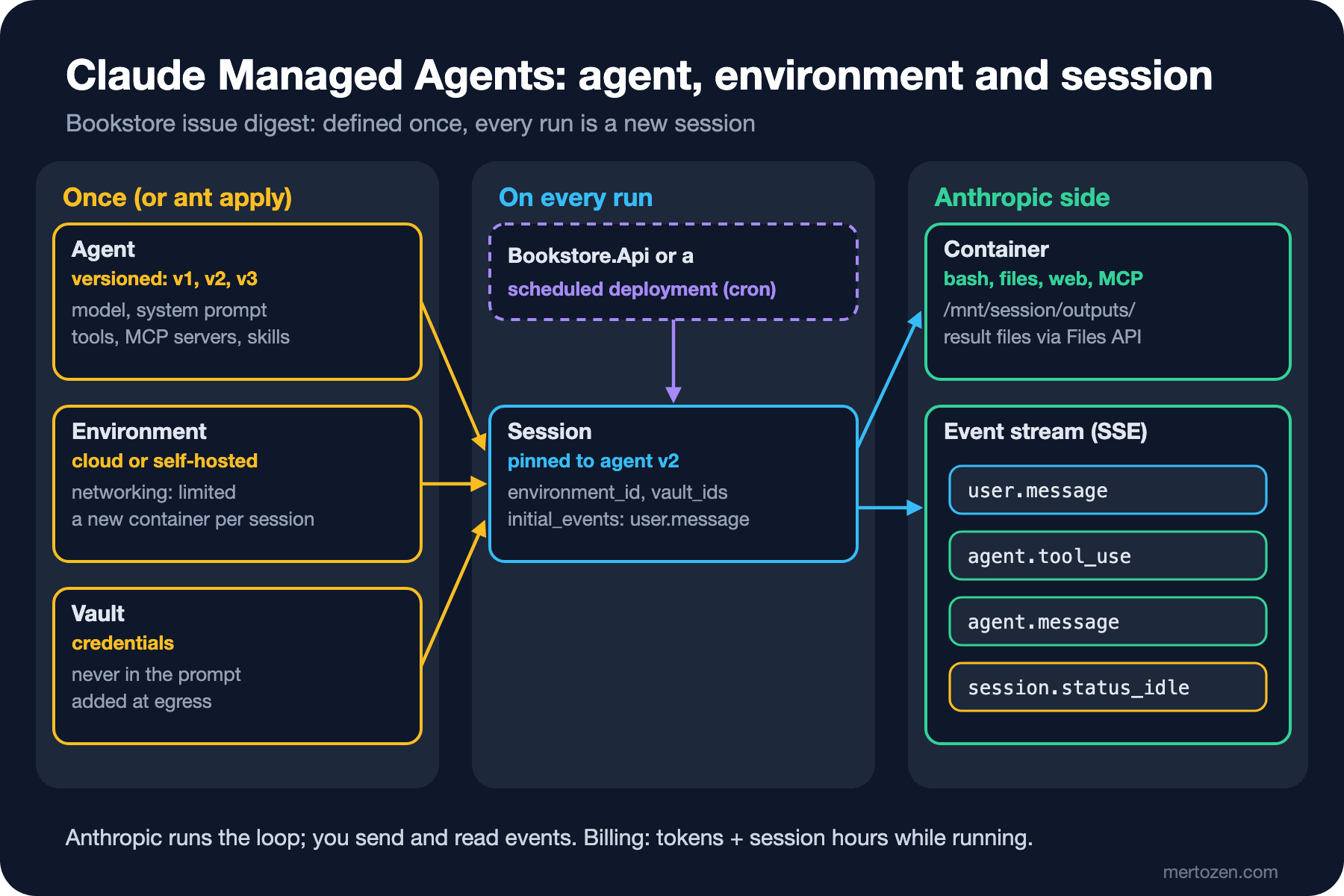
According to the documentation, Managed Agents is a ready-made harness and infrastructure for running Claude as an autonomous agent. You do not write the agent loop, tool execution or the runtime; you get a managed environment where Claude can read files, run commands, search the web and run code. The harness does optimizations such as prompt caching and compaction by itself. The documentation separates the two routes clearly: the Messages API for fine-grained control and your own loop, Managed Agents for long-running and asynchronous work.
There are four concepts:
| Concept | What |
|---|---|
| Agent | Model, system prompt, tools, MCP servers and skills; a versioned definition |
| Environment | Where sessions run: Anthropic's cloud sandbox or a self-hosted sandbox on your own infrastructure |
| Session | A running agent instance doing a specific job inside an environment |
| Event | Messages between your application and the agent: user turns, tool results, status updates |
All endpoints need the managed-agents-2026-04-01 beta header; according to the documentation the SDK adds it by itself, and our test confirms that. The built-in tools are bash, file operations (read, write, edit, glob, grep), web search and web fetch, and MCP servers. An important note in the documentation concerns data: because sessions are stateful resources, Managed Agents is not covered by ZDR or HIPAA. The exception is self-hosted Managed Agents, released on 12 November 2026: you run the service, the session history and the sandboxes on your own infrastructure, while the model runs at Anthropic or at a provider you choose.
Agent: A Versioned Definition Created Once
The documentation describes an agent as a resource you create once and reuse by its id. Bookstore's issue digest agent:
    public static AgentCreateParams BuildAgent() => new()
    {
        Name = "Bookstore issue digest",
        Model = BetaManagedAgentsModel.ClaudeSonnet5_5,
        System = """
            You write a short morning digest of Bookstore's open issues for the development team.
            Group the issues by area (catalog, ordering, payments, support), list what changed since yesterday,
            and flag anything that blocks a release. Do not change, close or comment on any issue.
            Write the digest to /mnt/session/outputs/digest.md.
            """,
        Tools =
        [
            new BetaManagedAgentsAgentToolset20260401Params
            {
                // The digest needs the repository, not the web.
                Configs =
                [
                    new BetaManagedAgentsWebSearchToolConfigParams { Enabled = false },
                    new BetaManagedAgentsWebFetchToolConfigParams { Enabled = false },
                ],
            },
        ],
    };

    // Creates the agent only the first time; every later call returns the stored id and version.
    public async Task<AgentReference> EnsureAsync(CancellationToken cancellationToken)
    {
        if (registry.Find(RegistryKey) is { } existing)
        {
            return existing;
        }

        BetaManagedAgentsAgent created = await claude.Beta.Agents.Create(BuildAgent(), cancellationToken);
        AgentReference agent = new(created.ID, created.Version);
        registry.Save(RegistryKey, agent);
        logger.LogInformation("Created agent {AgentId} version {Version}", agent.Id, agent.Version);
        return agent;
    }
EnsureAsync creates the agent only on the first call and keeps the id and the version in a registry. Creating a new agent every morning is both unnecessary and confusing: hundreds of identical agents pile up and you can no longer tell which session ran with which definition. The fake response in the test is the documented example:
{"id":"agent_01HqR2k7vXbZ9mNpL3wYcT8f","type":"agent","name":"Bookstore issue digest",
"model":{"id":"claude-sonnet-5-5","effort":{"type":"medium"},"speed":"standard"},
"system":"You write a short morning digest of Bookstore's open issues.","description":null,
"tools":[{"type":"agent_toolset_20260401","default_config":{"permission_policy":{"type":"always_allow"}}}],
"skills":[],"mcp_servers":[],"multiagent":null,"metadata":{},"version":1,
"created_at":"2026-11-15T18:24:10.412Z","updated_at":"2026-11-15T18:24:10.412Z","archived_at":null}
The response repeats the configuration you sent, adds id, version and the date fields, and fills in model fields you did not send (here effort: medium) with their defaults. The always_allow in the toolset's default_config is the default permission policy; the agent's tool calls run without waiting for approval. Our agent will access GitHub with read-only rights, so this is acceptable; for an agent with write rights, a policy that asks for approval should be considered.
version starts at 1 and increases with every update that changes the configuration. If you send the version you last read with an update and the agent has changed in the meantime, you get 409; if you do not send it, the update is applied unconditionally. An archived agent becomes read-only: no new sessions can be opened, but running ones continue.
Environment, Session and Events
An environment is also created once; many sessions can use the same environment, but each session gets its own isolated Linux container. In a cloud environment, networking can be limited; the documented example shows allowing package managers.
The request that opens a session:
    // Pinning the version lets a new agent version roll out on purpose, not by accident.
    public static SessionCreateParams BuildSession(AgentReference agent, string environmentId, string vaultId, DateOnly day) => new()
    {
        Agent = new BetaManagedAgentsAgentParams { ID = agent.Id, Version = agent.Version },
        EnvironmentID = environmentId,
        // Credentials live in the vault and are injected outside the model's context; never in the prompt.
        VaultIds = [vaultId],
        Title = $"Issue digest {day:yyyy-MM-dd}",
        InitialEvents =
        [
            new BetaManagedAgentsUserMessageEventParams
            {
                Content = [new BetaManagedAgentsTextBlock { Text = $"Write the issue digest for {day:yyyy-MM-dd}." }],
            },
        ],
    };
Giving the agent id as a plain string opens the session with the agent's latest version. Giving it as an object with a version pins it to that version. The documentation describes this as the way to control rollouts of new versions: you write v3, try it in a few sessions, then update the version in the registry. With initial_events we open and start the session in a single call; according to the documentation, up to 50 user.message or user.define_outcome events can be given. The body that goes out:
{"agent":{"type":"agent","id":"agent_x","version":3},"environment_id":"env_x","vault_ids":["vlt_x"],"title":"Issue digest 2026-11-16","initial_events":[{"type":"user.message","content":[{"type":"text","text":"Write the issue digest for 2026-11-16."}]}]}Once the session is open, communication runs on events. You send user.* events; the session streams status, agent message and tool use events to you over Server-Sent Events. When the work is done, session.status_idle arrives. The server keeps the event history, and you can read it from the beginning whenever you want. Files the agent produces are written under /mnt/session/outputs/ in the sandbox and are listed by session id and downloaded with the Files API from the eighth post.
A session can also get a budget: when spend, priced at list rates, reaches the limit, the session starts no new model requests and stops with the budget_reached reason. For an agent that runs at night, this is a hard ceiling on top of the cost tracking from the seventh post.
Vault: Secrets Stay Out of the Prompt
The agent will access GitHub; where do we put the token? Putting it into the system prompt or the first message is the worst option: the token enters the model's context, is stored in the event history, and can be leaked through prompt injection. This is exactly the hidden-context disclosure from the third post of the LLM Application Security series.
Managed Agents' answer is the vault. According to the documentation, a vault is a resource that collects the credentials of one end user; it is referenced with vault_ids when the session is opened. OAuth credentials for MCP servers are stored there, and Anthropic handles token refresh. Credentials of the environment variable type stay in the sandbox only as a placeholder; the real value is substituted at egress when the agent sends a request out. Even code running in the sandbox does not see the real value. Because the vault is given per session, you can manage the product at the agent level and the users at the session level.
Managing the Agent as Files: ant apply
Creating the agent with C# code is not the only option. The ant apply command of the ant CLI creates and updates agents, environments, skills and deployments from files in the repository; changes go through the same review as code. We added a claude/ folder to the Bookstore repository. An agent is a Markdown file: the frontmatter is the configuration, the body is the system prompt:
---
name: Bookstore issue digest
model: claude-sonnet-5-5
tools:
  - type: agent_toolset_20260401
    configs:
      - name: web_search
        enabled: false
      - name: web_fetch
        enabled: false
---
You write a short morning digest of Bookstore's open issues for the development team.
Group the issues by area (catalog, ordering, payments, support), list what changed since yesterday,
and flag anything that blocks a release. Do not change, close or comment on any issue.
Write the digest to /mnt/session/outputs/digest.md.
An environment is a YAML file:
# yaml-language-server: $schema=https://platform.claude.com/schemas/ant/beta/environment.json
name: bookstore-digest-env
description: Cloud container with limited networking for the nightly issue digest.
config:
  type: cloud
  networking:
    type: limited
    allow_package_managers: false
The scheduled deployment that starts the morning digest at 06:00 every working day:
---
name: Nightly issue digest
agent: ../agents/issue-digest.md
environment_id: ../environments/bookstore-cloud.yaml
schedule:
  type: cron
  expression: "0 6 * * 1-5"
  timezone: Europe/Istanbul
---

Write the issue digest for today.
According to the documentation, files refer to each other by relative path; ant apply pins the agent reference to the version it applied in that run. The cron expression is interpreted in a time zone, and the smallest interval is one minute. ant apply first shows a plan and asks for approval; --dry-run prints the plan without changing anything. The first run writes a claude-lock.json that records which file created which resource. The documentation asks for this file to be committed; the next run, on your machine or in CI, finds the resources from this file instead of creating them again. It is the file counterpart of the registry in EnsureAsync.
With a deployment you do not even need code that opens the session; the StartAsync above is for cases where you want to trigger the same work from Bookstore.Api.
When Managed Agents?
Across the series we have seen four different routes, and a fifth comes in the planned twelfth post of the Claude Code series:
| Route | Who runs the loop | When |
|---|---|---|
| Messages API, a single call or a workflow (01–09) | Your code, fixed steps | The steps are known; extraction, classification, reports |
| Your own tool loop (05) | Your code | A few rounds, tools in your process, full control |
| Microsoft Agent Framework (AI with .NET 11–13) | Your process, with the framework | A provider-independent agent, .NET hosting |
| Claude Agent SDK (Claude Code series) | Your process, with the Claude Code harness | Using Claude Code's tools as a library |
| Managed Agents | Anthropic (or the self-hosted service) | Long-running, asynchronous work; a sandbox, scheduling, session history are needed |
The cost has two parts. Tokens are billed at the normal model prices and the prompt caching multipliers apply as they are; there is no batch discount, because sessions are interactive. On top of that there is session runtime: according to the documentation 0.08 USD per session-hour, counted only while the session is running; time spent idle, rescheduling and terminated is not counted. In Managed Agents, the code execution container hours from the ninth post are not billed separately.
Vendor dependency belongs in the calculation too. The agent definition, the event model and the vault are specific to Anthropic. For an internal job like Bookstore's issue digest this is acceptable; for an agent at the core of the product, a provider-independent route such as Microsoft Agent Framework should be considered as well. The self-hosted option keeps the data in place but does not remove the dependency.
Features the plan covers but that we only name here: outcomes (a grader that evaluates the result against a rubric in a separate context, and the agent iterating until it reaches the target), multiagent orchestration and dynamic workflows (the agent distributing work to sub-agents), and memory stores. All of them are under the same beta header.
In Production
Store agent and environment ids durably. The in-memory registry is this post's example; production needs a table or claude-lock.json.
Pin the version. Open sessions with a specific agent version and roll out new versions on purpose. For deployments, ant apply does this for you.
Set a budget. An agent that runs at night and gets stuck in a loop for hours costs both tokens and session hours. The session budget is the ceiling.
Review the permission policy. The default is always_allow. If the agent has a tool with write rights, use a policy that asks for approval.
Delete the event history. Sessions and transcripts are kept until you delete them; delete sessions that may contain customer data when the work is done.
Common Pitfalls
Creating a new agent on every run. An agent is created once; a session is opened on every run.
Putting a secret into the prompt. The token enters the context and the event history. Use a vault.
Opening sessions with the agent's latest version. Anyone who updates the agent also changes production behavior.
Not committing claude-lock.json. The next ant apply creates the resources again.
Choosing Managed Agents for every agent need. For a few-round, in-process job, the loop from the fifth post is simpler and cheaper.
A Small Experiment
★☆☆ Add a budget to IssueDigestAgent.BuildSession. Look at the SDK's BetaManagedAgentsBudgetLimit type and confirm with a test that it produces the same JSON as the documented example.
★★☆ Add version updates to IAgentRegistry: change the system prompt with claude.Beta.Agents.Update and store the new version it returns. Add a 409 response to the fake handler and test the concurrent update case.
★★★ Design a BackgroundService that reads session events: open the event stream, collect the agent.message texts, and when session.status_idle arrives, download /mnt/session/outputs/digest.md with the Files API and send it to the team. Describe how you would continue where you left off by reading the history from the beginning if the connection drops.
With Managed Agents, the series' tour of features is complete. In the eleventh and final post we take all these parts to production: the SDK's exception hierarchy, automatic retries and rate limits, per-request cost tracking, OpenTelemetry, and the IChatClient bridge that connects Claude to Microsoft.Extensions.AI.