

CLAUDE.md and Memory: Teaching Claude Code Your Project
CLAUDE.md is context, not a rules engine: Claude reads it as a message after the system prompt and tries to follow it, but a hard block needs a permission rule or a hook. File locations and load order, the 200-line guideline, imports, path-specific rules with .claude/rules/, AGENTS.md support, auto memory and a short CLAUDE.md for Bookstore.
Version note: This post describes Claude Code 2.1.325 (13 November 2026); file locations, loading rules and limits were checked on 15 November 2026 against the "How Claude remembers your project" and Commands pages at code.claude.com/docs. This post is based on the official documentation.
Guess First
Ayşe is the person rolling out Claude Code on Bookstore, the online bookstore used as the shared example across this site's series. Her first move was a 600-line CLAUDE.md at the repo root: the whole architecture document, a text version of each module's class diagram, Angular rules, SQL Server settings and, at the very bottom, one line: "Never edit existing migration files by hand." In the second week, in Emre's session, Claude changed an old migration file to fix a column name. Ayşe's reaction: "So I need to write the file in even more detail."
What is your guess? Would a longer, more detailed CLAUDE.md prevent this mistake? Why did Claude skip that line, and where is the right place if you want to forbid something for certain? The answer is in the "Writing Instructions" section.
We covered the tool-independent side of giving an agent context (the AGENTS.md idea, what belongs in an instruction file) in the second post of the AI-Assisted Development series, and the Copilot equivalent in the fourth post of the GitHub Copilot series. This post focuses on Claude Code's mechanics: which file lives where, when it loads and how much room it takes.
Two Memories: CLAUDE.md and Auto Memory
Every Claude Code session starts with a fresh context window. Two mechanisms carry knowledge from session to session, and both load at the start of every session:
CLAUDE.md files | Auto memory | |
|---|---|---|
| Who writes it | You (and your team) | Claude |
| Content | Instructions and rules | What it learned: your preferences, your corrections |
| Scope | Organization, user or project | Per repo, shared across worktrees |
| How much loads | All of each file loaded at startup | The first 200 lines or first 25KB of MEMORY.md |
| Use it for | Build commands, coding rules, architecture decisions | Context that can't be derived from code, personal preferences |
The most important sentence in the docs sits right above this table: Claude treats these two sources as context, not as enforced configuration. The more specific and concise an instruction, the more consistently it is followed; but no instruction blocks an action for certain.
Where CLAUDE.md Lives and When It Loads
There are four locations. The managed policy file the organization distributes centrally is C:\Program Files\ClaudeCode\CLAUDE.md on Windows; your personal preferences for every project go in ~/.claude/CLAUDE.md (%USERPROFILE%\.claude\CLAUDE.md on Windows); team-shared project instructions go in ./CLAUDE.md or ./.claude/CLAUDE.md; and project notes that are yours alone and never committed go in ./CLAUDE.local.md. Adding that last one to .gitignore is up to you.
The loading rule has two parts. The CLAUDE.md and CLAUDE.local.md in the directory where you start Claude Code and in every directory above it load at startup. The files don't override each other; they are concatenated: the order runs from the filesystem root down to the working directory, and within one directory CLAUDE.local.md comes after CLAUDE.md. So the instruction closest to you is read last. CLAUDE.md files in folders below the working directory don't load at startup; they load when Claude reads, writes or edits a file in that folder.
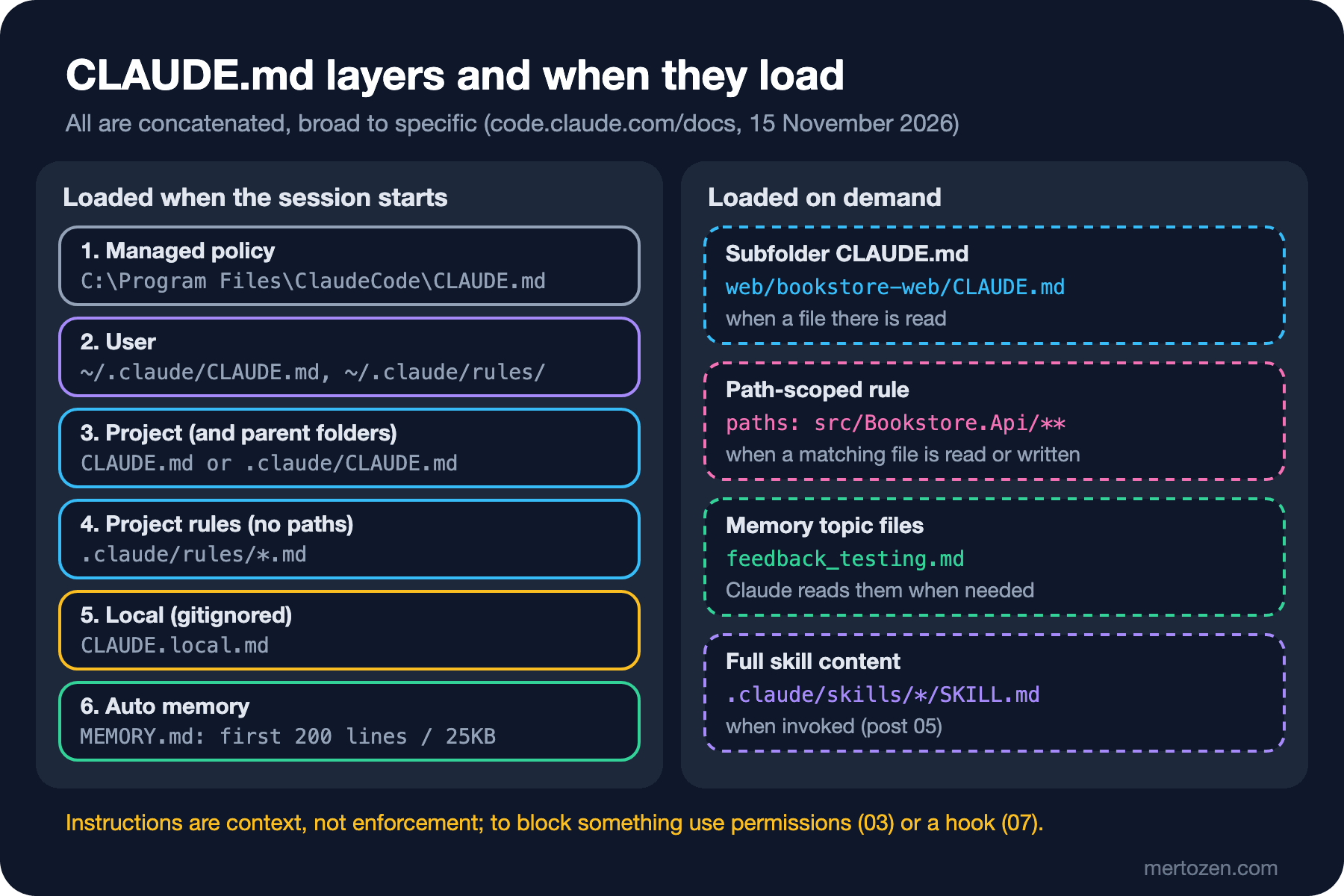
For Bookstore this means: the root CLAUDE.md is in every session; if you create a web/bookstore-web/CLAUDE.md, it never enters the context of a session working on the backend, only once Claude touches the Angular side. You can see which files loaded at startup in the Memory files list of /context all inside a session; a subfolder file doesn't appear in that list, and when it loads a line with its path shows up in the terminal. The /memory command lists all of these files too, opens the one you pick in your editor and creates it if it doesn't exist yet.
A Short CLAUDE.md for Bookstore
To get started you can run /init: Claude analyzes the codebase and generates a file with build commands, test instructions and the conventions it finds; if a file already exists, it suggests improvements instead of overwriting it. But the generated file is a draft. The docs' yardstick is clear: stay under 200 lines per file and include only what every session needs. Bookstore's root file can start like this:
# Bookstore

Online bookstore: ASP.NET Core 10 API, Angular 22 client, SQL Server.
See @README.md for local setup.

<!-- Maintainers: keep this file under 100 lines. Area rules live in .claude/rules/. -->

## Build and test
- Build: `dotnet build Bookstore.slnx`
- API tests: `dotnet test` (needs SQL Server; the connection string `ConnectionStrings:BookstoreDb` is in user-secrets)
- Client: `npm test` and `npm run build` in `web/bookstore-web`
- Run the relevant tests before you say a change is done, and show the test summary.

## Layout
- `src/Bookstore.Api`: endpoints, EF Core `BookstoreContext`, migrations in `src/Bookstore.Api/Data/Migrations`
- `src/Bookstore.Contracts`: DTOs shared with the client; no reference to EF Core
- `tests/Bookstore.Api.Tests`: API tests
- `web/bookstore-web`: Angular client

## Rules
- Money is `decimal` with currency `TRY`; times are stored in UTC.
- Endpoints return `ProblemDetails` on errors.
- Never edit an existing migration; add a new migration instead.
- Never put secrets in code or appsettings files; use user-secrets locally.
- Ask before adding a NuGet or npm package.
Three details. @README.md is an import: that file loads into context together with this one. Imports organize a file but don't reduce its context cost, because the imported file loads too; paths resolve relative to the importing file and the chain goes at most four hops deep. To mention a path without importing it, wrap it in backticks. Second, block-level HTML comments are stripped before the content reaches the context, which makes them a way to leave notes for maintainers without spending tokens. Third, there is no architecture document in the file. According to the docs, the /doctor checkup proposes trimming content from a committed CLAUDE.md that Claude can already derive from the code (folder layout, dependency lists, architecture overviews); what should stay are pitfalls, rationale and conventions that differ from the tools' defaults, things the code doesn't show.
Writing Instructions: Specific, Short, Consistent
Here is the answer to the guess. Ayşe's file failed for two reasons. First, a one-line ban in a 600-line file competes with thousands of other lines in the context; the docs say plainly that long files both consume more context and reduce adherence. Second, and more important, CLAUDE.md content is not part of the system prompt; according to the docs it is delivered as a user message after the system prompt, and while Claude tries to follow it there is no guarantee. If you want to block an action in every case, the right place is a permission rule (post three) or a PreToolUse hook (post seven). A longer file doesn't fix that problem; it makes it bigger.
The yardstick the docs suggest is verifiability. "Use 2-space indentation" instead of "format code properly", "run npm test before committing" instead of "test your changes", "API handlers live in src/api/handlers/" instead of "keep files organized". The time to add something to the file is clear too: when Claude makes the same mistake a second time, when a code review catches something Claude should have known, when you type the same correction you typed last session, or when a new teammate would need the same information.
A multi-step procedure (like the steps for adding a migration) or rules that belong to one area shouldn't live in the root file; the first goes into a skill (post five), the second into a path-specific rule. Conflicts are a risk as well: if two files say different things about the same behaviour, Claude may pick one arbitrarily. Since 2.1.283, the /doctor prompt-audit command scans CLAUDE.md, CLAUDE.local.md, AGENTS.md and the rule, skill and subagent files under .claude/ for instructions written for older models, references to files or commands that don't exist and content that contradicts itself. The result is a report with proposed edits; nothing changes until you approve.
Path-Specific Rules with .claude/rules/
In a growing project you can split instructions into one Markdown file per topic under .claude/rules/; subfolders are scanned too. Rule files without frontmatter load at startup with the same priority as .claude/CLAUDE.md. The real gain comes when you add a paths list in YAML between two --- lines at the top of the file: that rule enters the context only when Claude reads, writes or edits a matching file. Bookstore's backend rules:
---
paths:
  - "src/Bookstore.Api/**/*.cs"
  - "tests/Bookstore.Api.Tests/**/*.cs"
---

# API rules

- Use file-scoped namespaces and primary constructors where they fit.
- Endpoints live in one static class per module (`CatalogEndpoints`, `OrderingEndpoints`).
- Read-only EF Core queries use `AsNoTracking()`.
- Pass the `CancellationToken` through to every async EF Core call.
- Every new endpoint gets at least one test in `tests/Bookstore.Api.Tests`.
A second file for the Angular side; with brace expansion you can cover several extensions in one pattern:
---
paths:
  - "web/bookstore-web/src/**/*.{ts,html,scss}"
---

# Angular rules

- Standalone components only; no NgModules.
- Use signals for component state and `ChangeDetectionStrategy.OnPush`.
- Use the built-in control flow (`@if`, `@for`) in templates.
- HTTP calls go through services in `src/app/core`; components never inject `HttpClient` directly.
- Every component gets a `.spec.ts` file next to it.
A few rules are explicit in the docs. In project rules, patterns resolve against the directory that contains the .claude folder. paths is the only frontmatter field Claude Code reads from a rule file; any other field is ignored without an error. If the frontmatter doesn't parse, Claude Code ignores it and loads the rule in every session as if it had no paths; a YAML block with broken indentation carries the Angular rules into backend sessions as well. You can see the parse error with claude --debug. For personal rules that apply in every project there is ~/.claude/rules/; these load before project rules, but if the two conflict it is not defined which one wins.
When the Repo Has an AGENTS.md
If the team already keeps an AGENTS.md for Copilot or another agent, Claude Code can read it directly since 2.1.277. The default is this: if there is no CLAUDE.md, .claude/CLAUDE.md or CLAUDE.local.md in or above the working directory, AGENTS.md is read; if one of them exists, only the CLAUDE.md files are read. That is why adding your own CLAUDE.local.md stops AGENTS.md from being read in your sessions. You can change the behaviour with the Project instructions setting in /config; claude-md-and-agents-md reads both.
The most portable way to share one file with every tool is a short CLAUDE.md that imports AGENTS.md. The docs recommend this over a symlink for Windows: creating a symlink on Windows needs administrator rights or Developer Mode, and unless core.symlinks is enabled Git checks out a committed symlink as a one-line plain text file.
@AGENTS.md

## Claude Code

- Use plan mode for any change under `src/Bookstore.Api/Data/Migrations`.
Auto Memory: Claude's Own Notes
Auto memory is the set of notes Claude keeps for itself while it works. It is on by default in local sessions. Claude takes four kinds of notes: your role and working preferences, the corrections you give and the approaches you confirm, ongoing work and decisions that can't be derived from the code or git history, and where to find information outside the project. It doesn't save what it can derive from the code (architecture, file paths) or what your CLAUDE.md already says.
The notes live under ~/.claude/projects/<project>/memory/: a MEMORY.md index with one line per entry and one file per topic. At the start of every session the first 200 lines or first 25KB of MEMORY.md (whichever comes first) load; topic files are read when Claude needs them. Because the folder is derived from the git repository, all worktrees and subfolders of the same repo share one memory folder. The notes are machine-local: they don't travel to another machine or to a cloud session. The main conversation's auto memory doesn't load into subagents either.
If you tell Claude to remember something like always use the Docker SQL Server on port 14333 for my local tests, the note goes to auto memory; if it should be a team-wide rule, say add this to CLAUDE.md or edit the file yourself. Lines such as "Saved 2 memories" or "Recalled 2 memories" in the interface show that Claude is writing or reading the memory folder. From /memory you can turn auto memory on or off, open the folder and read, fix or delete the notes; they are all plain Markdown. To turn it off for one project, setting "autoMemoryEnabled": false in the project settings is enough.
In Production
Manage CLAUDE.md like code. The committed file enters the context of every session on the team; review changes in a pull request and clean out lines that go stale. Updating the file when a build command changes prevents hundreds of failed attempts with the old command.
When imports or symlinked rules point outside the working directory, Claude Code shows an approval dialog the first time it meets them; if you decline, those imports stay off in that project. The dialog protects you from a file someone else committed pulling files from your machine into the context; read what you approve.
Account for compaction in long sessions. According to the docs, after /compact the root CLAUDE.md is re-read from disk and added back to the context; subfolder files and rules with paths are gone until a matching file is touched again. An instruction you gave only in the conversation can be lost in compaction; if it should persist, write it into the file.
Because CLAUDE.local.md is gitignored, it exists only in the worktree where you created it. If you want your personal notes in every worktree, import a file from your home folder. For organization-wide instructions there is the managed CLAUDE.md; developers can't exclude it, but it is still guidance, and enforced rules go in permissions.deny in managed settings.
Common Pitfalls
Turning CLAUDE.md into a wiki. Architecture documents, folder trees and dependency lists are things Claude can read from the code; in the file they take up room and reduce adherence.
Taking an instruction for an enforced rule. A line starting with "never" is a request. For a hard block, use a deny rule or a hook.
Conflicting nested files. If the root says ng test and a subfolder says npm test, Claude picks one, and which one is not defined. /doctor prompt-audit exists to find these conflicts.
Broken frontmatter. A paths block with shifted indentation silently spreads the rule to every session.
Treating imports as savings. @docs/architecture.md splits the file but still loads it into context. The real savings are in path-specific rules and skills.
A Small Experiment
★☆☆ Start a session in your own repo, run /context all and look at the Memory files list. Is a file you didn't expect loading, such as a forgotten CLAUDE.md in a parent folder?
★★☆ Move the area-specific rules in your root CLAUDE.md into two rule files with paths. Then start a session that works only on the backend and check that the Angular rules are not in context, and that they enter once Claude reads a .ts file.
★★★ Run /doctor prompt-audit and read the report. For each proposed edit ask "can this line be derived from the code, or is it a rule the code doesn't show?"; keep only the second group in the file.
CLAUDE.md shapes what Claude tries to do, not what it is allowed to do. In post three we move to the real control layer: permission modes, the settings.json layers, allow, ask and deny rules, and stopping Bookstore's SQL Server connection details from being read.