

Claude Code in a Team: The Shared .claude Folder, Plugins, Output Styles and Managed Settings
To share a Claude Code setup in a team, package the skills, subagents, hooks and MCP configuration into a plugin and distribute it from a marketplace in the repository; the organization then limits logins, versions, marketplaces and hooks with managed settings. The bookstore-dev plugin for Bookstore, renamed tools and permission rules, code intelligence plugins, Learning and a custom output style, allowManagedHooksOnly and its effect on CI.
Version note: This post describes Claude Code 2.1.325 (13 November 2026); the plugin, marketplace, output style and managed settings details were checked on 15 November 2026 against the Plugins overview, Create a Claude Code plugin, Add components to a plugin, Create a marketplace, Plugin loading reference, Manage Claude Code plugins for your organization, Code intelligence plugins, Plugin security and trust, Output styles, Deploy managed settings and All settings pages at code.claude.com/docs. This post is based on the official documentation. The JSON files were parsed, plugin.json, marketplace.json and the settings files were validated against the schemastore.org schemas, the frontmatter was read with a YAML parser, and the commands in hooks.json were run with PowerShell 7.7 on sample hook input.
Guess First
In Bookstore, the online bookstore used as the shared example across this site's series, Ayşe moved the skills, subagents, hooks and MCP configuration from the earlier posts into one plugin and tried it on her own machine with claude --plugin-dir ./plugins/bookstore-dev. Three things stood out: when she asked Claude to edit a committed migration, the same denial came twice; the search_books tool, which used to run without a prompt, asked for approval again; and after the pull request was merged, the migration guard never fired in the @claude job in CI.
What is your guess? Why did the denial come twice, why does the permission rule no longer match, and why didn't the hooks run in CI? The answers are in the plugin section and in In Production.
What Goes into the Repository and What Doesn't
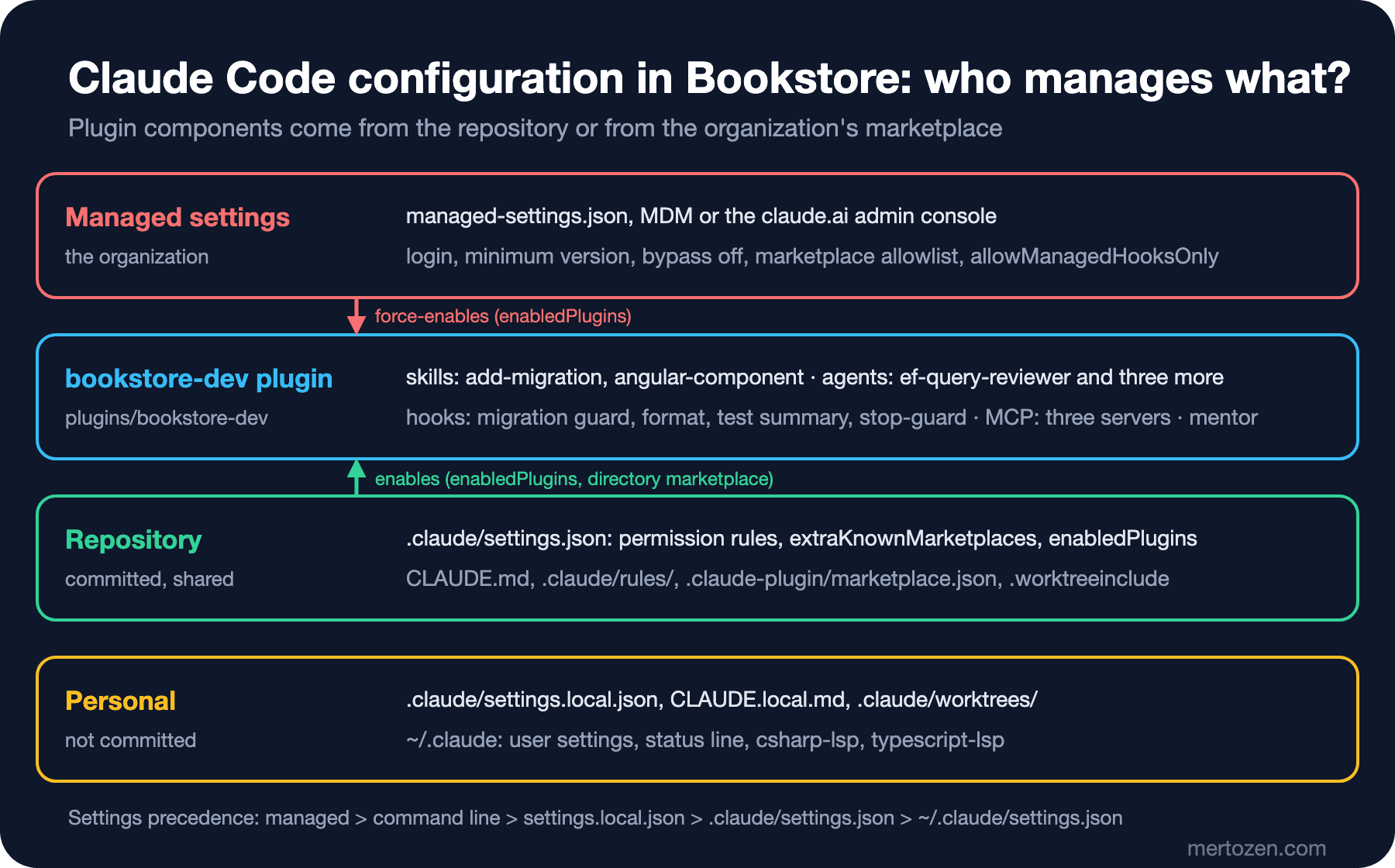
Team use starts with separating the shared configuration from the personal one. In Bookstore, this is what gets committed and what doesn't:
- Committed:
CLAUDE.md,.claude/rules/,.claude/settings.json,.worktreeinclude,.claude-plugin/marketplace.jsonandplugins/bookstore-dev/. - Not committed:
.claude/settings.local.json,CLAUDE.local.md,.claude/worktrees/, the plugin'snode_modulesfolder and everything under~/.claude/.
When Claude Code writes settings.local.json itself, it adds the file to the global git excludes; if you created it by hand, add it to .gitignore yourself. Settings precedence is the same as in the third post: managed settings, the command line, settings.local.json, .claude/settings.json and finally ~/.claude/settings.json.
When You Need a Plugin
A plugin is a folder that Claude Code installs and loads as one unit: skills, subagents, hooks, MCP and LSP servers, output styles and the .claude-plugin/plugin.json manifest. All of these also work without a plugin, and the docs recommend staying standalone while the setup serves one project or only you. A plugin makes sense when you want to share the setup with a team, use it in several places or ship versioned releases.
Bookstore is a single repository, but there are two concrete reasons to switch. The first is on the organization side: with allowManagedHooksOnly, which we'll see below, project hooks don't run, while hooks from plugins that managed settings force-enable do. The second is maintenance: the skills, agents, hooks and MCP configuration turn on and off as one unit and show up with their components in the /plugin screen.
There is a cost too. An enabled plugin is part of every session: the name and description of each skill and agent that Claude can invoke on its own sit in context on every turn, its MCP servers start with every session, and its hooks fire on every event. Everything the plugin runs, it runs with your user privileges.
The bookstore-dev Plugin
The plugin lives inside the repository, under plugins/bookstore-dev. The component folders sit at the plugin root; .claude-plugin/ holds only the manifest, and per the docs components placed there don't load:
plugins/bookstore-dev/
├── .claude-plugin/plugin.json
├── skills/add-migration/SKILL.md
├── skills/angular-component/{SKILL.md,reference.md}
├── agents/{ef-query-reviewer,angular-a11y-checker,test-runner,ui-tester}.md
├── hooks/hooks.json
├── scripts/{protect-migrations,format-file,short-test-output,stop-guard}.ps1
├── output-styles/mentor.md
├── .mcp.json
├── dbhub.toml
├── sql/create-readonly-login.sql
├── package.json
└── package-lock.json
The only required manifest field is name; it becomes the prefix of every skill and agent in the plugin:
{
  "name": "bookstore-dev",
  "displayName": "Bookstore Dev",
  "description": "Skills, subagents, hooks and MCP servers for working on the Bookstore repository with Claude Code",
  "author": {
    "name": "Bookstore team"
  }
}
We left version out on purpose. Per the docs, if you set version, users stay on their cached copy until that value changes; if you leave it out, a plugin installed from git tracks commits. For a plugin loaded in place from the repository, version isn't considered at all.
The names change in the move. /add-migration is now /bookstore-dev:add-migration, the subagent is bookstore-dev:ef-query-reviewer, the server in /mcp is plugin:bookstore-dev:bookstore, and the tools look like mcp__plugin_bookstore-dev_bookstore__search_books. That answers the second question in the guess: the mcp__bookstore__search_books rule in .claude/settings.json doesn't match the new name, so the rules need the new names. Plugin agents ignore the permissionMode, hooks, mcpServers and initialPrompt fields; we removed the mcpServers line from ui-tester and changed the wildcard in tools to mcp__plugin_bookstore-dev_playwright__*.
The hooks move to hooks/hooks.json in the same shape as the hooks object in a settings file. The only change is the script path: every hook process receives the CLAUDE_PLUGIN_ROOT environment variable. The first event:
{
  "hooks": {
    "PreToolUse": [
      {
        "matcher": "Edit|Write",
        "hooks": [
          {
            "type": "command",
            "shell": "powershell",
            "command": "& \"$env:CLAUDE_PLUGIN_ROOT\\scripts\\protect-migrations.ps1\"",
            "onFailure": "block",
            "timeout": 30
          }
        ]
      }
    ]
  }
}
Hooks have no prefix in their names. That is the answer to the first question: if you load the plugin while the originals are still in .claude/settings.json, the same hook runs twice. Once you've seen the plugin work, delete the copies under .claude/ and the hooks block in settings. Skills and agents are prefixed, so they don't collide, but both sets show up in the list.
The MCP servers are in .mcp.json at the plugin root. ${CLAUDE_PLUGIN_ROOT} and ${CLAUDE_PROJECT_DIR} are substituted in the command, args and env fields, and the DBHub and Playwright MCP packages now live in the plugin's own package.json:
{
  "mcpServers": {
    "bookstore": {
      "type": "stdio",
      "command": "dotnet",
      "args": ["${CLAUDE_PROJECT_DIR}/src/Bookstore.Mcp.Server/bin/Debug/net10.0/Bookstore.Mcp.Server.dll"],
      "env": {
        "Bookstore__CustomerId": "7"
      }
    },
    "bookstore-db": {
      "type": "stdio",
      "command": "node",
      "args": [
        "${CLAUDE_PLUGIN_ROOT}/node_modules/@bytebase/dbhub/dist/index.js",
        "--transport", "stdio",
        "--config=${CLAUDE_PLUGIN_ROOT}/dbhub.toml"
      ],
      "env": {
        "BOOKSTORE_RO_PASSWORD": "${BOOKSTORE_RO_PASSWORD}"
      }
    },
    "playwright": {
      "type": "stdio",
      "command": "node",
      "args": [
        "${CLAUDE_PLUGIN_ROOT}/node_modules/@playwright/mcp/cli.js",
        "--browser", "msedge",
        "--isolated",
        "--allowed-origins", "http://localhost:4200"
      ]
    }
  }
}
We added package-lock.json as well. If the plugin is later installed as a copy from git, Claude Code installs the dependencies itself; that needs a lockfile next to package.json at the root, and the install runs without lifecycle scripts and with a 60-second limit.
The Marketplace and Rolling Out to the Team
A marketplace is a catalog that lists plugins and where to fetch each one. The root of the Bookstore repository is also a marketplace:
{
  "name": "bookstore",
  "description": "Claude Code plugins for the Bookstore repository",
  "owner": {
    "name": "Bookstore team"
  },
  "plugins": [
    {
      "name": "bookstore-dev",
      "source": "./plugins/bookstore-dev",
      "description": "Migration and component skills, review subagents, migration guard and format hooks, Bookstore MCP servers"
    }
  ]
}
The source path is written from the marketplace root and can't contain ... The entry's name must match the name in the manifest; the install ID bookstore-dev@bookstore is built from the entry name. The last piece the team needs is two keys in .claude/settings.json, plus the permission rules with the new names:
{
  "permissions": {
    "allow": [
      "mcp__plugin_bookstore-dev_bookstore__search_books",
      "mcp__plugin_bookstore-dev_bookstore__check_stock",
      "mcp__plugin_bookstore-dev_bookstore-db__search_objects"
    ]
  },
  "extraKnownMarketplaces": {
    "bookstore": {
      "source": {
        "source": "directory",
        "path": "./"
      }
    }
  },
  "enabledPlugins": {
    "bookstore-dev@bookstore": true
  }
}
Per the docs, extraKnownMarketplaces applies only in a folder where you accepted the workspace trust dialog. When a local directory marketplace lists the plugin by a relative path, no install is needed: the plugin loads in place at session start, and changes you make to its files take effect in the next session or after /reload-plugins. The relative path resolves against the repository's main checkout. The plugin's MCP servers go through the same per-server approval as a project .mcp.json. Setup for a new developer:
git clone <bookstore-repo-url>
cd bookstore
npm ci --prefix plugins/bookstore-dev
claude
npm ci is required, because Claude Code doesn't install dependencies for plugins loaded in place. While you work on the plugin itself, claude --plugin-dir ./plugins/bookstore-dev loads it for one session, claude plugin validate ./plugins/bookstore-dev checks the manifest and frontmatter, and claude plugin details bookstore-dev lists its components.
You can choose a GitHub source instead of the local marketplace; the difference is in versions and installs:
| Source | Where the plugin loads from | What the developer does | Updates |
|---|---|---|---|
directory, ./ | The files in the main checkout, in place | Trusts the folder, runs npm ci | Next session |
github | A copy under ~/.claude/plugins/cache/ | claude plugin install bookstore-dev@bookstore --scope project | When the commit or version changes, with autoUpdate |
With the GitHub option you register the marketplace in the repository once with claude plugin marketplace add your-org/bookstore --scope project and commit the .claude/settings.json it writes; because enabledPlugins alone doesn't install anything, every developer runs the single install command above once per clone. In Bookstore the plugin changes together with the repository, so we chose the directory source.
Anthropic's Marketplaces and Code Intelligence
Claude Code adds Anthropic's official marketplace, claude-plugins-official, on its own in the first interactive terminal session; the community marketplace, claude-community, you add yourself. Both names are accepted only from repositories under github.com/anthropics/; every other marketplace, ours included, is third-party.
The code intelligence plugins in the official marketplace connect Claude to a language server: it sees type errors after edits and navigates by symbol. There is csharp-lsp for C# and typescript-lsp for TypeScript. The plugin doesn't include the language server; you install the binary first:
dotnet tool install --global csharp-ls
npm install -g typescript-language-server typescript
/plugin install csharp-lsp@claude-plugins-official
/plugin install typescript-lsp@claude-plugins-officialBecause the binary is installed separately on each machine, these plugins belong at user scope, not in the repository. The server starts the first time Claude edits a file with one of its extensions; a line under the edit that reports the number of new diagnostics means it works. If you don't see one, look for an Executable not found in $PATH row in the Errors tab of /plugin.
Read a plugin's source before you install it. The docs suggest checking the commands in hooks/hooks.json, the server commands in .mcp.json and the bin/ folder. Permission rules and the sandbox cover Claude's tool calls; hooks and MCP server processes run outside the sandbox, with your privileges. If auto-update is on for the marketplace, the files you reviewed can change in the background.
Output Styles
An output style is a set of instructions that sets Claude's role, tone and response format for a whole session. Besides Default there are four built-in styles: Proactive moves on through routine decisions without asking, Concise leads with the result and cuts the narration, Explanatory explains the reasoning behind changes in Insight blocks, and Learning does the same and also marks small pieces that involve a design decision with TODO(human) and waits for you to write them. Learning is a good choice for a junior's first week on the team.
A style you pick with /output-style learning or /config is written to .claude/settings.local.json. The outputStyle value in settings is case-sensitive: Learning works, learning falls back to Default. Plugins can ship styles too; the one in bookstore-dev is Learning adapted to Bookstore:
---
name: mentor
description: For developers new to Bookstore. Names the module and layer of each change and leaves the new tests for you to write.
keep-coding-instructions: true
---

You are pairing with a developer who is new to the Bookstore repository.

- Before you change code, name the module (Catalog, Ordering, Inventory, Payments,
  Shipping, Notifications, Institutional, Identity) and the layer (endpoint,
  EF Core, Contracts, Angular client) the change belongs to, and point to one
  existing file that shows the convention to follow.
- When a rule in CLAUDE.md or .claude/rules decides something, say which rule.
- When the change needs a new test, write the test name and what it must assert,
  mark the spot with a TODO(human) comment and wait for the developer to write it.
  Write the rest of the change yourself.
- After each change, list the commands that verify it, such as `dotnet test` or
  `npm test` in web/bookstore-web.
The style shows up in the /output-style list as bookstore-dev:mentor. keep-coding-instructions: true keeps Claude Code's software engineering instructions; for custom styles the default is false. An output style is an instruction, not enforcement: project knowledge stays in CLAUDE.md, and whatever must happen every time stays in a hook. The style applies to the main conversation and to forks, not to other subagents. Watching context and cost continuously with a status line is covered in the last post of the series.
Managed Settings: What the Organization Sets
This section is based on the official documentation. Managed settings are the top layer, which user and project settings can't override. They arrive in one of three ways: on Team and Enterprise plans, from the Organization settings, Claude Code, Managed settings screen in the claude.ai admin console (the Owner or Primary Owner role is required); through MDM, such as Intune or Jamf, which on Windows writes a Settings value under HKLM\SOFTWARE\Policies\ClaudeCode; or as the file C:\Program Files\ClaudeCode\managed-settings.json on Windows. By default only one source applies on a machine: server-managed first, then MDM, then the file. An example for the company behind Bookstore:
{
  "forceLoginMethod": "claudeai",
  "forceLoginOrgUUID": "xxxxxxxx-xxxx-xxxx-xxxx-xxxxxxxxxxxx",
  "requiredMinimumVersion": "2.1.325",
  "permissions": {
    "deny": [
      "Read(**/.env)",
      "Read(**/.env.*)",
      "Read(**/appsettings.Production.json)"
    ],
    "disableBypassPermissionsMode": "disable"
  },
  "strictKnownMarketplaces": [
    { "source": "github", "repo": "anthropics/claude-plugins-official" },
    { "source": "github", "repo": "your-org/bookstore" }
  ],
  "extraKnownMarketplaces": {
    "claude-plugins-official": {
      "source": { "source": "github", "repo": "anthropics/claude-plugins-official" }
    },
    "bookstore": {
      "source": { "source": "github", "repo": "your-org/bookstore" },
      "autoUpdate": true
    }
  },
  "enabledPlugins": {
    "bookstore-dev@bookstore": true
  },
  "allowManagedHooksOnly": true
}
forceLoginMethod and forceLoginOrgUUID restrict logins to the company's claude.ai organization; this is how the organization closes the "personal subscription on a company repository" trap from the first post. requiredMinimumVersion stops an older version from starting, while minimumVersion only keeps updates from going below it. disableBypassPermissionsMode turns off bypass mode and the --dangerously-skip-permissions flag; to turn off auto mode, the separate key is disableAutoMode: "disable".
strictKnownMarketplaces lets plugins install only from the listed sources but registers nothing; extraKnownMarketplaces does the registering. The managed bookstore entry replaces the same-name entry in the repository, and enabledPlugins installs the plugin on every machine and force-enables it. The plugin then no longer loads in place from the repository but comes as a copy from the default branch; a change spreads through autoUpdate once it is merged.
allowManagedHooksOnly is the key we promised in the seventh post. When it is on, only hooks from managed settings, Agent SDK hooks and hooks from plugins that managed enabledPlugins force-enables by their full plugin@marketplace ID run; user, project and local hooks are blocked. It has two side effects: /goal doesn't work, because it depends on hooks, and the status line is read from managed settings only.
On the MCP side there are the three tools we mentioned in the eighth post: distributing a fixed set of servers with managed-mcp.json, locking the allowlist to managed settings with allowedMcpServers and allowManagedMcpServersOnly, and adding "mcp" to strictPluginOnlyCustomization so that servers come only from plugins. The docs stress that a serverName match is not a security control, because the user picks the name.
Check that a policy applies with the Setting sources line in /status on one machine; for the file you should see Enterprise managed settings (file). claude doctor lists entries that failed the schema. To follow usage there are dashboards at claude.ai/analytics/claude-code on Team and Enterprise and at platform.claude.com/claude-code on the Console. The team policy itself is in the sixth post of the AI-Assisted Development series.
In Production
CI behaves differently. Per the docs, in -p runs the repository's extraKnownMarketplaces entry applies only in folders that were trusted before, and a CI runner isn't one. While the hooks were in .claude/settings.json they ran in the @claude job; after the move to the plugin they don't. That is the answer to the third question in the guess. If you want the guard in CI, you can add --plugin-dir ./plugins/bookstore-dev to claude_args; then the dotnet test in the Stop hook runs there too and needs SQL Server.
In worktrees the plugin loads from the main checkout, because the relative path resolves there. If you change the plugin in a worktree, start that session with --plugin-dir.
Review the plugin like code. A change under plugins/ means a hook or a server that runs on everyone's machine with their privileges from the day it is merged.
Common Pitfalls
Not deleting the originals. Hooks run twice, and skills and agents show up twice in the list.
Permission rules left with the old tool names. The rule quietly stops matching; the only sign is the approval prompts coming back.
Putting components inside .claude-plugin/ or writing mcpServers in an agent. Both can be ignored without an error; check the Errors tab of /plugin and the output of claude plugin details.
Setting version in a plugin distributed from git and forgetting to bump it. Users never get the new commits.
Installing an unreviewed community plugin at user scope. It runs in every project and every session with your privileges.
A Small Experiment
★☆☆ Ask for a small Bookstore change with /output-style learning, then repeat the same task with bookstore-dev:mentor. Compare which pieces Claude leaves for you.
★★☆ Load the plugin without deleting the .claude/hooks/ copies, try to have Claude edit a committed migration and count the denial messages. Then delete the copies and run /reload-plugins.
★★★ On a test machine, put only {"allowManagedHooksOnly": true} in C:\Program Files\ClaudeCode\managed-settings.json. Read the Setting sources line in /status, then try to have Claude edit a committed migration: because a project setting enables bookstore-dev, the migration guard shouldn't fire anymore. Delete the file and repeat the attempt.
The plugin turned Claude Code into a tool the team shares. In the twelfth post we call the same harness from our own code: with the Claude Agent SDK we write a nightly dependency report agent for Bookstore.