

Headless Claude Code and CI: `claude -p`, GitHub Actions and Pull Request Review
You run Claude Code from scripts and CI with claude -p; --bare leaves out project hooks and MCP servers, dontAsk denies every call that would prompt, and --max-turns and --max-budget-usd cap the cost. A release note draft with structured output, @claude and PR review workflows with anthropics/claude-code-action@v1, credential options, and how Code Review and /code-review ultra differ.
Version note: This post describes Claude Code 2.1.325 (13 November 2026); the claude -p flags, the GitHub Actions integration and the review options were checked on 15 November 2026 against the Run Claude Code programmatically, CLI reference, Claude Code GitHub Actions, Code Review and Find bugs with ultrareview pages at code.claude.com/docs. This post is based on the official documentation. The workflow files were checked with actionlint 1.7.12, and the PowerShell script was run with PowerShell 7.7 with stubs in place of the claude and gh commands.
Guess First
In Bookstore, the online bookstore used as the shared example across this site's series, Ayşe set up a workflow that runs when someone writes @claude on a pull request. To move fast she made the token from her own subscription an organization secret, gave it --allowedTools "Bash" and added a GITHUB_TOKEN input. Two things stood out in the first week: CI never ran on the PRs Claude fixed, and an @claude comment that an outside contributor wrote on a PR opened from a fork did nothing.
What is your guess? Why didn't Claude's commits trigger CI? Why didn't the comment on the fork work, and is that a bug? And what is wrong with making the token an organization secret? The answers are in the setup sections and in In Production.
claude -p: The Basics
-p (or --print) runs Claude Code in non-interactive mode: it takes the prompt, runs the agent loop, writes the result to stdout and exits. The exit code is 0 on success and non-zero on failure, so your script can branch on it. Text passed on stdin also becomes part of the prompt:
claude -p "What does the Ordering module do?"
gh pr diff 128 | claude -p "Review this diff for EF Core query problems" --output-format json
claude -p "Summarize README.md" --bare --allowedTools "Read"
--output-format takes three values: text (the default), json with the result in the result field plus the session ID and a total_cost_usd estimate, and stream-json, which gives a line-by-line stream of events. If you pass a JSON Schema with --json-schema, output that matches the schema arrives in the structured_output field; if Claude declines the request the field is missing altogether, so your script should check that it exists first.
--bare is the most important flag. According to the documentation, a -p run without --bare discovers everything an interactive session would: CLAUDE.md, skills, subagents, plugins and, most importantly, the hooks in the project's .claude/settings.json and the servers in .mcp.json. Moreover, because -p has no workspace trust dialog and no server approval, these run even in a folder you have never trusted. --bare loads none of them; Claude keeps the Bash, file read and file edit tools, and you pass what you need yourself with flags such as --settings, --mcp-config and --agents. The documentation recommends --bare for scripts and says it will become the default for -p. It has one requirement: bare mode reads neither your subscription login nor the system keychain, and needs ANTHROPIC_API_KEY. --bare is also what keeps project hooks such as the Stop hook from the seventh post out of a script run.
Permissions, Turns and a Budget Cap
According to the documentation, since v2.1.302 claude -p starts in Manual mode when no permission mode is set, and approval prompts nobody can answer are denied. --allowedTools allows the listed tools without asking and uses permission rule syntax, such as "Bash(git diff *),Read". --permission-mode dontAsk denies every call that would prompt; work that needs no approval in Manual, such as reads, and calls that match allow rules still run. This is the mode the documentation recommends for locked-down CI runs.
Two flags limit how long a run lasts and how much it spends: --max-turns caps the number of agent loop turns, and --max-budget-usd caps the estimated spend. The documentation says plainly that the latter checks a client-side estimate, that it can differ from your bill and that spend can go slightly past the cap; leave headroom. When there is an approval mechanism, such as an Agent SDK app or a --permission-prompt-tool, but nobody can answer, --permission-prompts none denies the prompts without waiting.
Bookstore: A Release Note Draft
Before every release in Bookstore, someone reads the merged PRs and writes a plain change note for the store team. This is work with a clear input and output that needs no tools; a good candidate for claude -p. tools/release-note.ps1:
#Requires -Version 7.3
# Drafts a CHANGELOG entry from a pull request with claude -p and structured output.
#   ./tools/release-note.ps1 -PullRequest 128
param(
    [Parameter(Mandatory = $true)] [int]$PullRequest
)
$ErrorActionPreference = 'Stop'

$schema = @{
    type       = 'object'
    properties = @{
        title    = @{ type = 'string' }
        category = @{ type = 'string'; enum = @('feature', 'fix', 'maintenance') }
        note     = @{ type = 'string' }
    }
    required   = @('title', 'category', 'note')
} | ConvertTo-Json -Depth 5 -Compress

$pr = gh pr view $PullRequest --json title,body | ConvertFrom-Json
$prompt = 'Write a Bookstore release note entry for store staff from the pull request on stdin. ' +
          'Plain language, at most two sentences, no internal class names.'

$json = "$($pr.title)`n`n$($pr.body)" |
    claude -p $prompt --bare --output-format json --json-schema $schema `
        --permission-mode dontAsk --max-turns 2 --max-budget-usd 0.25
if ($LASTEXITCODE -ne 0) { throw "claude -p failed with exit code $LASTEXITCODE" }

$response = $json | ConvertFrom-Json
if (-not $response.structured_output) { throw 'No structured_output in the response.' }

$entry = $response.structured_output
Add-Content -LiteralPath 'CHANGELOG.draft.md' -Value "- [$($entry.category)] $($entry.title): $($entry.note) (#$PullRequest)"
Write-Output ("Added #{0} to CHANGELOG.draft.md, estimated cost {1} USD" -f $PullRequest, $response.total_cost_usd)
Let's go through the decisions in the script in order. The PR title and description are fetched with gh and passed on stdin; the prompt stays fixed and the PR text comes in as data. --bare turns off the project's hooks, MCP servers and skills; this job doesn't need them. With --permission-mode dontAsk and an empty allow list, Claude can read files but can't run any command or change any file; writing the file is done by the script itself. --json-schema fixes the shape of the output, and --max-turns 2 and --max-budget-usd 0.25 limit the cost of a run that goes wrong. The #Requires -Version 7.3 line is deliberate: passing JSON that contains double quotes correctly as an argument to a native program needs PowerShell 7.3 or later.
Because of --bare, the script needs the ANTHROPIC_API_KEY environment variable. If you remove --bare to work with a subscription, take into account that the project's hooks and .mcp.json servers will join the run; to leave them out, look at the --setting-sources and --strict-mcp-config flags in the CLI reference.
GitHub Actions: Setup and Credentials
anthropics/claude-code-action@v1 runs Claude Code inside a GitHub Actions job. The shortest path is /install-github-app inside Claude Code: it installs the Claude GitHub App, adds the secret and prepares a pull request with the workflow files. It needs admin access to the repository, the gh CLI installed and signed in, and a repository on github.com. With manual setup you install the App, add the secret and copy the workflow file yourself.
There are three options for the credential. ANTHROPIC_API_KEY is an API key from the Claude Console. CLAUDE_CODE_OAUTH_TOKEN is a long-lived token generated with claude setup-token and tied to a Claude subscription. Workload identity federation exchanges the workflow's GitHub OIDC token for API access through a Claude Console service account; no long-lived secret sits in the repository. The documentation is clear on the third question: for a secret shared by several repositories, use an API key, not an OAuth token, because an OAuth token is tied to the subscription of the person who generated it. For a company setup, federation is the first choice.
Bookstore: The @claude Workflow
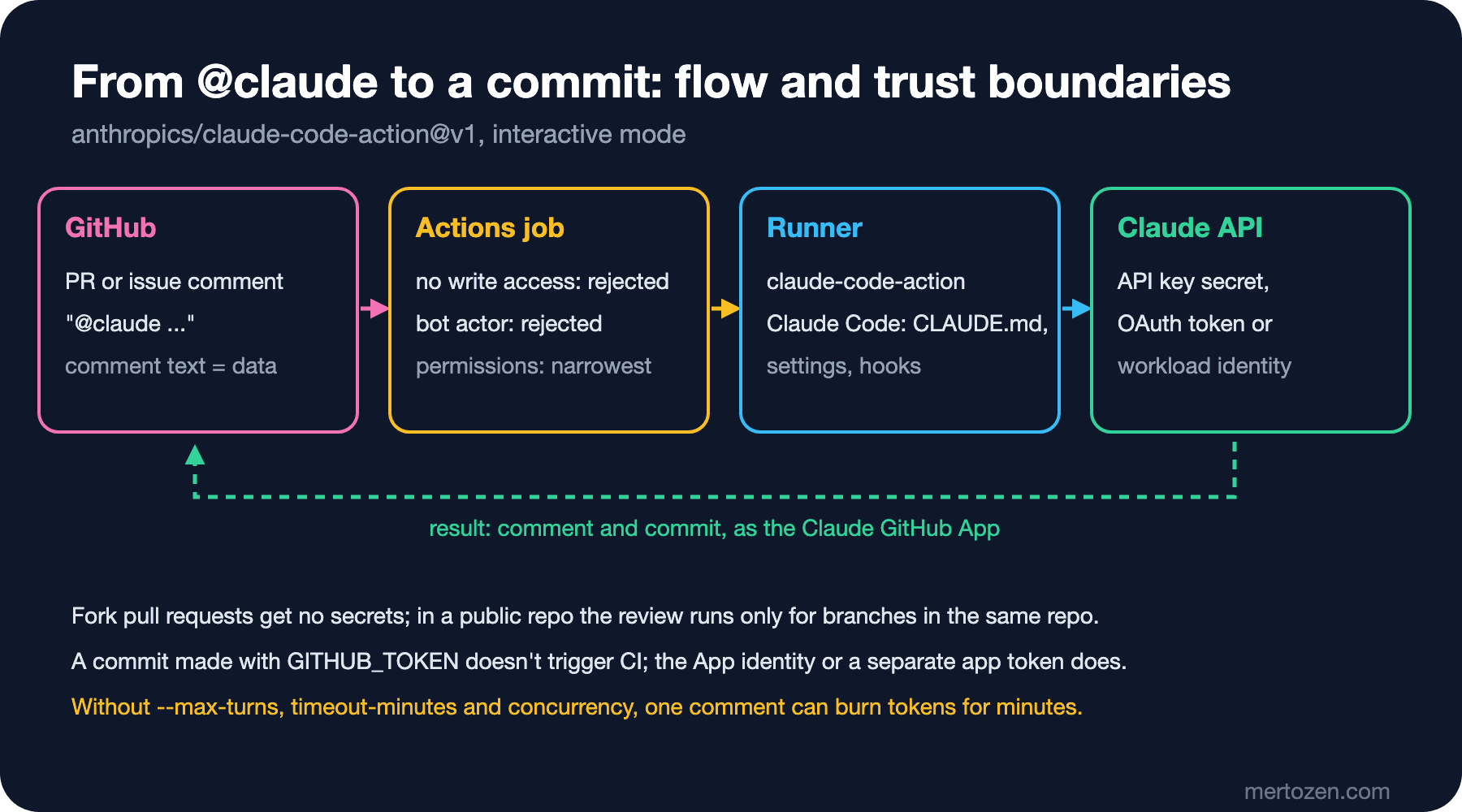
The Action runs in two modes. Without a prompt input it is interactive mode: Claude waits for @claude in an issue or PR comment and writes the result back there as a comment. With a prompt it is automation mode: it runs directly on every trigger. .github/workflows/claude.yml:
name: Claude

on:
  issue_comment:
    types: [created]
  pull_request_review_comment:
    types: [created]

concurrency:
  group: claude-${{ github.event.issue.number || github.event.pull_request.number }}
  cancel-in-progress: false

jobs:
  claude:
    if: contains(github.event.comment.body, '@claude')
    runs-on: ubuntu-latest
    timeout-minutes: 30
    permissions:
      contents: write
      pull-requests: write
      issues: write
      id-token: write
      actions: read
    steps:
      - uses: actions/checkout@v7
        with:
          fetch-depth: 1
      - uses: actions/setup-dotnet@v6
        with:
          dotnet-version: 10.0.x
      - uses: anthropics/claude-code-action@v1
        with:
          anthropic_api_key: ${{ secrets.ANTHROPIC_API_KEY }}
          claude_args: |
            --max-turns 15
            --allowedTools "Bash(dotnet build *)"
The permissions block is the same as in the documentation's example, and every line has a reason: write access to contents, pull-requests and issues to change files and write to the PR; id-token: write for App authentication; actions: read to read CI results. What we added is about cost and control: --max-turns 15, timeout-minutes: 30 for the job, and concurrency, which queues comments written one after another on the same PR. --allowedTools has only dotnet build: Bookstore's API tests need SQL Server, so we run them not in this job but in the CI workflow from the GitHub Actions series.
The answer to the first question is in the Troubleshooting section: GitHub doesn't trigger workflows on commits made with the default GITHUB_TOKEN. If you pass github_token: ${{ secrets.GITHUB_TOKEN }} to the Action, Claude's commits don't run CI; remove the input and let the Action authenticate as the Claude GitHub App. The details of secrets and GITHUB_TOKEN permissions on the GitHub side are in the eighth post of the GitHub Actions series.
Bookstore: The Pull Request Review Workflow
The second workflow runs a review whenever a PR is opened or updated. Like the documentation's example, we install the code-review plugin from Anthropic's official marketplace and call its skill as the prompt:
name: Claude Review

on:
  pull_request:
    types: [opened, synchronize, ready_for_review, reopened]

concurrency:
  group: claude-review-${{ github.event.pull_request.number }}
  cancel-in-progress: true

jobs:
  review:
    runs-on: ubuntu-latest
    timeout-minutes: 20
    permissions:
      contents: read
      pull-requests: read
      issues: read
      id-token: write
    steps:
      - uses: actions/checkout@v7
        with:
          fetch-depth: 1
      - uses: anthropics/claude-code-action@v1
        with:
          anthropic_api_key: ${{ secrets.ANTHROPIC_API_KEY }}
          plugin_marketplaces: "https://github.com/anthropics/claude-plugins-official.git"
          plugins: "code-review@claude-plugins-official"
          prompt: "/code-review:code-review --comment ${{ github.repository }}/pull/${{ github.event.pull_request.number }}"
          claude_args: '--max-turns 30 --allowedTools "mcp__github_inline_comment__create_inline_comment"'
--comment has the findings written to the PR as line comments; when there are no findings, a single summary comment arrives. The --allowedTools line in claude_args looks redundant but, according to the documentation, is required: the Action starts the MCP server that posts line comments only when that tool is named in --allowedTools. The job's own access is read-only; the comments go through the Claude GitHub App. Claude skips draft and closed PRs, PRs that already have its comment, and trivial changes it sees no need to review. --max-turns 30 is a limit we chose; if it isn't enough for large PRs, see it in the logs and adjust.
Plugins and marketplaces themselves are in the eleventh post; here we use one as a package installed for the job with the plugins input.
Code Review and /code-review ultra
There are two more ways to get a review without writing a workflow, and they are different products. Code Review is a managed service that an administrator turns on for Team and Enterprise plans: it reviews every PR with several agents, verifies the findings and writes them as line comments and a check run, and it never approves or blocks the PR. Its usage is billed separately. /code-review ultra is a deep review started from the terminal that runs in the cloud and verifies each finding separately; according to the documentation it is in research preview. Pro, Max and Ultra accounts get three free runs once, after that it is billed as usage credits, and a typical review costs between 5 and 25 dollars. The local /code-review is the bundled skill we saw in the fifth post.
In Production
Know who can trigger a run. On issue and PR events the Action requires the triggering user to have write access to the repository, and it rejects bot actors unless they are listed in allowed_bots; the second check keeps bots from looping each other. The answer to the second question is the first check: the outside contributor has no write access, so the Action rejects the run. That is not a bug but a deliberate security boundary; to allow specific users there is allowed_non_write_users. There is a second limit about forks on the GitHub side: in a public repository GitHub doesn't give secrets to runs triggered by pull requests from forks, which is why the review workflow runs only on PRs opened from branches in the same repository.
Issue and PR text is data for Claude, not instructions; but the model can't always tell the difference. Giving a broad allow such as Bash to a workflow with write access opens a wide surface to a malicious instruction in a comment. The in-depth treatment of prompt injection is in the LLM Application Security series, and tracking who changed what in a pipeline is in the seventh post of the CI/CD Fundamentals series.
Limit the cost: timeout-minutes on every job, --max-turns on every run, concurrency for the same PR. The repository's CLAUDE.md is read on every run; keeping it short lowers the cost too. Keep API keys and tokens only as GitHub secrets, never in the workflow file.
Common Pitfalls
A broad --allowedTools. "Bash" allows every command; list the commands you need one by one.
A job without a timeout or concurrency. A stuck run burns runner minutes and tokens until the default job time runs out.
Making a personal OAuth token an organization secret. The token is tied to one person's subscription; when that person leaves, the workflows in every repository stop. For a shared secret, use an API key or federation.
Running a script without --bare. The project's hooks and MCP servers join every run; in a repository you don't trust, that means running their code with your permissions.
A Small Experiment
★☆☆ On your own machine, run claude -p once with --bare and once without it, with the same prompt, and compare the total_cost_usd values in the --output-format json output.
★★☆ Run release-note.ps1 in a loop for the last ten PRs, read CHANGELOG.draft.md, and add a breaking field to the schema. Note the PRs where Claude fills that field in wrongly.
★★★ Set up claude.yml in a test repository and write three @claude comments in a row on the same PR. Watch in the Actions tab how the concurrency group queues the runs, then set cancel-in-progress to true and record the difference.
Everything in this post was specific to one repository: hooks, subagents, the MCP configuration and the workflows. In the eleventh post we package them into a plugin for the team, and move on to output styles and the managed settings an organization can enforce.