

API Testing with Playwright and Playwright Test Agents: APIRequestContext, Hybrid Scenarios and Using the Planner, Generator and Healer Safely
Giving storageState to an API context does not carry the session in a token-based application: in Bookstore, Ada's own order returned 401. We cover browserless API tests with APIRequestContext, toBeOK, a hybrid scenario that combines the UI and the API, where API tests belong compared with integration tests, and setting up Playwright Test Agents with init-agents, the seed test and reviewing what the planner, generator and healer produce.
Version note: The code in this post was built and run with .NET 10, Angular 22.2 and Playwright 1.65 (@playwright/test).
Guess First
In the E2E suite of Bookstore, the online bookstore used as the shared example across this site's series, Ada's login is done once and saved as storageState in playwright/.auth/customer.json (post 7). Browser tests start signed in with this file. In one test you wanted to read Ada's order directly from the API and gave the same file to an API context:
const api = await playwrightRequest.newContext({ baseURL: apiURL, storageState: customerStorageState });
const response = await api.get(`/api/orders/${placedOrder.id}`);
console.log('status with storageState only:', response.status());
The order is Ada's, and so is the storageState. Which status code is printed to the console?
The Answer: storageState Carries Cookies, Not Tokens
status with storageState only: 401A storageState file holds two things: cookies and localStorage per origin. An API context adds only the cookies to its requests. Bookstore's Angular client keeps the token in localStorage and puts it into the Authorization header with an interceptor; an API context has neither an interceptor nor anything that reads localStorage. If the application used a cookie-based session, the same line would work. For Bookstore the right way is the helper we moved into support/api.ts in post 12: a context that gets the token from the E2E host and adds it to every request with extraHTTPHeaders.
A similar distinction exists for page.request. page.request and context.request share the cookie store of the browser context; a Set-Cookie in the response is written to the browser as well. playwright.request.newContext(), by contrast, is independent. As the last post of the series, this one uses APIRequestContext as a test tool beyond preparing data and covers Playwright Test Agents, which arrived in 2025.
The request Fixture and API Tests
API tests should not open a browser. Because pageErrors from post 12 is an auto fixture and depends on page, every test that uses e2e/fixtures.ts starts a browser. That is why the API tests live in a separate folder, in a separate project and with their own fixture file:
// API tests have no browser; baseURL points straight at the API
{ name: 'api', testDir: './api-tests', use: { baseURL: apiURL } },
// API tests do not open a browser: page-bound fixtures (like pageErrors) are not here
export const test = base.extend<ApiFixtures, { adminApi: APIRequestContext }>({
adminApi: [
async ({ playwright }, use) => {
const api = await signedInApi(playwright, { customerId: 0, roles: ['admin'] });
await use(api);
await api.dispose();
},
{ scope: 'worker' },
],
data: async ({ adminApi }, use, testInfo) => {
await use(new BookstoreData(adminApi, `api${testInfo.workerIndex}t${Date.now().toString(36)}-`));
},
buyerApi: async ({ playwright }, use) => {
const api = await signedInApi(playwright, { customerId: 2, roles: ['institution-buyer'] });
await use(api);
await api.dispose();
},
customerApi: async ({ playwright }, use) => {
const api = await signedInApi(playwright, { customerId: 1 });
await use(api);
await api.dispose();
},
});The tests target the institutional order endpoints added in post 10. Nevin Hanım's order and invoice:
test('a buyer places a bulk order and gets its invoice', async ({ data, buyerApi }) => {
  const emma = await data.book('Emma', 39.5, 50);

  const response = await buyerApi.post('/api/institutional/orders', {
    data: { lines: [{ isbn: emma.isbn, quantity: 20 }] },
  });
  await expect(response).toBeOK();
  expect(response.status()).toBe(201);
  const order = await response.json();
  expect(order).toMatchObject({ status: 'Placed', total: 711 });
  expect(response.headers()['location']).toBe(`/api/orders/${order.id}`);

  const invoice = await buyerApi.get(`/api/orders/${order.id}/invoice`);
  await expect(invoice).toBeOK();
  expect(invoice.headers()['content-type']).toBe('application/pdf');
  expect(invoice.headers()['content-disposition']).toContain(`filename=invoice-${order.reference}.pdf`);
  expect((await invoice.body()).subarray(0, 5).toString()).toBe('%PDF-');
});

test('only institution buyers may place bulk orders', async ({ data, customerApi, request }) => {
  const emma = await data.book('Emma', 39.5, 50);
  const body = { data: { lines: [{ isbn: emma.isbn, quantity: 20 }] } };

  // request: the built-in fixture without a token that uses the baseURL from the config
  expect((await request.post('/api/institutional/orders', body)).status()).toBe(401);
  expect((await customerApi.post('/api/institutional/orders', body)).status()).toBe(403);
});
The file has two more tests: an order of 19 copies returns 400 with a ProblemDetails body, and Ada gets a 404 when she asks for Nevin Hanım's invoice. Running only the API project:
$ npx playwright test --project=api
Running 4 tests using 4 workers

  ✓  2 [api] › api-tests/institutional-orders.spec.ts:22:1 › fewer than 20 copies is a validation problem (98ms)
  ✓  1 [api] › api-tests/institutional-orders.spec.ts:3:1 › a buyer places a bulk order and gets its invoice (300ms)
  ✓  3 [api] › api-tests/institutional-orders.spec.ts:34:1 › only institution buyers may place bulk orders (399ms)
  ✓  4 [api] › api-tests/institutional-orders.spec.ts:43:1 › an invoice is visible only to the buyer who ordered (565ms)

  4 passed (4.7s)
The tests took milliseconds, but the run took 4.7 seconds: webServer belongs to the whole config, so the Angular dev server was started even when the API project ran on its own. toBeOK() requires the status code to be in the 200–299 range and, when it fails, prints the request and the response together. A bulk order attempt with Ada's token:
    Error: expect(response).toBeOK() failed

    Call log:
    → POST http://127.0.0.1:52480/api/institutional/orders
      user-agent: Mozilla/5.0 (Windows NT 10.0; Win64; x64) AppleWebKit/537.36 (KHTML, like Gecko) Chrome/158.0.8127.18 Safari/537.36
      accept: */*
      accept-encoding: gzip,deflate,br
      Authorization: Bearer <token>
      content-type: application/json
      content-length: 51
    ← 403 Forbidden
      content-type: application/problem+json
      date: Sun, 15 Nov 2026 08:17:56 GMT
      server: Kestrel
      transfer-encoding: chunked

    Response text:
    {"type":"https://tools.ietf.org/html/rfc9110#section-15.5.4","title":"Forbidden","status":403,"traceId":"00-0ec87b4522934276a3e12db5fc24335b-4e252b240b1d4ee5-00"}
I shortened the token in the output: toBeOK prints the headers as they are, so a real token can end up in CI logs. Port 52480 comes from the environment variables in post 12.
A Hybrid Scenario: Order in the UI, Verify Through the API
Where an E2E test is valuable is in showing that the flow the user sees and the state the system records are the same. Reading the fields that the screen does not show from the API is the cheapest way to do that:
// Fields that the screen does not show are verified through the API
const response = await customerApi.get(`/api/orders/${id}`);
await expect(response).toBeOK();
expect(await response.json()).toMatchObject({ status: 'Placed', total: 39.5, trackingNumber: 'TRK-E2E-1' });

// Cancellation has no UI; it is done through the API and its result is checked on the page
await expect(await customerApi.post(`/api/orders/${id}/cancel`)).toBeOK();
await page.reload();
await expect(page.getByRole('heading', { level: 1 })).toHaveText('Order cancelled');
The beginning of the test is the flow from post 7: searching the catalog, the cart, "Place order" and toHaveURL(/\/orders\/\d+$/); the order number is read from the address. The test passed in 1.8 seconds. The other direction is useful too: performing an operation that has no UI yet (cancellation) through the API and verifying its result on screen.
Where Should API Tests Live?
Because writing API tests with Playwright is easy, after a while the E2E suite can start taking the place of integration tests. In this series the two layers do different jobs:
| Question | Integration test (posts 2–4) | Playwright API test |
|---|---|---|
| Where does the API run? | Inside the test process, WebApplicationFactory | On a real port, in a separate process |
| Time, external services | FakeTimeProvider, WireMock, replacing services | Only as much as the host offers |
| Seeing the database | Directly with DbContext | Only through the API |
| Where it is best | Business rules, failure scenarios, the authorization matrix | Hybrid checks next to a UI test, end-to-end verification of the contract |
For institutional orders, the 19-copy case, insufficient stock and all role combinations are faster to write and have fewer dependencies as WebApplicationFactory tests. In the Playwright API tests I keep only the contract that the browser test needs (invoice headers, status fields). Manual exploration and shared request collections are a separate need; the choice between curl, .http files, Postman and Bruno was covered in the API Tools series.
Playwright Test Agents: Setup and the Seed Test
Playwright 1.56 (October 2025) brought three agent definitions: planner, generator and healer. They are instruction files and tool lists given to an AI coding tool; the actual work happens through Playwright's own MCP server. Setting them up in Bookstore's web folder:
$ npx playwright init-agents --loop=claude --project chromium
 🎭 Using project "chromium" as a primary project
 📝 specs/README.md - directory for test plans
 🌱 e2e/seed.spec.ts - default environment seed file
 🤖 .claude/agents/playwright-test-generator.md - agent definition
 🤖 .claude/agents/playwright-test-healer.md - agent definition
 🤖 .claude/agents/playwright-test-planner.md - agent definition
 🔧 .mcp.json - mcp configuration
 ✅ Done.
The --help output of 1.65 lists claude, codex, copilot, opencode, vscode and vscode-legacy for --loop; the documentation page gives four of them as examples. The generated .mcp.json defines a single server: npx playwright run-test-mcp-server. The agent definitions are tied to the Playwright version and the documentation asks for them to be regenerated on every upgrade; that is why only the seed test and the specs/ folder went into Bookstore's snapshot.
The seed test is the agents' starting point: the planner runs it to get a ready page, and the generator uses it as the model for the tests it writes. Instead of the empty seed that init-agents produced, I wrote one that uses Bookstore's fixtures, so the agents start with Ada's session and the data and catalog fixtures:
import { expect, test } from './fixtures';

// The starting point for Playwright Test Agents: signed in as Ada, catalog open
test.describe('Bookstore', () => {
  test('seed', async ({ catalog, page }) => {
    await catalog.open();
    await expect(page.getByRole('heading', { name: 'Catalog' })).toBeVisible();
  });
});
Planner, Generator and Healer
This section is based on the official documentation.
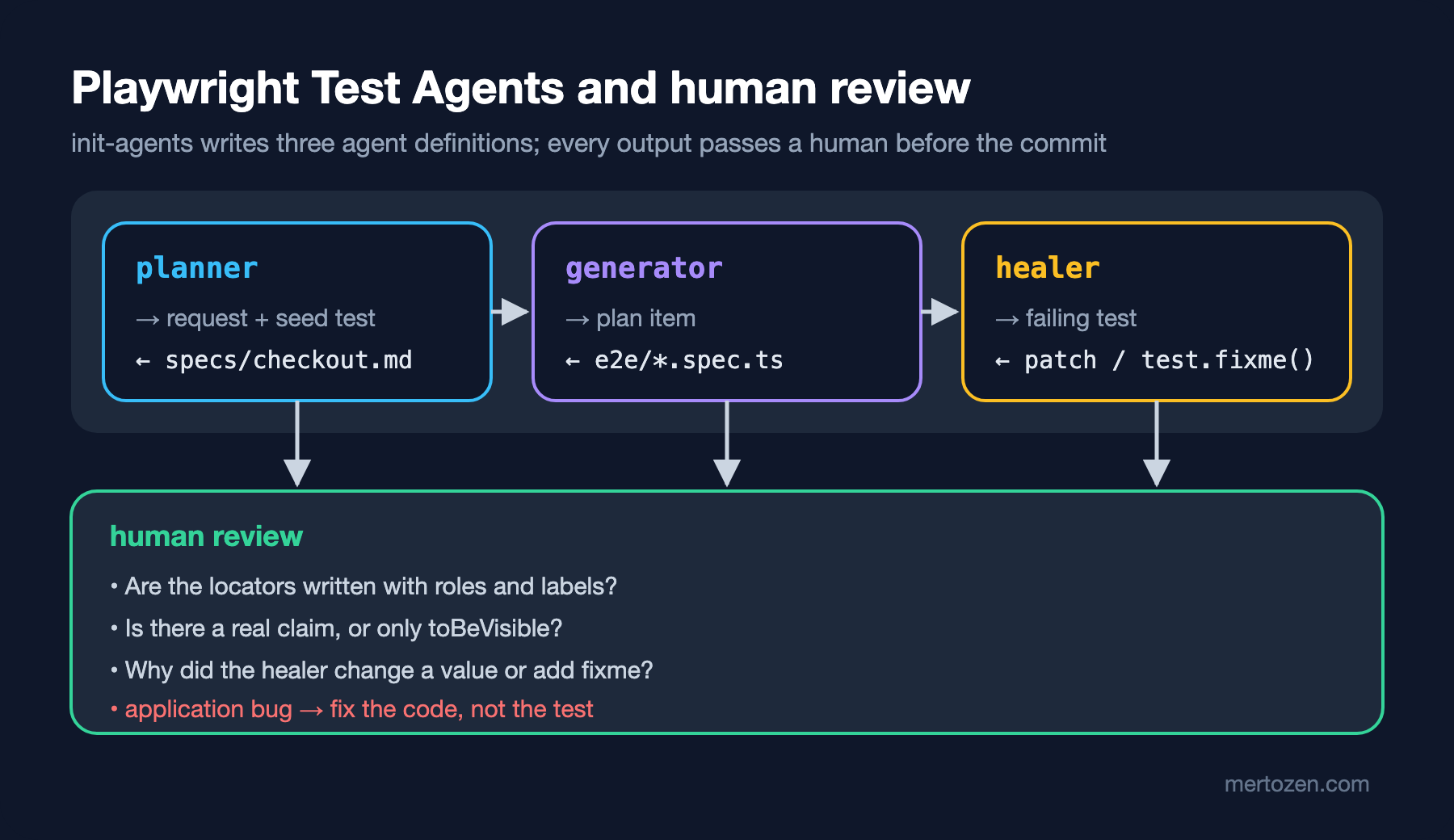
Given a request (for example "the checkout flow of an order with a coupon applied") and the seed test, the planner explores the application in the browser and saves a Markdown plan with step-by-step scenarios under specs/. A product requirements document can also be added to the request. For Bookstore, giving the planner the coupon rule from post 7 and the 10% discount makes the plan actually test the business rule.
The generator takes one item of the plan, walks through the steps live in the browser to verify locators and assertions, and writes a single-test file. The file it produces starts with comments that say which plan and which seed it is based on. In the definition written by init-agents, the tools available to the generator include browser_verify_element_visible, browser_verify_text_visible and browser_verify_value; so it is no surprise that its assertions lean toward visibility and text checks.
The healer reruns a failing test, looks at the page snapshot at the moment of failure, proposes a patch and tries again until the test passes or it reaches its own limits. According to the documentation, if it decides the functionality is really broken it can leave the test skipped. The definition generated in Bookstore spells this behavior out: the healer is asked to update selectors and expected values, to mark the test with test.fixme() and leave an explanatory comment if it is confident the test is correct, and to do the most reasonable thing to make the test pass without asking the user questions.
Reviewing a Test Written by AI
To show the problems to look for in a review, I wrote the test below by hand with patterns that are common in generator output and ran it against Bookstore:
// Review example: written by hand to show the problems to look for in tests the generator produces
test('checkout with coupon', async ({ page }) => {
  await page.goto('http://127.0.0.1:52481/');
  await page.locator('li:nth-child(1) button').click();
  await page.getByRole('link', { name: /Cart/ }).click();
  await page.getByLabel('Coupon code').fill('SAVE10');
  await page.getByRole('button', { name: 'Apply' }).click();
  await page.waitForTimeout(1000);
  await expect(page.getByText(/Total/)).toBeVisible();
});
The test passed in 1.5 seconds. Yet there is no coupon called SAVE10 in the database; the screen said Coupon SAVE10 is not valid. and the total stayed equal to the subtotal (₺64.90). The test's only claim is "the word Total is visible". The questions I ask in a review map to each line of this test: is the address written relative to baseURL, is the locator based on role and name (or is it "the button of the first card"), was the test data prepared by the test itself, is there a waitForTimeout, does the assertion check the scenario's claim (the discounted total)? The corrected version of this test already exists as checkout.spec.ts from post 7: the coupon is created with data.coupon(10) and toHaveText('Total: ₺58.41') is expected.
Read the healer's changes separately. If an application bug calculates the total wrongly, the instruction "update expected values" can pull the test's expected amount to the new, wrong value; test.fixme(), in turn, turns a red test into one that is quietly skipped. If an expected value or a fixme changed in the healer's pull request, first make sure the application behaves correctly. The general method for reviewing code written by AI is in the AI-Assisted Development series post on reviewing and verifying AI-written code.
In Production
Protect the headers of API tests from logs. A toBeOK failure prints the Authorization header in full; in Bookstore the token is a short-lived test token signed with a key generated for each run, but in a suite that runs against a real environment a lasting secret can end up in CI logs.
Look at the cost of running the API project on its own. Because webServer belongs to the whole config, the Angular dev server starts even when only the API tests run. For an API suite that runs often, a separate config file or turning the web server off with an environment variable is worth considering.
If you use the agents, limit their permissions. In the definitions written by init-agents, the planner's tools include browser_run_code_unsafe, which runs code in the page. Run the agent against a test environment, without real user data or real secrets; every file it produces should go through review like a normal pull request.
Common Pitfalls
Piling API tests into the E2E suite and using them instead of integration tests. Business rule combinations written with a real port, a real dev server and a shared database are slow and brittle; WebApplicationFactory tests check the same rules in under a second, with time and external services under control.
Giving storageState to an API context and assuming the session comes along. The 401 from the guessing section gives the same result in every token-based application.
The healer covering an application bug with a "test fix". Every change that turns a red test green should answer one question: did the application change, or the test?
Committing a test produced by the generator without review. The example above passed and verified nothing.
A Small Experiment
★☆☆ Add a test for insufficient stock to the API tests: order 25 copies of a book with a stock of 10 and verify that the title field in the body is "Insufficient stock". Write the same check as an integration test like the ones in posts 2–4 and compare the two durations.
★★☆ Reverse the hybrid test: create the order with customerApi, open the order page and verify the amount with toShowPrice. In which situations is this direction more appropriate than placing the order in the UI?
★★★ Turn the review example above into a checklist and add the eslint-plugin-playwright rules from post 11 (missing-playwright-await, prefer-web-first-assertions) to the project as the automated part of that checklist. Which rules does the example test trip, and which problems does only a human see?
The series ends here. In the first nine posts we put Bookstore's API under test with a real SQL Server and external services faked at the boundary, along with the contract with Angular and end-to-end flows that go through the browser, and built a method for dealing with flaky tests and version changes. The last four posts completed the Playwright API used every day: locators and actions, assertions, config and fixtures, API tests and agents that generate tests. To keep the same suite fast in CI, see the Playwright post in the GitHub Actions series; to automate accessibility checks with axe, see the Accessibility Test Automation post in the Accessibility series; to see how the system behaves under load, see the Performance and Load Testing series.