

Terraform Built-in Functions and Expression Patterns: String, Collection, Encoding, Filesystem and Network Functions, for, Splat and terraform console

The way to write Terraform expressions with confidence is to know the 119 built-in functions by family and to try every expression in terraform console first. We try string, collection, encoding, filesystem and network functions, for and splat, optional() defaults and AzureRM's provider functions, and in Bookstore we build a subnet per environment with cidrsubnet and the API settings from YAML.
Version note: The examples in this post were run with Terraform 1.17.2, OpenTofu 1.13.9, the kreuzwerker/docker provider 4.7.0, the hashicorp/azurerm provider 5.14.0 and Docker Engine 29. The AzureRM code was checked with validate and a mocked terraform test.
Guess First
We want to keep the API settings of Bookstore, the online bookstore used as the shared example across this site's series, in a YAML file instead of a long map in tfvars:
Bookstore:
  Catalog__PageSize: 20
  Features__Recommendations: false
Terraform will read this file with yamldecode and pass it to the container as environment variables. Two questions. Inside the container, under which names and with which types do these two values show up? And when you make this change, does the plan tell you which setting changed? The answers are in the Bookstore section of this post.
terraform console and the Function List
In post 3 we saw merge, lookup, try and convert. You can ask the binary itself how many built-in functions Terraform 1.17 has:
$ terraform metadata functions -json | jq '.function_signatures | keys | map(select(contains("::") | not)) | length'
119
Every function also appears in the list with a core:: prefix (core::merge). That is how you pick the built-in one explicitly if it ever clashes with a provider-defined function, which arrived in 1.8. You do not need to memorise all 119; knowing the families and trying every expression you are unsure about in terraform console first is enough.
For that I added a small folder without providers or state to the repo: infra/examples/functions. It does not even need terraform init; you open terraform console and start typing. You can also pipe an expression into the console: echo 'local.retention' | terraform console. That is handy for checking an expression's result in a script.
# A playground for built-in functions: no provider, no state; run terraform console here
terraform {
  required_version = "~> 1.17"
}

variable "environment" {
  type    = string
  default = "dev"
}

variable "image" {
  type    = string
  default = "bookstore-api:1.1.0"
}

locals {
  environments = ["dev", "staging", "prod"]
  data_sets    = ["covers", "exports"]

  # Days to keep blobs per data set
  retention = zipmap(local.data_sets, [365, 30])

  settings = yamldecode(file("${path.module}/appsettings.yaml"))
}
All the console output below comes from this folder.
String Functions
> format("%s-bookstore-%s-%s", "app", var.environment, "weu")
"app-bookstore-dev-weu"
> join(",", local.data_sets)
"covers,exports"
> split("/", "bookstore/dev.tfstate")
tolist([
  "bookstore",
  "dev.tfstate",
])
> replace("bookstore-dev-weu", "-", "")
"bookstoredevweu"
> regex("^(?P<name>[^:]+):(?P<tag>.+)$", var.image)
{
  "name" = "bookstore-api"
  "tag" = "1.1.0"
}
> regex("^(?P<name>[^:]+):(?P<tag>.+)$", "bookstore-api")

Error: Error in function call

Call to function "regex" failed: pattern did not match any part of the
given string.

> trimprefix("refs/tags/v1.1.0", "refs/tags/v")
"1.1.0"
> lower("Bookstore-API")
"bookstore-api"
format is the most readable way to build a naming convention in one line; when you join several parts it reads cleaner than nested interpolation. replace removes the dashes from a storage account name: an Azure storage account name only accepts lowercase letters and digits, which is exactly what compact_suffix did in post 3. With named groups, regex returns an object and you reach a field with .tag. Without a match it fails, and that matters, because below we turn that failure into a validation with can. trimprefix is enough to get an image tag from a Git tag (refs/tags/v1.1.0) in CI; no regex needed.
Collection Functions and Type Conversion
> flatten([["covers", "exports"], ["reports"], []])
[
  "covers",
  "exports",
  "reports",
]
> setproduct(local.environments, local.data_sets)
tolist([
  [
    "dev",
    "covers",
  ],
  [
    "dev",
    "exports",
  ],
  ...
])
> local.retention
{
  "covers" = 365
  "exports" = 30
}
> coalesce("", null, "B1")
"B1"
> one([])
null
> one(["westeurope", "northeurope"])

Error: Invalid function argument

Invalid value for "list" parameter: must be a list, set, or tuple value with
either zero or one elements.

> can(regex("^97[89][0-9]{10}$", "9780441013593"))
true
> can(regex("^97[89][0-9]{10}$", "978-0441013593"))
false
> try(local.settings.Bookstore.Search__PageSize, 50)
50
flatten turns nested lists into one level; an empty list adds nothing. setproduct gives every combination of two lists: six pairs for three environments and two data sets (I shortened the output). zipmap pairs two lists as keys and values and builds a map. coalesce returns the first argument that is neither null nor an empty string, and fails if all of them are. one is how you say "I expect at most one element": null for an empty list, an error for two. To read a value from a resource created with count = var.enabled ? 1 : 0, one(azurerm_key_vault.bookstore[*].id) is safer than [0], which fails on an empty list.
can returns false when an expression fails. That makes it most useful in variable validation: a rule such as an ISBN-13 check fits in one line. try returns a default instead of the error. Both have limits, as the pitfalls section shows.
The type conversion functions sit close to this family:
> toset(["covers", "exports", "covers"])
toset([
  "covers",
  "exports",
])
> tomap({ dev = 1, staging = "2" })
tomap({
  "dev" = "1"
  "staging" = "2"
})
> tonumber("18480")
18480
> tostring(true)
"true"
toset removes duplicates and does not guarantee order; since for_each does not accept a list, it is the standard way to turn a list into a set. Note what tomap did: all values of a map must have the same type, so Terraform turned 1 into a string as well. The same conversion happens in variable types, and the Bookstore section relies on exactly this behaviour.
Encoding, Filesystem and Network Functions
> local.settings
{
  "Bookstore" = {
    "Catalog__PageSize" = 20
    "Features__Recommendations" = false
  }
  "Logging" = {
    "LogLevel__Default" = "Information"
  }
}
> jsonencode({ environment = var.environment, data_sets = local.data_sets })
"{\"data_sets\":[\"covers\",\"exports\"],\"environment\":\"dev\"}"
> base64encode("Bookstore__Environment=dev")
"Qm9va3N0b3JlX19FbnZpcm9ubWVudD1kZXY="
> fileset(path.module, "templates/*.tftpl")
toset([
  "templates/appsettings.json.tftpl",
])
yamldecode(file(...)) reads the file and turns it into a Terraform value; 20 in the YAML arrives as a number and false as a bool. jsonencode sorts keys alphabetically; the same input always gives the same string, so no false differences show up in the plan. path.module is the folder of the module the expression is written in; always build file paths from it, otherwise the path resolves against the folder you run terraform in.
templatefile renders a file as a template. When the output is JSON or YAML, the documentation recommends a single jsonencode call inside the template instead of writing the JSON by hand; that way you never hit quoting or comma mistakes:
${jsonencode({
  Bookstore = {
    Environment = environment
    Catalog     = { PageSize = page_size }
  }
  AllowedHosts = join(";", hosts)
})}
> templatefile("${path.module}/templates/appsettings.json.tftpl", { environment = "dev", page_size = 20, hosts = ["localhost", "bookstore.example.com"] })
<<EOT
{"AllowedHosts":"localhost;bookstore.example.com","Bookstore":{"Catalog":{"PageSize":20},"Environment":"dev"}}
EOTThe empty line at the end is the template file's final newline. That is fine if you write the result to a file; if you compare it with an attribute, cut it with chomp. file and templatefile read files that are on disk before the plan starts. As the documentation points out, functions do not take part in the dependency graph, so they cannot read a file created during apply.
The network functions compute IP ranges. cidrsubnet(prefix, newbits, netnum) adds newbits bits to a range given in CIDR notation and returns subnet number netnum:
> cidrsubnet("10.80.0.0/16", 8, 1)
"10.80.1.0/24"
> cidrhost(cidrsubnet("10.80.0.0/16", 8, 1), 1)
"10.80.1.1"
> cidrsubnets("10.40.0.0/16", 8, 8, 4)
tolist([
  "10.40.0.0/24",
  "10.40.1.0/24",
  "10.40.16.0/20",
])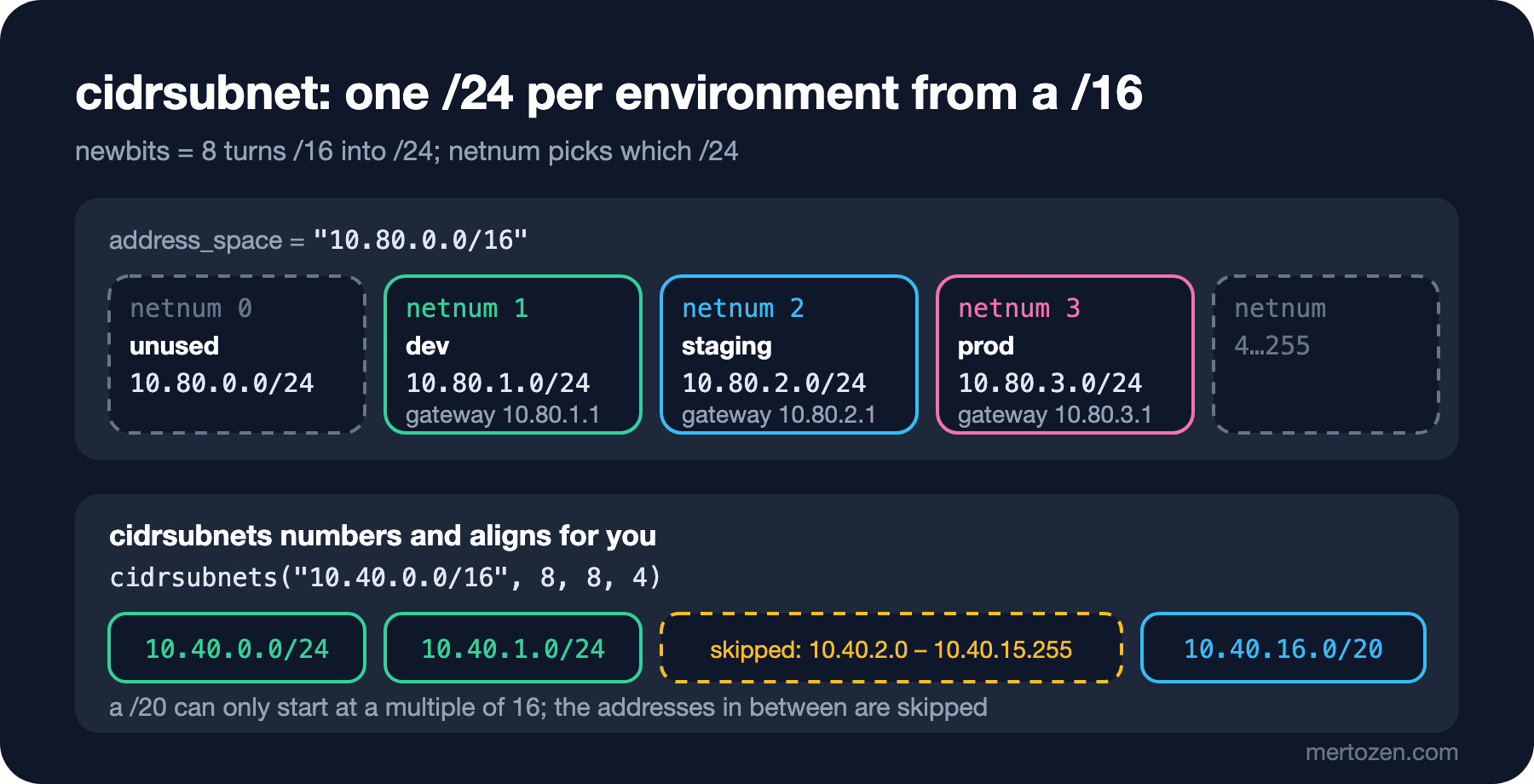
Adding 8 bits to a /16 gives a /24; subnet number 1 is 10.80.1.0/24, and cidrhost gives its first host address, 10.80.1.1. cidrsubnets numbers the subnets itself and has a surprise: the third subnet is not 10.40.2.0/20 but 10.40.16.0/20. A /20 can only start at a multiple of 16, so the function skips the addresses in between. This matters when you split an Azure VNet into application and database subnets: changing the order shifts every range.
for, Splat and optional()
We saw the for expression in post 3. It has three more uses. The first is building a map with keys you choose:
> { for pair in setproduct(local.environments, local.data_sets) : "${pair[0]}-${pair[1]}" => { environment = pair[0], data_set = pair[1] } }
{
  "dev-covers" = {
    "data_set" = "covers"
    "environment" = "dev"
  }
  "dev-exports" = {
    "data_set" = "exports"
    "environment" = "dev"
  }
  ...
}
This is the standard way to build the map you pass to for_each, and the pitfalls show why the key must come from the data. The second: with ... after the value, values that land on the same key are collected into a list (grouping mode):
> { for name, days in merge(local.retention, { reports = 30 }) : days => name... }
{
  "30" = [
    "exports",
    "reports",
  ]
  "365" = [
    "covers",
  ]
}
The third is what ... means in a function call: expanding a list into arguments. merge takes several maps, but we have a list of maps:
> merge([for section, values in local.settings : { for key, value in values : "${section}__${key}" => value }]...)
{
  "Bookstore__Catalog__PageSize" = 20
  "Bookstore__Features__Recommendations" = false
  "Logging__LogLevel__Default" = "Information"
}
Two nested for expressions flatten the two YAML levels into one, in Section__Key form. This line goes into Bookstore's code shortly.
A splat ([*]) is a shortcut for taking the same attribute from every element of a list. It only works on lists and tuples; resources created with for_each are maps, so you need values first:
> [{ name = "covers" }, { name = "exports" }][*].name
[
  "covers",
  "exports",
]
> { covers = { name = "c" }, exports = { name = "e" } }[*].name

Error: Unsupported attribute

This object does not have an attribute named "name".

> values({ covers = { name = "c" }, exports = { name = "e" } })[*].name
[
  "c",
  "e",
]
> null[*]
[]
> "westeurope"[*]
[
  "westeurope",
]
The last two lines show a lesser-known splat behaviour: applied to a single value it returns a one-element list, applied to null it returns an empty list. That is why for_each = var.backup[*] works when you generate an optional block with dynamic.
Finally, optional(). In post 3 we used optional(map(string), {}); in nested objects the defaults are applied level by level:
variable "api" {
  type = object({
    image_tag = string
    sku_name  = optional(string, "B1")
    scaling = optional(object({
      min = optional(number, 1)
      max = optional(number, 3)
    }), {})
    app_settings = optional(map(string))
  })
}
$ terraform console -var 'api={ image_tag = "1.1.0", scaling = { max = 10 } }'
> var.api
{
"app_settings" = tomap(null) /* of string */
"image_tag" = "1.1.0"
"scaling" = {
"max" = 10
"min" = 1
}
"sku_name" = "B1"
}Only max was given inside scaling; min came from the default. An optional without a default leaves null, so every place that uses that attribute has to handle null.
Provider-defined Functions
Since Terraform 1.8, providers can ship their own functions; you call them as provider::<name>::<function>. Which functions a provider offers is in the terraform providers schema -json output. AzureRM 5.14 has two, the docker provider has none:
$ terraform providers schema -json | jq -r '.provider_schemas | to_entries[] | "\(.key): \((.value.functions // {}) | keys | join(", "))"'
registry.terraform.io/hashicorp/azurerm: normalise_resource_id, parse_resource_id
registry.terraform.io/kreuzwerker/docker:
> provider::azurerm::parse_resource_id("/subscriptions/00000000-0000-0000-0000-000000000000/resourceGroups/rg-bookstore-dev-weu/providers/Microsoft.Web/sites/app-bookstore-dev-weu")
{
"full_resource_type" = "Microsoft.Web/sites"
"parent_resources" = tomap({})
"resource_group_name" = "rg-bookstore-dev-weu"
"resource_name" = "app-bookstore-dev-weu"
"resource_provider" = "Microsoft.Web"
"resource_scope" = ""
"resource_type" = "sites"
"subscription_id" = "00000000-0000-0000-0000-000000000000"
}
> provider::azurerm::normalise_resource_id("/Subscriptions/00000000-0000-0000-0000-000000000000/resourcegroups/rg-bookstore-dev-weu/providers/microsoft.web/sites/app-bookstore-dev-weu")
"/subscriptions/00000000-0000-0000-0000-000000000000/resourceGroups/rg-bookstore-dev-weu/providers/Microsoft.Web/sites/app-bookstore-dev-weu"These functions do not connect to Azure; terraform init is enough and no account is needed. parse_resource_id replaces fragile indexes such as split("/", ...)[4] for getting the resource group name out of an ID that comes from a data source. normalise_resource_id prevents false changes in the plan caused by differences in letter case.
A short note on OpenTofu: 1.13.9 has all 119 of Terraform's functions plus 15 more (cidrcontains, urldecode, base64gunzip and the assume... family). cidrcontains("10.80.0.0/16", "10.80.1.0/24") returns true in OpenTofu and fails with "There is no function named" in Terraform. As in post 12, in a repo that supports both tools, use these functions only in .tofu files.
In Bookstore: A Subnet per Environment and App Settings from YAML
Now we apply these functions to Bookstore's local infrastructure. The first job is moving the API settings into a YAML file. infra/local/envs/dev/appsettings.yaml:
# Non-secret API settings; Section: { Key: value } becomes Section__Key=value
Logging:
  LogLevel__Default: Information
Bookstore:
  Catalog__PageSize: 20
  Features__Recommendations: false
I added settings = optional(map(map(string)), {}) to the api variable, and the environment folder passes settings = yamldecode(file("${path.module}/appsettings.yaml")). The module's locals.tf:
locals {
  # Fixed numbers, not list positions: adding an environment never moves another one's subnet
  subnet_numbers = {
    dev     = 1
    staging = 2
    prod    = 3
  }
  subnet = cidrsubnet(var.address_space, 8, local.subnet_numbers[var.environment])

  # { Logging = { LogLevel__Default = "Information" } } => { Logging__LogLevel__Default = "Information" }
  file_settings = merge([
    for section, values in var.api.settings : {
      for key, value in values : "${section}__${key}" => value
    }
  ]...)

  app_settings = merge(
    { Bookstore__Environment = var.environment },
    local.file_settings,
    var.api.app_settings,
  )
}
The order in merge is deliberate: the right-hand side wins, so app_settings from tfvars can override the YAML. First I put only the old Logging line in the YAML and ran a plan: Plan: 0 to add, 0 to change, 0 to destroy. The refactor did not change behaviour. Then I added the Bookstore section, and here is the answer to the opening question:
  # module.bookstore.module.api.docker_container.this must be replaced
-/+ resource "docker_container" "this" {
      ~ env                                         = (sensitive value) # forces replacement
      ...
Plan: 1 to add, 0 to change, 1 to destroy.
$ terraform console
> module.bookstore.app_settings
{
"Bookstore__Catalog__PageSize" = "20"
"Bookstore__Environment" = "dev"
"Bookstore__Features__Recommendations" = "false"
"Logging__LogLevel__Default" = "Information"
}The values became strings: the map(map(string)) type constraint applied the conversion we saw with tomap to the number and the bool in the YAML. Environment variables are strings anyway, so this is what we want. ASP.NET Core reads __ as : in configuration, so the application sees Bookstore:Catalog:PageSize. The plan, however, did not say which setting changed: secret_env in the module is sensitive, so the whole env list is hidden. In post 14 we find a way to see it through the plan's JSON output.
On the Azure side I put the same two lines into infra/azure/bookstore/locals.tf; Linux App Service reads __ in app setting names the same way. I added a run to the module test that checks that the YAML is flattened and that tfvars overrides it:
$ terraform test
tests/bookstore.tftest.hcl... in progress
  run "dev_uses_small_tiers"... pass
  run "settings_file_is_flattened"... pass
  run "prod_rejects_b1"... pass
  run "prod_uses_zone_redundancy"... pass
tests/bookstore.tftest.hcl... tearing down
tests/bookstore.tftest.hcl... pass

Success! 4 passed, 0 failed.
The second job is putting the environments in separate IP ranges. I added an address_space variable to the module with a default of 10.80.0.0/16. Its validation uses can(cidrhost(...)): for an invalid CIDR, cidrhost fails and can turns that into false. The Docker network gets an ipam_config:
resource "docker_network" "bookstore" {
  name = local.name_prefix

  ipam_config {
    subnet  = local.subnet
    gateway = cidrhost(local.subnet, 1)
  }

  # labels ...
}
# module.bookstore.docker_network.bookstore must be replaced
-/+ resource "docker_network" "bookstore" {
- ipam_config { # forces replacement
...
}
+ ipam_config { # forces replacement
+ gateway = "10.80.1.1"
+ subnet = "10.80.1.0/24"
}
}
Plan: 1 to add, 0 to change, 1 to destroy.
Changes to Outputs:
+ subnet = "10.80.1.0/24"dev got 10.80.1.0/24, and the staging plan got 10.80.2.0/24. When I applied this plan, though, Terraform tried to delete the network, waited 30 seconds and timed out: the container was still attached to it, and the plan had not put the container on the replace list. The fix was to pass the network's ID to the module instead of its name (networks = [docker_network.bookstore.id, ...]). When the network is recreated its ID changes, and the container is replaced along with it. Post 14 walks through how I read that error. After the fix, apply replaced both resources in order, and the next plan said "0 to change".
Production Notes
Computing network ranges in code does not make them fixed. Taking cidrsubnet's netnum from a list index shifts every subnet when an element is inserted in the middle; in Azure that means trying to replace subnets that have resources in them. Keep the numbers in an explicit map such as subnet_numbers and never reuse a number.
Split long expressions into locals and give each local a comment with an example of what it produces, as in file_settings. Someone reading a line with nested for expressions and merge(...)... six months later should know the result without opening a console.
Functions that read files depend on files in the repo: every change to appsettings.yaml is an infrastructure change and should be reviewed with its plan in the pull request. Do not put secrets in these files; a value read with file is not sensitive and shows up in plan output. For secrets, the ephemeral values and Key Vault approach from post 9 still applies.
Common Pitfalls
Passing a list built with flatten to for_each keyed by index. I keyed the environment and data set pairs two ways: { for i, b in local.buckets : i => b } and { for b in local.buckets : "${b.environment}-${b.data_set}" => b }. After removing dev from the list:
  # terraform_data.by_index["0"] will be updated in-place
  # terraform_data.by_index["1"] will be updated in-place
  # terraform_data.by_index["2"] will be updated in-place
  # terraform_data.by_index["3"] will be updated in-place
  # terraform_data.by_index["4"] will be destroyed
  # terraform_data.by_index["5"] will be destroyed
  # terraform_data.by_name["dev-covers"] will be destroyed
  # terraform_data.by_name["dev-exports"] will be destroyed
Plan: 0 to add, 4 to change, 4 to destroy.
In the indexed version every element shifted by one, and the resources being destroyed were the ones for prod; had they been volumes or storage containers, data would be gone. With named keys, only the two resources that really left are destroyed. The count problem from post 3 comes straight back if you use for_each but build the key from an index.
Swallowing errors with try. try(local.settings.Bookstore.Catalog__PageSise, 50) returns 50 despite the typo, and nobody notices. try does not catch static errors such as a reference to an undeclared local (local.setings gives "Reference to undeclared local value"), but it does catch a missing attribute. For a key with a default, lookup(map, key, default) states the intent more clearly, and optional() plus validation is the right place for type and shape checks.
Building JSON by hand in a template. A template such as {"PageSize": ${page_size}} produces unquoted output when the value is a string and broken JSON when it is a list. Use jsonencode inside the template, or call jsonencode directly if you do not need a template at all.
A Small Experiment
★☆☆ Open terraform console in infra/examples/functions and predict the result of cidrsubnets("10.40.0.0/16", 4, 8, 8). Why do you get different ranges when you change the order to 8, 8, 4?
★★☆ Add a third level to appsettings.yaml (Bookstore: { Catalog: { PageSize: 20 } }). Which error does plan give, and what does it tell you about what the type constraint protects? Write a file_settings that supports three levels; remember that Terraform has no recursive functions.
★★★ Write a validation for address_space that checks the range lies inside the company's 10.0.0.0/8. Terraform has no cidrcontains; can you build the same check with cidrhost and cidrnetmask?
In this post a plan hid a change, and an apply that looked correct timed out. In the next post we look at such cases systematically: reading the plan line by line, TF_LOG, provider errors, locked state, "already exists" and drift.