

The Material Data Table: mat-table, MatSort, MatPaginator, Filtering and Server-side Pagination

Show a growing list by keeping sort, filter and page in the URL and paging in the API, not with MatTableDataSource in the browser: Bookstore's 10,000 orders sort in 59 ms in the browser, but the 1.5 MB response takes 1.26 seconds at 10 Mbit/s. We measure a missing URL param arriving as undefined, not resetting the page after a filter, avoiding an empty table while loading with linkedSignal, and the bug of reading SelectionModel inside computed().
Version note: The examples in this post were tried with Angular 22.2 (TypeScript 6.0), Angular Material and the CDK 22.2.7, .NET 10 and EF Core 10; browser behavior was observed in headless Chromium with Playwright 1.65. For the measurements Bookstore.Api ran on SQLite instead of SQL Server.
Predict First
We are building an orders table in the admin panel of Bookstore, the online bookstore used as the shared example across this site's series: a status filter, sorting by date and total, 25 rows per page. The development database has 10,000 orders. Three questions: if you download all orders at once and hand them to MatTableDataSource, what actually makes the user wait: sorting 10,000 rows in the browser or downloading them? We keep sort and page in the URL; when the URL has no status, what is the value of an input declared with input('')? And if the user is on page 300 and switches the status to "Cancelled" (1,223 orders, 49 pages), what do they see?
The Structure of mat-table: Column Definitions
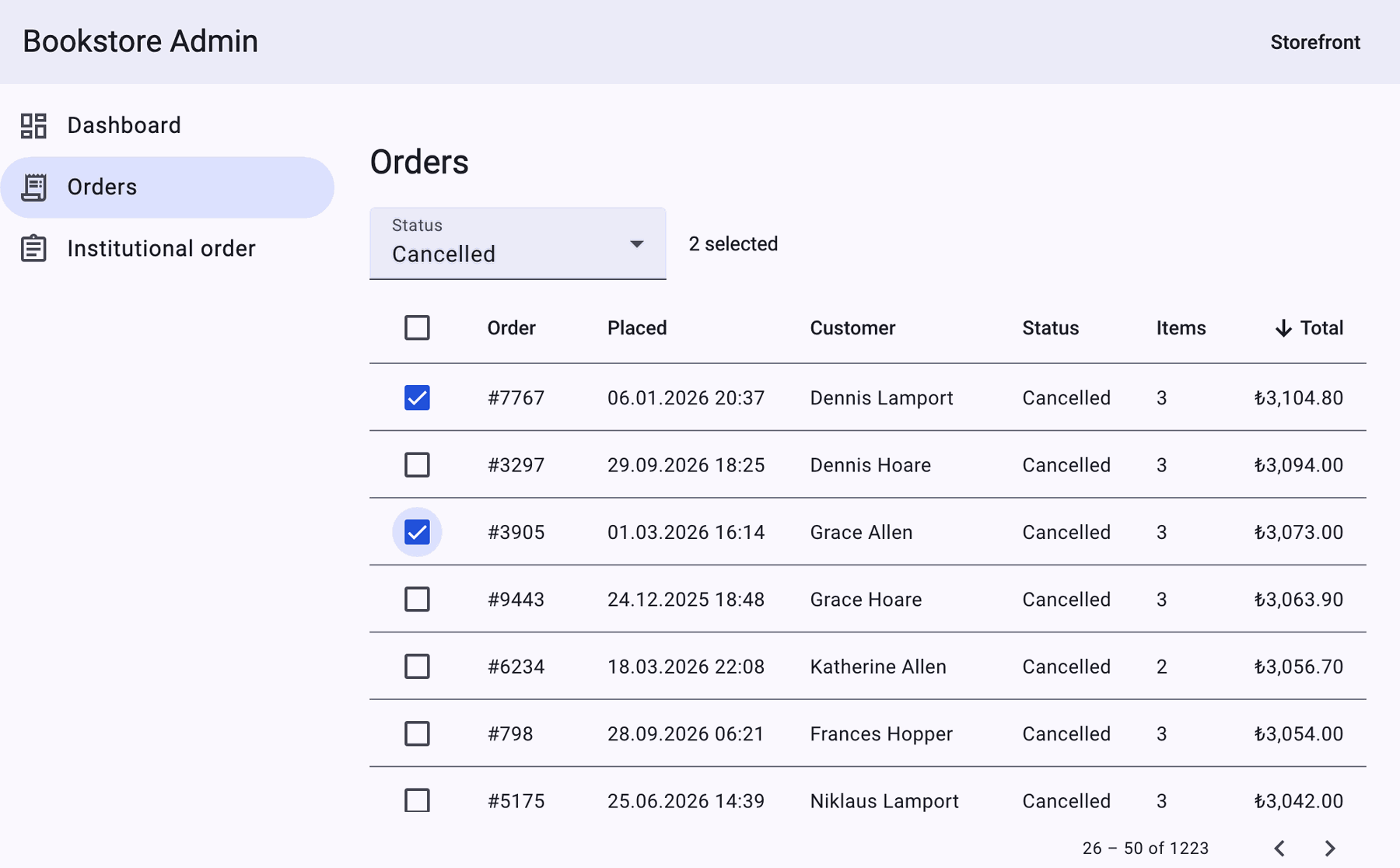
mat-table is the Material-styled version of the CDK table. In the template every column is a matColumnDef holding the template of the header cell (*matHeaderCellDef) and of the data cell (*matCellDef). The row definitions decide which columns are shown and in which order:
<table mat-table [dataSource]="rows()" matSort [matSortActive]="sort()" [matSortDirection]="dir()"
       (matSortChange)="sortChanged($event)">
  <ng-container matColumnDef="id" sticky>
    <th mat-header-cell *matHeaderCellDef mat-sort-header>Order</th>
    <td mat-cell *matCellDef="let order">#{{ order.id }}</td>
  </ng-container>

  <ng-container matColumnDef="placedAtUtc">
    <th mat-header-cell *matHeaderCellDef mat-sort-header>Placed</th>
    <td mat-cell *matCellDef="let order">{{ order.placedAtUtc | date: 'dd.MM.yyyy HH:mm' }}</td>
  </ng-container>

  <ng-container matColumnDef="total">
    <th mat-header-cell *matHeaderCellDef mat-sort-header arrowPosition="before">Total</th>
    <td mat-cell *matCellDef="let order">{{ order.total | currency: order.currency : 'symbol-narrow' }}</td>
  </ng-container>

  <tr mat-header-row *matHeaderRowDef="columns; sticky: true"></tr>
  <tr mat-row *matRowDef="let order; columns: columns"></tr>
  <tr class="mat-row" *matNoDataRow>
    <td class="mat-cell no-data" [attr.colspan]="columns.length">
      @if (orders.error()) {
        The orders could not be loaded.
      } @else if (orders.isLoading()) {
        Loading orders…
      } @else {
        No orders match this filter.
      }
    </td>
  </tr>
</table>
The column name is the key for two more things: mat-sort-header sends it as active in the sort event, and the table puts the class mat-column-<name> on every cell of the column. We use that class for fixed column widths; since these elements are in the component's own template, encapsulation is not a problem:
// Fixed widths via the class mat-table puts on every cell of a column
.mat-column-select {
  width: 48px;
}

.mat-column-id {
  width: 96px;
}

.mat-column-total {
  width: 120px;
  text-align: right;
}
Client-side: MatTableDataSource and 10,000 Rows
Most examples in Material's documentation use MatTableDataSource: you give it the data, connect sort and paginator, and sorting, filtering and paging happen in the browser. To measure the first question we built that route on purpose as a bad example (it is not in the snapshot) and raised the API's page limit to 10,000 for the measurement:
// Anti-example: all 10,000 orders in the browser, sorted, filtered and paged by MatTableDataSource
export class OrdersClientPage implements AfterViewInit {
  protected readonly columns = ['id', 'customerName', 'total'];
  protected readonly dataSource = new MatTableDataSource<OrderRow>([]);
  private readonly sort = viewChild.required(MatSort);
  private readonly paginator = viewChild.required(MatPaginator);
  private readonly http = inject(HttpClient);

  ngAfterViewInit(): void {
    this.dataSource.sort = this.sort();
    this.dataSource.paginator = this.paginator();
    this.http.get<PagedResult<OrderRow>>('/api/admin/orders', { params: { pageSize: 10000 } })
      .subscribe(result => (this.dataSource.data = result.items));
  }
}
On a production build we throttled the network through the Chrome DevTools protocol to 10 Mbit/s with a 40 ms round trip, sent both requests from the same page, and then measured sorting and filtering in the 10,000-row table:
GET /api/admin/orders?pageSize=10000       1519789 bytes | download 1263 ms | JSON.parse 4 ms
GET /api/admin/orders?page=1&pageSize=25      3860 bytes | download 48 ms | JSON.parse 0 ms
sort Total (10,000 rows)             59 ms | first row: #3672 Alan Hoare TRY219.90
filter "Grace" (10,000 rows)         8 ms | first row: #9226 Grace Hoare TRY219.90
JS heap 17 MB
The answer: downloading. The browser sorts 10,000 rows in 59 ms and filters them in 8 ms; the table renders only 25 rows anyway. The expensive part is the 1.5 MB response: 1.26 seconds on this network, before the page's first screen. Response compression is not enabled in the API; even with it, the byte count grows with the number of orders, not with the number of users, and it grows with every new order. The second problem is consistency: the list in the browser is a snapshot of the moment it was downloaded, and an order cancelled five minutes ago still shows as "Paid". For a list of a few hundred rows that changes slowly (like Bookstore's 4 categories) MatTableDataSource is a good choice; for a growing table like orders it is not.
Server-side: the API
We added a separate endpoint to the API so that sorting, filtering and paging happen in the database. Two details matter: the page size is capped at 100 (the client cannot ask for pageSize=10000), and every sort ends with Id:
// GET /api/admin/orders?status=Shipped&sort=total&direction=desc&page=2&pageSize=25
page = Math.Max(page, 1);
pageSize = Math.Clamp(pageSize, 1, 100);

IQueryable<Order> query = db.Orders.AsNoTracking();
if (!string.IsNullOrWhiteSpace(status))
{
    if (!Enum.TryParse(status, ignoreCase: true, out OrderStatus parsed))
    {
        return TypedResults.ValidationProblem(new Dictionary<string, string[]>
        {
            ["status"] = [$"Unknown status '{status}'."]
        });
    }
    query = query.Where(o => o.Status == parsed);
}

bool descending = !string.Equals(direction, "asc", StringComparison.OrdinalIgnoreCase);
// Every sort ends with the id, so a page boundary never splits rows with equal values differently.
query = (sort?.ToLowerInvariant(), descending) switch
{
    ("id", false) => query.OrderBy(o => o.Id),
    ("id", true) => query.OrderByDescending(o => o.Id),
    ("total", false) => query.OrderBy(o => o.Total).ThenBy(o => o.Id),
    ("total", true) => query.OrderByDescending(o => o.Total).ThenByDescending(o => o.Id),
    ("customer", false) => query.OrderBy(o => o.Customer.Name).ThenBy(o => o.Id),
    ("customer", true) => query.OrderByDescending(o => o.Customer.Name).ThenByDescending(o => o.Id),
    (_, false) => query.OrderBy(o => o.PlacedAtUtc).ThenBy(o => o.Id),
    (_, true) => query.OrderByDescending(o => o.PlacedAtUtc).ThenByDescending(o => o.Id)
};

int total = await query.CountAsync(ct);
List<OrderRow> items = await query
    .Skip((page - 1) * pageSize)
    .Take(pageSize)
    .Select(o => new OrderRow(
        o.Id, o.PlacedAtUtc, o.Customer.Name, o.Status.ToString(), o.Items.Count, o.Total, o.Currency))
    .ToListAsync(ct);
The second rule is small but important. In the demo data 9,081 of the 10,000 orders share their total with another order, and the largest group has 73 orders; if you sort by Total alone, the database does not guarantee the order of equal rows, and one order can show up on both page 1 and page 2 while another never shows up. We generate the demo data in the Development environment with the "Database:DemoOrders": 10000 setting and a fixed Random(2026) seed. The API's page starts at 1, MatPaginator's pageIndex starts at 0; we convert in one place, the component.
State in the URL: Inputs and httpResource
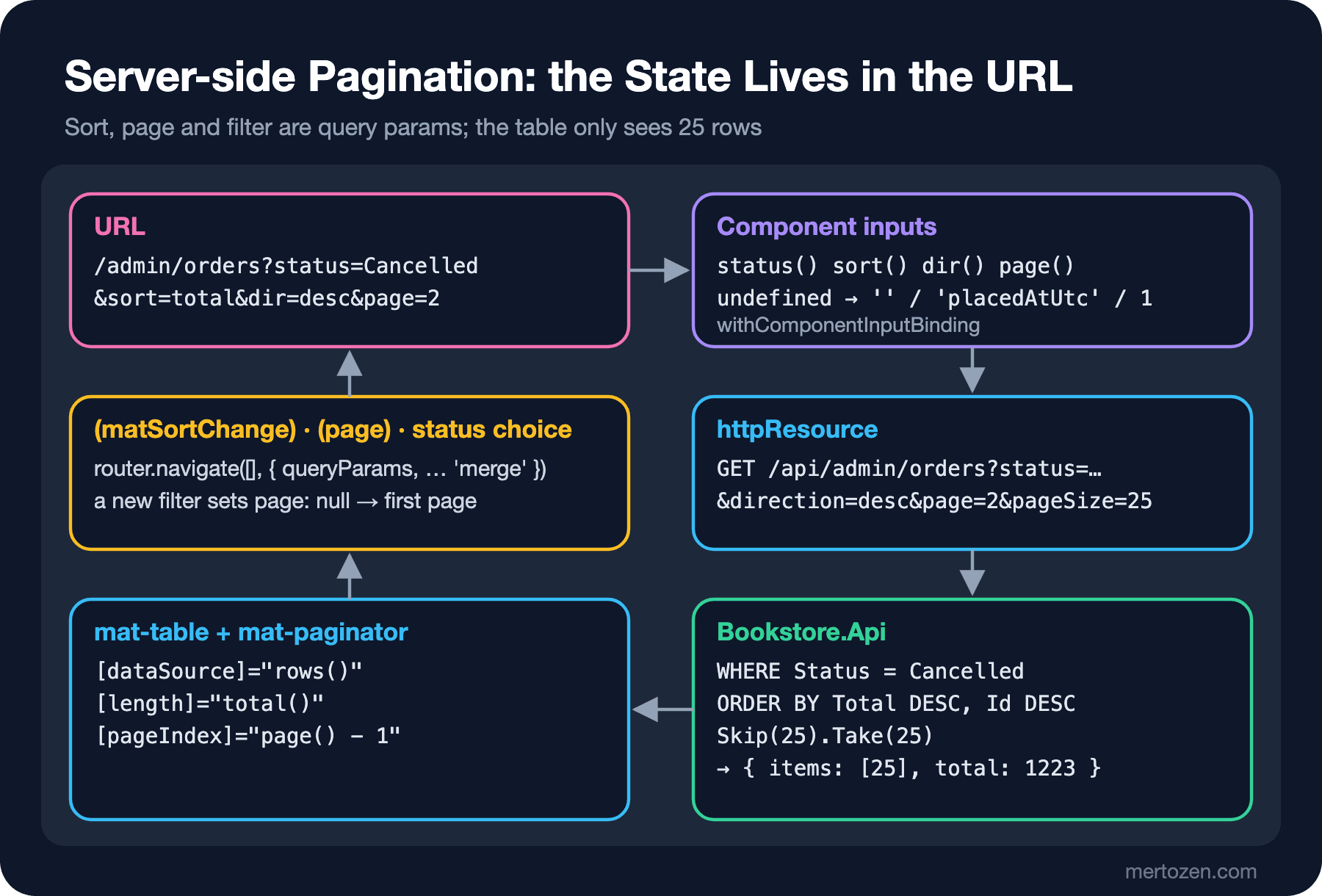
Sort, page and filter are the URL's query params: a reload or a shared link brings back the same view, and the browser's back button returns to the previous page. withComponentInputBinding() is already on in the Bookstore client, so query params are written into component inputs. In the first attempt we declared the inputs with default values, and the first request to the API was this:
GET /api/admin/orders?status=undefined&sort=total&direction=asc&page=1&pageSize=25The answer to the second question: undefined. For a query param that is not in the URL, the router writes undefined into the input, not its default value. The API knows no status called "undefined", returned 400, and the table stayed empty. The fix is a transform on every input:
// The URL is the state: ?status=Cancelled&sort=total&dir=desc&page=3 (withComponentInputBinding).
// A missing query param arrives as undefined, not as the input's default, hence the transforms.
readonly status = input('', { transform: (value: string | undefined) => value ?? '' });
readonly sort = input('placedAtUtc', { transform: (value: string | undefined) => value ?? 'placedAtUtc' });
readonly dir = input<'asc' | 'desc', string | undefined>('desc', { transform: value => (value === 'asc' ? 'asc' : 'desc') });
readonly page = input(1, { transform: (value: unknown) => Math.max(1, numberAttribute(value, 1)) });

protected readonly orders = httpResource<PagedResult<OrderRow>>(() => ({
  url: '/api/admin/orders',
  params: { status: this.status(), sort: this.sort(), direction: this.dir(), page: this.page(), pageSize },
}));
The details of using the URL as state (replaceUrl, the back button, validating params) are covered in the State Management in Angular series post "Using the URL as State: Query Params, withComponentInputBinding and a Working Back Button". For this table the flow looks like this:
Sort, Page and Filter Events
The table changes no state by itself; events only change the URL, and everything else flows from the inputs:
protected sortChanged(sort: Sort): void {
  this.navigate({ sort: sort.direction ? sort.active : null, dir: sort.direction || null, page: null });
}

protected pageChanged(event: PageEvent): void {
  this.navigate({ page: event.pageIndex + 1 });
}

protected statusChanged(status: string): void {
  // A new filter starts again from the first page
  this.navigate({ status: status || null, page: null });
}

private navigate(queryParams: Record<string, string | number | null>): void {
  void this.router.navigate([], { queryParams, queryParamsHandling: 'merge' });
}
<mat-paginator [length]="total()" [pageIndex]="page() - 1" [pageSize]="pageSize" [hidePageSize]="true"
(page)="pageChanged($event)" aria-label="Orders pages" />We walked through the table with Playwright and printed the URL, the paginator's label, the first row and the last request to the API at every step:
load                   url=/admin/orders | 1 – 25 of 10000 | rows=25 | first: #1616 15.11.2026 06:59 Ada Dijkstra Delivered 1 ₺689.00
sort Total             url=/admin/orders?sort=total&dir=asc | 1 – 25 of 10000 | rows=25 | first: #482 24.12.2025 18:45 Katherine Johnson Cancelled 1 ₺219.90
                       GET /api/admin/orders?status=&sort=total&direction=asc&page=1&pageSize=25
next page              url=/admin/orders?sort=total&dir=desc&page=2 | 26 – 50 of 10000 | rows=25 | first: #2402 31.10.2026 09:50 Ada Hamilton Shipped 3 ₺3,773.80
                       GET /api/admin/orders?status=&sort=total&direction=desc&page=2&pageSize=25
page 300               url=/admin/orders?page=300 | 7476 – 7500 of 10000 | rows=25 | first: #6889 14.02.2026 10:52 Katherine Thompson Shipped 3 ₺2,354.80
                       GET /api/admin/orders?status=&sort=placedAtUtc&direction=desc&page=300&pageSize=25
filter Cancelled       url=/admin/orders?status=Cancelled | 1 – 25 of 1223 | rows=25 | first: #6838 15.11.2026 06:56 Donald Hoare Cancelled 3 ₺1,665.90
                       GET /api/admin/orders?status=Cancelled&sort=placedAtUtc&direction=desc&page=1&pageSize=25
browser back           url=/admin/orders?page=300 | 7476 – 7500 of 10000 | rows=25 | first: #6889 14.02.2026 10:52 Katherine Thompson Shipped 3 ₺2,354.80
                       GET /api/admin/orders?status=&sort=placedAtUtc&direction=desc&page=300&pageSize=25
The date column converts the UTC value to the browser's time zone: 03:59 in the API is 06:59 in Istanbul. On the third click on a sort header Material clears the sort (direction arrives as an empty string); we then remove the query params and go back to the default order. For the third question we temporarily removed page: null from statusChanged:
filter Cancelled url=/admin/orders?page=300&status=Cancelled | 7476 – 7500 of 1223 | No orders match this filter.The user is on page 300 of a 49-page list and sees an empty table with a meaningless label like "7476 – 7500 of 1223". The same rule applies to sorting: staying on page 7 after the order changes shows a slice the user has never seen.
While Loading and When Empty
While httpResource loads with new parameters, value() is empty until that request finishes. If you bind the table to it directly, the table briefly falls back to the "No orders" row on every page change and the paginator goes back to "0 of 0". To keep the previous page on screen we derived the rows and the total with linkedSignal:
// Keep the previous page on screen while the next one loads instead of an empty table
protected readonly rows = linkedSignal<PagedResult<OrderRow> | undefined, OrderRow[]>({
  source: () => this.orders.value(),
  computation: (result, previous) => result?.items ?? previous?.value ?? [],
});
We delayed the API by 800 ms in Playwright and moved to the next page, first with rows derived directly from orders.value(), then with linkedSignal:
# rows = orders.value()?.items ?? []
while loading page 2  : rows 1 | Loading orders… | 0 of 0
# with linkedSignal the previous value is kept
while loading page 2  : rows 25 | progress bar 1 | first #1616
page 2 loaded         : first #606
During loading the old 25 rows and a mat-progress-bar on top are visible, and the rows change when the response arrives. *matNoDataRow shows a single row when the table is really empty; we distinguish the error, loading and empty-filter cases in that row.
Row Selection and Sticky Columns
For bulk actions we select rows with the CDK's SelectionModel. Rows are new objects in every response, so the selection holds order ids rather than objects; that way it survives page and sort changes:
// Selected order ids survive paging and sorting; rows are new objects on every response
protected readonly selection = new SelectionModel<number>(true);

// A method, not computed(): SelectionModel is not a signal, a computed() would keep its first answer
protected allOnPageSelected(): boolean {
  const ids = this.rows().map(row => row.id);
  return ids.length > 0 && ids.every(id => this.selection.isSelected(id));
}
The comment comes from a real bug. We first wrote allOnPageSelected as a computed(); a computed is only recalculated when the signals it reads change, and SelectionModel is not a signal. We measured it with the header checkbox:
# with computed()
click header checkbox        25 selected | header checked: true
click header again           25 selected | header checked: false
# with a method
click header checkbox        25 selected | header checked: true
click header again           0 selected | header checked: false
In the first version the second click selected everything again instead of clearing the selection; there was no way left to clear the page. The page change and sticky header measurements:
page 1 selected       : 2 selected
back on page 1        : 2 selected | checked 2
sticky header         : top before 208 after scrolling 400px 208 | first row cell -140
*matHeaderRowDef="columns; sticky: true" gives the header cells position: sticky, and matColumnDef="id" sticky does the same for that column's cells. For sticky to work the table needs its own scroll area; we put it into a container with max-height and overflow: auto. The rows scrolled 400px, the header stayed in place.
In Production
Index the sort columns. At 10,000 rows even SQLite is fast, but as the orders table grows, ORDER BY PlacedAtUtc and WHERE Status need indexes; on SQL Server consider an index such as (Status, PlacedAtUtc) and separate ones for frequent sorts. We did not measure this in this post; the EF Core series and the SQL series cover index choice in detail.
Deep pages are expensive. Skip(7475) tells the database to read and skip 7,475 rows. Nobody goes to page 300 by hand in the panel, but for jobs that walk the whole list, such as an export, keyset pagination that asks for "the 25 after this id" fits better than page numbers.
COUNT is a query too. We recompute the total on every page request; for very large tables caching the total or showing "1000+" is an option.
Let the server cap the page size. Do not trust the pageSize sent by the client; our API cuts it at 100.
Write tests against the URL contract. The five tests in this post check the mapping from inputs to the API query (including undefined), the paginator label, the page reset on filter and sort, and the header checkbox; when we put the computed() version back, the last one broke with expected '3 selected' to be '0 selected'.
 ✓ src/app/admin/orders/orders-page.spec.ts > OrdersPage > turns the URL state into the API query, also when query params are missing
 ✓ src/app/admin/orders/orders-page.spec.ts > OrdersPage > shows the server total in the paginator and keeps a zero-based page index
 ✓ src/app/admin/orders/orders-page.spec.ts > OrdersPage > starts from the first page when the status filter changes
 ✓ src/app/admin/orders/orders-page.spec.ts > OrdersPage > writes the sort into the URL and resets the page
 ✓ src/app/admin/orders/orders-page.spec.ts > OrdersPage > selects and deselects every order on the page from the header checkbox
      Tests  13 passed (13)
Common Pitfalls
First, handing 10,000 rows to MatTableDataSource and paging in the browser. Sorting is fast, downloading is slow, and the list grows every day.
Second, not resetting the page when the filter or sort changes. The paginator ends up with a label like "7476 – 7500 of 1223".
Third, assuming that with withComponentInputBinding a param missing from the URL falls back to the default value. It arrives as undefined.
Fourth, ending the sort with a single column. Rows with equal values disappear at a page boundary or show up twice.
Fifth, reading state that is not a signal (SelectionModel) inside computed().
A Small Experiment
★☆☆ Add [pageSizeOptions]="[25, 50, 100]" to the paginator, write the page size into the URL as size, and decide which page to go to when the page size changes.
★★☆ Add a search box for the customer name. Where do you debounce so that the URL does not change on every key stroke: in the input, or before writing to the URL? Try replaceUrl to keep the browser history clean.
★★★ Add keyset pagination with an afterId parameter to the API and fetch "the next 25" in PlacedAtUtc DESC, Id DESC order. Which features of the paginator do you have to give up (total pages, jumping to the last page)?
The table knows the selected orders but does nothing with them yet. In the next post we add a "Cancel order" confirmation dialog to the table, a snackbar that says "Undo" after removing an item from the cart, and a bottom sheet for mobile; we measure passing data to MatDialog, getting the result with afterClosed, the CDK Dialog and how all of it differs from the native dialog.