

Publishing a Flutter App: Google Play and the App Store, Signing, Versioning, Flavors and CI
A Flutter app takes the same road in both stores: release build, signing, a test channel, review and a gradual release. For Bookstore we cover version numbers, environments with --dart-define-from-file (and why they cannot carry secrets), the Android upload key and Play App Signing, iOS signing and TestFlight, the 2026 store rules and a signed App Bundle build in GitHub Actions.
Version note: The examples in this post were run with Flutter 3.47.8 (Dart 3.13.7); the output comes from flutter test, flutter build web and actionlint 1.7.12 runs. The Android App Bundle build, signing, the iOS build, TestFlight, Play Console and App Store Connect need a device, a signing key and a store account, so they were not run; they are described from the Flutter, Google Play and Apple docs. The store rules were checked again on the relevant pages on 15 November 2026.
Guess First
You build the staging version of Bookstore, the online bookstore used as the shared example across this site's series, with --dart-define-from-file=config/staging.json. Someone on the team suggests adding a payment service's API key to the same file: "we build with --obfuscate anyway, nobody can read it". Are they right? Does obfuscation hide the strings in the binary?
From Code to the Store, and Version Numbers
The road is the same on both platforms: a release build, signing, a test channel, store review and release. What changes is the tool for each step:
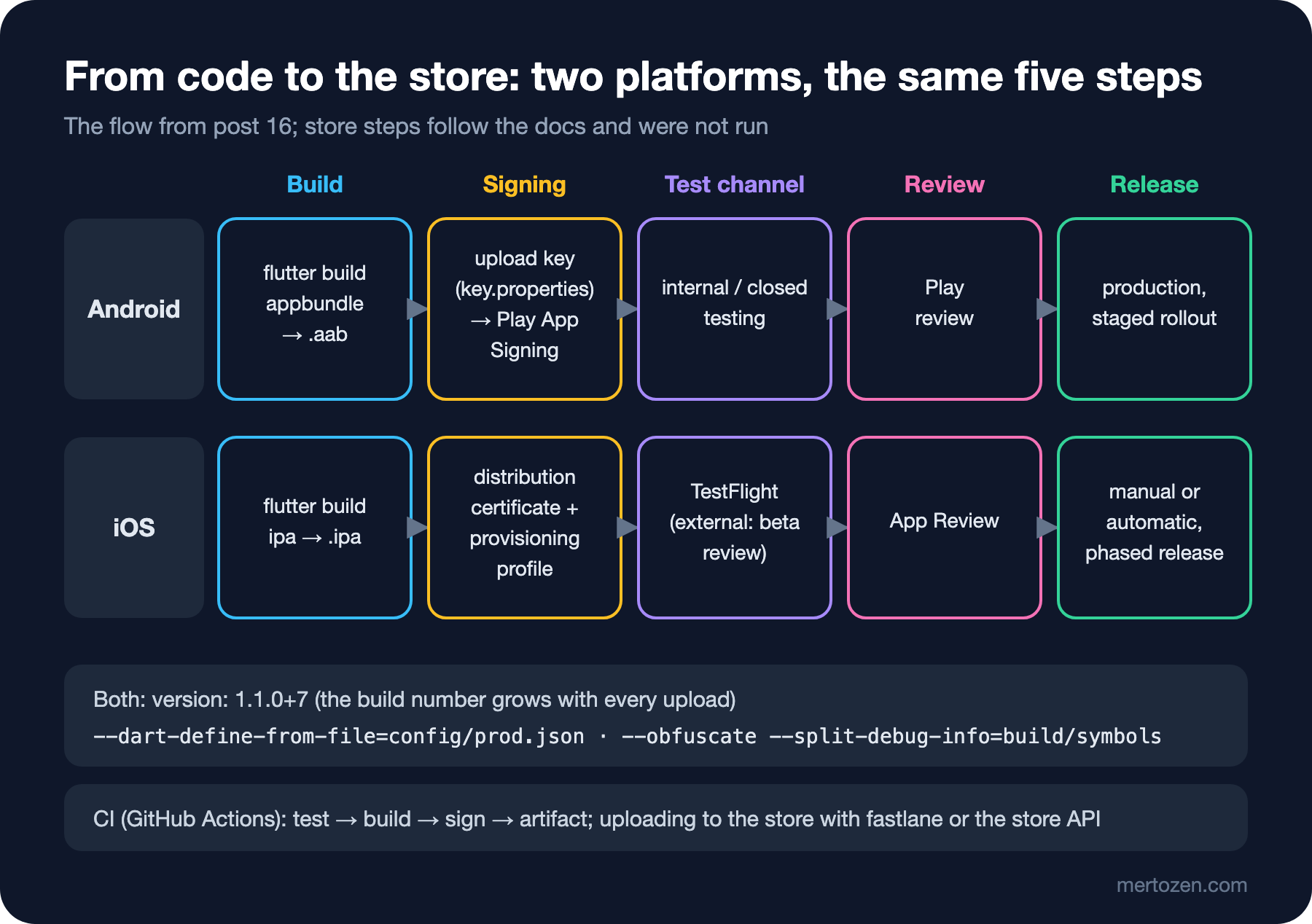
The version lives in one place, pubspec.yaml: version: 1.0.0+1. The part before the + is the version users see (versionName on Android, CFBundleShortVersionString on iOS), the part after it is the build number (versionCode, CFBundleVersion). The stores want a new build number for every upload; that is why CI passes --build-name and --build-number at build time instead of changing the pubspec. We can see this directly in the web build:
flutter build web --release --dart-define-from-file=config/staging.json --build-name=1.1.0 --build-number=7
build/web/version.json:
{"app_name":"bookstore_app","version":"1.1.0","build_number":"7","package_name":"bookstore_app"}
Environments: --dart-define-from-file or Flavors
Bookstore has three environments: the API on the development machine, staging and production. One JSON file for each:
{
  "APP_ENV": "staging",
  "API_BASE_URL": "https://staging-api.bookstore.example.com"
}
/// Build-time configuration, one file per environment:
/// flutter build appbundle --dart-define-from-file=config/prod.json
/// These values end up inside the app binary: never put a secret here.
const apiBaseUrl = String.fromEnvironment(
'API_BASE_URL',
defaultValue: 'http://127.0.0.1:5080',
);
/// dev, staging or prod; anything but prod shows a corner banner.
const appEnvironment = String.fromEnvironment('APP_ENV', defaultValue: 'dev');In builds other than prod, BookstoreApp uses MaterialApp.builder to put a Banner with the environment's name in the top-left corner, so that testers do not mistake staging for the real app. The same test with the three files:
APP_ENV=dev, API_BASE_URL=http://127.0.0.1:5080, banners: DEBUG, DEV
APP_ENV=staging, API_BASE_URL=https://staging-api.bookstore.example.com, banners: DEBUG, STAGING
APP_ENV=prod, API_BASE_URL=https://api.bookstore.example.com, banners: DEBUG
The DEBUG banner is the one MaterialApp adds in debug builds; it is not in release builds. The answer to "Guess First" is in the output of the staging web build:
grep -o "https://staging-api.bookstore.example.com" build/web/main.dart.js | sort | uniq -c
   1 https://staging-api.bookstore.example.com
The value sits in the compiled JavaScript as plain text. It is no different on Android and iOS: Flutter's obfuscation docs say plainly that obfuscation only renames symbols, does not encrypt resources, and that secrets must not be put in an app. A secret such as a payment key stays on the server; the app only calls its own API.
The second option is native flavors: productFlavors on Android, separate Xcode schemes on iOS, and flutter run --flavor staging. The comparison is simple. --dart-define-from-file works the same on every platform and does not touch the native project files, but it produces a single app identity. Flavors let you install staging and production side by side on the same phone with a different applicationId, name and icon, and in return they need configuration on the Gradle and Xcode side and separate signing for each flavor. Bookstore goes with the first for now; if the two apps need to be installed side by side, flavors can be added without breaking the config files.
Android: the App Bundle, the Upload Key and Play App Signing
Google Play wants an App Bundle (.aab), not an APK; Play itself produces the right APK for each device from the bundle. Signing works with two keys: you sign and upload the bundle with the upload key you hold, and Play App Signing signs the APKs that go to users with an app signing key that Google keeps. If the upload key is lost, it can be reset through Play Console; losing the app signing key would mean the app can no longer be updated, so it is a good thing that Google keeps it. The key is created with the command from the Flutter docs, and its details go into a file that never enters the repo:
keytool -genkey -v -keystore $env:USERPROFILE\upload-keystore.jks `
        -storetype JKS -keyalg RSA -keysize 2048 -validity 10000 `
        -alias upload
android/key.properties:
storePassword=<password-from-previous-step>
keyPassword=<password-from-previous-step>
keyAlias=upload
storeFile=<keystore-file-location>
The Flutter template's android/.gitignore already leaves out key.properties, *.jks and *.keystore. build.gradle.kts reads the file if it exists; a fresh clone has no such file, so the release build is signed with the debug key and the developer is not blocked:
// Upload key for Google Play; key.properties and the .jks file stay out of git
val keystoreProperties = Properties()
val keystorePropertiesFile = rootProject.file("key.properties")
if (keystorePropertiesFile.exists()) {
    keystoreProperties.load(FileInputStream(keystorePropertiesFile))
}
buildTypes {
release {
// Without key.properties (a fresh clone) release builds use the debug key
signingConfig = if (keystorePropertiesFile.exists()) {
signingConfigs.getByName("release")
} else {
signingConfigs.getByName("debug")
}
}
}We did not compile this Gradle change, because we did not run an Android build; the code is the example from the Flutter docs, changed to fall back to the debug key when the file is missing. In release builds, code shrinking with R8 is on by default. To obfuscate the Dart code, pass --obfuscate --split-debug-info=build/symbols; keep the symbol files written to that folder, because they are the only way to make a stack trace from production readable again with flutter symbolize. According to the docs, web builds do not support obfuscation; they are minified instead.
Play's target API rule: since 31 August 2026, new apps and updates must target Android 16 (API 36); there was an extension until 1 November 2026 for those who asked. Flutter fills in targetSdk with its own value through flutter.targetSdkVersion; keeping the Flutter version current covers most of this rule. The first upload goes to internal testing (fast, a small test group). According to Google's help page, personal developer accounts created after 13 November 2023 must run a closed test with at least 12 testers for 14 continuous days before going to production; put that in the schedule from the start.
iOS: the Bundle ID, Signing and TestFlight
The iOS side needs macOS and Xcode; for a team working on Windows, this step happens either on a Mac or in CI with a macOS runner. According to the Flutter docs, the order is: Apple Developer Program membership, an explicit Bundle ID in the developer account (e.g. com.example.bookstore), an app record in App Store Connect tied to that Bundle ID, and "Automatically manage signing" with a team selected for the Runner target in Xcode. Then:
flutter build ipa --release --dart-define-from-file=config/prod.json --obfuscate --split-debug-info=build/symbolsThe command writes an .xcarchive to build/ios/archive/ and an .ipa to build/ios/ipa. The upload is done with Apple's Transporter app, with xcrun altool or through Xcode's "Distribute App" step. Once the build has been processed in App Store Connect, it can be opened to internal testers in TestFlight; external testers need Apple's beta review. According to Apple's "upcoming requirements" page, since 28 April 2026 uploads must be built with Xcode 26 and the iOS 26 SDK, and since 9 September 2026 they must target at least iOS 13.
The places where an app like Bookstore gets stuck most often in App Review: the privacy policy address and the privacy details in App Store Connect (the data the app and its SDKs collect), a way to delete the account from inside the app if an account can be created in the app (Google Play has a similar account deletion rule), and a working test account for the review team. The reviewer must be able to open every screen that needs sign-in.
CI: Tests, Build and Signing in GitHub Actions
The general structure of the workflow is the subject of the GitHub Actions series; here we only have the mobile steps. Analyze and tests on every pull request, a signed App Bundle on a mobile-v* tag:
- name: Restore the upload key from secrets
  env:
    UPLOAD_KEYSTORE_BASE64: ${{ secrets.UPLOAD_KEYSTORE_BASE64 }}
    UPLOAD_KEYSTORE_PASSWORD: ${{ secrets.UPLOAD_KEYSTORE_PASSWORD }}
  run: |
    echo "$UPLOAD_KEYSTORE_BASE64" | base64 --decode > "$RUNNER_TEMP/upload-keystore.jks"
    {
      echo "storePassword=$UPLOAD_KEYSTORE_PASSWORD"
      echo "keyPassword=$UPLOAD_KEYSTORE_PASSWORD"
      echo "keyAlias=upload"
      echo "storeFile=$RUNNER_TEMP/upload-keystore.jks"
    } > android/key.properties
- name: Build the app bundle
  env:
    BUILD_NUMBER: ${{ github.run_number }}
  run: >
    flutter build appbundle --release
    --dart-define-from-file=config/prod.json
    --build-number="$BUILD_NUMBER"
    --obfuscate --split-debug-info=build/symbols
The upload key is not in the repo but in a GitHub secret as base64; the job is tied to the play-internal environment, so the secrets are only available to approved tag builds. The actions are pinned to commit SHAs, actions/checkout does not leave the token in the git config (persist-credentials: false), and the build number comes from github.run_number. We could not run the workflow (no repo and no secrets), but we ran it through actionlint; it printed nothing and exited with 0, meaning it found no errors in syntax, expressions or action inputs.
We did not put the last step, uploading to the store, into this workflow. The common option is fastlane: supply to upload to the Play Console API on Android, pilot to upload to TestFlight on iOS, and match to share signing certificates within the team. Alternatives are ready-made actions that use the Play Developer API, and Xcode Cloud. What they all have in common is a service account or an API key with access to the store account; those are stored as secrets too.
Production Notes
Back up the keys. Keep the upload keystore and its password in a password manager or the company's secret store; a key that lives only on one developer's computer leaves with that computer.
Keep the symbol files with the release. The workflow stores each release's build/symbols folder as an artifact together with the bundle; they should also be uploaded to the crash reporting service. An obfuscated stack trace without symbols cannot be read.
Release gradually. With staged rollout on Play you open an update to a small percentage of users first, and with phased release on the App Store you spread it over several days. If you see a bug, you pause the rollout; there is no rollback on mobile, a fix only ships with a new version.
Store rules change. Target API, Xcode version and privacy declarations are updated every year; add checking Play Console and Apple's "upcoming requirements" page to the pre-release checklist.
Common Pitfalls
The first pitfall is committing key.properties or the .jks file. .gitignore does not stop a file from being added with git add -f; secret scanning should run in CI too.
The second pitfall is uploading twice with the same build number. Both stores reject it; generate the number in CI.
The third pitfall is treating --dart-define values as secrets. The grep in "Guess First" shows otherwise in a second.
The fourth pitfall is thinking about the test account and the privacy texts the day before release. Once the review is rejected, every round can take days.
A Small Experiment
★☆☆ Add "SHOW_DEBUG_TOOLS": true to config/dev.json, read it with bool.fromEnvironment and add a menu item that appears only in dev. Show with a test that the value is false in the prod build.
★★☆ Add staging and production flavors on Android (applicationIdSuffix = ".staging") and match the config file to appFlavor. Read Flutter's separate flavor guide for iOS; which steps need Xcode?
★★★ Add an iOS job to the workflow: a macOS runner, flutter build ipa, an App Store Connect API key for signing and an upload to TestFlight. Which environment would you put the secrets in, and what happens when the certificates expire?
In the last post of the series we look back: what changed in Flutter 3 and Dart 3, which version brought the features we used in this series, what changes with Flutter 3.50 and material_ui, and how to keep a Flutter project up to date.