

Personal Data in Logs, Telemetry and Analytics: URLs, Exception Messages, IP Addresses, Session Replay and Error Reporting Tools
Personal data rarely enters logs through a LogInformation call; it gets in through an e-mail address in the URL, a record passed to a log message, an exception message, a span tag or a metric label. On Bookstore's checkout flow we show these leaks with real output, lock them down with a test that searches for canary values, clean browser error reports, truncate IP addresses and add telemetry to the inventory.
Version note: The code in this post was built and run with .NET 10, ASP.NET Core 10, Entity Framework Core 10.0.15 (SQLite), Microsoft.Extensions.Diagnostics.Testing 10.11 and xUnit 2.9. Legal wording and Google's analytics policy were checked against kvkk.gov.tr, mevzuat.gov.tr and Google's help page on 15 November 2026.
This series is a developer's view, not legal advice. How long logs are kept, which legal basis they rely on and who may read them are decided by your legal and security teams; the periods in this post are examples.
Guess First
In Bookstore, the online bookstore used as the shared example across this site's series, guest customers track their orders with an e-mail address and an order number. The endpoint is GET /api/orders/lookup?email=...&orderId=.... The e-mail column in the database was classified in post 02, its access restricted in post 03 and its erasure path written in post 04. How many places does this e-mail address live in right now? A hint: the answer has nothing to do with the database, and the code does not need a single LogInformation call.
Where Personal Data Enters Telemetry
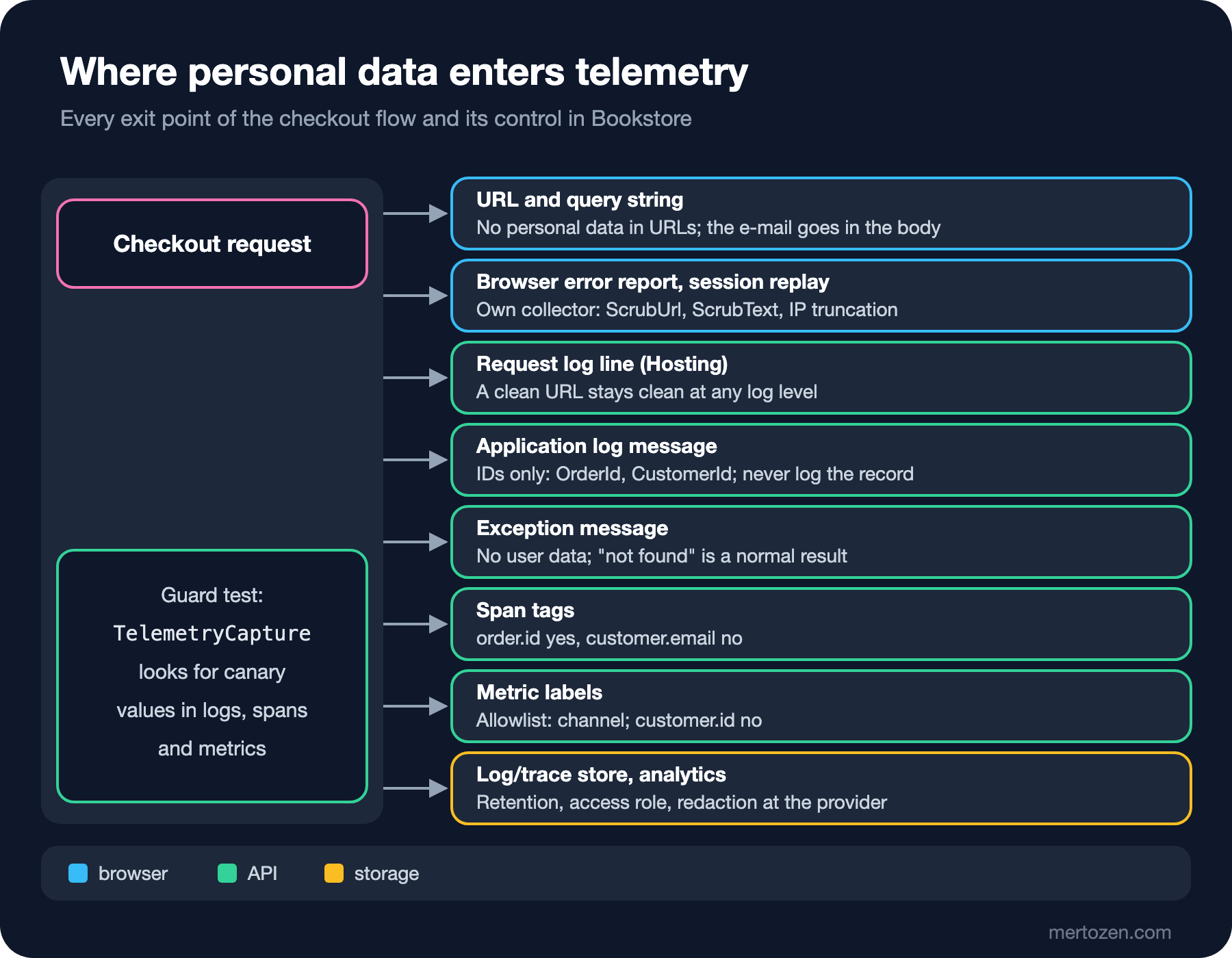
Article 4 of KVKK, Turkey's Law No. 6698, requires processing to be relevant, limited and proportionate to its purpose, and Article 12 requires the data to be protected against unlawful access. Logs, traces and analytics are processing activities too: they record the data, keep it and often hand it to another provider. Unlike the database record, these copies are not classified, many people can read them and they are hard to erase. The erasure flow from post 04 cannot reach them; the only realistic answer is that personal data never gets in. The places where data enters telemetry in Bookstore's checkout flow, and the control for each:
We covered the mechanics of log redaction (data classification attributes, redactors, [LogProperties]) in the .NET Logging series post "Sensitive Data in Logs: Redaction, Data Classification and Privacy-Compliant Logging", and PII filtering in the OpenTelemetry Collector in the Observability series post "The OpenTelemetry Collector: Receivers, Processors, Exporters, Tail Sampling and PII Filtering". This post looks at the question those tools answer: where does personal data leak in Bookstore, and who notices it, and how.
The E-mail Address in the URL
I called the endpoint from the opening question and looked at the API's default log output. The application code has no log call at all; ASP.NET Core's hosting layer writes the line:
info: Microsoft.AspNetCore.Hosting.Diagnostics[1]
      Request starting HTTP/1.1 GET http://127.0.0.1:52801/api/orders/lookup?email=ada.testwell@example.com&orderId=7 - - -
The project has no appsettings.json, so the default level is Information and hosting writes the URL of every request, query string included. The same URL also lands in the reverse proxy's access log, in CDN logs, in the browser history and in the Referer header sent to another site when the user leaves the page. Raising the log level to Warning hides this line but does not fix the problem: the night someone lowers the level to debug an issue, e-mail addresses start flowing again. The right fix is not to carry personal data in the URL:
// In the body, not the URL: URLs end up in access logs, proxies and browser history.
public sealed record OrderLookupRequest([property: PersonalData(InformationType = "Contact Info")] string Email, int OrderId);

app.MapPost("/api/orders/lookup", async (OrderLookupRequest request, OrderLookupService lookup, CancellationToken ct) =>
    await lookup.FindAsync(request, ct) is { } status ? Results.Ok(status) : Results.NotFound());
Search pages, password reset links and "track your order" buttons in e-mails fall into the same trap. If a link must identify a person, use an unguessable, time-limited, single-purpose token instead of the e-mail address; even if the token lands in a log, it does not point to the person on its own.
Log Messages, Exceptions, Spans and Metrics
The first version of the checkout service had three lines a real team could easily write:
logger.LogInformation("Checkout started: {Request}", request);
activity?.SetTag("customer.email", customer.Email);
OrdersPlaced.Add(1, new KeyValuePair<string, object?>("customer.id", customer.Id));
logger.LogInformation("Order {OrderId} placed by {Email}", order.Id, customer.Email);
The first line is the least suspicious. CheckoutRequest is a record, and the compiler-generated ToString writes every property:
info: Bookstore.Ordering.CheckoutService[0]
      Checkout started: CheckoutRequest { ShippingAddress = Example St. 1, Ankara, BillingName = Ada Testwell, Total = 412,50 }
info: Bookstore.Ordering.CheckoutService[0]
      Order 7 placed by ada.testwell@example.com
Today the record has an address and a name; tomorrow someone adds Phone or a national ID for the invoice and the log line quietly grows. Exception messages leak the same way. The first version of the tracking service threw KeyNotFoundException($"No order {orderId} for {email}") when no order matched, and the exception middleware wrote the message to the log as it was (stack trace shortened):
fail: Microsoft.AspNetCore.Diagnostics.DeveloperExceptionPageMiddleware[1]
      An unhandled exception has occurred while executing the request.
      System.Collections.Generic.KeyNotFoundException: No order 99 for ada.testwell@example.com
After the log, exception messages are copied to the error reporting tool, alert e-mails and tickets, so they travel further than any other text. "Not found" is not an error but a normal result: the service returns null, the endpoint returns 404 and the message carries no user data.
Span tags and metric labels are two separate problems. An e-mail address written to a span goes to the trace backend, where everyone who reads traces sees it. On the metric side the problem is cardinality rather than content: a customer.id label creates one time series per customer, inflates the cost of the metric backend and turns counters into a per-person activity record. Metrics should keep only low-cardinality, non-personal labels. The fixed version:
// IDs only: the customer number points to the record, the record stays in the database.
activity?.SetTag("order.id", order.Id);
OrdersPlaced.Add(1, new KeyValuePair<string, object?>("channel", "web"));
logger.LogInformation("Order {OrderId} placed by customer {CustomerId}", order.Id, customer.Id);
info: Bookstore.Ordering.CheckoutService[0]
Order 7 placed by customer 1The customer number is personal data too, but it is pseudonymous: it points to a person only together with the access-restricted database. It is enough to investigate an incident from the log, and if the log leaks on its own it holds no name or address. It is a trade-off, and the decision belongs in the inventory; we come back to it below.
Catching the Leak with a Test
Code review can catch the lines above, but not reliably: {Request} looks harmless. Instead, the test itself knows the personal data and searches for it everywhere. It runs checkout with known fake values (canary values) and collects logs with FakeLogger, spans with an ActivityListener and metric labels with a MeterListener:
[Fact]
public async Task Checkout_telemetry_contains_no_personal_data()
{
    using var testDb = new TestDb();
    await using BookstoreContext db = testDb.CreateContext();
    Customer ada = FakePeople.ToCustomer(0, Now.AddMonths(-8));
    db.Customers.Add(ada);
    await db.SaveChangesAsync();
    var request = new CheckoutRequest($"Example St. 1, {ada.City}", ada.FullName, 412.50m);

    using var telemetry = new TelemetryCapture("Bookstore.Ordering");
    var checkout = new CheckoutService(db, new FixedClock(Now), new FakeLogger<CheckoutService>(telemetry.Logs));
    await checkout.PlaceOrderAsync(ada.Id, request);

    // Canary values: the test knows the personal data it put in, so it can look for it everywhere.
    string[] leaks = [.. telemetry.FindLeaks([ada.FullName, ada.Email, ada.Phone!, request.ShippingAddress])];
    Assert.True(leaks.Length == 0, "Personal data in telemetry:\n" + string.Join("\n", leaks));

    string[] tags = [.. telemetry.UnexpectedMetricTags(new HashSet<string> { "channel" })];
    Assert.True(tags.Length == 0, "Metric tags not in the allowlist: " + string.Join(", ", tags));
}
TelemetryCapture is a small class: from FakeLogCollector it collects every record's message, structured log fields and exception message, and from stopped spans their names and tags. Against the first version of the service the test failed with this output:
Failed Bookstore.Privacy.Tests.TelemetryTests.Checkout_telemetry_contains_no_personal_data [386 ms]
 Personal data in telemetry:
log: Checkout started: CheckoutRequest { ShippingAddress = Example St. 1, Ankara, BillingName = Ada Testwell, Total = 412,50 }  <-- contains 'Ada Testwell'
log: Checkout started: CheckoutRequest { ShippingAddress = Example St. 1, Ankara, BillingName = Ada Testwell, Total = 412,50 }  <-- contains 'Example St. 1, Ankara'
log field Request: CheckoutRequest { ShippingAddress = Example St. 1, Ankara, BillingName = Ada Testwell, Total = 412,50 }  <-- contains 'Ada Testwell'
log field Request: CheckoutRequest { ShippingAddress = Example St. 1, Ankara, BillingName = Ada Testwell, Total = 412,50 }  <-- contains 'Example St. 1, Ankara'
log: Order 1 placed by ada.testwell@example.com  <-- contains 'ada.testwell@example.com'
log field Email: ada.testwell@example.com  <-- contains 'ada.testwell@example.com'
span tag customer.email: ada.testwell@example.com  <-- contains 'ada.testwell@example.com'
After the fix the test passes and all 19 tests in the project are green. The value of the test is not today's code but tomorrow's change: when someone adds a new log line or span tag to checkout, it fails in the pull request. Copying the same pattern to every flow that handles personal data (sign-up, password reset, returns) is cheap. The test does not replace redaction; as we showed in the Logging series, redaction masks classified fields automatically, and this test shows where classification was forgotten.
Browser Errors, IP Addresses and Session Replay
Frontend error reporting tools and session replay recordings can collect whatever is on the user's screen: the URL, form fields, page text and network requests. Bookstore collects browser errors on its own endpoint, so we decide what is kept before anything is written. The incoming text is not ours, so it is cleaned before it is logged:
app.MapPost("/api/client-errors", (ClientErrorReport report, HttpContext http, ILogger<ClientErrorReport> logger) =>
{
    logger.LogWarning("Client error at {Page}: {Message} (client {ClientNetwork})",
        TelemetryScrubber.ScrubUrl(report.Url, ClientErrorReport.AllowedQueryKeys),
        TelemetryScrubber.ScrubText(report.Message),
        TelemetryScrubber.TruncateIp(http.Connection.RemoteIpAddress));
    return Results.Accepted();
});
ScrubUrl keeps the path and the allowed query keys (page, category) and drops the fragment and every other parameter; ScrubText replaces e-mail addresses and numbers longer than ten digits (national ID, card and phone numbers) with placeholders; TruncateIp zeroes the last octet of an IPv4 address and everything after the first 48 bits of an IPv6 address. I sent a report locally (the national ID in it is a fake value with a deliberately wrong check digit):
curl -X POST http://127.0.0.1:52801/api/client-errors -H "Content-Type: application/json" \
  -d '{"message":"TypeError: cannot read invoice of ada.testwell@example.com (id 23515709358)","url":"http://127.0.0.1:52806/orders/track?email=ada.testwell%40example.com&page=2#ref=x","stack":null}'

warn: Bookstore.Api.ClientErrorReport[0]
      Client error at /orders/track?page=2: TypeError: cannot read invoice of [email] (id [number]) (client 127.0.0.0)
Regex-based cleaning is a safety net, not a guarantee: it cannot recognise a name or an address. The real rule is therefore on the client: error reports carry no form values, request bodies or user details. IP truncation rests on proportionality; the Authority's Guide on Cookie Practices (KVKK Publications No. 69, July 2025) gives masking the IP address as an example technique that lowers the identification risk for first-party analytics cookies. A truncated IP still does not count as anonymous data on its own; combined with other data it can get close to a person, so it stays personal data in the inventory.
Session replay needs a separate decision. Because these tools record what the user does on the page, recording on checkout, account and address pages should either be off or mask all text and inputs. Check your tool's masking defaults and network capture in its documentation; no third-party error reporting or session replay tool was run for this post. These tools are also a cookie and consent question, which we come back to in the next post.
Analytics, Retention and Access
Google's analytics help page asks that no data identifying a person be sent to Google and says leaks most often happen through URLs, page titles, custom dimensions and text users type into search boxes. GA4 web streams have a data redaction setting that removes e-mail addresses and selected query parameters; Google describes it as "best-effort", so it should stay the last line of defence. In Bookstore this is the analytics side of the URL rule above: page paths contain no personal data, and search terms are never sent to analytics. We will cover GA4 setup and its event model separately in the Analytics and Measurement series.
Telemetry copies go into the inventory too. We added an activity without a table of its own to the ProcessingActivities list from post 02:
// Logs, traces and browser error reports: no table of their own, but the same questions apply.
new("telemetry", "Operations, debugging, security monitoring", "Legitimate interest",
    "Example: logs 30 days, traces 7 days, error reports 30 days", ["Developer", "SRE"], ["log-store", "trace-store", "error-reports"]),
The periods here are examples; what matters is that the question was asked. Retention is set in the log backend (we covered retention and cost in Application Insights and Log Analytics in the Observability series post "Observability in Production: Azure Monitor and Application Insights, Sampling, Cost, PII and Auto-Instrumentation on Kubernetes"), and the value in the inventory must match it. Access is a control as well: to resolve a customer complaint the support team does not need the whole log, only a view filtered by order number. Giving raw log access only to developer and operations roles reduces the number of people who read it.
Production Notes
The log level is a configuration value and can change in production. In this sample the Microsoft.AspNetCore and Microsoft.EntityFrameworkCore.Database.Command categories are at Warning; Entity Framework Core's SQL log shows parameter values as '?' even at Information, but once EnableSensitiveDataLogging() is on, the values go into the log. That setting belongs only in development, and a test or startup check should verify that it is not left on in the production configuration. The developer exception page that is on in Development also writes the exception message to the HTTP response; in production return a ProblemDetails without the message through UseExceptionHandler. Finally, fixing the code is not enough once you find a leak: the older entries are still in the log backend. Know when retention will drop them, use the provider's delete or purge feature if needed and report the incident to the legal team; it may need a data breach assessment, which is the subject of post 07.
Common Pitfalls
The most common one is a "temporary" Debug or Information log level that stays on in production; the issue is closed a week later, the setting stays on for months. The second is passing a record or a DTO to a log message as it is. The third is turning personal data into a metric label: a privacy problem and a cost problem at once. The fourth is writing the hash of an e-mail address to the log and treating it as anonymous; as we saw in post 01, a hash matches back against a list of known addresses. The fifth is enabling an error reporting or session replay tool with default settings on the checkout page. The sixth is forgetting to clean up the log after a leak: the code is fixed, but the old entries stay readable until retention expires.
Sources for This Post
Accessed on 15 November 2026.
- Law No. 6698, Articles 4 and 12:
mevzuat.gov.tr/mevzuatmetin/1.5.6698.pdf - KVKK, Guide on Cookie Practices, KVKK Publications No. 69, July 2025, section 5.9:
kvkk.gov.tr/SharedFolderServer/CMSFiles/fb193dbb-b159-4221-8a7b-3addc083d33f.pdf - Google Analytics help page on not sending data that identifies a person:
support.google.com/analytics/answer/6366371
A Small Experiment
★☆☆ Add a second test to TelemetryTests for the returns flow: let the return request take the customer's IBAN, have the service write the request as a record in a log line and watch the test catch it.
★★☆ Extend TelemetryCapture with the Data dictionary of exceptions and with span events; then show with a test that code calling activity?.AddException(ex) in a catch block carries the e-mail address into the trace.
★★★ Write a test that reads the production configuration (appsettings.Production.json) and fails if the Microsoft.AspNetCore level drops below Warning or Entity Framework Core's sensitive data logging is left on. Run it in CI for every pull request that changes configuration.
We took personal data out of the logs, but we have not yet asked anyone's permission for analytics itself. In the next post we look at the difference between a privacy notice and explicit consent, the ConsentRecord data model, the "reject" button of the cookie banner, Google Consent Mode and reporting commercial message permissions to İYS.