

CDK Scrolling and Layout: Virtual Scroll for a Long Catalog, BreakpointObserver, Clipboard and Other Utilities
CDK virtual scroll kept only 15 of 5,000 rows in the DOM and drew the page in 38 ms instead of 249 ms; the price is that Ctrl+F cannot find rows that are not rendered and that row height has to be fixed. On Bookstore's stock list we measure virtual scroll, content-visibility and a plain list, jumps with variable heights, choosing a menu or a bottom sheet with BreakpointObserver, the clipboard and CdkListbox.
Version note: The examples in this post were tried with Angular 22.2 (TypeScript 6.0), Angular Material and the CDK 22.2.7, .NET 10 and Node.js 24; browser behavior was observed in headless Chromium with Playwright 1.65. For the measurements Bookstore.Api ran on SQLite instead of SQL Server.
Predict First
We add a "Stock" page to the admin panel of Bookstore, the online bookstore used as the shared example across this site's series: the on-hand and reserved quantities of 5,000 book editions in three warehouses, in one list. Rows are 48px; about ten rows are visible at a time. Three questions: how much heavier does printing 5,000 rows with a plain @for make the page, and how much lighter does CDK virtual scroll make it? In a virtual-scrolled list, does the user find a book near the end of the list with the browser's Ctrl+F? If some rows wrap to two lines because of a long title, what does itemSize="48" do?
5,000 Rows with cdk-virtual-scroll-viewport
The idea of virtual scroll is simple: the DOM holds only the visible rows plus a little buffer above and below, and as you scroll the same row elements are filled with new data. An empty spacer element carries the list's real height; thanks to it the scrollbar behaves like a 5,000-row list. The only thing the CDK needs to know for this is the height of a row:
<div class="header" aria-hidden="true">
  <span>Title</span><span>ISBN</span><span>Warehouse</span><span class="num">On hand</span><span class="num">Reserved</span>
</div>
<!-- itemSize must equal the real row height: the viewport computes positions from it -->
<cdk-virtual-scroll-viewport itemSize="48" class="viewport" role="list" aria-label="Stock">
  <div class="row" role="listitem" *cdkVirtualFor="let row of rows(); trackBy: trackById">
    <span class="title">{{ row.title }}</span>
    <span class="isbn">
      {{ row.isbn }}
      <button matIconButton type="button" [cdkCopyToClipboard]="row.isbn" (cdkCopyToClipboardCopied)="copied($event, row.isbn)"
              [attr.aria-label]="'Copy ISBN ' + row.isbn">
        <mat-icon>content_copy</mat-icon>
      </button>
    </span>
    <span>{{ row.warehouse }}</span>
    <span class="num">{{ row.onHand }}</span>
    <span class="num">{{ row.reserved }}</span>
  </div>
</cdk-virtual-scroll-viewport>
.viewport {
height: 60vh;
}
// Fixed height: the same 48px as itemSize, long titles are cut instead of wrapping
.row {
height: 48px;
box-sizing: border-box;
border-bottom: 1px solid var(--mat-sys-surface-container-high);
.title {
overflow: hidden;
white-space: nowrap;
text-overflow: ellipsis;
}
}The viewport must have its own height (here 60vh); a viewport whose height grows with its content prints every row and virtual scroll loses its point. *cdkVirtualFor replaces @for; it has no control flow syntax, so the trackBy function is still ours to write. We added a demo GET /api/admin/stock with 5,000 deterministically generated rows to Bookstore.Api; the JSON is 627,103 bytes and arrives in one go. We discuss that decision below.
We served the production build and measured the time from clicking the "Stock" link on the dashboard until the rows were on screen, the number of elements in the DOM and the JavaScript heap. We compiled the same page twice more: one prints the 5,000 rows with a plain @for, the other adds CSS content-visibility: auto to that:
virtual (prod)   : rows in DOM 15 | elements 286 | 38 ms from click to rendered rows | JS heap 10 MB
all rows (prod)  : rows in DOM 5000 | elements 55118 | 249 ms from click to rendered rows | JS heap 23 MB
c-visibility(prod): rows in DOM 5000 | elements 55118 | 121 ms from click to rendered rows | JS heap 22 MB
Virtual scroll kept 15 rows in the DOM (the 10 rows visible in the 480px viewport plus the CDK's default 100–200px buffer) and the page was drawn in 38 ms. The plain list produced 55,118 elements and took 249 ms; that time is paid again on every filter change and every re-render. content-visibility: auto skips layout and paint for rows that are off screen, so it brought the time down to 121 ms, but all the elements stayed in the DOM and in memory. The times were measured on this machine; on a slower laptop the gap grows, it does not shrink.
We also saw the rows being reused while scrolling:
scrolling        : scrollTop 0: rows 15 first "The Hobbit · Hardcover #1" last "The Great Gatsby · Hardcover #15"
                 : scrollTop 100000: rows 17 first "Emma · Annotated #2082" last "The Count of Monte Cristo · Annotated #2098"
                 : scrollTop 239500: rows 13 first "Moby-Dick · Annotated #4988" last "Dune · Hardcover #5000"
100,000px down, the first row in the DOM is #2082 (100,000 / 48 ≈ 2083), and at the very bottom the last row is #5000. The number of rows stayed between 13 and 17.
Ctrl+F, Search and Screen Readers
The second question. Since we cannot press Ctrl+F from Playwright, we called Chromium's non-standard window.find(), which uses the same search engine:
virtual (prod)   : window.find("The Great Gatsby · Hardcover #15") true
virtual (prod)   : window.find("Anna Karenina · Hardcover #4013") false
all rows (prod)  : window.find("The Great Gatsby · Hardcover #15") true
all rows (prod)  : window.find("Anna Karenina · Hardcover #4013") true
c-visibility(prod): window.find("The Great Gatsby · Hardcover #15") true
c-visibility(prod): window.find("Anna Karenina · Hardcover #4013") true
The book on screen was found in all three; #4013 near the end of the list was not found only with virtual scroll, because that row is not in the DOM. content-visibility: auto left the row searchable even though it did not draw it. The same reason applies to screen readers: in a virtual list a screen reader sees only the 15 rows in the DOM and cannot say "list, 5,000 items". So a virtual-scrolled page has to bring its own search. The stock page's title and ISBN search runs over the 5,000 rows in memory:
// Ctrl+F cannot see rows that are not rendered, so the page has its own search
protected readonly rows = computed(() => {
  const term = this.search().trim().toLowerCase();
  const rows = this.stock.value();
  return term ? rows.filter(r => r.title.toLowerCase().includes(term) || r.isbn.includes(term)) : rows;
});
Which one to choose? If the list is really long and the user moves through it by scrolling (stock, logs, a message list), virtual scroll. If the user is looking for a specific record and page-by-page results make sense, the server-side pagination of post 03: 25 rows reach the browser instead of 627 kB. If the list is between a few hundred and a few thousand rows and it matters that Ctrl+F and screen readers see the whole list, content-visibility: it needs no JavaScript and, according to MDN's compatibility data, has been available since Chrome 85, Firefox 125 and Safari 18. On our stock page warehouse staff count stock by scrolling through the list and there is a search box; we chose virtual scroll.
When Row Height Is Not Fixed
The third question. In one experiment we let titles wrap and added a long subtitle to every third row; rows varied between 48px and 221px. Then we scrolled the list in 400 steps of 10 pixels and counted whether a row on screen moved by the scroll amount or by more:
fixed 48px rows       : row heights 48px | spacer 240000px | 400 scroll steps: 0 jumps (max 0px), 0 with blank space at the bottom
wrapping, itemSize 48 : row heights 48/61/81/101/121/141/161/181/201/221px | spacer 240000px | 400 scroll steps: 22 jumps (max 219px), 0 with blank space at the bottom
wrapping, autosize    : row heights 48/61/81/101/121/161/181/201/221px | spacer 542199px | 400 scroll steps: 0 jumps (max 0px), 0 with blank space at the bottom
With a fixed itemSize, the CDK moves the rendered block down by "index of the first row × 48". When the real rows are taller, that calculation does not hold: in 22 of the 400 steps the row on screen jumped by up to 219px. The user sees this as the row they were reading suddenly disappearing while scrolling. The autosize strategy in the third line measures rows as it renders them, and jumps went down to zero; but this strategy is not in the main @angular/cdk package, it is in @angular/cdk-experimental/scrolling. In 22.2.7 the package still carries the "experimental" name; we ran the experiment with npm i --no-save and did not put it in the snapshot. In production our preference is to fix the row height: the title is cut (text-overflow: ellipsis) and shown in full in a tooltip or on the details page. For content with truly variable heights, like cards, either pagination or content-visibility brings fewer surprises.
BreakpointObserver: Behavior by Screen Width
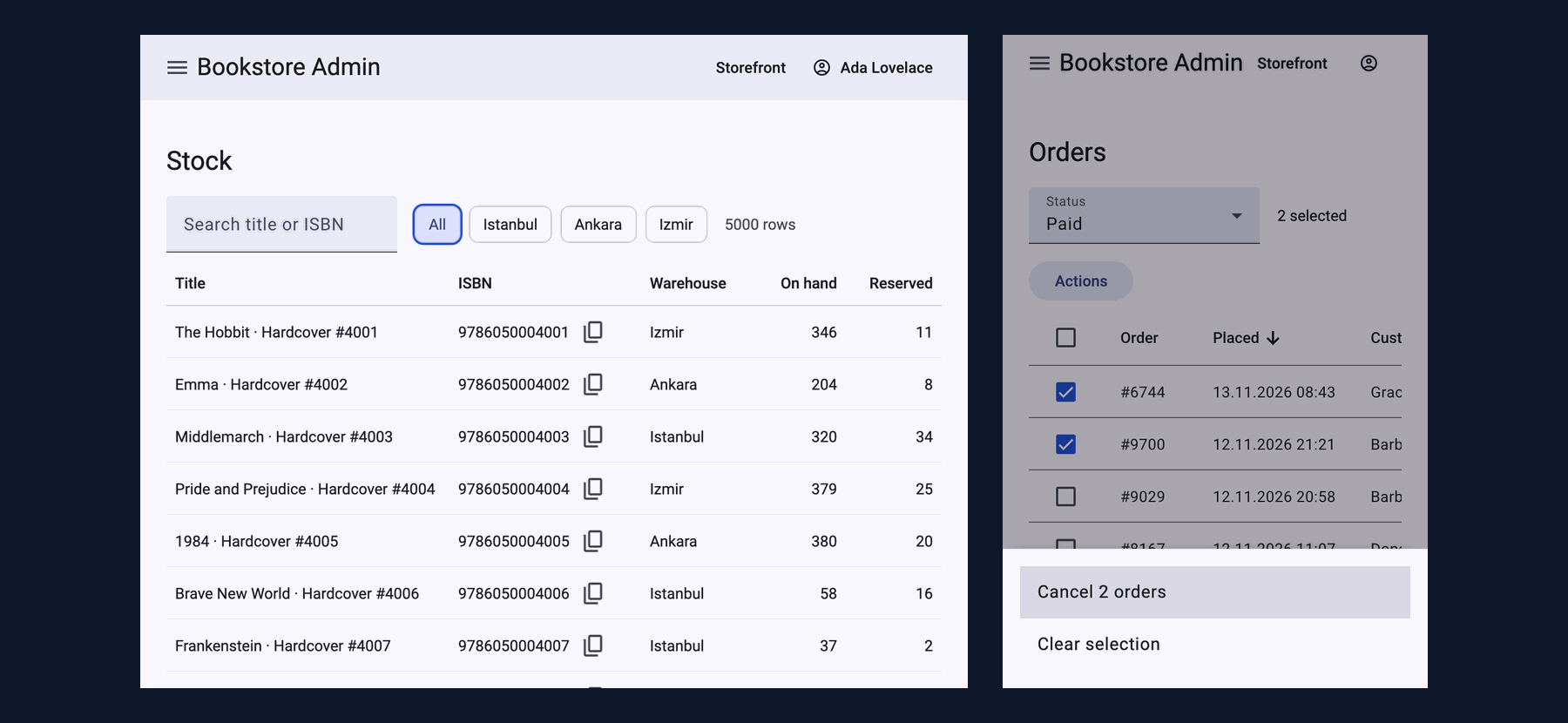
In post 01 we switched the admin shell's sidenav to over mode on phones with BreakpointObserver; the mechanics are there. Post 04 left a question open: the bulk actions for selected orders open as a bottom sheet on a phone, while on a desktop a sheet rising from the bottom of the screen looks odd. What differs here is not the look but which component opens; CSS cannot solve that:
// The same actions as a bottom sheet on a phone (thumb reach) and as a menu next to the button on a wide screen
protected readonly handset = toSignal(
  inject(BreakpointObserver).observe(Breakpoints.Handset).pipe(map(state => state.matches)),
  { initialValue: false },
);
@if (selection.selected.length) {
@if (handset()) {
<button matButton="tonal" type="button" (click)="openActions()">Actions</button>
} @else {
<button matButton="tonal" type="button" [matMenuTriggerFor]="actionsMenu">Actions</button>
}
}
<mat-menu #actionsMenu="matMenu">
<button mat-menu-item type="button" (click)="runAction('cancel')">
Cancel {{ selection.selected.length }} {{ selection.selected.length === 1 ? 'order' : 'orders' }}
</button>
<button mat-menu-item type="button" (click)="runAction('clear')">Clear selection</button>
</mat-menu>1280x800 : mat-menu role=menu at y=192-304 | items "Cancel 2 orders", "Clear selection" | focus "Cancel 2 orders"
390x844 : bottom sheet role=dialog at y=716-844 | items "Cancel 2 orders", "Clear selection" | focus "Cancel 2 orders"On a wide screen a role="menu" mat-menu opened right below the button, on a phone the bottom sheet at the bottom edge of the screen; in both, focus is on the first action. In the CDK's definition Breakpoints.Handset is two media queries: screens narrower than 600px in portrait and narrower than 960px in landscape. So a tablet held in landscape at 900px wide also counts as a "handset" and gets the bottom sheet; if your breakpoint is different, write the media query yourself.
In the same post we did the opposite as well. At 390px the account button did not fit in the toolbar, and we solved this layout-only problem with a media query:
// A layout-only change is a media query, not a BreakpointObserver: on a phone the account button shows only its icon
// (the name stays in the accessibility tree as the button's name)
@media (max-width: 599.98px) {
  .user-name {
    position: absolute;
    width: 1px;
    height: 1px;
    overflow: hidden;
    clip-path: inset(50%);
    white-space: nowrap;
  }
}
before 390px | overflowing: menu (42px in 36px), account_circle Ada Lovelace (98px in 89px) | button named "Ada Lovelace": 1
after 390px | overflowing: menu (42px in 36px) | button named "Ada Lovelace": 1The account button no longer overflows and its name for screen readers is still "Ada Lovelace". (The 6px difference on the menu icon button is there in both measurements; it comes from Material's ripple element and is not a visible overflow.)
Clipboard, Listbox and Other Utilities
The stock page has two more CDK utilities. cdkCopyToClipboard copies the ISBN to the clipboard; according to the CDK's source code it does this with an invisible textarea and document.execCommand('copy'), and reports the result as a boolean through cdkCopyToClipboardCopied; telling the user when copying failed is up to us. The warehouse filter is a CdkListbox: role="listbox", arrow key navigation and selection come from the CDK, the look is ours:
<!-- CdkListbox: role="listbox", arrow keys and selection come from the CDK, the look is ours -->
<ul class="warehouses" cdkListbox cdkListboxOrientation="horizontal" aria-label="Warehouse"
    [cdkListboxValue]="[warehouse()]" (cdkListboxValueChange)="warehouseChanged($event.value)">
  @for (w of warehouses; track w) {
    <li class="chip" [cdkOption]="w">{{ w || 'All' }}</li>
  }
</ul>
copy : 9786050000003 | snackbar Copied 9786050000003
listbox : role=listbox aria-orientation=horizontal options=All*,Istanbul,Ankara,Izmir
ArrowRight : active=Istanbul selected=All | 5000 rows
ArrowRight x2 : active=Izmir selected=All | 5000 rows
Space : active=Izmir selected=Izmir | 1554 rowsThe arrow keys only moved the active option, the selection changed with Space and ?warehouse=Izmir went to the API; not sending a request on every arrow key press is the right behavior for this filter. In the same family there are CdkMenu (menubars and context menus), cdkTextareaAutosize (we compared it with field-sizing in post 02), CdkAccordion, CdkStepper and CdkTree. They all give you the behavior and leave the look to you; the keyboard and ARIA behavior is covered in depth in the Accessibility (a11y) series post "Accessible Components in Angular: Angular Aria, CDK a11y, Material and Not Writing Your Own Combobox". If you are going to write a new component, look at the Angular Aria option there too.
In Production
Virtual scroll shrinks the DOM, not the data. The 5,000 rows arrive in one request of 627,103 bytes and all of them stay in memory. If the list grows to tens of thousands, the problem is not rendering but the network and memory; at that point you need server-side pagination or loading in chunks while scrolling.
The page's cost. The stock page's chunk is 20.64 kB in the production build (5.80 kB transfer) and lazy; virtual scroll, listbox and clipboard come only with this page.
Tests. jsdom has no layout and the viewport's height is zero; so in the unit tests we tested the search and the listbox's API request, not rendering rows. The real scrolling is in Playwright:
 ✓ src/app/admin/stock/stock-page.spec.ts > StockPage > searches the loaded rows by title or ISBN, because Ctrl+F cannot see rows that are not rendered
 ✓ src/app/admin/stock/stock-page.spec.ts > StockPage > loads one warehouse when it is picked in the listbox
 ✓ src/app/admin/orders/orders-page.spec.ts > OrdersPage > offers the bulk actions as a menu on wide screens and as a bottom sheet on handsets
      Tests  30 passed (30)
Common Pitfalls
First, showing cards of variable height with a fixed itemSize. In the measurement, 22 jumps and a shift of 219px; the fix is to fix the row height or to give up virtual scroll.
Second, assuming Ctrl+F works with virtual scroll. A row that is not in the DOM is not found; give the page its own search.
Third, moving work that CSS should do into JavaScript with BreakpointObserver. Hiding something, laying things side by side or changing a size is the job of a media query or a container query; a breakpoint in JavaScript starts with the wrong value during SSR because the server does not know the screen width, and produces a brief shift in the browser, while CSS gives the right layout on the first paint. Use BreakpointObserver only when a different component or behavior is needed.
Fourth, not giving the viewport a height. A cdk-virtual-scroll-viewport that grows with its content renders every row.
Fifth, putting virtual scroll on a 50-row list. You lose Ctrl+F, the list size for screen readers and flexible row heights, and gain nothing measurable in return.
A Small Experiment
★☆☆ Give cdk-virtual-scroll-viewport minBufferPx="400" maxBufferPx="800". How do the number of rows in the DOM and the appearance of blank space during fast scrolling change?
★★☆ Make the stock list server-side: the API takes offset and limit, and the client writes its own DataSource that loads only the visible range based on viewport.renderedRangeStream. Can you scroll to the end of the list without the 5,000 rows ever arriving?
★★★ Fix the list for screen readers: give rows aria-setsize="5000" and aria-posinset. Do Playwright's ariaSnapshot() and Chromium's accessibility tree show this information? What does changing the role from list to grid change?
We have seen the components and utilities of Material and the CDK. In the last post of the series we return to the look: we fit Material to Bookstore's institutional portal theme with token overrides, measure the density scale, write our own component with the CDK for a need Material does not fit, and explain what changed from Angular Material 12 to 22 and why old .mat-* overrides no longer work.