

Personal Data Inventory and Privacy by Design: Classifying Data, Marking It in Code and Minimisation
The technical half of a personal data inventory can be generated from code: we classify entities with Microsoft.Extensions.Compliance attributes and derive tables, columns, purposes, retention periods and copies from the EF Core model. A test that catches unclassified fields, a SQL Server sensitivity label script, minimisation decisions such as an age confirmation instead of a birth date, PCI DSS and LINDDUN on Bookstore, with real output.
Version note: The code in this post was built and run with .NET 10, Entity Framework Core 10.0.15 (SQLite), Microsoft.Extensions.Compliance.Abstractions 10.11 and xUnit 2.9. Legal statements were checked against kvkk.gov.tr and mevzuat.gov.tr on 15 November 2026.
This series is a developer's view, not legal advice. Purpose, legal basis and retention decisions are made by your legal counsel; the periods in this post are examples.
Guess First
Because the product team says "we'll do segmentation later", a developer adds Gender and MarketingSegment fields to the Customer entity. The migration is generated, the build passes and nobody objects in code review. What catches that these two fields never made it into the inventory and went to production without a purpose or a retention period? We do not want the answer to be "a careful reviewer"; by the end of this post the answer is a red test.
Why the Inventory Belongs in Code
In the previous post we wrote the endpoints that answer data subject requests for Bookstore, the online bookstore used as the shared example across this site's series, and saw that the export does not end with the profile table. The document behind that is what KVKK, Turkey's Law No. 6698, calls the personal data processing inventory. The Regulation on the Erasure, Destruction or Anonymisation of Personal Data defines the inventory as the record that links the processing activities in business processes to their purpose, legal basis, data category, recipient group and data subject group, and shows the retention period, transfers abroad and security measures (Art. 4(1)(e), as amended on 28 April 2019). Article 5 of the same regulation requires those obliged to register with the Data Controllers' Registry to prepare a retention and destruction policy consistent with that inventory. The GDPR equivalent is the records of processing activities in Art. 30. The Authority also publishes a guide on preparing the inventory.
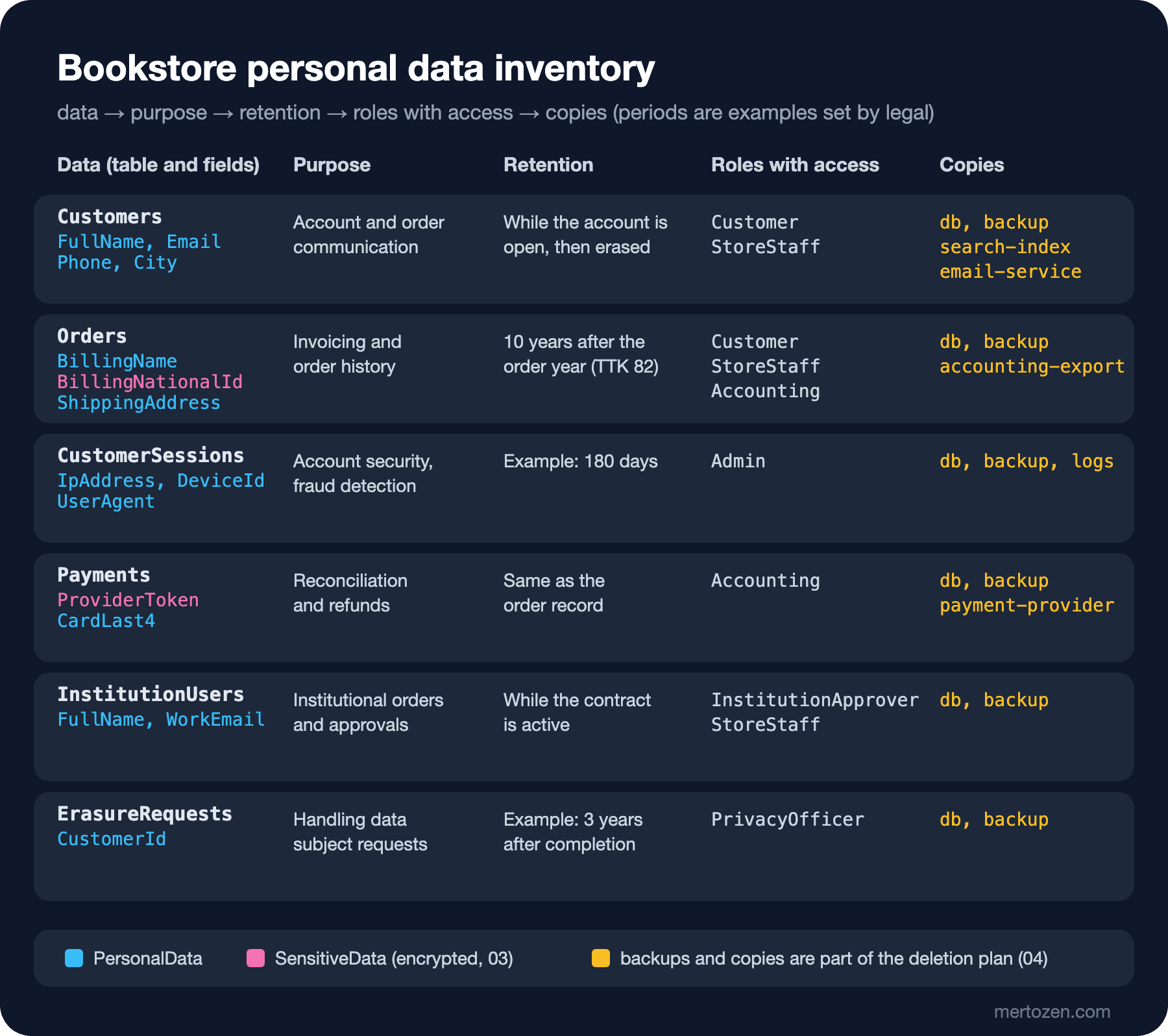
These documents usually live in a spreadsheet and go stale as the code changes. The developer's contribution is to generate the technical half of the inventory from the code: which table holds which personal data, which of it is sensitive and which processing activity it belongs to. Purpose, legal basis and period come from the legal team, but if you keep that information next to the code, updating the inventory when a new field arrives becomes a build rule rather than a reminder. This is the map we are aiming for:
Classifying Fields: Microsoft.Extensions.Compliance
.NET's compliance packages give a shared language for classifying data: a taxonomy, the DataClassification values in it and the DataClassificationAttribute that attaches them to properties. In the .NET Logging series post "Sensitive Data in Logs: Redaction, Data Classification and Privacy-Compliant Logging" we connected the same attributes to log redaction; here we put the same classification on the entities and make it the source of the inventory. That way the field masked in the log and the field marked sensitive in the inventory come from the same attribute.
public static class BookstoreTaxonomy
{
    public static string Name => "Bookstore";

    // Identifies a person directly or through another record (name, e-mail, address, IP, device ID).
    public static DataClassification PersonalData => new(Name, nameof(PersonalData));

    // Personal data whose leak causes direct harm (national ID, payment token). Must be encrypted at rest.
    public static DataClassification SensitiveData => new(Name, nameof(SensitiveData));
}

[AttributeUsage(AttributeTargets.Property | AttributeTargets.Parameter)]
public sealed class PersonalDataAttribute() : DataClassificationAttribute(BookstoreTaxonomy.PersonalData)
{
    public string InformationType { get; init; } = "Other";
}

[AttributeUsage(AttributeTargets.Property | AttributeTargets.Parameter)]
public sealed class SensitiveDataAttribute() : DataClassificationAttribute(BookstoreTaxonomy.SensitiveData)
{
    public string InformationType { get; init; } = "Other";
}

// Links an entity to a processing activity in the inventory.
[AttributeUsage(AttributeTargets.Class)]
public sealed class DataCategoryAttribute(string category) : Attribute
{
    public string Category => category;
}
Two classes is deliberately few. SensitiveData is not the same as KVKK's special category data; it is Bookstore's own internal rule: every field in this class is encrypted at rest. There is no class for special category data, because Bookstore does not collect it at all; anyone trying to add some would need an inventory discussion anyway. Non-personal fields are marked explicitly with the package's [NoDataClassification] attribute. The distinction matters: an unmarked field does not mean "not personal", it means "nobody decided".
[DataCategory("customer-profile")]
public sealed class Customer
{
    [PersonalData(InformationType = "Customer ID")]
    public int Id { get; set; }

    [PersonalData(InformationType = "Name")]
    public required string FullName { get; set; }

    [PersonalData(InformationType = "Contact Info")]
    public required string Email { get; set; }

    [PersonalData(InformationType = "Contact Info")]
    public string? Phone { get; set; }

    // Minimisation: the product only needs "is the customer an adult", not the birth date.
    [PersonalData(InformationType = "Age Confirmation")]
    public DateTime? AdultConfirmedAtUtc { get; set; }

    // Minimisation: analytics segments by city; the full address lives on the order.
    [PersonalData(InformationType = "Location")]
    public required string City { get; set; }

    [NoDataClassification]
    public DateTime CreatedAtUtc { get; set; }

    public List<Order> Orders { get; } = [];
    public List<CustomerSession> Sessions { get; } = [];
}
The purpose, legal basis, period, roles and copies of each processing activity live in one file. A developer does not invent these values; they carry the legal team's decision into code. The legal basis column corresponds to the contract (c), legal obligation (ç) and legitimate interest (f) conditions in Article 5(2) of the law:
// Values come from the legal team; retention periods below are examples, not advice.
public static readonly ProcessingActivity[] All =
[
    new("customer-profile", "Account and order communication", "Contract",
        "While the account is open, then erased", ["Customer", "StoreStaff"], ["db", "backup", "search-index", "email-service"]),
    new("order-billing", "Invoicing and order history", "Legal obligation",
        "10 years after the year of the order (TTK 82)", ["Customer", "StoreStaff", "Accounting"], ["db", "backup", "accounting-export"]),
    new("sign-in-session", "Account security, fraud detection", "Legitimate interest",
        "Example: 180 days", ["Admin"], ["db", "backup", "logs"]),
    new("payment", "Payment reconciliation and refunds", "Contract",
        "Same as order-billing", ["Accounting"], ["db", "backup", "payment-provider"]),
    new("institution-user", "Institutional orders and approvals", "Ask legal",
        "While the institution's contract is active", ["InstitutionApprover", "StoreStaff"], ["db", "backup"]),
    new("privacy-request", "Handling data subject requests", "Legal obligation",
        "Example: 3 years after completion", ["PrivacyOfficer"], ["db", "backup"]),
];
The ten years on the order row come from Article 82 of the Turkish Commercial Code: a merchant keeps commercial books and the documents behind the entries for ten years (Art. 82(5)), and the period starts at the end of the relevant calendar year (Art. 82(6)). Article 253 of the Tax Procedure Law also sets a five-year duty to keep books and documents. Which record falls under which law is decided by the accountant and the legal team together. The "Ask legal" on the institutional user row is deliberate: until the question from the previous post, "who is the controller for this data", is answered, the inventory is not complete.
Deriving the Inventory from the EF Core Model
The EF Core model already knows which CLR property goes to which table and column. The inventory combines that with the attributes:
public static IReadOnlyList<InventoryEntry> Build(DbContext db)
{
    List<InventoryEntry> entries = [];
    foreach (IEntityType entity in db.Model.GetEntityTypes().OrderBy(e => e.GetTableName()))
    {
        string table = entity.GetTableName()!;
        string category = entity.ClrType.GetCustomAttribute<DataCategoryAttribute>()?.Category
            ?? throw new InvalidOperationException($"{entity.ClrType.Name} has no [DataCategory].");
        ProcessingActivity activity = ProcessingActivities.All.Single(a => a.Category == category);

        List<InventoryColumn> columns = [];
        foreach (IProperty property in entity.GetProperties())
        {
            (string classification, string infoType) = Classify(property);
            if (classification != "None")
            {
                columns.Add(new InventoryColumn(table, property.GetColumnName(), classification, infoType));
            }
        }
        entries.Add(new InventoryEntry(activity, table, columns));
    }
    return entries;
}
Part of the output (three of the six tables):
dotnet run --project tools/Bookstore.PrivacyLab -- inventory
Customers [customer-profile] purpose: Account and order communication; basis: Contract
  retention: While the account is open, then erased; roles: Customer, StoreStaff; copies: db, backup, search-index, email-service
  Id                   PersonalData   Customer ID
  AdultConfirmedAtUtc  PersonalData   Age Confirmation
  City                 PersonalData   Location
  Email                PersonalData   Contact Info
  FullName             PersonalData   Name
  Phone                PersonalData   Contact Info
Orders [order-billing] purpose: Invoicing and order history; basis: Legal obligation
  retention: 10 years after the year of the order (TTK 82); roles: Customer, StoreStaff, Accounting; copies: db, backup, accounting-export
  BillingName          PersonalData   Name
  BillingNationalId    SensitiveData  National ID
  CustomerId           PersonalData   Customer ID
  ShippingAddress      PersonalData   Contact Info
Payments [payment] purpose: Payment reconciliation and refunds; basis: Contract
  retention: Same as order-billing; roles: Accounting; copies: db, backup, payment-provider
  CardLast4            PersonalData   Credit Card
  ProviderToken        SensitiveData  Payment Token
This output does not replace the legal team's spreadsheet; it feeds it. When it is generated on every release and compared with the previous version, the answer to "which personal data fields were added this sprint" becomes a diff. BillingNationalId in the Orders table is currently plain text and marked SensitiveData; it is the field we encrypt in the next post.
Catching the "we might need it later" field in a test
The piece that turns the inventory into a build rule is a test that looks for a decision on every property in the model:
public static IEnumerable<string> UnclassifiedProperties(DbContext db) =>
    from entity in db.Model.GetEntityTypes()
    from property in entity.GetProperties()
    where property.PropertyInfo is { } info && info.GetCustomAttribute<DataClassificationAttribute>() is null
    select $"{entity.ClrType.Name}.{property.Name}";

[Fact]
public void Every_mapped_property_is_classified()
{
    using var testDb = new TestDb();
    using BookstoreContext db = testDb.CreateContext();

    string[] missing = [.. PersonalDataInventory.UnclassifiedProperties(db)];

    Assert.True(missing.Length == 0,
        "Classify these properties or remove them: " + string.Join(", ", missing));
}
I added the two fields from the opening question to Customer and ran the tests:
dotnet test
  Failed Bookstore.Privacy.Tests.InventoryTests.Every_mapped_property_is_classified [14 ms]
  Error Message:
   Classify these properties or remove them: Customer.Gender, Customer.MarketingSegment
Failed!  - Failed:     1, Passed:     3, Skipped:     0, Total:     4, Duration: 541 ms - Bookstore.Privacy.Tests.dll (net10.0)
The test does not decide whether a field is personal data; it catches that nobody decided. To classify the field, the developer has to tie it to a DataCategory, and if that category has no purpose and period, add a line to the inventory file, which is a change the legal team sees in the pull request. In this example neither field had a purpose, so I removed both and the test went green again.
Sensitivity Labels in SQL Server
Bookstore's production database is SQL Server. SQL Data Discovery and Classification adds sensitivity label and information type metadata to columns; ADD SENSITIVITY CLASSIFICATION is supported on SQL Server 2019 and later, Azure SQL Database and Managed Instance, and the results are read from the sys.sensitivity_classifications view. Instead of assigning labels by hand in SSMS, we generate them from the same inventory:
dotnet run --project tools/Bookstore.PrivacyLab -- inventory --sql
ADD SENSITIVITY CLASSIFICATION TO dbo.Orders.BillingName
WITH (LABEL = 'Confidential', INFORMATION_TYPE = 'Name', RANK = MEDIUM);
ADD SENSITIVITY CLASSIFICATION TO dbo.Orders.BillingNationalId
WITH (LABEL = 'Highly Confidential', INFORMATION_TYPE = 'National ID', RANK = HIGH);
ADD SENSITIVITY CLASSIFICATION TO dbo.Payments.CardLast4
WITH (LABEL = 'Confidential', INFORMATION_TYPE = 'Credit Card', RANK = MEDIUM);
ADD SENSITIVITY CLASSIFICATION TO dbo.Payments.ProviderToken
WITH (LABEL = 'Highly Confidential', INFORMATION_TYPE = 'Payment Token', RANK = HIGH);
Generating the script is real output. According to the documentation, the command needs the ALTER ANY SENSITIVITY CLASSIFICATION permission, viewing labels on SQL Server 2019 needs VIEW ANY SENSITIVITY CLASSIFICATION, and the RANK parameter is currently unused. Labels do not protect data; they make "which column is sensitive" visible on the database side as well and feed auditing and reporting. We covered SQL Server's permission model in the SQL Server Deep Dive series post "The SQL Server Security Model: Logins, Users, Schemas, Roles, Least Privilege and Row-Level Security".
Minimisation: Data You Never Collect Cannot Leak
The principle of being "relevant, limited and proportionate to the purpose" in Article 4 of the law and data protection by design and by default in GDPR Art. 25 both say the cheapest control in code is not adding the field. Art. 25(2) asks that by default only the data needed for the purpose is processed, separately for the amount collected, the extent of processing, the storage period and accessibility. The decisions we made while building Bookstore's inventory:
- An age confirmation instead of a birth date:
BirthDatewas removed and replaced byAdultConfirmedAtUtc, the time the customer confirmed being an adult. A birthday campaign would be a separate purpose with its own consent. - City on the profile, address on the order: segmentation and analytics work at city level; the full address is only on the order, for delivery.
- Never keeping card data: the payment institution stores the card; Bookstore keeps only a token and the last four digits.
- Work e-mail for institutional users: no personal phone or address is collected.
// No card number, no CVV: the payment provider keeps the card and returns a token.
[DataCategory("payment")]
public sealed class Payment
{
    [NoDataClassification]
    public int Id { get; set; }

    [NoDataClassification]
    public int OrderId { get; set; }

    [SensitiveData(InformationType = "Payment Token")]
    public required string ProviderToken { get; set; }

    [PersonalData(InformationType = "Credit Card")]
    public required string CardLast4 { get; set; }

    [NoDataClassification]
    public decimal AmountTry { get; set; }
}
Card data has its own standard: PCI DSS, the card schemes' security standard for anyone handling card data. Requirement 3.3.1 of version 4.0.1 says sensitive authentication data such as the CVV must not be kept after authorisation, even if encrypted. A shop that never takes the card number into its own database leaves most of that standard's scope with the payment institution; which self-assessment questionnaire applies depends on the integration method and is settled with the payment institution.
Looking at Privacy Threats with LINDDUN
STRIDE asks about security threats; LINDDUN does the same job for privacy and takes its name from the initials of seven threat categories. Walking through Bookstore's inventory turns each one into a concrete question:
| LINDDUN category | Example question for Bookstore |
|---|---|
| Linking | Does the user ID in analytics combine with the DeviceId in the sessions table to reveal a person's whole browsing history? |
| Identifying | Do the city and order date in an "anonymous" report give a person away in a small district? |
| Non-repudiation | Does the audit log tie a customer to an action in more detail than needed, such as which book they looked at and when? |
| Detecting | Can someone find out that a user exists in the institutional portal by trying e-mail addresses? |
| Data disclosure | Does the support team see the full national ID number (03)? |
| Unawareness and unintervenability | Can the customer see which sub-processor their data goes to, and object? |
| Non-compliance | Is the period in the inventory the same as the one the destruction job applies (04)? |
We will cover the threat modeling process itself, with data flow diagrams and trust boundaries, in the Threat Modeling and Secure Development Process series; this table is the inventory read from a privacy angle.
Production Notes
An inventory that only covers the database is half finished. That is why the copies column in the figure exists: backups, the search index, the recipient list sent to the e-mail service, the accounting export and the logs. Code cannot know all of these copies; each copy gets a line in the inventory by hand and an owner. In post 04 we build the deletion plan from this column. The second point is versioning the inventory output: generating it in CI and keeping it as an artifact answers "did this field exist last year" during an audit. The third is connecting the attributes to log redaction: if the same [PersonalData] attribute is not wired to a redactor in the logging pipeline, the inventory calls a field sensitive while the log keeps writing it in plain text.
Scale is a factor too: switching the test on at once in a system with hundreds of entities means a red build. Putting the existing fields on a "not decided yet" list, applying the test only to new fields and then shrinking the list sprint by sprint is more realistic.
Common Pitfalls
The first pitfall is collecting fields "because we might need them later". Data without a purpose breaks the purpose limitation principle in Article 4 from the start, and every new field is one more responsibility: returned on an access request, deleted on an erasure request, reported in a breach. The second pitfall is copying production data into test and staging environments. When you have to write staging in the inventory's copies column, the problem becomes visible: that environment's access control, logs and backups are not as strict as production's. The fix is a masked copy or synthetic data, which we do in the next post. The third is classifying once and walking away; preventing exactly that is the point of the test. The fourth is thinking the SensitiveData label protects anything: a label encrypts nothing, it only says what must be encrypted.
Sources for This Post
Accessed on 15 November 2026.
- Regulation on the Erasure, Destruction or Anonymisation of Personal Data (Official Gazette No. 30224 of 28 October 2017; Art. 4(1)(e) and 5):
kvkk.gov.tr/Icerik/5441 - Law No. 6698, Art. 4 and 5:
mevzuat.gov.tr/mevzuatmetin/1.5.6698.pdf - Turkish Commercial Code No. 6102, Art. 82:
mevzuat.gov.tr/MevzuatMetin/1.5.6102.pdf - Tax Procedure Law, Art. 253 (Revenue Administration legislation page):
gib.gov.tr/mevzuat/kanun/434 - GDPR Art. 25 and 30:
eur-lex.europa.eu/eli/reg/2016/679/oj - The Authority's guide on preparing the personal data processing inventory:
kvkk.gov.trpublications section; LINDDUN threat types:linddun.org/threat-types;ADD SENSITIVITY CLASSIFICATION:learn.microsoft.com/sql/t-sql/statements/add-sensitivity-classification-transact-sql
A Small Experiment
★☆☆ Add a MobilePhone field to InstitutionUser and see which message the test fails with. Then classify the field and check where it shows up in the inventory output.
★★☆ See that the inventory blows up in the Single call when a [DataCategory] value has no match in ProcessingActivities, and write a separate test that catches it with a clear message.
★★★ Add an inventory --json command that writes the inventory as JSON, and design a CI step that compares it with the previous version's output and comments on the pull request when a new SensitiveData field arrives.
The inventory now tells us that BillingNationalId is sensitive and sits in plain text. In the next post we encrypt that field at the application level, add a blind index for lookups, show it masked to the support team and move the test environment to synthetic data with Bogus.