

CDK Drag and Drop: cdkDrag, cdkDropList, Sortable Lists and Moving Items Between Lists
In CDK Drag and Drop, cdkDropList and cdkDrag handle the dragging and you change the array: apply moveItemInArray and transferArrayItem to a copy, set it on the signal and track rows by identity. The CDK offers no keyboard sorting; we add button alternatives to a reading list and an institutional shipment plan in Bookstore, and measure focus lost on a moved row, touch behavior with a handle and touch-action, and the re-render cost at 500 rows.
Version note: The examples in this post were tried with Angular 22.2 (TypeScript 6.0), Angular Material and the CDK 22.2.7, .NET 10 and Node.js 24; browser behavior was observed in headless Chromium with Playwright 1.65. For the measurements Bookstore.Api ran on SQLite instead of SQL Server.
Predict First
We build two screens in Bookstore, the online bookstore used as the shared example across this site's series. On the customer side, "My reading list": the customer puts the books they want to read in order by dragging them. In the admin panel, the shipment plan of an institutional order: we move the lines of a school library's order between a "This shipment" and a "Next shipment" list to plan a partial shipment. We build both with CDK Drag and Drop. Three questions: does CDK Drag and Drop support sorting with the keyboard by itself? When you press the button that moves a row down, the row changes place in the DOM; does focus stay on that button? On a phone, does a user sliding a finger over a book scroll the page or drag the book?
A Sortable List with cdkDropList and cdkDrag
Two directives are enough to make a list sortable: cdkDropList on the container and cdkDrag on each row. The CDK computes the dragging, the shifting of the other rows and the drop position; it does not change the data. On drop, the cdkDropListDropped event gives the old and the new index, and we change the array:
<ol class="reading-list" cdkDropList cdkDropListLockAxis="y" (cdkDropListDropped)="dropped($event)">
  @for (book of books(); track book.isbn; let i = $index, first = $first, last = $last) {
    <li class="row" cdkDrag cdkDragBoundary=".reading-list">
      <span class="handle" cdkDragHandle aria-hidden="true">⠿</span>
      <span class="title">
        <a [routerLink]="['/books', book.isbn]">{{ book.title }}</a>
        <span class="muted">{{ book.author }}</span>
      </span>
      <button #move type="button" class="secondary" [attr.data-isbn]="book.isbn" data-dir="up" [disabled]="first"
              [attr.aria-label]="'Move ' + book.title + ' up'" (click)="moveBy(i, -1, 'up')">↑</button>
      <button #move type="button" class="secondary" [attr.data-isbn]="book.isbn" data-dir="down" [disabled]="last"
              [attr.aria-label]="'Move ' + book.title + ' down'" (click)="moveBy(i, 1, 'down')">↓</button>
      <div class="placeholder" *cdkDragPlaceholder></div>
    </li>
  }
</ol>
<!-- Screen readers hear where the book went -->
<p class="visually-hidden" aria-live="polite">{{ status() }}</p>
The other settings on the row: cdkDragHandle starts a drag only from the handle, so clicking the link in the title or selecting text does not start a drag. cdkDropListLockAxis="y" locks the preview to the vertical axis, and cdkDragBoundary keeps it inside the list. *cdkDragPlaceholder shows a dashed box where the row will land; without it the CDK uses a copy of the row as the placeholder. There is also *cdkDragPreview if you want to change the preview; we used the preview the CDK clones from the row.
protected dropped(event: CdkDragDrop<BookSummary[]>): void {
  this.move(event.previousIndex, event.currentIndex);
}

private move(from: number, to: number): void {
  if (from === to) {
    return;
  }
  const previous = this.books();
  // A new array with the same book objects: @for (track isbn) moves rows instead of re-creating them
  const next = [...previous];
  moveItemInArray(next, from, to);
  this.books.set(next);
  this.status.set(`${next[to].title} moved to position ${to + 1} of ${next.length}`);
  void this.save(next, previous);
}

private async save(next: BookSummary[], previous: BookSummary[]): Promise<void> {
  try {
    await firstValueFrom(this.http.put('/api/reading-list/order', { isbns: next.map(b => b.isbn) }));
  } catch {
    // Optimistic update: show the old order again if the API refused the new one
    this.books.set(previous);
    this.status.set('The new order could not be saved');
  }
}
moveItemInArray is a helper that changes an array in place; instead of changing the array inside the signal and calling set, we copy it first, otherwise the signal sees the same reference and does not report a change. The order goes to the API right away; the UI does not wait for the answer (optimistic update), and if the API refuses, the old order comes back. On the Bookstore.Api side the endpoint that saves the order accepts only a new order of the same books:
// PUT /api/reading-list/order {"isbns": [...]}: only a new order of the same books is accepted
private static Results<NoContent, ValidationProblem> SaveOrder(ReadingListOrder body, ReadingListStore store)
{
    string[] current = store.Get(() => []);
    if (body.Isbns.Length != current.Length || body.Isbns.Distinct().Count() != body.Isbns.Length
        || !body.Isbns.All(current.Contains))
    {
        return TypedResults.ValidationProblem(new Dictionary<string, string[]>
        {
            ["isbns"] = ["The order must contain every book of the reading list exactly once."]
        });
    }
    store.Set(body.Isbns);
    return TypedResults.NoContent();
}
The reading list is kept in memory for the demo (until customer accounts arrive in the Identity module). Sending the order as a list of ISBNs rather than indexes keeps a command like "move 3 to 1" from being applied to the wrong book when the same list is open in two tabs. We dragged the list with a mouse in Playwright:
start         : 1984 | Anna Karenina | Brave New World | Crime and Punishment | Don Quixote | Dune
while dragging: preview popover=manual :popover-open=true parent=body | placeholder true
after drag    : Anna Karenina | Brave New World | 1984 | Crime and Punishment | Don Quixote | Dune
drag on title : Anna Karenina | Brave New World | 1984 | Crime and Punishment | Don Quixote | Dune
"1984", dragged by its handle, moved to third place; the same movement started on the title changed nothing. During the drag the preview is a popover="manual" element under body, so it is in the top layer; the CDK brought this in 17.3.6 with the fix "use native popover to avoid stacking issues with preview". The preview is not clipped even when it is dragged out of a dialog or a card with overflow: hidden.
The Preview's Width and box-sizing
In the first screenshot the preview came out wider than the row and overflowed on the right. We measured it:
# .row { padding: 0.5rem 0.75rem; border: 1px } — the default content-box
row 552 (box-sizing content-box) | preview 578 (inline width 552px)
# .row { box-sizing: border-box; }
row 552 (box-sizing border-box) | preview 552 (inline width 552px)
The CDK writes the row's measured width (552px, padding and border included) to the preview as an inline width. With the row in content-box, that value counts as the content width and the padding and border are added on top again: a preview 26px wider. Giving the dragged element box-sizing: border-box was enough. Material components use border-box, so this mostly shows up in lists with your own styles.
Sorting Without Dragging: Keyboard and a Single Click
The first question: no. There is not a single keydown handler in the CDK Drag and Drop source; a drag starts only with a mouse or touch. WCAG 2.2 success criterion 2.5.7 "Dragging Movements" is at level AA and asks that everything done by dragging can also be done with a single pointer without dragging; keyboard access is the topic of 2.1.1 on its own. The ↑ and ↓ buttons on each row cover both: they can be clicked with a mouse or a finger, and they take focus and work with Enter on the keyboard.
// Keyboard and single-pointer alternative to dragging (WCAG 2.2, 2.5.7)
protected moveBy(index: number, delta: -1 | 1, direction: 'up' | 'down'): void {
  const target = index + delta;
  if (target < 0 || target >= this.books().length) {
    return;
  }
  const isbn = this.books()[index].isbn;
  this.move(index, target);
  // If Angular moved the focused row itself in the DOM, focus fell to <body>: put it back on the same button
  afterNextRender(() => {
    const button = this.moveButtons().find(b => b.nativeElement.dataset['isbn'] === isbn && b.nativeElement.dataset['dir'] === direction);
    (button ?? this.moveButtons().find(b => b.nativeElement.dataset['isbn'] === isbn))?.nativeElement.focus();
  }, { injector: this.injector });
}
We measured the second question without the afterNextRender line. Angular can swap two neighboring rows in two ways: by moving the row that goes down or the row that goes up. Which one it moves decides what happens to focus:
with focus restore  : down row 1: focus button Move 1984 down | up row 3: focus button Move Anna Karenina up
no focus restore    : down row 1: focus button Move Brave New World down | up row 3: focus body
For "down" Angular moved the other row and focus stayed; for "up" it moved the focused row itself, and the browser dropped the focus of the element that left the DOM to body. Keyboard support that works half the time is the kind most easily missed in testing. Focusing the same book's button in the same direction after the render fixed both; if the book reached the top or the bottom of the list that button is disabled, so we fall back to the other one. For the user who does not see the result of the move, an aria-live="polite" paragraph says "Anna Karenina moved to position 2 of 6". The whole keyboard flow:
focus         : button Move Anna Karenina down
Enter         : Brave New World | Anna Karenina | 1984 | Crime and Punishment | Don Quixote | Dune
focus after   : button Move Anna Karenina down
live region   : Anna Karenina moved to position 2 of 6
Enter again   : Brave New World | 1984 | Anna Karenina | Crime and Punishment | Don Quixote | Dune
PUT requests  :
  /api/reading-list/order {"isbns":["9780143035008","9780060850524","9780451524935","9780143058144","9780060934347","9780441172719"]}
  /api/reading-list/order {"isbns":["9780060850524","9780143035008","9780451524935","9780143058144","9780060934347","9780441172719"]}
  /api/reading-list/order {"isbns":["9780060850524","9780451524935","9780143035008","9780143058144","9780060934347","9780441172719"]}
after reload  : Brave New World | 1984 | Anna Karenina | Crime and Punishment | Don Quixote | Dune
The drag and the two button moves made three PUTs, and the order was still there after a reload. The details of live regions and focus management are in the Accessibility (a11y) series posts "Dynamic Content and Screen Reader Announcements: Live Regions, ariaNotify(), Form Errors, Toasts and Loading States" and "Keyboard Navigation and Focus Management: Tab Order, :focus-visible, Skip Links, Focus Traps, inert and Roving Tabindex".
On a Touch Screen
The third question. Because Playwright's mouse API does not produce touches, we sent real touch events through CDP in a 390px mobile context:
start          : Anna Karenina | 1984 | Brave New World | Crime and Punishment | Don Quixote | Dune | scrollY 0
touch on handle: 1984 | Brave New World | Anna Karenina | Crime and Punishment | Don Quixote | Dune | scrollY 0
touch on text  : 1984 | Brave New World | Anna Karenina | Crime and Punishment | Don Quixote | Dune | scrollY 120
The movement that started on the handle moved the book and the page did not scroll; the movement that started on the row's text did not change the order and scrolled the page by 120px. Two things make this work: cdkDragHandle limits dragging to the handle, and touch-action: none on the handle keeps the browser from starting a scroll at that point. If the whole row were draggable, a user trying to scroll a long list would shuffle the books. In a design where you cannot add a handle, cdkDragStartDelay can tie dragging on touch to a press of a few hundred milliseconds (such as { touch: 300, mouse: 0 }); we did not measure that. We did not try a real phone or iOS Safari; the measurement is Chromium's touch emulation.
/* Only the handle starts a drag; touch-action keeps the page scrollable everywhere else */
.handle {
  cursor: grab;
  font-size: 1.25rem;
  color: #6b7280;
  touch-action: none;
}

/* The other rows slide out of the way while dragging */
.cdk-drop-list-dragging .row:not(.cdk-drag-placeholder) {
  transition: transform 200ms cubic-bezier(0, 0, 0.2, 1);
}
Moving Between Lists: Two Shipments of an Institutional Order
For Institutional Orders, partial shipments are a Release 2 topic: part of a school's order ships this week, the rest when the stock arrives. In the admin panel we move the lines of order #1042 between two lists. cdkDropListGroup connects all the drop lists inside it, so there is no need to write cdkDropListConnectedTo one by one:
<!-- cdkDropListGroup connects every drop list inside it: lines can move between the two columns -->
<div class="columns" cdkDropListGroup>
  @for (slot of slots; track slot.id) {
    <section class="column">
      <h2 [id]="slot.id + '-title'">{{ slot.title }}</h2>
      <p class="summary">{{ lists()[slot.id].length }} lines · {{ copies(slot.id) }} copies</p>
      <ul class="lines" cdkDropList [cdkDropListData]="slot.id" [attr.aria-labelledby]="slot.id + '-title'"
          (cdkDropListDropped)="dropped($event)">
        @for (line of lists()[slot.id]; track line.id) {
          <li class="line" cdkDrag>
            <span class="title">{{ line.title }}</span>
            <span class="quantity">× {{ line.quantity }}</span>
            <button matButton type="button" (click)="moveTo(line, slot.id)"
                    [attr.aria-label]="'Move ' + line.title + ' to ' + slot.other + ' shipment'">{{ slot.action }}</button>
          </li>
        } @empty {
          <li class="empty">Drop lines here</li>
        }
      </ul>
    </section>
  }
</div>
protected dropped(event: CdkDragDrop<Slot>): void {
const from = event.previousContainer.data;
const to = event.container.data;
const next = { this: [...this.lists().this], next: [...this.lists().next] };
if (from === to) {
moveItemInArray(next[to], event.previousIndex, event.currentIndex);
} else {
transferArrayItem(next[from], next[to], event.previousIndex, event.currentIndex);
}
this.update(next);
}
// The same move without dragging: to the end of the other list
protected moveTo(line: InstitutionalOrderLine, from: Slot): void {
const to: Slot = from === 'this' ? 'next' : 'this';
const next = { this: [...this.lists().this], next: [...this.lists().next] };
transferArrayItem(next[from], next[to], next[from].indexOf(line), next[to].length);
this.update(next);
}We gave cdkDropListData the list's name ('this', 'next'), not the array itself. In the event, previousContainer.data and container.data carry these names; the arrays stay inside the signal and every change is set as a new object. Passing the array as data and running transferArrayItem directly on it is the way of the examples in the CDK documentation, but then the signal does not see the change. Drag, button and save:
start        : This shipment (4 lines · 115 copies): Dune, The Hobbit, Pride and Prejudice, 1984
               Next shipment (2 lines · 40 copies): Middlemarch, Frankenstein
after drag   : This shipment (3 lines · 90 copies): Dune, Pride and Prejudice, 1984
               Next shipment (3 lines · 65 copies): Middlemarch, The Hobbit, Frankenstein
after button : This shipment (2 lines · 50 copies): Dune, Pride and Prejudice
               Next shipment (4 lines · 105 copies): Middlemarch, The Hobbit, Frankenstein, 1984
save enabled : true
snackbar     : Shipment plan saved
 OK
PUT          : /api/admin/institutional-orders/1042/shipments {"thisShipment":[1,3],"nextShipment":[4,2,6,5]}
"The Hobbit" landed where it was dragged, below "Middlemarch"; the button put "1984" at the end of the list. Here we did not save sorting and moves automatically; the plan is built in a few steps and goes in one go with "Save plan". The UI does not allow the first shipment to be empty (the button is disabled), and the API enforces the same rule on its own:
{"type":"https://tools.ietf.org/html/rfc9110#section-15.5.1","title":"One or more validation errors occurred.","status":400,"errors":{"lines":["Every line must be in exactly one shipment and the first shipment cannot be empty."]},"traceId":"00-6e1f5b45ff6d778a1cc62aa0c89c5816-5385822aeea5159a-00"}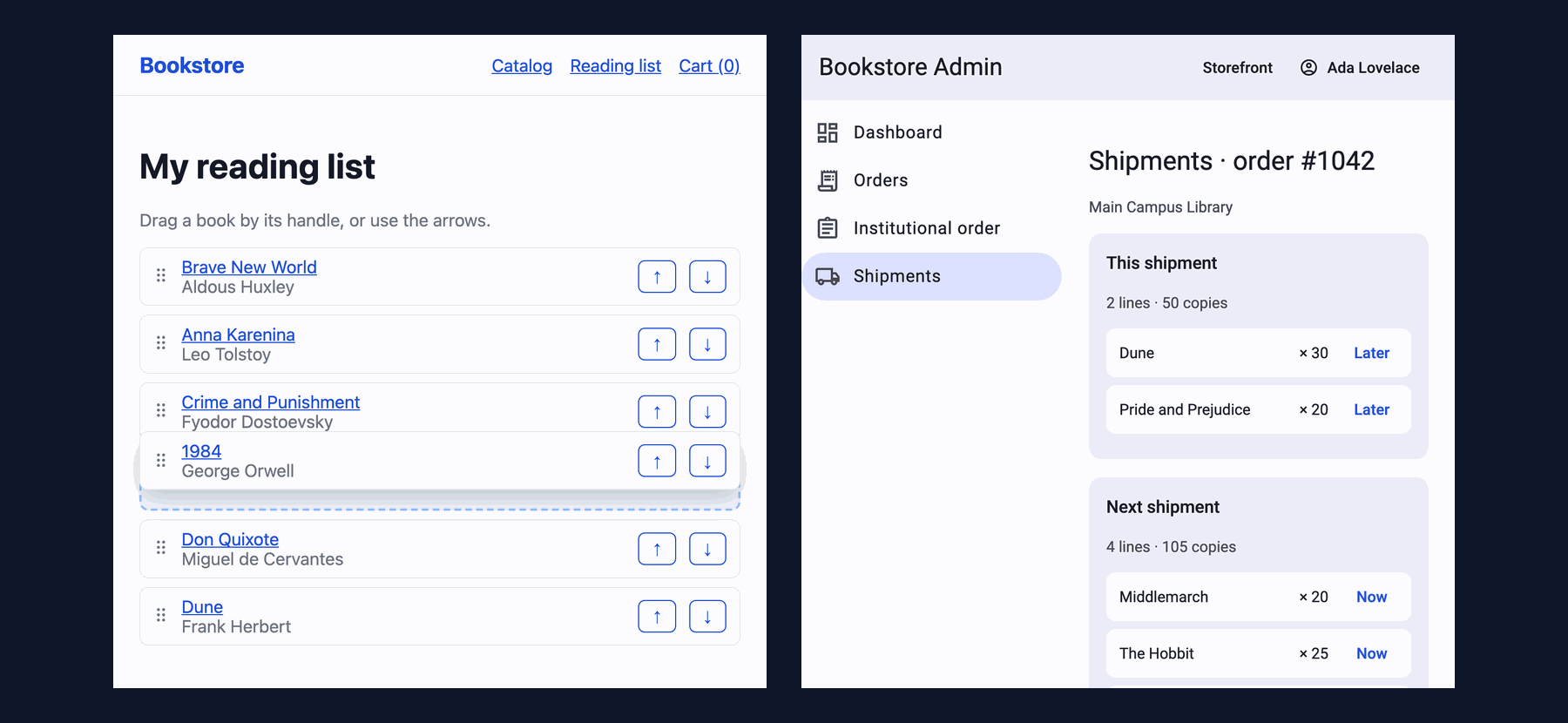
In Production
Be clear about who decides the order. In the reading list every move is saved immediately; in the shipment plan nothing goes out until the user says "Save plan". Both can be right; what is wrong is the user not knowing which one they are in. The state of the button, or a warning when leaving the page, shows an unsaved plan.
The order of the PUTs on quick consecutive moves. The reading list sends the whole order on every move, so the request that arrives last writes the correct state; but if two requests swap places on the network, the old order can remain on the server. In a serious list, queue the requests or send them with a version (If-Match); we did not do this and did not measure it.
The effect on the bundle. The reading list is a lazy route; in the production build a user going from the catalog to the reading list downloaded 4 JavaScript files, 73,441 bytes in total (the route's own chunk is 4.31 kB, the rest is CDK drag-drop and shared CDK code). Measure this before putting drag and drop on an eager page.
Tests. In the unit tests, instead of imitating a drag we fired the cdkDropListDropped event with triggerEventHandler and checked the result; the real drag is in Playwright. The button path is tested by clicking in the DOM:
 ✓ src/app/reading-list/reading-list-page.spec.ts > ReadingListPage > moves a book with the arrow button, saves the new order and keeps focus on the moved book
 ✓ src/app/reading-list/reading-list-page.spec.ts > ReadingListPage > applies a drop from the drop list
 ✓ src/app/reading-list/reading-list-page.spec.ts > ReadingListPage > shows the old order again when the API refuses the new one
 ✓ src/app/admin/shipments/shipment-plan-page.spec.ts > ShipmentPlanPage > moves a line to the next shipment without dragging and saves the plan
 ✓ src/app/admin/shipments/shipment-plan-page.spec.ts > ShipmentPlanPage > moves a line between the lists on drop and does not allow an empty first shipment
      Tests  27 passed (27)
Common Pitfalls
First, re-rendering the whole list on every move in a large list. We grew the reading list to 500 rows, moved one row with ↓ and counted the rows added to the DOM. The variant on the second line produces new objects on every move (like fetching the list from the API again) and tracks the @for by the object itself:
500 rows, track isbn      : rows 500 | li.row added 1 | 8 ms | focus button Move 1984 #0 down
500 rows, new objects+track: rows 500 | li.row added 500 | 45 ms | focus button Move 1984 #0 down
On the right path Angular moved one row; on the wrong path it removed and re-created all 500 rows, and the move took more than five times as long. afterNextRender rescued focus after the button was re-created; without that line focus would be lost on every move. If you must fetch the list from the server again after saving, the track expression has to be an identity (ISBN, id), not an object reference.
Second, leaving an operation that can only be done by dragging. Dragging does not exist for keyboard users, for users with tremors or fine motor difficulties, and for some screen reader users. Put a button that does the same job next to every drop list.
Third, making the whole row draggable on touch. Without a handle and touch-action, a long list becomes impossible to scroll on a phone.
Fourth, applying moveItemInArray directly to the array inside a signal. The array changes but the signal's value is the same reference; a computed that does not see the change keeps showing the old total.
Fifth, content-box on the dragged element. The preview comes out wider by the padding.
A Small Experiment
★☆☆ Remove the handle from the reading list, give cdkDrag [cdkDragStartDelay]="{ touch: 300, mouse: 0 }" and repeat the touch measurement. Does a quick swipe starting on the text now scroll the page or move the book?
★★☆ Add a cdkDropListEnterPredicate to the shipment plan so that an out-of-stock line cannot be dropped into "This shipment". Apply the same rule to the "Now" button and disable it with a text that says why it does not work.
★★★ Queue the PUTs of the reading list: if a new move comes before a request finishes, send only the latest order. Slow the network down (a 1 second delay with route in Playwright), make five moves in a row and show that the order on the server stays the same as on the screen.
In drag and drop the number of rows in the DOM was small, so performance was not an issue; even at 500 rows a single row moved. In the next post we go where the number of rows really is a problem: we show a 5,000-book stock list in the admin panel with CDK virtual scroll, and look at BreakpointObserver, the clipboard and the CDK's other utilities.