

Windows Containers: Containerising a .NET Framework 4.8 and IIS App, Server Core, Nano Server and Isolation Modes
A .NET Framework 4.8 and IIS application can go into a Windows container, but it only runs on a Windows host whose Windows version matches the image. For Bookstore's old back office we cover the Server Core based Dockerfile, configuration builders that override web.config with environment variables, ServiceMonitor and LogMonitor, process and Hyper-V isolation, the 2.6 GB image size, multi-OS tags and Windows node pools on AKS, and weigh the move to .NET 10.
Version note: The Linux-side steps in this post were run with Docker Engine 29.9.3, .NET SDK 10.0.404 (compiling against the .NET Framework 4.8 reference assemblies), hadolint 2.15.1 and kubeconform 0.8.0 (Kubernetes 1.35 schema). The Windows images (mcr.microsoft.com/dotnet/framework/aspnet:4.8.1, Windows Server 2025 and 2022, LogMonitor 2.2.1) were inspected by reading them from the registry.
Guess First
You built an image for Bookstore's back office on Windows Server 2025 (ltsc2025). On which machines does it run with process isolation: (a) a Windows Server 2022 server, (b) a Windows 11 24H2 developer machine, (c) a Windows Server 2025 server? Second question: roughly how many times larger is the download of this image than the Bookstore.Api image on Linux: 3, 10, 35?
In our scenario, the back office of Bookstore, the online bookstore used as the shared example across this site's series, covers stock entries, price management and reports; it was written in 2016 with .NET Framework 4.8 and still runs on IIS on a Windows server. The team wants to put it into a container before moving it to .NET 10. The Windows build and run steps come from Microsoft's and Docker's docs. Everything that can be read from the registry (image configs, sizes, manifests) and everything that can be done on Linux (compiling, linting, manifest lists) is shown with real output.
What Makes Windows Containers Different: Kernel, Version Matching and Isolation
In post 1 we saw that a container is a process that shares the host's kernel. A Windows container is the same idea, but the shared kernel is Windows', so it only runs on a Windows host. Pulling the .NET Framework image from a Linux engine finds no Linux entry in the registry's list:
docker pull mcr.microsoft.com/dotnet/framework/aspnet:4.8.1Error response from daemon: no matching manifest for linux/amd64 in the manifest list entries: no match for platform in manifest: not foundOn Windows, Docker Desktop carries two engines: the Linux engine on WSL (post 2) and the Windows engine, which uses Windows' own container feature. "Switch to Windows containers" in the menu selects which one the CLI talks to. According to the docs, Windows containers are only available on Windows 10/11 Pro or Enterprise, and only when Docker Desktop is installed in "all users" mode; the default per-user installation does not offer them.
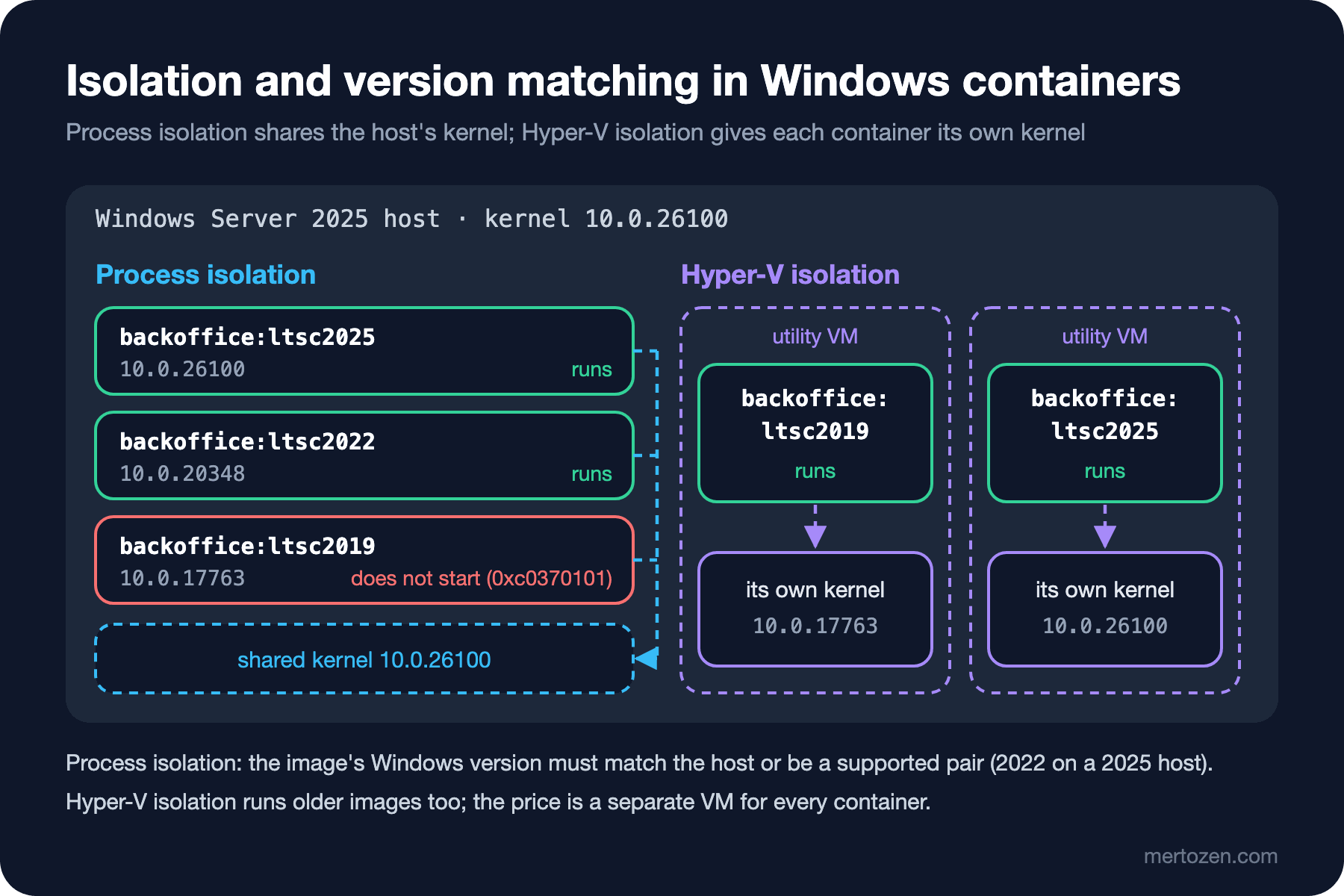
The real difference is version matching. According to Microsoft's docs, user mode and kernel mode are tightly bound in Windows, so the image's Windows version, its build number, has to match the host's. Behind one tag there is a separate image for every Windows Server version:
docker buildx imagetools inspect mcr.microsoft.com/dotnet/framework/aspnet:4.8.1Name: mcr.microsoft.com/dotnet/framework/aspnet:4.8.1
MediaType: application/vnd.docker.distribution.manifest.list.v2+json
Digest: sha256:afccb81a22b0...
Manifests:
Name: mcr.microsoft.com/dotnet/framework/aspnet:4.8.1@sha256:e4d434f9e261...
MediaType: application/vnd.docker.distribution.manifest.v2+json
Platform: windows/amd64
OSVersion: 10.0.20348.5870
Name: mcr.microsoft.com/dotnet/framework/aspnet:4.8.1@sha256:d76c82cca0cc...
MediaType: application/vnd.docker.distribution.manifest.v2+json
Platform: windows/amd64
OSVersion: 10.0.26100.3382210.0.20348 is the build number of Windows Server 2022, 10.0.26100 that of Windows Server 2025 (and Windows 11 24H2). A Windows host picks the entry that matches its own version. Microsoft's compatibility table says which host can run which image, and how:
| Host | ltsc2025 image | ltsc2022 image | ltsc2019 image |
|---|---|---|---|
| Windows Server 2025 | Process and Hyper-V | Process and Hyper-V | Hyper-V only |
| Windows Server 2022 | Does not run | Process and Hyper-V | Hyper-V only |
| Windows 11 (24H2 and later for the 2025 image) | Process and Hyper-V | Process and Hyper-V | Hyper-V only |
The answer to Guess First: (a) no, a Windows Server 2022 host cannot run the 2025 image in any mode; (b) and (c) yes. With a pair that does not match, the container fails to start with this error from the docs: The operating system of the container does not match the operating system of the host. (0xc0370101).
The two modes in the table are the isolation modes. With process isolation the container shares the host's kernel; this is the model closest to a Linux container. With Hyper-V isolation every container runs inside a small utility VM with its own kernel, so it can run an older image too, and the boundary between container and host is stronger. The price is a separate VM for every container. According to Microsoft's docs the default is process on Windows Server and Hyper-V on Windows 10 Pro and Enterprise clients; you pick the mode with --isolation:
# on a Windows host
docker run --rm --isolation=process mcr.microsoft.com/windows/nanoserver:ltsc2025 cmd /c ver
docker run --rm --isolation=hyperv mcr.microsoft.com/windows/nanoserver:ltsc2022 cmd /c ver
This section is based on the official documentation.
Base Images: Server Core, Nano Server and Size
Microsoft publishes four base images. Nano Server is the smallest; it has no PowerShell, WMI or .NET Framework and is designed for .NET (Core) applications. Server Core is medium-sized and meant for moving existing Windows Server applications as they are; .NET Framework and IIS run here. The Windows and Windows Server images carry the full Windows API (for example when you need graphics acceleration). For a .NET Framework application the choice is clear: the dotnet/framework/aspnet image built on Server Core, with IIS and ASP.NET inside. I collected the sizes from the manifests in the registry without downloading the images (labs/17-windows/image-sizes.sh, compressed layer sizes):
mcr.microsoft.com/windows/nanoserver:ltsc2025  layers=1  compressed=194 MB
mcr.microsoft.com/windows/servercore:ltsc2025  layers=2  compressed=2345 MB
mcr.microsoft.com/dotnet/framework/aspnet:4.8.1-windowsservercore-ltsc2025  layers=10  compressed=2600 MB
mcr.microsoft.com/dotnet/framework/sdk:4.8.1-windowsservercore-ltsc2025  layers=9  compressed=5009 MB
mcr.microsoft.com/dotnet/aspnet:10.0-nanoserver-ltsc2025  layers=8  compressed=250 MB
mcr.microsoft.com/dotnet/aspnet:10.0  layers=6  compressed=97 MB
mcr.microsoft.com/dotnet/aspnet:10.0-noble-chiseled-extra  layers=5  compressed=72 MB
The answer to the second question: about 35 times. The noble-chiseled-extra base Bookstore.Api uses is a 72 MB download, the back office's base is 2.6 GB and its build image 5 GB; unpacked on disk they grow further. The same list shows that .NET 10 is much smaller on Windows too: aspnet:10.0-nanoserver-ltsc2025 on Nano Server is 250 MB.
One more thing stands out in the image config:
docker buildx imagetools inspect mcr.microsoft.com/dotnet/framework/aspnet:4.8.1-windowsservercore-ltsc2025 \
--format '{{json .Image}}' | jq -c '.config | {Entrypoint, ExposedPorts, User}'{"Entrypoint":["C:\\ServiceMonitor.exe","w3svc"],"ExposedPorts":{"80/tcp":{}},"User":null}Server Core images define no user, so the container starts as ContainerAdministrator; on Nano Server the default is ContainerUser. IIS's worker process still runs under its own application pool identity. The port is 80; the move to 8080 in post 15 belongs to the .NET 8 Linux images. The lifecycle is a decision input too: according to Microsoft's table, mainstream support for the Windows Server 2022 base images ended on 13 October 2026 (extended support runs until October 2031), while 2025 is in mainstream support until October 2029. The .NET Framework 4.8.1 images exist only for 2022 and 2025.
The Back Office Dockerfile
To keep the example short I reduced the back office to two HTTP handlers: /prices.ashx returns the morning price list as CSV, and /health.ashx says "Healthy" if it can reach the database. An ASP.NET MVC or Web API application goes into a container with the same Dockerfile. The code is under legacy/Bookstore.BackOffice/:
// GET /prices.ashx: the price list the store staff export every morning
public sealed class PriceListHandler : IHttpHandler
{
    public bool IsReusable => true;

    public void ProcessRequest(HttpContext context)
    {
        string connectionString = ConfigurationManager.ConnectionStrings["BookstoreDb"].ConnectionString;
        StringBuilder csv = new StringBuilder("Isbn;Title;PriceTry\r\n");

        using (SqlConnection connection = new SqlConnection(connectionString))
        using (SqlCommand command = new SqlCommand(
            "SELECT Isbn, Title, PriceTry FROM dbo.Books ORDER BY Title", connection))
        {
            connection.Open();
            using (SqlDataReader reader = command.ExecuteReader())
            {
                while (reader.Read())
                {
                    csv.Append(reader.GetString(0)).Append(';')
                       .Append(reader.GetString(1)).Append(';')
                       .Append(reader.GetDecimal(2).ToString(CultureInfo.InvariantCulture))
                       .Append("\r\n");
                }
            }
        }

        context.Response.ContentType = "text/csv; charset=utf-8";
        context.Response.Write(csv.ToString());
    }
}
The project is an SDK-style csproj (TargetFramework net48, output into the bin\ folder IIS expects). On Linux the .NET SDK adds the .NET Framework reference assemblies by itself; I cannot run the application here, but I could at least verify that it compiles:
docker run --rm -v "$PWD:/work" -w /work mcr.microsoft.com/dotnet/sdk:10.0 \
    dotnet build legacy/Bookstore.BackOffice/Bookstore.BackOffice.csproj -c Release
Bookstore.BackOffice -> /work/legacy/Bookstore.BackOffice/bin/Bookstore.BackOffice.dll
Build succeeded.
0 Warning(s)
0 Error(s)The Dockerfile (not built on Windows):
# escape=`
# Windows images are built by the classic builder: no "# syntax", heredoc, RUN --mount or ADD --checksum
ARG WINDOWS_VERSION=ltsc2025

FROM mcr.microsoft.com/dotnet/framework/sdk:4.8.1-windowsservercore-${WINDOWS_VERSION} AS build
WORKDIR C:\src
COPY legacy/Bookstore.BackOffice/Bookstore.BackOffice.csproj legacy/Bookstore.BackOffice/
RUN msbuild legacy\Bookstore.BackOffice\Bookstore.BackOffice.csproj -t:Restore -v:minimal
COPY legacy/Bookstore.BackOffice/ legacy/Bookstore.BackOffice/
RUN msbuild legacy\Bookstore.BackOffice\Bookstore.BackOffice.csproj -p:Configuration=Release -v:minimal

FROM mcr.microsoft.com/dotnet/framework/aspnet:4.8.1-windowsservercore-${WINDOWS_VERSION} AS final
SHELL ["powershell", "-Command", "$ErrorActionPreference = 'Stop'; $ProgressPreference = 'SilentlyContinue';"]
# LogMonitor sends IIS logs and Application event log errors to stdout (docker logs)
RUN New-Item -ItemType Directory C:\LogMonitor | Out-Null; `
    Invoke-WebRequest -Uri https://github.com/microsoft/windows-container-tools/releases/download/v2.2.1/LogMonitor.exe -OutFile C:\LogMonitor\LogMonitor.exe; `
    if ((Get-FileHash C:\LogMonitor\LogMonitor.exe -Algorithm SHA256).Hash -ne '9f2c6dc34d363595afefddc4d4f21a5ecea332c30578c2b89e0f9ed7a4412191') { throw 'LogMonitor.exe checksum mismatch' }
COPY legacy/Bookstore.BackOffice/LogMonitor/LogMonitorConfig.json C:\LogMonitor\
WORKDIR C:\inetpub\wwwroot
COPY --from=build C:\src\legacy\Bookstore.BackOffice\bin\ bin\
COPY legacy/Bookstore.BackOffice/Web.config legacy/Bookstore.BackOffice/prices.ashx legacy/Bookstore.BackOffice/health.ashx ./
EXPOSE 80
ENTRYPOINT ["C:\\LogMonitor\\LogMonitor.exe", "C:\\ServiceMonitor.exe", "w3svc"]
According to Docker's BuildKit docs, the classic builder is used when building Windows containers (BuildKit's Windows support is experimental), so heredocs, cache mounts and ADD --checksum are not available here. We verify the checksum ourselves with PowerShell's Get-FileHash. The # escape=` directive makes the backtick the escape character, so paths such as C:\src can be written as they are. SHELL switches to PowerShell, and $ErrorActionPreference = 'Stop' is the counterpart of set -e and pipefail from post 16: the step stops at the first error. Only bin\, Web.config and the two .ashx files go into the final image, not the source code.
Linux lint tools read this file as a Linux Dockerfile, so look at their results carefully:
docker build --check --platform linux/amd64 -f legacy/Bookstore.BackOffice/Dockerfile .
docker run --rm -i hadolint/hadolint:v2.15.1 hadolint --no-color - < legacy/Bookstore.BackOffice/Dockerfile
Check complete, 4 warnings have been found!
WARNING: InvalidBaseImagePlatform
Base image mcr.microsoft.com/dotnet/framework/sdk:4.8.1-windowsservercore-ltsc2025 was pulled with platform "windows(10.0.26100.33822)/amd64", ...
WARNING: WorkdirRelativePath - https://docs.docker.com/go/dockerfile/rule/workdir-relative-path/
Relative workdir "C:\\src" can have unexpected results if the base image changes
...
-:8 SC1001 info: This \B will be a regular 'B' in this context.
-:10 SC1001 info: This \B will be a regular 'B' in this context.None of them is a real problem: C:\src is an absolute Windows path and the image is meant for Windows; the ShellCheck findings come from reading the backslashes on the msbuild line as a Linux shell would.
Building and running on Windows:
# PowerShell, Docker Desktop in Windows containers mode
docker build -f legacy/Bookstore.BackOffice/Dockerfile -t dockerseries-bookstore-backoffice:1.4.0-ltsc2025 .
docker run -d --name dockerseries-backoffice -p 8090:80 `
    -e "BookstoreDb=Server=sql.bookstore.test;Database=BookstoreDb;User Id=bookstore_app;Password=$env:BOOKSTORE_DB_PASSWORD;TrustServerCertificate=True" `
    dockerseries-bookstore-backoffice:1.4.0-ltsc2025
curl.exe http://localhost:8090/prices.ashx
docker logs dockerseries-backoffice
This section is based on the official documentation.
Configuration and Logs: web.config, ServiceMonitor and LogMonitor
On Linux, Bookstore.Api took its connection string from the ConnectionStrings__Default environment variable (posts 8 and 12). In .NET Framework the settings live in web.config and are baked into the image. To change them per environment there are the configuration builders that came with .NET Framework 4.7.1; the Microsoft.Configuration.ConfigurationBuilders.Environment package replaces values in web.config with environment variables of the same name:
<configBuilders>
  <builders>
    <!-- Strict: only keys that exist below are replaced, with environment variables of the same name -->
    <add name="Env" mode="Strict" type="Microsoft.Configuration.ConfigurationBuilders.EnvironmentConfigBuilder, Microsoft.Configuration.ConfigurationBuilders.Environment" />
  </builders>
</configBuilders>

<connectionStrings configBuilders="Env">
  <!-- developer default; in the container, docker run -e BookstoreDb=... replaces it -->
  <add name="BookstoreDb" connectionString="Server=localhost;Database=BookstoreDb;Integrated Security=true" providerName="System.Data.SqlClient" />
</connectionStrings>
Getting the variable to IIS's worker process is a separate matter, because IIS is a Windows service and does not see the container's environment by itself. The image's entrypoint, ServiceMonitor, solves this: according to its README, while it watches the w3svc service it copies the container's environment variables (except those on an exclusion list) to DefaultAppPool. That is why docker run -e BookstoreDb=... works.
Integrated Security=true, common in old applications, does not work in a container by itself: the container is not a member of a domain. Microsoft's answer is group Managed Service Accounts and a credential spec passed with docker run --security-opt "credentialspec=file://..."; setting it up takes work on the Active Directory side. With a password-based connection the rule from post 13 applies: an environment variable shows up in docker inspect. KeyPerFileConfigBuilder from the same package family can read values mounted as files, like Kubernetes secrets.
Logs differ as well. docker logs only shows the entrypoint's stdout; IIS writes requests to files under C:\inetpub\logs and application errors go to the event log, so docker logs stays empty. Microsoft's LogMonitor reads these sources and writes them to stdout. The ENTRYPOINT in the Dockerfile puts it in front of ServiceMonitor, and its configuration is this:
{
  "LogConfig": {
    "logFormat": "json",
    "sources": [
      {
        "type": "EventLog",
        "startAtOldestRecord": true,
        "eventFormatMultiLine": false,
        "channels": [
          {
            "name": "application",
            "level": "Error"
          }
        ]
      },
      {
        "type": "File",
        "directory": "c:\\inetpub\\logs",
        "filter": "*.log",
        "includeSubdirectories": true
      }
    ]
  }
}
One Tag, Several Operating Systems
In post 4 we saw that one tag can hold images for several architectures. The same list can carry different operating systems as well. Docker's official golang image is a good example:
docker buildx imagetools inspect golang:1.25 \
    --format '{{range .Manifest.Manifests}}{{with .Platform}}{{.OS}}/{{.Architecture}} {{.OSVersion}}{{end}}{{"\n"}}{{end}}' \
    | grep -v unknown | grep .
linux/amd64
linux/arm
linux/arm64
linux/386
linux/ppc64le
linux/riscv64
linux/s390x
windows/amd64 10.0.26100.33296
windows/amd64 10.0.20348.5499A Linux server pulls the Linux entry, a Windows Server 2025 host the one with 26100. The pitfall is building Linux and Windows images on separate machines and pushing them to the same tag one by one: every push overwrites the previous one and the tag points to the last push. Because I cannot build a Windows image on this machine, I show the same mechanism with two Linux platforms, in our own registry container on 127.0.0.1:
docker run -d --name dockerseries-registry -p 127.0.0.1:52817:5000 registry:3
R=127.0.0.1:52817/bookstore/api
platforms() {
    docker buildx imagetools inspect "$1" \
        --format '{{range .Manifest.Manifests}}{{with .Platform}}{{.OS}}/{{.Architecture}}{{end}}{{"\n"}}{{end}}' | grep -v unknown | grep .
}
for arch in amd64 arm64; do
    docker build -q --platform linux/$arch -f src/Bookstore.Api/Dockerfile -t $R:1.3.0 .
    docker push -q $R:1.3.0
done
platforms $R:1.3.0linux/arm64The amd64 image is gone. The right way is to push a separate tag for each and then combine them into one list:
for arch in amd64 arm64; do
    docker build -q --platform linux/$arch -f src/Bookstore.Api/Dockerfile -t $R:1.3.0-linux-$arch .
    docker push -q $R:1.3.0-linux-$arch
done
docker buildx imagetools create -t $R:1.3.0 $R:1.3.0-linux-amd64 $R:1.3.0-linux-arm64
platforms $R:1.3.0
#1 0.000 copying sha256:0b7aa69c1d1b... from 127.0.0.1:52817/bookstore/api:1.3.0-linux-arm64 to 127.0.0.1:52817/bookstore/api
...
#1 0.006 pushing sha256:37a511660155... to 127.0.0.1:52817/bookstore/api:1.3.0
linux/amd64
linux/arm64imagetools create does not run the images; it reads the manifests in the registry and writes a new list. For the back office the pattern is the same: the Windows build machine pushes 1.4.0-ltsc2025 and 1.4.0-ltsc2022, and then the 1.4.0 tag is created from the two.
Windows Node Pools in Kubernetes
Kubernetes runs Windows containers only on Windows nodes; the cluster's control plane is still on Linux. On AKS that means a separate node pool. According to the docs, Windows Server 2025 is the default from Kubernetes 1.36 on and these node pools require a FIPS-enabled image; Windows Server 2022 is not available from 1.37 and retires in June 2028:
az aks nodepool add --resource-group bookstore-rg --cluster-name bookstore-aks \
    --os-type Windows --os-sku Windows2025 --enable-fips-image --name npwin --node-count 2
A nodeSelector sends the pod to a Windows node with the right Windows version. Kubernetes adds the build number to every Windows node as the node.kubernetes.io/windows-build label; .spec.os.name is informational and does not affect scheduling:
apiVersion: apps/v1
kind: Deployment
metadata:
  name: bookstore-backoffice
spec:
  replicas: 2
  selector:
    matchLabels:
      app: bookstore-backoffice
  template:
    metadata:
      labels:
        app: bookstore-backoffice
    spec:
      os:
        name: windows
      nodeSelector:
        kubernetes.io/os: windows
        node.kubernetes.io/windows-build: "10.0.26100"
      containers:
        - name: backoffice
          image: registry.example.com/bookstore/backoffice:1.4.0
          ports:
            - containerPort: 80
          env:
            - name: BookstoreDb
              valueFrom:
                secretKeyRef:
                  name: bookstore-backoffice-db
                  key: connection-string
          readinessProbe:
            httpGet:
              path: /health.ashx
              port: 80
            initialDelaySeconds: 20
          resources:
            requests:
              cpu: 500m
              memory: 1Gi
            limits:
              cpu: "1"
              memory: 1Gi
kubeconform -strict -summary -kubernetes-version 1.35.0 labs/17-windows/backoffice-windows.yamlSummary: 1 resource found in 1 file - Valid: 1, Invalid: 0, Errors: 0, Skipped: 0The manifest was only validated against the schema, not applied to a cluster. The rest of the move to managed Kubernetes is in the Kubernetes series post "End to End: Taking a .NET + Angular App to Managed Kubernetes (AKS, EKS, GKE) and a Production Checklist".
This section is based on the official documentation.
The Decision: Containerize It or Move It to .NET 10?
The gain from containerizing comes quickly: the server setup turns into a Dockerfile, test and production run the same image, and CI builds it on every commit. The costs are clear too:
- Image size: a 2.6 GB base and a 5 GB build image; this download repeats on every new node and every base update.
- Licensing: according to Microsoft's base image license, Windows images may only be used on a licensed Windows host, and on Windows client editions only for development and testing. Production means a Windows Server license, or Windows VMs in the cloud with the license included in the price.
- Ecosystem: chiseled images, BuildKit features and most Linux tools are not available; host and image versions have to be managed together.
Moving to .NET 10 removes these costs (a 72 MB Linux image, post 8), but it means rewriting code that depends on System.Web for ASP.NET Core; Web Forms has no direct counterpart. The practical path is often to do both, in order: first containerize and get rid of the old server, then move features to Bookstore.Api one at a time and shrink the back office. There is also a path without containers: running the ASP.NET Core application on IIS, covered in the Web Servers and Hosting series post "ASP.NET Core on IIS: Hosting Bundle, ASP.NET Core Module, In-Process and Out-of-Process".
In Production
Windows base images are republished every month with security updates, and according to the docs the .NET Framework images are refreshed within 12 hours of a base update. Rebuild your image every month; if you want reproducibility, use one of the dated tags (4.8.1-20261013-windowsservercore-ltsc2025) or a digest. From Windows Server 2019 on, the host and the image do not need the same revision number, only the same build number.
Prepare the images before upgrading the hosts. When moving Windows Server 2022 nodes to 2025, first publish the tag that contains both versions, then replace the nodes; in the opposite order the pods fail to start because of the version mismatch.
Account for the first pull. A 2.6 GB image can take minutes on a new node; set the readiness probe and the deployment timeouts accordingly.
Common Pitfalls
Working around "The operating system of the container does not match the operating system of the host" with isolation. Hyper-V isolation makes it run, but adds a VM to every container; the lasting fix is building the image that matches the host.
Pushing Linux and Windows images to the same tag separately. The last push wins; use separate tags and imagetools create.
Using BuildKit features in a Windows Dockerfile. Heredocs, RUN --mount and ADD --checksum do not work in the classic builder.
Installing Docker Desktop per user and then looking for the Windows containers menu. That mode only exists in an "all users" installation.
Taking an empty docker logs to mean the application writes no logs. IIS writes to files; without LogMonitor nothing reaches stdout.
A Small Experiment
★☆☆ On a Windows 11 Pro or Enterprise machine, switch Docker Desktop to Windows containers and run mcr.microsoft.com/windows/nanoserver:ltsc2025 first with --isolation=process, then with --isolation=hyperv. Compare the startup times with Measure-Command.
★★☆ Also build the back office with --build-arg WINDOWS_VERSION=ltsc2022, push both tags to your own registry and create a single 1.4.0 tag with imagetools create. Verify which one the Windows host pulls with docker image inspect.
★★★ Write the same thing as /prices.ashx as a minimal API endpoint in Bookstore.Api and compare the two images for size, startup time and memory. How many endpoints would moving the rest of the back office take?
With this post the Docker series ends. Starting from a container being a process, we turned the three parts of Bookstore (Bookstore.Api, bookstore-web and SQL Server) into images, connected them with volumes and networks, ran them securely, learned to read them when they break, moved old setups to 2026, used the lesser-known Dockerfile flags and put the old Windows version of the back office into a container as well. Defining all of this in a single file and managing it together is the topic of the Docker Compose series; running the same images on a cluster is the topic of the Kubernetes series, and packaging and delivering them to a cluster that of the Helm and GitOps and Argo CD series.