

Terraform State: What It's For, a Remote Backend on Azure Storage, Locking and State Commands
The state is the file that maps every resource in the code to its real-world object and keeps secrets in plain text, which is why it lives not on a laptop or in Git but in a remote backend with restricted access and locking. We set up the backend with a bootstrap stack, move the state with -migrate-state, read a real lock error, write the Azure Storage backend with Entra ID, and try state mv, rm, import and -refresh-only.
Version note: The examples in this post were run with Terraform 1.17.2, the kreuzwerker/docker provider 4.7.0, hashicorp/random 3.9.1, PostgreSQL 18 (pg backend) and Docker Engine 29. For the Azure Storage backend and the AzureRM 5.14.0 code, init and validate were run; no connection to Azure was made.
Guess First
Ayşe and Emre have cloned the same repository, and both apply to Bookstore's dev environment from their own laptops. Each of them has the state in a local terraform.tfstate file. Ayşe adds a volume and applies. The next day Emre runs a plan for another change. Does Emre's plan see the volume Ayşe added? If not, what happens? Second question: what would have happened if they had applied at the same time? By the end of the post we will see the answers to both, including a real lock error.
What Is the State For?
In post 1 we called the state "Terraform's memory". Let's open that up a little. The state has three jobs. The first is mapping: it records which real-world object, that is which ID, the address docker_network.bookstore in the code corresponds to. In Docker that is a network ID; in Azure it is a resource ID such as /subscriptions/.../resourceGroups/rg-bookstore-dev-weu. The second is metadata: it stores dependencies between resources and provider information, so it knows in which order and with which provider to delete a resource that has been removed from the code. The third is performance: in a large infrastructure, instead of discovering everything from scratch on every plan, it starts from the list in the state.
The state file of the local example at the end of post 3, shortened:
{
  "version": 4,
  "terraform_version": "1.17.2",
  "serial": 24,
  "lineage": "38798711-cf2d-6c7a-223f-6c1b96392845",
  "outputs": { ... },
  "resources": [
    ...
    {
      "mode": "managed",
      "type": "docker_network",
      "name": "bookstore",
      "provider": "provider[\"registry.terraform.io/kreuzwerker/docker\"]",
      "instances": [
        {
          "schema_version": 1,
          "attributes": {
            "driver": "bridge",
            "id": "d944056ddbb65636184fe660d8266875395e5662b03e6646ee07ff50c50e21ee",
            "name": "tfseries-dev",
            ...
          },
          "sensitive_attributes": [],
          ...
        }
      ]
    }
  ]
}
serial goes up by one on every write, and lineage is the identity of this state; together they stop Terraform from accidentally overwriting an older or a different state. In the container's record, sensitive_attributes points to env, but as we saw in post 3, the value itself is plain text in the same file. Instead of opening the state by hand, you use the commands:
$ terraform state list
docker_container.api
docker_network.bookstore
docker_volume.data["covers"]
docker_volume.data["exports"]
$ terraform state show docker_network.bookstore
# docker_network.bookstore:
resource "docker_network" "bookstore" {
    attachable  = false
    driver      = "bridge"
    id          = "d944056ddbb65636184fe660d8266875395e5662b03e6646ee07ff50c50e21ee"
    ...
    name        = "tfseries-dev"
    ...
}
Why the State Does Not Live on a Laptop
Back to the opening question. Ayşe's apply updated only the state on her laptop. Emre's state knows nothing about the volume. When Emre plans, Terraform refreshes the resources in his own state; Ayşe's volume is not there, so it is never asked about. Because the code on Emre's machine also describes the volume, the plan wants to create it. With Docker volumes this may pass silently, since creating a volume accepts one with the same name; in Azure you get an "already exists" error or, worse, the two people's states start to describe different realities.
The first idea that comes to mind is committing the state to Git; it is the wrong one. Secrets sit in the state as plain text, and anyone with access to the repository can read them. Git also does not prevent concurrent writes: two people apply at the same time, both commit, and you end up resolving a merge conflict inside JSON by hand. The solution is a remote backend that keeps the state in one place everyone can reach and allows only one write at a time.
Setting Up the Backend First: The Chicken-and-Egg Problem
We will keep Bookstore's state in a storage account on Azure. But we also want to create that storage account with Terraform, so where does its state live? The standard answer to this chicken-and-egg problem is a small bootstrap stack that creates the backend. This stack keeps its own state locally (or the platform team runs it once, by hand); once it is set up it rarely changes. For Azure:
# Creates the storage account that holds Bookstore's Terraform state.
# This stack keeps its own state locally (or is run once by the platform team).
terraform {
  required_version = "~> 1.17"

  required_providers {
    azurerm = {
      source  = "hashicorp/azurerm"
      version = "~> 5.14"
    }
  }
}

provider "azurerm" {
  resource_providers_to_register = ["Microsoft.Storage"]
  features {}
}

variable "state_writer_principal_ids" {
  type        = set(string)
  description = "Object IDs (people, CI identities) allowed to read and write state."
  default     = []
}

resource "azurerm_resource_group" "tfstate" {
  name     = "rg-bookstore-tfstate-weu"
  location = "westeurope"

  tags = {
    app        = "bookstore"
    purpose    = "terraform-state"
    managed_by = "terraform"
  }
}

resource "azurerm_storage_account" "tfstate" {
  name                            = "stbookstoretfstateweu"
  resource_group_name             = azurerm_resource_group.tfstate.name
  location                        = azurerm_resource_group.tfstate.location
  account_tier                    = "Standard"
  account_replication_type        = "ZRS"
  min_tls_version                 = "TLS1_2"
  shared_access_key_enabled       = false
  default_to_oauth_authentication = true
  tags                            = azurerm_resource_group.tfstate.tags

  blob_properties {
    versioning_enabled = true

    delete_retention_policy {
      days = 30
    }

    container_delete_retention_policy {
      days = 30
    }
  }
}

resource "azurerm_storage_container" "tfstate" {
  name                  = "tfstate"
  storage_account_id    = azurerm_storage_account.tfstate.id
  container_access_type = "private"
}

resource "azurerm_role_assignment" "state_writers" {
  for_each = var.state_writer_principal_ids

  scope                = azurerm_storage_account.tfstate.id
  role_definition_name = "Storage Blob Data Contributor"
  principal_id         = each.key
}
There are a few deliberate choices. versioning_enabled keeps the old version on every state write; that is how you roll the state back to the previous version after a broken apply. delete_retention_policy keeps a deleted blob recoverable for thirty days. shared_access_key_enabled = false turns off access with the storage account key, so the state can only be reached with an Entra ID identity and a role assignment. ZRS copies the state to three availability zones in the same region. I did not apply this stack to Azure; validate ran.
On the local twin we build the same idea with Docker: a PostgreSQL container for Terraform's pg backend. random_password generates the password, and the connection string is a sensitive output:
# This stack keeps its own state locally: it creates the backend the other stacks use.
terraform {
  required_version = "~> 1.17"

  required_providers {
    docker = {
      source  = "kreuzwerker/docker"
      version = "~> 4.7"
    }
    random = {
      source  = "hashicorp/random"
      version = "~> 3.9"
    }
  }
}

provider "docker" {}

resource "random_password" "state_db" {
  length  = 24
  special = false
}

resource "docker_image" "postgres" {
  name         = "postgres:18-alpine"
  keep_locally = true
}

resource "docker_volume" "state_db" {
  name = "tfseries-state-data"
}

resource "docker_container" "state_db" {
  name    = "tfseries-state"
  image   = docker_image.postgres.image_id
  restart = "unless-stopped"
  wait    = true

  env = [
    "POSTGRES_USER=terraform",
    "POSTGRES_PASSWORD=${random_password.state_db.result}",
    "POSTGRES_DB=terraform_state",
  ]

  healthcheck {
    test     = ["CMD", "pg_isready", "-U", "terraform", "-d", "terraform_state"]
    interval = "2s"
    retries  = 15
  }

  volumes {
    volume_name    = docker_volume.state_db.name
    container_path = "/var/lib/postgresql"
  }

  ports {
    internal = 5432
    external = 15480
  }
}

output "pg_conn_str" {
  description = "Connection string for the pg backend (PG_CONN_STR)."
  value       = "postgres://terraform:${random_password.state_db.result}@localhost:15480/terraform_state?sslmode=disable"
  sensitive   = true
}
random_password.state_db: Creation complete after 0s [id=none]
docker_image.postgres: Creation complete after 1s [id=sha256:1018733457011bf88d81db98cf43aac6d5150afc18787dbe204771fedf80ff95postgres:18-alpine]
docker_container.state_db: Creating...
docker_container.state_db: Creation complete after 3s [id=3e9e812ea7764599bc16573eece3b48e5c29b05b383fa46b0bcf8cb067724e1c]
Apply complete! Resources: 4 added, 0 changed, 0 destroyed.
Outputs:
pg_conn_str = <sensitive>Thanks to wait = true and the healthcheck, Terraform waited until the container accepted PostgreSQL connections. The database password is plain text in the bootstrap stack's own state; in real life the platform team runs this stack somewhere protected.
Moving the State to a Remote Backend
We add a backend block to the local example's versions.tf:
terraform {
  required_version = "~> 1.17"

  # The connection string comes from the PG_CONN_STR environment variable
  backend "pg" {
    schema_name = "bookstore_dev"
  }

  required_providers {
    docker = {
      source  = "kreuzwerker/docker"
      version = "~> 4.7"
    }
  }
}
Variables cannot be used in a backend block, because the backend is set up during init, before variables. So either the values are written directly or environment-specific and secret values come from outside; here the connection string comes from PG_CONN_STR. When the backend changes, we run init with -migrate-state:
$ export PG_CONN_STR=$(terraform -chdir=../bootstrap-local output -raw pg_conn_str)
$ terraform init -migrate-state
Initializing the backend...
Do you want to copy existing state to the new backend?
  Pre-existing state was found while migrating the previous "local" backend to the
  newly configured "pg" backend. No existing state was found in the newly
  configured "pg" backend. Do you want to copy this state to the new "pg"
  backend? Enter "yes" to copy and "no" to start with an empty state.

  Enter a value: yes

Successfully configured the backend "pg"! Terraform will automatically
use this backend unless the backend configuration changes.
The PowerShell equivalent of the first line is $env:PG_CONN_STR = terraform -chdir=../bootstrap-local output -raw pg_conn_str. The plan after the move says "No changes.", and the state is now in the database:
$ docker exec tfseries-state psql -U terraform -d terraform_state -c "select id, name, length(data) as bytes from bookstore_dev.states;"
 id |  name   | bytes
----+---------+-------
  1 | default | 10219
(1 row)
A surprise is left in the folder, though:
$ wc -c terraform.tfstate terraform.tfstate.backup
       0 terraform.tfstate
   10220 terraform.tfstate.backup
   10220 total
Terraform emptied the local state, but its full content from before the move is in terraform.tfstate.backup, secrets included. Once you have confirmed the move worked, delete that file; the *.tfstate.* line in .gitignore keeps it out of commits but does not delete it from disk.
Locking: One Writer at a Time
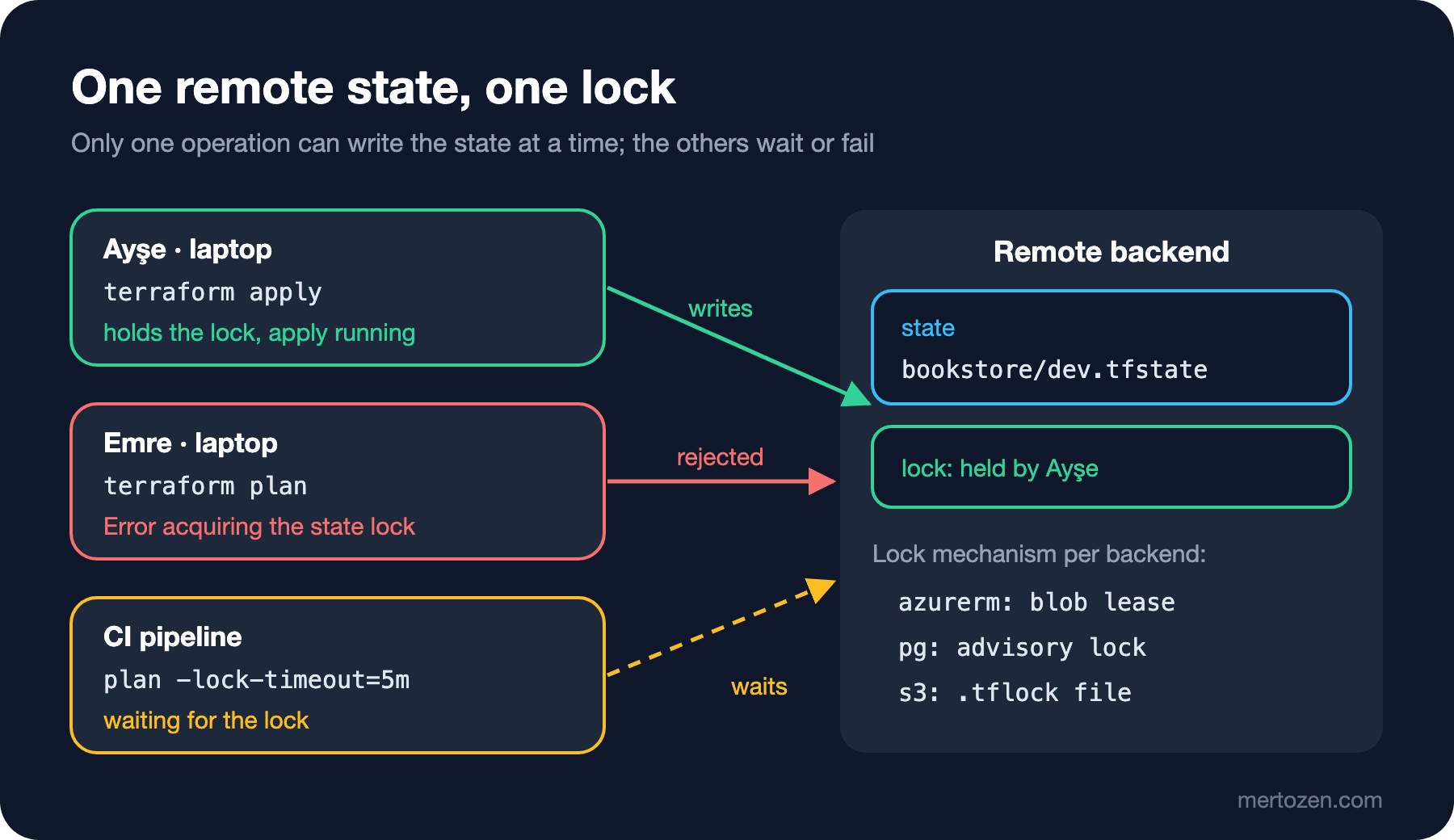
The second job of a remote backend is to prevent two operations from writing the state at the same time. While an apply of Ayşe's waits at the confirmation prompt, Emre runs a plan:
Error: Error acquiring the state lock

Error message: Workspace is already locked: default
Lock Info:
  ID:        d04ef8d6-0b12-5d3c-e7e4-77561e7b4805
  Path:
  Operation: OperationTypePlan
  Who:       user@my-pc
  Version:   1.17.2
  Created:   2026-11-14 16:59:16.073638 +0000 UTC
  Info:


Terraform acquires a state lock to protect the state from being written
by multiple users at the same time. Please resolve the issue above and try
again. For most commands, you can disable locking with the "-lock=false"
flag, but this is not recommended.
That is the answer to the second question: the second operation stops before it starts. I masked the user and machine name on the Who line. There is a pg-specific detail here: PostgreSQL advisory locks store no information about who holds them, so the time and operation in the Lock Info belong to Emre's own attempt. I confirmed this by running the same command twice a few seconds apart and seeing the Created value change each time. The Azure Storage backend, by contrast, writes the lock information into the blob's metadata when it takes the lock; there you really see who holds it.
If you would rather wait than fail, pass -lock-timeout=5m; it is handy in CI jobs. What happens if the process holding the lock crashes? I killed Ayşe's waiting apply with kill -9; Emre's next plan said "No changes." without waiting at all. The pg backend documentation explains this: an advisory lock is tied to the session and is released automatically when the connection drops, which is why force-unlock is not supported. A blob lease on Azure, however, is taken with no expiry and a crashed process does not release it. In that case you need terraform force-unlock <ID>. The danger is this: is the process holding the lock really dead, or is it still applying on a CI runner? If it is the latter, force-unlock lets two writers loose at once and the state can be corrupted. Before a force-unlock, find the lock's owner and make sure its process has finished.
A short note for teams on AWS: since Terraform 1.10 the S3 backend can hold the lock with a .tflock file in the bucket using use_lockfile = true. This used to require a separate DynamoDB table; the dynamodb_table argument is now marked as deprecated in the documentation.
The Azure Storage Backend
On the Azure side, the backend block is written as a partial configuration: only the setting that is the same in every environment goes into the code, and the rest comes from a file per environment.
terraform {
  required_version = "~> 1.17"

  # Partial configuration: the rest comes from -backend-config=backend/<environment>.azurerm.tfbackend
  backend "azurerm" {
    use_azuread_auth = true
  }

  required_providers {
    azurerm = {
      source  = "hashicorp/azurerm"
      version = "~> 5.14"
    }
  }
}
resource_group_name = "rg-bookstore-tfstate-weu"
storage_account_name = "stbookstoretfstateweu"
container_name = "tfstate"
key = "bookstore/dev.tfstate"terraform init -backend-config=backend/dev.azurerm.tfbackenduse_azuread_auth = true makes the backend connect with an Entra ID identity instead of the storage account key; in the bootstrap above we already turned key access off. For this method, the backend documentation recommends the Storage Blob Data Contributor role on the state container as least privilege. On a laptop the identity comes from the Azure CLI session; in CI, OIDC is used with use_oidc = true or ARM_USE_OIDC, which post 11 covers in detail. Locking needs no extra setting; the backend uses Azure Blob Storage's own lease mechanism.
I did not connect to this backend. Without credentials, init stops with this error:
Error: unable to build authorizer for Storage API: could not configure AzureCli Authorizer: could not parse Azure CLI version: launching Azure CLI: exec: "az": executable file not found in $PATHTo validate the code without connecting to the backend, terraform init -backend=false followed by terraform validate is enough. Since Terraform 1.15, validate also checks the backend block: that the backend type exists and the required settings are written.
State Commands: mv, rm, import and -refresh-only
Instead of editing the state by hand, there are commands written for it. The first is state mv: it changes a resource's address. To show in the name that the volumes really belong to the API, we rename docker_volume.data to docker_volume.api_data. Had we changed the name only in the code, the plan would say:
  # docker_volume.api_data["covers"] will be destroyed
  # (because docker_volume.api_data is not in configuration)
  # docker_volume.api_data["exports"] will be destroyed
  # (because docker_volume.api_data is not in configuration)
  # docker_volume.renamed["covers"] will be created
  # docker_volume.renamed["exports"] will be created
Plan: 2 to add, 0 to change, 2 to destroy.
This output comes from code I renamed once more to renamed as a test; the point is the same: Terraform takes the new name for a new resource and the old name for a deleted one. The right way is to move the address in the state as well:
$ terraform state mv docker_volume.data docker_volume.api_data
Move "docker_volume.data" to "docker_volume.api_data"
Successfully moved 1 object(s).
After updating the references in main.tf and outputs.tf, the plan says "No changes." state mv takes effect immediately and skips review; doing the same thing in code with a moved block that shows up in the pull request is a better way, covered in post 8.
state rm takes a resource out of Terraform's management but does not delete it in the real world. If its definition is still in the code, the result can be surprising:
$ terraform state rm docker_network.bookstore
Removed docker_network.bookstore
Successfully removed 1 resource instance(s).
$ terraform plan -var-file=dev.tfvars
...
  # docker_network.bookstore will be created
Plan: 1 to add, 0 to change, 0 to destroy.
The network is still in Docker, but Terraform no longer knows it and wants to create it again; had you applied, you would have got the "already exists" error from post 1. To undo it, we import the resource again by its ID:
$ terraform import -var-file=dev.tfvars docker_network.bookstore d944056ddbb65636184fe660d8266875395e5662b03e6646ee07ff50c50e21ee
docker_network.bookstore: Importing from ID "d944056ddbb65636184fe660d8266875395e5662b03e6646ee07ff50c50e21ee"...
docker_network.bookstore: Import prepared!
  Prepared docker_network for import
docker_network.bookstore: Refreshing state... [id=d944056ddbb65636184fe660d8266875395e5662b03e6646ee07ff50c50e21ee]
Import successful!
The last command is -refresh-only. Someone changes the container's restart policy by hand in Docker (docker update --restart=no tfseries-dev-api). terraform plan -refresh-only only reads the real world and shows the difference from the state; it does not compare with the code:
Note: Objects have changed outside of Terraform

Terraform detected the following changes made outside of Terraform since the
last "terraform apply" which may have affected this plan:

  # docker_container.api has changed
  ~ resource "docker_container" "api" {
        id                                          = "79417355f8fa56076db1106f8a64f0201e6f206dbab001b86ca26e900108d4e8"
        name                                        = "tfseries-dev-api"
      ~ restart                                     = "unless-stopped" -> "no"
        ...
    }
...
This is a refresh-only plan, so Terraform will not take any actions to undo
these. If you were expecting these changes then you can apply this plan to
record the updated values in the Terraform state without changing any remote
objects.
The real output is longer: because the provider normalizes empty lists and blocks on the first refresh, there were "has changed" lines for the network and volumes too; I shortened them. Once you have seen the drift, you have two options. If the change is right, you first update the code to match it, then record the new value in the state with terraform apply -refresh-only. If the change is wrong, a normal terraform apply takes the code as the truth and sets the restart policy back to unless-stopped. I did the latter; the -refresh-only plan taken afterwards said "No changes. Your infrastructure still matches the configuration."
Production Notes
Manage access to the state like access to the application's production database. Anyone who can read the state can read the connection strings and passwords in it. On Azure that means granting the role on the state container only to the identities that run Terraform and a few people.
Keep each environment's state under a separate key, ideally in a separate storage account. If dev and prod live in one state, a mistake in dev also locks or breaks prod. We will discuss ways to split environments in post 7.
Keep versioning and soft delete on, and try rolling a state back to an older version at least once. You do not want to learn that for the first time during a real outage.
Common Pitfalls
Committing the state to Git. Secrets enter the repository history, and removing them from history is painful. The *.tfstate line in .gitignore should be there from day one.
Two people applying to the same environment with local state. Nobody gets an error, but the two states start to describe two different realities. Move to a remote backend the day a second person joins the project.
Editing the state by hand, or getting past a lock error with -lock=false. Changing the JSON by hand can break the serial and the dependency information; -lock=false releases the one thing locking protects, concurrent writes. If a manual fix is needed, use state mv, state rm, import, or terraform state pull and push, and back up the state before each one.
A Small Experiment
★☆☆ Set up the bootstrap stack, move the local example to the pg backend with -migrate-state, and note the serial value in the output of terraform state pull. Run one more apply and see how the value changes.
★★☆ Open two terminals. In one, run terraform apply -var-file=dev.tfvars -replace=docker_container.api and wait at the confirmation prompt; in the other, run terraform plan first and then terraform plan -lock-timeout=60s. What happens in the second terminal when you type "no" in the first?
★★★ The PostgreSQL password in the bootstrap stack is plain text in the bootstrap's local state. How would you run this stack in a team? Think of at least two options and write down the tradeoff of each.
In the next post we look at the dependency graph that decides the order in which Terraform creates resources: implicit dependencies and depends_on, data sources that read existing resources, lifecycle settings (create_before_destroy, prevent_destroy, ignore_changes), and checking the API's health endpoint from Terraform with check blocks.